
Choosing your first wireless video system can be confusing when product listings mix HDMI standards, range claims, latency figures, and unclear compatibility details.
This roundup focuses on beginner-friendly video transmitters that can simplify camera monitoring, streaming, presentations, and multi-screen setups. Use the guide below to match the right kit to your equipment and workflow.
Best 10 Video Transmitters for Beginners Picks for 2026
Long-Range Starter

- 1080p/60Hz wireless HDMI with about 0.05-second latency
- Up to 1300 feet in open-field conditions
- Loop-out, dual receiver outputs, and flexible power options
Best For: Beginners needing long-range home, presentation, or camera monitoring
Quiet Production Pick

- Fanless 2W design for quiet shooting
- 1080p/60fps transmission up to 300 meters
- Automatic pairing and support for up to nine monitoring endpoints
Best For: Mobile camera crews, interviews, events, and quiet recording environments
Simple Indoor Setup

- Dedicated 5GHz wireless connection for 1080p/60Hz playback
- One-time pairing with automatic reconnection
- Includes Micro HDMI and Mini HDMI adapters
Best For: Beginners mirroring laptops, cameras, and presentations indoors
Creator Monitoring Choice

- 4K/30fps support with about 0.06-second latency
- Selectable 5.8GHz channels and OLED status screen
- Supports up to four receivers plus mobile app monitoring
Best For: Beginning filmmakers, camera rigs, and small-team monitoring
Best Long-Range Pick
Synco XVision 300m Wireless Video System

- 1080p/60fps transmission up to 300m
- 40ms latency with HDMI loopout
- Fanless 2W design and monitoring app
Best For: Beginner filmmakers and event streamers needing extended range
Best Simple Multi-Source Kit
Wireless HDMI 2-Transmitter Set
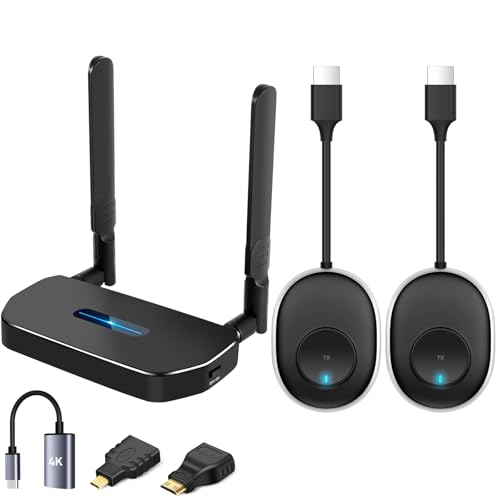
- Includes two transmitters and one receiver
- Pre-paired plug-and-play operation
- Up to 50m in open-field conditions
Best For: Home offices, classrooms, and two-source HDMI switching
Best for Streaming Flexibility
Vrriis 1500ft Wireless Video System
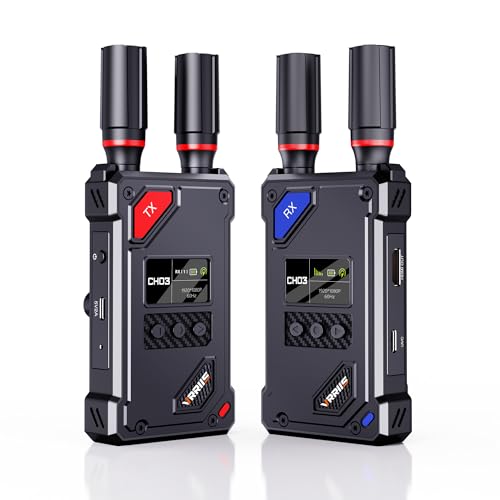
- UVC output works with OBS streaming
- 20 channels and 0.05-second latency
- 1080p/60Hz with HDMI loopout
Best For: Beginner streamers using cameras and OBS
Easy-Setup Pick
Vrriis WL081 1080p Wireless HDMI Kit

- Plug-and-play 1080p transmission
- HDMI loop out and IR control
- Open-field range rated up to 1,300 feet
Best For: Beginners needing simple Full HD HDMI distribution
4K Starter Choice
Vrriis WL095P Wireless HDMI System

- Supports 4K video at 30Hz
- Pre-paired with under-0.1-second claimed latency
- Dual HDMI output and audio connectivity
Best For: Beginners setting up 4K home theater or presentation displays
On-Set Monitoring Pick
Wireless HDMI Kit with 7-Inch Monitor
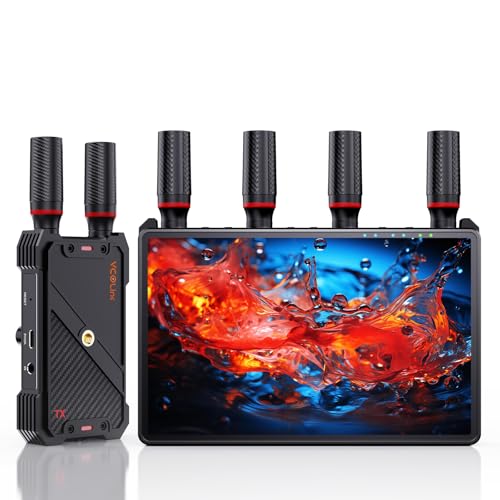
- Built-in 7-inch receiver monitor
- 1080p/60Hz with claimed sub-0.05-second latency
- Expandable to five receivers with loop out
Best For: Beginner filmmakers and streamers needing portable monitoring
Long-Range Starter – Vrriis Wireless HDMI Kit
For beginners comparing video transmitters for beginners, the Vrriis kit offers a straightforward way to send 1080p HDMI video wirelessly between a source and display. Its plug-and-play setup, multiple power options, and monitoring features make it practical for home entertainment, presentations, and basic camera rigs.
Best For: Beginners who need long-range 1080p transmission and flexible monitoring connections.
Pros:
- Claims up to 1300 feet of open-field transmission range with dual antennas.
- Supports 1080p at 60Hz with approximately 0.05-second latency.
- Includes transmitter loop-out, dual HDMI output on the receiver, and IR remote support.
- Can use USB-C, adapters, or compatible NP-F batteries for power.
Cons:
- Walls, metal, brick, and glass can significantly reduce range.
- Batteries are not included.
- Transmission distance may decrease when using multiple receivers.
This is a feature-rich option for a beginner who wants room to expand, though its best range figures apply to open areas and careful setup.
Quiet Production Pick – SYNCO XVision HD System
The SYNCO XVision is a useful choice among video transmitters for beginners who want a compact system for camera monitoring. A fanless 2W design, automatic pairing, and a color status display simplify operation for interviews, events, and mobile shoots.
Best For: Beginners filming on location who value quiet operation, low power use, and collaborative monitoring.
Pros:
- Fanless 2W operation helps avoid adding noise during recording.
- Provides 1080p/60fps transmission up to 300 meters under stated conditions.
- Offers approximately 40ms latency for responsive monitoring.
- Supports one transmitter to as many as nine receiver endpoints for monitoring and includes HDMI loop-out.
Cons:
- NP-F battery is not included.
- Receiver endpoints are intended for monitoring only.
- The supplied notes describe an HDMI-port system but do not specify all source and display compatibility details.
Its lightweight body and automatic reconnection make it approachable, while the fanless design is especially appealing when microphone recordings are made close to the transmitter.
Simple Indoor Setup – Huhuve 5GHz HDMI Kit
For shoppers seeking video transmitters for beginners, the Huhuve kit focuses on easy indoor wireless casting. Dedicated 5GHz transmission, one-time pairing, automatic reconnection, and clear LED indicators make it a sensible match for laptops, presentations, classrooms, and everyday TV use.
Best For: First-time users who want compact, driver-free HDMI mirroring for indoor presentations and entertainment.
Pros:
- Uses a dedicated 5GHz band to help reduce interference from 2.4GHz networks.
- Automatically reconnects after the initial transmitter-receiver pairing.
- Includes HDMI extension, Micro HDMI, and Mini HDMI adapters.
- Provides a physical receiver button, EDID recognition, and multiple status LEDs.
Cons:
- The product is described as a fixed one-to-one transmitter-receiver set.
- Its advertised 1080p output is not a native 4K video transmission claim.
- Indoor performance and range can vary with the surrounding environment.
This is one of the easier options to approach if you prefer visible connection indicators and minimal setup instead of advanced production features.
Creator Monitoring Choice – SVBONY ST1 Wireless Kit
The SVBONY ST1 stands out among video transmitters for beginners who are moving toward camera production. It combines 4K/30fps support, selectable 5.8GHz channels, an OLED status screen, and app monitoring, giving new creators useful control without requiring software for the basic plug-and-play connection.
Best For: Beginner filmmakers and small crews needing camera-to-monitor transmission with multi-person viewing options.
Pros:
- Supports 4K/30fps video with approximately 0.06-second latency.
- Offers up to 1000 feet of stated real-time transmission range in suitable conditions.
- Provides nine selectable 5.8GHz channels to help manage signal congestion.
- Supports up to four receivers, dual receiver HDMI outputs, loop-out, and Android/iOS app monitoring.
Cons:
- NP-F batteries are not included.
- Adding receivers can reduce the transmission range.
- The system is larger and heavier than the compact Huhuve option, at about 1.76 pounds according to the supplied details.
With its display, channel selection, and team-monitoring features, the ST1 offers a stronger upgrade path for beginners planning to build more capable shooting setups.
Best Long-Range Pick – Synco XVision 300m Wireless Video System
For beginners comparing video transmitters for beginners, the Synco XVision is a practical step toward more advanced camera monitoring. It supports 1080p at 60fps, offers HDMI input, output, and loopout options, and uses automatic pairing memory to simplify startup.
Best For: Beginner filmmakers, live streamers, and event shooters who need long-range transmission and real-time monitoring.
Pros:
- Supports stable 1080p/60fps transmission up to 300 meters in suitable conditions.
- 40ms latency helps provide responsive real-time feedback.
- Low-power, fanless 2W design avoids added cooling noise.
- App supports monitoring, image tools, screenshots, saving, and playback.
Cons:
- Its longer-range, production-oriented feature set may be more than a casual user needs.
- The supplied notes do not specify included batteries or the full accessory list.
The large status display, intuitive buttons, and automatic reconnection make this a friendly option for newcomers who want professional-style range without a complicated workflow.
Best Simple Multi-Source Kit – Wireless HDMI 2-Transmitter Set
Among video transmitters for beginners, this wireless HDMI kit stands out for its straightforward plug-and-play setup. It includes two transmitters and one receiver, allowing users to switch between two source devices without repeatedly moving cables.
Best For: Home offices, classrooms, meetings, and entertainment setups that switch between two HDMI sources.
Pros:
- Two transmitters and one receiver support convenient source switching.
- Pre-paired devices require no app, Bluetooth, or separate Wi-Fi setup.
- Supports up to 1080p Full HD and offers dual-band 2.4GHz/5GHz operation.
- Advertised open-field transmission distance reaches up to 50 meters.
Cons:
- Concrete walls and floors can reduce the range substantially, to roughly 3–5 meters according to the notes.
- The supplied listing information is inconsistent about resolution, mentioning both HD@60Hz and Full HD support.
- It is less suited to long-distance production work than dedicated camera transmission systems.
This is an approachable choice for beginners who mainly want to mirror or switch computer, camera, or other HDMI sources with minimal configuration.
Best for Streaming Flexibility – Vrriis 1500ft Wireless Video System
For beginners exploring video transmitters for beginners, the Vrriis system combines simple setup with useful live-streaming features. Its receiver provides UVC output for platforms such as OBS, while the transmitter offers HDMI loopout and manual channel selection for more control.
Best For: Beginner live streamers, camera operators, and small production teams working in open line-of-sight environments.
Pros:
- UVC output can connect received footage to a computer for streaming without a separate capture device.
- Offers advertised 1500-foot line-of-sight range and 0.05-second latency in open conditions.
- 20 adjustable channels help users respond to congestion or interference.
- Supports 1080p/60Hz, HDMI loopout, and several power options.
Cons:
- Walls, metal, brick, and glass can significantly reduce signal coverage.
- NP-F batteries are supported but not included.
- Adding more receivers can reduce the wireless transmission distance.
The LCD channel and signal information, bundled HDMI adapters, and plug-and-play design make this a capable beginner system, especially for users who plan to stream through OBS.
Easy-Setup Pick – Vrriis WL081 1080p Wireless HDMI Kit
For beginners comparing video transmitters for beginners, the Vrriis WL081 is a straightforward 1080p option for sending HDMI from a laptop, DSLR, set-top box, or other source to a TV or projector. Its pre-cable-free setup, loop-out port, and included IR accessories make it practical for home entertainment, presentations, and basic monitoring.
Best For: Beginners who want plug-and-play 1080p HDMI transmission with local monitoring and remote-source control.
Pros:
- Supports up to 1080p at 60Hz with claimed 0.05-second latency.
- Includes transmitter-side HDMI loop out for a local monitor.
- Supports IR remote control and up to five receivers according to the supplied notes.
- Dual-band 2.4/5G wireless transmission is rated up to 1,300 feet in an open field.
Cons:
- Walls, metal, brick, and glass can substantially reduce the stated range.
- It is limited to Full HD rather than 4K.
- Additional receivers can reduce transmission distance.
The WL081 keeps the learning curve low while adding useful features beyond basic point-to-point transmission. It is a sensible starting point if 1080p is sufficient and you want a local loop-out display.
4K Starter Choice – Vrriis WL095P Wireless HDMI System
If you want a beginner-friendly video transmitter with sharper output, the Vrriis WL095P adds UHD 4K support to a pre-paired wireless HDMI setup. It is designed for streaming from cameras, laptops, or PCs to a TV or monitor without requiring apps or drivers.
Best For: Beginners who want 4K video, low-latency presentation, and the option to feed multiple displays.
Pros:
- Supports up to 4K at 30Hz with H.265 encoding.
- Pre-paired, plug-and-play design with claimed latency below 0.1 second.
- Rated for up to 1,150 feet in an unobstructed open field.
- Supports up to four receivers and includes receiver-side dual HDMI outputs plus audio output.
Cons:
- The 4K specification is limited to 30Hz.
- Walls, metal, brick, and glass can shorten the stated range.
- Adding receivers reduces the wireless transmission distance.
The WL095P is a stronger fit than a basic 1080p kit when resolution matters. Its multi-display and audio features add flexibility, though beginners should keep expectations realistic in rooms with obstructions.
On-Set Monitoring Pick – Wireless HDMI Kit with 7-Inch Monitor
For video transmitters for beginners who are learning camera work or live streaming, this kit offers unusually complete monitoring hardware. The receiver includes a built-in 7-inch HD screen, while HDMI output, loop out, IR control, and flexible power options support a more capable filming setup.
Best For: New filmmakers, streamers, and small crews who need portable wireless monitoring without buying a separate receiver screen.
Pros:
- Built-in 7-inch HD monitor enables immediate receiver-side viewing.
- Supports 1080p at 60Hz with claimed latency below 0.05 second and a 1,312-foot line-of-sight range.
- One transmitter can broadcast to up to five receivers for multi-viewer collaboration.
- Offers HDMI loop out, IR remote control, headphone monitoring, and NP-F, power-bank, or USB-C power options.
Cons:
- An HDMI cable for external monitor connection is not included.
- Smartphone or tablet use requires a Type-C-to-HDMI cable.
- The supplied notes do not provide complete specifications for every feature.
The built-in monitor makes this a practical all-in-one choice for beginners who want to see a camera feed without adding another screen. It costs more complexity than a basic transmitter, but the mounting and power options are useful as a setup grows.
How We Picked These Video Transmitters for Beginners
We prioritized systems that are relatively straightforward to connect, support common HDMI sources and displays, and offer useful features for new users. Our comparison considers signal stability, advertised range, resolution support, latency, loop-out capability, receiver quantity, switching options, and practical streaming features such as UVC output.
Specifications vary by setup. Walls, nearby wireless networks, the source device, and the display can all reduce real-world range. Treat long-distance figures as best-case claims rather than guaranteed indoor performance.
Quick Comparison
| Feature | Why It Matters | Best For |
|---|---|---|
| 1080p support | Reliable quality with broad device compatibility | Beginners, presentations, and streaming |
| 4K decoding or input support | Can accommodate newer sources, though output may remain 1080p | Future-proofing and compatible cameras |
| Loop out | Lets you feed a local monitor while transmitting wirelessly | Camera operators and live production |
| Multiple receivers | Shows one source on several displays | Events, classrooms, and multi-screen monitoring |
| UVC output | Allows compatible computers to recognize the signal as a video source | Live streaming and video calls |
Key Buying Factors for Video Transmitters for Beginners
Check Connections First
Most kits use HDMI, but confirm whether your camera, laptop, projector, monitor, or capture device has full-size, mini, or micro HDMI. You may need an adapter or a separate cable. Also check whether the transmitter supports the source’s resolution and refresh rate.
Balance Resolution and Latency
For presentations and casual viewing, 1080p is usually sufficient and often offers broader compatibility. For gaming, live camera work, or interactive demonstrations, low latency matters more than a headline 4K number. A system that accepts 4K but outputs 1080p is not the same as a true 4K wireless link.
Evaluate Range Realistically
Advertised ranges may assume direct line of sight. If the transmitter and receiver will be separated by walls or crowded wireless environments, choose a system with a comfortable margin and place both units where they have clear airflow and minimal obstruction.
Look for Setup-Friendly Features
Pairing buttons, status indicators, loop-out ports, remote controls, automatic channel selection, and manual channel switching can make troubleshooting easier. If you stream from a computer, verify that UVC output is supported and compatible with your operating system and software.
Who Should Buy Which Video Transmitters for Beginners?
- For a simple first setup: Choose a basic 1080p transmitter-and-receiver kit with straightforward pairing and HDMI support.
- For camera monitoring: Look for low latency, loop out, stable range, and compatibility with your camera’s HDMI output.
- For streaming: Consider a model with UVC output or pair a standard wireless system with a compatible capture device.
- For presentations: Prioritize dependable 1080p performance, easy switching, and practical range over maximum resolution.
- For several displays: Select a kit designed for multiple receivers or one that clearly supports multi-receiver expansion.
- For future upgrades: A model with 4K input or decoding may be worthwhile, but confirm its actual wireless output and supported refresh rates before paying more.
Before buying, compare the exact package contents, power requirements, cable types, warranty, and return policy. These details often determine whether a wireless video system feels genuinely plug-and-play.