
A reliable wireless video transmitter can simplify camera-to-monitor connections, livestreaming setups, presentations, and multi-screen studio workflows. The right system reduces cable clutter without introducing distracting lag or unstable signals.
These 10 options cover budget-friendly 1080p HDMI kits, long-range systems, dual-receiver models, UVC streaming outputs, and more advanced HDMI/SDI transmitters. Use the guide below to match features such as range, latency, resolution, and receiver capacity to your studio.
Best 10 Video Transmitters for Home Studios Picks for 2026
Best for Flexible Streaming
Vrriis Wireless HDMI Video System
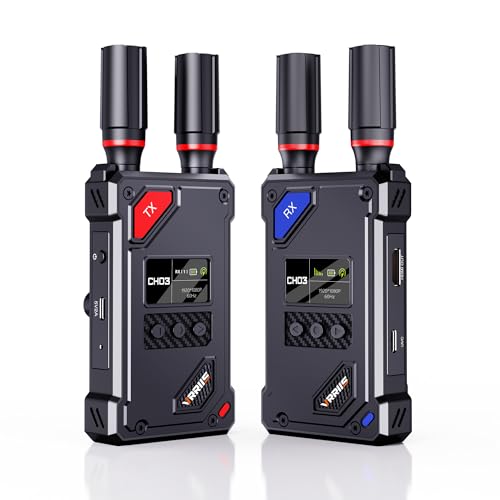
- UVC output supports OBS streaming without a separate capture device
- 20 selectable channels with signal and interference display
- Up to 1080p/60Hz with HDMI loop out for local monitoring
Best For: Home studio streaming with flexible monitoring and channel control
Best for Pro-Oriented Streaming
Accsoon CineView HE Transmitter

- Dual-band 2.4GHz/5GHz transmission for stable wireless operation
- Supports up to four receivers or mobile devices
- HDMI input/output and UVC support for streaming and local monitoring
Best For: Advanced 1080p streaming and multi-viewer studio workflows
Best Professional Workflow Pick
Accsoon CineView SE Video Transmitter

- HDMI and SDI inputs
- 1080p60 with 0.05-second stated latency
- Streams to up to four monitoring devices
Best For: Small production teams needing flexible connections and shared monitoring
Best On-Set Monitoring Pick
7-Inch Multi-Viewer HDMI System
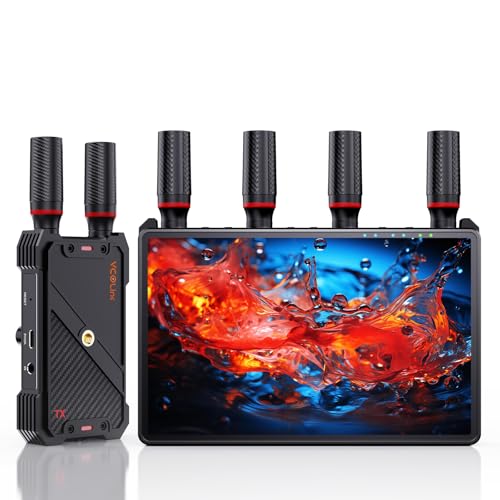
- Built-in 7-inch receiver monitor
- 1-to-5 receiver support for shared viewing
- 1080p60 transmission with loop-out and IR control
Best For: Studios and crews needing built-in and multi-viewer monitoring
Long-Range Studio Link
1080p HDMI Transmitter with Loop Out

- Up to 1,300 feet in open-field conditions
- 1080p/60Hz with claimed 0.05-second delay
- Loop-out, dual receiver outputs, and IR support
Best For: Long-distance 1080p studio monitoring
Best for Flexible Streaming – Vrriis Wireless HDMI Video System
For home studios needing a practical wireless link to a computer, the Vrriis system stands out among video transmitters for home studios with UVC output for streaming and a transmitter-side HDMI loop out for local monitoring. It supports up to 1080p at 60Hz and offers manual channel selection for managing interference.
Best For: Home studio streaming setups that use OBS, need local monitoring, and may connect multiple receivers.
Pros:
- UVC output can send received video to platforms such as OBS without a separate capture device.
- Offers 20 selectable channels with a display showing signal strength and interference.
- Supports up to 1500 feet line of sight with claimed 0.05-second latency in open areas.
- Includes HDMI, Mini HDMI, and Micro HDMI cables plus several power options.
Cons:
- Walls, metal, brick, and glass can significantly reduce coverage.
- Batteries are not included.
- Adding receivers can reduce the wireless transmission distance.
This is a versatile pick when live streaming and monitoring flexibility matter more than a simple one-screen connection. Its channel controls and UVC workflow are particularly useful for a home studio, provided the transmitter and receiver have a reasonably clear path.
Best for Dual-Screen Setups – EVATEK Wireless HDMI Dual Display Kit
The EVATEK kit is a convenient choice among video transmitters for home studios when one source needs to feed two displays. Its single transmitter and two receivers support simultaneous viewing on TVs, projectors, or monitors, with mirror and extend modes for different workspace layouts.
Best For: Home studios, presentations, and workspaces that need the same source shown on two screens.
Pros:
- Includes one transmitter and two receivers for a ready-made dual-display setup.
- Supports up to 1080p/60Hz and automatically adjusts resolution based on connected displays.
- Dual-band 2.4GHz/5GHz operation offers a stated range of up to 328 feet.
- Compact, lightweight design with mirror and extend modes.
Cons:
- Obstacles can shorten the stated transmission distance.
- Some devices may require an additional charger for adequate USB power.
- The included one-to-two system cannot be mixed with other EVATEK devices.
This kit makes the most sense for a fixed two-screen workflow rather than an expandable studio network. Its plug-and-play design minimizes setup, while the separate receivers make it easier to place displays in different locations.
Best for 4K Monitoring – SVBONY ST1 Wireless Video System
For creators who prioritize higher-resolution monitoring, the SVBONY ST1 is one of the more feature-rich video transmitters for home studios. It supports 4K/30fps transmission, includes selectable 5.8GHz channels, and provides loop-out and dual HDMI outputs on the receiver for flexible display arrangements.
Best For: DSLR or camera-based studios that need 4K monitoring, multiple receivers, or app-based viewing.
Pros:
- Supports 4K/30fps video with claimed 0.06-second latency.
- Provides nine selectable 5.8GHz channels for avoiding signal congestion.
- One transmitter can support up to four receivers, with dual HDMI outputs on the receiver.
- Offers OLED status information, app monitoring, and multiple power options.
Cons:
- Additional receivers may reduce range by about 50 meters in open areas.
- NP-F batteries are not included.
- The stated 1000-foot range depends on open, unobstructed conditions.
The ST1 is a strong fit when a home studio needs more than basic point-to-point viewing. Its 4K support, receiver expansion, and phone-monitoring feature add flexibility, although the system is likely more than necessary for a simple 1080p setup.
Best for Pro-Oriented Streaming – Accsoon CineView HE Transmitter
The Accsoon CineView HE is a dedicated transmitter for creators who want a stable wireless workflow with live-streaming support. Its dual-band 2.4GHz/5GHz transmission, HDMI input and output, UVC output, and support for up to four receivers make it a compelling option among video transmitters for home studios.
Best For: Home studios and small production teams that need long-range monitoring and direct streaming connectivity.
Pros:
- Dual-band transmission is designed for stability and interference resistance.
- Claims up to 1200 feet of transmission distance with latency below 0.06 seconds.
- Supports up to four receivers, including standard receivers and mobile devices.
- HDMI input and output allow camera connection plus local monitor passthrough.
Cons:
- This listing is for the transmitter only, so compatible receivers may be needed separately.
- It is specified for 1080p at 60fps rather than 4K output.
- Its feature set may be excessive for a basic single-display setup.
The CineView HE is best viewed as a building block for a more advanced studio system. It offers useful expansion and monitoring options, but buyers should account for the transmitter-only package and confirm which receivers their workflow requires.
Best Plug-and-Play Pick – Long-Range 4K Wireless HDMI Kit
For home studios seeking video transmitters for home studios without adding network setup, this wireless HDMI transmitter and receiver emphasizes quick installation and flexible placement. It supports 4K decoding, dual-band transmission, and both mirrored and extended-screen modes for compatible HDMI sources and displays.
Best For: Home studios, presentations, gaming, and live streaming where easy setup and long-range HDMI transmission matter.
Pros:
- Plug-and-play setup requires no Wi-Fi, apps, or Bluetooth.
- Claims transmission up to 400 feet using 2.4GHz and 5.8GHz bands.
- Supports 4K decoding, 10-bit 4:2:2 processing, and stereo or surround audio.
- Includes HDMI, Micro HDMI, and Mini HDMI connection accessories.
Cons:
- It is an HDMI-focused system rather than an HDMI-and-SDI production transmitter.
- The stated 400-foot range is dependent on the environment and signal conditions.
This is a practical choice when a studio needs a simple wireless link between cameras, computers, set-top boxes, or other HDMI sources and a remote monitor or projector. Its 4K decoding and screen-extension options add flexibility, while the included adapters help broaden source compatibility.
Best Professional Workflow Pick – Accsoon CineView SE Video Transmitter
The Accsoon CineView SE is aimed at more production-oriented users comparing video transmitters for home studios. Its dual-band 2.4GHz and 5GHz design, HDMI and SDI inputs, app-based monitoring, and support for up to four devices make it suited to collaborative video workflows.
Best For: Home studios and small production teams that need HDMI/SDI connectivity, multi-device monitoring, and a compact transmitter.
Pros:
- Uses simultaneous 2.4GHz and 5GHz transmission to help manage interference.
- Supports up to 1080p at 60fps with stated 0.05-second latency.
- Offers HDMI and SDI connections for broader production compatibility.
- Compact aluminum construction includes a 1.3-inch OLED display and silent cooling.
Cons:
- This listing is for the transmitter only, so a compatible receiver is needed for the complete system.
- It supports 1080p transmission rather than the 4K output offered by some HDMI-focused alternatives.
- Monitoring and control use the Accsoon GO app.
Choose this model when stable monitoring and production connectivity are more important than a basic plug-and-play experience. The HDMI/SDI combination and dual-band approach give it a more studio-oriented profile, but buyers should account for the transmitter-only configuration.
Best On-Set Monitoring Pick – 7-Inch Multi-Viewer HDMI System
This wireless HDMI system stands out among video transmitters for home studios by combining transmission with a built-in 7-inch receiver monitor. It sends 1080p at 60Hz over a stated 1,312-foot line-of-sight range, supports up to five receivers, and adds loop-out, headphone monitoring, and flexible power options.
Best For: Camera operators, live-streaming setups, and studio teams that need local monitoring plus multiple viewer feeds.
Pros:
- Receiver includes a built-in 7-inch screen for monitoring without an extra display.
- Supports 1-to-5 transmission for multi-person or multi-location viewing.
- Offers HDMI loop-out, an IR remote, and a 3.5mm headphone jack.
- Can use NP-F batteries, a power bank, or USB-C power and includes 1/4-inch mounting support.
Cons:
- Video transmission is specified at 1080p60 rather than 4K.
- The claimed 1,312-foot range is listed for line-of-sight use.
- A Type-C-to-HDMI cable is required for smartphone or tablet compatibility.
Its built-in display and expandable receiver design make this a strong fit for collaborative shoots where several people need to view the same feed. It is less focused on maximum resolution, but the monitoring, mounting, and power options make it especially practical for mobile studio and on-set work.
Long-Range Studio Link – 1080p HDMI Transmitter with Loop Out
For home studios that need to send a camera, laptop, or set-top box feed to a distant TV or projector, this wireless HDMI system emphasizes range, simple setup, and monitoring flexibility. It supports 1080p at 60Hz with a claimed 0.05-second delay, though walls and other obstacles can reduce coverage.
Best For: Home studios needing long-distance 1080p transmission, local loop-out monitoring, or multiple display connections.
Pros:
- Claims up to 1,300 feet in an open field using dual antennas and 2.4/5G transmission.
- Supports 1080p at 60Hz with approximately 0.05-second latency.
- Transmitter loop-out, receiver dual HDMI output, and IR control support flexible monitoring.
- Offers USB-C, adapters, and optional NP-F battery power.
Cons:
- Walls, glass, metal, and brick can significantly reduce range.
- Batteries are not included.
- Adding more receivers can reduce transmission distance.
This is a strong fit when a studio needs a flexible 1080p link across a larger space. Its loop-out and multi-output design are especially useful for monitoring, but advertised range should be treated as an open-field maximum rather than an indoor guarantee.
Compact Creator Pick – Portable 1080p Wireless HDMI Kit
Among video transmitters for home studios, this compact wireless HDMI kit is aimed at creators who value portability and a low-setup workflow. It automatically pairs for basic operation, supports 1080p streaming, and can work with compatible 4K sources that output at 1080p.
Best For: Small studios, mobile creators, and simple laptop-to-monitor or camera-to-display setups.
Pros:
- Compact built-in-antenna design is easy to carry between setups.
- Automatic pairing requires no app for basic operation.
- Supports 1080p video and 4K source devices with 1080p output.
- Includes charging cables, an HDMI-to-Type-C cable, and mini HDMI adapters.
Cons:
- Maximum claimed range is 165 feet, and obstacles may reduce it to about 50 feet.
- Requires a 5V/2A power supply.
- It has one listed HDMI port, offering less connection flexibility than loop-out models.
This model makes the most sense for a tidy, portable studio where a short-to-moderate wireless link is sufficient. Its accessory bundle and automatic pairing reduce friction, while users seeking long-range transmission or advanced monitoring should consider a more feature-rich unit.
Multi-Display Studio System – 4K-Capable HDMI Transmitter for Multi-Screen Monitoring
This wireless HDMI system is designed for home studios that want higher source compatibility and multi-display monitoring. It supports transmission up to 4K at 30Hz, provides a transmitter loop-out and dual receiver outputs, and can add receivers for up to four displays.
Best For: Studios handling 4K sources, multi-screen monitoring, live production, or events that need phone and tablet monitoring.
Pros:
- Supports up to 4K at 30Hz and claims approximately 0.06-second latency.
- Can support one transmitter with up to four receivers and multiple screens.
- Offers app monitoring for up to four Android or iOS phones or tablets.
- Supports USB-C, 9–16V DC, and optional NP-F battery power.
Cons:
- Advertised 1,000-foot range applies to open transmission conditions.
- Adding receivers can shorten the wireless distance.
- NP-F batteries are not included, and the listing provides no warranty description.
With its 4K capability, app monitoring, and expandable receiver support, this is the most production-oriented option in the group. It is a practical choice for multi-screen workflows, provided the studio can accommodate the reduced range that may come with obstacles or additional receivers.
How We Picked the Best Video Transmitters for Home Studios
We focused on the specifications that matter most in a home studio: video resolution, wireless range, latency, connection type, receiver flexibility, setup simplicity, and streaming support. The selection includes compact plug-and-play HDMI systems alongside more capable transmitters with UVC output, SDI compatibility, loop-through connections, or multi-screen support.
Advertised range is measured under favorable conditions. Walls, neighboring Wi-Fi networks, crowded 2.4GHz bands, and electromagnetic interference can reduce real-world performance, so we favored products with clear frequency information and practical connectivity options.
Quick Comparison
| Best For | What to Look For |
|---|---|
| Basic camera-to-monitor use | 1080p HDMI, simple pairing, and low latency |
| Livestreaming | UVC output, stable wireless performance, and USB compatibility |
| Multiple displays | Two or more receivers, multi-screen synchronization, or loop out |
| Long rooms or open spaces | Strong range specifications, external antennas, and dual-band operation |
| Professional camera rigs | HDMI and SDI support, 60fps capability, and dependable signal handling |
Key Buying Factors for Video Transmitters for Home Studios
Resolution and Frame Rate
Choose a system that matches your source and display. A 1080p transmitter is usually sufficient for webcams, mirrorless cameras, and livestream monitoring. If your workflow includes 4K cameras or projectors, verify whether 4K is transmitted end to end or merely accepted and downscaled. Confirm the supported frame rates as well, especially if you record or monitor at 60fps.
Latency and Signal Stability
Low latency is essential for talking-head videos, live performances, and camera operation. A small delay may be acceptable for confidence monitoring but distracting when synchronizing movement or sound. Dual-band wireless operation can help avoid congestion, while antenna design and clear line of sight often matter more than an impressive maximum-range number.
Inputs, Outputs, and Streaming Support
Check whether the transmitter uses HDMI, SDI, or both, and confirm that the receiver has the outputs your setup requires. Loop out is useful when one source must feed both a wireless monitor and a wired display. For computer-based streaming, a UVC output can allow the receiver to appear as a webcam or capture source, but check required USB power and software compatibility.
Power and Installation
Some units use wall adapters, while others support batteries or USB power. Battery compatibility is helpful for mobile camera rigs; fixed studios may prefer simple continuous power. Also consider ventilation, mounting, cable access, and whether the system reconnects automatically after startup.
Who Should Buy Which Video Transmitters for Home Studios?
Choose a basic 1080p HDMI kit if you need an uncomplicated camera-to-monitor link for a small studio. A long-range dual-band model is better for larger rooms, workshops, or setups where the camera and display cannot remain close together.
For livestreamers, prioritize a transmitter or receiver with UVC output and dependable low-latency performance. If you need to monitor several screens, select a dual-receiver or multi-receiver system and verify whether all displays can operate simultaneously at the desired resolution.
Professional videographers and advanced home studios should consider systems with HDMI and SDI support, 60fps transmission, loop out, and stronger interference management. Finally, do not pay for 4K or extreme range unless your camera, display, room layout, and workflow can use those capabilities.