
Moving a desktop computer out of sight without giving up convenient access to its display, keyboard, and mouse requires more than a standard video cable. The best KVM extenders for desktops send video and USB control signals over longer distances, helping create cleaner workstations, quieter offices, and more flexible control-room setups.
This roundup includes options for basic 1080p connections, 4K workflows, dual-monitor systems, and distances ranging from about 164 to 390 feet. Use the buying guide below to match resolution, cabling, USB support, and installation requirements to your setup.
Best 10 Kvm Extenders for Desktops Picks for 2026
Best Long-Run KVM Extender

- Extends HDMI and USB up to 230 feet
- Supports 4K@30Hz with HDR10
- Includes HDMI loop-out and PoC
Best For: Long-distance workstation and control-room installations
Best Dual-Monitor Desktop Switch

- Shares two monitors between two computers
- Supports 4K@60Hz extended or copy mode
- Adds four USB 3.0 peripheral ports
Best For: Compatible dual-monitor desktop workstations
Best 4K60 KVM Extender
- Extends 4K@60Hz up to 230 feet
- Supports HDR and HDCP 2.2
- Includes USB KVM and HDMI loop-out
Best For: Long-range 4K desktop and AV installations
Best 8K Dual-Monitor KVM
8K HDMI Switch for Two Computers

- Supports 8K@60Hz and 4K@120Hz
- Shares two monitors and four USB 3.0 devices
- Provides extended or copy display modes
Best For: High-resolution dual-monitor desktop workstations
Reliable Full-HD Reach
- 1080p at 60Hz over HDMI
- Up to 50m via Cat6/7
- USB keyboard and mouse control
Best For: Remote Full HD desktop setups
Professional 4K Performance
- 4K60 video with HDR10 support
- Up to 230ft over Cat6/6A/7
- PoC reduces power-cable clutter
Best For: Professional long-distance 4K installations
Flexible Home and Office Control

- 1080p60 video over Cat5e/6/7
- Dual USB 2.0 remote-control ports
- HDMI loop-out and plug-and-play setup
Best For: Full HD home office and gaming setups
Best Network-Ready Pick

- 4K@30Hz video over up to 390 feet
- KVM control over an existing IP network
- Three USB 2.0 receiver ports and 16-set pairing
Best For: Scalable offices, server rooms, and control centers
Best 1080p Long-Range Value

- 1080p@60Hz transmission up to 400 feet
- HDMI loop-out for local monitoring
- Supports standard USB keyboards and mice
Best For: Classrooms, conference rooms, and home theaters
Best Compact 50m Option
avedio links 1080p KVM Extender

- 1080p@60Hz transmission up to 164 feet
- Two receiver-side USB 2.0 ports
- Single-adapter POC power and local HDMI loop-out
Best For: Moderate-distance offices, gaming setups, and classrooms
Best Long-Run KVM Extender – AV Access 4K USB KVM Extender
For desktops that need remote keyboard, mouse, and display access, this AV Access model is a practical choice among kvm extenders for desktops. It sends HDMI and USB signals up to 230 feet over Cat6, Cat6A, or Cat7 cable while maintaining 4K video at 30Hz.
Best For: Control rooms, workstations, classrooms, and other installations requiring long-distance desktop control with local monitoring.
Pros:
- Extends HDMI and USB control up to 230 feet with zero-latency operation.
- Supports 4K@30Hz video, HDR10, HDCP 1.4, and 4:4:4 color.
- HDMI loop-out supports simultaneous local and remote display use.
- PoC, EDID management, and plug-and-play setup simplify installation.
Cons:
- Video output is limited to 4K@30Hz rather than 4K@60Hz.
- USB extension is USB 1.1, so it is intended for keyboard and mouse control rather than fast storage transfers.
This extender focuses on dependable remote desktop operation rather than high-refresh video. Its long range, local loop-out, and flexible power arrangement make it well suited to professional or fixed-location setups.
Best Dual-Monitor Desktop Switch – HDMI+DisplayPort 4K KVM
This dual-monitor KVM is designed for desktops where two computers need to share two displays and a single keyboard-and-mouse setup. It combines HDMI and DisplayPort connections, supports extended or copy display modes, and adds four USB 3.0 peripheral ports.
Best For: Dual-monitor desktop users with compatible HDMI-and-DisplayPort computers who regularly switch between two systems.
Pros:
- Controls two computers across two monitors with extended or copy modes.
- Supports up to 4K@60Hz video.
- Provides four USB 3.0 ports for peripherals such as printers and scanners.
- Offers both panel-button and wired-controller switching.
Cons:
- Does not convert HDMI signals to DisplayPort or DisplayPort signals to HDMI.
- Each computer must provide compatible HDMI and DisplayPort outputs and support dual displays.
- Keyboard shortcut switching is not supported.
This is a strong fit for a conventional two-PC, two-monitor desk, provided the computers and cables match its port requirements. The USB 3.0 hub and external controller add useful convenience for busy desktop workflows.
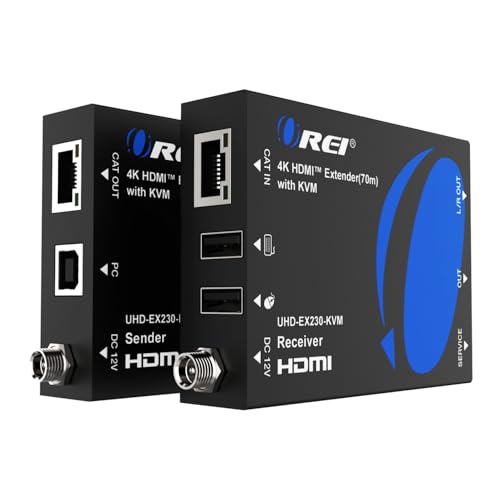
Best 4K60 KVM Extender – OREI HDMI Over Ethernet Balun
The OREI EX-230PRO-KVM combines long-distance HDMI extension with remote keyboard-and-mouse access, making it one of the more capable kvm extenders for desktops requiring 4K video. It transmits up to 230 feet over Cat6 or Cat7 cable and supports HDMI 2.0b features.
Best For: Desktop, media, presentation, and control setups that need 4K@60Hz transmission with remote USB control.
Pros:
- Extends 4K@60Hz HDMI video up to 230 feet over Cat6 or Cat7.
- Supports HDR formats including HDR10, HDR10+, Dolby Vision, and HLG.
- Includes USB KVM extension, HDMI loop-out, EDID pass-through, and analog audio output.
- Supports HDCP 2.2 and a wide range of HDMI audio formats.
Cons:
- Remote USB KVM functionality is USB 1.1, so it is aimed at keyboard and mouse control.
- The listed package uses a US-plug power supply, although an international adapter is included.
Compared with 4K30 extenders, this OREI model is better suited to smoother desktop video and HDR content. Its loop-out and audio extraction also make it flexible for installations that need both local viewing and remote access.
Best 8K Dual-Monitor KVM – 8K HDMI Switch for Two Computers
For a local desktop setup that prioritizes resolution and shared peripherals, this 8K HDMI KVM switch connects two computers to two monitors. It supports extended or copy display modes, 4K@120Hz, and up to 8K@60Hz, while sharing four USB 3.0 devices.
Best For: High-resolution dual-monitor desktops with two HDMI-equipped computers and demanding USB peripheral-sharing needs.
Pros:
- Supports up to 8K@60Hz and 4K@120Hz, with backward compatibility.
- Shares two monitors and four USB 3.0 peripherals between two computers.
- Offers extended and copy display modes.
- Includes panel buttons, an external wired controller, and a 12V power adapter.
Cons:
- Requires each computer to have two HDMI outputs and dual-display support.
- Does not support keyboard shortcut switching.
- High-power USB devices may require the included external power supply.
This switch is aimed at performance-focused desks rather than long-distance cable runs. It is a compelling option when both computers already support dual HDMI displays and the monitors can take advantage of its high-resolution specifications.
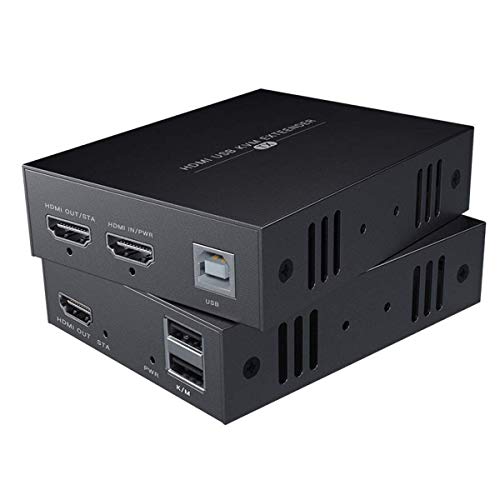
Reliable Full-HD Reach – 50m HDMI KVM Extender
For straightforward kvm extenders for desktops, this unit sends 1080p video and USB keyboard-and-mouse control over Cat5e, Cat6, or Cat7 cable. It reaches up to 50 meters with Cat6/7 and is designed for compatible Windows, Mac, and Linux systems.
Best For: Desktop users who need remote Full HD display access and basic keyboard-and-mouse control over a wired connection.
Pros:
- Supports 1080p at 60Hz for Full HD output.
- Extends HDMI and KVM signals up to 50m over Cat6/7 cable.
- Compatible with a broad range of Windows, Mac, and Linux versions.
- Simple setup with a power adapter for the transmitter.
Cons:
- Cat5e distance is listed as 40m, shorter than the Cat6/7 range.
- Limited to HDMI 1.3 and 1080p rather than 4K video.
This is a practical choice when 1080p is sufficient and you want a simple wired way to place a desktop away from its monitor, keyboard, and mouse. Use higher-category cable if you need the maximum stated distance.
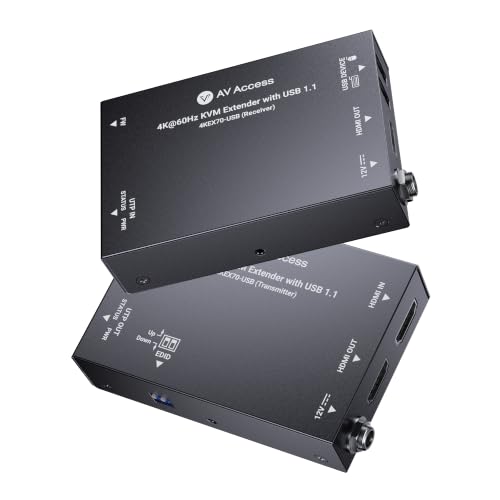
Professional 4K Performance – AV Access 4K60 KVM Extender
This AV Access model is a higher-resolution option among kvm extenders for desktops, carrying 4K video at 60Hz plus USB keyboard-and-mouse signals over one Cat6 cable. Its PoC design, mounting brackets, and compact metal chassis suit organized installations.
Best For: Professional desktop, signage, classroom, conferencing, security, and worship installations that need 4K60 video and tidy cable management.
Pros:
- Supports 4K at 60Hz with 4:4:4 color and HDCP 2.3.
- Extends video and USB control up to 230ft over Cat6, 6A, or 7 cable.
- Bi-directional PoC can power both units with one adapter.
- Passes Dolby Atmos, DTS:X, and PCM 7.1 audio.
Cons:
- USB control is specified as USB 1.1, which may not suit higher-speed peripherals.
- Its professional feature set may be more than a basic desktop setup requires.
Choose this extender when resolution, distance, and installation flexibility matter more than keeping the setup minimal. The included brackets and single-power design are particularly useful for rack, lectern, or behind-display mounting.
Flexible Home and Office Control – 164ft HDMI KVM Extender
This 164ft model gives desktop users Full HD video and remote USB control over Cat5e, Cat6, or Cat7 Ethernet cable. It adds dual USB 2.0 ports, HDMI loop-out, and a plug-and-play setup for PCs, gaming systems, streaming devices, and home theater equipment.
Best For: Home offices, gaming setups, media rooms, and users who want to operate a desktop or entertainment device from another room.
Pros:
- Supports 1080p at 60Hz, 3D, and a stated range up to 164ft.
- Provides dual USB 2.0 ports for remote keyboard and mouse control.
- Works with Windows, macOS, and Linux.
- Includes HDMI loop-out and a USB cable.
Cons:
- Long runs may require powering the transmitter, or both units, for reliable signal integrity.
- The product notes recommend avoiding 5.8GHz wireless keyboards and mice.
- It does not provide 4K video output.
This is a versatile Full HD option for separating a computer or media source from the viewing area. Pay close attention to the power guidance at longer distances, and favor wired or 2.4GHz peripherals for the stated compatibility.
Best Network-Ready Pick – AV Access 4K IP KVM Extender
If you need kvm extenders for desktops across an existing network, the AV Access 4KIP100-KVM is a versatile option. It sends HDMI, audio, and USB signals up to 390 feet over Cat5e/6/6a/7 cabling, with support for 4K at 30Hz and 1080p at 120Hz. Its KVM-over-IP design is suited to centralized equipment rooms and distributed workstations.
Best For: Offices, server rooms, control centers, and users who need long-range 4K video with remote keyboard, mouse, and peripheral access.
Pros:
- Extends HDMI, audio, and USB up to 390 feet over a single Ethernet cable.
- Supports 4K@30Hz, 1080p@120Hz, and 7.1-channel audio.
- Works over an existing IP network and supports up to 16 paired extender sets.
- Includes three USB 2.0 ports on the receiver and requires no drivers.
Cons:
- 4K output is limited to 30Hz.
- Network-based deployment may be more involved than a simple point-to-point extender.
This is the strongest choice of the three for scalable installations. Its network support, high resolution, multiple USB ports, and broad operating-system compatibility make it practical when a desktop or server must be controlled from a distant location.
Best 1080p Long-Range Value – VPFET 400ft HDMI KVM Extender
For straightforward 1080p desktop control over a long cable run, the VPFET HDMI KVM USB Extender provides up to 400 feet of transmission over Cat5e/6/7 cable. It combines remote keyboard and mouse control with a local HDMI loop-out, making it useful when you want to monitor the source display from both ends.
Best For: Classrooms, conference rooms, home theaters, and basic desktop setups that need 1080p video and standard keyboard-and-mouse access at up to 120 meters.
Pros:
- Extends 1080p video up to 394–400 feet over compatible Ethernet cable.
- Provides HDMI loop-out for monitoring the source locally.
- Plug-and-play compatibility with Windows, Mac OS, and Linux systems.
- Reset button and status indicators simplify troubleshooting.
Cons:
- USB support is limited to USB 1.1 keyboards and mice.
- It does not support gaming peripherals or switches.
- Both transmitter and receiver require their own power connection.
The VPFET is a sensible budget-oriented pick when 1080p is sufficient and your peripherals are limited to a standard keyboard and mouse. The loop-out is particularly helpful for keeping a local display active while using the remote screen.
Best Compact 50m Option – avedio links 1080p KVM Extender
When your desktop setup needs a shorter run, this 164-foot HDMI KVM USB Extender offers 1080p at 60Hz over Cat5e/6/7 cable. It carries video and USB keyboard-and-mouse signals with claimed zero latency and includes a local HDMI loop-out for viewing the source at the transmitter.
Best For: Home offices, gaming setups, classrooms, conference rooms, and other installations where a 50-meter run is enough.
Pros:
- Supports 1080p@60Hz over up to 164 feet.
- Provides two USB 2.0 ports at the receiver for keyboard and mouse control.
- HDMI loop-out enables simultaneous local and remote viewing.
- POC technology powers both units from one adapter, with no driver installation required.
Cons:
- Its maximum range is shorter than the other two extenders.
- It is limited to 1080p rather than 4K output.
- The transmitter must connect to the PC with the included USB-B cable.
This model is a practical fit when you want a clean, uncomplicated KVM link without paying for a 120-meter system. One-adapter power, receiver USB ports, and local loop-out make it convenient for moderate-distance desktop and entertainment installations.
How We Picked the Best Kvm Extenders for Desktops
We compared these models by the features that most affect real-world desktop installations: supported video resolution and refresh rate, maximum transmission distance, USB keyboard-and-mouse compatibility, cabling requirements, signal reliability, and setup simplicity. We also considered useful extras such as HDMI loop output, HDR support, HDCP compatibility, power-over-cable designs, and network-style transmission.
Because “KVM extender” can describe several different products, this list includes both true transmitter-and-receiver extenders and dual-monitor KVM switches. Check each product’s connection layout carefully before buying; a switch shares one workstation between computers, while an extender places the computer and controls farther apart.
Quick Comparison
- For 4K desktop setups: Choose a model rated for 4K at 60Hz and confirm that both the source and display use compatible HDMI standards.
- For dual monitors: Select a dual-monitor KVM switch rather than a single-channel extender unless the product specifically supports two video links.
- For long cable runs: Look for 230-foot or 390-foot specifications, but remember that cable quality, connectors, interference, and installation layout can reduce practical distance.
- For budget 1080p systems: A 164-foot or 50-meter HDMI-over-Cat extender can be sufficient for office, classroom, or basic workstation use.
Key Buying Factors for Kvm Extenders for Desktops
Resolution and Refresh Rate
Match the extender to your monitor and work. 1080p at 60Hz works well for ordinary productivity, while 4K at 60Hz is preferable for detailed text, design, editing, and modern office displays. An advertised 8K or 4K-at-120Hz mode may require compatible source hardware, displays, cables, and content, so do not assume every configuration will reach the maximum rating.
Cable Type and Distance
Most products here use Cat5e, Cat6, Cat6a, or Cat7 cable for the long run. Cat6 or better is a sensible choice for demanding 4K installations, while Cat5e may be adequate for shorter 1080p connections. Use a single, properly terminated cable when possible, and avoid unplanned couplers or patch panels that can weaken the signal.
USB, Audio, and Network Features
Verify that the USB ports support the peripherals you need. Basic keyboard-and-mouse control is common, but USB 3.0 matters if you plan to connect storage or other higher-bandwidth devices. Also check whether the unit passes audio, supports HDMI loop-out, requires separate power at both ends, or is intended for direct point-to-point use rather than an existing network.
Compatibility and Installation
Check HDMI version, HDCP support, HDR compatibility, operating-system requirements, and whether the included adapters match your equipment. For a stable installation, place transmitters and receivers where they have ventilation and use the recommended power supplies.
Who Should Buy Which Kvm Extenders for Desktops?
Choose a 1080p extender for a simple remote keyboard-and-mouse station, signage system, classroom, or office computer where long-distance HD video is enough. Choose a 4K extender for sharper text, creative work, monitoring, or newer desktop displays. Choose a dual-monitor KVM switch if you need to share two screens and USB peripherals between two computers. Choose a long-range TCP/IP model when the computer and control station are separated by an unusually long run, but confirm network requirements and compatibility before installation.