
A desk converter can turn a standard workstation into a more flexible sit-stand setup without replacing the entire desk. The best choice depends on your available surface, monitor arrangement, preferred adjustment method, and how often you plan to change positions.
We compared 10 desk converters under $500 across size, lifting design, keyboard support, stability, and workspace compatibility to help you find the right fit for home offices, gaming setups, and everyday productivity.
Best 10 Desk Converters Under 500 Picks for 2026
Best Electric Upgrade
VIVO Black 42-inch Electric Desk Converter

- Electric height adjustment from 6.4 to 16.7 inches
- 42-inch surface supports expansive monitor setups
- Synchronized keyboard tray and minimal assembly
Best For: Powered sit-stand transitions and large workstations
Best Manual Value
G-Pack Pro 38-inch Standing Desk Converter

- Gas-spring adjustment reaches up to 17.3 inches
- 38-inch surface supports dual monitors
- Removable keyboard tray and protective pads included
Best For: Large manual workstations with value-focused features
Best Compact Pick
VIVO White 29-inch Standing Desk Converter

- Compact 29.3-by-17.8-inch work surface
- Straight-up adjustment from 1.8 to 16.2 inches
- Fully assembled with a three-year warranty
Best For: Smaller desks and straightforward single-tier setups
Best Corner Workstation
Rocelco 46-inch Corner Desk Converter

- 45.5-inch surface supports substantial monitor setups
- Gas-piston adjustment from 5 to 18 inches
- Extra-wide keyboard tray and cable-management grommet
Best For: Corner desks and large dual-monitor workstations
Best for Easy Setup
VIVO 28 in Single Top Desk Converter

- Compact 27.5-by-12-inch work surface
- Eight height settings up to 14 inches
- Preassembled with an 11-pound capacity
Best For: Laptop users with limited desk space
Balanced Workstation
32 in Pneumatic Desk Converter
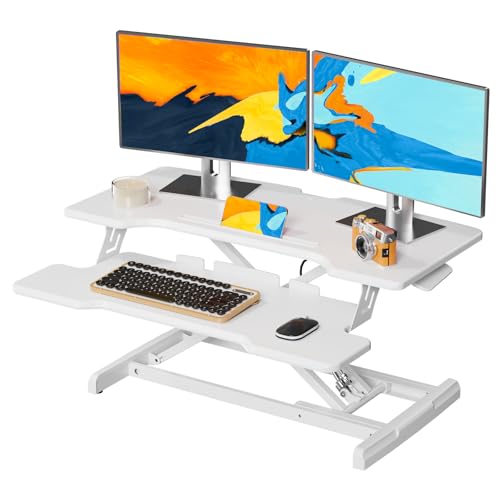
- 32-inch two-level workspace
- Height range from 4.9 to 19.3 inches
- Supports up to 33 pounds on the desktop
Best For: Home-office users building a larger computer setup
Multi-Monitor Pick
37 in Pneumatic Standing Desk Converter

- Designed for two 24-inch monitors
- 39.68-pound stated load capacity
- Single-button lift from 10.2 to 24.8 inches
Best For: Multi-monitor professionals needing a wide workstation
Compact Comfort Pick
Minimalist 24-Inch Standing Desk Converter

- Fully assembled for immediate use
- 10 height positions up to 15.7 inches
- 23.6-inch surface with 300-pound stated capacity
Best For: Compact home-office setups and laptop or single-monitor users
Dual-Monitor Workspace Pick
36-Inch Pneumatic Desk Converter

- Wide upper surface for monitors or a laptop
- Separate lower tray for keyboard and mouse
- Pneumatic height adjustment up to 19.8 inches
Best For: Large home-office workstations and dual-monitor users
Easy-Lift Corner Pick

- Pneumatic lift from 4.7 to 16 inches
- 32-by-18-inch work surface
- One-step keyboard-tray assembly
Best For: Stable, organized home-office setups with moderate equipment
Best Electric Upgrade – VIVO Black 42-inch Electric Desk Converter
For shoppers comparing desk converters under 500, the VIVO DESK-V000VLE is a spacious electric riser for switching between sitting and standing with the flip of a control-panel switch. Its 42-inch surface accommodates single-monitor, dual-monitor, and laptop-and-monitor setups.
Best For: Users who want powered height adjustment and a large dual-monitor workstation.
Pros:
- Electric adjustment moves from 6.4 to 16.7 inches.
- 42-by-22-inch top provides generous workspace.
- Keyboard tray raises in sync with the main platform.
- Requires little to no assembly and includes a three-year warranty.
Cons:
- Its 45.4-pound weight may make repositioning difficult.
- The total weight capacity is 33 pounds, with 4 pounds allocated to the keyboard tray.
This is a strong choice when convenience and surface area matter more than portability. Confirm that your existing desk can accommodate its 22-inch depth and 42-inch width.
Best Manual Value – G-Pack Pro 38-inch Standing Desk Converter
Among desk converters under 500, the G-Pack Pro offers a manual gas-spring setup with a 38-inch work surface and a stated 33-pound capacity. It is designed to convert an existing desk into a sit-stand workstation without requiring a full office rearrangement.
Best For: Dual-monitor users seeking a broad manual converter with a removable keyboard tray.
Pros:
- Gas-spring adjustment reaches up to 17.3 inches.
- 38-inch surface is designed for dual monitors and accessories.
- Includes a removable keyboard tray and non-slip silicon pads.
- Installation is described as fast and easy.
Cons:
- The manual platform lifts slightly outward, so clearance is needed.
- It weighs 35.2 pounds, which may limit portability.
The G-Pack Pro balances workspace, adjustability, and included features without using a motor. Measure the area in front of and behind your desk before choosing it, since the manual motion requires extra clearance.
Best Compact Pick – VIVO White 29-inch Standing Desk Converter
For smaller work areas, this VIVO 29-inch riser is a practical option among desk converters under 500. Its single-tier surface fits a monitor, laptop, or full-sized keyboard, while the touch height-locking mechanism raises the platform straight upward.
Best For: Compact desks and users who want a preassembled, low-profile converter.
Pros:
- Compact 29.3-by-17.8-inch surface fits varied desk layouts.
- Height adjusts from 1.8 to 16.2 inches.
- Straight-up movement is designed to reduce shifting and wobbling.
- Arrives fully assembled and includes a three-year warranty.
Cons:
- The 22-pound capacity is lower than that of the larger models here.
- The single top offers less workspace than a dedicated dual-monitor platform.
This model makes the most sense when desk space is limited or a simple setup is preferred. Its 22-pound capacity should be checked against the combined weight of your monitor, laptop, and accessories.
Best Corner Workstation – Rocelco 46-inch Corner Desk Converter
The Rocelco R CADRB-46 is a large corner-oriented option for shoppers considering desk converters under 500. Its 45.5-inch desktop, deep keyboard tray, and 40-pound capacity are designed for substantial dual-monitor arrangements while retaining a tabletop riser format.
Best For: Corner desks, large dual-monitor setups, and users needing a wide keyboard tray.
Pros:
- 45.5-by-23.25-inch work surface fits up to two 32-inch monitors according to the supplied specifications.
- Gas-piston assistance provides continuous adjustment from 5 to 18 inches.
- 40-inch keyboard tray offers room for a laptop and keeps a 4.5-inch ergonomic separation.
- Grommet hole supports cable management or compatible monitor mounts.
Cons:
- Its 23.25-inch depth and 40-pound weight require substantial desk space and support.
- Minimal assembly is required, and the warranty is limited to one year.
This is the most workstation-focused choice in the group, particularly for a corner desk and multiple displays. Verify your desktop dimensions and mounting needs before purchase, as its large footprint is part of the design.
Best for Easy Setup – VIVO 28 in Single Top Desk Converter
If you need desk converters under 500 for a compact laptop workstation, the VIVO DESK-V011F offers a straightforward way to alternate between sitting and standing. Its single 27.5-by-12-inch platform arrives assembled and uses a manual scissor-lift design with eight height settings.
Best For: Laptop users with limited desk space who want a simple, preassembled standing riser.
Pros:
- Compact surface fits a variety of desk layouts.
- Eight height settings range from 2 to 14 inches above the desk.
- Supports up to 11 pounds and requires no assembly.
- Straight-up scissor-lift movement is designed to minimize shifting.
Cons:
- The 11-pound capacity and compact surface are limiting for heavier or multi-monitor setups.
- It has a single-tier design with no separate keyboard tray.
This VIVO converter prioritizes simplicity and a small footprint over expansive workspace. It is a practical fit for a lightweight laptop setup, especially if you want to start standing without replacing your existing desk.
Balanced Workstation – 32 in Pneumatic Desk Converter
Among desk converters under 500, this 32-inch model is suited to users who need more room for a computer setup and prefer assisted height adjustment. Its pneumatic lift moves from 4.9 to 19.3 inches, while the two-level design includes a dedicated keyboard tray.
Best For: Home-office users who want a spacious converter for a laptop, keyboard, mouse, or dual-monitor workstation.
Pros:
- 32-by-15.7-inch desktop provides more workspace than a compact single-platform riser.
- Pneumatic lift supports smooth straight-up-and-down adjustment.
- Desktop supports up to 33 pounds, with a 4.4-pound keyboard tray capacity.
- Includes a two-level layout and oversized keyboard tray.
Cons:
- Minimal assembly is required to attach the keyboard tray and cable clips.
- At 26.5 pounds, it is less convenient to move than a lightweight riser.
With its larger surface, higher load rating, and keyboard tray, this converter is a more capable option for a full workstation. Make sure your existing desk has enough depth and width for its 32-inch footprint.
Multi-Monitor Pick – 37 in Pneumatic Standing Desk Converter
For shoppers comparing desk converters under 500 for a multi-screen setup, this 37-inch riser emphasizes capacity and workspace. Its single-button pneumatic lift adjusts from 10.2 to 24.8 inches, and the two-tier layout is designed to accommodate two 24-inch monitors along with keyboard and mouse space.
Best For: Programmers, traders, designers, and other users who need room for two monitors and frequent sit-to-stand adjustments.
Pros:
- Supports up to 39.68 pounds for a substantial monitor setup.
- Single-button pneumatic adjustment covers a broad 10.2-to-24.8-inch range.
- 37-inch main surface and 9-inch secondary tier provide expansive workspace.
- Hidden 3.7-inch storage space helps organize small accessories.
Cons:
- Its wide, two-tier design requires more desk space than compact converters.
- The supplied dimensions and product specifications are less detailed than those of the other listed models.
- Although described as tool-free, the 26.9-pound unit may not be ideal for frequent relocation.
This model is the most workspace-focused choice in the group, with the highest stated load capacity and tallest adjustment range. It makes the most sense when dual-monitor stability and a broad work surface matter more than conserving desk space.
Compact Comfort Pick – Minimalist 24-Inch Standing Desk Converter
For shoppers comparing desk converters under 500, this fully assembled riser offers a straightforward way to alternate between sitting and standing. Its 23.6-by-15.75-inch work surface, manual lift, and 10 height positions suit a monitor or laptop setup without requiring installation.
Best For: Home-office users who want a compact, ready-to-use converter with multiple height settings.
Pros:
- Arrives fully assembled and can be placed directly on an existing desk.
- Offers 10 height positions from 2.67 to 15.7 inches.
- Provides a 23.6-by-15.75-inch surface with a stated 300-pound maximum weight recommendation.
- Includes storage options described as a shelf and utility drawers.
Cons:
- The 23.6-inch width may be limiting for larger multi-monitor setups.
- Height adjustment is manual rather than pneumatic or powered.
- Its 17-pound weight can make repositioning less convenient.
This is a practical choice when easy setup and a broad adjustment range matter more than expansive workspace. Verify your monitor footprint and desk depth before buying.
Dual-Monitor Workspace Pick – 36-Inch Pneumatic Desk Converter
Among desk converters under 500, this wide workstation stands out for users who need room for a monitor setup and peripherals. Its pneumatic lifting structure, separate lower tray, and height range up to 19.8 inches are designed for flexible sitting and standing positions.
Best For: Home-office users with dual monitors, a laptop, or a larger keyboard-and-accessory setup.
Pros:
- Wide 37-by-15.75-inch upper surface accommodates a single monitor, dual monitors, or a laptop.
- Lower 31.5-by-15.75-inch tray provides space for a keyboard, mouse, or accessories.
- Pneumatic strut supports smoother lifting and lowering without sudden rebound, according to the supplied notes.
- Adjusts from 4.3 to 19.8 inches using a handle.
Cons:
- Its large footprint may not suit smaller desks.
- At 25.4 pounds, it is less convenient to move frequently.
- The supplied information does not provide a specific load-capacity figure.
This converter is the strongest fit here for a spacious workstation, especially when a separate keyboard tray is important. Measure both your desk and equipment before committing to its wide design.
Easy-Lift Corner Pick – 32-Inch Standing Desk Riser
For desk converters under 500 that balance workspace and simple installation, this 32-inch riser offers a practical middle ground. It uses pneumatic springs for adjustment, includes a keyboard tray, and needs only one assembly step before use.
Best For: Users who want a stable, moderately wide workstation with a dedicated keyboard tray and minimal setup.
Pros:
- Pneumatic lift adjusts from 4.7 to 16 inches.
- 32-by-18-inch work surface provides useful room for a desktop setup.
- Included 25-by-9.5-inch keyboard tray keeps input devices separate from the main surface.
- Requires only one assembly step, attaching the keyboard tray.
Cons:
- The listed 22-pound load capacity is lower than some larger converters.
- Its maximum height of 16 inches may be insufficient for some standing users.
- The unit weighs 31.2 pounds, so it is not especially portable.
This model makes sense for buyers prioritizing a clean, organized workstation and quick assembly. Check the stated load capacity against your monitor and accessory weight.
How We Picked the Best Desk Converters Under 500
We focused on the features that matter most in daily use: usable work-surface size, height-adjustment range, lifting mechanism, stability, monitor capacity, keyboard-tray design, and overall fit on a standard desk. The selection includes electric, pneumatic, and manually adjustable models, along with compact single-platform and corner-oriented designs.
Because converter dimensions and weight limits can vary by configuration, check the manufacturer’s current specifications before buying. A converter should fit your desk with enough room for cables, monitor stands, and comfortable arm movement.
Quick Comparison
- Best for larger setups: Choose a 42- or 46-inch model for multiple monitors, speakers, and accessories.
- Best for compact desks: A 28- or 29-inch single-top converter takes up less surface area.
- Best for corner workstations: Corner-shaped models make better use of L-shaped or angled desk layouts.
- Best for easy adjustment: Electric and pneumatic designs reduce the effort needed to move between sitting and standing.
- Best for keyboard-and-mouse users: Look for a dedicated tray or a platform with enough depth for proper wrist positioning.
Key Buying Factors for Desk Converters Under 500
Size and Desk Compatibility
Measure the width and depth of your existing desk before choosing a converter. Larger platforms provide more room for dual monitors but can leave less space for notebooks or other equipment. Also account for rear clearance, cable routing, and the converter’s weight.
Height Range and Adjustment Method
Confirm that the lowest setting works with your seated position and that the highest setting lets you stand without hunching. Electric controls offer convenient, consistent movement, while pneumatic and manual systems can be simpler and quieter. A smooth adjustment is especially important if you switch positions several times a day.
Monitor and Accessory Support
Check the stated weight capacity rather than judging by platform size alone. Two monitors, monitor arms, a laptop, and speakers can add up quickly. A separate keyboard tray may improve ergonomics by keeping the keyboard and mouse at a more usable height.
Stability and Everyday Ergonomics
Look for a broad, balanced base and a platform that does not wobble noticeably when you type. When standing, position the screen near eye level, keep your elbows relaxed, and leave enough room to move your feet. A converter improves flexibility, but it does not replace a properly adjusted chair, monitor, and desk setup.
Who Should Buy Which Desk Converters Under 500?
Choose a wide converter if you use two monitors or want space for a laptop and accessories. A compact single-top model suits smaller desks, occasional standing, or a straightforward monitor-and-keyboard setup. Electric models are a strong fit for frequent sit-stand transitions, while pneumatic options can provide quick movement without relying on a motor. For L-shaped work areas, a corner converter can maximize available surface space. If you primarily work from a laptop, prioritize a stable platform, comfortable viewing height, and a keyboard tray or enough depth to separate the screen from your input devices.