
Need reliable remote control for servers, PCs, and lab gear? The best kvm over ip switches let you access BIOS, troubleshoot locked systems, and manage machines without being physically on-site.
In this roundup, we focus on practical picks for home labs, IT teams, and rack environments, with options ranging from compact single-port units to fully managed multiport switches.
Best 10 Kvm Over Ip Switches Picks for 2026
Remote BIOS-Access KVM

- BIOS-level remote control with no host software
- 4K 30Hz video plus remote audio
- Instant file transfer for remote workflows
Best For: Single-PC remote management, IT support, and BIOS access
Rack-Mount IP KVM
Tripp Lite NetDirector 16-Port

- Manages up to 16 computers or servers directly
- Remote access via LAN, WAN, or Internet
- Supports USB, PS/2, and up to 64 secure users
Best For: Rack-mounted server management and multi-system remote access
PoE Remote KVM

- PoE-powered remote KVM design
- 4K streaming support
- Tailscale support for remote access
Best For: Clean PoE deployments that need remote streaming access
Ultra-High-Performance 1-Port KVM
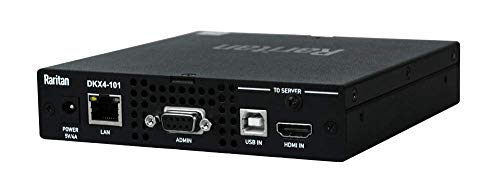
- High-performance single-port KVM-over-IP
- 4K remote access over Ethernet
- Rack-mount design for dedicated systems
Best For: One critical server or workstation that needs premium remote control
Wireless Remote KVM

- Dual-band Wi‑Fi 6 and wired access
- 4K@30FPS passthrough with two-way audio
- Cloud, app, and self-hosted remote control
Best For: Home labs and remote support needing flexible wireless KVM access
Rackmount Enterprise KVM

- 16-port rackmount KVM over IP
- CAC/Smart Card support with module
- Works with Avocent DSView 4 management
Best For: Enterprise rack environments needing centralized secure KVM management
Open-Source Ethernet KVM

- 1080p@60FPS with 30–60 ms latency
- Local browser, cloud, and Wake on LAN access
- Open-source platform with expansion support
Best For: Developers and technical users wanting open-source remote KVM control
Compact Rackmount Remote Access
Tripp Lite 8-Port NetCommander KVM

- 8-port Cat5 KVM with 1 local + 1 remote user
- Supports IPv4/IPv6 and remote authentication
- Can control IP PDUs and cascade to 128 servers
Best For: Small racks that need secure remote administration and expansion flexibility
High-Resolution Enterprise Control
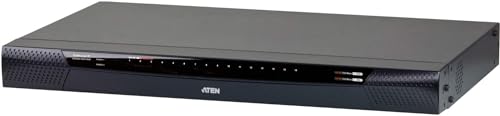
- 16-port Cat 5 KVM with virtual media support
- Up to 1920 x 1200 for local and remote sessions
- Supports FIPS 140-2 level 1 security standards
Best For: Enterprise server rooms needing high-resolution remote control and security support
Feature-Rich Remote Console

- Includes 16 VGA KVM cables
- Supports OSD, hotkey, button, and IP access
- Daisy chains up to 256 computers
Best For: Users needing a flexible 16-port IP KVM with expansion and included cables
Remote BIOS-Access KVM – GL.iNet Comet GL-RM1
If you want one of the more flexible kvm over ip switches for single-system remote control, the GL.iNet Comet GL-RM1 is built for practical hands-on access from anywhere. It offers BIOS-level control, 4K 30Hz output, remote audio, and instant file transfer, all without needing software on the host computer.
Best For: IT pros, smart home users, and anyone who needs BIOS-level remote access to one PC or server.
Pros:
- 4K 30Hz remote viewing with low latency
- BIOS interface access for rebooting and OS installation
- No software required on the controlled computer
- Built-in file transfer and remote audio support
Cons:
- Designed for one controlled machine rather than a multi-port rack setup
- PD adapters cannot be used
For remote troubleshooting, off-site maintenance, and everyday access to a critical machine, this hardware-based KVM is a strong fit. Its Ethernet connection, hardware encoding, and Tailscale support make it especially useful when you need reliable access beyond the local network.
Rack-Mount IP KVM – Tripp Lite NetDirector 16-Port
The Tripp Lite NetDirector is a traditional rack-style option among kvm over ip switches, built to manage multiple computers or servers from a browser-accessible remote location. With 16 direct ports, LAN/WAN/Internet access, and compatibility with USB and PS/2 systems, it fits environments that need centralized control.
Best For: Server rooms and admins who need remote access to multiple machines from a rack-mount switch.
Pros:
- Controls up to 16 computers or servers directly
- Built-in IP access through LAN, WAN, or the Internet
- Supports both USB and PS/2 connections
- Up to 64 secure user accounts
Cons:
- More complex than a single-port remote KVM
- Best suited to rack deployments rather than simple desktop use
This model is a strong pick when you need a more conventional infrastructure-focused KVM over IP setup. The rack-mount design, on-screen display, and daisy-chain support make it practical for managing larger collections of systems.
PoE Remote KVM – GL.iNet Comet PoE GL-RM1PE
The GL.iNet Comet PoE remote KVM is aimed at users who want streamlined remote access with network-powered installation. As a member of the kvm over ip switches category, it is positioned around 4K streaming and Tailscale support, making it appealing when you want a clean remote-control setup with fewer power-cabling concerns.
Best For: Users who want a PoE-powered remote KVM with 4K streaming and Tailscale support.
Pros:
- PoE design can simplify installation
- 4K streaming support
- Tailscale support for remote access workflows
Cons:
- Supplied notes do not list detailed port, compatibility, or encoding specs
- Less information provided than comparable models in the roundup
Because the supplied details are limited, this is best evaluated by its core advantages: PoE convenience and remote streaming. If your priority is a cleaner network-powered deployment rather than a feature-heavy spec sheet, it is worth a closer look.
Ultra-High-Performance 1-Port KVM – Raritan Dominion KX IV-101
Raritan Dominion KX IV-101 Ultra High Performance 1-Port 4K KVM-Over-IP Switch
Check Price On AmazonThe Raritan Dominion KX IV-101 is a premium single-port option in the kvm over ip switches category, built for remote control through Ethernet with rack-mount hardware. Its 4K support and remote control method make it a focused solution for users who need high-performance access to one target system.
Best For: Teams that need a high-performance 1-port rack-mount KVM over IP switch for one critical device.
Pros:
- High-performance 1-port KVM-over-IP design
- 4K-capable remote access
- Rack-mount form factor
- Ethernet connectivity for remote control
Cons:
- Only supports one port
- Heavier and more specialized than compact remote KVM units
This model makes the most sense when performance and reliability for a single system matter more than port count. For focused server or workstation control, it provides the kind of dedicated hardware approach many admins want from a KVM over IP switch.
Wireless Remote KVM – GL.iNet GL-RM10 Comet Pro
If you want kvm over ip switches with a cleaner setup, the GL.iNet GL-RM10 Comet Pro stands out by combining dual-band Wi‑Fi 6 with wired connectivity. It is built for remote access without extra software, while still offering 4K passthrough, two-way audio, and cloud or self-hosted control options.
Best For: Home labs, offices, and remote support setups that need flexible wireless or wired access with 4K passthrough.
Pros:
- Dual-band Wi‑Fi 6 plus wired connectivity for a less cluttered setup
- 4K@30FPS video passthrough with two-way audio and H.264 encoding
- Built-in touchscreen for quick local setup and cloud toggles
- Supports web cloud control, GLKVM app access, and self-hosted deployment
Cons:
- Some recovery and power-control features depend on sold-separately add-ons
- Touchscreen is small at 2.22 inches, so it is mainly for basic control
This is a strong pick if your priority is flexible remote management rather than a traditional rackmount switch. The combination of wireless access, secure Tailscale support, and disaster-recovery features makes it especially practical for mixed home lab and IT support use.
Rackmount Enterprise KVM – Vertiv Avocent AV3000 16-Port
Among kvm over ip switches, the Vertiv Avocent AV3000 is aimed at rack environments that need integrated local and remote management right out of the box. It supports centralized administration with Avocent DSView 4 and is built for secure access, including CAC/Smart Card support with the required module.
Best For: Rackmount server rooms and IT teams that want centralized KVM over IP management with secure access options.
Pros:
- Integrated local and remote KVM over IP management
- 16-port rackmount design for multi-server setups
- CAC/Smart Card support for secure login with required AVRIQ-VMC module
- Compatible with Avocent DSView 4 for centralized management
Cons:
- Requires compatible modules for CAC support
- More specialized than desktop-style KVM devices
This is a better fit for structured IT infrastructure than for casual remote access. If you need a rack-ready switch with centralized control and support for multiple video standards, it offers a serious enterprise-oriented feature set.
Open-Source Ethernet KVM – JetKVM IP KVM
If you are comparing kvm over ip switches for fast remote recovery, JetKVM focuses on simple browser-based control with low latency and flexible access methods. It connects by USB-C and HDMI, supports local browser access or optional cloud access, and adds Wake on LAN for powering up a machine remotely.
Best For: Tinkerers, developers, and remote admins who want an open-source IP KVM with flexible access and recovery tools.
Pros:
- Easy browser-based setup through a displayed IP address
- 1080p@60FPS video with 30–60 ms latency using H.264 encoding
- Three access options: local browser, cloud dashboard, and Wake on LAN
- Open-source design with SSH uploads and expansion for power and serial control
Cons:
- Requires USB-C, HDMI, and Ethernet connections for setup
- Advanced expansion features rely on optional add-ons or customization
JetKVM is a strong option if you want hands-on control and room to expand functionality. Its mix of low-latency video, open-source software, and recovery-friendly access makes it especially appealing for technical users.
Compact Rackmount Remote Access – Tripp Lite 8-Port NetCommander KVM
If you need a practical kvm over ip switch for a small server rack, this Tripp Lite NetCommander focuses on clean installation, remote access, and straightforward server control. Its 8-port Cat5 design helps reduce cable clutter, while the simultaneous local and remote user support makes it useful for shared administration.
Best For: IT admins who want an 8-port, rackmount KVM with remote browser-based access and strong security options.
Pros:
- Supports 1 local and 1 remote user at the same time.
- Cat5 design helps eliminate cable clutter at the rack.
- Supports IPv4 and IPv6, plus RADIUS and LDAP/S remote authentication.
- Can control IP PDUs as devices through the KVM.
Cons:
- Limited to 8 ports before cascading.
- Java-based remote access may not suit every workflow.
- Rackmount setup is best suited to a fixed infrastructure.
This model is a solid fit if you want a compact, security-minded remote management switch with room to expand through cascading. The combination of local console control, browser-based access, and PDU support makes it especially appealing for basic data center administration.
High-Resolution Enterprise Control – ATEN KN1116VA 16-Port KVM
This ATEN kvm over ip switch is built for environments that care about resolution, security, and remote manageability. With 16 ports, virtual media support, and up to 1920 x 1200 video for local and remote sessions, it suits administrators who need precise control over multiple systems.
Best For: Enterprise users who want a 16-port KVM with high-resolution remote access and FIPS-aligned security support.
Pros:
- 16-port Cat 5 design for managing multiple systems.
- Up to 1920 x 1200 resolution for local and remote sessions.
- Supports virtual media and Panel Array Mode.
- Includes FIPS 140-2 level 1 security support and Laptop USB Console access.
Cons:
- Likely more than needed for smaller setups.
- Advanced feature set may be overkill for simple rack access.
- Panel-mount style and enterprise focus may not fit casual users.
For larger server rooms, this model stands out for pairing high video clarity with security-focused remote operations. If you need a more advanced administration tool than a basic KVM switch, the KN1116VA is aimed squarely at that job.
Feature-Rich Remote Console – MT-VIKI 16-Port IP KVM
If you want a feature-packed kvm over ip switch for a larger mixed environment, this MT-VIKI 16-port model is designed around remote BIOS-level control and flexible switching. It includes 16 VGA KVM cables, supports OSD, button, hotkey, and IP access, and is positioned for administrators who want broad compatibility and easy remote troubleshooting.
Best For: Users who want a 16-port rackmount IP KVM with included cables, multiple switching methods, and daisy-chain expansion.
Pros:
- Includes 16 VGA KVM cables for immediate setup.
- Supports OSD menu, button, hotkey, and IP access.
- Provides BIOS-level control and full boot process interaction.
- Daisy chains up to 256 computers and includes 4 USB ports.
Cons:
- Client software is recommended for IP access.
- VGA-based design may not suit newer display needs.
- Feature depth may be more than required for small setups.
This is a strong option if you want wide expansion potential and multiple ways to operate the switch. The included cables and BIOS-level remote control make it especially practical for hands-on server maintenance and recovery tasks.
How We Picked These Kvm Over Ip Switches
We prioritized remote access quality, video performance, security features, and real-world installation flexibility. That means looking at whether a device supports BIOS-level control, local and remote access, virtual media, multi-user access, and the right video or network options for typical deployments.
We also weighed rack-mount readiness, power options like PoE, compatibility with modern networks, and how well each model fits different use cases, from a single critical workstation to a dense server closet.
Quick Comparison: Which Type Fits Your Setup?
If you only need to manage one machine, a compact single-port unit is usually the simplest and most affordable route. For server rooms or shared environments, multiport models make more sense because they centralize access and reduce the need for separate remote tools.
Wireless-oriented or PoE-powered options can simplify placement when cabling is limited, while enterprise switches often add stronger user management, centralized access, and features like CAC support or virtual media.
Key Buying Factors for Kvm Over Ip Switches
Port Count and Expansion
Choose a port count based on the number of systems you need to control now, plus room for growth. If you expect to scale, a higher-port model can be more cost-effective than replacing a smaller unit later.
Video Resolution and Responsiveness
Look for enough resolution for your workflow. Higher-resolution support matters for modern desktops and graphical interfaces, while low-latency streaming helps during BIOS changes, boot troubleshooting, and mouse-heavy admin tasks.
Security and User Access
For shared or business use, prioritize authentication controls, encrypted remote access, and support for multiple users or role-based administration. These features are especially important when several technicians may need access.
Connectivity and Cabling
Check whether the switch uses Cat5-style server connections, direct HDMI or USB links, or newer network-focused approaches. Match the hardware to your existing rack layout so installation stays simple and tidy.
Advanced Management Features
Virtual media, on-screen display, CAC support, and out-of-band management can save a lot of time during OS installs, firmware updates, and recovery tasks. These features are most valuable in professional environments.
Who Should Buy Which Kvm Over Ip Switches?
Home lab users and solo admins should start with a compact model that offers BIOS access and dependable remote video. Small businesses may want a midrange switch with strong user access controls and enough ports for a few servers or workstations.
IT departments and data center teams should favor enterprise-grade Kvm Over Ip Switches with centralized management, better security, and expansion-friendly designs. If you need the easiest installation, consider PoE or rackmount options; if you need the broadest compatibility, look for virtual media and common legacy video support.