
A Bluetooth dongle can add wireless headphones, keyboards, and mice to a Linux PC—but the version number on the box does not guarantee an easy setup. Chipset support, kernel version, and adapter design matter more.
These five options cover modern USB Bluetooth adapters, a combined Wi-Fi/Bluetooth dongle, and a model marketed for several Linux distributions. Use the guide below to match their claims to your system before you buy.
Best 5 Bluetooth Adapters for Linux Picks for 2026
Linux Plug-and-Play Pick
Edimax BT-8500 Bluetooth 5.0 Nano Adapter
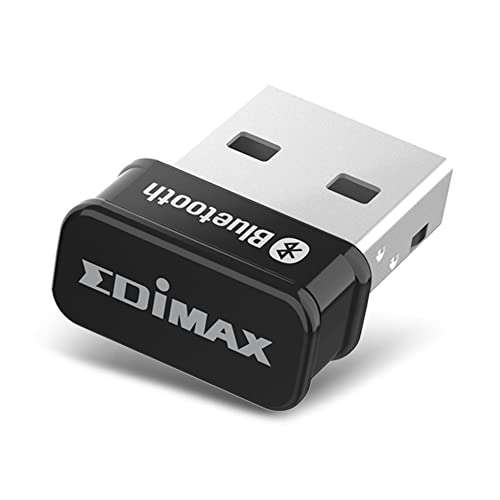
- Plug-and-play on Linux kernel 5.8+ and Mint 21
- Bluetooth 5.0 Classic and LE support
- Older supported kernels need a driver
Best For: Newer Linux systems where easy setup matters
Multi-Device Pick
ASUS USB-BT600 Bluetooth 6.0 Adapter

- Supports up to seven device connections
- Bluetooth 6.0 with LE
- Linux supported; kernel requirements unspecified
Best For: Connecting multiple Bluetooth devices to a Linux PC
Manual-Driver Option
Cudy BU530 Bluetooth 5.3 Nano Adapter

- Bluetooth 5.3 in a 2 g nano design
- Backward compatible with older Bluetooth devices
- Linux driver requires manual installation
Best For: Linux users comfortable installing a downloaded driver
Best Wi-Fi and Bluetooth Combo
GenBasic WiFi 5 Bluetooth 4 Nano Dongle
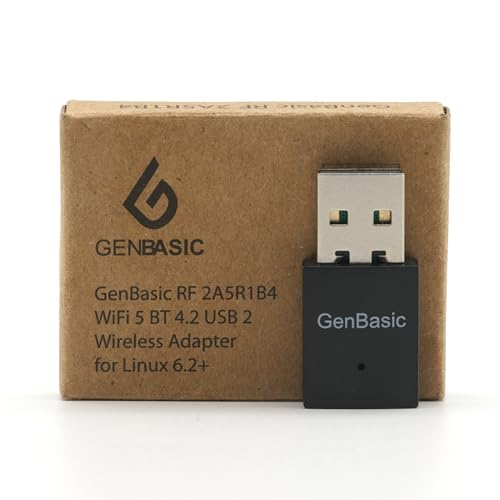
- Bluetooth 4.0 plus dual-band Wi-Fi 5
- Plug-and-play on Linux 6.2+
- Compact USB 2.0 design
Best For: Single-board computers needing Wi-Fi and Bluetooth together
Best Bluetooth-Only Nano Pick
Panda Bluetooth 4.0 USB Adapter

- Bluetooth 4.0 LE+EDR
- Lists multiple Linux distributions
- Up to 80-foot stated range with Bluetooth Smart devices
Best For: Linux users who need Bluetooth but not additional Wi-Fi
Linux Plug-and-Play Pick – Edimax BT-8500 Bluetooth 5.0 Nano Adapter
Among bluetooth adapters for linux, the Edimax BT-8500 stands out for its stated plug-and-play support with Linux kernel 5.8 or newer and Mint 21. Its tiny USB 2.0 design adds Bluetooth 5.0 without taking up much space.
Best For: Linux users on supported newer kernels who want a compact adapter with minimal setup.
Pros:
- Plug-and-play support is specified for Linux kernel 5.8 or newer and Mint 21.
- Bluetooth 5.0 supports both Bluetooth Classic and Bluetooth Low Energy.
- Nano-sized design and Bluetooth SIG certification.
Cons:
- Older supported Linux kernels require a driver, with Fedora and Ubuntu specified.
- Uses a USB-A port rather than USB-C.
Check your kernel version before buying: the straightforward installation claim applies to newer Linux setups, while older ones call for more driver planning.
For shoppers comparing bluetooth adapters for linux, the ASUS USB-BT600 offers Bluetooth 6.0, Bluetooth Low Energy, and support for up to seven device connections in an ultra-compact USB-A design.
Best For: Desktop or laptop users who want to connect several Bluetooth devices and prefer a compact adapter.
Pros:
- Supports up to seven device connections.
- Bluetooth 6.0 includes Bluetooth Low Energy and backward compatibility with earlier versions.
- Lists Linux support and includes a three-year warranty.
Cons:
- The supplied specifications do not identify supported Linux kernel versions or installation requirements.
- Requires a USB-A port.
The seven-device support is the main draw, but Linux buyers should confirm compatibility with their particular distribution and kernel before ordering.
The Cudy BU530 is a small USB-A choice among bluetooth adapters for linux, adding Bluetooth 5.3 to a PC. Unlike its Windows 10/11 setup, Linux installation uses a driver available from Cudy’s download center.
Best For: Linux users comfortable downloading and installing a driver for a lightweight nano adapter.
Pros:
- Compact 20 × 15 × 8 mm design weighs about 2 g.
- Bluetooth 5.3 is backward compatible with earlier Bluetooth versions.
- Linux driver is available from Cudy’s download center.
Cons:
- Linux setup requires manual driver installation rather than the advertised Windows 10/11 plug-and-play process.
- The supplied specifications do not list supported Linux distributions or kernel versions.
This is a practical compact option if you can accommodate the driver step; verify your Linux setup against Cudy’s download information first.
Best Wi-Fi and Bluetooth Combo – GenBasic WiFi 5 Bluetooth 4 Nano Dongle
GenBasic WiFi 5 Bluetooth BT4 USB Mini Wireless Network Dongle Adapter for Linux 6.2+
Check Price On AmazonAmong bluetooth adapters for linux, this GenBasic nano dongle is the choice when you also need 2.4GHz and 5GHz Wi-Fi for a single-board computer or USB-A PC. Its small, low-power USB 2.0 design is intended to leave neighboring ports accessible.
Best For: Libre Computer boards and Linux 6.2+ systems that need Wi-Fi and Bluetooth in one compact adapter.
Pros:
- Combines Bluetooth 4.0 with dual-band Wi-Fi 5.
- Plug-and-play on Linux 6.2+ and official Libre Computer images, according to the manufacturer.
- Supports WPA3 and Wi-Fi AP and monitor modes.
Cons:
- Linux support requires CONFIG_RTW88; older setups may need additional configuration.
- 433Mbps is a Wi-Fi PHY rate that requires an 80MHz access point, not a guaranteed real-world speed.
Choose this for its combined connectivity rather than Bluetooth alone. On a single-board computer, check that the power supply and cable can reliably power the board and dongle.
Best Bluetooth-Only Nano Pick – Panda Bluetooth 4.0 USB Adapter
If you are comparing bluetooth adapters for linux and already have Wi-Fi covered, the Panda PBU40 focuses on Bluetooth connectivity. This USB nano adapter supports Bluetooth 4.0 LE+EDR and lists Linux distributions including Ubuntu, Mint, Fedora, openSUSE, and Kali.
Best For: Adding Bluetooth to a Linux computer for compatible devices such as keyboards and smartphones, without buying a Wi-Fi combo adapter.
Pros:
- Bluetooth 4.0 supports both Low Energy and Enhanced Data Rate.
- Lists support for several Linux distributions and Windows versions.
- Specified operating range is up to 80 feet when connected to a Bluetooth Smart device.
Cons:
- Does not provide Wi-Fi connectivity.
- The stated range is conditional and may not reflect every setup.
This is the more focused pick when Bluetooth is the only missing connection. Check your distribution and intended device against the listed compatibility before purchasing.
How We Picked These Bluetooth Adapters for Linux
We focused on the listed Linux compatibility, connection type, Bluetooth generation, and intended use of each selected product. We also considered practical distinctions: a nano dongle can stay in a laptop, while a combined Wi-Fi/Bluetooth adapter serves a different need. Manufacturer compatibility claims are a starting point, not a guarantee for every distribution, kernel, or Bluetooth device.
Quick Comparison
For a compact modern dongle, compare the ASUS USB-BT600 and Cudy BU530 first: both list Linux compatibility, with Bluetooth 6.0 and 5.3 respectively. The Panda Bluetooth 4.0 adapter is the one to investigate if its long list of named distributions matches an older installation. Choose the WiFi 5 Bluetooth BT4 mini dongle only if you want Wi-Fi as well and run a Linux 6.2+ kernel, as stated in its listing. The Edimax Bluetooth 5.0 nano adapter lists Windows 10/11 rather than Linux, so confirm its exact hardware revision and Linux support before treating it as a plug-and-play choice.
Key Buying Factors for Bluetooth Adapters for Linux
Check the Exact Hardware, Not Just the Version
Two adapters advertised with the same Bluetooth version can use different chipsets or revisions. Look for Linux reports tied to the exact model and hardware revision, plus the USB ID when available. Bluetooth 6.0 or 5.3 on the packaging does not by itself establish driver support or improve an older headset’s capabilities.
Match Support to Your Kernel and Distribution
Check the kernel version your system actually runs, especially for the Wi-Fi/Bluetooth model that specifies Linux 6.2+. A distribution name in a product listing is helpful, but releases of that distribution can ship very different kernels. Before purchase, check whether your setup needs additional firmware and whether other users report successful pairing with your distribution.
Consider Placement and the Devices You Use
Nano adapters are unobtrusive, but a USB port behind a metal desktop case can be a poor location for a wireless connection. If possible, place the adapter in a front port or on a short USB extension cable. If you use Bluetooth audio, confirm that your Linux audio stack supports the profiles and codecs you need; a newer dongle alone will not add a missing profile.
Who Should Buy Which Bluetooth Adapters for Linux?
Start with the ASUS USB-BT600 or Cudy BU530 if you want a small, Bluetooth-only adapter with Linux compatibility stated in the listing, then verify support for your particular system. Consider Panda when compatibility with one of its named distributions matters more than having a newer Bluetooth version. Pick the Wi-Fi/Bluetooth dongle for a compatible Linux 6.2+ setup that needs both functions. Approach Edimax as a verify-first option for Linux because its provided compatibility claim names Windows, not Linux.