
If you need more high-speed storage without rebuilding your PC, a four slot M.2 PCIe adapter is one of the most efficient upgrades you can buy.
In this roundup, we focus on cards that balance compatibility, cooling, and bandwidth so you can choose the right fit for gaming, content creation, or a small storage server.
Best 10 Four Slot M.2 PCIe Adapter Picks for 2026
RIITOP Quad NVMe PCIe Adapter

- Adds 4 NVMe SSDs through one x16 slot
- Includes heatsink and LED activity indicators
- Needs PCIe x16 bifurcation support
Best For: Compatible server and workstation builds with bifurcation support
GLOTRENDS PA44
4-Slot 2280 NVMe PCIe x8 Adapter

- Runs four NVMe drives from a PCIe 4.0 x8 link
- No motherboard bifurcation required
- Limited to 2280 M.2 NVMe SSDs
Best For: Builds that need four NVMe slots without motherboard bifurcation
GLOTRENDS PA41
Quad M.2 NVMe x16 Adapter for Bifurcation
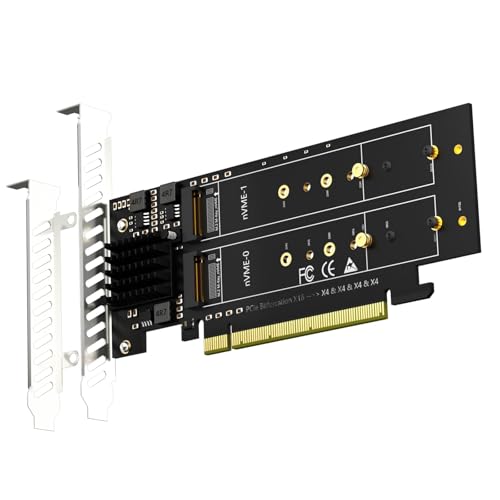
- Holds four NVMe SSDs in one x16 slot
- Supports 22110 down to 2230 M.2 sizes
- Requires BIOS bifurcation support
Best For: Bifurcation-ready Intel or AMD systems needing broad SSD size support
Premium Bifurcation Choice
SABRENT 4-drive NVMe PCIe 4.0 x16 adapter

- Holds four M.2 NVMe SSDs in one x16 card
- Requires motherboard PCIe bifurcation support
- Includes thermal padding, optional fan, and LED status
Best For: Users with bifurcation-ready motherboards who want a cooled four-drive NVMe adapter
RAID-Focused Value Pick
PCIe 4.0 x16 4x M.2 NVMe expansion card

- Supports four M.2 2280 NVMe SSDs
- Needs motherboard PCIe bifurcation split modes
- Includes heatsink and independent power modules
Best For: RAID builders with bifurcation-capable boards who want a cooled four-drive adapter
Non-Bifurcation Pick
Quad PCIe 4.0 NVMe adapter with Broadcom chip
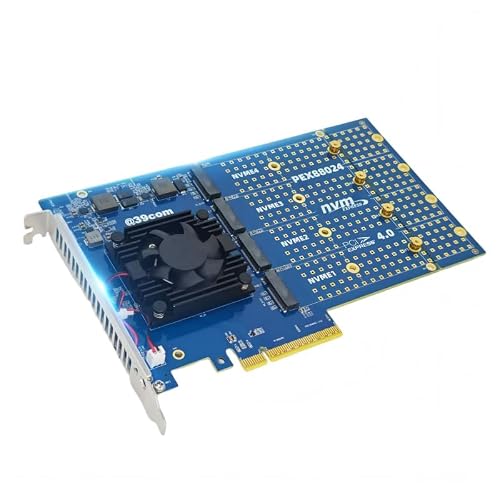
- Runs four M.2 NVMe SSDs without bifurcation
- Uses Broadcom PEX88024 controller
- Includes active fan cooling and heatsink
Best For: Users with non-bifurcation boards who still want four-drive NVMe expansion
Top Pick for Bifurcation Servers
Quad PCIe 4.0 x16 to 4x NVMe Card

- Adds 4 NVMe SSDs from one x16 slot
- Low-profile bracket for 2U systems
- Needs PCIe x16 bifurcation support
Best For: Bifurcation-ready servers and workstations
Best Heavy-Duty Pick

- ASM2824 chipset removes bifurcation requirement
- Runs four NVMe drives from PCIe 3.0 x8
- Includes heatsink and fan cooling
Best For: Systems without PCIe bifurcation support
Best Cooling-Focused Pick
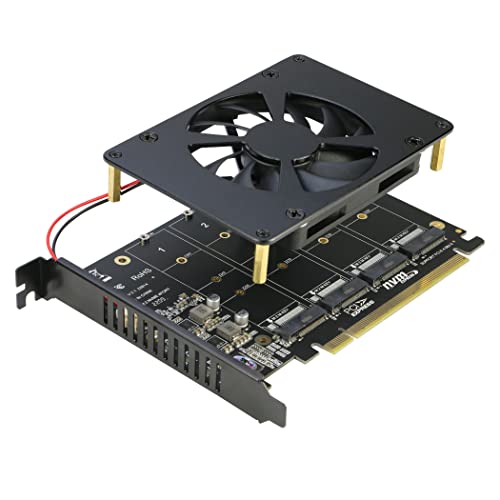
- Four NVMe slots on one x16 card
- Fan and thicker heatsink aid cooling
- Requires PCIe x16 bifurcation
Best For: Bifurcation builds needing active cooling
RIITOP Quad NVMe PCIe Adapter – 4-Port x16 Bifurcation Card
If your board supports PCIe x16 bifurcation, this four slot M.2 PCIe adapter is a straightforward way to add up to four NVMe drives from one x16 slot. The RIITOP card is aimed at users who want full-speed multi-SSD expansion on PCIe 4.0 or 3.0 systems, with support for 2280, 2260, 2242, and 2230 M.2 NVMe drives.
Best For: Server, X299, or X399 builds that already support PCIe x16 bifurcation and need four NVMe drives in one slot.
Pros:
- Supports 4x NVMe SSDs in a single PCIe x16 slot
- Works with PCIe 4.0 or 3.0 x16 slots that can be set to x4x4x4x4
- Includes a heatsink and individual LED status indicators
- Supports multiple M.2 NVMe sizes, including 2230 through 2280
Cons:
- Requires motherboard PCIe x16 bifurcation support
- Does not support SATA-based M.2 SSDs
- No hardware RAID support
Overall, this is a practical expansion card if your platform already has the right lane-splitting support and you want a simple four-drive NVMe setup. It is best suited to compatible workstation and server boards rather than general consumer systems.
GLOTRENDS PA44 – 4-Slot 2280 NVMe PCIe x8 Adapter
The GLOTRENDS PA44 is a four slot M.2 PCIe adapter for users who want to mount four NVMe drives in a PCIe 4.0 x8 or x16 slot without relying on motherboard bifurcation support. It is limited to 2280-size M.2 NVMe SSDs, so it makes sense when your build is standardized around that form factor.
Best For: Users who want a 4-drive NVMe adapter that can work without motherboard PCIe bifurcation, especially on systems like Mac Pro.
Pros:
- Uses a PCIe 4.0 x8 interface and supports x8/x16 slots
- Does not require motherboard or CPU bifurcation support
- Supports software RAID setup across Windows, Linux, and macOS
- Includes standard and low-profile brackets
Cons:
- Only supports 2280-form-factor M.2 NVMe SSDs
- No hardware RAID support
- Boot support requires OS reinstallation and BIOS/UEFI setup
This card stands out when you need four NVMe slots but cannot depend on motherboard bifurcation. The 2280-only restriction is important, but for matching builds it is a flexible option for storage expansion and software RAID.
Yosoo Health Gear PH44 – Four-Port M.2 NVMe x16 Adapter
This four slot M.2 PCIe adapter is built for users who want to expand a PC with four NVMe drives through one PCIe x16 slot. It is designed around PCIe splitting or PCIe RAID-capable motherboards, and it supports both PCIe 3.0 and 4.0 protocols.
Best For: PC or server users with a motherboard that supports PCIe split or RAID functions and want a sturdy four-drive expansion card.
Pros:
- Supports 4x NVMe SSDs at full speed
- Works with PCIe 3.0 and 4.0 systems that support splitting or RAID
- Uses thicker PCB materials for added stability
- Includes LED indicators for each drive
Cons:
- Requires motherboard PCIe split or RAID support
- Compatibility can vary by motherboard lane layout
- Not positioned as a universal plug-in solution
Compared with simpler adapters, this one is focused on stable multi-drive operation on compatible platforms. It is a solid choice if your board already offers the necessary split or RAID features and you want a sturdier card design.
GLOTRENDS PA41 – Quad M.2 NVMe x16 Adapter for Bifurcation
The GLOTRENDS PA41 is a four slot M.2 PCIe adapter for systems that already support PCIe bifurcation in BIOS. It lets you install four M.2 NVMe SSDs, including 22110 and 2280 sizes, and it is meant for users who want a quad-drive setup from a PCIe 4.0 x16 slot.
Best For: Intel or AMD desktop and server builds that can set x4x4x4x4 or Hyper M.2 X16 mode in BIOS.
Pros:
- Supports 4 M.2 NVMe SSDs in one PCIe 4.0 x16 slot
- Accepts 22110, 2280, 2260, 2242, and 2230 sizes
- Supports soft RAID and OS booting on compatible systems
- Plug-and-play support for Windows, Linux, and macOS
Cons:
- Requires motherboard PCIe bifurcation support
- Some lane configurations may only recognize three SSDs
- PCIe 4.0 full speed depends on the CPU, slot, and SSD
This is a versatile quad-NVMe adapter for users who already have bifurcation-capable hardware and want broad size compatibility. It is best viewed as a storage expansion card for modern platforms rather than a universal fit.
Premium Bifurcation Choice – SABRENT 4-drive NVMe PCIe 4.0 x16 adapter
If you want a four slot M.2 PCIe adapter that can handle a full-stack NVMe upgrade, this SABRENT card is built for systems with PCIe bifurcation support. It fits four M.2 M-key NVMe SSDs in a physical x16 slot and is designed for PCIe 4.0 performance, with thermal padding and optional fan cooling to help keep drives stable under load.
Best For: Desktop builders who have a bifurcation-capable motherboard and want four NVMe drives in one adapter with active cooling.
Pros:
- Supports up to four M.2 NVMe SSDs in a single PCIe 4.0 x16 card.
- Includes thermal padding plus optional active fan cooling for better heat control.
- Plug-and-play design with no drivers required.
- Rear LED indicators provide quick drive status monitoring.
Cons:
- Requires UEFI PCIe bifurcation support to use more than one drive properly.
- The destination slot must be a physical x16 PCIe slot.
- Designed for NVMe M-key drives only.
This is a strong pick if your motherboard supports lane splitting and you want a straightforward four-drive expansion card with built-in cooling and status LEDs. If your system lacks bifurcation, this adapter is not the right fit.
RAID-Focused Value Pick – PCIe 4.0 x16 4x M.2 NVMe expansion card
This four slot M.2 PCIe adapter is aimed at builders who need dense NVMe storage and are comfortable matching the card to a motherboard with PCIe split support. It supports four M.2 2280 NVMe drives, includes a heatsink and independent power modules, and is positioned for RAID-focused setups where the board can run x4x4x4x4 or similar split modes.
Best For: RAID-minded desktop users who need a four-drive NVMe expansion card and have a compatible bifurcation motherboard.
Pros:
- Supports four NVMe M.2 SSDs with PCIe 4.0 x16 connectivity.
- Designed for motherboards that can set x4x4x4x4 or 4×4 split mode.
- Includes an aluminum alloy heat sink plate for cooling.
- Uses independent power modules to help protect drives and data.
Cons:
- Motherboard PCIe split support is required.
- Compatibility depends on the board’s RAID and split-channel options.
- Notes only call out 2280 support, so form-factor flexibility appears limited.
If your platform can do PCIe bifurcation and you want a practical multi-drive RAID build, this card covers the basics with cooling and dedicated power handling. It is less appealing for users who need a plug-and-play card on a standard motherboard.
Non-Bifurcation Pick – Quad PCIe 4.0 NVMe adapter with Broadcom chip
If you need a four slot M.2 PCIe adapter but do not want to rely on motherboard bifurcation, this model stands out because it uses a Broadcom PEX88024 controller chip and explicitly supports non-bifurcation motherboards. It offers four M.2 NVMe slots, PCIe 4.0 support, and active cooling in a card sized for standard x8/x16 slots.
Best For: Users who want four NVMe drives on a motherboard without PCIe bifurcation support.
Pros:
- Supports up to four M.2 NVMe SSDs simultaneously.
- Works with non-bifurcation motherboards.
- Uses a Broadcom PEX88024 controller for stable multi-drive operation.
- Includes a fan and heatsink for active heat dissipation.
Cons:
- It is still a PCIe 4.0 x8-based design, not a full x16 lane path.
- Physical size and slot requirements may be more demanding than simpler adapters.
- Drive support is limited to NVMe M.2 formats listed in the notes.
This is the most flexible choice in the group if your system cannot split PCIe lanes, since the onboard controller handles the multi-drive setup. It is a smart option for upgrading older or less feature-rich boards that still have a spare x8 or x16 slot.
Top Pick for Bifurcation Servers – Quad PCIe 4.0 x16 to 4x NVMe Card
If you already have a motherboard that supports PCIe x16 bifurcation, this four slot M.2 PCIe adapter is a straightforward way to add up to four NVMe SSDs through a single x16 slot. It supports PCIe 4.0 or 3.0 x16 connections, includes a low-profile bracket for 2U systems, and is aimed at users building dense storage setups rather than simple single-drive upgrades.
Best For: Server, workstation, or X299/X399 builds that can be set to x4x4x4x4 bifurcation and need four NVMe drives in one slot.
Pros:
- Supports four M.2 NVMe SSDs at once through a PCIe 4.0/3.0 x16 slot.
- Includes a low-profile bracket suited to 2U case requirements.
- Individual LED indicators show each SSD’s working status.
Cons:
- Requires motherboard PCIe x16 bifurcation support to recognize all drives.
- Does not support SATA-based M.2 SSDs.
- Two-sided NAND SSDs cannot be installed on Side 2 because of screw clearance.
This is a strong fit for builders who know their platform supports bifurcation and want the highest drive count from a single slot. If your board cannot be configured for x4x4x4x4, this card is not the right match.
Best Heavy-Duty Pick – Quad NVMe PCIe x8 Adapter
This four slot M.2 PCIe adapter is built for systems that do not support PCIe bifurcation. It uses an ASMedia ASM2824 switch chipset so the card can recognize all four NVMe drives automatically from a single PCIe 3.0 x8 slot, making it a practical upgrade for desktops, workstations, and servers where motherboard lane splitting is not available.
Best For: Non-bifurcation motherboards that need plug-and-play support for four NVMe drives.
Pros:
- Built-in ASM2824 chipset means no bifurcation is required.
- Supports four M.2 NVMe SSDs from a single PCIe 3.0 x8 slot.
- Includes a large heatsink and fan over the main chipset for cooling.
Cons:
- Limited to M.2 NVMe M-key SSDs only.
- Each drive gets PCIe 3.0 x4 bandwidth, so total bandwidth is shared.
- May require SSD drivers if the drive is not detected in system tools.
For users with a motherboard that cannot bifurcate lanes, this is the most flexible option in the lineup. It trades some theoretical simplicity of a direct x16 bifurcation card for much broader compatibility.
Best Cooling-Focused Pick – Quad NVMe x16 Card with Fan
If your motherboard supports PCIe x16 bifurcation and you want a four slot M.2 PCIe adapter with active cooling, this RIITOP card is designed for that job. It fits a PCIe 4.0 or 3.0 x16 slot, supports up to four NVMe SSDs, and uses both a fan and a thicker heatsink to help keep drive temperatures under control during sustained use.
Best For: Bifurcation-capable systems that need four NVMe slots plus active cooling.
Pros:
- Supports four NVMe SSDs through one PCIe 4.0/3.0 x16 slot.
- Includes a fan and thicker heatsink for temperature management.
- Individual LED indicators show each SSD’s status.
Cons:
- Requires PCIe x16 bifurcation support in the motherboard BIOS.
- Does not support SATA-based M.2 SSDs.
- The thicker heatsink blocks the adjacent slot.
This model makes the most sense when thermal control matters as much as capacity. If you can live with the space it occupies and your board supports x4x4x4x4, it offers a well-rounded four-drive layout.
How We Picked the Best Four Slot M.2 PCIe Adapter
For a Four Slot M.2 PCIe Adapter, the most important factors are motherboard support, lane layout, thermal design, and the type of NVMe SSDs supported. We favored cards that offer clear lane requirements, broad M.2 size compatibility, and practical cooling for sustained workloads.
We also looked for options that make sense for different builds, including systems with PCIe bifurcation support and cards designed to work without it, since that compatibility issue is often the deciding factor.
Quick Comparison
At a high level, the main differences are slot speed, board length, and cooling. PCIe 4.0 x16 models are best when you want maximum bandwidth and your motherboard can spare the lanes. PCIe x8 models can be a smarter choice for tighter builds or boards with more limited expansion layouts. Active cooling is worth prioritizing if you expect long transfers, RAID use, or hot environments.
Key Buying Factors for a Four Slot M.2 PCIe Adapter
Motherboard Compatibility
Check whether your board supports PCIe bifurcation, and if so, what split it offers. Some adapters need bifurcation, while others are designed to work without it or rely on software-managed setups. If you are unsure, verify your motherboard manual before buying.
PCIe Lane and Version Support
A Four Slot M.2 PCIe Adapter only performs as well as the slot feeding it. PCIe 4.0 delivers more total bandwidth, but PCIe 3.0 can still be fine for everyday storage expansion. Match the card to the actual lane capacity available on your system.
SSD Size and Cooling
Most adapters support common 2280 drives, but some also accept 2230, 2242, 2260, or 22110 lengths. Heatsinks and fans matter more as you stack multiple NVMe drives on one card, especially for sustained writes, caching, or RAID arrays.
RAID and Usage Goals
If you want simple extra storage, a pass-through style adapter may be enough. If you want RAID-like behavior, fast scratch space, or a workstation storage pool, choose a card whose architecture and software support match that goal.
Who Should Buy Which Four Slot M.2 PCIe Adapter?
Gamers and general PC users should prioritize compatibility and easy installation. Creators working with large files should lean toward PCIe 4.0 cards with strong cooling. Power users building NAS, lab, or workstation setups should focus on bifurcation support, lane availability, and drive length flexibility.
If your motherboard is older or less flexible, choose the most compatible Four Slot M.2 PCIe Adapter available rather than the fastest one on paper. The best card is the one your system can run correctly at full stability.