
If you charge a laptop, tablet, phone, and accessories from one desk, a desktop USB-C laptop charging station can simplify everything. The best models combine enough wattage, smart power sharing, and a tidy footprint.
In this roundup, we focused on practical charging hubs that make everyday desk setups cleaner, faster, and easier to manage in 2026.
Best 10 Desktop USB-C Laptop Charging Station Picks for 2026
Compact multi-device pick
UGREEN 100W 6-Port Desktop Charging Station
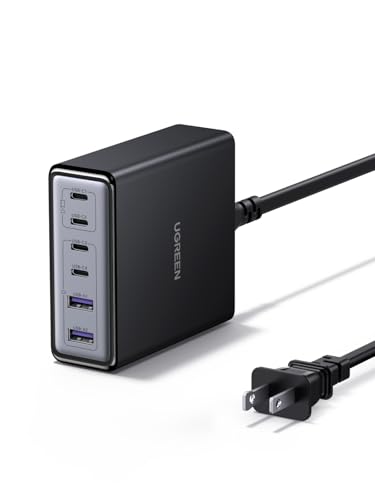
- 100W desktop charger with 4 USB-C and 2 USB-A ports
- Single USB-C port supports up to 65W for laptops
- GaN build keeps the footprint small and efficient
Best For: Users who want a compact charging hub for a laptop and accessories
Power strip + charger combo
Anker 9-in-1 100W Desktop Charger

- Combines 3 AC outlets with 4 USB-C and 2 USB-A ports
- USB-C1 and USB-C2 can each deliver up to 100W alone
- Includes 300J surge protection for added peace of mind
Best For: People who want a desk power strip and USB-C charger in one
Highest-output desk charger
UGREEN Nexode 200W 8-Port Desktop Charger

- 200W total output with up to 100W from one USB-C port
- Charges up to 8 devices using 6 USB-C and 2 USB-A ports
- Includes 6ft cord and GaN efficiency for tidy desktop use
Best For: Heavy desk users who need maximum power and lots of ports
Slim desk-organizing pick
Anker 9-in-1 Slim 100W Desktop Charger

- 4 USB-C ports plus 3 AC outlets and 2 USB-A ports
- 100W capacity for fast charging on a busy desk
- Slim plug and flat cord help reduce clutter
Best For: Buyers who want a neat desk hub with laptop charging
Family Desktop Charging Hub
8-Port USB-C Multi Device Station

- 8 USB ports with 5 USB-C connections
- Dual 65W ports support laptops
- Includes 6 short mixed charging cables
Best For: households and shared desks needing organized USB-C charging
Power Strip Charging Dock
12-in-1 200W Desktop USB-C Station

- Combines 4 AC outlets and 8 USB ports
- 65W USB-C1 supports laptop charging
- Flat plug and 5ft cord help save space
Best For: offices and dorm desks needing USB and AC in one unit
Compact Desk Charger

- 3 USB-C and 3 USB-A ports
- Up to 30W from one USB-C port
- Includes silicone cable organizer
Best For: small home offices that want a compact, organized charger
Top Pick
Anker Nano 100W 7-in-1 Retractable Charging Station

- 100W USB-C charging with shared power across multiple devices
- Two built-in retractable USB-C cables for a cleaner desk
- Includes 3 AC outlets, 3 USB-C ports, and 1 USB-A port
Best For: organized home office or gaming desks
Highest Power
Anker Prime 200W 6-Port GaN Desktop Charger

- 200W total output for up to six devices
- Dual USB-C use can deliver up to 100W per port
- Compact desktop design with temperature monitoring
Best For: powering several high-demand devices at one desk
Best Compact
Anker 112W 6-Port Desktop Charger with Cable Organizer

- Small 3.0 x 3.2 x 1.3 in desktop footprint
- 3 USB-C plus 3 USB-A ports for everyday devices
- Includes a silicone cable organizer for neat setups
Best For: small desks that need organized multi-device charging
Compact multi-device pick – UGREEN 100W 6-Port Desktop Charging Station
If you want a desktop USB-C laptop charging station that can handle a laptop plus everyday devices, this UGREEN model is built around speed and simplicity. Its 100W output, vertical footprint, and mix of USB-C and USB-A ports make it a practical fit for a desk, nightstand, or travel bag.
Best For: Charging a laptop and several smaller devices from one compact desktop hub.
Pros:
- Delivers up to 65W from a single USB-C port for laptops like MacBook Pro/Air and Dell XPS.
- 4 USB-C and 2 USB-A ports let you charge up to 6 devices at once.
- GaN design keeps the body compact and helps reduce heat.
- Smart power distribution assigns output based on how many devices are connected.
Cons:
- Single-port output tops out at 65W, not the full 100W.
- USB-C3/C4 are limited to 35W, so they are better for phones and tablets than larger laptops.
Overall, this is a straightforward option if your priority is a space-saving charging station with a real laptop-capable USB-C port and enough outputs for a busy daily carry.
Power strip + charger combo – Anker 9-in-1 100W Desktop Charger
This Anker desktop USB-C laptop charging station blends charging ports with AC outlets, making it a strong pick for a home office or shared desk. With 3 AC outlets, 4 USB-C ports, 2 USB-A ports, and 300J surge protection, it is designed to replace a cluttered strip with a more organized desktop setup.
Best For: A desktop setup that needs AC outlets, USB charging, and basic surge protection in one unit.
Pros:
- 9-in-1 layout includes 3 AC outlets, 4 USB-C ports, and 2 USB-A ports.
- USB-C1 and USB-C2 each support up to 100W when used individually.
- Built-in 300J surge protector adds protection for connected devices.
- Flat plug extension cord helps keep the setup neat behind furniture or on a desk.
Cons:
- Full 100W output is only available when USB-C ports are used individually.
- Heavier than a simple charger because it combines charging and AC outlets.
For buyers who want a desktop charging station that doubles as a power strip, this Anker is especially practical thanks to its AC outlets, strong USB-C output, and safety-focused design.
Highest-output desk charger – UGREEN Nexode 200W 8-Port Desktop Charger
If you need a desktop USB-C laptop charging station for a busy workspace, this UGREEN Nexode model is built for volume and speed. It offers up to 200W total output, a 100W max single-port output, and enough ports to keep laptops, phones, tablets, and accessories powered together.
Best For: Powering a laptop plus a full set of desk devices from one high-output station.
Pros:
- 200W total output with up to 100W from a single USB-C port.
- 6 USB-C and 2 USB-A ports can charge up to 8 devices at once.
- GaN tech is designed to charge efficiently and run cooler than traditional chargers.
- Includes a 6ft extension cord for more flexible desk placement.
Cons:
- Designed for many devices, so the most demanding charging behavior depends on how outputs are shared.
- More ports and power may be more than needed for a simple single-device setup.
This is the strongest choice in the group if your desk regularly supports multiple devices and you want one station with enough power headroom for a laptop and accessories.
Slim desk-organizing pick – Anker 9-in-1 Slim 100W Desktop Charger
This Anker desktop USB-C laptop charging station is aimed at buyers who want a tidy, streamlined power hub with serious USB-C capability. It combines 4 USB-C ports, 3 AC outlets, and 2 USB-A ports in a slim body with a flat wire design that should sit neatly on an office desk or side table.
Best For: Keeping a clean desktop while charging a laptop, phone, and a few accessories.
Pros:
- 9-in-1 layout gives you 4 USB-C ports, 3 AC outlets, and 2 USB-A ports.
- 100W capacity supports fast charging for high-power devices.
- Unique outlet placement helps keep USB devices and cords organized.
- Ultra-slim plug and flat wire design are made for a low-profile setup.
Cons:
- Full 100W charging requires an E-Marker certified cable.
- Mostly about desk organization, so it is less compact than a pure USB charger.
If your priority is desk order as much as charging speed, this model stands out for its slim form factor and thoughtfully arranged outlet layout.
Family Desktop Charging Hub – 8-Port USB-C Multi Device Station
If you want a desktop USB-C laptop charging station that can handle a mix of laptops, tablets, and phones without turning into cable chaos, this Lcssio hub is built for the job. Its 8 ports, dual 65W outputs, and included short cables make it easier to keep a desk, nightstand, or family charging spot organized while still covering everyday fast-charging needs.
Best For: households or shared desks that need a tidy, all-in-one charging station for laptops and smaller devices.
Pros:
- 8-port design includes 5 USB-C ports for modern devices
- Dual 65W ports can charge laptops like MacBook Pro and MacBook Air
- Includes 6 short mixed cables for immediate use
- Built-in protections cover over-current, over-voltage, overheat, and short circuit risks
Cons:
- No AC outlets, so it is limited to USB-powered devices
- Higher-power laptop charging is limited to the two 65W ports
- Best suited for desk use rather than ultra-portable travel setups
This is a practical pick if your priority is a compact desktop charging station with enough USB-C capacity for a family or shared workspace. The thicker device slots and anti-slip pads add to the organizer feel, making it a strong fit for everyday desk cleanup.
Power Strip Charging Dock – 12-in-1 200W Desktop USB-C Station
This desktop USB-C laptop charging station is a strong option if you want one compact hub to power laptops, phones, and desk gear at the same time. With 4 AC outlets, 8 USB ports, and a 200W GaN IV design, it works more like a charging command center than a simple charger block.
Best For: offices, dorm rooms, and home desks that need both USB charging and AC power in a small footprint.
Pros:
- 12-in-1 layout combines 4 AC outlets with 8 USB ports
- 65W USB-C1 port can charge a MacBook Pro quickly
- 5ft extension cord and flat plug help reduce desktop clutter
- GaN IV design and safety protections add a durability-focused build
Cons:
- Only one USB-C port is rated at 65W for the fastest laptop charging
- AC outlets may not be necessary if you only need USB charging
- Large device loads still require attention to the total power sharing limit
For buyers who need a desktop charging station that also functions as a power strip, this model is especially practical. It saves space, supports many device types, and gives you more flexibility than a USB-only station.
Compact Desk Charger – 112W 6-Port USB-C Organizer
If you need a desktop USB-C laptop charging station that keeps the footprint small, this Anker charger focuses on clean desk organization and everyday multi-device charging. Its 6-port layout, 112W total output, and included cable organizer make it a simple fit for a home office or shared workspace.
Best For: users who want a compact, tidy charging hub for a laptop plus phones and accessories.
Pros:
- 6 ports total with 3 USB-C and 3 USB-A connections
- Single USB-C port can deliver up to 30W for MacBook Air and phones
- Includes a silicone cable organizer to reduce desk clutter
- Compact, lightweight design is easy to place on a desk or carry
Cons:
- 30W max per USB-C port is better for lighter laptop charging
- Cables are not included, so you must supply your own
- Not designed with AC outlets for powering non-USB devices
This is the most minimal of the three options, and that is its advantage if you care about desk space. It is a straightforward charging station for smaller laptop needs and multiple everyday devices, especially when organization matters as much as power.
Top Pick – Anker Nano 100W 7-in-1 Retractable Charging Station
If you want a desktop USB-C laptop charging station that also keeps cables under control, the Anker Nano is a strong all-in-one option. It combines 3 AC outlets, 3 USB-C ports, and 1 USB-A port in a compact body, plus two built-in retractable USB-C cables for quick desk charging.
Best For: Home office or gaming desk setups that need laptop charging, multiple device support, and a cleaner cable layout.
Pros:
- 100W max output from any USB-C port when used alone
- Two retractable USB-C cables extend to 2.3 ft for desk use
- 7-in-1 layout combines AC outlets with USB-C and USB-A charging
- LCD display shows real-time charging status
Cons:
- Retractable cords are limited to 2.3 ft, so it works best near an outlet
- Power cord itself is not retractable
- Some power is shared when multiple devices are connected
Overall, this is the most desk-friendly pick in the group if cable tidiness matters as much as charging speed. The retractable leads and partitioned layout make it especially appealing for organized setups with a laptop and several everyday accessories.
Highest Power – Anker Prime 200W 6-Port GaN Desktop Charger
For buyers looking for a desktop USB-C laptop charging station with the most headroom, the Anker Prime stands out with 200W total output and six USB-C ports. It is built to power multiple high-demand devices at once, making it a strong fit when two laptops or a laptop-plus-tablet setup need fast charging.
Best For: Desk setups that regularly charge multiple power-hungry devices and need a compact but high-output USB-C hub.
Pros:
- 200W total output for charging up to 6 devices simultaneously
- Each USB-C port supports up to 100W when two are used at the same time
- Compact desktop form factor with a stable, desk-friendly design
- Built-in safety system monitors temperature during charging
Cons:
- Not intended for travel
- USB-C focused design means no USB-A ports
- Higher-output charging is shared across ports when multiple devices are connected
This is the right choice if raw charging power is the priority. It gives you plenty of USB-C capacity for a modern workstation, but it makes the most sense on a permanent desk rather than as a portable charger.
Best Compact – Anker 112W 6-Port Desktop Charger with Cable Organizer
If you need a desktop USB-C laptop charging station that stays small and tidy, this Anker 112W model is designed for exactly that. It offers 3 USB-C ports and 3 USB-A ports in a compact footprint, and it includes a silicone cable organizer to help keep the workspace clear.
Best For: Smaller home office desks that need multi-device charging without giving up a lot of space.
Pros:
- Compact and lightweight at 3.0 x 3.2 x 1.3 in and 10.65 oz
- 6 ports total with 3 USB-C and 3 USB-A outputs
- Includes a cable organizer for a cleaner desk setup
- Single USB-C port can deliver up to 30W, enough for lighter laptop charging needs
Cons:
- USB-C cables are not included
- 30W max on a single USB-C port is modest for larger laptops
- Best suited to smaller devices or lighter laptop charging demands
This charger makes sense if you value space savings and organization more than high-wattage laptop output. It is a practical pick for everyday devices, but it is not the strongest option for power-hungry notebook charging.
How We Picked the Best Desktop USB-C Laptop Charging Station
We prioritized real-world desk usefulness over marketing claims. The best picks offer strong USB-C output for modern laptops, enough ports for mixed-device setups, and dependable power distribution so charging stays efficient when multiple devices are connected.
We also looked at build quality, safety features, outlet and port variety, cord length, and how well each Desktop USB-C Laptop Charging Station fits a home office, studio, or travel-ready desk.
Quick Comparison
If you need the simplest setup, a compact multi-port USB-C charger is usually best. If your desk also needs AC outlets for monitors, lamps, or accessories, a power-strip-style charging station is more versatile. Higher-wattage options are the better choice for users who regularly charge a laptop plus several high-demand devices at once.
Key Buying Factors for a Desktop USB-C Laptop Charging Station
Power Output and USB-C Wattage
Check the maximum wattage first. For most laptop users, 65W to 100W is a practical range, while heavier workloads or larger laptops may benefit from 100W or more. Make sure the USB-C port you plan to use can actually deliver laptop-level power, not just shared output.
Port Mix and Device Count
Choose a model with the right mix of USB-C, USB-A, and AC outlets for your gear. A Desktop USB-C Laptop Charging Station should match how you actually work, whether that means one laptop and a phone or a full desk with peripherals, earbuds, and a tablet.
Power Sharing Behavior
Many chargers reduce output when several ports are in use. That is normal, but it matters. If you plan to charge a laptop and multiple accessories together, look for clear power distribution details so you know what performance to expect.
Safety and Desk Design
Surge protection, temperature control, and overcurrent safeguards are important, especially for daily use. A flat plug, longer cord, or compact vertical design can also help keep cable clutter under control and make the station easier to place on or under a desk.
Who Should Buy Which Desktop USB-C Laptop Charging Station?
Choose a high-wattage USB-C-focused charger if your priority is fast laptop charging in the smallest possible footprint. Pick a power-strip-style desktop charger if you need both USB and AC power for a fuller workstation. If you regularly charge several devices at once, a higher-capacity model with strong total output is usually the smartest value.
For most buyers, the best Desktop USB-C Laptop Charging Station is the one that matches your laptop wattage, desk layout, and number of everyday devices without adding more clutter than it solves.