
If you need to connect an older VGA computer to a modern HDMI display, an active VGA to HDMI adapter is the simplest way to bridge the gap.
This guide focuses on 10 practical options that can help you get cleaner video, the right audio setup, and a smoother upgrade path for monitors, TVs, and projectors.
Best 10 Active VGA to HDMI Adapter Picks for 2026
Portable 1080P Desktop Converter

- Built-in IC converts VGA to HDMI
- USB audio support over HDMI
- Compact, plug-and-play design
Best For: Portable use with laptops, desktops, projectors, and TVs
Travel-Friendly Audio Converter

- Converts VGA and 3.5mm audio to HDMI
- USB-powered, plug-and-play setup
- Mini size with LED status indicators
Best For: Traveling users and simple big-screen presentations
Gold-Plated Legacy Display Adapter
Cable Matters VGA to HDMI Adapter
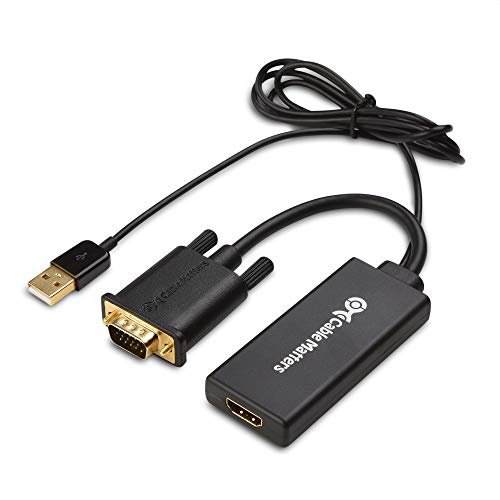
- Supports up to 1080p video output
- USB cable carries audio over HDMI
- Gold-plated connectors and compact tail
Best For: Reliable everyday hookup to HDMI monitors, TVs, and projectors
Powered 1080P Signal Bridge

- Active chipset needs USB power
- Includes 3.5mm aux and micro USB cables
- One-way VGA-to-HDMI with 1080p support
Best For: Powered one-way conversion with audio for older computers
Legacy VGA Upgrade
VGA to HDMI Adapter with Audio

- 1080p Full HD output up to 1920×1080@60Hz
- Includes AUX audio and Micro USB power cables
- Built for VGA-only source devices, not reverse use
Best For: Legacy VGA computers and TV boxes that need HDMI display output with audio
Simple Display Converter

- Plug-and-play with no driver installation
- Outputs the same image to HDMI and VGA
- Not bi-directional and not an MST-style hub
Best For: Basic VGA-to-HDMI/VGA display conversion for monitors and projectors
All-in-One Converter Cable

- Integrated active chipset for plug-and-play use
- Supports 1080p/60Hz with USB power and audio
- Gold-plated connectors with anti-interference shielding
Best For: Users who want a single cable-style VGA to HDMI connection for desks or presentations
Best with Extra Features
JideTech VGA to HDMI Converter with Audio

- One-way VGA source to HDMI only
- Built-in 3.5mm audio input
- Active chipset with 5V power
Best For: Older VGA devices needing HDMI output with audio
Portable Cable Pick
Tianle VGA to HDMI Cable with Audio

- Mirror and extended display modes
- 1080P/60Hz output with audio support
- USB-powered active chipset
Best For: Portable dual-display or big-screen setups
Compact Desk Adapter
Lamroyce USB-Powered VGA to HDMI Adapter

- 0.6-foot compact VGA-to-HDMI design
- 1080P@60Hz with USB power
- Gold-plated, braided, durable build
Best For: Tight setups where a short converter cable is enough
Portable 1080P Desktop Converter – BENFEI VGA to HDMI Adapter
If you need an active VGA to HDMI adapter for an older computer, laptop, or desktop, this BENFEI model offers a simple way to send VGA video to an HDMI monitor, TV, or projector. It is a plug-and-play converter with built-in IC processing and USB audio support, making it a practical pick for everyday presentations and basic display extension.
Best For: Users who want a compact VGA-to-HDMI solution for presentations, monitors, or TVs with audio support.
Pros:
- Converts VGA analog output to HDMI digital input with a built-in IC chip.
- Includes USB audio support so sound can travel with the video over HDMI.
- Compact, lightweight design is easy to carry for travel or business use.
- Plug-and-play setup with broad compatibility for common VGA-source devices.
Cons:
- Not bi-directional, so it will not work from HDMI source to VGA display.
- An HDMI cable is required but sold separately.
- Audio setup may need to be configured in Windows sound settings.
Overall, this is a straightforward active VGA to HDMI adapter for users who value portability and simple setup over extra features. Its USB-powered audio support and compact body make it a dependable choice for office, classroom, or travel use.
Travel-Friendly Audio Converter – SYBA VGA to HDMI Converter
This active VGA to HDMI adapter is designed for turning a VGA computer signal and separate 3.5mm audio into HDMI output for a TV or projector. SYBA keeps it simple with USB-powered operation, plug-and-play setup, and a compact size that works well when you need a quick display solution on the go.
Best For: Travelers and business users who need a compact VGA-to-HDMI converter for big-screen output.
Pros:
- Converts VGA video plus 3.5mm audio to HDMI output.
- USB-powered with no driver installation required.
- Mini size makes it easy to carry for travel or presentations.
- Supports 1920×1080 output and includes LED indicators for power and activity.
Cons:
- Requires a separate HDMI cable.
- Built for one-way conversion only from VGA to HDMI.
- Designed specifically for PC-style VGA sources.
For users who want a basic active VGA to HDMI adapter with audio input and a portable footprint, this SYBA model covers the essentials. It is best suited to simple hookup jobs where fast setup and big-screen output matter more than advanced features.
Gold-Plated Legacy Display Adapter – Cable Matters VGA to HDMI Adapter
The Cable Matters active VGA to HDMI adapter is aimed at users who want a dependable way to connect a VGA laptop or desktop to an HDMI monitor, TV, or projector. It supports common resolutions up to 1080p, includes USB audio support, and uses a compact cable-tail design with gold-plated connectors for a more finished setup.
Best For: Anyone needing a sturdy VGA-to-HDMI converter for monitors, TVs, or projectors with audio support.
Pros:
- Supports video resolutions up to 1080p and below, including several legacy PC formats.
- Integrated USB cable supports audio over HDMI.
- Gold-plated connectors and a compact cable-tail design improve build quality.
- Works with desktops, laptops, monitors, projectors, and TVs with HDMI input.
Cons:
- An HDMI cable is required and sold separately.
- Not a reverse converter for HDMI-to-VGA use.
- Best results depend on matching a compatible output resolution between source and display.
This is a solid active VGA to HDMI adapter for users who want broad compatibility and a slightly more robust physical design. If you need a practical converter for older computers and newer HDMI displays, it covers the basics well.
Powered 1080P Signal Bridge – FOINNEX VGA to HDMI Adapter
If you are shopping for an active VGA to HDMI adapter that is explicitly one-way, this FOINNEX model is built for older laptops and computers with VGA output. It supports audio and video synchronization, requires USB power for the active chipset, and is meant for connecting to HDMI TVs, monitors, or projectors without driver installation.
Best For: Users who need a powered, one-direction VGA-to-HDMI converter with audio support.
Pros:
- Active chipset requires USB power for stable conversion.
- Includes 3.5mm aux and micro USB cables for audio and power.
- Supports 1080p HD resolution and aims to reduce flicker and instability.
- Plug-and-play design with gold-plated connector and no driver required.
Cons:
- Not bidirectional; HDMI to VGA will not work.
- An HDMI cable is required but not included.
- USB power must be connected for the adapter to function.
For buyers who want a powered active VGA to HDMI adapter with included audio cabling, this FOINNEX unit is a focused choice. It is best for basic display conversion where one-way output, powered operation, and simple setup are the priority.
Legacy VGA Upgrade – VGA to HDMI Adapter with Audio
If you need an active VGA to HDMI adapter for an older laptop, desktop, or TV box, this model focuses on straightforward VGA-to-HDMI conversion with 1080p output. It includes both a 3.5mm AUX cable for audio and a Micro USB cable for power, so it’s aimed at practical setups where you want one cable path for video and sound on a modern HDMI display.
Best For: Connecting legacy VGA devices to HDMI monitors, TVs, or projectors when you need audio support too.
Pros:
- Supports up to 1920×1080@60Hz for clear Full HD output.
- Includes 3.5mm AUX and Micro USB cables for audio and power.
- Gold-plated connectors and reinforced housing help with durability.
- Compatible with older VGA-equipped laptops, desktops, projectors, and TV boxes.
Cons:
- Uni-directional only; it does not work as an HDMI to VGA adapter.
- Requires an HDMI cable, which is not included.
- Needs external USB power to operate the built-in chipset.
Overall, this is a solid pick if you want a simple active VGA to HDMI adapter with audio support and stable 1080p output. It’s best suited to everyday office, classroom, or home use where legacy VGA gear still needs to connect to HDMI displays.
Simple Display Converter – VGA to HDMI VGA Adapter
This active VGA to HDMI adapter is a compact choice if you want to convert VGA output to HDMI or VGA displays without dealing with drivers. It’s positioned more like a simple signal converter/splitter for basic display matching, with plug-and-play use and gold-plated interfaces for more stable transmission.
Best For: Users who need a straightforward VGA-to-HDMI/VGA converter for a projector, monitor, or HDTV.
Pros:
- Plug-and-play design with no driver installation needed.
- Supports VGA input up to 1920×1080 and HDMI output up to 1080P.
- Can display the same content on HDMI and VGA at the same time.
- Gold-plated HDMI interface helps resist wear and corrosion.
Cons:
- Not bi-directional; it only converts VGA to HDMI/VGA.
- HDMI and VGA outputs mirror the same content, not independent displays.
- Output resolution depends on the source and the display device.
In practice, this adapter makes sense for basic one-way conversion where simplicity matters more than advanced features. If you just need an active VGA to HDMI adapter for older notebooks or desktops, it covers the essentials without extra setup.
All-in-One Converter Cable – 5FT VGA to HDMI Active Cable
For buyers who prefer an all-in-one active VGA to HDMI adapter cable, this 5-foot option combines the converter and cable into a single setup. It’s designed for older VGA-equipped devices that need to connect to HDMI displays, and it includes USB power plus 3.5mm audio support for a more complete media connection.
Best For: Cleaner cable-based setups for desktops, notebooks, and media devices connecting VGA out to HDMI displays.
Pros:
- Built-in active chipset with plug-and-play operation.
- Supports up to 1920×1080@60Hz Full HD resolution.
- Includes USB power and 3.5mm audio output support.
- Gold-plated connectors and shielding are designed for better signal quality.
Cons:
- Not bidirectional; it cannot convert HDMI to VGA.
- Requires USB power to work properly.
- At 5 feet, the fixed cable length may be limiting in some setups.
This is a practical choice if you want an active VGA to HDMI adapter cable rather than a separate dongle and cables. It’s especially useful for straightforward desk or presentation setups where the built-in conversion and audio support keep things simple.
Best with Extra Features – JideTech VGA to HDMI Converter with Audio
If you need an active VGA to HDMI adapter for an older PC, DVR, POS terminal, or industrial system, this JideTech converter is built for one-way VGA source to HDMI display use. It converts analog VGA to digital HDMI and adds 3.5mm audio input, making it a practical choice when you want both picture and sound on a modern screen.
Best For: Older VGA-equipped devices that need a stable HDMI display connection with audio.
Pros:
- Active conversion chipset for stable analog-to-digital output
- Supports up to 1080P Full HD HDMI resolution
- Includes 3.5mm audio input to carry sound with video
- Powered by DC 5V for dependable operation
Cons:
- Not bidirectional and does not support HDMI to VGA
- Requires external 5V power
- Only works from VGA source to HDMI display
For legacy equipment, this is a straightforward active VGA to HDMI adapter with the key features most buyers need: powered conversion, audio support, and Full HD output. Just make sure your source device is VGA and your display is HDMI before ordering.
Portable Cable Pick – Tianle VGA to HDMI Cable with Audio
This active VGA to HDMI adapter cable is a compact option for connecting VGA-only computers and laptops to HDMI monitors, TVs, or projectors. It supports mirror and extended display modes, and the built-in chipset is designed to reduce flicker and black screen issues when the USB power connection is in place.
Best For: Users who want a portable cable-style converter for dual-display or big-screen viewing.
Pros:
- Supports mirror mode and extended mode
- Up to 1080P Full HD resolution at 60Hz
- Includes 3.5mm audio support and RCA audio output option
- Plug-and-play design with USB power included
Cons:
- Not bidirectional
- Needs USB power connected for the active chipset
- Short 1m/3.3FT length may not suit every setup
If you want a simple active VGA to HDMI adapter in cable form, this Tianle model is appealing for its portability and display flexibility. It fits well for everyday desktop extension or mirror use, as long as you have a VGA source and an HDMI display.
Compact Desk Adapter – Lamroyce USB-Powered VGA to HDMI Adapter
For a compact active VGA to HDMI adapter, this Lamroyce model keeps things simple with a VGA male to HDMI female design and USB power support. It is aimed at connecting VGA source devices like PCs, desktops, and laptops to HDMI monitors, HDTVs, and projectors at up to 1080P.
Best For: Compact desk setups that need a small powered VGA-to-HDMI converter.
Pros:
- Uni-directional VGA input to HDMI output
- Supports up to 1080P@60Hz and 720P backward compatibility
- USB-powered for plug-and-play use
- Durable build with gold-plated connectors and braided jacket
Cons:
- Very short 0.6-foot cable length
- Not bidirectional
- USB is for power only, not video transmission
This is a good pick if you want a rugged, minimal active VGA to HDMI adapter and do not need cable reach. The materials and power setup make it well suited to a fixed workstation or tight connection point.
How We Picked the Best Active VGA to HDMI Adapter
We prioritized Active VGA to HDMI Adapter models that are straightforward to use, support common 1080P output needs, and include the essentials most buyers actually need: stable signal conversion, audio handling, and a power method that fits typical desktop or laptop setups.
We also looked for options that make sense across different use cases, from office PCs and school labs to home media and projector connections.
Quick Comparison
At a high level, most picks fall into two groups: compact adapters that work well for short desktop connections, and cable-style converters that are better when you want a cleaner single-cable run between devices. Some include 3.5mm audio input and USB power, while others use a dedicated power connection for added stability.
Key Buying Factors for an Active VGA to HDMI Adapter
Direction Matters
These converters are usually one-way only. Make sure you are converting from VGA source to HDMI display, not the other way around.
Audio Support
VGA does not carry audio, so an Active VGA to HDMI Adapter must handle sound separately. If you need audio on your TV or monitor speakers, look for 3.5mm AUX input or another clear audio pathway.
Power Requirements
Many adapters need USB power or another external power source. That is normal for active conversion and can improve reliability, especially with longer cables or older PCs.
Resolution and Refresh Expectations
1080P support is the most common sweet spot, but real-world output still depends on the source device. For best results, match the adapter’s spec to the native output of your PC or laptop.
Cable Style Vs. Compact Dongle
A cable-style unit can reduce clutter and stress on ports, while a small dongle is easier to pack and move between setups. Choose based on whether portability or a tidier permanent installation matters more.
Who Should Buy Which Active VGA to HDMI Adapter?
If you want the simplest desk setup, a compact dongle-style converter is usually the most flexible choice. If you are connecting a PC to a TV, projector, or classroom display and want fewer loose parts, a cable-style Active VGA to HDMI Adapter may be better.
For users who need dependable audio, prioritize models with clear audio input support and included power accessories. If you are upgrading older hardware for occasional presentations or secondary-monitor use, focus on compatibility and power stability before anything else.