
If you need more SATA ports without replacing your motherboard, an M.2 SATA expansion card is one of the cleanest upgrade paths. It can turn an unused M.2 slot into practical storage expansion for SSDs, HDDs, and mixed drive arrays.
Below, we focus on port count, chipset support, cable inclusion, and compatibility so you can choose a card that fits your PC build and storage goals.
Best 10 M.2 SATA Expansion Card Picks for 2026
6-Port NAS Expansion
6-Port M.2 to SATA Adapter with ASM1166

- Adds up to 6 SATA drives from one M.2 PCIe slot.
- ASM1166 chip with PCIe 3.0 x2 upstream bandwidth.
- Heatsink and LED indicators support 24/7 storage use.
Best For: NAS builders and home server upgrades with multiple SATA drives.
4-Port Budget Storage Add-On
4-Port M.2 to SATA Card with Cables

- Adds 4 SATA 3.0 ports from a compatible M.2 PCIe slot.
- Includes 4 SATA cables for an easier install.
- ASM1064 chipset with heatsink and LED status.
Best For: Windows 10/11 users wanting a simple 4-port storage expansion.
6-Bay Desktop Expansion
6-Port M.2 to SATA Adapter by 10Gtek

- Adds up to 6 SATA 3.0 SSDs or HDDs.
- ASM1166 chip with plug-and-play setup.
- Includes screwdriver and mounting screw.
Best For: Users who want broad compatibility and six SATA ports from one M.2 slot.
5-Port Silent Storage Card
SilverStone ECS07 5-Port M.2 PCIe Adapter

- Adds 5 SATA Gen3 6Gbps ports from one M.2 PCIe slot.
- Aluminum heatsink supports silent passive cooling.
- Includes sleep power management and plug-in detection.
Best For: Users who want quiet 5-port storage expansion with simple setup.
6-Port Value Pick
10Gtek M.2 to SATA Adapter with 6 SATA Cables

- Adds up to 6 SATA ports from one M.2 slot
- Includes 6 SATA cables and uses ASM1166
- No RAID or hot-swapping support
Best For: Desktop storage expansion with multiple SATA drives
Premium 4-Port Choice
StarTech 4-Port M.2 PCIe 3.0 to SATA Card

- Adds up to 4 SATA drives from one M.2 slot
- Supports TRIM, SMART, and SATA I/II/III
- Auto-installs on most major operating systems
Best For: Modern PCs and storage builds needing four SATA ports
High-Capacity M.2 Pick
RIITOP 6-Port NVMe to SATA Adapter
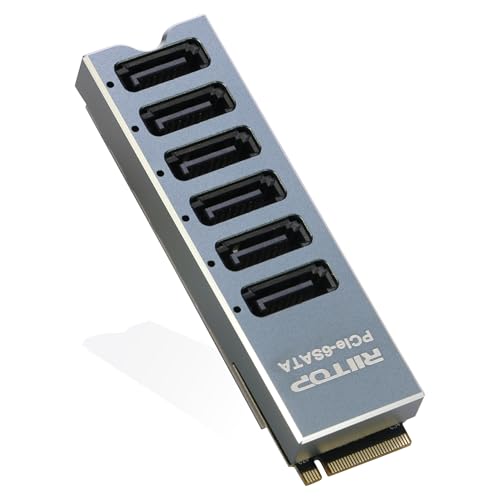
- Adds 6 SATA 6Gbps ports from one NVMe M.2 slot
- Includes heatsink cover and reinforced backboard
- ASM1166 chipset supports booting
Best For: Storage-heavy builds needing six SATA ports from M.2
Best with Extra Features
Sintech ASM1166 6-Port M.2 to SATA Adapter

- Adds 6 SATA 6Gbps ports from one M.2 PCIe slot
- ASM1166 chip with heatsink for stable use
- LED activity indicator for each connected drive
Best For: Users who want a simple 6-drive SATA expansion card for a PC or laptop.
High-Capacity 9-Port Option
Aukuoy 9-Port M.2 to SATA Expansion Card

- Converts one M.2 slot into 9 SATA 6Gbps ports
- ASM1166 controller with PCIe 3.0 x2 bandwidth
- Nine LEDs and heatsink support easy monitoring and cooling
Best For: Multi-drive setups that need the most SATA ports from one M.2 slot.
Budget 6-Port Adapter
Acogedor ASM1166 6-Port M.2 to SATA Card

- Turns one M.2 PCIe 3.0 x2 slot into 6 SATA ports
- ASM1166 chip with plug-and-play setup
- Smart indicator LEDs and aluminum heatsink included
Best For: PC users who want a straightforward 6-port SATA expansion solution with minimal setup.
6-Port NAS Expansion – 6-Port M.2 to SATA Adapter with ASM1166
If you need a M.2 SATA expansion card that turns one supported M.2 PCIe slot into a larger SATA array, this 6-port adapter is built for storage expansion in NAS boxes, home servers, and desktop upgrades. It uses the ASM1166 controller, supports SATA SSDs and HDDs, and is designed for driver-free operation on compatible Windows and Linux systems.
Best For: NAS builders and home server users who want up to 6 SATA drives from one M.2 PCIe slot.
Pros:
- Supports up to 6 SATA 3.0 drives for broad internal storage expansion.
- ASM1166 controller with PCIe 3.0 x2 uplink for stable transfer performance.
- Aluminum heatsink helps with passive cooling during long transfers and 24/7 use.
- Per-port LED indicators make it easy to spot drive activity.
Cons:
- Requires an M.2 PCIe / NVMe M-Key slot; not for M.2 SATA-only or B-Key slots.
- Not intended for NVMe SSDs or hot-swap use.
- Drive setup requires powering off before connecting drives.
Overall, this is a practical M.2 SATA expansion card for storage-heavy systems where cooling, drive visibility, and straightforward setup matter more than advanced features.
4-Port Budget Storage Add-On – 4-Port M.2 to SATA Card with Cables
M.2 to SATA Card 4 Port, 6Gbps SATA 3.0 Binardat Controller, Includes 4 Cables, for Windows 10/11
Check Price On AmazonThis M.2 SATA expansion card is a straightforward way to add four SATA 3.0 connections from a compatible M.2 PCIe slot. It uses the ASMedia ASM1064 chipset, includes four SATA cables, and is aimed at Windows 10/11 users who want simple storage expansion for a PC, server, workstation, or NAS.
Best For: Users who want a compact 4-port SATA expansion card with included cables for Windows systems.
Pros:
- Four SATA 3.0 ports support multiple storage devices at once.
- Includes 4 SATA cables, which simplifies the first install.
- ASM1064 chipset and aluminum heat transfer/heatsink are designed for stable operation.
- LED indicator helps show connection status.
Cons:
- Designed for storage use only and cannot boot OS/system drives.
- Does not support hot-swap.
- Non-RAID design limits advanced array setups.
For a basic M.2 SATA expansion card, this model stands out for its included cables and simple plug-and-play approach, especially if you are building on Windows 10 or 11.
6-Bay Desktop Expansion – 6-Port M.2 to SATA Adapter by 10Gtek
If your goal is to expand internal storage from a single M.2 slot, this M.2 SATA expansion card gives you six SATA 3.0 connections for SSDs or HDDs. It uses the ASMedia ASM1166 chip, supports plug-and-play setup, and is listed for a wide range of desktop, server, and Linux or Windows environments.
Best For: Desktop and server users who need six SATA ports and broad OS compatibility.
Pros:
- Connects up to 6 SATA 3.0 SSDs or HDDs.
- ASM1166 chipset is designed for stable, widely compatible operation.
- Plug-and-play setup with no additional software required.
- Includes a screwdriver and screw in the package.
Cons:
- Does not support RAID.
- Does not support hot swapping.
- Requires a compatible M.2 key interface and storage-only use.
This is a sensible pick if you want a no-fuss M.2 SATA expansion card and value included tools plus broad operating system support over advanced storage features.
5-Port Silent Storage Card – SilverStone ECS07 5-Port M.2 PCIe Adapter
The SilverStone ECS07 is a compact M.2 SATA expansion card for users who want five SATA Gen3 6Gbps ports from one M.2 PCIe NVMe interface. It focuses on simple expansion, passive cooling through an aluminum alloy heatsink, and plug-and-play setup without extra drivers.
Best For: Buyers who want a 5-port SATA expansion card with silent cooling and device sleep support.
Pros:
- Provides 5 SATA Gen3 6Gbps ports from a single M.2 PCIe NVMe slot.
- Aluminum alloy heatsink supports stable, passive cooling.
- Supports device sleep power management and SATA plug-in detection.
- Plug-and-play design with no additional driver installation.
Cons:
- Windows-only support is listed in the supplied notes.
- Non-RAID design limits array configuration options.
- For brand new drives, Windows Disk Management setup is required.
As a M.2 SATA expansion card, this model is a good fit when you want quiet operation and a balanced 5-port layout rather than the highest possible port count.
6-Port Value Pick – 10Gtek M.2 to SATA Adapter with 6 SATA Cables
If you need a practical M.2 SATA expansion card for a desktop with a free M-key slot, this 10Gtek adapter turns one slot into up to six SATA connections. It uses the ASMedia ASM1166 chip, includes six SATA cables, and is aimed at straightforward storage expansion without extra software setup.
Best For: Desktop users who want to add multiple SATA SSDs or HDDs from one M.2 slot with a simple, driver-free setup.
Pros:
- Expands one M.2 slot into up to 6 SATA 3.0 ports
- Includes 6 SATA cables in the box
- ASMedia ASM1166 chip for wider compatibility and stable operation
- No additional software installation required
Cons:
- Does not support RAID
- Does not support hot swapping
- The card may not be detected until drives are connected
This is a solid no-frills expansion option if your priority is adding a lot of internal SATA storage from an available M.2 slot. Its broad OS support and included cables make it easy to deploy, but buyers should be comfortable with its no-RAID, no-hot-swap design.
Premium 4-Port Choice – StarTech 4-Port M.2 PCIe 3.0 to SATA Card
This M.2 SATA expansion card from StarTech is built for users who want to add four independent SATA drives from a PCIe-based M.2 slot. It supports SATA 6Gbps speeds per drive, includes four SATA cables, and is designed for broad compatibility across Windows, macOS, and Linux systems.
Best For: Users who need a well-supported 4-drive expansion card for a modern motherboard, NAS-style build, or storage-focused workstation.
Pros:
- Adds up to 4 independent SATA HDDs or SSDs
- Supports SATA I/II/III and TRIM/SMART
- Auto-installs on most major operating systems
- Includes 4 SATA cables
Cons:
- Not compatible with SATA M.2 drive slots
- Limited to PCIe-based B- or M-key M.2 slots
- Only supports up to four drives, not six
For buyers who value compatibility and clean installation over maximum port count, this StarTech card is a strong fit. It is especially appealing for backup, content creation, and NAS-oriented setups where reliable four-drive expansion is enough.
High-Capacity M.2 Pick – RIITOP 6-Port NVMe to SATA Adapter
If your goal is to add a lot of SATA storage from a spare M.2 NVMe slot, this RIITOP adapter is built for that job. It provides six SATA 6Gbps ports, uses the ASM1166 chipset, and adds an aluminum heatsink cover plus a reinforced backboard for better thermal control and rigidity.
Best For: System builders and NAS users who want six SATA ports from a free M.2 NVMe slot with added cooling and support for booting.
Pros:
- Turns one M.2 NVMe slot into 6 SATA 3.0 ports
- ASM1166 chipset supports booting and stable operation
- Aluminum heatsink cover helps reduce heat
- Reinforced backboard adds structural support
Cons:
- Does not support hot swapping
- Requires a spare M.2 NVMe slot
- Runs as a SATA expansion card only, not a RAID solution
This is the most expansion-focused option in the group if you need six SATA ports and want extra attention to cooling and board support. It makes the most sense for storage-heavy builds where the M.2 slot is available and you want a simple, high-capacity add-on.
Best with Extra Features – Sintech ASM1166 6-Port M.2 to SATA Adapter
If you want an M.2 SATA expansion card that turns one M.2 PCIe slot into practical storage growth, this Sintech adapter is a straightforward option. It uses the ASM1166 chip, supports up to 6 SATA 6Gbps drives, and adds a heatsink plus activity LEDs for easy monitoring.
Best For: Users who want a simple 6-drive SATA expansion card for a PC or laptop.
Pros:
- Supports up to 6 SATA HDDs or SSDs through one M.2 PCIe slot
- ASM1166 chipset is built for stable high-speed operation
- LED shows when a drive is present and flashes during read/write activity
- Aluminum alloy heatsink helps keep the chipset cool
Cons:
- Warranty is only 3 months
- Limited to SATA 6Gbps devices, not NVMe storage
Overall, this is a clean, plug-and-play choice for users who mainly need dependable SATA expansion without extra complexity. The 6-port layout is a solid middle ground for adding storage while keeping the installation simple.
High-Capacity 9-Port Option – Aukuoy 9-Port M.2 to SATA Expansion Card
For bigger storage builds, this M.2 SATA expansion card stands out by converting a single M.2 slot into 9 SATA III ports. It uses the ASM1166 controller, includes LED indicators for each port, and is designed for plug-and-play installation on Windows, Linux, and macOS.
Best For: Multi-drive setups that need the most SATA ports from one M.2 slot.
Pros:
- Provides up to 9 SATA 6Gbps ports for SSDs, HDDs, or optical drives
- ASM1166 chipset is rated for reliable performance with PCIe 3.0 x2 bandwidth
- 9 LED indicators show drive presence and activity
- Aluminum heatsink helps with cooling during prolonged use
Cons:
- Does not support hot swapping
- Requires a compatible M.2 slot and SATA cabling for all attached drives
This is the most expansion-focused option in the group, making it useful when port count matters more than compactness. If you need lots of SATA connections from one M.2 slot, the 9-port design is the main attraction.
Budget 6-Port Adapter – Acogedor ASM1166 6-Port M.2 to SATA Card
This M.2 SATA expansion card is built for simple storage expansion, turning one M.2 PCIe 3.0 x2 link into SATA 3.0 connectivity for up to 6 ports. With the ASM1166 chip, smart status lighting, and an aluminum heatsink, it focuses on easy setup and steady operation.
Best For: PC users who want a straightforward 6-port SATA expansion solution with minimal setup.
Pros:
- Expands one M.2 slot into up to 6 SATA 6Gbps ports
- ASM1166 chipset is aimed at stable, high-speed performance
- Smart indicator lights up for connected drives and flashes during activity
- Aluminum alloy heatsink adds cooling for better stability
Cons:
- Listed hardware interface is SATA 3.0 Gb/s in the supplied details
- Best suited to basic expansion needs rather than advanced features
If your goal is to add more SATA drives without extra setup overhead, this card keeps the formula simple. It offers the core features most buyers want in an M.2 SATA expansion card: multiple ports, status LEDs, and cooling support.
How We Picked the Best M.2 SATA Expansion Card
For this roundup, we prioritized cards that use widely supported SATA controllers, offer sensible port counts, and include the hardware most buyers actually need. We also looked for clear support for SSD and HDD use, useful indicators such as activity LEDs, and practical extras like SATA cables or heatsinks.
Because M.2 slots vary by motherboard, we favored options that are straightforward to install and easy to match with common desktop storage builds. Compatibility with M.2 M-key PCIe slots is especially important for an M.2 SATA Expansion Card.
Quick Comparison
The main difference among these models is capacity. 4-port cards are best for modest storage expansion, 5- and 6-port models suit most enthusiasts and small-server builds, while 9-port options are for users who need maximum drive attachment in a single slot.
In practice, more ports are not always better if your power supply, case airflow, or drive budget is limited. Choose the smallest card that still leaves room for future growth.
Key Buying Factors for an M.2 SATA Expansion Card
Chipset and OS Support
Controller choice affects reliability and driver behavior. Common chipsets like ASM1166 are popular because they are broadly used for multi-port SATA expansion. If you are on Windows 10/11, macOS, or Linux, confirm the card is supported before buying.
Port Count and Bandwidth Needs
Match the number of ports to your actual storage plan. A 4-port card is enough for backup drives or a small media library, while 6 ports are a better fit for expansion-heavy desktops. If you plan to run many spinning drives, remember that total bandwidth still depends on the host interface.
Cables, Mounting, and Cooling
Some cards include SATA cables, which can save time and extra cost. A heatsink or smart LED indicator can also be useful, especially in compact cases where controller temperatures may climb. Check the board layout to make sure it will physically fit alongside nearby GPUs or heatsinks.
Drive Type Support
Most buyers want a card that supports both SATA SSDs and HDDs. If you are building a NAS-like desktop or adding bulk storage for video work, make sure the model explicitly supports the mix of drives you intend to use.
Who Should Buy Which M.2 SATA Expansion Card?
If you only need a few extra ports, a 4-port card is usually the best value. If you are building a larger desktop storage stack, a 5- or 6-port M.2 SATA Expansion Card is the sweet spot for most users. Power users and advanced home-lab builders who want to maximize one slot can consider the 9-port option, but only if the rest of the system can support the added drives.
For the safest purchase, start with your motherboard compatibility, then pick the lowest port count that still meets your near-term storage plan. That approach keeps the upgrade simpler, cooler, and more cost-effective.