
Choosing the right wireless display adapter for conference room use can make meetings smoother, faster, and far less dependent on cables. The best options should be easy to connect, compatible with common laptops and mobile devices, and stable enough for real presentations.
Below, we focus on systems that simplify screen sharing for teams, presenters, and hybrid workspaces while balancing image quality, range, and deployment ease.
Best 10 Wireless Display Adapter for Conference Room Picks for 2026
Premium BYOM Conference Hub
MeetHub Kit True 4K Wireless USB-C Dongle

- True 4K wireless sharing with no app setup
- Supports BYOM meetings with room camera and speakers
- Quad-view and dual HDMI suit larger conference rooms
Best For: Teams needing a high-end room system for wireless sharing and BYOM
Multi-Display Wireless Extender

- Mirrors one HDMI source to up to 6 receivers
- 165 ft range with 5.8G/2.4G dual-band stability
- Plug-and-play setup with 4K input and 1080p output
Best For: Shared spaces that need one feed on several screens
Portable Wireless Display Dongle
AIMIBO AirPlay Miracast Adapter
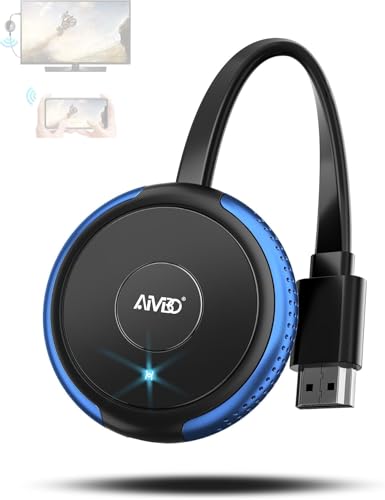
- Plug-and-play casting with direct no-router mode
- Works with AirPlay, Miracast, DLNA, and Cast
- Compact 4K dongle for quick room-to-room use
Best For: Travel-friendly users and small rooms that need simple mirroring
Scalable Meeting System
Lemorele G500 8-in-1 Wireless HDMI Kit

- Scales up to 8 transmitters on one receiver
- 5.8GHz band helps reduce interference in offices
- 1080p/60Hz with under 50ms latency and charging dock
Best For: Conference rooms and training spaces with multiple presenters
Portable Long-Range Pick
Wireless HDMI Transmitter and Receiver 328ft/100m Extender

- Plug-and-play wireless HDMI with no WiFi or app needed
- Claims up to 165 ft indoors and 328 ft outdoors
- Supports 1080P/60Hz output with 4K decoding input
Best For: Presentations, classrooms, and portable meeting-room setups
Easy Cast Receiver
ScreenCast 4K HDMI Wireless Adapter Receiver

- Supports Miracast, AirPlay, and Chromecast
- Works with Windows, macOS, iOS, Android, and more
- Compact receiver with external antenna for better coverage
Best For: Shared conference-room displays with mixed-device casting
USB-C Meeting Room Choice
SVBONY TransAir4 USB-C Wireless HDMI Transmitter and Receiver 4K

- USB-C transmitter draws power from the source device
- 4K/30Hz output with mirror and extend modes
- Built-in USB hub adds charging and accessory support
Best For: USB-C meeting-room setups and presenter laptops
Portable AirPlay Cast Adapter

- AirPlay support for iOS and macOS
- 1080P/60Hz output with 4K decoding
- Dual-band 2.4G+5G transmission up to 33 ft
Best For: Small meeting rooms and Apple-device presentations
Long-Range Presentation Kit

- Transmitter and receiver bundle for presentations
- Up to 165 ft/50 m claimed range
- Receiver can pair with up to 8 transmitters
Best For: Larger rooms and multi-device meeting setups
Dual-Band Meeting Dongle

- No-WiFi setup with plug-and-play use
- AirPlay and Miracast support
- 5G+2.4G stability with 1080P/60Hz output
Best For: Unreliable Wi-Fi environments and large meeting rooms
Premium BYOM Conference Hub – MeetHub Kit True 4K Wireless USB-C Dongle
If you want a wireless display adapter for conference room use that can handle both screen sharing and full BYOM meetings, the MeetHub Kit is built for that job. It combines true 4K wireless presentation, dual HDMI output, and quad-view support, so it fits collaborative spaces where multiple presenters or dual displays matter.
Best For: Conference rooms that need 4K wireless sharing, BYOM support, and multi-screen collaboration.
Pros:
- True 4K output keeps dashboards, design work, and detailed visuals sharp.
- BYOM support lets you use the room’s display, camera, and speakers from your laptop.
- Quad-view and dual HDMI help larger rooms show more than one source at once.
- Plug-and-play USB-C setup works without WiFi, apps, or drivers.
Cons:
- Designed around USB-C connectivity, so source-device compatibility matters.
- Advanced multi-display features may be more than small meeting rooms need.
Overall, this is the most feature-rich option in the group if your priority is a polished meeting-room presentation system rather than basic mirroring. It’s especially appealing when you want wireless sharing and conferencing tools in one package.
Multi-Display Wireless Extender – 3-Receiver 5.8G HDMI Kit
This wireless display adapter for conference room setups is aimed at sending one HDMI source to several screens at once. With three included receivers and support for up to six total, it’s a strong fit when you need the same content visible across multiple monitors or projectors in a shared space.
Best For: Rooms and venues that need one source mirrored to multiple displays.
Pros:
- Supports up to 6 receivers for broad multi-display casting.
- 165 ft range and 5.8G/2.4G dual-band help maintain a stable signal.
- Plug-and-play design avoids WiFi, Bluetooth, and app setup.
- 4K input with 1080p output and stereo sound cover common presentation needs.
Cons:
- Outputs at 1080p rather than full 4K.
- Best suited to mirroring, not interactive conference features.
If your priority is distributing one presentation to several displays, this kit makes more sense than a single-screen adapter. It’s a practical choice for classrooms, bars, restaurants, and conference rooms where visibility across the space matters more than advanced collaboration tools.
Portable Wireless Display Dongle – AIMIBO AirPlay Miracast Adapter
If you need a compact wireless display adapter for conference room presentations, the AIMIBO dongle keeps setup simple. It supports plug-and-play casting with direct mode for no-router use, making it a handy pick for quick meetings, travel, or temporary presentation spaces.
Best For: Portable presentations and simple wireless mirroring in small meeting spaces.
Pros:
- Truly plug-and-play with no apps, WiFi, or Bluetooth required in direct mode.
- Supports AirPlay, Miracast, DLNA, and Cast across iOS, Android, Windows, and macOS.
- 4K Ultra HD support and 5G chip aim to keep casting smooth and clear.
- Compact size makes it easy to carry between rooms or on the road.
Cons:
- Wireless range is listed at 65 ft, which is shorter than some conference-focused systems.
- iPhone, iPad, and MacBook support is limited to mirror-friendly, HDCP-free apps.
This is a good fit if you want a no-fuss dongle rather than a more complex meeting-room system. It offers useful compatibility and portability, but it is best for straightforward screen sharing instead of advanced multi-display setups.
Scalable Meeting System – Lemorele G500 8-in-1 Wireless HDMI Kit
The Lemorele G500 is a wireless display adapter for conference room environments that need a cleaner, more organized presenter workflow. Its starter kit includes TX, RX, a USB-C adapter, and a charging dock, while the system can scale up to eight TX units on one receiver for multi-presenter meetings.
Best For: Meeting rooms and training spaces that need scalable one-button wireless presenting.
Pros:
- Scales from 1-to-1 to 8-to-1 for collaborative meetings.
- 5.8GHz wireless band is designed to reduce interference from busy networks.
- 1080p at 60Hz with under 50ms latency supports smooth presentations.
- Includes a charging dock and battery-powered TX for tidier room setup.
Cons:
- Resolution is limited to 1080p rather than 4K.
- Works with devices that have HDMI ports, so source options are narrower than USB-C dongle systems.
For businesses that value stable meeting-room operation and easy presenter switching, the G500 is a strong practical choice. It focuses on dependable wireless sharing and room organization more than ultra-high-resolution output.
Portable Long-Range Pick – Wireless HDMI Transmitter and Receiver 328ft/100m Extender
If you want a wireless display adapter for conference room use without running HDMI across the table, this transmitter-and-receiver set is built for simple plug-and-play sharing. It supports 1080P/60Hz output with 4K decoding input, plus extended and duplicate modes for presentations, slides, and video playback.
Best For: Presenters, teachers, and small teams that need a portable wireless HDMI link for meetings or demos.
Pros:
- Plug-and-play setup with no WiFi, app, or Bluetooth required
- Long claimed range up to 165 ft indoors and 328 ft in open outdoor spaces
- Supports 1080P/60Hz output and 4K decoding input
- Compact, lightweight design that is easy to travel with
Cons:
- Range can drop when walls or obstacles are in the way
- Both transmitter and receiver must be powered
- More of a source-to-display HDMI bridge than a cast-any-device smart adapter
This is a practical option if your priority is straightforward wireless HDMI for presentations and mixed-use AV setups. The included adapters and broad device support make it flexible, while the low-latency claim and portable build help it fit mobile meeting environments.
Easy Cast Receiver – ScreenCast 4K HDMI Wireless Adapter Receiver
This wireless display adapter for conference room use is designed for quickly casting from phones, tablets, and laptops to a bigger screen. It supports Miracast, AirPlay, and Chromecast, and its compact receiver design makes it easy to keep on a meeting-room display.
Best For: Teams that want a compact receiver for mixed-device casting from Windows, macOS, iOS, and Android.
Pros:
- Supports Miracast, AirPlay, and Chromecast
- Compatible with Windows, macOS, iOS, Android, and cast-capable devices
- External antenna helps improve signal coverage
- Customizable background and PIN code features for presentations
Cons:
- Best used in the same room; walls can obstruct the signal
- AirPlay and Chromecast need Wi-Fi configuration
- PIN code function is exclusive to Miracast
For straightforward room-to-screen casting, this is a flexible receiver that fits mixed-device offices well. The security and customization options are nice touches, but its practical range and setup depend on staying close to the display and following the network instructions carefully.
USB-C Meeting Room Choice – SVBONY TransAir4 USB-C Wireless HDMI Transmitter and Receiver 4K
For a wireless display adapter for conference room setups, this USB-C transmitter/receiver kit is aimed at clean, cable-light presentations. It plugs directly into compatible USB-C devices, supports 4K/30Hz output, and adds mirror or extend modes for presentation and multitasking use.
Best For: USB-C laptops, tablets, and phones used in offices, classrooms, and meeting rooms.
Pros:
- TX draws power directly from the device, so no separate TX power is needed
- 4K/30Hz output with landscape and portrait mode support
- Includes USB hub features for charging and connecting accessories
- Dual-band 2.4G/5.8G transmission for up to 165 ft in open areas
Cons:
- Receiver still needs power
- Requires USB-C devices with DP Alt Mode or Thunderbolt 3/4
- Range is quoted for open areas, so obstacles can reduce real-world performance
This model stands out if your team uses modern USB-C hardware and wants a tidy, power-efficient transmitter on the presenter side. The built-in hub and support for mirror/extend modes make it more versatile than a basic casting dongle, especially for active meeting workflows.
Portable AirPlay Cast Adapter – 4K Decode White Dongle
If you need a wireless display adapter for conference room use that stays simple, this compact dongle focuses on quick setup and clean presentation output. It supports AirPlay for iOS and macOS, uses dual-band 2.4G+5G transmission, and delivers 1080P at 60Hz after 4K decoding for smoother slides and video.
Best For: Small meeting rooms, travel presentations, and iPhone/iPad/MacBook users who want plug-and-play casting.
Pros:
- Plug-and-play setup with no apps, Bluetooth, or Wi-Fi configuration needed.
- 4K decoding with 1080P/60Hz output for crisp presentation visuals.
- Dual-band 2.4G+5G transmission rated up to 33 ft for flexible room placement.
- Lightweight 0.1 lb design makes it easy to carry between meetings.
Cons:
- Does not support several HDCP-protected streaming apps such as Netflix, Hulu, and Prime Video.
- Laptops and tablets function as transmitters only, not receivers.
- You must confirm the display has an HDMI input port, not an output port.
Overall, this is a practical pick for straightforward office casting when you want fast AirPlay-based sharing without extra software. It is best suited to slides, web content, and everyday presentation use rather than protected streaming services.
Long-Range Presentation Kit – 4K Wireless HDMI Set
This wireless display adapter for conference room setups is built like a full transmitter-and-receiver kit, making it useful when you need a longer reach than a simple dongle. It mirrors video and audio to a larger screen, supports plug-and-play use, and is designed for laptops, phones, cameras, and other HDMI devices.
Best For: Larger conference rooms, multi-device presentations, and users who want a bundled transmitter/receiver solution.
Pros:
- Supports 1080P full HD at 60Hz for clear mirrored presentations.
- Claims up to 165 ft/50 m transmission range in open conditions.
- Includes mini HDMI and USB-C adapter support for broader device compatibility.
- Receiver can match up to 8 transmitters for easier device switching in meetings.
Cons:
- Range can drop significantly through cement walls or between floors.
- Does not include a 5V/2A charger.
- Some adapters are included as expansion pieces, so setup may be less minimal than a basic dongle.
For conference rooms that need more flexibility than a single-stick receiver, this kit offers a practical long-range approach with room to grow across multiple devices. It is especially appealing when presenters switch between laptops or sources during the same session.
Dual-Band Meeting Dongle – NoWiFi Display Adapter
If your wireless display adapter for conference room use needs to work in places with weak or missing internet, this Unitek dongle is built around no-WiFi setup and fast mirroring. It supports AirPlay and Miracast, delivers 1080P output with 4K decoding, and uses 5G+2.4G dual-band stability for smoother screen sharing.
Best For: Offices, hotels, and large meeting spaces where Wi-Fi may be unreliable or unavailable.
Pros:
- No router, app download, or account creation needed for setup.
- 5G+2.4G dual-band design improves stability and interference resistance.
- 1080P/60Hz output with 4K decoding for clean meeting visuals.
- Supports both AirPlay and Miracast for iOS, Mac, Android, and Windows devices.
Cons:
- Google Pixel series is not supported.
- HDCP-protected streaming content may still require app-specific casting support.
- As with similar adapters, it needs an HDMI input port on the display.
This model stands out when stability and convenience matter more than extra features. For teams that want fast screen mirroring across common devices in a conference room, it keeps the focus on reliable, low-friction sharing.
How We Picked the Best Wireless Display Adapter for Conference Room
For a Wireless Display Adapter for Conference Room setups, the most important factors are connection reliability, ease of use, device compatibility, and signal stability in busy office environments. We also favored options that support quick plug-and-play operation, since meeting-room tech should reduce friction rather than add it.
We also considered whether each product fits real presentation workflows: laptop-to-display casting, mobile sharing, multi-user convenience, and the ability to handle typical meeting-room screens and projectors without complicated software.
Quick Comparison
Some products are better for simple one-presenter meetings, while others are built for more advanced rooms that need multiple inputs, dual-display output, or receiver-based installations. In general, dongle-style adapters are easiest for portable use, while transmitter-and-receiver kits are better for fixed conference room deployments.
If your team uses mixed devices, prioritize broad compatibility. If your room is larger or more formal, focus on range, latency, and output quality first.
Key Buying Factors for a Wireless Display Adapter for Conference Room
Compatibility
Check support for Windows, macOS, iPhone, iPad, Android, and USB-C laptops. The fewer workarounds required, the better the meeting experience.
Latency and Resolution
For slides and spreadsheets, low latency matters more than maximum resolution. For video-heavy presentations, look for stable 1080p or 4K support with consistent output.
Range and Reliability
Conference rooms often have interference from Wi-Fi networks, Bluetooth devices, and nearby electronics. A stronger wireless design and a realistic range rating help prevent dropouts.
Setup and Management
Plug-and-play systems are ideal when many people share the room. If IT manages the space, features like dedicated receivers, docked transmitters, or multi-view support may be worth the extra complexity.
Display Workflow
Consider whether you need simple mirroring, dual-screen output, or support for multiple presenters. The best choice depends on how your team actually runs meetings, not just on headline specs.
Who Should Buy Which Wireless Display Adapter for Conference Room?
Choose a compact dongle-style model if you need a portable solution for frequent travel or ad hoc meetings. Choose a transmitter-and-receiver kit if you are outfitting a permanent conference room and want more dependable shared use. If your team presents from different device types, pick the option with the broadest ecosystem support and the least setup friction.
For most buyers, the best Wireless Display Adapter for Conference Room use is the one that your team can connect to quickly, trust during every meeting, and use without a support ticket.