
When a PC won’t boot, a good diagnostic card can save time, guesswork, and unnecessary part swaps. These tools help you read POST codes and pinpoint motherboard, power, or compatibility issues faster.
Below, we’ve rounded up 10 of the best options for 2026, from simple PCI and ISA testers to more versatile multi-interface kits for desktops, laptops, and repair benches.
Best 10 PC Diagnostic Card Picks for 2026
All-in-One Old-PC Repair Kit
PSU and Motherboard Tester Starter Kit

- Includes desktop and laptop test boards
- Adds PSU tester, BIOS speaker, and power switch cable
- Cased kit for organized old-PC troubleshooting
Best For: Old-PC repair work, training, and broad starter troubleshooting
Classic Post-Code Reader
4-Digit PCI ISA Diagnostic Card

- 4-digit display shows current and previous codes
- Supports standard PCI and ISA slots
- Remote display function improves visibility
Best For: Simple desktop POST-code troubleshooting on PCI or ISA boards
Multi-Interface Repair Kit

- Works with PCI E, mini PCI E, LPC, and PCI slots
- LEDs show power, memory, video, and drive status
- Includes adapter and connection cables
Best For: Versatile laptop and motherboard diagnostics across multiple interfaces
Compact Laptop and PC Analyzer

- Supports PCI E, mini PCI E, LPC, and PCI slots
- Multi-LED status checks for major components
- Includes card, wires, terminal, and adapter parts
Best For: Compact motherboard testing for laptop and PC repair
Legacy PCI/ISA Troubleshooter

- Supports PCI and ISA desktop slots
- 4-digit display shows current and previous codes
- Includes code search and bus speed test support
Best For: Desktop repair on older PCI/ISA motherboards
Multi-Interface Pro Scanner

- Supports PCIe, mini PCIe, and LPC
- LEDs track power, CPU, DRAM, VGA, and PCH
- Includes cables, adapters, and terminals
Best For: Technicians repairing desktops and laptops
Fast POST Code Reader
PCI & ISA Motherboard Analyzer

- Four-digit display shows error codes clearly
- Bell error report function adds an audible alert
- Compatible with both PCI and ISA bus systems
Best For: Quick troubleshooting of older motherboard POST errors
3-in-1 Laptop & PC Tester
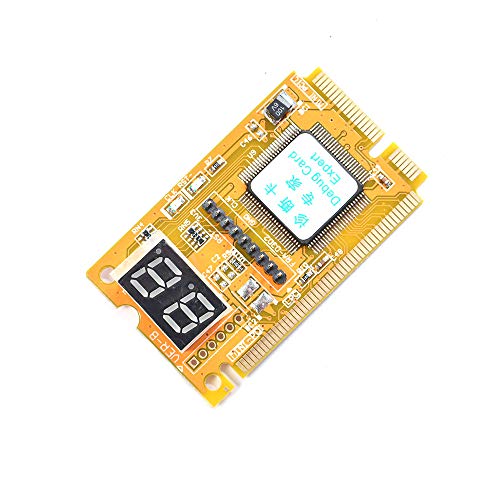
- Tests PCI, PCI-E, and LPC
- Mini diagnostic post-test card
- Notes say it is easy to use
Best For: Simple multi-bus troubleshooting on laptops and PCs
4-Digit Fault Code Reader
PCI & ISA Motherboard Analyzer

- 4-digit fault code display
- Sound report for faults
- Anti-insertion protection noted
Best For: Older PCI/ISA motherboard troubleshooting with code-based fault reading
USB Multi-Device Diagnostic Kit
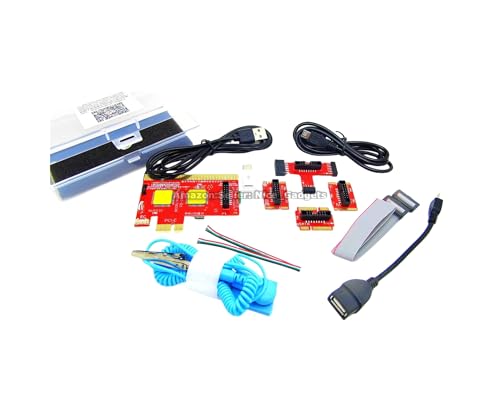
- USB-based diagnosis with app output
- Works with PCs, Macs, and Android devices
- Includes PDFs, videos, and guide material
Best For: Guided troubleshooting across many device types
All-in-One Old-PC Repair Kit – PSU and Motherboard Tester Starter Kit
This PC diagnostic card starter kit is built for older desktop and laptop repair work, especially when you need to troubleshoot no power, no POST, no display, or auto power-off issues. It combines a large PCI motherboard test board, a small laptop test board, PSU testing, a BIOS speaker, a motherboard power switch cable, and an anti-static wrist strap in one carrying case.
Best For: Technicians, students, and DIY repairers working on older PCs that still use standard PCI slots.
Pros:
- Includes both a desktop PCI test board and a small laptop test board.
- Comes with a BIOS speaker, PSU tester, power switch cable, and anti-static wrist strap.
- Packaged in a portable storage case for organized tool storage.
- Useful for quick troubleshooting without swapping known-good parts.
Cons:
- Requires a standard PCI slot; it is not for PCIe-only motherboards.
- Needs careful pin matching on PSU connectors to avoid fit issues.
- Manuals and guides must be followed closely for correct use.
Overall, this is the most complete kit in the group if you want a practical repair bundle rather than just a standalone board. It is especially attractive for legacy hardware support and classroom or workshop use.
Classic Post-Code Reader – 4-Digit PCI ISA Diagnostic Card
PC Diagnostic Card 4 Digit Standard PCI ISA Post Code Display Desktop Diagnostic Card Mother Board
Check Price On AmazonIf you want a straightforward PC diagnostic card for desktop troubleshooting, this model focuses on post-code readout through standard PCI and ISA interfaces. Its 4-digit display is meant to show current and previous error codes, and the hexadecimal readout plus remote display function make it easier to inspect POST status during repairs.
Best For: Desktop repair users who need a simple post-code display card for PCI or ISA motherboards.
Pros:
- Supports standard PCI and ISA bus slots.
- 4-digit display shows current and previous error codes.
- Hexadecimal readout helps identify POST status codes.
- Includes a remote display function for easier viewing.
Cons:
- Works only with motherboards that have PCI or ISA slots.
- More basic than multi-tool diagnostic kits.
- No bundled extras like PSU testers or cables are listed.
This is a solid no-frills choice if your main goal is reading desktop POST codes clearly. It keeps the focus on diagnostics rather than accessory-heavy repair kits.
Multi-Interface Repair Kit – PCIe LPC Debug Tester
This PC diagnostic card kit is designed for broader motherboard troubleshooting, with support for PCI E, mini PCI E, LPC, and all PCI slots. It also adds serial communication protocol support, including DEBUG for UART1, plus LED indicators for key component status such as power supply, motherboard, memory, video card, and hard drive.
Best For: Repair users who need a more versatile diagnostic kit for laptop and motherboard work across multiple interfaces.
Pros:
- Supports PCI E, mini PCI E, LPC, and all PCI slots.
- LED indicators show status for major system components.
- Includes diagnostic card, adapter card, and connection cables.
- Supports serial communication protocols for broader testing use.
Cons:
- More complex than a basic post-code-only card.
- Best suited to users who understand multi-interface repair workflows.
- Product details suggest mixed platform references, so careful setup review is important.
For users who want flexibility across newer and older interfaces, this kit stands out as the most feature-rich option here. It is aimed at efficient diagnostics rather than single-purpose code reading.
Compact Laptop and PC Analyzer – Motherboard Test Card Kit
Motherboard Test Card Kit Post Test Analyzer for Laptop and PC Motherboard Diagnostic Adapter Card
Check Price On AmazonFor buyers looking for a compact PC diagnostic card kit, this motherboard test set focuses on multi-channel and multi-LED status checking for common repair tasks. It supports PCI E, mini PCI E, LPC, and all PCI slots, and it is described as suitable for brands such as ASUS, Gigabyte, and ASRock.
Best For: DIY repairers and technicians who want a compact analyzer kit for common laptop and PC motherboard checks.
Pros:
- Supports PCI E, mini PCI E, LPC, and all PCI slots.
- Multi-LED indicators show power, motherboard, CPU, memory, video card, and hard disk status.
- Includes a diagnostic card, adapter card, wires, terminal, and flat cables.
- Designed for easy use with automatic recognition of the power module.
Cons:
- Fewer extras than larger starter kits.
- No case or PSU tester is listed in the package contents.
- Best for users who only need motherboard-focused testing accessories.
This is a practical middle-ground option if you want a small kit with broad motherboard compatibility. It covers the essentials well without turning into a full repair toolbox.
Legacy PCI/ISA Troubleshooter – 4-Digit PC Diagnostic Card
Optimal Shop 4 Digit PCI and ISA PC Computer Motherboard Power Diagnostic Analyzer Post Tester Card
Check Price On AmazonIf you need a straightforward PC diagnostic card for older desktop repairs, this PCI and ISA tester focuses on fast POST code reading. Its 4-digit display shows current and previous error codes, and the included code table helps you interpret motherboard faults quickly after power-on self-test.
Best For: Technicians and hobbyists working on desktop PCs with PCI or ISA slots who want a simple error-code reader.
Pros:
- Supports both standard PCI and ISA interfaces for broad access to desktop systems.
- 4-digit display shows current and previous error codes for easier troubleshooting.
- Includes error code table support and code search function for faster diagnosis.
- Also supports motherboard bus speed testing.
Cons:
- Focused on PCI/ISA systems, so it is not the most flexible option for newer interfaces.
- Best suited to desktop PC diagnostics rather than laptop repair.
This is a practical diagnostic card if your work centers on classic motherboards and you want a direct POST-code tool without extra complexity.
Multi-Interface Pro Scanner – PCIe LPC Diagnostic Card
This PC diagnostic card is built for broader motherboard troubleshooting, with support for PCIe, mini PCIe, and LPC interfaces. It uses LED indicators to monitor power, CPU, memory, graphics, and storage-related status, making it a more advanced option for technicians who want more than basic POST code reads.
Best For: Repair technicians who need a multi-interface diagnostic tool for desktops and laptops.
Pros:
- Supports PCIe, mini PCIe, and LPC interfaces for wider compatibility.
- LED indicators monitor key system areas including power supply, CPU, DRAM, VGA, and PCH south bridge.
- Includes diagnostic card, connecting wires, terminals, adapter cards, and flat cables.
- Plug-and-play design with a compact 78×51.8mm body for portability.
Cons:
- More specialized than a basic POST tester, so it may be more than casual users need.
- Its feature set is geared toward repair workflows rather than simple one-step checks.
For technicians who handle mixed motherboard types, this model stands out as the most versatile PC diagnostic card in the group.
Fast POST Code Reader – PCI & ISA Motherboard Analyzer
If you want a no-nonsense PC diagnostic card for quickly finding motherboard errors, this PCI and ISA analyzer is designed around clear POST code reporting. It uses a four-digit display, includes a bell error report function, and is meant to help you identify fault states by simply powering on the system.
Best For: Users who want a simple, widely compatible POST tester for PCI and ISA motherboards.
Pros:
- Finds motherboard errors quickly with a clear four-digit code display.
- Bell error report function adds an extra audible reminder.
- Compatible with a wide range of high, medium, and low-end motherboards.
- Works with both ISA bus and PCI bus systems.
Cons:
- Appears centered on classic PCI/ISA troubleshooting rather than newer interfaces.
- Most useful for motherboard POST checks, not broader system diagnostics.
This is a solid pick if your priority is quick code-based troubleshooting on a broad mix of older motherboard platforms.
3-in-1 Laptop & PC Tester – Mini PCI/PCI-E/LPC Analyzer
Comimark 1Pcs Mini 3 in1 PC Laptop Analyzer PCI PCI-E LPC Tester Diagnostic Post Test Card
Check Price On AmazonIf you want a compact PC diagnostic card for quick motherboard checks, this 3-in-1 analyzer covers PCI, PCI-E, and LPC testing in one tool. It is aimed at straightforward post-test use, with the product notes emphasizing easy operation for laptop and desktop troubleshooting.
Best For: Technicians or DIY users who need a simple multi-bus diagnostic card for PCI, PCI-E, and LPC systems.
Pros:
- Supports three interfaces: PCI, PCI-E, and LPC.
- Designed as a diagnostic post-test card for PCs and laptops.
- Compact mini format may suit bench or field repair use.
- Notes describe it as easy to use.
Cons:
- Product details provide limited guidance on display or code features.
- Notes do not list included accessories or cable contents.
Overall, this is a practical option if you mainly need broad bus compatibility in a small PC diagnostic card. It keeps the feature set focused on PCI-family and LPC testing rather than extra workflow features.
4-Digit Fault Code Reader – PCI & ISA Motherboard Analyzer
This PC diagnostic card is built for motherboard troubleshooting on PCI and ISA systems, with a 4-digit fault code display to help identify failures more quickly. The notes also highlight audible fault reporting and protection against incorrect insertion, which makes it a more traditional bench diagnostic tool.
Best For: Users who want a PCI/ISA analyzer with a 4-digit code display and sound-based fault reporting.
Pros:
- Displays faults with a four-digit code readout.
- Includes a sound report function for fault indication.
- Notes say it can find computer failures accurately, stably, and fast.
- Anti-insertion or misinsertion design is mentioned in the listing notes.
Cons:
- Focused on PCI and ISA, so it is not as broad as multi-interface analyzers.
- The listing notes do not mention newer bus support or USB-based workflows.
For older-style motherboard diagnostics, this card keeps the workflow direct and readable. It is a solid match if you value numbered fault codes and audible alerts over more modern, app-based diagnosis methods.
USB Multi-Device Diagnostic Kit – V8 PCIe Post Test Card
For buyers looking beyond a basic PC diagnostic card, this V8 kit adds USB-based diagnosis with support for a wide range of devices. The notes say it works with desktop PCs, laptops, servers, all-in-one PCs, Macs, Android phones and tablets, and it relies on an Android app rather than a traditional digital display.
Best For: Repair users who want USB-based diagnosis across PCs, Macs, and Android devices with guided setup.
Pros:
- Supports USB diagnosis instead of only traditional POST code display.
- Notes say it works with PCs, laptops, servers, Macs, Android phones, and tablets.
- Includes complete instruction folders, PDFs, app guidance, and videos.
- Uses the Android app to display results on screen, reducing manual code lookup.
Cons:
- The notes stress that you must study the guides before use.
- Requires correct app and cable handling for stable results.
- Not a simple plug-and-read card; setup appears more involved than basic testers.
This is the most feature-rich option in the group, especially if you need cross-device USB diagnosis. It trades simplicity for broader support and guided workflows, so it suits users who are comfortable following detailed instructions.
How We Picked the Best PC Diagnostic Card
We focused on compatibility, readability, and practical repair use. The strongest PC Diagnostic Card options support clear POST code output, cover common legacy and modern interfaces, and offer indicators that are easy to interpret in a busy workshop.
We also favored models that fit different repair needs, whether you are checking older desktop boards, newer PCIe systems, or mixed-device environments where one tool needs to do more than one job.
Quick Comparison
If you mostly service older desktops, a PCI or ISA post tester is usually the simplest choice. For newer systems, a PCIe or LPC Diagnostic Card is more relevant. If you repair a broad mix of hardware, a multi-interface or all-in-one tester gives the best flexibility.
Display type matters too: 4-digit readouts are often easier to interpret at a glance, while LED-based cards can be useful for fast visual checks and basic fault tracing.
Key Buying Factors for a PC Diagnostic Card
Interface Support
Match the card to the systems you service. PCI and ISA still matter for legacy machines, while PCIe and LPC support is more useful for modern desktop boards. A wider interface range can reduce the need to own multiple tools.
Display and Indicators
Look for a clear POST code display, stable LEDs, and a layout that is readable under bench lighting. If you work quickly, a 4-digit display can make code tracking simpler than a basic light-only unit.
Device Coverage
Some diagnostic cards are designed mainly for desktops, while others add laptop, server, or mini PC support. Choose based on the hardware you actually troubleshoot most often.
Build Quality and Ease of Use
A reliable PC Diagnostic Card should seat securely, power consistently, and provide straightforward readings without a long learning curve. Simpler tools are often better for fast triage; more advanced models suit broader repair work.
Who Should Buy Which PC Diagnostic Card?
Home users and hobbyists usually do best with a basic, easy-to-read post tester for desktop troubleshooting. Techs who service a wide range of systems should consider a multi-interface PC Diagnostic Card with PCIe, LPC, and legacy support.
If you handle mixed hardware in a repair shop, prioritize flexibility and visibility over extra features you may rarely use. The right tester is the one that matches your most common motherboard problems, not the most complex one on the shelf.