
If a PC won’t POST, a PCIe diagnostic card can save time by narrowing down motherboard, CPU, RAM, and power issues fast.
Below, we’ve rounded up 10 practical options for builders, technicians, and repair-minded users who need a clearer path to diagnosis.
Best 10 PCIe Diagnostic Card Picks for 2026
USB Diagnosis Multi-Port Tester
New V8 Multi-Port Motherboard Analyzer
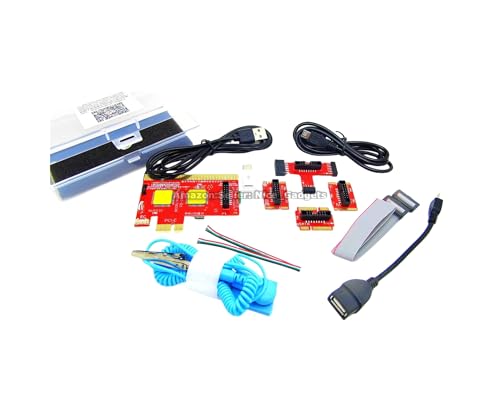
- USB-based diagnosis with Android app output
- Supports PCs, Macs, Android devices, and tablets
- Includes PDF guides, videos, and printed instructions
Best For: Multi-device troubleshooting with app-guided diagnostics
Compact LED Debug Tester
TL611 Pro PCIe LPC Diagnostic Card

- Supports PCIe, mini PCIe, and LPC interfaces
- LEDs monitor CPU, memory, VGA, and Southbridge
- Compact 84x56mm body with cables and adapters
Best For: Portable LED diagnostics for desktop and laptop repairs
Legacy PCI/ISA POST Tester
4-Digit PCI and ISA Motherboard Analyzer

- Works with standard PCI and ISA interfaces
- 4-digit display shows current and previous codes
- Includes code search support and bus speed test
Best For: Older desktop PC repairs on PCI or ISA systems
Portable Multi-Interface Analyzer
Advanced PCIe LPC Post Test Card

- Supports PCIe, mini PCIe, and LPC
- LEDs cover power, CPU, memory, graphics, and HDD
- Includes cables, terminals, and adapter cards
Best For: Technicians needing a compact motherboard debug kit
Southbridge Slot Checker
ASHATA PCIe 16X Tester Card with LED Diagnostic

- Checks PCIe 16X slots for Southbridge open or short circuits
- LED indicators help spot missing signals during diagnosis
- Can be powered by 12V DC or a 6P graphics power connector
Best For: Desktop motherboard repair with simple LED-based PCIe diagnostics
Multi-Bus Debug Analyzer
TL611 Pro Mainboard Debug Card

- Supports PCI E, mini PCI E, and LPC interfaces
- Uses a 4-digit display plus LED indicators for diagnostics
- Automatically identifies power modules to aid troubleshooting
Best For: Broader motherboard and laptop debugging across multiple bus types
Compact 3-in-1 Tester
Comimark Mini PCI PCI-E LPC Analyzer
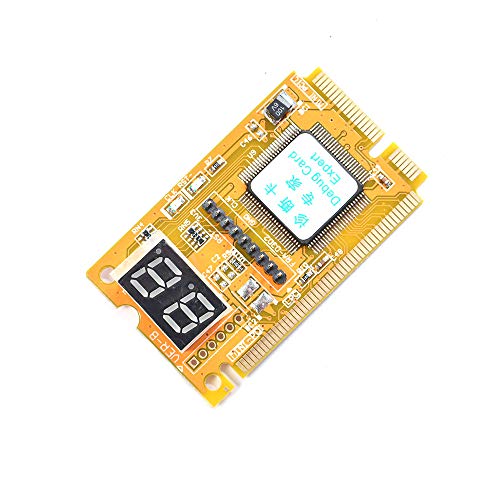
- Tests PCI, PCI-E, and LPC in one compact card
- Designed for basic diagnostic post-code use
- Compatible with laptops and personal computers
Best For: Basic multi-bus troubleshooting in a compact tester
Motherboard Technician Pick
LPC Debug Tester with PCIe Support

- LED fault indicators for CPU, DRAM, VGA, and storage
- Digital tube and PCIe reset status prompts for analysis
- Compact PCB tool for motherboard and server troubleshooting
Best For: Technicians and builders troubleshooting PCIe-capable motherboards
All-in-One Vintage Repair Kit
PCI Motherboard and PSU Tester Set

- Includes PCI and laptop test boards for older systems
- Adds PSU tester, BIOS speaker, and power switch cable
- Comes in a portable carrying case for organized repairs
Best For: Legacy PC repair, training labs, and older motherboard troubleshooting
Portable Laptop Debug Pick
Multi-Interface Motherboard Tester
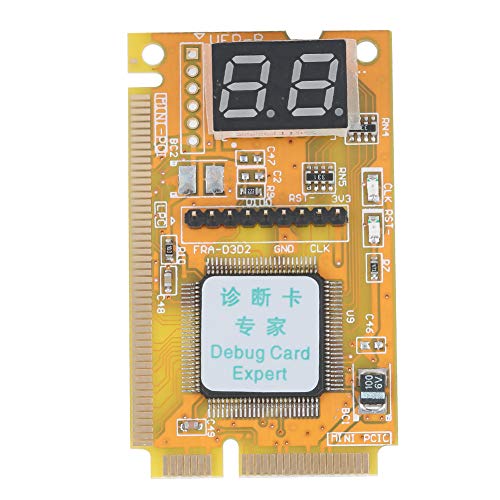
- Supports Mini PCI, Mini PCI-E, and LPC bus interfaces
- Uses a 7-segment display for diagnostic results
- Four-layer PCB and tantalum capacitor for stable operation
Best For: Laptop and compact-system repairs using Mini PCI or Mini PCI-E
USB Diagnosis Multi-Port Tester – New V8 Multi-Port Motherboard Analyzer
This PCIe diagnostic card alternative takes a different approach by using USB-based diagnosis with Android app support instead of a traditional digital POST display. It is built for users who want a guided troubleshooting workflow, especially when checking desktop PCs, servers, laptops, all-in-one systems, Mac machines, and Android devices. The included PDF and video guides are central to using it correctly.
Best For: Technicians and DIY users who want app-based motherboard diagnosis across many device types.
Pros:
- Uses USB diagnosis with an Android app to display results on screen.
- Supports multiple device types, including PCs, Macs, phones, and tablets.
- Includes printed and PDF instruction materials plus video guidance.
- Built around multi-port support for broader troubleshooting setups.
Cons:
- Requires following the guides closely for correct setup and use.
- Depends on the tested app rather than a traditional onboard code display.
- Needs careful USB cable handling between tests to avoid cached data issues.
For buyers who prefer a guided, software-driven workflow, this card stands out more for flexibility than for a simple plug-in code readout. Its value is strongest when you want to diagnose across different machines and are comfortable using the included app and documentation.
Compact LED Debug Tester – TL611 Pro PCIe LPC Diagnostic Card
If you want a compact PCIe diagnostic card for motherboard troubleshooting, this TL611 Pro focuses on broad slot compatibility and clear LED-based indicators. It supports PCIe, mini PCIe, and LPC interfaces, and it is positioned for desktop and laptop diagnostics with fast setup through the included cables and adapter cards.
Best For: IT technicians and hobbyists who need a small, LED-based PCIe/LPC diagnostic tool.
Pros:
- Supports PCIe, mini PCIe, and LPC interfaces.
- Uses LED indicators to report on CPU, memory, VGA, and Southbridge modules.
- Compact 84x56mm size makes it easy to carry for on-site work.
- Includes connection cables and adapter cards for quicker setup.
Cons:
- Details are focused on motherboard diagnostics rather than broader system testing.
- Compatibility notes in the listing are incomplete in places.
- Best suited to users who are comfortable reading LED status indicators.
This is a practical choice if you want a portable debug card with straightforward indicator-based feedback. Its strength is in compact size, interface flexibility, and the ability to support common repair workflows on desktops and laptops.
Legacy PCI/ISA POST Tester – 4-Digit PCI and ISA Motherboard Analyzer
Optimal Shop 4 Digit PCI and ISA PC Computer Motherboard Power Diagnostic Analyzer Post Tester Card
Check Price On AmazonThis PCIe diagnostic card is not a PCIe model, but it fits buyers who specifically need a classic PCI and ISA POST tester for older desktop systems. It uses a 4-digit display to show the current and previous error codes, which makes it useful when you want fast motherboard power-on self-test feedback and a simple code lookup workflow.
Best For: Repair users working on legacy PCs with PCI or ISA slots.
Pros:
- Supports standard PCI and ISA interfaces.
- 4-digit display shows current and previous error codes.
- Includes code search support and a motherboard bus speed test feature.
- Designed for easy access to desktop PC diagnostics.
Cons:
- Only suited to older PCI/ISA systems, not modern PCIe platforms.
- Focused on desktop PCs rather than laptops or compact devices.
- Feature set is more basic than newer multi-interface diagnostic cards.
For legacy troubleshooting, this card is a straightforward and familiar POST tool. It is best chosen when the target machine still relies on PCI or ISA and you want a simple display-driven way to read error codes.
Portable Multi-Interface Analyzer – Advanced PCIe LPC Post Test Card
For buyers comparing a PCIe diagnostic card with broader motherboard debug coverage, this analyzer focuses on PCIe, mini PCIe, and LPC troubleshooting with LED indicators. It is aimed at technicians who need quick status checks on power, CPU, memory, graphics, and storage-related board health, and it comes with a full set of wires, terminals, adapter cards, and flat cables.
Best For: Repair technicians who want a portable multi-interface motherboard test kit.
Pros:
- Supports PCIe, mini PCIe, and LPC interfaces.
- LED indicators cover power supply, CPU, memory, graphics card, and hard disk status.
- Includes connecting wires, terminals, adapter cards, and flat cables.
- Compact 78×51.8mm size with a portable round-hole design.
Cons:
- Requires interpretation of LED signals rather than a full text display.
- Best suited to users already familiar with motherboard diagnostics.
- Compatibility details in the listing are partly incomplete.
This card makes sense if you want a compact debug tool with broad interface support and clear indicator lights. It is especially appealing for hands-on repair work where portability and quick fault isolation matter.
Southbridge Slot Checker – ASHATA PCIe 16X Tester Card with LED Diagnostic
ASHATA PCIe 16X Tester Card with LED Diagnostic | PCI Express Slot Test Tool Support Type C Power
Check Price On AmazonIf you need a PCIe diagnostic card to quickly narrow down motherboard faults, this ASHATA PCIe 16X tester card is built for basic desktop repair checks. It is designed to insert into a PCIe 16X slot, detect open or short circuits in the Southbridge, and help determine whether a boot failure or display issue points to the graphics card or the chipset.
Best For: Desktop motherboard troubleshooting when you need a simple LED-based PCIe slot test.
Pros:
- Designed to quickly identify open or short circuits in the Southbridge
- LEDs light up for pin-by-pin checking during diagnostics
- Can be powered by 12V DC input or a motherboard 6P graphics card connector
- Useful for boards that fail to boot, show FF code, or have no display
Cons:
- Focused on motherboard fault detection rather than general-purpose PC testing
- Requires basic power-up steps before use
- Best suited to desktop PCIe 16X diagnostics, not a broad multi-slot analyzer
This is a practical, targeted repair tool if your priority is fast Southbridge and display-related troubleshooting. The LED-based layout keeps the process straightforward, but it is most valuable when you already know you are working on a desktop PCIe 16X fault.
Multi-Bus Debug Analyzer – TL611 Pro Mainboard Debug Card
This PCIe diagnostic card is built as a broader mainboard debug tool for laptop and computer troubleshooting. The TL611 Pro supports PCI E, mini PCI E, and LPC, and uses LED indicators plus a 4-digit display to provide diagnostic feedback across power supply, CPU, memory, and other channels.
Best For: Users who want a versatile diagnostic card for multiple motherboard bus types and clearer code-based troubleshooting.
Pros:
- Supports PCI E, mini PCI E, and LPC for wider compatibility
- 4-digit display and LED indicators help with reading diagnostic states
- Automatically identifies power modules to simplify troubleshooting
- Compatible with Windows, macOS, and Linux
Cons:
- More of a general debug card than a single-purpose slot tester
- Primarily described for laptop and motherboard testing rather than one specific repair task
- Compatibility claims are broad, so fit depends on the target system interface
If you want one PCIe diagnostic card that covers more than a basic slot check, this TL611 Pro is the more flexible option. Its multiple interfaces and code display make it better suited to users who need broader diagnostic coverage across different systems.
Compact 3-in-1 Tester – Comimark Mini PCI PCI-E LPC Analyzer
Comimark 1Pcs Mini 3 in1 PC Laptop Analyzer PCI PCI-E LPC Tester Diagnostic Post Test Card
Check Price On AmazonFor a compact PCIe diagnostic card with multi-standard support, this Comimark 3-in-1 analyzer covers PCI, PCI-E, and LPC testing in one small tool. It is described as easy to use, which makes it a straightforward choice for basic post-code troubleshooting on personal computers and laptops.
Best For: Simple 3-in-1 diagnostic use when you want one small tester for PCI, PCI-E, and LPC.
Pros:
- 3-in-1 design supports PCI, PCI-E, and LPC
- Compact diagnostic post-test card for basic troubleshooting
- Compatible with laptop and personal computer use
Cons:
- Product details are limited compared with more fully specified debug cards
- No detailed display or advanced feature set is listed in the notes
- Best suited to basic analyzer tasks rather than deep, feature-rich diagnostics
This Comimark tester is a practical low-complexity option if you mainly need a compact multi-bus diagnostic card. It stands out for its 3-in-1 format, but it is best approached as a simple utility tool rather than a high-end analyzer.
Motherboard Technician Pick – LPC Debug Tester with PCIe Support
If you need a PCIe diagnostic card for motherboard troubleshooting, this Fafeicy board is aimed at fast post-code analysis and visual fault isolation. It uses LED indicators, a digital tube display, and PCIe reset status prompts to help narrow down CPU, DRAM, VGA, storage, and standby power issues during assembly or repair.
Best For: Hardware technicians, PC builders, and repair users who want a compact debug card for motherboard and PCIe-related fault finding.
Pros:
- Displays CPU, DRAM, VGA, and hard disk fault indicators with colored LEDs
- Shows clock signals and PCIe reset status through visual prompts
- Designed for motherboard diagnosis and server maintenance work
- Compact PCB build keeps the tool simple to carry and use
Cons:
- Supports PCI and selected GIGABYTE PCIe motherboards, so compatibility is limited
- Focused on debugging, not on general PC testing features
- User manual is included, but setup still depends on the correct motherboard match
This is a practical PCIe diagnostic card for users who want straightforward visual feedback instead of a more complex all-in-one kit. Its strength is targeted motherboard fault analysis, especially when you need to isolate where a boot problem starts.
All-in-One Vintage Repair Kit – PCI Motherboard and PSU Tester Set
This PCI diagnostic card kit is built for older desktop and laptop repair work, not PCIe-only systems. It combines a standard PCI motherboard test board with a laptop test board, plus a PSU tester, BIOS speaker, motherboard power switch cable, anti-static wrist strap, and carrying case for broader bench diagnostics.
Best For: Repair shops, instructors, and hobbyists working on older PCs that still use standard PCI slots.
Pros:
- Includes a large PCI test board and a small laptop test board
- Comes with a BIOS speaker and power switch cable for faster diagnosis
- Bundled ATX PSU tester helps check 20/24-pin power supplies
- Neatly packed in a portable storage case for bench use
Cons:
- Not a PCIe card; it only works with motherboards that have a standard PCI slot
- Requires careful pin matching and slot selection to avoid misuse
- Best suited to legacy systems rather than modern builds
For legacy repairs, this kit is more than just a PCI diagnostic card—it is a full starter set for power, POST, and no-display troubleshooting. If your work centers on older hardware, the added accessories make it especially practical.
Portable Laptop Debug Pick – Multi-Interface Motherboard Tester
If you want a compact PCIe diagnostic card alternative for mixed laptop and small-form-factor repairs, this Bewinner debug card focuses on Mini PCI, Mini PCI-E, and LPC bus interfaces. It uses a multi-interface layout and a 7-segment display to show diagnostic results, making it useful when you only need one connected port for testing.
Best For: Laptop repair users and technicians who need a portable debug card for Mini PCI and Mini PCI-E systems.
Pros:
- Supports Mini PCI, Mini PCI-E, and LPC bus interfaces
- Only one interface needs to be connected during use
- 7-segment display presents diagnostic results clearly
- Four-layer PCB and tantalum capacitor are designed for stability
Cons:
- Not a standard full-size PCIe desktop card
- Best suited to smaller systems rather than general desktop troubleshooting
- Limited details on included accessories or extra tools
This is a focused motherboard debug tool for portable and laptop-oriented repairs. Its strength is interface flexibility and stable construction, which makes it a sensible choice when you work on compact systems more often than full desktops.
How We Picked the Best PCIe Diagnostic Card
We focused on diagnostic cards that offer broad platform support, readable POST output, and practical form factors for everyday repair work. Compatibility, display clarity, interface support, and ease of use were prioritized over marketing claims.
Because the right PCIe Diagnostic Card depends on the system you’re testing, we also looked for options that cover common desktop, laptop, and mixed-interface repair scenarios.
Quick Comparison
For most desktop troubleshooting, a straightforward PCIe/LPC tester with a clear LED or 4-digit display is the easiest choice. If you work across older and newer systems, a multi-interface model can be more flexible. For technicians handling compact devices, mini and portable cards are often more practical than full-size kits.
Key Buying Factors for a PCIe Diagnostic Card
Interface Support
Check whether the card supports PCIe, LPC, mini PCI, mini PCI-E, PCI, or ISA, depending on the systems you repair. Broader support is useful in mixed fleets, but only if the indicators remain easy to read.
Display Type
LED indicators are simple and fast for basic fault isolation. A 4-digit POST display can provide more granular boot-code information, which is helpful when you need better insight into where startup is failing.
Compatibility
Look at motherboard, chipset, and platform compatibility carefully. Some tools are optimized for desktop boards, while others are better suited to laptops, mini PCs, or legacy hardware.
Power and Connectivity
Some diagnostic cards include USB or Type-C power support, which can be convenient during bench testing. Make sure the card can be powered and read comfortably in your workspace.
Build and Portability
If you move between jobs or service calls, a compact tester is easier to carry and store. If you mainly work in a shop, a larger analyzer with more interface options may be worth it.
Who Should Buy Which PCIe Diagnostic Card?
Choose a basic PCIe Diagnostic Card if you only need quick POST checks on standard desktops. Pick a multi-interface analyzer if you repair a variety of systems and want one tool for more than one slot type.
For technicians who service laptops or compact machines, mini or portable testers make the most sense. If you deal with older boards or mixed legacy systems, consider a kit that includes PCI and ISA support alongside PCIe.
In short, match the card to your hardware, your workflow, and how much detail you need during troubleshooting. The best choice is the one that gives you the fastest, clearest answer when a system refuses to boot.