
If you need to verify whether a port is delivering the right power, data, or charging behavior, a USB port tester for PC can save time and guesswork. These tools help identify weak ports, faulty cables, and charging issues before they turn into bigger problems.
In this roundup, we focus on practical testers for everyday PC use, from simple voltage checks to more advanced meters with current, capacity, and fast-charge support.
Best 10 USB Port Tester for PC Picks for 2026
Guided USB motherboard diagnostic kit
USB Diagnosis Kit for PCs, Laptops, and Android Devices
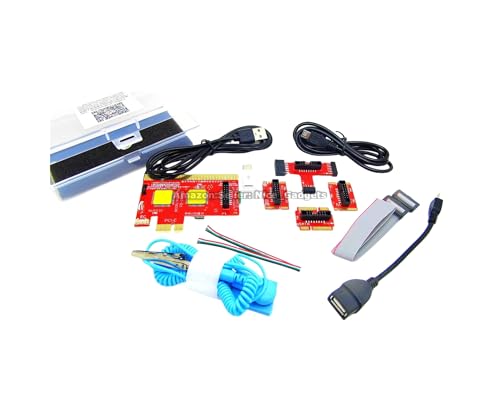
- Uses an Android app to show diagnostic results
- Includes PDFs, videos, and printed setup guidance
- Supports PCs, Macs, Android devices, and mini PCs
Best For: Repair users who want guided USB-based motherboard diagnostics
Rugged USB power meter
USB-A and USB-C Meter for Voltage and Current

- Measures voltage, current, capacity, energy, and resistance
- Supports USB-A, USB-C, and Quick Charge ports
- Stores up to 10 readings and has a rugged build
Best For: Everyday USB power testing with a durable handheld meter
Budget USB voltage checker
Compact USB Meter with LED Readout
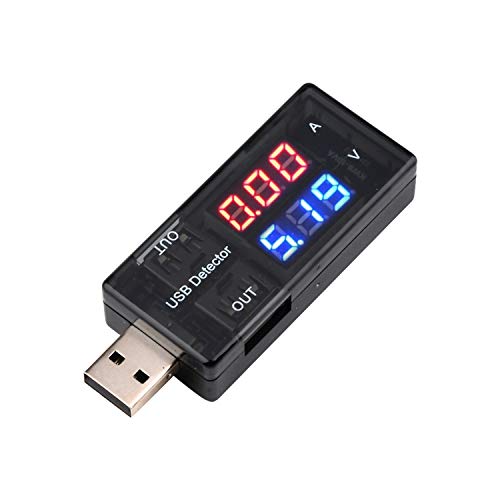
- Displays voltage and current on a color screen
- Small, portable, and easy to use
- Good for charger, cable, and port checks
Best For: Shoppers who want a simple low-cost USB checker
Advanced USB protocol tester
FNIRSI FNB58 with App and Fast-Charge Detection

- Supports USB-A, Micro-USB, and Type-C interfaces
- Measures power, resistance, capacity, D+/D-, and more
- Detects PD, QC, and other fast-charge protocols
Best For: Advanced users testing charging protocols and cable behavior
Type-C Precision Pick
USB C Tester Power Meter with Color Display

- 4V-30V, up to 12A measurement range
- Detects PD, QC, FCP, SCP, and more
- Color display shows detailed charging data
Best For: USB-C chargers, power banks, and charging diagnostics
Simple Budget Check
Black USB Power Meter 3-9V 0-5A

- Plug-and-play USB testing
- Backlit LCD shows voltage, current, power
- Compact and easy to carry
Best For: Quick checks on USB-powered devices and supplies
Dual-Port Diagnostic Choice
DROK USB Tester with 7 Display Modes

- USB-A and USB-C input with dual output
- 7 modes for voltage, current, power, capacity
- Alarm functions for over-voltage and short circuit
Best For: Laptops, power banks, solar panels, and charger testing
Top Pick
YOJOCK USB C Tester with IPS Display

- Measures voltage, current, capacity, power, and more
- Supports USB-A and USB-C with PD/QC fast charging
- 8-screen IPS display with built-in safety protections
Best For: USB-C laptop, charger, cable, and power bank testing
Value Choice
DROK USB-A Tester with Dual Outputs

- 7 modes for voltage, current, power, and capacity
- Dual USB output with charging and data support
- PD/QC 3.0 support plus basic safety alarms
Best For: USB-A charging and fast-charge protocol checks
Runner-Up
YEREADW USB C Tester with Storage Case

- USB-C and USB-A compatible with PD/QC support
- Reads voltage, current, capacity, and power
- Includes storage case, adapter, and manual
Best For: Broad device compatibility with a tidy accessory bundle
Guided USB motherboard diagnostic kit – USB Diagnosis Kit for PCs, Laptops, and Android Devices
If you need a USB port tester for PC troubleshooting that goes beyond simple power checks, this diagnostic kit is built around guided USB motherboard analysis. It uses a dedicated Android app plus PDF/video instructions to help identify faulty components on desktop PCs, laptops, servers, Mac machines, Android phones, tablets, and mini PCs.
Best For: Technicians and DIY users who want a guided USB-based motherboard diagnostic tool for multi-device repair work.
Pros:
- Uses an Android app to display diagnosis results on screen
- Includes PDF guides, videos, and printed instructions for setup
- Supports USB, micro USB, and Type-C diagnosis workflows
- Designed for many machine types, including PCs, Macs, and mobile devices
Cons:
- Requires careful study of the guides before use
- Needs the correct cable setup to avoid unstable connectivity
- Not a traditional digital POST-code display tool
This is a more specialized diagnostic kit than a basic meter, so it makes the most sense if you want structured motherboard troubleshooting rather than only USB voltage readings. For repair-focused users who are comfortable following the instructions, it offers a broad feature set and multi-port support.
Rugged USB power meter – USB-A and USB-C Meter for Voltage and Current
A practical USB port tester for PC and charger checks, this Klein Tools meter focuses on measuring power delivery rather than advanced protocol analysis. It monitors voltage, current, capacity, energy, and resistance across USB-A and USB-C connections, making it useful for comparing ports, chargers, and cables.
Best For: Users who want a rugged, straightforward USB power meter for everyday testing and troubleshooting.
Pros:
- Measures voltage, current, capacity, energy, and resistance
- Works with both USB-A and USB-C, including Quick Charge ports
- Stores and recalls up to 10 readings
- Built with a durable pocket-sized design and drop protection
Cons:
- Focused on electrical measurements, not motherboard diagnostics
- Limited to standard USB power ranges and compatible devices
If your goal is to verify whether a USB port is delivering the expected power, this is a simple and durable option. It is especially appealing for users who value clear readings, portability, and a straightforward in-line test setup.
Budget USB voltage checker – Compact USB Meter with LED Readout
This compact USB port tester for PC and charger checks is designed for basic voltage and current measurement. It plugs in directly to show whether a USB interface, charger, or USB-powered device is delivering power within its supported range.
Best For: Budget buyers who want a small, easy-to-read USB meter for basic charging and port checks.
Pros:
- Shows voltage and current on a color LED display
- Small, portable, and plug-and-read simple to use
- Useful for checking USB chargers, cables, and USB-powered devices
- Uses a stable measurement design with high claimed accuracy
Cons:
- Limited to basic voltage and current testing
- Lower measurement range than more advanced testers
- Battery-powered design may not suit every workflow
This is a practical pick if you only need quick visibility into USB output behavior without extra features. Its simple display and compact size make it a convenient tester for light troubleshooting and everyday use.
Advanced USB protocol tester – FNIRSI FNB58 with App and Fast-Charge Detection
If you want a USB port tester for PC accessories, chargers, and cables with deeper analysis, the FNIRSI FNB58 is built for more advanced measurement. It combines USB-A, Micro-USB, and Type-C interfaces with app support, fast-charge trigger detection, waveform and ripple drawing, and protocol monitoring.
Best For: Enthusiasts and technicians who need detailed USB charging, cable, and protocol testing.
Pros:
- Supports USB-A, Micro-USB, and Type-C interfaces
- Monitors voltage, current, power, resistance, capacity, and D+/D- data
- Detects and triggers multiple fast-charge protocols, including PD and QC
- Includes app software plus advanced recording and waveform features
Cons:
- No printed manual is included
- Setup depends on the QR code, app, and correct port selection
- More complex than a basic plug-and-read USB meter
This is the most feature-rich option in the group, especially if you need protocol-level visibility instead of just raw power numbers. It is a strong fit for users who regularly test fast charging behavior, cable performance, and USB device communication.
Type-C Precision Pick – USB C Tester Power Meter with Color Display
If you want a USB port tester for PC accessories that also handles modern USB-C gear, this KWS-2303C meter offers a practical way to check voltage, current, power, capacity, and charging behavior. It supports a wide 4V-30V range, up to 12A, and includes protocol detection for PD2.0/3.0, QC2.0/3.0, FCP, SCP, AFC, PE, DASH VOOC, and Super VOOC.
Best For: USB-C chargers, power banks, and electronics hobbyists who want richer charging diagnostics.
Pros:
- Measures 4V-30V and up to 12A for broader USB-C testing.
- Supports multiple fast-charging protocols, including PD and QC.
- 1.06-inch color display shows voltage, current, power, capacity, energy, time, and more.
- Curve function can record real-time voltage and current over selectable time windows.
Cons:
- Designed for USB-C and compatible charging protocols, so it is less universal than simple USB-A meters.
- More feature-rich than basic testers, which may be more than some users need.
For buyers who need deeper insight into charging performance, this meter stands out for its protocol support and detailed display. It is a stronger fit for testing newer USB-C equipment than a basic inline meter.
Simple Budget Check – Black USB Power Meter 3-9V 0-5A
For a straightforward USB port tester for PC accessories and everyday USB devices, this compact meter keeps things simple. It measures 3V-9V and 0-5A, and its backlit LCD gives you real-time voltage, current, and power readings without any setup.
Best For: Quick plug-and-play checks on USB-powered devices and power supplies.
Pros:
- Easy plug-and-play operation with no setup required.
- Backlit LCD makes readings easy to see.
- Shows voltage, current, and power in real time.
- Compact size is convenient for portable diagnostics.
Cons:
- Narrower 3V-9V, 0-5A range than more advanced testers.
- Lacks the protocol detection and advanced monitoring features of higher-end models.
This is the most basic option in the group, but that also makes it easy to use. If you mainly want fast checks on USB voltage and current, it covers the essentials well.
Dual-Port Diagnostic Choice – DROK USB Tester with 7 Display Modes
If you need a USB port tester for PC setups that can also monitor chargers, power banks, and other higher-voltage gear, this DROK meter offers flexible testing in a compact form. It supports USB-A and USB-C input, dual USB 2.0 output, PD/QC 3.0 fast charge support, and 7 display modes for voltage, current, power, and capacity.
Best For: Users who want a multifunction tester for laptops, power banks, solar panels, and chargers.
Pros:
- 7 display modes for voltage, current, power, and capacity monitoring.
- USB-A and USB-C input with dual USB output support.
- Supports PD and QC 3.0 protocols with automatic identification.
- Includes over-voltage, under-voltage, over-current, and short-circuit alarms.
Cons:
- Some modes are cyclic displays, which may be less convenient for some users.
- Requires button interaction to activate output in certain setups.
Compared with simpler meters, this model gives you more ways to inspect charging behavior and device health. It is a good choice when you want one tester for several kinds of USB power tasks.
Top Pick – YOJOCK USB C Tester with IPS Display
If you want a USB port tester for PC that does more than just read voltage, this YOJOCK unit is built for deeper cable, charger, and power bank checks. It measures voltage, current, capacity, power, temperature, resistance, and charging time, while supporting both USB-A and USB-C devices.
Best For: People who want a flexible tester for USB-C laptops, chargers, cables, and power banks.
Pros:
- Measures a wide range of values, including voltage, current, capacity, power, resistance, and charging time.
- Supports USB-A and USB-C, plus PD3.0/PD2.0, QC3.0/QC2.0, and BC1.2.
- 8 IPS display modes make readings easier to view and compare.
- Includes safety protections for over-voltage, over-current, under-voltage, and low energy.
Cons:
- Rated up to 8.0A and 32V, so it is not intended for higher-power electrical testing.
- Power bank capacity testing requires the correct discharge setup and calculation method.
Overall, this is a strong all-around USB port tester for PC users who want broad compatibility and more detailed charging data. The display flexibility and protection features make it especially useful for routine diagnostics.
Value Choice – DROK USB-A Tester with Dual Outputs
This DROK USB port tester for PC is a practical pick if you mainly work with USB-A gear and want a simple meter for voltage, current, power, and capacity checks. Its dual USB output design and 7 display modes make it handy for testing chargers, cables, power banks, and solar panels.
Best For: Users who want a USB-A meter with straightforward fast-charge monitoring and dual output ports.
Pros:
- Seven display modes cover VA, capacity, power, and combined readouts.
- Dual USB output with one port supporting charging and data transfer.
- Supports PD/QC 3.0 fast-charge protocols and auto-identifies fast charging.
- Includes over-voltage, under-voltage, over-current, and short-circuit alarm functions.
Cons:
- Uses USB-A input and output, so it is less suited to USB-C-only setups.
- Current range tops out at 5A, which is lower than some higher-capacity testers.
For USB-A users, this is a simple and versatile tester that makes everyday charger and cable checks easy. The dual outputs and protocol support give it broad utility without adding complexity.
Runner-Up – YEREADW USB C Tester with Storage Case
For buyers comparing a USB port tester for PC that can handle both modern USB-C devices and older USB-A gear, this YEREADW meter covers a lot of ground. It reads voltage, current, capacity, and power, and it is designed for testing chargers, cables, and power banks across a wide range of devices.
Best For: Users who want a USB-C and USB-A tester with broad compatibility and a cleaner accessory bundle.
Pros:
- Measures voltage from 3.6V to 32V and current up to 8.0A.
- Supports PD3.0/2.0, QC3.0/2.0, and BC1.2 fast-charge standards.
- Eight color-screen interfaces help display key readings clearly.
- Includes a micro USB adapter, user manual, and storage case.
Cons:
- Like similar meters, power bank capacity testing depends on proper discharge and calculation.
- Focuses on charging diagnostics rather than advanced PC hardware testing.
This model is a well-rounded alternative if you want broad compatibility and a useful included accessory kit. Its display options and safety protections make it a dependable everyday charging tester.
How We Picked the Best USB Port Tester for PC
We prioritized accuracy, compatibility, ease of reading, and the kinds of checks most PC users actually need. The best options balance clear displays with useful measurement ranges, dependable build quality, and support for common USB-A and USB-C setups. For a USB Port Tester for PC, we also looked for models that make it easy to spot unstable voltage, current limits, and charging-speed problems.
Quick Comparison
Simple meter-style testers are best if you only want to confirm voltage and current draw. More advanced models add capacity, energy, resistance, fast-charge detection, or app support, which is helpful if you troubleshoot laptops, desktops, power banks, or USB peripherals regularly. USB-C units are the better fit for newer PCs, while dual-interface testers are more flexible if you work across older and newer hardware.
Key Buying Factors for a USB Port Tester for PC
Connector Support
Choose USB-A, USB-C, or dual-interface support based on the devices you test most often. If your PC has both legacy and modern ports, a dual-port tester is usually the most versatile choice.
Measurement Range and Accuracy
Look for a tester that covers the voltage and current your devices actually use. If you plan to evaluate charging performance or high-draw accessories, make sure the meter can handle those loads without unreliable readings.
Display and Readability
A bright LCD or color display makes troubleshooting faster, especially when checking multiple ports in a row. Clear labels for voltage, current, and power reduce mistakes during quick diagnostics.
Extra Functions
Features like capacity tracking, fast-charge detection, trigger support, or resistance measurement can be useful, but only if you will use them. Basic users often benefit more from clarity and reliability than from lots of extras.
Build Quality and Portability
If you plan to keep the tester in a toolkit or carry it between workstations, compact construction matters. A sturdy housing and secure connector fit help ensure consistent readings over time.
Who Should Buy Which USB Port Tester for PC?
If you mainly want a fast, simple check of whether a USB port is alive and delivering sensible power, a basic meter is enough. If you troubleshoot laptops, chargers, docking stations, or external drives, step up to a model with wider input support and more detailed readouts. Power users and technicians will usually prefer a more advanced USB Port Tester for PC with USB-C compatibility, higher current range, and extra diagnostic modes.
In short, the right choice depends on how deeply you want to diagnose. For occasional checks, keep it simple. For regular repair or testing work, prioritize range, readability, and flexibility.