
A mouse with fingerprint reader can simplify sign-ins while adding a layer of biometric security to your desk setup. For Windows users who want faster access without juggling passwords, these devices are a practical upgrade.
Below, we focus on 10 strong options for different needs, from all-in-one mouse designs to compact USB fingerprint readers for cleaner workstation setups.
Best 10 Mouse with Fingerprint Reader Picks for 2026
Combo Security Mouse
Wireless Mouse with Fingerprint Reader

- 2-in-1 mouse plus fingerprint reader
- Stores up to 20 fingerprints
- 2.4G, BT5.0, and USB connection
Best For: People who want an all-in-one biometric mouse for a tidier desk
Gaming Biometric Mouse
Tt eSPORTS Black FP Gaming Mouse
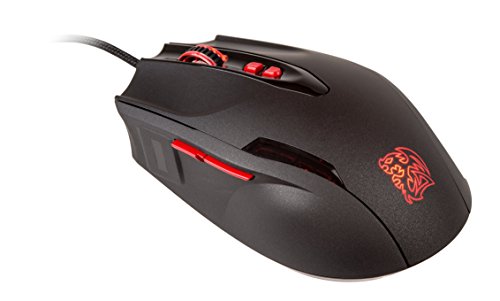
- FIDO UAF biometric fingerprint scanner
- Up to 5700 DPI laser sensor
- 7 programmable buttons
Best For: Gamers wanting fingerprint security in a customizable corded mouse
Windows Hello Fingerprint Reader
USB Login Key for Windows 10/11

- Windows Hello and Windows Biometric Framework support
- Plug-and-play on genuine Windows systems
- Stores up to 10 fingerprints
Best For: Windows users who need a simple dedicated fingerprint login device
Tri-Mode Security Mouse
Gugxiom Fingerprint Sensor Mouse

- Fingerprint unlock for Windows 7/8/10/11
- 2.4GHz, Bluetooth 5.0, and USB wired
- Rechargeable 600mAh battery
Best For: Users who want a rechargeable biometric mouse with flexible connections
Desktop Passwordless Sign-In
Kensington VeriMark Desktop 1.0 USB Fingerprint Reader

- Windows Hello certified for PC login
- FIDO U2F and FIDO2 WebAuthn support
- Match-in-sensor security with anti-spoofing
Best For: Windows users needing secure desktop fingerprint sign-in
All-in-One Biometric Mouse
Wired USB Mouse with Fingerprint Reader
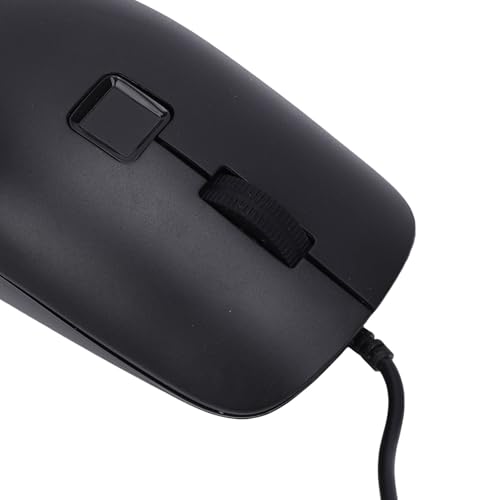
- Mouse and fingerprint reader in one device
- Windows Hello support for Windows 10 and 11
- 360-degree fingerprint recognition with multi-user storage
Best For: Windows users wanting an all-in-one mouse and fingerprint login device
Enterprise Security Mouse
Adesso iMouse F1 Wired USB Mouse with Fingerprint Reader

- Built-in fingerprint reader with Match-in-Sensor technology
- AES-256 encryption and Windows Hello support
- 1200 DPI optical tracking in a wired USB design
Best For: Secure Windows desktops, government procurement, and office logins
Simple Windows Login Scanner
ineo USB Fingerprint Reader for Windows 10/11

- Windows Hello fingerprint login with one-touch lock
- Plug-and-play setup with a 5 ft cable
- Compact portable design for desktop or travel
Best For: Windows 10/11 users who want fast fingerprint login and screen locking
Compact Biometric Login Key
ineo USB Fingerprint Reader for Windows Hello

- Windows Hello support with under-0.5-second authentication
- Stores up to 10 fingerprints for multiple users
- Ultra-compact metal design for portability
Best For: Travel-friendly Windows users who want a tiny biometric login device
Combo Security Mouse – Wireless Mouse with Fingerprint Reader
If you want a mouse with fingerprint reader that also cuts down on desk clutter, this 2-in-1 model combines a wireless mouse with a built-in fingerprint scanner. It supports 2.4G, BT5.0, and USB cable connection, and the fingerprint function works in 2.4G or USB mode for Windows Hello-style sign-in and related security tasks.
Best For: Users who want an all-in-one mouse and biometric login tool for a cleaner workspace.
Pros:
- Combines mouse and USB fingerprint reader in one device
- Stores up to 20 fingerprints with 360-degree reading
- Supports 2.4G, BT5.0, and USB cable connection
- Includes password box, USB key, and file encryption functions
Cons:
- Fingerprint function is not supported in BT5.0 mode
- Right-hand design only
- Wireless details are somewhat mixed in the supplied specs
This is a practical pick if you want biometric convenience built into your everyday mouse, especially for a laptop or PC setup where desk space matters. Its strongest appeal is the combination of multi-mode connectivity and security-focused login features.
Gaming Biometric Mouse – Tt eSPORTS Black FP Gaming Mouse
This mouse with fingerprint reader is aimed at users who want biometric login built into a performance-focused design. It pairs an Iron Veil fingerprint scanner with a gaming-grade laser sensor, plus seven programmable buttons and Thermaltake Command Center support for configuration.
Best For: Gamers or PC users who want biometric security alongside a feature-rich corded mouse.
Pros:
- Iron Veil biometric fingerprint scanner with FIDO UAF certification
- Gaming-grade AVAGO laser sensor up to 5700 DPI
- Seven programmable buttons for customization
- Ergonomic design with matte surface coating
Cons:
- Corded USB design only
- Ambidextrous shape may not suit everyone equally
- Older model compared with newer Windows Hello-focused options
This model makes sense if you care about both authentication and control features in one device. It is less about minimalist convenience and more about combining security with a configurable gaming mouse experience.
Windows Hello Fingerprint Reader – USB Login Key for Windows 10/11
If you specifically need a mouse with fingerprint reader alternative for Windows sign-in, this compact USB fingerprint reader focuses on fast password-free login. It works with Windows Hello and Windows Biometric Framework on Windows 10/11, with plug-and-play setup and no driver installation for genuine Windows systems.
Best For: Windows users who want a dedicated fingerprint login device rather than a full mouse combo.
Pros:
- Windows Hello and Windows 10/11 support
- Plug and play with no drivers needed on genuine Windows systems
- Stores up to 10 fingerprints
- Includes a 5ft braided USB extension cable
Cons:
- Not a mouse, so you still need a separate pointing device
- Linux and Mac are not supported
- Designed only for Windows desktops and laptops
This is the most direct choice if your priority is secure login rather than mouse replacement. It offers a simple way to add biometric access to a Windows PC without extra software or complicated setup.
Tri-Mode Security Mouse – Gugxiom Fingerprint Sensor Mouse
This mouse with fingerprint reader is built for users who want biometric login and wireless flexibility in one package. It supports fingerprint unlocking for Windows 7, 8, 10, and 11, and also offers 2.4GHz wireless, Bluetooth 5.0, and USB wired connection for different setups.
Best For: People who want a rechargeable fingerprint mouse with multi-device connection options.
Pros:
- Supports fingerprint unlocking on Windows 7/8/10/11
- Tri-mode connectivity: 2.4GHz, Bluetooth 5.0, and USB wired
- Stores more than 20 fingerprint IDs
- Rechargeable 600mAh battery for longer use
Cons:
- Fingerprint performance details vary from the supplied specs
- LED lighting may not appeal to everyone
- Some listed compatibility text is unclear in the notes
If you want a feature-packed biometric mouse with flexible connection modes, this is the most versatile option in the group. It leans toward convenience and modern styling, with security features that fit shared or personal Windows setups.
Desktop Passwordless Sign-In – Kensington VeriMark Desktop 1.0 USB Fingerprint Reader
If you want a mouse with fingerprint reader alternative for secure desktop sign-in, the Kensington VeriMark Desktop is a dedicated Windows Hello fingerprint scanner built for PC login and broader authentication use. It supports Windows 11 and Windows Hello for Business, and it also works with FIDO U2F and FIDO2 WebAuthn services for passwordless, dual-factor, and multi-factor flows.
Best For: Windows users who want a desktop fingerprint reader for secure sign-in and FIDO-based authentication.
Pros:
- Windows Hello certified, including Windows Hello for Business
- FIDO U2F and FIDO2 WebAuthn support for more login options
- Match-in-sensor security with anti-spoofing protection
- Long 3.9 ft USB cable gives flexible desktop placement
Cons:
- Windows ARM-based computers are not supported
- It is not a mouse, so it adds a separate device to your desk
This is a strong choice if you need a reliable fingerprint reader for Windows-centric security rather than an all-in-one peripheral. Its broad authentication support and hardware-based matching make it a practical pick for users who want stronger desktop sign-in without relying on passwords.
All-in-One Biometric Mouse – Wired USB Mouse with Fingerprint Reader
If you specifically want a mouse with fingerprint reader, this wired USB model combines a standard optical mouse with biometric login in one device. It supports Windows 10 and 11 with Windows Hello, uses 360-degree fingerprint recognition, and is designed to verify identities quickly while reducing desktop clutter.
Best For: Users who want a single wired mouse and fingerprint login device for Windows PCs.
Pros:
- Combines mouse control and fingerprint authentication in one device
- Supports Windows Hello on Windows 10 and 11
- 360-degree fingerprint recognition for easier placement
- Stores up to 10 fingerprints for multi-user use
Cons:
- Not compatible with Windows 7/8, macOS, or Linux
- Uses a wired USB design, so it is less flexible than wireless options
- Listed compatibility details are limited compared with dedicated fingerprint readers
For buyers who want the convenience of a mouse with built-in biometric login, this is the most direct fit in the roundup. It is best viewed as a practical two-in-one desktop accessory for Windows users rather than a universal pointing device.
Travel-Friendly Windows Login – USB Fingerprint Reader for Windows 10/11 ONLY
For a compact mouse with fingerprint reader style setup, this mini USB fingerprint reader is built for quick Windows Hello sign-in on Windows 10 and 11 laptops and desktops. It is a plug-and-play option with match-in-sensor security, local-only biometric storage, and a flush-fit design that makes it especially convenient for travel.
Best For: Laptop and desktop users who want a tiny, no-fuss fingerprint login accessory for Windows.
Pros:
- Plug-and-play setup with no software required on supported systems
- Match-in-sensor security keeps biometric data stored locally
- Ultra-compact, flush-fit design is easy to carry
- Supports up to 10 fingerprints
Cons:
- Works only with Windows 10/11 and not Mac or Linux
- Windows Hello availability still depends on OS and service support
- It is a fingerprint dongle, not a mouse, so it does not replace your pointing device
This is a good pick if portability and simplicity matter more than extra features. It keeps the experience focused on fast Windows login and local biometric protection, which makes it easy to recommend for everyday carry.
Enterprise Security Mouse – Adesso iMouse F1 Wired USB Mouse with Fingerprint Reader
If you want a mouse with fingerprint reader that doubles as a security tool, the Adesso iMouse F1 focuses on biometric login and data protection rather than flashy extras. Its built-in fingerprint reader uses Match-in-Sensor technology, supports up to 10 fingerprint IDs, and pairs with Windows Hello for fast access on compatible Windows systems.
Best For: Offices, government buyers, and Windows users who want a secure wired mouse with biometric login.
Pros:
- Built-in fingerprint reader with 360° readability and anti-spoofing technology
- AES-256 encryption helps protect biometric data
- Windows Hello compatible with 50ms matching time
- 1200 DPI optical tracking for everyday cursor control
Cons:
- Wired USB design may not suit users who prefer wireless setups
- Focused on Windows compatibility, so it is best matched to PC environments
- Basic 1200 DPI tracking is more practical than performance-oriented
This is a specialized choice for buyers who care more about login security and compliance than general-purpose mouse features. If biometric protection is the priority, it brings a strong security-first feature set in a standard desktop format.
Simple Windows Login Scanner – ineo USB Fingerprint Reader for Windows 10/11
This mouse with fingerprint reader alternative is really a dedicated USB fingerprint reader for Windows users who want quick biometric login without changing their mouse. It is designed for Windows 10/11 and Windows Hello, with plug-and-play setup, one-touch computer lock, and a compact body that keeps the desk uncluttered.
Best For: Windows users who want a simple plug-and-play fingerprint login device for daily security.
Pros:
- Works with Windows Hello for password-free fingerprint login
- One-touch computer lock via Win + L
- Plug-and-play setup with no complex installation
- Compact, portable design with a 5 ft cable
Cons:
- Not for Mac
- It is a fingerprint reader, not a mouse, so it does not replace pointing hardware
- Best suited to Windows 10/11 environments only
For buyers who mainly want fast fingerprint authentication, this is the simplest option in the group. It keeps the security benefits focused on login and screen locking, while staying easy to move and easy to set up.
Compact Biometric Login Key – ineo USB Fingerprint Reader for Windows Hello
If you are comparing a mouse with fingerprint reader and mainly want the fingerprint part, this compact ineo USB model is built for quick Windows Hello access. It plugs directly into a USB port, supports up to 10 fingerprints, and is aimed at fast, secure login on Windows 10/11 systems.
Best For: Windows users who want a tiny fingerprint scanner for secure, password-free sign-in.
Pros:
- Windows Hello and Windows Biometric Framework support
- Stores up to 10 fingerprints for shared use
- Fast authentication in under 0.5 seconds
- Compact metal design that is easy to carry
Cons:
- Not for Mac
- May require manual driver updates on non-genuine systems
- Does not include mouse functions, so it is only a login accessory
This model is the most travel-friendly security option in the set, especially if you want a small device that stays out of the way. Its value is in fast, reliable fingerprint sign-in rather than broad hardware features.
How We Picked the Best Mouse with Fingerprint Reader
We prioritized Windows Hello compatibility, ease of setup, reliability, and real-world convenience. We also looked at fingerprint capacity, connection type, security features, and whether each device makes sense as a daily driver or as a dedicated login accessory.
Quick Comparison
Some models combine a mouse and sensor in one body, which is ideal if you want fewer peripherals on your desk. Others are standalone USB fingerprint readers that pair with your existing mouse and keyboard, making them a better fit if you already own a favorite input device.
Key Buying Factors for a Mouse with Fingerprint Reader
Compatibility
Check that the model supports your version of Windows and specifically Windows Hello if that is your goal. Many devices are designed only for Windows 10/11, and some do not work on macOS or Linux.
Design and Workflow
If you travel or use a laptop dock, a compact reader may be more portable than a full Mouse with Fingerprint Reader. If you want a cleaner single-device solution, an integrated mouse can reduce clutter and keep login controls close at hand.
Security Features
Look for match-in-sensor or on-chip storage of fingerprint data, plus encryption and standards such as FIDO2 or FIDO U2F when available. These features help improve protection beyond basic password entry.
Fingerprint Capacity and Responsiveness
Models that store multiple fingerprints are useful for shared workspaces or if you want to register different fingers. Fast recognition and consistent matching matter more than headline specs in day-to-day use.
Who Should Buy Which Mouse with Fingerprint Reader?
Choose an integrated mouse if you want a streamlined desk setup and prefer biometric login built into your main pointing device. Choose a standalone USB reader if you already like your current mouse or need a smaller, more flexible security accessory. For business users, prioritize strong compatibility, encryption, and dependable Windows Hello support. For gamers or power users, comfort, DPI performance, and button feel may matter as much as the fingerprint feature itself.
In short, the best Mouse with Fingerprint Reader is the one that fits your workflow, your hardware, and how often you actually sign in.