
If you spend hours moving through long documents, spreadsheets, timelines, or web pages, a mouse with a free-spinning scroll wheel can make everyday navigation noticeably faster.
Below, we focus on models that balance speed, comfort, wireless convenience, and practical features like side scrolling, multi-device pairing, and quiet clicks.
Best 10 Mouse with Free-Spinning Scroll Wheel Picks for 2026
Classic Productivity Pick
Logitech MX Master Wireless Mouse
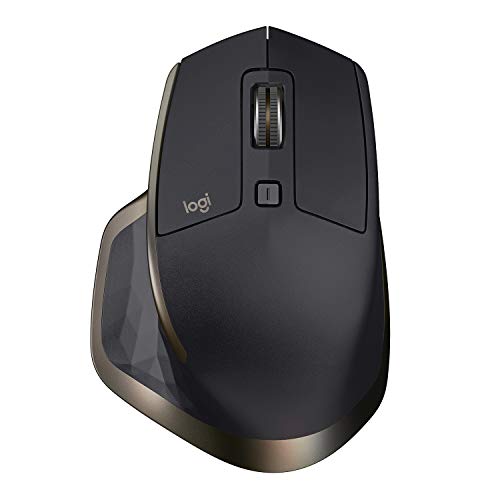
- Speed-adaptive scroll wheel for fast page navigation
- Thumb wheel adds horizontal scrolling and gestures
- Works with up to three computers via receiver or Bluetooth
Best For: multi-device productivity and horizontal scrolling
Budget Multi-Scroll Choice
INFINMIND Wireless Side Scroll Mouse

- Smart flying scroll for fast, near-silent vertical movement
- Side scroll wheel supports left-right navigation
- Connects to 3 devices across USB and Bluetooth
Best For: budget buyers needing fast scrolling and side scroll support
Premium Workflow Upgrade

- MagSpeed wheel scrolls up to 1,000 lines per second
- Thumb scroll wheel and haptic feedback boost control
- Quiet Clicks and ergonomic design suit long work sessions
Best For: power users who want premium scrolling and workflow tools
Gaming Speed Scroll Pick

- HyperScroll Tilt Wheel free-spins or switches to tactile mode
- 11 programmable buttons for macros and shortcuts
- 26K DPI sensor and Chroma RGB lighting
Best For: gamers who want fast scrolling and customizable controls
Quiet Productivity Pick
PHILIPS Multi-Device Wireless with Side Scroll

- Silent clicks for quieter shared workspaces
- Right-handed ergonomic shell with thumb rest
- USB-A/C receiver plus Bluetooth for 3 devices
Best For: Right-handed office work and spreadsheet navigation
Fast Scroll Upgrade
MiniLuxis Ergonomic Multi-Device Mouse

- Infinite vertical scroll for fast document navigation
- Side scroll wheel for spreadsheets and timelines
- OLED display plus support for up to 5 devices
Best For: Power users who scroll a lot and switch devices often
Multi-Device Productivity Mouse
TECKNET 3-Mode Mouse With Side Scroll

- Dual Bluetooth plus 2.4GHz for 3-device switching
- Metal scroll wheel and quiet clicks
- Side scroll wheel for horizontal navigation
Best For: People who multitask across devices and need horizontal scrolling for work
Fast-Scrolling Productivity Pick

- Flying scroll wheel for fast vertical navigation
- Thumb wheel supports horizontal scrolling
- 3-device switching with Bluetooth and 2.4G
Best For: People who work in long documents, spreadsheets, and multi-device setups
Classic Productivity Pick – Logitech MX Master Wireless Mouse
If you want a mouse with free-spinning scroll wheel behavior for fast navigation, the MX Master is built around speed and control. Its speed-adaptive main wheel handles long documents efficiently, and the thumb wheel adds horizontal scrolling for spreadsheets, timelines, and multi-pane work.
Best For: Productivity users who want fast scrolling, horizontal navigation, and multi-device switching.
Pros:
- Speed-adaptive scroll wheel for quicker movement through long pages
- Thumb wheel supports horizontal navigation and advanced gestures
- Connects to up to three computers via receiver or Bluetooth
- Tracks on glass and other high-gloss surfaces with Darkfield sensor
Cons:
- Uses an older design compared with newer MX models
- Right-handed shape only
This is a strong choice if you care more about dependable workflow tools than flashy extras. It combines fast scrolling, cross-device convenience, and solid tracking in a proven office mouse layout.
Budget Multi-Scroll Choice – INFINMIND Wireless Side Scroll Mouse
For shoppers searching for a mouse with free-spinning scroll wheel features without moving into premium pricing, this INFINMIND model is focused on speed and versatility. Its smart flying scroll is designed for quick up-and-down movement, while the side scroll wheel makes left-right navigation easier on wide pages.
Best For: Users who want fast scrolling, side scrolling, and broad device compatibility.
Pros:
- Smart flying scroll supports fast, near-silent vertical scrolling
- Side scroll wheel helps move left and right across wide content
- Connects to 3 devices with 2.4G USB and dual Bluetooth
- Supports Windows, Mac, Linux, iOS, Android, and Chrome OS
Cons:
- Uses AA batteries instead of a rechargeable battery
- Ergonomic right-hand shape may not suit every user
This is a practical option if you want multi-device flexibility and fast scrolling on a tighter budget. The tradeoff is a simpler build and battery-powered operation, but the scrolling features are the main appeal.
Premium Workflow Upgrade – Logitech MX Master 4
If you want a mouse with free-spinning scroll wheel performance at the high end, the MX Master 4 brings Logitech’s MagSpeed scrolling into a refined productivity mouse. It is designed for rapid, precise scrolling, and the thumb scroll wheel plus customizable controls make it useful for complex workflows.
Best For: Power users who want advanced scrolling, haptics, and a premium ergonomic design.
Pros:
- MagSpeed scroll wheel scrolls up to 1,000 lines per second
- Thumb scroll wheel supports fluid navigation and control
- Haptic Sense Panel adds customizable feedback for actions and notifications
- Quiet Clicks reduce noise for focused work
Cons:
- Premium features likely make it a higher-cost option
- Uses an included AA battery rather than built-in charging
This is the most feature-rich mouse in the group for serious productivity users. It pairs ultra-fast scrolling with ergonomic comfort, app-focused shortcuts, and quieter clicks for demanding desk setups.
Gaming Speed Scroll Pick – Razer Basilisk V3
For a mouse with free-spinning scroll wheel behavior in a gaming-focused design, the Basilisk V3 stands out with its HyperScroll Tilt Wheel. You can let the wheel free-spin for speed or switch to tactile mode when you want more precise control, which is ideal for both browsing and gameplay.
Best For: Gamers who want a fast scroll wheel, lots of buttons, and customizable lighting.
Pros:
- HyperScroll Tilt Wheel free-spins or switches to tactile scrolling
- 11 programmable buttons support macros and secondary functions
- 26K DPI optical sensor delivers precise tracking
- Chroma RGB lighting adds extensive customization
Cons:
- Wired USB design may not suit users who prefer wireless mice
- Built primarily for Windows gaming setups
This is a strong pick if you want scroll-wheel flexibility in a gaming mouse with plenty of customization. It mixes speed, precision, and extra controls in a classic ergonomic shape with a thumb rest.
Quiet Productivity Pick – PHILIPS Multi-Device Wireless with Side Scroll
If you want a mouse with free-spinning scroll wheel-style speed for work, this Philips model leans into fast spreadsheet navigation with a tactile main wheel and a thumb-side horizontal scroll wheel. It is aimed at people who spend long hours at a desk and want a comfortable right-handed shape, silent clicks, and easy switching between devices.
Best For: Right-handed office users who want quiet clicks, multi-device switching, and horizontal scrolling for spreadsheets.
Pros:
- Contoured right-handed shell with anti-slip thumb rest for everyday comfort
- Silent left and right buttons help keep shared workspaces quieter
- Dual 2.4G receiver supports USB-A and USB-C, plus Bluetooth for up to 3 devices
- 5-level DPI adjustment from 800 to 4000 for more flexible tracking
Cons:
- Designed specifically for right-handed users
- Main benefit is horizontal scrolling rather than a true free-spinning wheel
- Battery life is solid, but it is still a rechargeable mouse that needs periodic top-ups
This is a practical productivity mouse if your priority is comfort, quiet operation, and fast side-to-side movement in Excel or similar work. It is less about flashy features and more about making daily desk work smoother.
Fast Scroll Upgrade – MiniLuxis Ergonomic Multi-Device Mouse
For buyers looking for a mouse with free-spinning scroll wheel behavior, this MiniLuxis model stands out with infinite vertical scrolling and a separate side scroll wheel. That combination makes it especially useful when you move through long pages, wide timelines, or large spreadsheets and want faster navigation without constant scrollbar dragging.
Best For: Users who want fast, smooth scrolling plus a premium-looking productivity mouse with device switching.
Pros:
- Infinite scroll wheel is built for quickly moving through long documents and web pages
- Dedicated horizontal side scroll wheel helps with wide spreadsheets and timelines
- OLED display shows DPI, battery status, and connection mode at a glance
- Connects to up to 5 devices with Bluetooth and 2.4G wireless
Cons:
- Hand shape is vertical, which may not suit everyone
- Heavier than a basic office mouse at 1300 grams as listed
- No detailed software customization is mentioned in the supplied notes
This is a strong fit if scrolling speed is your top priority and you also want a multi-device setup. The OLED screen and dual scroll setup make it feel more like a workflow tool than a basic mouse.
Speed-First Ergonomic Pick – ProtoArc EM25 with Side Scroll
If you need a mouse with free-spinning scroll wheel performance for long documents, the ProtoArc EM25 is built around fast vertical scrolling and a separate side scroll wheel. It is designed to reduce hand strain while keeping navigation quick for spreadsheets, editing timelines, and large projects.
Best For: People who want rapid scrolling, ergonomic comfort, and simple web-based customization.
Pros:
- Fast vertical scroll wheel is rated for moving through long pages at very high speed
- Side scroll wheel makes left-right navigation easier in wide documents and timelines
- Supports up to 3 devices with 2.4G and dual Bluetooth connections
- Up to 8000 DPI with quiet clicks for precise, distraction-free use
Cons:
- The side scroll wheel cannot be customized
- Web-based customization requires a USB connection
- Best fit is medium to large hands, so smaller hands may find it less ideal
Overall, this is the most feature-rich scrolling option in the group if you want speed and control in one ergonomic package. It balances fast navigation with practical extras like multi-device support and quiet buttons.
Multi-Device Productivity Mouse – TECKNET 3-Mode Mouse With Side Scroll
If you want a mouse with free-spinning scroll wheel-style productivity features, this TECKNET model is built more around speed and multitasking than pure simplicity. It combines Bluetooth and 2.4GHz connectivity, a precision metal main scroll wheel, and a dedicated side scroll wheel for horizontal navigation, making it a practical pick for spreadsheets, wide documents, and multi-device setups.
Best For: Users who want a versatile everyday mouse for switching between devices and scrolling horizontally in work apps.
Pros:
- Connects to up to 3 devices with dual Bluetooth plus 2.4GHz.
- Metal main scroll wheel feels smooth and durable.
- Side scroll wheel helps with spreadsheets and wide pages.
- Rechargeable design and quiet clicks suit office use.
Cons:
- Side scroll wheel is not supported on macOS.
- All buttons are non-programmable.
- Not a true free-spinning wheel model.
Overall, this is a strong productivity mouse if your priority is device switching, quiet operation, and horizontal scrolling rather than a specialized free-spin wheel. The long battery life and broad compatibility make it easy to live with across common laptops and desktops.
Fast-Scrolling Productivity Pick – CITLLA Flying Scroll Mouse
This mouse with free-spinning scroll wheel-style productivity focus is aimed at fast navigation through long documents, spreadsheets, and web pages. The CITLLA pairs a premium metal flying scroll wheel with a thumb wheel for horizontal movement, plus multi-device switching and quiet clicks for a workflow-friendly setup.
Best For: Users who want fast vertical scrolling and horizontal thumb-wheel control for office and study work.
Pros:
- Flying scroll wheel is designed for quicker navigation through long content.
- Thumb wheel makes horizontal scrolling easier.
- Supports dual Bluetooth plus 2.4G for 3 devices.
- Rechargeable with quiet clicks and up to 60 days per charge.
Cons:
- Maximum sensitivity listed in details is 3200 DPI, though the description mentions up to 4800 DPI.
- Requires attention to platform compatibility details for best results.
For users who care most about fast scrolling behavior, this is the most directly relevant option in the group. It is especially appealing if you regularly move through long sheets or documents and want a mouse that reduces repeated wheel flicks.
Ergonomic Horizontal-Scroll Mouse – Acer Side Scroll Office Mouse
If you are shopping for a mouse with free-spinning scroll wheel alternatives and want better control over wide-screen workflows, this Acer model focuses on side scrolling and ergonomic comfort. It offers Bluetooth and 2.4GHz switching, a rechargeable battery, and a dedicated side scroll wheel for moving left and right across spreadsheets, timelines, and wide documents.
Best For: Medium to large hands that need ergonomic comfort and reliable horizontal scrolling for office tasks.
Pros:
- Dedicated side scroll wheel supports horizontal navigation.
- Switches across 3 devices with Bluetooth and 2.4G.
- Ergonomic shape is designed for medium to large hands.
- Rechargeable battery and 6 DPI settings add flexibility.
Cons:
- Side scroll wheel is not customizable.
- There is an adjustment period of 1-2 weeks for comfort.
- Bluetooth and 2.4G modes cannot be used simultaneously.
As an office mouse, this Acer stands out for users who spend time in wide layouts more than those who want a traditional free-spinning main wheel. Its strengths are comfort, straightforward mode switching, and a dedicated thumb control for horizontal work.
How We Picked the Best Mouse with Free-Spinning Scroll Wheel
We prioritized models with true free-spin or hyper-fast scrolling, plus the features buyers actually use: reliable wireless connectivity, comfortable ergonomics, useful button layouts, and rechargeable power where available. Because many shoppers want one mouse for work and general use, we also favored options with multi-device switching and side scrolling.
Quick Comparison
If you want the fastest page navigation, look for a Mouse with Free-Spinning Scroll Wheel plus a high-quality sensor and an easy way to switch between ratcheted and free-spin modes. For office work, ergonomic shape and quiet buttons matter more than gaming-grade specs. For mixed use, choose a model that also supports Bluetooth and 2.4GHz, so it can move easily between laptop, desktop, and tablet setups.
Key Buying Factors for a Mouse with Free-Spinning Scroll Wheel
Scrolling Behavior
Not all fast-scroll wheels feel the same. Some are fully free-spinning, while others use adaptive or “smart” scrolling that shifts between precise steps and rapid glide. If you work with large files, prioritize a wheel that is easy to control without accidental overshooting.
Ergonomics and Grip
A faster scroll wheel is only helpful if the mouse feels good over long sessions. Look for palm-friendly shapes, thumb rests, and button placement that reduces strain. Larger hands often do better with fuller ergonomic designs, while compact users may prefer a lighter, simpler shell.
Connectivity and Switching
Bluetooth plus USB receiver support is ideal for flexibility. If you use multiple devices, make sure the mouse offers dependable switching and stores pairings cleanly. That matters more than extra gimmicks for most productivity buyers.
Side Scroll and Extra Controls
Side scrolling can be a major advantage in spreadsheets, video timelines, and wide tables. Additional buttons are helpful if they are customizable and easy to reach without changing your grip.
Battery and Charging
Rechargeable mice are convenient, but battery life still matters. A good fast-scroll mouse should remain usable for days or weeks between charges, with a charging port that does not interfere with daily use.
Who Should Buy Which Mouse with Free-Spinning Scroll Wheel?
Choose a premium productivity model if you want the smoothest scrolling, best ergonomics, and multi-device convenience. Choose a budget-friendly wireless option if you mainly want faster navigation without paying for advanced software features. Gamers and power users should focus on sensor quality, button responsiveness, and switching controls in addition to scroll speed. If your work involves large sheets or side-to-side movement, a Mouse with Free-Spinning Scroll Wheel and side scroll support is the most practical upgrade.