
Choosing the right adapter can make or break a pfSense build. Stability, driver support, and the right port speed matter more than raw specs.
Below, we focus on options that fit different router and firewall setups, from simple add-ons to multi-gig and high-performance cards.
Best 10 Network Adapter for PfSense Router Picks for 2026
4-Port 2.5GbE Upgrade

- Four Intel i226-V 2.5GbE RJ45 ports
- Designed for pfSense, OPNsense, Proxmox, and NAS builds
- Needs PCIe x4 slot and compatible 2.5GbE network gear
Best For: Users building a multi-port, high-speed pfSense router or homelab firewall
Low-Cost 4-Port Gigabit NIC

- Four Gigabit RJ45 ports for firewall and routing tasks
- Plug-and-play design with regular and low-profile brackets
- Compatible with pfSense, OPNsense, OpenWrt, and Linux/Windows
Best For: Value-focused users who need four 1GbE ports for a pfSense router
Portable USB Ethernet Option
Amazon Basics USB 3.0 Gigabit Ethernet

- USB 3.0 to 1GbE adapter in a compact form
- Supports Wake-on-LAN and energy-efficient Ethernet
- Best suited to computers and laptops, not PCIe router builds
Best For: Portable wired networking for a laptop or desktop
Compact Dual-Port NIC
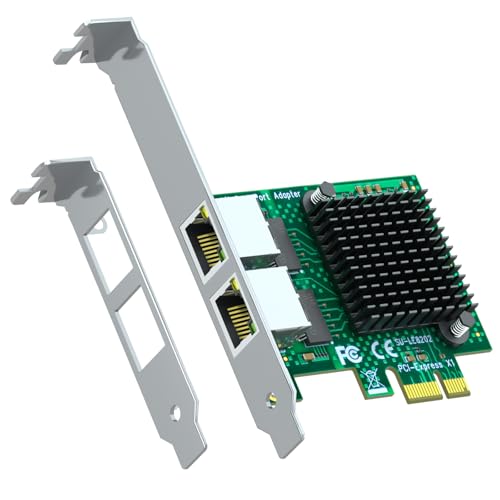
- Two Gigabit RJ45 ports for pfSense-style routing
- PCIe 2.0 x1 card with low-profile bracket included
- Works with pfSense, OPNsense, OpenWrt, and common OSes
Best For: Small pfSense router builds that only need two wired ports
Compact M.2 Router NIC
Intel I226V M.2 A+E 2.5G Ethernet Adapter
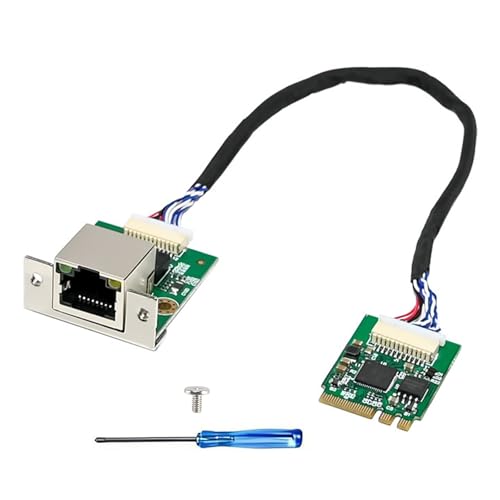
- 2.5G Intel I226-V controller
- Compact board plus separate RJ45 module
- Supports OpenWRT, Linux, Windows, and more
Best For: Space-constrained pfSense-style builds with a compatible M.2 A/E slot
Portable 10GbE USB-C Adapter
StarTech USB4 10GbE Ethernet Adapter

- Up to 10Gbps over USB4/Thunderbolt
- Bus-powered with aluminum housing
- Includes Wake-on-LAN and NBASE-T
Best For: Portable USB-C systems that need 10GbE wired networking
Basic USB Gigabit Adapter
TP-Link UE300 USB 3.0 Gigabit Ethernet Adapter

- 10/100/1000Mbps Gigabit support
- Driver-free on Windows, macOS, Chrome OS, and Linux
- Foldable and portable USB 3.0 design
Best For: Simple Gigabit networking on portable or backup USB setups
2.5GbE PCIe Upgrade
TP-Link TX201 2.5Gb PCIe Ethernet Adapter

- Up to 2.5 Gbps wired speed
- Includes standard and low-profile brackets
- Supports Linux and Windows
Best For: pfSense router builds needing a simple 2.5GbE PCIe adapter
USB Plug-and-Play Option
UGREEN USB 3.0 Gigabit Ethernet Adapter

- Gigabit speed up to 1000 Mbps
- Driver-free on supported systems
- Compact and portable USB design
Best For: quick USB-based wired networking on compatible devices
Dual-Port Intel PCIe Choice
Binardat 2-Port Intel 82575/82576 Card

- Two RJ45 gigabit ports
- Intel 82575/82576 controller
- Supports VLAN, PXE, and jumbo frames
Best For: pfSense or firewall builds needing two gigabit ports
4-Port 2.5GbE Upgrade – Intel i226-V 4-Port 2.5GbE
If you’re building a pfSense router and need more than the usual two ports, this network adapter for pfSense router setups gives you four 2.5GbE RJ45 connections on a PCIe x4 card. It’s aimed at home servers, firewalls, virtualization hosts, NAS projects, and custom router builds, but it does require a free PCIe slot and compatible network gear to reach full 2.5Gbps speeds.
Best For: Advanced pfSense, OPNsense, Proxmox, and homelab router builds that need four fast wired ports.
Pros:
- Four Intel i226-V 2.5GbE ports for multi-interface routing and segmentation
- Works with pfSense, OPNsense, Proxmox, TrueNAS, and modern Linux/Windows systems
- Useful for firewall, NAS, and virtualization builds that need dedicated Ethernet ports
Cons:
- Requires an available PCIe x4 slot and chassis clearance
- 2.5GbE performance depends on matching switches, cables, and endpoints
- Compatibility for specialized systems may require driver updates or verification
This card makes sense when you want a high-port-count, higher-speed NIC for a custom router or lab server, but it is not a universal plug-and-play upgrade. If your build can support PCIe expansion and 2.5GbE networking, it offers a flexible multi-port foundation.
Low-Cost 4-Port Gigabit NIC – ST7387 4x RJ45 Gigabit
This network adapter for pfSense router setups is a straightforward way to add four Gigabit RJ45 ports for firewall rules, soft routing, NAS link aggregation, or network isolation. It uses a PCIe 1.1 x1 interface and is positioned as a plug-and-play card for desktops and compact cases, with compatibility listed for pfSense, OPNsense, OpenWrt, Windows, Linux, and macOS.
Best For: Basic pfSense or soft-router builds that need four dependable 1GbE ports on a low-cost PCIe card.
Pros:
- Four RJ45 Gigabit ports for routing, isolation, and link aggregation
- Plug-and-play installation with no complex setup
- Includes regular and low-profile brackets for different case types
Cons:
- Limited to 1Gbps per port
- Uses a PCIe 1.1 x1 interface, so it is not a high-bandwidth upgrade
- Older Windows and some ESXi versions may require drivers
For straightforward firewall and segmented-network projects, this card covers the essentials without adding unnecessary complexity. It is a practical choice when you want multiple wired ports and do not need 2.5GbE speeds.
Portable USB Ethernet Option – Amazon Basics USB 3.0 Gigabit Ethernet
If your pfSense router setup needs a simple extra uplink or a temporary wired connection, this USB Ethernet adapter offers a compact Gigabit option through USB 3.0. It is best thought of as a convenience adapter for computers and laptops rather than a dedicated PCIe network adapter for pfSense router builds, and it is officially positioned for Windows and macOS use.
Best For: Adding a portable Gigabit Ethernet connection to a computer or laptop when you do not need an internal PCIe card.
Pros:
- USB 3.0 to Gigabit Ethernet in a very compact 33 g design
- Supports Wake-on-LAN, Green Ethernet, and IEEE 802.3az energy-saving features
- Includes IPv4/IPv6 checksum offload to help reduce CPU load
Cons:
- Not a PCIe expansion card, so it is less suitable as a primary router NIC
- Does not support smart TVs or gaming consoles
- Compatibility is centered on Windows and macOS rather than specialized firewall platforms
This is a handy adapter for quick networking needs, but it is not the best match when you are assembling a dedicated pfSense router with internal multi-port expansion. For that use case, an internal PCIe NIC is usually the better fit.
Compact Dual-Port NIC – LE8202 2-Port Gigabit PCIe
For a smaller pfSense router build, this network adapter for pfSense router use adds two Gigabit RJ45 ports on a PCIe 2.0 x1 card. It is aimed at soft routers, NAS link aggregation, and network isolation, and it also includes both standard and low-profile brackets for tighter cases.
Best For: Compact pfSense or OPNsense builds that need two RJ45 ports in a low-profile PCIe slot.
Pros:
- Two Gigabit RJ45 ports for routing, isolation, and link aggregation
- PCIe 2.0 x1 interface fits many smaller systems
- Includes regular and low-profile brackets for flexible installation
Cons:
- Limited to 1Gbps per port
- May need drivers on older Windows or newer ESXi versions
- Not ideal if you need more than two physical LAN ports
This is a sensible choice when your router build is space-constrained and you only need a simple dual-port layout. It delivers the core network interfaces you need without the size or speed requirements of a larger multi-gig card.
Compact M.2 Router NIC – Intel I226V M.2 A+E 2.5G Ethernet Adapter
If you need a compact network adapter for pfSense router builds, this M.2 A+E key card is aimed at space-limited systems that can accept a non-WiFi NGFF slot. Its Intel I226-V controller supports 2.5G, 1G, 100M, and 10Mbps auto-negotiation, while the separate RJ45 module and flexible cable help keep the install tidy inside mini PCs, SBCs, and small routers.
Best For: Small-form-factor router and lab builds that have a compatible M.2 A/E slot and need 2.5GbE wired networking.
Pros:
- Intel I226-V controller with 2.5G/1G/100M/10Mbps support
- Compact M.2 A+E key board with separate RJ45 module saves space
- Supports OpenWRT, PVE, ESXi, DSM, Linux, Windows, and more
- Includes WOL, PXE boot, VLAN filtering, and checksum offloading
Cons:
- Requires a motherboard slot that matches M.2 A/E, 2230, and non-WiFi support
- Driver installation is required before use
- Only a single Ethernet port is included
This is a practical pick if your pfSense hardware already has the right M.2 slot and you want 2.5GbE without adding a bulky PCIe card. Just verify compatibility carefully, because the product is tightly tied to the correct slot type and driver setup.
Portable 10GbE USB-C Adapter – StarTech USB4 10GbE Ethernet Adapter
This network adapter for pfSense router use is really best viewed as a high-speed external USB-C Ethernet option for supported systems, especially when you need a portable 10GbE connection. It works with USB4 and Thunderbolt 3/4/5 systems that support PCIe tunneling, offers multi-gig speeds up to 10Gbps, and includes a detachable cable plus bus-powered design for cleaner deployment.
Best For: Portable high-speed USB-C and Thunderbolt systems that need a reliable 10GbE Ethernet adapter.
Pros:
- Supports 10/5/2.5/1Gbps and 100Mbps networking
- USB4, Thunderbolt 3/4/5 compatibility with PCIe tunneling support
- Bus-powered, aluminum housing, and passive cooling for portability
- Includes Wake-on-LAN, autonegotiation, and NBASE-T
Cons:
- Requires a USB-C port that supports PCIe tunneling
- Compatibility is limited to supported USB4/Thunderbolt systems
- Windows setup is highlighted most clearly in the product details
For a pfSense setup, this makes sense only if your hardware platform can use an external USB4 adapter rather than an internal NIC. If portability and 10GbE matter more than expansion simplicity, it is a strong premium option.
Basic USB Gigabit Adapter – TP-Link UE300 USB 3.0 Gigabit Ethernet Adapter
If you want a basic network adapter for pfSense router testing or a lightweight wired upgrade, the TP-Link UE300 keeps things simple. It converts a USB 3.0 port to a Gigabit RJ45 connection, supports common operating systems including Linux, and folds down for easy transport when you need a compact spare adapter.
Best For: Basic Gigabit Ethernet expansion on USB 3.0 systems where portability and simplicity matter.
Pros:
- Gigabit Ethernet over USB 3.0 with 10/100/1000Mbps support
- Driver-free installation on Windows XP and later, macOS 10.9+, Chrome OS, and Linux
- Foldable design makes it easy to carry or store
- Broad device compatibility across laptops, desktops, and Linux PCs
Cons:
- Limited to 1GbE rather than multi-gig speeds
- Not suitable for Nintendo Switch, Wii U, or Wii
- Requires USB 3.0 for best use case
For pfSense users, this is the most straightforward choice only when you need a simple Gigabit USB adapter and not a higher-end multi-gig card. It is practical, portable, and easy to deploy, but it is not meant for faster-than-gigabit builds.
2.5GbE PCIe Upgrade – TP-Link TX201 2.5Gb PCIe Ethernet Adapter
If you’re looking for a network adapter for pfSense router hardware with extra headroom, this TP-Link PCIe card is a practical 2.5GbE option. It supports 2.5 Gbps plus fallback speeds of 1 Gbps and 100 Mbps, and it comes with both standard and low-profile brackets for flexible desktop or mini-tower installs.
Best For: pfSense builds in a PCIe desktop chassis that can use a 2.5GbE uplink and wants low-profile bracket support.
Pros:
- Up to 2.5 Gbps performance for faster-than-gigabit wired networking
- Backwards compatible with 2.5 Gbps, 1 Gbps, and 100 Mbps Base-T speeds
- Includes standard and low-profile brackets for different case sizes
- Supports Linux and Windows, plus Wake on LAN and QoS features
Cons:
- Single-port design, so it won’t add multiple LAN ports
- Requires a PCIe slot, so it’s not for systems without one
For a pfSense router build that needs a straightforward PCIe upgrade, the TX201 stands out for its 2.5GbE speed and flexible bracket options. It’s a good fit when you want faster wired connectivity without moving to a more complex multiport card.
USB Plug-and-Play Option – UGREEN USB 3.0 Gigabit Ethernet Adapter
This UGREEN USB to Ethernet adapter is a simple network adapter for pfSense router setups if you’re working with USB-based hardware or need an easy wired Ethernet link. It delivers gigabit speeds through USB 3.0 and is designed to be driver-free on supported systems, which makes it easy to connect and test quickly.
Best For: quick USB-based wired networking on compatible devices where plug-and-play setup matters.
Pros:
- Gigabit Ethernet speed up to 1000 Mbps
- Plug-and-play on Windows 11/10/8.1/8, macOS, and Chrome OS
- Compatible with Nintendo Switch and Switch OLED
- Compact design that’s easy to carry
Cons:
- Uses USB instead of PCIe, so it may not suit all router builds
- Compatibility is narrower for driver-free use than a typical PCIe card
As a practical USB Ethernet dongle, this model is best when convenience is the priority. For pfSense projects, it makes sense only when your hardware setup can actually use a USB network interface.
Dual-Port Intel PCIe Choice – Binardat 2-Port Intel 82575/82576 Card
If your network adapter for pfSense router duties needs two wired ports instead of one, this Binardat PCIe card is a strong candidate. It uses Intel 82575/82576 controllers, offers dual RJ45 interfaces, and supports common networking features like VLAN tagging, PXE, Auto MDIX, and jumbo frames.
Best For: pfSense or firewall builds that need two gigabit ports on a single PCIe card.
Pros:
- Two Gigabit Ethernet ports on one PCIe card
- Intel 82575/82576 controller for established compatibility
- Supports VLAN tagging, PXE, Auto MDIX, and 9.5K jumbo frames
- Includes both standard and low-profile brackets
Cons:
- Limited to 1000/100 Mbps operation, not 2.5GbE
- Requires a PCIe slot and is not for PCI slots
For router and firewall builds, the main advantage here is having two onboard Ethernet ports in one PCIe slot. That makes it especially useful when you want a cleaner pfSense layout with WAN and LAN on the same card.
How We Picked the Best Network Adapter for PfSense Router
We prioritized compatibility, proven chipset families, port count, speed, and install flexibility. For a Network Adapter for PfSense Router use, long-term reliability matters more than marketing claims, so we favored models with strong Linux/BSD track records and practical layouts for firewall or soft-router deployments.
Quick Comparison: What Each Type Does Best
USB adapters are best for quick expansion, recovery, or lightweight use, while PCIe cards are the better fit for permanent pfSense installations. Multi-port cards work well for segmentation, WAN/LAN separation, and link aggregation. Multi-gig and 10GbE options make sense when your upstream, switch, and internal traffic can actually use the extra bandwidth.
Key Buying Factors for a Network Adapter for PfSense Router
Chipset and Driver Support
Start with chipset reputation. Intel-based adapters are commonly preferred in firewall and router builds because they tend to offer stable drivers and predictable behavior. If you’re mixing hardware with pfSense, avoid unknown controllers unless you’ve verified compatibility first.
Port Count and Use Case
Two-port cards are a solid baseline for WAN and LAN. Four-port cards are better if you want VLAN-heavy segmentation, multiple LAN zones, or a lab setup. Single-port adapters can still be useful for USB expansion or secondary uplinks.
Speed Versus Your Network
There is no reason to pay for 10GbE if your internet connection and switching gear are still gigabit. On the other hand, if you run NAS transfers, VM traffic, or high-throughput firewall rules, 2.5GbE or above can be worthwhile.
Form Factor and Power
PCIe cards are typically more dependable in always-on systems. USB adapters are easy to deploy but are better suited to temporary or lower-stress roles. Also check slot availability, bracket fit, and whether your case can handle the card length and airflow.
Who Should Buy Which Network Adapter for PfSense Router?
If you want the most dependable all-around choice, look for an Intel-based PCIe adapter. If you need multiple isolated networks, choose a multi-port card. If you’re building a compact box or need a quick fix, a USB adapter may be enough. And if your pfSense router is part of a faster home lab or small business network, a 2.5GbE or 10GbE model is the smarter long-term upgrade.
In short, the best Network Adapter for PfSense Router setups is the one that matches your chipset comfort level, port count needs, and actual network speed goals.