
A good docking station for handheld gaming PC use turns a portable device into a living-room or desk-ready setup. The right dock adds stable charging, display output, wired networking, and the ports you need for controllers and accessories.
Below, we focus on docks that balance power delivery, HDMI performance, and broad compatibility so you can choose a setup that fits your handheld and your display.
Best 10 Docking Station for Handheld Gaming PC Picks for 2026
Compact 5-in-1 dock
JSAUX 5-in-1 Dock for Steam Deck & Ally

- 4K@120Hz HDMI 2.1 output
- 100W PD charging and Ethernet
- Fits Steam Deck, Ally, Legion Go, and more
Best For: Gamers who want a simple, compact dock with strong display output
Portable foldable dock
UGREEN 6-in-1 Dock with 4K@120Hz HDMI

- 4K@120Hz HDMI 2.1 with VRR support
- Foldable stand for portability
- USB-A, USB-C, and gigabit Ethernet
Best For: Portable gamers who want a foldable dock with modern display support
High-refresh 8-in-1 dock
iVANKY 8-in-1 Dock with 4K@144Hz

- 4K@144Hz HDMI 2.1 output
- Three USB-A 3.0 ports plus gigabit Ethernet
- 100W charging for handheld gaming devices
Best For: Gamers who want a high-refresh dock with extra USB expansion
Most versatile 11-in-1 hub
JSAUX 11-in-1 Dock with HDMI & DisplayPort

- HDMI and DisplayPort with 8K/dual-display support
- 100W pass-through plus USB-C, USB-A, SD/TF, and audio
- Built for gaming handhelds and laptop setups
Best For: Users who want the broadest port selection in one handheld dock
Premium RGB 14-in-1 Dock

- 4K@120Hz HDMI 2.1 output
- 14-in-1 with SD/TF, audio, Ethernet, USB
- Foldable stand with 7 RGB modes
Best For: Gamers wanting a feature-packed dock for a desktop-style handheld setup
Best Value 6-in-1

- 4K@120Hz HDMI 2.1 and Gigabit Ethernet
- 100W PD charging for handheld play
- Three USB 3.0 ports in a compact build
Best For: Players who want a simple, dependable dock with the main essentials
Balanced 9-in-1 Stand Dock

- 9-in-1 with TF/SD slots and 10Gbps USB
- 4K@60Hz HDMI plus Gigabit Ethernet
- Foldable stand and 100W PD charging
Best For: Users who want a balanced dock with storage support and fast data connections
Universal 6-in-1 Dock
JSAUX 6-in-1 Docking Station for Handhelds

- Fits many SteamOS and Windows handhelds
- 4K@120Hz HDMI, Ethernet, and 3 USB 3.0 ports
- 100W pass-through charging support
Best For: Simple all-round docking for mixed handheld setups
Feature-Packed RGB 12-in-1
JSAUX RGB 12-in-1 Dock with Dual 4K Outputs
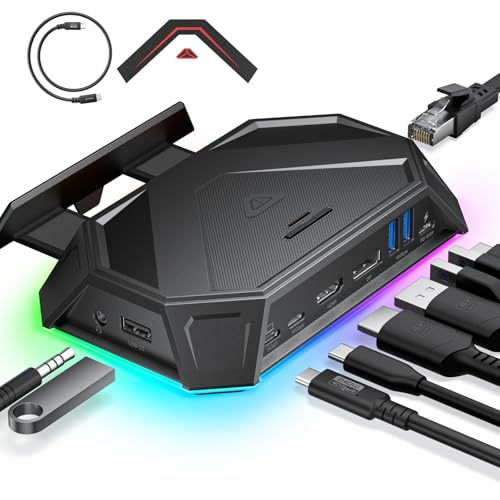
- 4K@120Hz HDMI and DisplayPort with VRR/ALLM/HDR
- 12-in-1 layout adds USB, SD/TF, Ethernet, and audio
- Six RGB modes with touch control
Best For: Users who want the most ports and visual extras
Modular 6-in-1 Stand Dock
JSAUX HB0609 Modular Dock for Handheld Gaming

- Dock or stand design with detachable base
- 4K@120Hz HDMI plus Gigabit Ethernet
- 100W charging with USB-C and dual USB-A
Best For: Gamers who want a flexible dock-and-stand combo
Compact 5-in-1 dock – JSAUX 5-in-1 Dock for Steam Deck & Ally
If you want a straightforward docking station for handheld gaming PC use, this JSAUX 5-in-1 keeps the essentials in a small footprint. It focuses on high-refresh HDMI 2.1 output, 100W pass-through charging, and wired Ethernet, making it a practical pick for couch gaming, desk setups, and stable online play.
Best For: Players who want a compact dock with 4K@120Hz output, Ethernet, and broad handheld compatibility.
Pros:
- HDMI 2.1 supports up to 4K@120Hz for smoother external display gaming.
- 100W PD pass-through helps keep supported handhelds charged during long sessions.
- Built-in Ethernet adds a stable wired connection for online play.
- Works with Steam Deck, ROG Ally/Ally X, Legion Go/Go S, MSI Claw, and more.
Cons:
- Only includes two USB-A 2.0 ports, so it is light on high-speed peripheral support.
- Not compatible with ROG XBOX Ally / XBOX Ally X.
This is a sensible dock if you mainly need reliable display output, charging, and networking without extra extras. Its mix of 4K@120Hz and compact design makes it easy to recommend for general handheld gaming setups.
Portable foldable dock – UGREEN 6-in-1 Dock with 4K@120Hz HDMI
This UGREEN docking station for handheld gaming PC setups combines a foldable stand with the ports most people actually use. It offers HDMI 2.1 with 4K@120Hz support, USB-A and USB-C data ports, gigabit Ethernet, and 100W charging, so it works well as both a gaming dock and a travel-friendly hub.
Best For: Portable gamers who want a foldable, all-around dock for handhelds, laptops, and mixed-use setups.
Pros:
- HDMI 2.1 supports up to 4K@120Hz, with VRR, FreeSync, and G-Sync on compatible displays.
- Foldable aluminum alloy and PC+ABS stand keeps the dock compact and portable.
- Includes 2 USB-A 3.0 ports, 1 USB-C 3.0 data port, and gigabit Ethernet.
- Broad compatibility covers Steam Deck, ROG Ally, Rog Xbox Ally/X, and more.
Cons:
- Power delivery to the host is listed up to 85W, not the full 100W in all use cases.
- Not compatible with Nintendo Switch 2.
If you want a dock that can move between a gaming handheld and other devices with minimal hassle, this one is well-rounded. The foldable design and strong port selection make it especially appealing for players who value portability.
High-refresh 8-in-1 dock – iVANKY 8-in-1 Dock with 4K@144Hz
If your priority is a docking station for handheld gaming PC use with a faster external display option, the iVANKY 8-in-1 stands out. It pairs 4K@144Hz HDMI 2.1 output with three USB-A 3.0 ports, gigabit Ethernet, and 100W charging, making it a strong fit for couch gaming and accessory-heavy setups.
Best For: Players who want a high-refresh dock with plenty of USB ports and wired networking.
Pros:
- HDMI 2.1 supports up to 4K@144Hz for very smooth external display gaming.
- Three USB-A 3.0 ports give you room for controllers, storage, and dongles.
- 1Gbps Ethernet supports stable wired online play.
- 100W charging helps keep compatible handhelds powered during play.
Cons:
- ROG Ally compatibility notes mention BIOS and firmware updates for best results.
- Included charging details indicate a 65W power supply, so you may want to verify your power setup.
This is a better pick if you want more than a basic dock and expect to use multiple peripherals at once. The combination of 4K@144Hz output and three USB ports makes it especially useful for a more permanent gaming station.
Most versatile 11-in-1 hub – JSAUX 11-in-1 Dock with HDMI & DisplayPort
For a docking station for handheld gaming PC setups that also covers work and media tasks, this JSAUX 11-in-1 goes far beyond a basic TV dock. It adds HDMI, DisplayPort, USB-C data, multiple USB-A ports, SD/TF slots, and a 3.5mm audio jack, so it is built for users who want a single hub for display output, file transfers, and peripherals.
Best For: Users who want the most complete port selection for gaming, travel, and desktop-style use.
Pros:
- Includes both HDMI and DisplayPort, with up to 8K single-display or 4K dual-display support.
- Offers 100W pass-through charging for powering the device and connected accessories.
- Has USB-C data, three USB-A ports, SD/TF card slots, and a 3.5mm audio jack.
- Compatible with Steam Deck, ROG Ally, MacBook, and other USB-C video-output devices.
Cons:
- ROG Ally 30W Turbo Mode is not guaranteed and may depend on charger and setup.
- Full display support requires the host device to support USB-C video output and DP Alt Mode.
This hub is best for buyers who want maximum flexibility rather than the simplest possible dock. If you need extra display options and file-transfer tools in one box, it is the most versatile of the group.
Premium RGB 14-in-1 Dock – iVANKY 14-in-1 RGB Dock
If you want a docking station for handheld gaming PC setups with a lot of expansion room, this iVANKY option is built for a fully loaded desk setup. It combines HDMI 2.1 output, Ethernet, multiple USB-A ports, SD/TF slots, audio, and 100W charging, while the foldable stand is designed to keep vents clear for better airflow.
Best For: Players who want maximum ports, RGB styling, and a dock that can handle a monitor, wired networking, and storage cards at once.
Pros:
- 4K@120Hz HDMI 2.1 output for high-refresh external display use
- 14-in-1 layout with 10Gbps USB-A ports, 5Gbps USB-A ports, SD/TF slots, and audio jack
- Dual-foldable stand design helps avoid blocking cooling vents
- 7 RGB lighting modes add a more customized setup look
Cons:
- More feature-heavy than a basic travel dock
- Some display issues may require firmware updating per the notes
- Max charging speeds still depend on the handheld’s supported wattage
For buyers who want one dock to do almost everything, this iVANKY model stands out for breadth of connections and 4K@120Hz support. It makes the most sense for a permanent gaming station rather than a minimal carry-around accessory.
Best Value 6-in-1 – JSAUX HB0603 Dock
This docking station for handheld gaming PC users keeps the formula simple: 4K@120Hz HDMI, Gigabit Ethernet, 100W PD, and three USB 3.0 ports. It is a clean pick if you want strong core features for big-screen play without paying for extra slots you may not use.
Best For: Buyers who want a compact, straightforward dock focused on display, charging, wired internet, and a few USB connections.
Pros:
- HDMI 2.1 output supports 4K@120Hz for smoother external play
- 100W PD charging supports handheld Turbo modes with the right charger
- Gigabit Ethernet helps with lower-latency online gaming and fast downloads
- Three USB 3.0 ports add room for accessories and controllers
Cons:
- Not compatible with ROG XBOX Ally or XBOX Ally X
- Fewer expansion options than 9-in-1 or 14-in-1 docks
- No SD/TF card slots listed
If you mostly need the essentials, this JSAUX dock is easy to recommend. It focuses on the features that matter most for docked handheld gaming and avoids extra complexity.
Balanced 9-in-1 Stand Dock – UGREEN Steam Deck Dock 9-in-1
For a docking station for handheld gaming PC use that balances ports and size, the UGREEN 9-in-1 dock lands in a very practical middle ground. It offers 4K@60Hz HDMI, Gigabit Ethernet, 100W PD, 10Gbps USB-C and USB-A ports, plus TF/SD slots in a foldable stand design that leaves room for ventilation.
Best For: Gamers who want a well-rounded dock with storage card support and fast data ports without moving up to a larger 14-in-1 hub.
Pros:
- 9-in-1 layout adds TF/SD slots and fast 10Gbps USB 3.2 ports
- Foldable stand design helps avoid blocking cooling vents
- 100W PD charging supports powerful handhelds and Turbo mode use
- Wide compatibility includes Steam Deck, ROG Ally, ROG Xbox Ally, Legion Go, and MSI Claw
Cons:
- HDMI tops out at 4K@60Hz rather than 4K@120Hz
- Two USB-A ports are USB 2.0, so they are better for peripherals than fast transfers
- Not compatible with Switch 2
This UGREEN model is a strong all-around choice if you want more than a basic dock but do not need the highest-end display output. It is especially appealing for users who value both file transfer speed and card-slot convenience.
Universal 6-in-1 Dock – JSAUX 6-in-1 Docking Station for Handhelds
If you want a practical docking station for handheld gaming PC use, this JSAUX 6-in-1 dock covers the essentials without adding clutter. It supports a wide range of handhelds, adds 4K@120Hz HDMI output, wired Ethernet, and three USB 3.0 ports, so it works well as a simple living-room or desk setup.
Best For: Players who want one compact dock that works across SteamOS and Windows handhelds.
Pros:
- Wide compatibility with Steam Deck, ROG Ally/X, Legion Go, MSI Claw, and more
- 4K@120Hz HDMI 2.1 output for high-refresh gaming on supported displays
- Gigabit Ethernet plus 3 USB 3.0 ports for a fuller desktop-style setup
- 100W pass-through charging to support peak handheld performance
Cons:
- No extra video ports beyond the single HDMI output
- Best charging results depend on pairing with a 100W charger
- More basic feature set than larger 12-in-1 docks
This is a straightforward choice if you value compatibility and the core dock features most handheld gamers actually need. It keeps the setup simple while still supporting fast charging, stable networking, and high-refresh external display use.
Feature-Packed RGB 12-in-1 – JSAUX RGB 12-in-1 Dock with Dual 4K Outputs
This docking station for handheld gaming PC setups is built for users who want more than the basics. Along with 4K@120Hz HDMI and DisplayPort output, it adds VRR, ALLM, HDR, fast USB transfer, storage card slots, audio out, and RGB lighting, making it a strong hub for a more complete desk or TV rig.
Best For: Gamers who want maximum connectivity, dual-display options, and RGB styling in one dock.
Pros:
- HDMI and DisplayPort both support 4K@120Hz
- VRR, ALLM, and HDR support for smoother, more responsive gameplay
- 12-in-1 layout adds USB 3.2 ports, Ethernet, SD/TF slots, and a 3.5mm jack
- Six RGB lighting modes with touch control and OpenRGB support
Cons:
- Dual-screen support is limited to 4K@60Hz or 2K@120Hz
- RGB features may be unnecessary if you want a plain dock
- Compatibility details are broader in the notes than the brief device listing suggests
If you want a more advanced dock with display flexibility and plenty of ports, this model stands out. It suits users who plan to connect peripherals, storage, and an external display while also wanting gaming-focused video features.
Modular 6-in-1 Stand Dock – JSAUX HB0609 Modular Dock for Handheld Gaming
If you are shopping for a docking station for handheld gaming PC use and want a bit more flexibility, this JSAUX model adds a modular base that can work as a dock or stand. It still covers the key features: 4K@120Hz HDMI, Gigabit Ethernet, USB-C and USB-A expansion, and 100W charging support.
Best For: Handheld owners who want a dock that can also act as a detachable stand.
Pros:
- Modular design lets you use the base as a dock or standalone stand
- 4K@120Hz HDMI output, with 1080p@240Hz also supported by the notes
- Gigabit Ethernet plus USB-C and dual USB-A ports for accessories
- Supports 100W max power delivery for fast charging with a compatible charger
Cons:
- Does not support VRR or ALLM
- Original 65W chargers may trigger a low-power warning on ROG Xbox Ally devices
- Customization card is optional and not included
This is a solid pick if you want more than a fixed dock and like the idea of a detachable stand. It keeps the feature set focused on the essentials, while the modular design makes it easier to adapt to different desk or portable setups.
How We Picked the Best Docking Station for Handheld Gaming PC
We prioritized real-world usefulness over port count alone. The best options combine reliable USB-C power delivery, strong video output, useful USB expansion, and broad support for popular handhelds such as Steam Deck, ROG Ally, Legion Go, and newer Ally X models. We also looked for practical extras like Ethernet, USB 3.x ports, and foldable or compact designs that work well on a desk or travel setup.
Quick Comparison: What Matters Most
If you mainly play on a TV, focus on HDMI version and refresh-rate support. If you use your handheld as a desktop replacement, prioritize more USB ports, faster data speeds, and Ethernet. If you charge while playing, make sure the dock supports at least 100W power delivery so your handheld can keep up during demanding games and accessory use.
Key Buying Factors for a Docking Station for Handheld Gaming PC
Video Output
For most players, 4K at 60Hz is the baseline. If your handheld and display support it, 4K at 120Hz is a stronger choice for smoother motion and better future-proofing. Some docks also support DisplayPort, which can be useful for certain monitors.
Power Delivery
A dock with 100W pass-through charging helps prevent battery drain while gaming and leaves room for connected accessories. This is especially important if you run a higher-power handheld or attach SSDs, controllers, or RGB accessories.
Ports and Connectivity
Ethernet gives you steadier online play than Wi-Fi, while USB-A and USB-C ports make it easier to connect external storage, headsets, keyboards, and controllers. If you regularly move files, look for faster USB 3.2 or 10Gbps data ports.
Form Factor and Stability
A good Docking Station for Handheld Gaming PC use should hold the device securely and keep cables tidy. Foldable stands and compact bases are great for portability, while larger RGB docks may suit permanent desk setups better.
Who Should Buy Which Docking Station for Handheld Gaming PC?
Choose a compact 5- or 6-in-1 dock if you want simple TV gaming and charging without extra clutter. Pick an 8- or 9-in-1 option if you need more ports for accessories and storage. Go with an 11- to 14-in-1 dock if you want a full desktop-style setup with expanded connectivity, display flexibility, and better cable management.
For most buyers, the sweet spot is a dock with 4K output, 100W charging, Ethernet, and at least three USB ports. That combination covers gaming, charging, and everyday use without overpaying for features you may not need.