
If you want a cleaner desk and a true multi-screen workstation, a docking station with four monitor outputs can be a major upgrade. The right model simplifies cable clutter while giving you the connectivity needed for trading, editing, coding, or multitasking.
Below, we focus on the most practical options for 2026, with attention to display support, charging, system compatibility, and the ports that matter most.
Best 10 Docking Station with Four Monitor Outputs Picks for 2026
Quad-Display Power Hub
TobenONE 4-Monitor DisplayLink Dock

- 4 HDMI + 4 DP outputs for up to 4 displays
- 4K@60Hz on each monitor with 20 total ports
- 150W power supply with up to 100W laptop charging
Best For: Windows and Mac users needing a flexible 4-screen dock
Triple-Screen Travel Dock

- Supports up to 3 external HDMI displays
- Up to 85W Power Delivery with 100W charger
- USB-A 3.0, USB-C 5Gbps, and SD card support
Best For: Remote workers who need a compact triple-monitor dock
Quad DP Workstation Dock
StarTech DisplayLink Quad Adapter

- Drives four 4K 60Hz DisplayPort monitors
- 140W PD passthrough with USB-A 2.0 port
- Auto-installs on most Windows and ChromeOS systems
Best For: Enterprise users needing a four-DisplayPort workstation dock
Quad-Display Productivity Dock

- 4 HDMI + 2 DP for up to 4 displays
- Up to 100W laptop charging with 120W adapter
- DisplayLink support for Windows and Mac
Best For: multitaskers who want one dock for monitors, charging, and peripherals
Thunderbolt Quad-Display Dock
Plugable TBT-6950PD Quad Monitor Dock
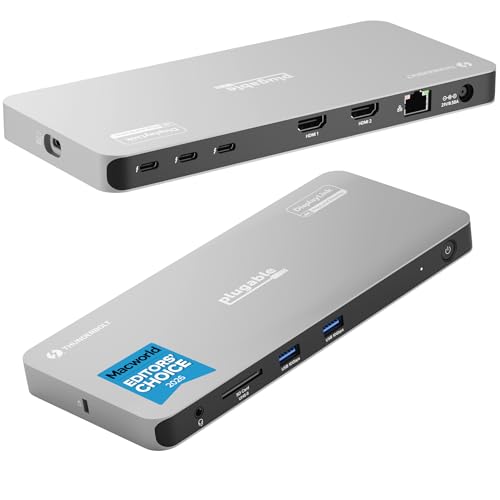
- Up to 4 displays with HDMI and Thunderbolt outputs
- 96W host charging plus 3 extra TB4 ports
- Works with Windows, macOS 11+, and ChromeOS
Best For: Thunderbolt users building a premium multi-monitor workstation
High-Resolution Multitasker

- Quad-monitor support up to 5K/4K@60Hz
- 4 HDMI and 4 DP outputs
- 2.5Gbps Ethernet with 100W charging
Best For: Users who want flexible high-resolution multi-monitor support
Quad-Display Power Hub – TobenONE 4-Monitor DisplayLink Dock
If you need a docking station with four monitor outputs for a demanding desk setup, this TobenONE model is built for maximum expansion. It supports up to 4 external displays with 4 HDMI and 4 DP ports, while also adding plenty of USB, Ethernet, SD/microSD, and audio connectivity for a full workstation.
Best For: Windows and Mac users who want a 4-monitor DisplayLink dock with lots of port flexibility.
Pros:
- Supports up to 4 external monitors with 4 HDMI and 4 DisplayPort outputs.
- Delivers 4K@60Hz to each display for a consistent multi-screen setup.
- Includes 20 total ports, plus Ethernet, SD/microSD, and audio connections.
- 150W adapter provides up to 100W laptop charging and 18W USB-C phone charging.
Cons:
- Requires DisplayLink driver installation before use.
- HDCP is not supported.
- M1 MacBooks can only extend to 3 monitors.
This is a strong choice if you want a dock that does more than just video expansion. It is aimed at users who value broad compatibility, lots of ports, and a clean single-cable workstation experience.
Triple-Screen Travel Dock – OREI SplitXtend 3xHDMI Dock
The OREI SplitXtend is a practical docking station with four monitor outputs only in the sense that it is built for multi-display workflows, but its actual focus is a triple-monitor setup. If your priority is connecting up to three external displays from a compact USB-C dock, this model offers a simple office-ready layout with HDMI expansion and charging support.
Best For: Users who want an affordable triple-monitor USB-C dock for productivity tasks.
Pros:
- Connects up to 3 external displays through HDMI.
- Includes Power Delivery up to 85W with a required 100W charger.
- Adds USB-A 3.0 and USB-C 5Gbps ports for peripherals and data transfer.
- Compact, travel-friendly design with SD card reader support.
Cons:
- Requires SiliconMotion driver installation for extended displays.
- Not recommended for gaming, design work, or HDCP-protected content.
- Does not provide four-monitor output support.
This dock makes sense when you need a straightforward triple-screen setup rather than an all-out workstation hub. It is best viewed as a productivity dock for hot desking, remote work, and travel.
Quad DP Workstation Dock – StarTech DisplayLink Quad Adapter
If your search for a docking station with four monitor outputs is really about driving four DisplayPort screens from one cable, the StarTech quad dock is purpose-built for that job. It connects four 4K 60Hz DisplayPort monitors, adds laptop charging, and keeps room for a mouse, keyboard, or wireless dongle through USB passthrough.
Best For: Enterprise and office users who need four DisplayPort monitors from a single USB-C connection.
Pros:
- Supports four DisplayPort monitors at 4K 60Hz.
- 140W PD passthrough helps power the laptop while docked.
- USB-A 2.0 passthrough supports mouse, keyboard, or dongles.
- DisplayLink drivers auto-install on most Windows and ChromeOS systems.
Cons:
- Manual driver installation is required for macOS.
- Uses DisplayPort only, not HDMI.
- Designed more for productivity than entertainment or gaming.
Compared with broader all-in-one docks, this model is focused and business-oriented. It suits teams and power users who want stable four-monitor productivity without extra clutter.
High-Refresh 4-Screen Dock – WAVLINK Dual HDMI Dual DP Dock
The WAVLINK dock is a strong fit if you want a docking station with four monitor outputs and higher refresh-rate support for Windows systems. With 2 DisplayPort 2.1 and 2 HDMI 2.1 ports, it can run up to four 4K@60Hz displays or mix in higher refresh configurations where supported.
Best For: Windows users who want a 4-monitor dock with high-refresh video support.
Pros:
- Provides 2 DP and 2 HDMI outputs for up to 4 monitors.
- Supports 4K@60Hz across four displays, with higher refresh options on compatible setups.
- Includes 100W PD in with up to 90W laptop charging.
- Offers 5G Ethernet and requires host USB3.2 support.
Cons:
- Windows only; not compatible with Mac OS.
- Host USB3.2 is required for operation.
- Needs compatible DP2.0/DSC support for top resolutions and refresh rates.
This dock stands out for users who care about display flexibility and fast networking in one unit. It is best suited to Windows workstations where multi-monitor output and high refresh rates matter.
Quad-Display Productivity Dock – TobenONE 4-Monitor USB-C Dock
If you want a docking station with four monitor outputs for a Windows or Mac workspace, this TobenONE model is built for wide screen expansion and everyday desk organization. It combines multiple HDMI and DisplayPort options, so you can wire up a serious multi-monitor setup while also keeping peripherals, networking, and charging on one cable.
Best For: Users who need four displays on Windows or a flexible multi-screen setup on supported Macs.
Pros:
- Supports up to 4 displays on Windows and up to 3 on MacBook with DisplayLink.
- Includes 18 total ports, with 4 HDMI, 2 DisplayPort, USB-A, USB-C, card slots, Ethernet, and audio.
- 120W adapter supports up to 100W laptop charging and up to 18W phone charging.
- Wide compatibility with USB4, Thunderbolt 5/4/3, and full-featured USB-C systems.
Cons:
- Requires DisplayLink driver installation before use.
- Not compatible with Linux/Unix.
- Mac support is limited to 3 displays rather than 4.
This is a practical choice if you want an all-in-one dock that simplifies cabling and supports a high-productivity desk setup. The mix of video ports and charging power makes it especially useful for multitasking, spreadsheets, coding, and office work.
Thunderbolt Quad-Display Dock – Plugable TBT-6950PD Quad Monitor Dock
This docking station with four monitor outputs is aimed at users who want Thunderbolt performance plus broad display flexibility. The Plugable TBT-6950PD combines Thunderbolt and DisplayLink to connect up to four displays, while also adding fast data ports, Ethernet, and host charging for a cleaner laptop-to-desk transition.
Best For: Thunderbolt laptop users who want a premium quad-monitor dock for Windows or Mac.
Pros:
- Connects up to 4 displays, with 2 HDMI and 2 Thunderbolt/USB-C video outputs.
- Provides up to 96W host charging and includes 3 additional 40Gbps Thunderbolt ports.
- Works with Windows, macOS 11+, and ChromeOS 100+ on Thunderbolt, USB4, or full-featured USB-C systems.
- Includes Gigabit Ethernet, high-speed USB ports, and an SD card slot.
Cons:
- DisplayLink software is required for the HDMI outputs to function.
- Four extended displays are not supported on every Mac configuration.
- Best suited to systems with Thunderbolt or USB4 support.
If you need a high-end dock for a workstation-style setup, this model stands out for its mix of charging, throughput, and monitor support. It is especially compelling for users who want a Thunderbolt dock that can still scale to a four-screen layout.
Quad 4K Output Dock – WAVLINK 4-Monitor 4K Dock
For buyers focused specifically on a docking station with four monitor outputs and 4K support, this WAVLINK adapter is built around quad-display expansion. It uses a driver-dependent setup and an SMI770 chip to extend four displays on compatible systems, making it a strong fit for users who want high-resolution output across a compact desktop hub.
Best For: Mac and Windows users who want four 4K displays with a high-refresh-rate option.
Pros:
- Supports 4 HDMI outputs and quad 4K display expansion.
- Offers flexible display combinations, including single 4K@144Hz and quad 4K modes.
- Supports up to 130W laptop charging with 140W PD input.
- Compatible with Windows 10/11 and macOS 13+ on supported USB-C/Thunderbolt hosts.
Cons:
- Driver installation is required and it is not plug-and-play.
- Host USB 3.2 Gen 2 is required.
- Not compatible with Linux, iPadOS, iOS, or Steam Deck.
This is a strong pick if your priority is a four-screen 4K setup rather than a general-purpose dock. Its appeal is highest for users who want to push resolution and refresh-rate options while keeping the hardware footprint small.
Quad-Screen Workhorse – TobenONE 4 HDMI 18-in-1 Dock
If you want a docking station with four monitor outputs and a broad port mix, this TobenONE model is built for heavy desktop expansion. It supports up to 4 external displays on Windows laptops and up to 3 on MacBook Pro/Air, all at 4K@60Hz, while also adding Ethernet, SD/microSD, audio, and multiple USB connections for a more complete workstation.
Best For: Windows users who want maximum four-monitor flexibility and Mac users who need a high-output dock with broad port expansion.
Pros:
- 4 HDMI outputs with support for up to 4 external displays on Windows
- 4K@60Hz display support for a sharp multi-monitor setup
- 18 total ports, including USB, Ethernet, SD/microSD, and audio
- 120W power adapter with up to 100W laptop charging
Cons:
- Mac users are limited to 3 displays, and only one of HDMI 3 or HDMI 4 can be selected
- Requires the latest DisplayLink driver for normal use
- Does not support Linux/Unix
Overall, this is the most feature-packed option in the group if you care about lots of ports as much as multi-display support. It fits best in a busy desk setup where the dock needs to handle monitors, peripherals, storage cards, and charging at once.
Creator-Ready Expansion – WAVLINK 4-Monitor Pro Dock
This docking station with four monitor outputs is aimed at users who need a compact but capable DisplayLink setup for serious multitasking. With 4x HDMI outputs supporting 4K@60Hz, 10Gbps USB ports, 2.5G Ethernet, and SD/TF 4.0 card readers, it gives you a practical hub for work, editing, and content-heavy workflows.
Best For: Mac and Windows users who want a 4-monitor dock with fast data transfer and strong everyday expansion.
Pros:
- 4 HDMI ports with 4K@60Hz support via DisplayLink DL7400
- 10Gbps USB 3.2 ports for fast file transfers
- 2.5G Ethernet for faster wired networking
- 160W power adapter included, with up to 100W laptop charging
Cons:
- Driver is required for operation
- Product notes list 4 HDMI outputs, while the details section lists 3 HDMI ports
- Not positioned as a travel dock due to its larger desktop-focused design
In practice, this dock makes the most sense if you want strong monitor support plus speedier peripherals in one unit. It is a solid pick for a desk setup that benefits from Ethernet, card readers, and high-speed USB alongside multiple displays.
High-Resolution Multitasker – WAVLINK Quad 4K/5K Dock
If your priority is a docking station with four monitor outputs and high-resolution support, this WAVLINK model is designed for demanding workspaces. It supports quad displays at up to 5K/4K@60Hz depending on the output combination, while also adding 2.5Gbps Ethernet, SD 4.0 card access, and 100W host charging for a more complete desktop setup.
Best For: Users who want a high-resolution four-monitor dock for productivity, editing, or wide-screen multitasking.
Pros:
- Supports quadruple monitors up to 5K/4K@60Hz
- 4 HDMI and 4 DP outputs for flexible display combinations
- 2.5Gbps Ethernet and SD 4.0 card reader
- 180W power adapter with 100W host charging
Cons:
- Display resolution depends on the mix of outputs used
- Driver-based setup may add an extra step
- Best suited to desktop-style setups rather than minimal travel use
This is the strongest choice if you care more about display quality and output flexibility than about keeping the dock simple. It is well matched to users who want a serious multi-monitor station with fast networking and broad laptop compatibility.
How We Picked the Best Docking Station with Four Monitor Outputs
We focused on models that can reliably drive four external displays, support modern USB-C and Thunderbolt workflows, and offer enough charging to replace a laptop’s power adapter. We also weighed display resolution, docking stability, port variety, and compatibility notes for Windows and Mac users, since a Docking Station with Four Monitor Outputs is only useful if it works with your exact setup.
Quick Comparison
Most buyers will fall into one of three groups: Thunderbolt users who want the strongest all-around performance, DisplayLink users who need flexible multi-monitor support across more laptops, and Mac users who need a dock that works around Apple’s external-display limits. Some models prioritize video bandwidth and premium laptop charging, while others emphasize broader compatibility or extra legacy ports.
Key Buying Factors for a Docking Station with Four Monitor Outputs
Display Technology
Check whether the dock uses Thunderbolt, USB-C Alt Mode, or DisplayLink. Thunderbolt can offer simpler, high-performance connectivity, while DisplayLink is often better for four-screen expansion on systems that do not natively support that many displays.
Monitor Resolution and Refresh Rate
Look closely at the advertised output limits. Many quad-display docks support 4K output, but not every port can run 4K at the same refresh rate. If you edit video, work with motion-heavy content, or want smoother visuals, 60Hz support is a meaningful baseline.
Power Delivery
Make sure the dock can charge your laptop adequately. A strong power budget helps avoid carrying a separate charger and is especially important for high-performance notebooks that draw more power under load.
System Compatibility
Mac and Windows support can differ significantly. Apple silicon systems may need DisplayLink or a dock designed specifically for broader multi-monitor support, while many Windows laptops handle four displays more flexibly. Always verify support for your exact chip and OS version.
Ports and Expansion
Beyond video outputs, consider Ethernet speed, USB-A count, USB-C data ports, and audio connections. A good Docking Station with Four Monitor Outputs should also support your keyboard, storage, networking, and peripheral needs without forcing you into extra hubs.
Who Should Buy Which Docking Station with Four Monitor Outputs?
If you want the easiest path to four displays across a wide range of laptops, choose a DisplayLink-based dock. If you use a Thunderbolt laptop and want strong performance with fewer software dependencies, a Thunderbolt dock is usually the better fit. Mac users should pay special attention to compatibility notes and pick a model explicitly built for multi-display Mac support. For office users who only need dependable productivity and charging, a balanced dock with solid power delivery and enough USB ports is often the smartest choice.