
Choosing a professional display for broadcast editing means balancing color accuracy, resolution, uniformity, and reliable connectivity. The right monitor can make grading, finishing, and on-air content checks faster and more trustworthy.
Below, we’ve highlighted 10 strong options for editors, colorists, and post-production teams who need precise image quality and practical studio features in 2026.
Best 10 Professional Display for Broadcast Editing Picks for 2026
6K Workspace Power
LG UltraFine evo 32U990A-S 32" 6K Nano IPS

- 32-inch 6K panel with 224 PPI for crisp timelines and text
- 98% DCI-P3 and 99.5% Adobe RGB for color-critical work
- Thunderbolt 5 plus HDMI, DisplayPort, USB-C, and KVM
Best For: Editors needing a large, sharp 6K professional display for broadcast editing
OLED Reference Control
ASUS ProArt PA27USD 26.5" 4K QD-OLED

- QD-OLED 4K panel with ΔE < 1 and factory calibration
- 12G SDI plus dual Thunderbolt 4 for studio workflows
- Supports Dolby Vision, HLG, HDR10, and 99% DCI-P3
Best For: HDR-focused editors who want OLED contrast and broadcast-friendly SDI input
Big 6K Editing Hub
LG UltraFine evo 32U990A-S 32-Inch 6K Thunderbolt 5

- 32-inch 6K screen with 224 PPI and 21 million pixels
- 98% DCI-P3, 99.5% Adobe RGB, and 10-bit color
- Thunderbolt 5, 96W PD, DisplayPort 2.1, and daisy chain support
Best For: Editors wanting a large 6K professional display for broadcast editing and clean cable management
Calibrated 6K Studio Panel
ASUS ProArt PA32QCV 32" 6K IPS

- 31.5-inch 6K IPS display with Calman Verified calibration
- 98% DCI-P3, 100% sRGB, and Delta E < 2 accuracy
- Dual Thunderbolt 4, Auto KVM, and ergonomic adjustments
Best For: Color-accurate editors who want a calibrated 6K professional display for broadcast editing
Color-Accurate 27-inch 4K Workhorse
ASUS ProArt PA279CV 27-inch 4K monitor

- 100% sRGB and 100% Rec. 709 coverage
- Factory calibrated, Calman Verified, Delta E < 2
- USB-C 65W, DisplayPort, HDMI, USB hub
Best For: editors needing accurate 27-inch 4K color for Rec. 709 workflows
High-Brightness 32-inch Color Control
ASUS ProArt PA32UCE 32-inch 4K monitor
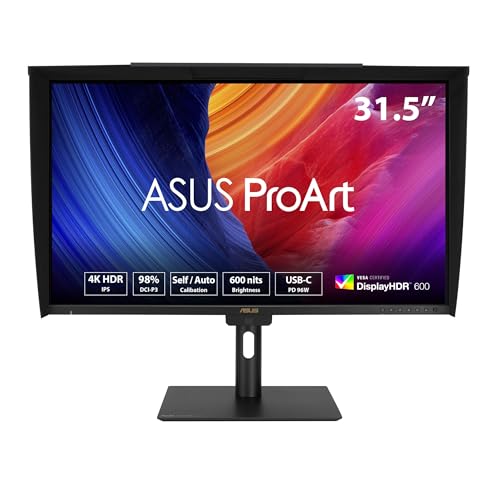
- 32-inch 4K panel with 600 nits brightness
- 98% DCI-P3, 100% sRGB, Delta E < 1
- Built-in motorized colorimeter and USB-C 96W
Best For: color-critical editors who want a larger screen with built-in calibration
Balanced WQHD Editing Monitor
ASUS ProArt 27-inch WQHD monitor

- 27-inch WQHD IPS panel with 75Hz refresh
- 100% sRGB/Rec.709, Calman Verified, Delta E < 2
- DisplayPort, HDMI, DVI, and USB hub
Best For: editors who want accurate color and a comfortable WQHD workspace
Reference-Calibrated 27-inch ProArt
ASUS ProArt PA27UCGE 27" 4K HDR Monitor
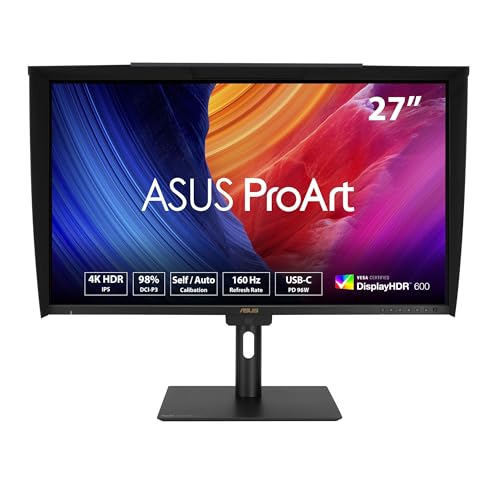
- Built-in motorized colorimeter
- 98% DCI-P3, Delta E < 1
- USB-C 96W and Auto KVM
Best For: Editors who want a calibrated desktop monitor with broad color coverage
Portable SDI Video Monitor
ASUS ProArt PA16USV 15.6" 4K HDR SDI Monitor

- 12G-SDI for 4K@60Hz playback
- 100% sRGB and Rec.709 coverage
- Calman Verified, Delta E < 2
Best For: Field editors and on-set crews needing compact SDI monitoring
Main-Desk Color Editing Monitor
ASUS ProArt PA279CRV 27" 4K HDR Monitor

- 99% DCI-P3 and 99% Adobe RGB
- Calman Verified, Delta E < 2
- USB-C 96W with hub and DisplayPort
Best For: Editors who want a calibrated 27-inch 4K desk monitor
6K Workspace Power – LG UltraFine evo 32U990A-S 32" 6K Nano IPS
If you need a professional display for broadcast editing, this 32-inch LG UltraFine evo is built around workspace density and color accuracy. Its 6K resolution, 224 PPI, and Nano IPS Black panel make timelines, text, and fine detail look exceptionally crisp, while Thunderbolt 5 and the built-in USB-C hub simplify a modern multi-device desk.
Best For: Editors and creative teams who want a large 6K monitor with strong color coverage and single-cable connectivity.
Pros:
- 6K resolution with 224 PPI creates a very sharp, expansive editing workspace.
- True 10-bit color with 98% DCI-P3 and 99.5% Adobe RGB supports color-critical work.
- Thunderbolt 5, HDMI 2.1, DisplayPort 2.1, and USB-C offer flexible pro connectivity.
- Built-in KVM and PBP/PIP modes help manage two connected computers efficiently.
Cons:
- 60Hz refresh rate is aimed at professional editing, not high-frame-rate gaming.
- At 32 inches, it needs a fairly deep desk to feel comfortable.
- Premium feature set may be more than casual users need.
The LG’s strength is workflow efficiency: more usable screen space, strong HDR support, and practical ergonomics for long sessions. For editors who want a sharp, reference-style panel with modern I/O, it is a very capable centerpiece.
OLED Reference Control – ASUS ProArt PA27USD 26.5" 4K QD-OLED
For a professional display for broadcast editing where contrast and color precision matter, the ASUS ProArt PA27USD brings a QD-OLED panel with factory calibration, self-calibration, and multiple HDR formats. Its 4K resolution, 99% DCI-P3 coverage, and ΔE < 1 rating are aimed at creators who need dependable image accuracy from session to session.
Best For: Color-sensitive editors, HDR workflows, and studio setups that benefit from OLED contrast and SDI connectivity.
Pros:
- QD-OLED panel with 1000 nits peak brightness and VESA DisplayHDR True Black 400.
- ΔE < 1 accuracy, hardware calibration, and integrated self/auto calibration support reliable color.
- 12G SDI handles 4K@60Hz real-time playback without compression.
- Dual Thunderbolt 4, HDMI 2.1, DisplayPort 2.1, and built-in USB hub give it broad connectivity.
Cons:
- 26.5-inch size is smaller than many reference-style editing monitors.
- OLED panels may not suit every static UI-heavy workflow equally well.
- Higher-end feature set may push it beyond basic editing needs.
This is a strong pick when image fidelity is the priority and you want advanced HDR support plus studio-oriented inputs. The included hood, calibration features, and long warranty add practical value for serious production use.
Big 6K Editing Hub – LG UltraFine evo 32U990A-S 32-Inch 6K Thunderbolt 5
This LG UltraFine evo is designed as a professional display for broadcast editing with a focus on sharpness, color depth, and simple one-cable workflows. The 32-inch 6K panel, 224 PPI density, and Nano IPS Black technology give editors a spacious canvas for timelines, source monitors, and detailed finishing work.
Best For: Creative professionals who want a 6K monitor with deep contrast, wide color support, and Thunderbolt 5.
Pros:
- 6K resolution and 224 PPI deliver over 21 million pixels and 156% more pixels than 4K.
- Real 10-bit color with up to 99.5% Adobe RGB and 98% DCI-P3 supports color-critical tasks.
- Thunderbolt 5 with 96W power delivery, daisy chaining, and DisplayPort 2.1 streamline setups.
- DisplayHDR 600 and 2000:1 contrast improve highlight and shadow detail.
Cons:
- 60Hz refresh rate is oriented toward editing, not fast-motion gaming.
- Large 32-inch size may be more monitor than some desktop setups need.
- No standout calibration features are listed like on some ProArt alternatives.
For editors who want maximum screen real estate and a clean Thunderbolt-centric workstation, this LG makes a strong case. It combines high-resolution detail with practical connectivity that fits modern Mac and Windows production rigs.
Calibrated 6K Studio Panel – ASUS ProArt PA32QCV 32" 6K IPS
If you are shopping for a professional display for broadcast editing, the ASUS ProArt PA32QCV focuses on calibrated color, 6K detail, and studio-friendly connectivity. Its 31.5-inch 6016 x 3384 IPS panel, Delta E < 2 rating, and DisplayHDR 600 support make it well suited for editing, grading, and finishing work.
Best For: Editors and colorists who want a calibrated 6K IPS monitor with Mac-friendly workflow features.
Pros:
- 6K resolution on a 31.5-inch panel creates a very detailed editing workspace.
- 98% DCI-P3 and 100% sRGB with Calman Verified calibration support accurate color.
- Dual Thunderbolt 4 with up to 96W Power Delivery plus HDMI 2.1 and DisplayPort 1.4 add flexibility.
- Auto KVM, ambient and backlight sensors, and ergonomic adjustments help in multi-device studio setups.
Cons:
- 60Hz refresh rate is aimed at production work rather than high-refresh use.
- Response time is modest compared with faster gaming-focused panels.
- Best color workflow features are most compelling for Mac or pro studio environments.
This monitor stands out for its balance of sharp 6K detail and practical calibration tools. For broadcast editing teams that value consistency and a polished desk setup, it is one of the most purpose-built options here.
Color-Accurate 27-inch 4K Workhorse – ASUS ProArt PA279CV 27-inch 4K monitor
If you need a professional display for broadcast editing, the ASUS ProArt PA279CV is a practical 27-inch 4K option built around accuracy and workflow flexibility. It covers 100% sRGB and 100% Rec. 709, is factory calibrated with Delta E < 2, and includes USB-C with 65W power delivery for a cleaner editing desk.
Best For: Editors who want reliable Rec. 709 and sRGB color in a compact 27-inch 4K monitor.
Pros:
- 100% sRGB and 100% Rec. 709 coverage for color-managed work
- Factory calibrated and Calman Verified with Delta E < 2
- USB-C with 65W Power Delivery plus HDMI, DisplayPort, and USB hub
- 5-year warranty with online registration extension
Cons:
- 60Hz refresh rate is fine for editing, but not aimed at high-frame-rate use
- 27-inch size may feel small for users who prefer a larger grading canvas
This is a well-rounded monitor for editors who want dependable color standards and strong connectivity without moving into a higher-priced reference-class panel. It is especially appealing if you work across laptop and desktop setups and value a simple, accurate 4K screen.
High-Brightness 32-inch Color Control – ASUS ProArt PA32UCE 32-inch 4K monitor
For a professional display for broadcast editing with more room to work, the ASUS ProArt PA32UCE brings a 32-inch 4K panel, 600 nits of brightness, and 98% DCI-P3 coverage. Its built-in motorized colorimeter, self/auto calibration support, and Delta E < 1 target make it a strong fit when consistent color is the priority.
Best For: Color-critical editors who want a larger 32-inch 4K screen with built-in calibration tools.
Pros:
- 32-inch 4K panel with 600 nits and HDR 600 support
- 98% DCI-P3 and 100% sRGB for wide, professional color coverage
- Built-in motorized colorimeter with Calman and ColourSpace CMS support
- USB-C with 96W Power Delivery, plus DisplayPort daisy-chaining, HDMI, and USB hub
Cons:
- Higher-end feature set is more than casual editing setups need
- 60Hz refresh rate is standard rather than fast
This model stands out when you want a larger workspace and deeper calibration features in one display. The mix of high brightness, broad color gamut, and built-in calibration hardware makes it especially compelling for serious post-production monitoring.
Balanced WQHD Editing Monitor – ASUS ProArt 27-inch WQHD monitor
If you want a professional display for broadcast editing without jumping to 4K, this ASUS ProArt 27-inch WQHD monitor offers a useful middle ground. It delivers 100% sRGB and Rec.709, is Calman Verified with Delta E < 2, and adds a 75Hz panel plus ergonomic adjustments for long editing sessions.
Best For: Editors who want accurate color and a sharp 27-inch WQHD workspace at a practical level.
Pros:
- WQHD resolution gives more workspace than standard 1080p
- 100% sRGB and Rec.709 with Calman Verified Delta E < 2 calibration
- USB hub, DisplayPort, HDMI, DVI, and Mini DP support for flexible hookups
- Height, tilt, swivel, and pivot adjustments help with multi-monitor setups
Cons:
- Not a 4K panel, so it offers less detail than the other ProArt options here
- Brightness is 350 nits, which is solid but not class-leading
This is the most balanced pick if you want accurate color and ergonomic flexibility at WQHD resolution. It should suit editors who care more about dependable standards and workflow comfort than maximum pixel density.
Reference-Calibrated 27-inch ProArt – ASUS ProArt PA27UCGE 27" 4K HDR Monitor
If you need a professional display for broadcast editing with strong color control and fast desktop flexibility, the ASUS ProArt PA27UCGE is built for that role. Its 27-inch 4K IPS panel, 98% DCI-P3 coverage, Delta E < 1 accuracy, and built-in colorimeter make it a solid fit for editors who want reliable image evaluation and frequent calibration.
Best For: Color-conscious editors and post-production workflows that need a calibrated 4K reference-style monitor with broad connectivity.
Pros:
- Built-in motorized colorimeter supports self and auto calibration.
- 4K IPS panel with 98% DCI-P3 and 100% sRGB coverage.
- Delta E < 1 accuracy helps keep color checks dependable.
- USB-C with 96W power delivery, DisplayPort, HDMI, and Auto KVM.
Cons:
- 60 Hz reference workflow users may not need the 160 Hz refresh rate.
- 27-inch size is less portable than smaller field monitors.
This is a strong choice if you want a desk-based pro display that combines serious calibration tools with modern connectivity. The extra calibration hardware and Auto KVM features make it especially practical for mixed Mac/PC editing setups.
Portable SDI Video Monitor – ASUS ProArt PA16USV 15.6" 4K HDR SDI Monitor
If your version of a professional display for broadcast editing needs to travel between set, client review, and edit bay, the ASUS ProArt PA16USV is designed for that workflow. The 15.6-inch 4K IPS panel, 100% sRGB/Rec.709 coverage, and Calman Verified factory calibration give it the color credentials expected for video work, while 12G-SDI support makes live 4K@60Hz playback straightforward.
Best For: Video editors and field crews who need a compact 4K monitor with SDI input and Rec.709 coverage.
Pros:
- 12G-SDI input supports real-time 4K@60Hz playback.
- 100% sRGB and 100% Rec.709 coverage fit video-focused work.
- Factory calibrated and Calman Verified to Delta E < 2.
- Compact 15.6-inch size with mini stand and kickstand options.
Cons:
- 15.6-inch screen is small for full desktop editing sessions.
- USB-C power delivery is limited to 7.5W.
Compared with larger studio monitors, this model trades screen real estate for portability and SDI flexibility. That makes it especially useful when you need a dependable color-managed monitor in locations where broadcast-style connections matter.
Main-Desk Color Editing Monitor – ASUS ProArt PA279CRV 27" 4K HDR Monitor
For a professional display for broadcast editing at a main workstation, the ASUS ProArt PA279CRV focuses on the essentials: 4K resolution, wide-gamut color, and factory calibration. With 99% DCI-P3 and 99% Adobe RGB coverage plus Delta E < 2 accuracy, it is a practical choice for editors who want dependable color without stepping into more specialized hardware.
Best For: Editors and content creators who want a calibrated 27-inch 4K monitor with strong color coverage.
Pros:
- 27-inch 4K IPS panel gives plenty of space for timelines and panels.
- 99% DCI-P3 and 99% Adobe RGB support color-managed workflows.
- Calman Verified and factory pre-calibrated to Delta E < 2.
- USB-C with 96W power delivery plus DisplayPort, HDMI, and USB hub.
Cons:
- 60 Hz refresh rate is aimed at editing, not motion-heavy use.
- It lacks the built-in colorimeter found on some higher-end ProArt models.
This monitor is a balanced pick for editors who want a straightforward, color-accurate display on the desk. It offers a strong mix of gamut coverage, calibration, and connectivity for everyday post-production work.
How We Picked the Best Professional Display for Broadcast Editing
We focused on monitors that make sense for broadcast and post workflows: strong factory calibration, wide gamut coverage for Rec. 709 and DCI-P3, dependable panel quality, and features that reduce setup friction in real edit bays. We also favored models with modern input options, USB-C or Thunderbolt connectivity, and resolutions that support clean timeline work and detailed image review.
Quick Comparison
For most color-critical suites, 4K remains the sweet spot because it offers detail without demanding extreme GPU overhead. 6K models are best for editors who want more workspace, sharper scaling, or future-proofing. OLED options are excellent for contrast and black level performance, while IPS models are still the safer choice for long sessions and consistent screen behavior across a team environment.
Key Buying Factors for a Professional Display for Broadcast Editing
Color Accuracy and Calibration
Look for low Delta E ratings, Calman verification, or hardware calibration support. For broadcast work, accurate Rec. 709 performance matters most, while DCI-P3 and Adobe RGB support help if your projects also cross into digital cinema or print-adjacent workflows.
Resolution and Screen Size
A larger panel with 4K or 6K resolution gives you more room for scopes, bins, and timeline detail. If your work is mostly SDR broadcast delivery, a well-tuned 27-inch 4K display can be ideal. For premium suites, 32-inch 6K panels offer a more expansive editing experience.
Panel Type and HDR Behavior
IPS displays are a reliable default for shared studios and long-form editing. OLED can deliver exceptional contrast and dark-scene evaluation, but teams should weigh burn-in considerations and workflow needs. HDR support is useful, but only if the monitor’s peak brightness, tone mapping, and validation are suitable for your delivery targets.
Connectivity and Workflow Features
Thunderbolt, USB-C, HDMI 2.1, SDI, and built-in USB hubs all matter in different studio setups. A good Professional Display for Broadcast Editing should minimize adapters, support stable device connections, and make it easy to move between laptops, workstations, and review sources.
Who Should Buy Which Professional Display for Broadcast Editing?
Choose a 27-inch 4K model if you want a dependable all-around editing monitor at a more approachable size. Step up to a 32-inch 6K display if you need more workspace and sharper detail for finishing. Pick OLED if contrast and HDR evaluation are top priorities. Choose SDI-equipped or ultra-portable models if your broadcast environment involves live monitoring, field use, or camera-assist workflows.
In short, the best monitor for you depends on whether you value color precision, screen real estate, HDR performance, or connectivity versatility most. The models in this roundup cover the strongest combinations for modern broadcast editing teams.