
Choosing the right display can make a major difference in animation work, especially when color accuracy, detail, and consistency matter across every frame.
This roundup focuses on screens built for creative professionals who need dependable performance for layout, cleanup, compositing, and review.
Best 10 Professional Display for Animation Picks for 2026
Premium Pen Display for Animation

- 27-inch 4K display with 99% Adobe RGB and 98% DCI-P3
- 120Hz refresh rate for smoother drawing and motion
- Wacom Pro Pen 3 with 8,192 pressure levels
Best For: Animators and illustrators needing a premium pen display
Reference-Grade OLED for Animation

- 26.5-inch QD-OLED panel with 240Hz and 0.1ms response
- ΔE < 1 color accuracy with hardware calibration
- Dual Thunderbolt 4, HDMI 2.1, and DisplayPort 2.1
Best For: Studios and creators needing calibrated HDR-ready OLED
Mac-Friendly Creative Display

- 27-inch 4K monitor tuned for MacBook color
- Single USB-C setup with 90W power delivery
- Height, tilt, swivel, and pivot adjustments
Best For: MacBook users wanting a simple color-matched 4K monitor
High-End Pro Monitor for Animation

- 27-inch 4K QD-OLED with 240Hz and 0.1ms response
- 99% DCI-P3 with ΔE < 1 calibration support
- Dual Thunderbolt 4 ports with up to 96W power delivery
Best For: Professional animators needing fast OLED and precise color
Calibrated 27-Inch Creator Pick
ASUS ProArt PA278QV 27-inch QHD IPS

- Delta E < 2 with Calman Verified accuracy
- 100% sRGB and Rec. 709 coverage
- USB hub and flexible ergonomic stand
Best For: Color-critical 2D animation and editing on a 27-inch 1440p screen
Studio-Grade 4K Calibration Choice
ASUS ProArt PA32UCE 32-inch 4K HDR
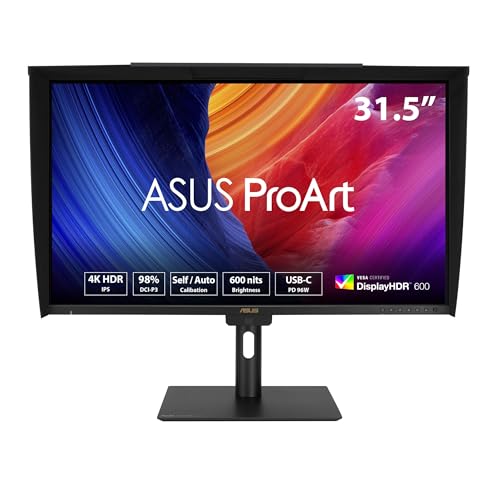
- Built-in motorized colorimeter for calibration
- Delta E < 1 with 98% DCI-P3 coverage
- USB-C 96W, daisy-chaining, and HDR 600
Best For: Studios that need a large 4K professional display with built-in calibration
Smooth Creator Display With Accurate Color
ASUS ProArt PA278CGRV 27-inch 144Hz QHD

- 144Hz IPS panel for smoother previews and navigation
- Calman Verified with Delta E < 2 accuracy
- USB-C 96W, Auto KVM, and ergonomic stand
Best For: Creators who want a professional display for animation with extra motion smoothness
Color-Accurate All-Rounder
ASUS ProArt PA279CV 27” 4K USB-C Monitor

- 100% sRGB and 100% Rec. 709 coverage
- Factory calibrated, Calman Verified, Delta E < 2
- USB-C 65W, DisplayPort, HDMI, and USB hub
Best For: Animators needing accurate sRGB/Rec.709 color and easy USB-C setup
High-Refresh Calibration Pro
ASUS ProArt PA27UCGE 27” 4K 160Hz Monitor
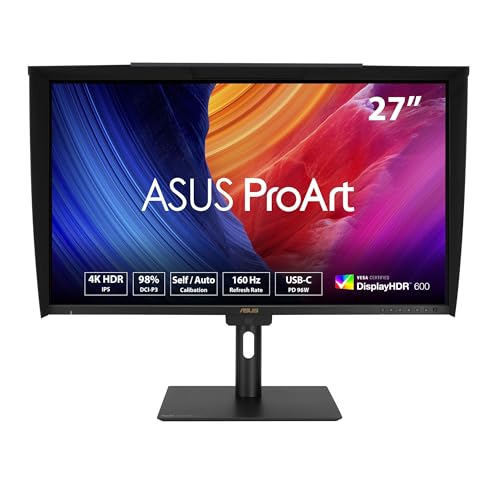
- 98% DCI-P3, 100% sRGB, Delta E < 1
- Built-in motorized colorimeter for calibration
- 160Hz 4K IPS with USB-C 96W and Auto KVM
Best For: Motion-heavy animation teams wanting elite calibration and smoother playback
Wide-Gamut Studio Pick
ASUS ProArt PA279CRV 27” 4K Adobe RGB Monitor

- 99% DCI-P3 and 99% Adobe RGB coverage
- Calman Verified with Delta E < 2 calibration
- USB-C 96W, DisplayPort, HDMI, and ergonomic stand
Best For: Creators needing wide-gamut color and accurate factory calibration
Premium Pen Display for Animation – Wacom Cintiq Pro 27
If you want a professional display for animation that feels built for hands-on drawing and cleanup work, the Wacom Cintiq Pro 27 is aimed squarely at that use case. Its 27-inch 4K screen, 120Hz refresh rate, and Wacom Pro Pen 3 make it a strong fit for long creative sessions where pen accuracy and smooth motion matter.
Best For: Animators, illustrators, and 3D artists who want a large pen display with top-tier color and customizable workflow controls.
Pros:
- 4K UHD 27-inch display with 99% Adobe RGB and 98% DCI-P3 for color-critical work
- 120Hz refresh rate helps motion and pen interaction feel smoother
- Wacom Pro Pen 3 offers 8,192 pressure levels and customizable grips/balance
- 8 ExpressKeys, multi-touch, and gesture support help streamline animation workflows
Cons:
- Requires a serious workspace due to its 27-inch size and 15.9-pound weight
- Best value is mainly for users who will use the pen display features heavily
- Some workflow extras depend on setup and accessory use
This is a flagship-style pen display for artists who prioritize drawing feel, calibration-friendly color, and customizable shortcuts over simplicity. If your animation work benefits from a large interactive canvas, it stands out as a premium choice.
Reference-Grade OLED for Animation – ASUS ProArt PA27USD
For a professional display for animation where color precision and HDR performance matter, the ASUS ProArt PA27USD brings a lot to the table. Its 26.5-inch QD-OLED panel, 240Hz refresh rate, and factory-level calibration features make it well suited to animation review, color checking, and high-end creative production.
Best For: Animators, color-focused creators, and studios that need fast OLED motion with strong HDR and calibration tools.
Pros:
- QD-OLED 4K panel with 240Hz refresh rate and 0.1ms response time
- World-leading ΔE < 1 color accuracy with hardware calibration and color profile write-back
- Supports Dolby Vision, HLG, and HDR10 for HDR-capable workflows
- Dual Thunderbolt 4 ports, HDMI 2.1, DisplayPort 2.1, and built-in USB hub
Cons:
- At 26.5 inches, it is smaller than some other large-format creative monitors
- Advanced features may be more than casual users need
- Premium positioning makes it most appealing to demanding professional workflows
This monitor is built for creators who care about calibration, contrast, and HDR-ready image quality as much as refresh rate. For animation and finishing work, it offers a very capable mix of speed and reference-level color tools.
Mac-Friendly Creative Display – BenQ MA270UP
If your animation setup centers on a MacBook, the BenQ MA270UP is a practical professional display for animation that focuses on easy connectivity and color matching. Its 27-inch 4K panel, P3 wide color gamut, and single-cable USB-C workflow make it a straightforward desk upgrade for Mac-based creative work.
Best For: MacBook Pro and Air users who want a simple 4K monitor with wide-gamut color and convenient USB-C power.
Pros:
- Calibrated for MacBook with BenQ color tuning and P3 wide color gamut
- Single USB-C connection supports display and expansion
- Dual USB-C ports provide 90W power delivery plus 15W charging for iPad or iPhone
- Height, tilt, swivel, and pivot adjustments improve desk ergonomics
Cons:
- 60Hz refresh rate is less suited to motion-heavy creative tasks than faster panels
- Designed primarily around MacBook compatibility, so it is less universal than other options
- Not positioned as a pen display for direct drawing
The MA270UP is a smart pick if you want an uncomplicated color-rich monitor for Mac-based animation prep, review, and general creative production. It is more about comfort and integration than high-end motion specs.
High-End Pro Monitor for Animation – ASUS ProArt PA27UCDMR
The ASUS ProArt PA27UCDMR is a professional display for animation aimed at creators who want OLED contrast, fast motion handling, and color tools in one monitor. Its 27-inch 4K QD-OLED panel, 240Hz refresh rate, and calibration support make it a strong fit for animation review, editing, and precision visual work.
Best For: Professional animators and video-focused creators who want fast OLED performance with strong color accuracy.
Pros:
- 4K QD-OLED panel with 240Hz refresh rate and 0.1ms response time
- 99% DCI-P3 coverage with ΔE < 1 color performance and ProArt hardware calibration
- Supports Dolby Vision, HLG, and HDR10 for HDR workflows
- Dual Thunderbolt 4 ports with up to 96W power delivery and built-in USB hub
Cons:
- OLED and professional calibration features may be more than basic users need
- Only one HDMI port and one USB-C data port are listed in the specs
- Premium feature set is focused on demanding creative pipelines
For animators who need sharp motion, deep contrast, and accurate color handling, this ProArt model checks the right boxes. It is especially compelling if your workflow includes HDR content or frequent calibration.
Calibrated 27-Inch Creator Pick – ASUS ProArt PA278QV 27-inch QHD IPS
If you want a professional display for animation, the ASUS ProArt PA278QV is built around dependable color accuracy and a clean 27-inch QHD workspace. Its Calman Verified tuning, Delta E < 2 calibration, and 100% sRGB / Rec. 709 coverage make it a practical pick for motion graphics, illustration, and video-focused creative work where consistency matters.
Best For: Animators and designers who need a reliable, color-accurate 1440p monitor for everyday creative work.
Pros:
- Calman Verified with Delta E < 2 for accurate out-of-box color
- 27-inch WQHD IPS panel gives plenty of room for timelines and tools
- 100% sRGB and 100% Rec. 709 suit digital media and video workflows
- Includes extensive connectivity plus a USB hub for a tidy desk
Cons:
- 75Hz refresh rate is modest compared with faster creator displays
- Not a 4K panel if you need the highest pixel density
- Brightness is solid at 350 nits, but not the strongest in this group
Overall, this model is a strong value if your priority is trustworthy color and a practical size rather than premium resolution or speed. It fits well in a focused creative setup where accuracy and flexibility matter most.
Studio-Grade 4K Calibration Choice – ASUS ProArt PA32UCE 32-inch 4K HDR
For a professional display for animation where detail and color control are top priorities, the ASUS ProArt PA32UCE stands out with 32-inch 4K UHD resolution, 600 nits of brightness, and industry-leading Delta E < 1 accuracy. The built-in motorized colorimeter, Calman Ready support, and ASUS Light Sync sensors make it especially well suited to studios that want consistent results across long projects.
Best For: Studio animators and color-focused creators who want a large 4K monitor with built-in calibration tools.
Pros:
- 32-inch 4K IPS panel with 600 nits and HDR 600 support
- Delta E < 1 plus 98% DCI-P3 and 100% sRGB coverage
- Built-in motorized colorimeter supports self, auto, and professional calibration
- USB-C with 96W power delivery and daisy-chaining improve workstation flexibility
Cons:
- 60Hz refresh rate is aimed at creation, not fast-motion use
- Large 32-inch footprint needs more desk space
- Premium calibration features make it more specialized than a basic monitor
This is the most advanced calibration-first option in the group, and it makes sense when accuracy has to be repeatable across production work. If your animation workflow benefits from 4K detail and built-in color management, it is the most studio-oriented choice here.
Smooth Creator Display With Accurate Color – ASUS ProArt PA278CGRV 27-inch 144Hz QHD
The ASUS ProArt PA278CGRV is a practical professional display for animation if you want accurate color without giving up smoother motion. Its 27-inch QHD IPS panel, Calman Verified factory calibration, 97% DCI-P3 coverage, and 144Hz refresh rate make it a strong all-rounder for creators who also value comfortable viewing during fast previews or timeline scrubbing.
Best For: Animators and creator workflows that want color accuracy plus a faster 144Hz panel.
Pros:
- Calman Verified with Delta E < 2 factory calibration
- 144Hz refresh rate adds smoother motion and easier viewing
- USB-C with 96W PD, HDMI, DisplayPort, and USB hub support modern setups
- Ergonomic stand, Auto KVM, and Light Sync add everyday convenience
Cons:
- QHD resolution is less detailed than a 4K creator monitor
- 400 nits brightness is good, but below the brightest professional panels
- DisplayHDR 400 is more modest than higher HDR tiers
Compared with more traditional color-focused monitors, this one adds noticeably better refresh performance while keeping creator-friendly color specs. It is a smart fit if your animation workflow includes both design accuracy and a smoother-feeling screen experience.
Color-Accurate All-Rounder – ASUS ProArt PA279CV 27” 4K USB-C Monitor
If you want a professional display for animation that prioritizes reliable color and everyday workflow convenience, the ASUS ProArt PA279CV is a strong fit. Its 27-inch 4K IPS panel, factory calibration, and Delta E < 2 accuracy make it practical for animation cleanup, color-sensitive review, and general content creation.
Best For: Animators and creators who want a dependable 4K monitor with accurate sRGB/Rec. 709 color and simple USB-C connectivity.
Pros:
- 100% sRGB and 100% Rec. 709 wide color gamut
- Factory calibrated and Calman Verified with Delta E < 2
- USB-C with 65W power delivery plus DisplayPort, HDMI, and USB hub
- 5-year warranty with online registration extension
Cons:
- 60Hz refresh rate is modest compared with higher-refresh options
- Color coverage is tuned more toward sRGB/Rec.709 than wider cinema gamuts
For animation work that leans on accurate color and a straightforward desk setup, this ProArt model covers the essentials well. It is less about flashy specs and more about dependable results, which is often what matters most in a production workflow.
High-Refresh Calibration Pro – ASUS ProArt PA27UCGE 27” 4K 160Hz Monitor
For a professional display for animation that also handles smooth motion and advanced calibration, the ASUS ProArt PA27UCGE stands out. It combines a 4K IPS panel, built-in motorized colorimeter, and Delta E < 1 color accuracy with a 160Hz refresh rate for a more fluid desktop and timeline experience.
Best For: Motion-focused animators and studio users who want premium calibration tools, wide-gamut color, and high refresh performance.
Pros:
- 98% DCI-P3 and 100% sRGB with Delta E < 1 accuracy
- Built-in motorized colorimeter for self/auto calibration
- 160Hz 4K IPS panel with 1ms response time
- USB-C with 96W power delivery, plus DisplayPort daisy-chaining and Auto KVM
Cons:
- More feature-rich than many users need for simple color review
- Premium calibration and high-refresh specs may come at a higher cost
This model is the most advanced option in the group if you want both color management and smoother motion handling. It is especially appealing for animation professionals who value built-in calibration and a monitor that can keep up with fast-moving workflows.
Wide-Gamut Studio Pick – ASUS ProArt PA279CRV 27” 4K Adobe RGB Monitor
If your search for a professional display for animation includes wider-gamut color work, the ASUS ProArt PA279CRV is a well-balanced choice. It offers 4K resolution, 99% DCI-P3 and 99% Adobe RGB coverage, and Calman Verified factory calibration, making it suitable for creators who need stronger color breadth without moving into a more specialized setup.
Best For: Animation artists and content creators who want wide-gamut color coverage with accurate, ready-to-use calibration.
Pros:
- 99% DCI-P3 and 99% Adobe RGB coverage
- Calman Verified with factory pre-calibrated Delta E < 2 accuracy
- USB-C 96W power delivery plus DisplayPort, HDMI, and USB hub
- Ergonomic stand with tilt, swivel, pivot, and height adjustment
Cons:
- 60Hz refresh rate may not appeal to users wanting higher motion smoothness
- Less specialized than the PA27UCGE for built-in calibration and high-refresh workflows
This is a practical wide-gamut monitor for animation workflows where color range matters as much as accuracy. It gives you strong Adobe RGB support, good ergonomics, and a clean feature set that fits a studio desk well.
How We Picked the Best Professional Display for Animation
We selected models that are well suited to animation pipelines, prioritizing color accuracy, resolution, panel quality, connectivity, and calibration support. For a Professional Display for Animation, the most important factor is not just sharpness, but how reliably the screen shows your work from one session to the next.
We also considered practical studio use, including USB-C workflows, wide-gamut coverage, hardware calibration, ergonomic support, and whether the display is a traditional monitor or a pen display for direct illustration.
Quick Comparison
In simple terms, 4K models are ideal for precise timeline work, clean line review, and detailed color correction, while QHD options can offer a strong balance of performance and value. OLED and QD-OLED panels can deliver excellent contrast and deep blacks, but IPS displays remain a dependable choice for consistent viewing and broad compatibility.
If your workflow includes drawing directly on screen, a pen display stands apart. If you mainly animate in software and need a reference or production monitor, prioritize calibration, uniformity, and a panel that matches your delivery color space.
Key Buying Factors for a Professional Display for Animation
Resolution and Screen Size
Animation work benefits from more screen real estate and finer detail. A 27-inch 4K display is a common sweet spot, while 32-inch 4K models can make timelines, toolbars, and reference windows easier to manage.
Color Accuracy and Gamut
Look for strong coverage of sRGB, Rec. 709, Adobe RGB, or DCI-P3 depending on your deliverables. Low Delta E values and factory calibration are especially valuable when color needs to stay consistent across production stages.
Calibration and Uniformity
Hardware or self-calibration helps preserve accuracy over time. For Professional Display for Animation use, this matters because even small shifts can affect paint work, compositing, and client review.
Connectivity and Ergonomics
USB-C with power delivery can reduce cable clutter, especially for laptop-based artists. Adjustable stands, pivot support, and easy-access OSD controls also improve long-session comfort and workflow speed.
Who Should Buy Which Professional Display for Animation?
Choose a pen display if you want direct-on-screen drawing and storyboard-style interaction. Choose a color-critical 4K monitor if you need a reliable reference display for animation production, editing, and review. Choose a higher-refresh professional monitor if you also do motion-heavy work, such as gaming visuals, motion graphics, or real-time previews.
If you are building a studio setup from scratch, start with the display that matches your main output format and color standard. That will usually deliver more value than chasing the highest refresh rate or the largest panel alone.