
If you’re building local inference systems, the right hardware can make all the difference. An AI accelerator for edge computing helps you run models closer to the data for lower latency, better privacy, and reduced cloud dependence.
In this roundup, we focus on practical options for Raspberry Pi, embedded boards, and developer-friendly edge setups so you can choose hardware that fits your performance goals and software stack.
Best 10 AI Accelerator for Edge Computing Picks for 2026
Raspberry Pi 5 AI Bundle
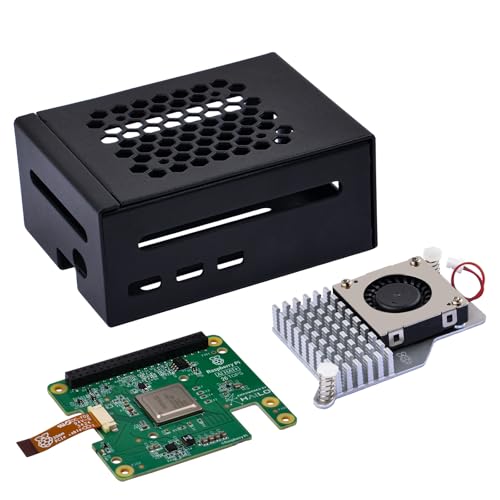
- AI HAT+ bundle for Raspberry Pi 5
- 26 TOPS Hailo accelerator for edge AI
- Includes metal case and active cooler
Best For: Raspberry Pi 5 owners wanting a bundled AI accelerator with cooling
Open-Source Edge SBC

- Built-in 5-TOPS Neuro Accelerator
- Open-source AI stack with Debian and Fedora support
- Long-term hardware and software support focus
Best For: Developers who prioritize open-source support and long product lifecycles
Pi 5 AI HAT+ Option

- 13/26 TOPS AI HAT+ for Raspberry Pi 5
- TensorFlow and PyTorch framework support
- Camera stack integration for AI post-processing
Best For: Pi 5 builders who want framework support and camera stack integration
Edge AI Learning Pick

- Covers embedded inference and on-device optimization
- Explains quantization and model compression methods
- Focuses on constrained edge-device deployment
Best For: Engineers learning practical edge AI deployment techniques
Raspberry Pi 5 Edge AI Upgrade
Hailo-8 M.2 AI Accelerator Module

- 26 TOPS Hailo-8 AI processor
- 2.5W typical power consumption
- Supports Linux, Windows, and major AI frameworks
Best For: Raspberry Pi 5 edge AI inference builds
Technical Guide Pick

- Focuses on optimizing embedded AI models
- Covers quantization, pruning, and memory limits
- Useful for planning low-latency edge deployments
Best For: Engineers tuning edge AI hardware and models
Low-Power Pi 5 Inference Module

- 26 TOPS Hailo-8 processor for edge inference
- 2.5W typical power use
- PCIe Gen3 x4 with Linux and Windows support
Best For: Compact Raspberry Pi 5 edge AI projects
Edge AI Infrastructure Guide
Real-Time Intelligence for Industry

- Explains edge AI with 5G and distributed systems
- Covers inference optimization for constrained hardware
- Includes security and rollout practices for production
Best For: Teams planning industrial, healthcare, or smart infrastructure deployments
USB Edge TPU Accelerator

- Up to 4 TOPS Edge TPU inference at low power
- USB 3.0 Type-C and Debian Linux compatible
- Works with TensorFlow Lite and AutoML Vision Edge
Best For: Raspberry Pi and Debian Linux users adding local ML inference
Hands-On Edge AI Projects

- Shows how to deploy ML on Raspberry Pi and local devices
- Includes five complete projects with setup and troubleshooting
- Covers optimization tools like TensorFlow Lite, ONNX, and quantization
Best For: Hands-on builders learning practical edge AI deployment
Raspberry Pi 5 AI Bundle – GeeekPi Hailo 26 TOPS Kit
If you want an AI accelerator for edge computing that plugs neatly into a Raspberry Pi 5 setup, this GeeekPi kit is built for practical deployment. It combines the AI HAT+, a metal case, and an active cooler, so it is aimed at users who want acceleration plus basic protection and thermal support in one package.
Best For: Raspberry Pi 5 users who want an all-in-one AI HAT+ kit with cooling and a protective case.
Pros:
- Includes the AI HAT+, metal case, and active cooler in one bundle
- 26 TOPS Hailo accelerator supports tasks like object detection, segmentation, and pose estimation
- Uses Raspberry Pi 5 PCIe Gen 3 and is automatically detected on updated Raspberry Pi OS
- Case keeps access to major ports while helping protect the board from dust and scratches
Cons:
- Built specifically for Raspberry Pi 5, so it is not a general-purpose accelerator
- Requires an up-to-date Raspberry Pi OS image for automatic detection and support
Overall, this is a sensible choice if you want an edge AI add-on that is close to plug-and-play on Raspberry Pi 5 and includes the accessories needed to keep temperatures under control. It is best suited to users who value convenience and compatibility over platform flexibility.
Open-Source Edge SBC – Libre Computer Alta AI SBC
For buyers comparing an AI accelerator for edge computing at the board level, the Libre Computer Alta is positioned as a full single-board computer with a 5-TOPS Neuro Accelerator built in. It is designed around upstream open-source support, Debian and Fedora images, and long-term hardware and software availability for development work that needs a stable platform.
Best For: Developers who want an open-source SBC with built-in AI acceleration and long-term support.
Pros:
- Built-in 5-TOPS Neuro Accelerator for real-time audio and video processing
- Upstream open-source AI stack with support for Debian and Fedora images
- Long-term hardware and software support is emphasized for extended development cycles
- Includes broad Linux distribution support and GPIO/I2C/SPI/PWM tooling
Cons:
- Lower accelerator throughput than the 26 TOPS Raspberry Pi HAT+ options in this roundup
- Less of a drop-in add-on, since it is a full SBC rather than an accessory
This is a good fit if your edge AI project benefits from a self-contained SBC with open-source tooling and long support horizons. It is less about maximum accelerator wattage and more about platform control, software transparency, and sustained development use.
Pi 5 AI HAT+ Option – Yahboom 13TOPS AI HAT+
If you need an AI accelerator for edge computing on a Raspberry Pi 5, this Yahboom AI HAT+ focuses on compact add-on acceleration with 13/26 TOPS variants. It is built to work with common frameworks like TensorFlow and PyTorch, and it is integrated into the Pi camera software stack for tasks such as object detection, image segmentation, and pose estimation.
Best For: Raspberry Pi 5 users who want a stackable AI HAT+ with framework support and camera integration.
Pros:
- Offers 13/26 TOPS performance options for edge AI workloads
- Supports TensorFlow and PyTorch for building AI-driven applications
- Fully integrated with Raspberry Pi camera software for post-processing tasks
- Supports stacking installation and use with heatsinks or active cooling
Cons:
- Designed for Raspberry Pi 5, so it is not a standalone platform
- Cooling is recommended for high-load computing, adding setup consideration
As an edge AI add-on, this model makes sense if you want a Pi 5-compatible accelerator that can slot into an existing camera or inference project. Its main appeal is flexibility across popular frameworks and tight integration with the Raspberry Pi software stack.
Edge AI Learning Pick – TinyML Deployment Guide
If you are researching an AI accelerator for edge computing, this book is a technical guide rather than hardware. It covers TinyML, embedded inference, and on-device optimization, with a focus on deploying models on resource-constrained endpoints where memory, latency, and power budgets matter.
Best For: Engineers and developers learning how to deploy and optimize AI on constrained edge devices.
Pros:
- Covers quantization, operator fusion, and other model-shrinking techniques
- Includes deployment patterns for ARM Cortex-M, NPUs, and FPGA fabric
- Discusses TensorFlow Lite Micro, ONNX Runtime, and microTVM workflows
- Addresses power management, OTA updates, and production reliability concerns
Cons:
- Not a physical accelerator or SBC, so it does not add hardware performance directly
- Geared toward technical readers who want engineering depth over quick setup
This is a strong supporting pick if your goal is to understand how edge AI systems are built, optimized, and maintained in production. It pairs well with hardware shopping by helping you evaluate what an accelerator can actually do at the edge.
Raspberry Pi 5 Edge AI Upgrade – Hailo-8 M.2 AI Accelerator Module
If you need an AI accelerator for edge computing that can turn a Raspberry Pi 5 into a much stronger inference box, this Hailo-8 M.2 module is built for exactly that job. It uses a 26 TOPS Hailo-8 processor, low 2.5W typical power, and PCIe/M.2 connectivity to deliver real-time, low-latency AI processing on compact devices.
Best For: Raspberry Pi 5 users building low-power edge AI inference setups.
Pros:
- 26 TOPS of AI performance for edge inference workloads
- 2.5W typical power consumption suits compact, low-power builds
- Supports TensorFlow, TensorFlow Lite, ONNX, Keras, and PyTorch
- Linux and Windows support adds flexibility for different setups
Cons:
- Made specifically for Raspberry Pi 5, so compatibility is limited
- Requires PCIe to M.2 hardware integration
- Best fit is inference, not general-purpose GPU-style computing
Overall, this is a practical upgrade if your edge computing project needs efficient local AI processing without a big power draw. The combination of multi-framework support, broad temperature tolerance, and Raspberry Pi 5 compatibility makes it a focused option for embedded AI builds.
Technical Guide Pick – Edge AI Architecture
Edge AI Architecture: Optimizing Embedded Models for High-Throughput, Low-Latency Edge Computing
Check Price On AmazonFor buyers comparing an AI accelerator for edge computing, this book is a useful technical guide rather than a hardware add-on. It focuses on how to optimize embedded models for high-throughput, low-latency edge systems, covering topics like quantization, pruning, memory bottlenecks, and hardware-specific deployment choices.
Best For: Engineers and architects planning or tuning edge AI systems.
Pros:
- Covers PTQ, QAT, and structured pruning for model optimization
- Addresses latency, throughput, and thermal limits in edge systems
- Includes memory optimization topics like zero-copy and KV caching
- Discusses edge hardware landscapes including Jetson, Apple Silicon, and OpenVINO
Cons:
- It is a book, not a physical accelerator module
- Publication date is listed as December 27, 2025
- Best suited to technical readers rather than casual buyers
This is best viewed as a planning resource for designing better edge AI deployments, not as a device you install. If you want guidance on making constrained hardware run efficiently, the detailed systems-focused approach should be helpful.
Low-Power Pi 5 Inference Module – Hailo-8 AI M.2 Module
This Hailo-8 module is another strong AI accelerator for edge computing if your goal is to add efficient inference capability to a Raspberry Pi 5. It pairs the 26 TOPS Hailo-8 processor with PCIe Gen3 x4 connectivity and 2.5W typical power use, making it a straightforward fit for compact edge AI builds that need local processing.
Best For: Raspberry Pi 5 projects that need a compact, low-power AI inference add-on.
Pros:
- 26 TOPS performance supports real-time edge inference
- 2.5W typical power consumption helps keep builds efficient
- PCIe Gen3 4-lane connectivity fits high-speed integration
- Supports Linux, Windows, and common AI frameworks
Cons:
- Designed around Raspberry Pi 5 compatibility
- Focused on inference workloads rather than broad computing tasks
- Requires PCIe-based setup for use
For builders who want efficient local AI performance without overcomplicating the system, this module stays on target. Its low power draw, framework support, and temperature range make it a practical choice for embedded deployments.
Edge AI Infrastructure Guide – Real-Time Intelligence for Industry
If you’re evaluating an AI accelerator for edge computing in industrial or infrastructure settings, this book is a practical guide to how edge AI, 5G, and distributed systems fit together. It focuses on deployment patterns for real-time decision-making, with coverage of model optimization, edge security, and lifecycle management for production environments.
Best For: Software engineers, architects, DevOps teams, and technical leaders building edge-native systems for manufacturing, healthcare, or smart infrastructure.
Pros:
- Covers edge computing, 5G core concepts, and localized AI in one deployment-focused guide
- Includes topics like quantization, pruning, and model compression for constrained hardware
- Addresses practical production concerns such as GitOps, CI/CD, canary rollouts, and zero-trust security
Cons:
- It is a technical book, not a plug-and-play hardware accelerator product
- Best suited to readers who want architectural depth rather than a beginner overview
Overall, this is a strong fit if your buying decision is really about the software and infrastructure side of an AI accelerator for edge computing. It gives you the architecture, optimization ideas, and operational context needed to make edge AI deployments practical at scale.
USB Edge TPU Accelerator – USB ML Accelerator for Linux
Coral G950-06809-01 USB Accelerator: ML Accelerator, USB 3.0 Type-C, Debian Linux Compatible
Check Price On AmazonThis AI accelerator for edge computing is designed for adding fast machine learning inference to existing Linux systems without rebuilding your stack from scratch. The Coral USB Accelerator focuses on practical deployment, with USB 3.0 Type-C connectivity, Debian Linux compatibility, and support for TensorFlow Lite and AutoML Vision Edge.
Best For: Raspberry Pi users, Linux developers, and edge AI builders who need a compact USB-based inference accelerator.
Pros:
- Delivers on-board Edge TPU inference with up to 4 TOPS at low power
- Works with Debian-based Linux systems through included USB 3.0 Type-C connection
- Supports TensorFlow Lite and AutoML Vision Edge for faster model deployment
Cons:
- Focused on inference rather than full training workflows
- Best fit for supported Linux environments, especially Debian-based systems
For buyers who want a compact hardware option to speed up local inference, this Coral accelerator is a very direct choice. Its value is in making edge AI practical on existing devices, especially for vision workloads and lightweight deployed models.
Hands-On Edge AI Projects – Raspberry Pi Deployment Guide
If you’re exploring an AI accelerator for edge computing through hands-on deployment, this book focuses on building working machine learning systems on Raspberry Pi and other local devices. It emphasizes practical setup, model optimization, and real-world projects such as smart cameras, offline assistants, and predictive maintenance monitors.
Best For: Technologists, students, engineers, and hardware enthusiasts who want project-based guidance for local AI on affordable devices.
Pros:
- Provides five complete projects with clear hardware requirements and troubleshooting guidance
- Covers TensorFlow Lite, ONNX, quantization, and model compression
- Includes edge use cases like computer vision, offline speech recognition, and anomaly detection
Cons:
- More of a practical guide than a deep hardware reference for accelerators
- Primarily centered on Raspberry Pi and local devices rather than broader enterprise edge systems
This is a solid option if you want to learn how edge AI gets built and tuned on real hardware. It is especially useful when your goal is to pair local compute with practical projects instead of just comparing specs.
How We Picked the Best AI Accelerator for Edge Computing
We prioritized real-world usability first: supported platforms, driver and software maturity, power and thermal requirements, and whether the accelerator is practical for common edge workloads such as vision, sensor analytics, and TinyML. We also favored devices that are widely discussed in the developer ecosystem and easier to integrate into a compact deployment.
Quick Comparison: What Matters Most
When comparing an AI Accelerator for Edge Computing, the most important differences usually come down to interface and compatibility. USB units are typically the easiest to set up, while PCIe and M.2 options often deliver better throughput and lower overhead. Board-integrated solutions can simplify deployment, but they may lock you into a narrower hardware path. Books and learning resources are useful if you are still designing your architecture or optimizing models for constrained devices.
Key Buying Factors for AI Accelerator for Edge Computing
Performance and Model Type
Look at TOPS, but don’t stop there. Real performance depends on your model size, precision support, and whether the accelerator is optimized for vision, classification, or other inference tasks. A high TOPS number is helpful, but only if it matches your workload.
Host Device Compatibility
Confirm support for Raspberry Pi, Linux, Windows, or other boards before buying. Some accelerators work best with a specific ecosystem, and adapter boards or hats may require additional space, power, or cooling.
Thermals and Power
Compact edge devices often run continuously, so active cooling and stable power delivery matter. If your deployment is enclosed or unattended, choose hardware with a sensible thermal design rather than relying on peak benchmark numbers alone.
Software Stack and Ease of Deployment
Check for SDK support, examples, container compatibility, and model conversion tools. A strong software stack can save more time than a small hardware speed gain.
Who Should Buy Which AI Accelerator for Edge Computing?
Choose a USB accelerator if you want the quickest path to testing on an existing system. Choose an M.2 or PCIe-based option if throughput and expansion matter more. Choose a board-integrated accelerator if you want a cleaner embedded build with fewer moving parts. If you’re still learning edge workflows, pair hardware with practical guides that cover deployment, optimization, and local inference best practices.
The best AI Accelerator for Edge Computing is the one that fits your board, your power budget, and your deployment timeline—not just the one with the highest headline specs.