
If you need easy drive changes, better storage density, and a cleaner build, a PC case with hot-swap drive bays is a smart choice.
This roundup focuses on practical options for NAS setups, home servers, and storage-heavy PCs where uptime, expandability, and cooling matter most.
Best 10 PC Case with Hot-Swap Drive Bays Picks for 2026
Compact NAS Builder
JONSBO N6 9-Bay Hot-Swap Micro ATX Case
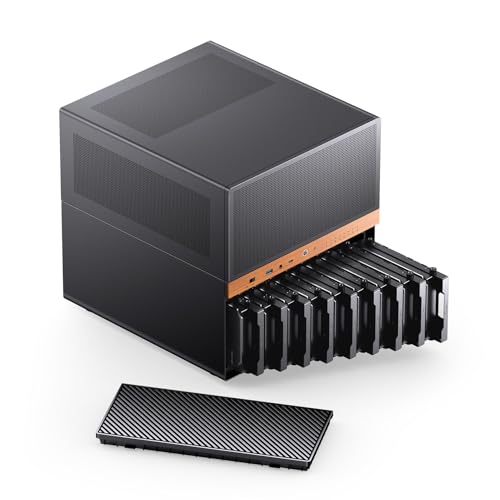
- 9 hot-swap HDD/SSD bays
- Supports ITX and Micro-ATX boards
- 240mm AIO and GPU support
Best For: Home NAS and storage-heavy compact server builds
Flexible Storage Tower
SilverStone SETA D1 Modular Mid-Tower Case

- Modular support for 5.25, 3.5, and 2.5-inch drives
- Fits up to SSI-EEB / E-ATX boards
- Strong steel chassis with broad cooling support
Best For: Versatile high-storage workstation and ATX builds
Trayless Hot-Swap Rack
StarTech 3-Bay SATA/SAS Hot-Swap Backplane

- Converts two 5.25-inch bays into a 3-drive rack
- Trayless hot-swap design for SATA and SAS
- Includes fan, speed control, and key lock
Best For: Upgrading an existing case with accessible hot-swap drive bays
Large NAS Powerhouse
JONSBO N5 12+4 Bay E-ATX Server Case

- 12 hot-swap HDD bays plus 4 SSD bays
- Supports E-ATX boards and up to 4 GPUs
- 240/280mm AIO and 3 built-in fans
Best For: High-capacity NAS and multi-drive home server builds
Hot-swap expansion cage
Compact 4-bay hot-swap drive cage

- Turns 3 x 5.25-inch bays into 4 hot-swap drive slots
- Supports SATA I/II/III and SAS HDDs
- Rear 120mm fan helps with cooling
Best For: Desktop builders with spare 5.25-inch bays
Compact NAS tower
Mini ITX NAS case with 4 hot-swap bays
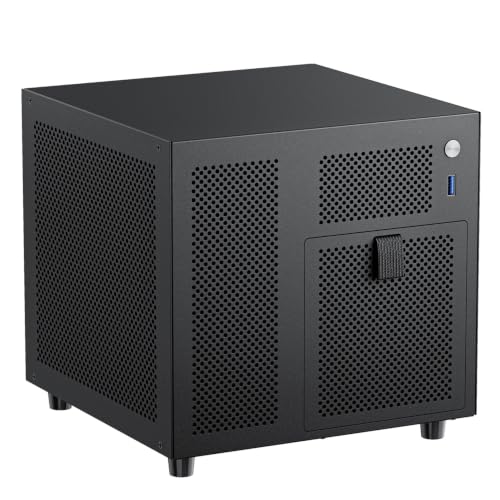
- Four hot-swappable 3.5-inch HDD bays plus one SSD slot
- Mini-ITX support with SFX/SFX-L PSU compatibility
- 9.9L chassis with front USB 3.0 and 120mm fan support
Best For: Small NAS or media server builds
High-capacity rackmount
4U rackmount case with 12 hot-swap bays
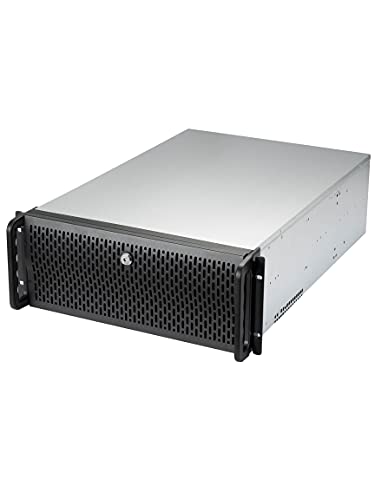
- Supports up to 12 hot-swap SATA or SAS drives
- Five pre-installed fans help manage airflow
- E-ATX support with 7 expansion slots
Best For: Rackmount servers needing maximum drive capacity
Aluminum Compact Storage Server

- 6 hot-swap 3.5-inch bays plus 2 SSD slots
- Aluminum shell with steel inner frame
- 4 PCIe slots and compact NAS layout
Best For: Compact NAS or media server builds with upgrade room
High-Capacity Dual-Chamber NAS

- 8 hot-swap 3.5-inch bays plus 2 SSD slots
- Dual-chamber design with dual SATA backplanes
- Supports Micro-ATX/Mini-ITX and 4 PCIe slots
Best For: Users building the largest storage array in a compact NAS case
Compact NAS Builder – JONSBO N6 9-Bay Hot-Swap Micro ATX Case
If you want a PC case with hot-swap drive bays for a small home server or NAS, the JONSBO N6 is built around storage-first flexibility. It supports up to 9 HDD/SSD bays with hot-swap convenience, fits ITX and Micro-ATX boards, and still leaves room for 240mm AIO cooling and a full-size GPU.
Best For: Home NAS builds, small office servers, and compact storage-focused systems that still need GPU and AIO support.
Pros:
- 9 hot-swap drive bays for dense storage in a compact chassis
- Supports ATX or SFX power supplies with multiple mounting positions
- Fits Micro-ATX/ITX boards and up to 240mm AIO cooling
- Includes 2 pre-installed fans plus multiple fan mounting locations
Cons:
- Limited to ITX and Micro-ATX motherboards
- GPU clearance is capped at 305mm in the listed specs
- Storage-oriented layout may be more complex than a standard tower build
The N6 makes sense if your priority is organized, accessible drive storage rather than maximum general-purpose space. Its wood-accent design and flexible cooling options add polish, but the main appeal is still its 9-bay hot-swap layout for a practical home NAS setup.
Flexible Storage Tower – SilverStone SETA D1 Modular Mid-Tower Case
The SilverStone SETA D1 is a strong pick if you need a PC case with hot-swap drive bays-style storage flexibility, but in a broader modular tower format. It focuses on mixing 5.25-inch, 3.5-inch, and 2.5-inch drives while also supporting large motherboards and extensive cooling options.
Best For: Builders who want a high-storage mid-tower for mixed drive types, workstation use, or a versatile ATX platform.
Pros:
- Modular storage layout for 5.25-inch, 3.5-inch, and 2.5-inch devices
- Supports SSI-EEB and extended ATX motherboards
- Solid steel construction for a durable chassis
- Broad air and water cooling support
Cons:
- Not a dedicated hot-swap NAS-style case
- Bulkier storage-first design than a typical mid-tower
- May be more case than needed for simple single-drive builds
For users who want flexibility more than a strictly NAS-focused layout, the SETA D1 offers a practical balance of storage, motherboard support, and cooling headroom. It’s best viewed as a roomy, modular chassis for systems that need lots of drive options and expansion.
Trayless Hot-Swap Rack – StarTech 3-Bay SATA/SAS Hot-Swap Backplane
If you specifically need a PC case with hot-swap drive bays functionality for three 3.5-inch drives, this StarTech backplane is a focused add-on rather than a full case. It converts two 5.25-inch bays into a trayless hot-swap setup for SATA and SAS drives, making it useful in existing PC or server builds.
Best For: IT professionals or builders upgrading an existing chassis with a secure, trayless hot-swap 3-drive rack.
Pros:
- Hot-swaps up to 3 x 3.5-inch SATA or SAS drives
- Trayless design with individual ejection levers
- Includes key-lock security and status LEDs for each bay
- Vented aluminum enclosure with built-in fan and speed control
Cons:
- Requires two 5.25-inch bays in an existing system
- Supports only three drives
- It is a backplane accessory, not a standalone computer case
This is the right choice when the goal is hot-swap convenience inside a chassis you already own. It’s especially practical for enterprise-style storage tasks where drive access, cooling, and basic security matter more than a full case redesign.
Large NAS Powerhouse – JONSBO N5 12+4 Bay E-ATX Server Case
For a PC case with hot-swap drive bays aimed at serious storage capacity, the JONSBO N5 goes much bigger. It supports up to 12 front hot-swap 3.5-inch HDDs plus 4 side-mounted 2.5-inch SSDs, while also leaving room for E-ATX boards, multiple GPUs, and 240/280mm AIO cooling.
Best For: Large home server builds, NAS systems, and workstation-style storage machines with high drive counts.
Pros:
- Huge 12 HDD + 4 SSD drive capacity
- Front hot-swap HDD layout for easy drive access
- Supports E-ATX, ATX, Micro-ATX, and ITX motherboards
- Built-in fans and support for up to 4 GPUs
Cons:
- Large footprint and heavier build than compact NAS cases
- PSU length affects how many front drive bays can be used
- Best suited to advanced storage builds rather than simple PCs
The N5 is the most storage-heavy option in this group, and its layout is clearly meant for builders who need expansion room. If your priority is a large, accessible drive bank with serious hardware support, this case is built for that job.
Hot-swap expansion cage – Compact 4-bay hot-swap drive cage
If you want a PC case with hot-swap drive bays without replacing your whole chassis, this Rosewill internal enclosure is a practical add-on. It converts three 5.25-inch optical drive spaces into four hot-swap 3.5-inch or 2.5-inch SATA bays, with SAS support as well, making it a straightforward storage expansion for compatible desktop builds.
Best For: Desktop users with spare 5.25-inch bays who want a simple hot-swap storage cage for SATA or SAS drives.
Pros:
- Converts 3 x 5.25-inch bays into 4 hot-swap 3.5-inch or 2.5-inch drive slots
- Supports SATA I/II/III and SAS HDDs, with SAS 6Gbps support noted
- Includes a rear 120mm exhaust fan for added airflow and cooling
- Steel and ABS construction is built for long-term use
Cons:
- Requires a case with available 5.25-inch drive bays
- Designed as an enclosure, not a full PC case
For a build that already has unused front-bay space, this is an efficient way to add hot-swap storage without moving to a larger chassis. It is best suited to users who value expandability and cooling over a compact footprint.
Compact NAS tower – Mini ITX NAS case with 4 hot-swap bays
This Mini ITX NAS case is a strong fit if you want a compact PC case with hot-swap drive bays for a home NAS or media server. It packs four hot-swappable 3.5-inch HDD bays plus a dedicated 2.5-inch SSD slot into a very small 9.9L chassis, so you can build a storage-focused system without giving up much desk space.
Best For: Small-form-factor NAS builds, home office storage servers, and DIY users who want maximum drive capacity in a tiny ITX case.
Pros:
- Four hot-swappable 3.5-inch bays plus one 2.5-inch SSD slot
- Includes a SATA backplane with 4 connectors for easier setup
- Supports Mini-ITX boards and SFX/SFX-L power supplies
- Ventilated design with a 120mm fan position for drive cooling
Cons:
- Only supports low-profile CPU coolers up to 70mm tall
- Expansion is limited to a half-height PCIe slot
- Flex PSU support requires an adapter
This is a purpose-built storage chassis rather than a general-purpose tower, and that focus shows in the compact layout and hot-swap setup. If your priority is dense NAS storage in a small footprint, it offers the right mix of drive capacity, cooling, and compatibility.
High-capacity rackmount – 4U rackmount case with 12 hot-swap bays
If your goal is a high-capacity PC case with hot-swap drive bays, this Rosewill 4U rackmount chassis is built for serious storage duties. It supports up to 12 hot-swap SATA or SAS drives, includes E-ATX compatibility, and comes with five pre-installed fans to keep a large drive array moving air effectively.
Best For: Server builders and power users who need a rackmount chassis with lots of hot-swap storage and strong cooling.
Pros:
- Holds up to 12 hot-swap 3.5-inch or 2.5-inch drives
- Supports SATA I/II/III and SAS devices
- Five pre-installed fans provide broad airflow across the chassis
- E-ATX support and 7 expansion slots add flexibility
Cons:
- Very large 4U rackmount design is not ideal for small spaces
- Heavier and more server-oriented than a typical desktop case
This is the most storage-dense option in the group, and it is clearly aimed at server and rackmount use rather than a compact desktop build. If you need many hot-swap bays and dependable cooling in one chassis, it is the strongest fit.
Walnut NAS Living-Room Build – JONSBO N4 Black NAS Case
If you want a PC case with hot-swap drive bays that looks more like furniture than server gear, the JONSBO N4 stands out. It combines 4 hot-swap 3.5-inch bays with 2 non-hot-swap 3.5-inch bays and 2 2.5-inch SSD mounts, making it a strong fit for a compact home NAS or personal storage server.
Best For: Home-office NAS and server builds that need storage capacity plus a wood-accented design.
Pros:
- 4 hot-swap 3.5-inch bays for faster drive changes
- Includes 6 total 3.5-inch HDD positions and 2 SSD mounts
- Walnut wood front panel gives it a more home-friendly look
- Supports Micro-ATX or ITX boards with USB 3.2 Gen 2 Type-C front I/O
Cons:
- CPU cooler height is limited to 70mm
- Only one 120mm fan is built in
- GPU support is limited to 230mm
This is a practical pick if appearance matters as much as storage flexibility. The tradeoff is that the compact layout imposes tight component limits, so it suits modest, storage-focused builds best.
Aluminum Compact Storage Server – 6 Bay NAS Case
This PC case with hot-swap drive bays is built for compact NAS and media server duty, with 6 hot-swappable 3.5-inch bays plus 2 dedicated 2.5-inch SSD slots. The aluminum outer shell and steel inner frame are aimed at durability, while the partitioned cooling layout helps it handle continuous operation.
Best For: Small home or office NAS builds that need hot-swap access, aluminum construction, and room for PCIe expansion.
Pros:
- 6 hot-swap 3.5-inch bays with 2 SSD slots
- Full-aluminum shell with steel inner frame for added rigidity
- Supports Micro ATX and Mini ITX boards
- Offers 4 full-height PCIe slots for upgrades like RAID or networking cards
Cons:
- CPU cooler clearance is limited to 55mm
- Uses a top-mount PSU layout, which may affect cable planning
- Maximum expansion hardware length is capped at 220mm
For buyers who prioritize storage access and a sturdier enclosure, this is a balanced compact option. Its main limitation is cooling and clearance, so it works best with low-profile components.
High-Capacity Dual-Chamber NAS – 8 Bay NAS Case
If you need a PC case with hot-swap drive bays for a larger storage array, this RGEEK 8-bay model is the most capacity-focused option here. It supports 8 hot-swappable 3.5-inch HDDs and 2 dedicated 2.5-inch SSDs, with dual SATA backplanes and a dual-chamber layout designed for a home NAS or media server.
Best For: High-capacity NAS builders who want the most drive bays in a compact mini-tower.
Pros:
- 8 hot-swap 3.5-inch bays plus 2 SSD slots
- Dual SATA backplanes support easier storage wiring
- Fits Micro-ATX or Mini-ITX boards with 4 full-height PCIe slots
- Supports ATX PSU and up to 4×12025 fan positions
Cons:
- CPU cooler height is limited to 55mm
- GPU length is limited to 240mm
- ATX PSU support is capped at 170mm length
This case is the strongest fit if your priority is sheer storage density. Just expect to plan carefully around the compact clearance limits, especially for cooling and larger add-in cards.
How We Picked the Best PC Case with Hot-Swap Drive Bays
We prioritized cases and enclosures that make storage management easier without creating thermal or compatibility problems. Key factors included drive-bay count, hot-swap access, motherboard and PSU support, airflow, build format, and whether the layout suits a NAS, workstation, or rackmount server role.
We also looked for designs that support common SATA and, where applicable, SAS drives, along with sensible front-panel access and enough internal clearance for cabling and cooling.
Quick Comparison
Not every PC Case with Hot-Swap Drive Bays is aimed at the same user. Compact Mini-ITX and Micro-ATX NAS cases are usually best for home media servers and small-footprint storage boxes. Mid-tower and full-size chassis tend to offer more flexibility for mixed-use PCs and larger drive arrays. Rackmount 4U cases are the strongest fit for dense, multi-drive server environments.
Key Buying Factors for a PC Case with Hot-Swap Drive Bays
Drive Count and Form Factor
Check how many 2.5-inch or 3.5-inch drives the case supports, and how many are truly hot-swappable. Some models mix hot-swap and fixed bays, which can be useful if you want a balance of capacity and cost.
Cooling and Airflow
High-drive-count builds generate heat quickly. Look for front intake fans, direct airflow over the drive cage, and enough space for uninterrupted cable routing. A dense storage chassis that runs hot will not stay reliable for long.
Motherboard, PSU, and Expansion Support
Make sure the chassis matches your board size, PSU type, and GPU or expansion needs. A PC Case with Hot-Swap Drive Bays can be storage-first or workstation-friendly, but not always both. Verify clearance before buying.
Backplane and Drive Interface
Hot-swap convenience depends on the backplane quality and compatibility. Confirm support for SATA or SAS drives, plus the connection style your controller or motherboard can use.
Who Should Buy Which PC Case with Hot-Swap Drive Bays?
Choose a compact NAS case if you want a small home server or media box with easy maintenance. Pick a mid-tower storage chassis if you need more flexibility for everyday PC parts plus several drives. Go with a rackmount or high-bay chassis if you are building a serious storage server, lab system, or redundancy-focused setup. For users replacing existing drive cages, a standalone hot-swap backplane or enclosure can be the most affordable upgrade path.
The best choice is the one that matches your drive count, cooling needs, and long-term expansion plans. For storage-heavy builds, that matters more than raw aesthetics.