
Choosing the right AI accelerator card for PC can make local inference faster, improve workflow responsiveness, and reduce reliance on the cloud.
From Coral-based PCIe cards to Jetson-powered developer kits, this roundup focuses on practical options for builders, creators, and edge AI users.
Best 8 AI Accelerator Card for PC Picks for 2026
PCIe Edge TPU Workhorse

- Up to 16 Coral Edge TPU M.2 modules
- PCIe Gen3 x16 desktop card
- Twin turbo fan cooling
Best For: Edge AI inference on a desktop PC
All-in-One Pi Starter

- Complete Raspberry Pi 5 + AI HAT+ bundle
- Hailo accelerator options up to 26 TOPS
- Includes cooling, case, storage, and power
Best For: Raspberry Pi 5 users who want a turnkey AI kit
Security Throughput Booster

- Up to 50Gbps hardware acceleration
- PCIe x16 cryptographic accelerator
- Works with SSL, TLS, NGINX, IPsec
Best For: Secure networking and cryptography workloads
High-End Jetson Builder
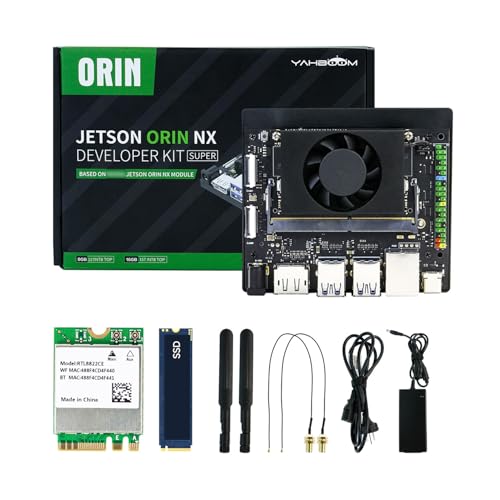
- Up to 157 TOPS AI performance
- 16GB LPDDR5 plus 256GB SSD
- Ubuntu 22.04 with CUDA and TensorRT
Best For: Advanced Jetson AI and robotics development
Compact Edge AI Starter Kit
Waveshare Jetson Orin NX 8GB Dev Kit

- 8GB Jetson Orin NX module
- Includes 128GB NVMe SSD
- Wi‑Fi and Bluetooth card included
Best For: Developers building a compact edge AI kit with storage and wireless ready to go
High-Performance Robotics Kit
Yahboom Jetson Orin NX 16GB Super Kit

- 117/157 TOPS AI performance
- Ubuntu 22.04 with CUDA/TensorRT support
- ROS2 and ROS courses included
Best For: Robotics builders who want high compute and guided learning resources
All-in-One AI Workstation Kit
Yahboom Orin NX 16GB Touchscreen Bundle

- 15.6-inch FHD IPS touchscreen included
- Comes with camera, keyboard, and mouse
- 256GB SSD and wireless card bundled
Best For: Users who want a complete Jetson workstation with screen and accessories
Vision AI Development Bundle
Yahboom Orin NX 16GB Camera Kit

- IMX219 CSI camera included
- 117/157 TOPS with 16GB LPDDR5
- 256GB SSD and Ubuntu 22.04 support
Best For: Camera-based AI and ROS2 builders who want a ready-to-test kit
PCIe Edge TPU Workhorse – youyeetoo 64TOPS AI Card
If you need an AI accelerator card for PC built around Edge TPU inference, this youyeetoo PCIe card is aimed at high-throughput TensorFlow Lite workloads. It supports up to 16 Coral Edge TPU M.2 modules for up to 64 TOPS, fits a PCI Express 3.0 x16 slot, and uses twin turbo fans for thermal management.
Best For: Desktop users and edge AI builders who want a PCIe-based Coral Edge TPU accelerator for real-time decision processing.
Pros:
- Supports up to 16 Coral Edge TPU M.2 modules for up to 64 TOPS
- Compatible with PCI Express 3.0 x16 expansion slots
- Designed around TensorFlow Lite machine learning framework support
- Twin turbo fans help with cooling under load
Cons:
- Requires Coral Edge TPU modules to reach the advertised performance
- Built for TensorFlow Lite, so it is less general-purpose than GPU-based options
- 36W power spec and active cooling add desktop integration considerations
This is a focused choice if your goal is edge inference rather than broad AI development. For a PC-based accelerator card, it stands out on raw TPU density and a straightforward PCIe install path.
All-in-One Pi Starter – Vilros Raspberry Pi 5 AI Kit
This AI accelerator card for PC roundup entry is really a complete Raspberry Pi 5 build kit, pairing the Pi 5 with an AI HAT+ option for 26 TOPS or 13 TOPS. If you want a ready-to-go package for AI projects, it bundles the board, cooling, storage, power, and cables so you can start quickly.
Best For: Beginners and makers who want a complete Raspberry Pi 5 AI setup in one box.
Pros:
- Includes Raspberry Pi 5, AI HAT+, active cooler, case, power supply, and accessories
- Hailo-8 or Hailo-8L accelerator options with 26 TOPS or 13 TOPS
- Preloaded 128GB micro SD card simplifies setup
- AI HAT+ is fully integrated into Raspberry Pi camera software
Cons:
- It is a kit around a Raspberry Pi, not a standalone PCIe accelerator card
- Performance depends on the selected HAT+ TOPS variant
- Focused on Pi 5 compatibility rather than standard desktop PC expansion
If you want the simplest path into Raspberry Pi AI work, this bundle removes a lot of separate buying decisions. It is best viewed as an ecosystem kit rather than a drop-in accelerator for a typical desktop tower.
Security Throughput Booster – Intel QuickAssist CPIC-8955
For buyers searching for an AI accelerator card for PC, this Intel QuickAssist card is more of a cryptographic acceleration solution than a general AI compute card. It is designed for PCIe x16 systems and focuses on speeding up SSL, TLS, IPsec, NGINX, and related data-transfer workloads with up to 50Gbps of hardware acceleration.
Best For: Desktop and server users who need hardware acceleration for cryptography and secure networking tasks.
Pros:
- Up to 50Gbps of hardware acceleration with QuickAssist technology
- Designed for easy drop-in implementation in new or existing equipment
- Suited to SSL, OpenSSL, NGINX, and IPsec/TLS security applications
- Works with Windows, macOS, and Linux
Cons:
- Not a general-purpose AI inference accelerator
- Best fit is security and compression-style throughput, not vision or LLM tasks
- Adult signature required shipping may be inconvenient for some buyers
This card makes sense when your bottleneck is secure data handling rather than machine learning. In a roundup of PC accelerator cards, it is the specialist option for cryptographic performance.
High-End Jetson Builder – Yahboom Orin NX Super Kit
This AI accelerator card for PC entry is actually a full Jetson Orin NX developer kit for advanced AI development. With up to 157 TOPS, a 1024-core Ampere GPU, 16GB LPDDR5 memory, and Ubuntu 22.04 with CUDA, TensorRT, cuDNN, and OpenCV support, it is aimed at builders working on large models, multimodal AI, and real-time video analysis.
Best For: Developers who want a powerful Jetson-based platform for large-model and vision AI projects.
Pros:
- High AI performance rated at up to 157 TOPS
- Includes 16GB LPDDR5 memory and 256GB SSD
- Ubuntu 22.04 with CUDA, TensorRT, cuDNN, and OpenCV is preinstalled
- Built for multimodal AI, voice interaction, and real-time video analysis
Cons:
- It is a developer kit, not a simple plug-in accelerator card
- Most useful for NVIDIA Jetson software workflows and embedded AI projects
- Higher-end capability may be more than casual users need
Among PC-adjacent AI options, this is the most development-focused and highest-performance package here. It suits users who want a compact platform for serious AI experimentation rather than a single-purpose add-in card.
Compact Edge AI Starter Kit – Waveshare Jetson Orin NX 8GB Dev Kit
If you want an AI accelerator card for PC-style edge development, this Waveshare Jetson Orin NX kit is built around the 8GB Orin NX module and adds the core accessories you need to start testing quickly. It’s aimed at embedded and edge systems, with a base board, M.2, HDMI, USB, and a bundled 128GB NVMe SSD for development work.
Best For: Developers who need a compact Jetson Orin NX setup with storage and wireless included.
Pros:
- Up to 70 TOPS/100 TOPS AI performance from the Orin NX module
- Includes a free 128GB NVMe SSD for faster project work
- Comes with a pre-installed Wi‑Fi and Bluetooth network card
- Base board offers M.2, HDMI, and USB connectivity
Cons:
- No built-in storage module on the Orin NX itself
- 8GB memory may be limiting for heavier model workflows
- Focused on embedded development rather than a general-purpose PC accessory
Overall, this is a practical starter kit if you want a ready-to-build Jetson platform with solid I/O, wireless support, and included SSD storage. It’s especially useful when you care more about edge AI development convenience than a barebones board.
High-Performance Robotics Kit – Yahboom Jetson Orin NX 16GB Super Kit
This AI accelerator card for PC-style Jetson development is really a full robotics and learning kit centered on the Orin NX 16GB Super platform. With 117/157 TOPS, Ubuntu 22.04, and support materials for ROS2 and ROS programming, it’s designed for users who want strong compute plus guided software setup.
Best For: Robotics and AI developers who want a high-end Jetson kit with training support.
Pros:
- 117/157 TOPS performance with Ampere GPU and 32 Tensor Cores
- 16GB LPDDR5 memory and support for external NVMe storage
- Includes Ubuntu 22.04 desktop environment and AI software stack support
- Provides ROS2 and ROS programming courses
Cons:
- Storage is external NVMe rather than built in
- More specialized than a simple plug-in accelerator for a standard PC
- Most useful if you plan to work with robotics or AI development tools
As a development kit, it stands out for combining performance, software support, and tutorials in one package. If your goal is learning and building advanced AI or robotics projects, this kit offers a strong foundation.
All-in-One AI Workstation Kit – Yahboom Orin NX 16GB Touchscreen Bundle
If you want an AI accelerator card for PC-style experimentation with fewer separate purchases, this Yahboom bundle packages the Orin NX 16GB Super platform with a 15.6-inch IPS touchscreen, camera, keyboard, mouse, case, wireless card, and SSD. It’s set up as a more complete desktop-like AI development kit for robots, vision projects, and hands-on testing.
Best For: Buyers who want a bundled Jetson AI workstation with display and peripherals included.
Pros:
- Includes a 15.6-inch FHD IPS touch screen
- Bundled with USB camera, keyboard, mouse, and wireless card
- 16GB LPDDR5 memory with 117/157 TOPS AI performance
- Comes with a 256GB SSD for local storage
Cons:
- Large bundle is less compact than a basic development board
- Storage still relies on the included SSD/external NVMe approach
- Best value depends on whether you need all bundled accessories
This is the most complete out-of-box option in the group, especially if you want a display and input devices included from day one. It’s a practical choice for users who prefer an all-in-one development setup over sourcing accessories separately.
Vision AI Development Bundle – Yahboom Orin NX 16GB Camera Kit
This AI accelerator card for PC-focused development is best viewed as a vision-and-robotics bundle built around the Jetson Orin NX 16GB platform. It pairs the module with an IMX219 CSI camera and 256GB SSD, which makes it a strong fit for projects that need real-time video input, AI interaction, and Ubuntu-based development tools.
Best For: Developers building camera-driven AI and ROS2 projects on Jetson.
Pros:
- 117/157 TOPS performance with 16GB LPDDR5 memory
- Includes an IMX219 CSI camera for vision projects
- Comes with a 256GB SSD for local project storage
- Supports Ubuntu 22.04 and the listed AI software stack
Cons:
- Only one USB port is listed in the supplied details
- Still uses external NVMe for expandable storage
- Best suited to camera and robotics workflows, not general PC use
For users focused on computer vision, this bundle is the most directly aligned with imaging-based AI work. The included camera makes it easier to start building and testing projects without adding extra hardware immediately.
How We Picked These AI Accelerator Card for PC Options
We focused on real-world acceleration, interface compatibility, power requirements, software support, and the kinds of projects each option is best suited for. Because this category spans both PCIe add-in cards and full developer kits, we included products that can serve as a practical AI Accelerator Card for PC in desktop, robotics, and edge-computing setups.
Priority went to devices with clear performance claims, current platform support, and enough ecosystem maturity to help buyers actually get projects running.
Quick Comparison
For simple desktop integration, PCIe-based cards are easiest to understand and install. For maximum flexibility, Jetson-based kits offer far more performance and broader AI development features, but they also require more setup and are not always drop-in PC upgrades. Raspberry Pi and embedded kits are better viewed as compact AI platforms rather than traditional accelerator cards.
Key Buying Factors for an AI Accelerator Card for PC
Form Factor and Integration
Check whether you need a true PCIe card, an M.2-style accelerator, or a full embedded kit. If you want a straightforward PC upgrade, PCIe compatibility matters most.
Performance in TOPS
TOPS is a useful headline metric, but it does not tell the whole story. Compare the number with software support, memory capacity, and the types of models you plan to run.
Software Ecosystem
The best hardware is only useful if your frameworks are supported. Look for compatibility with CUDA, JetPack, ROS, TensorRT, or vendor-specific toolchains depending on your workload.
Power, Cooling, and Expansion
High-performance AI hardware can require more power and better airflow than a standard desktop card. Make sure your system has the right PSU headroom, case clearance, and cooling plan.
Workload Fit
Object detection, vision processing, robotics, cryptography, and local LLM experiments all stress hardware differently. Match the card to your actual use case instead of chasing peak specs alone.
Who Should Buy Which AI Accelerator Card for PC?
Buy a PCIe accelerator if you want a compact add-in solution for inference tasks on a desktop PC. Choose a Jetson developer kit if you need a flexible platform for robotics, edge AI, or custom model deployment. Pick a smaller embedded board if you value low power and portability over raw throughput. For buyers evaluating an AI Accelerator Card for PC, the best choice is the one that balances performance, software support, and how much setup you are willing to manage.