
If you need to maximize rack space without sacrificing serviceability, a 1U rackmount computer setup can be the smartest way to build out a compact server, workstation, or access point.
This roundup focuses on space-efficient options for different use cases, including short-depth chassis, rack shelves, and integrated rack consoles, so you can choose the right fit for your hardware and cabinet.
Best 10 1U Rackmount Computer Picks for 2026
Shallow Rack Chassis
IN-WIN IW-RF100S-S265 1U Mini-ITX Chassis
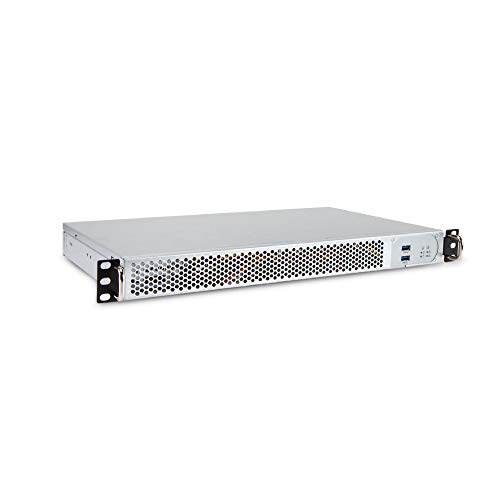
- 9.84" shallow-depth 1U design
- Supports Mini-ITX motherboards only
- Includes 265W 80+ Bronze flex PSU
Best For: Compact rack builds in shallow cabinets
Rackmount KVM Console
1U HDMI KVM Console with 19-inch Monitor

- Combines monitor, keyboard, and touchpad in 1U
- Single-port HDMI KVM for one computer
- Includes mounting hardware and USB HDMI cable
Best For: Single-server racks needing local access
Ultra-Compact Rack Case
Rackchoice N125 1U Mini-ITX Chassis

- 9.84" shallow 1U aluminum chassis
- Type-C and USB 3.0 front I/O support
- Fits Mini-ITX boards with 2x 40mm fans
Best For: Compact shallow-depth Mini-ITX builds
Renewed Enterprise Server
HP ProLiant DL360 G7 1U Dual-Xeon Server

- Dual Xeon X5675 CPUs included
- 72GB RAM and 4x 900GB SAS drives
- Redundant power supplies with P410i RAID
Best For: Business or lab buyers wanting a populated server
Hinged Mini PC Rack Shelf
Dell OptiPlex Micro Rack Shelf

- Fits one Dell OptiPlex Micro in 1U
- Hinged sides simplify rear access
- Bottom ventilation holes aid airflow
Best For: Dell OptiPlex Micro users needing a secure 1U rack shelf
Compact 1U Server Chassis

- Supports Mini-ITX or ATX motherboards
- Includes 315W 80+ Bronze PSU
- Fits multiple drives and a full-height PCI slot
Best For: Builders wanting a compact 1U chassis with included power
HP Mini PC Rack Mount Shelf

- Fits select HP ProDesk and EliteDesk Minis
- Hinged sides improve rear access
- Open top design supports airflow
Best For: HP Mini PC owners needing a ventilated 1U rack shelf
Vented 4-Post Shelf
Adjustable 21.7in Tray for Heavy Gear

- Fits 19-inch racks and cabinets
- Adjusts from 13.5 to 31.8 inches deep
- Supports up to 242 lbs with vented airflow
Best For: heavy IT, AV, and network equipment in 19-inch racks
Quiet 2U Rackmount PC
Ryzen 7 Workstation with 32GB RAM

- Ryzen 7 5700G with 8 cores and 16 threads
- 32GB DDR4 RAM and 1TB PCIe NVMe SSD
- Windows 11 Pro with integrated Radeon graphics
Best For: rackmount workstation users who need fast multitasking and storage
StarTech Vented Shelf
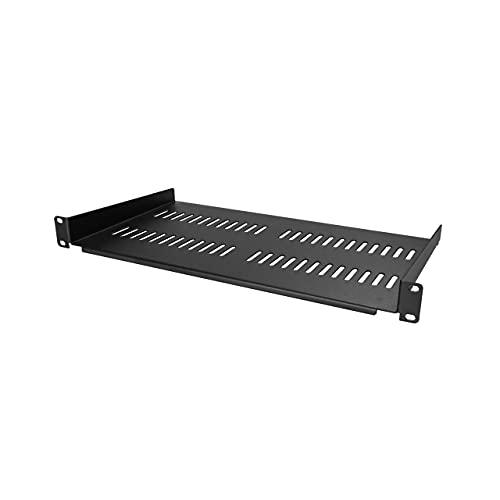
- Fits standard 19-inch racks and cabinets
- Vented front-mounted cantilever design
- Supports up to 44 lb / 20 kg
Best For: compact storage for lightweight rack gear and accessories
Shallow Rack Chassis – IN-WIN IW-RF100S-S265 1U Mini-ITX Chassis
If you need a compact 1U rackmount computer chassis for a shallow cabinet, the IN-WIN IW-RF100S-S265 is built around a Mini-ITX layout with a 9.8-inch depth. It’s a practical choice for small server racks or space-constrained installs where a full-depth chassis won’t fit.
Best For: Shallow-rack Mini-ITX builds that need integrated storage and included power.
Pros:
- Very shallow 9.84″ depth for tight racks
- Supports Mini-ITX motherboards
- Includes 265W 80+ Bronze flex power supply
- Tool-free drive bay supports 2x 2.5″ and 2x 3.5″ drives
Cons:
- No PCI expansion slot
- Limited to Mini-ITX boards only
- Built-in 265W PSU may be restrictive for higher-power setups
Overall, this 1U rackmount computer chassis is best when you want a compact, ready-to-build enclosure with basic storage flexibility and included power. The three 40mm fans and shallow footprint make it suited to straightforward rack deployments rather than expansion-heavy builds.
Rackmount KVM Console – 1U HDMI KVM Console with 19-inch Monitor
If your 1U rackmount computer setup needs built-in local access, this rack-mount KVM console combines a 19-inch monitor, keyboard, and touchpad in a single drawer. It’s designed for standard 19-inch racks and connects through HDMI for simple server-side control.
Best For: Rack environments that need a compact all-in-one local console for one HDMI computer.
Pros:
- Integrates 19″ LCD, keyboard, and touchpad in 1U
- HDMI connection works with many operating systems
- 1280×1024@60Hz display with 5ms response time
- Includes rail brackets, HDMI cable, and power cord
Cons:
- Single-port KVM supports only one computer
- Requires careful rack-depth measurement before purchase
- Not a computer chassis; it is an access console
For technicians who want direct front-of-rack access without extra peripherals, this console keeps the control setup compact and organized. Its value is strongest in racks where a single HDMI system needs dependable local monitoring and input in minimal space.
Ultra-Compact Rack Case – Rackchoice N125 1U Mini-ITX Chassis
The Rackchoice N125 is a compact 1U rackmount computer chassis built for Mini-ITX systems in very tight spaces. With a 9.84-inch depth, front-panel airflow, and Type-C plus USB 3.0 support, it suits small server racks or desktop-style conversion builds.
Best For: Small Mini-ITX server or desktop builds that need a shallow aluminum chassis.
Pros:
- Only 9.84″ deep for space-limited installs
- Supports Mini-ITX motherboards
- Includes 2x 40mm inlet fans, with support for up to 3
- Black aluminum chassis with customizable I/O plate
Cons:
- Limited drive support: 1x 3.5″ HDD or 2x 2.5″ SSDs
- CPU cooler is not included
- Low-profile RAM is required
This model is a strong fit when you want a lightweight, shallow enclosure rather than a feature-heavy server case. Its flexible front I/O and included cooling make it a practical foundation for a compact build, especially when rack depth is the main constraint.
Renewed Enterprise Server – HP ProLiant DL360 G7 1U Dual-Xeon Server
If you’re shopping for a ready-to-run 1U rackmount computer for business use, this renewed HP ProLiant DL360 G7 comes heavily configured with dual Xeon CPUs, 72GB of RAM, and four 900GB SAS drives. It’s aimed at buyers who want an enterprise server platform rather than a bare chassis.
Best For: Business or lab users who want a fully populated dual-CPU 1U server.
Pros:
- Dual Xeon X5675 processors included
- 72GB DDR3 RAM installed
- 4x 900GB 10K SAS 2.5″ HDDs included
- Redundant power supplies and P410i RAID
Cons:
- Renewed older-generation hardware
- Hard drives and memory upgrades are included separately, not installed
- Limited to the built-in enterprise platform and configuration
This is the most turnkey option in the group if you want an actual server instead of a case or accessory. Its value comes from the bundled hardware and redundant features, though buyers should expect legacy platform tradeoffs compared with newer systems.
Hinged Mini PC Rack Shelf – Dell OptiPlex Micro Rack Shelf
If you need a 1U rackmount computer setup for a Dell OptiPlex Micro, this hinged rack shelf is built to secure a single mini PC inside a 19-inch rack or network cabinet. The low-profile steel design leaves room for easy rear access, while bottom cooling holes help support airflow around the mounted system.
Best For: Dell OptiPlex Micro users who want a secure 1U rack shelf with easy access to rear connections.
Pros:
- Dedicated slot and bolt for mounting one Dell OptiPlex Micro Form Factor case
- Hinged structure on both sides for maintenance and network access
- Bottom cooling holes improve air circulation
- Includes bolts, screws, zip ties, and assembly guide
Cons:
- Made specifically for Dell OptiPlex Micro devices, so compatibility is narrow
- Only supports one mini PC, not a multi-device rack setup
- Requires fitting the system into a 1U, 19-inch rack space
This is a practical choice if your goal is tidy rack integration rather than a full server chassis. The hinged access and included mounting hardware make it especially useful for network closets where rear ports and maintenance access matter.
Compact 1U Server Chassis – In Win Short-Depth 1U Chassis
in-Win IW-RF100-S315 1U Short Depth Rackmount Server Chassis, ATX 315W Gold PSU
Check Price On AmazonThis 1U rackmount computer chassis is a compact server case for building a short-depth system in a rack environment. It supports Mini-ITX or ATX motherboards, includes a 315W power supply, and adds room for storage, expansion, and cooling in a low-profile enclosure.
Best For: Builders who want a compact 1U server chassis with included power supply and full-height expansion support.
Pros:
- Supports Mini-ITX or ATX motherboards
- Includes 315W 80+ Bronze flex power supply
- Tool-free drive bay fits 2x 2.5″ drives and 1x 3.5″ drive
- Supports three 40x28mm cooling fans and a full-height PCI slot
Cons:
- Short-depth design may not suit larger rack layouts
- 1U form factor limits internal space
- Best suited to specific motherboard and component sizes
If you want a true chassis rather than a mounting shelf, this model gives you the core rack hardware needed to assemble a compact server. Its included PSU and support for drives, fans, and a PCI slot make it a strong fit for practical rack builds.
HP Mini PC Rack Mount Shelf – HP Hinged 1U Mini Rack Mount
For an HP-focused 1U rackmount computer installation, this steel rack shelf is designed to hold compatible HP mini desktops in a standard 19-inch cabinet. The hinged sides make rear ports easier to reach, and the open, ventilated topless design helps promote airflow around the compact machine.
Best For: HP Mini PC owners who need a secure, ventilated 1U rack mount with easy port access.
Pros:
- Fits several HP ProDesk, EliteDesk, and HP Mini 800 models
- Hinged design on both sides improves access to rear connections
- No top panel for better airflow and cooling
- Includes mounting bracket and two zip ties for power supply management
Cons:
- Limited to specific HP mini desktop models
- Only supports one mini PC in 1U space
- Not a full server chassis, just a rack mount shelf
This is a clean fit when you want to rack an HP mini system without boxing it into a full enclosure. The combination of secure mounting, airflow-friendly design, and easy access makes it a sensible option for small business or network rack use.
Vented 4-Post Shelf – Adjustable 21.7in Tray for Heavy Gear
If you need a 1U rackmount computer support shelf that can handle oversized or heavier non-rack gear, this Tecmojo tray is built for flexible rack integration. It fits 19-inch racks and cabinets, adjusts from 13.5 to 31.8 inches deep, and uses a vented design to help airflow around equipment that needs cooling.
Best For: IT, AV, and network setups that need a sturdy adjustable shelf for tower servers, UPS units, NAS devices, or other bulky hardware.
Pros:
- Supports up to 242 lbs for heavy equipment
- Adjustable mounting depth from 13.5 to 31.8 inches
- Vented surface helps promote airflow and heat dissipation
- Includes mounting screws, cable tie, and anti-slip stop
Cons:
- Best suited to non-rackmount gear rather than dedicated 1U hardware
- Large depth range may be more than some compact racks need
This is a practical choice when you need a universal shelf instead of a fixed-purpose rack drawer or rail kit. The adjustable depth and high weight rating make it especially useful for mixed equipment installs where stability matters.
Quiet 2U Rackmount PC – Ryzen 7 Workstation with 32GB RAM
If you’re shopping for a 1U rackmount computer alternative with more workstation-style muscle, this 2U rackmount PC offers a Ryzen 7 5700G, 32GB of DDR4 memory, and a 1TB NVMe SSD. It’s positioned for home or business use where you want fast boot times, integrated graphics, and a rack-ready form factor.
Best For: Users who want a rackmount workstation for multitasking, content creation, gaming, or general business workloads.
Pros:
- AMD Ryzen 7 5700G with 8 cores and 16 threads
- 32GB DDR4 RAM for smoother multitasking
- 1TB PCIe NVMe SSD for fast boot and data transfer
- Includes Windows 11 Pro and integrated AMD Radeon graphics
Cons:
- It is a 2U system, not a true 1U rackmount computer
- Integrated graphics may not suit users needing a discrete GPU
This system makes sense if you want a rackmount PC with stronger everyday performance rather than the smallest possible chassis. The included warranty and lifetime technical support add value for buyers who want a ready-to-run workstation.
StarTech Vented Shelf – 10in Deep Universal Rack Tray
When a 1U rackmount computer setup needs a simple place for non-rack equipment, this StarTech vented shelf is a straightforward option. It fits standard 19-inch racks, uses a front-mounted cantilever design, and provides a 10-inch deep tray with perforation to help airflow around the gear you place on it.
Best For: Small network, IT, AV, or office installs that need a compact vented shelf for accessories or lightweight hardware.
Pros:
- Universal 19-inch fit for most racks and cabinets
- Vented design supports consistent airflow
- Rated to hold up to 44 lb / 20 kg
- Front-mounted cantilever tray for simple access
Cons:
- 10-inch depth limits what larger equipment it can hold
- Lower weight rating than heavy-duty rack shelves
For light to moderate rack storage, this shelf covers the basics without adding complexity. Its compact size and durable steel construction make it a sensible pick when you just need a vented landing spot inside a standard rack.
How We Picked These 1U Rackmount Computer Options
We prioritized products that solve real rack-mount needs: compatible sizing, practical depth, cooling support, mounting flexibility, and sensible power or accessory integration. Because a 1U Rackmount Computer category includes both complete chassis and supporting hardware, we also considered whether each option is best for building a system, housing an existing mini PC, or adding service access in a rack.
We favored products that fit common 19-inch environments, offer clear compatibility guidance, and avoid unnecessary bulk. For buyers, that means less guesswork and a better chance of matching the product to the server room, AV rack, or home lab it will actually live in.
Quick Comparison
Think of the lineup in three buckets: purpose-built 1U chassis for custom builds, rack shelves and mounts for mini PCs or small desktops, and a rack console for local access and troubleshooting. Chassis are best when you want an integrated computer platform; shelves and hinged mounts are ideal when you already own the computer; and a console makes sense if hands-on maintenance matters more than raw compute density.
Key Buying Factors for a 1U Rackmount Computer
Depth and Rack Clearance
Short-depth designs are easier to fit in smaller cabinets and leave more room for cable bends, while deeper trays and chassis may offer better stability or larger component support. Measure your rack interior before buying, not just the front panel width.
Cooling and Airflow
Low-profile systems can run hot, so check fan placement, venting, and whether the chassis or shelf design helps keep intake and exhaust paths clear. Thermal headroom matters even more if you plan to run servers continuously.
Power Supply and Hardware Compatibility
If you are building a true 1U Rackmount Computer, confirm PSU wattage, motherboard format, drive support, and connector placement. For shelves and mounts, verify the footprint and cable access for your mini PC or compact desktop.
Serviceability and Access
Hinged shelves, slide-out or easy-access designs, and front-facing ports can save time during upgrades and troubleshooting. If you expect frequent maintenance, convenience is worth paying for.
Who Should Buy Which 1U Rackmount Computer?
Choose a short-depth 1U chassis if you want a custom server or compact network appliance. Pick a universal rack shelf or hinged mini PC mount if you already have a small desktop or micro PC and just need clean rack integration. Consider a rack console if you want local KVM-style access for administration, testing, or emergency recovery.
If you are building for a home lab, prioritize flexibility and cooling. If you are outfitting a business rack, lean toward compatibility, service access, and standardized mounting. Matching the product to the workload is the easiest way to get long-term value from any 1U Rackmount Computer setup.