
If you move large video files, run shared projects, or want a faster home lab, a NAS with 10GbE port can make a noticeable difference in everyday workflows. The right model cuts transfer bottlenecks and keeps multiple users working more smoothly.
In this roundup, we focus on practical choices for speed, expansion, and long-term value, from compact desktop units to larger multi-bay systems.
Best 10 NAS with 10GbE Port Picks for 2026
Workstation-Class NAS
MINISFORUM N5 Air 5-Bay Desktop

- Ryzen 7 255 with Radeon 780M
- 10GbE + 5GbE LAN with link aggregation
- 5 bays, 3 M.2 slots, U.2 and PCIe expansion
Best For: Power users who want a high-speed, expandable NAS platform
Creator-Focused 10GbE NAS

- Dual 10GbE ports with SMB Multichannel
- Two USB4 host ports for direct transfers
- TOS 7 with AI tools, backup, and virtualization
Best For: Creators and teams who want fast networking and modern NAS tools
Expandable DIY NAS

- Ryzen 7 255 with DDR5 upgrade support
- Dual 10GbE + 5GbE ports, up to 15Gbps
- Five bays, 3 M.2 slots, U.2, and PCIe expansion
Best For: DIY users who want a highly configurable 10GbE NAS
Video Production NAS

- 10GbE-ready shared storage for teams
- Up to 1,181 MB/s for 4K and 8K editing
- Scales from 100TB to 300TB with DX525 units
Best For: Production teams that need scalable shared media storage
AI-Ready DIY NAS
MINISFORUM N5 Pro Ryzen AI 9 HX Pro 370

- Dual 10GbE+5GbE with link aggregation
- Five HDD bays plus M.2 and U.2 expansion
- ECC-supported DDR5 with MinisCloud OS
Best For: Power users who want a fast, expandable NAS with AI features
Expandable 8-Bay Storage
QNAP TS-855X-8G 8-Bay 10GbE NAS

- Single 10Gbase-T plus dual 2.5GbE ports
- Dual M.2 NVMe slots for cache or SSD pools
- Two PCIe Gen 3 x4 slots for expansion cards
Best For: Buyers who want an 8-bay NAS with 10GbE and strong upgrade options
AI Performance NAS
MINISFORUM N5 Pro 144TB Ryzen AI 10GbE
- Dual 10GbE+5GbE with link aggregation
- Up to 144TB capacity with HDD and SSD/U.2 support
- ECC DDR5 plus MinisCloud OS features
Best For: Power users who want top-end storage capacity and fast networking
Enterprise 8-Bay Powerhouse
UGREEN NAS DXP8800 Plus 8-Bay 2x10GbE

- Dual 10GbE ports with up to 20G aggregation
- Intel Core i5 1235U for demanding workloads
- 8 bays plus 2 M.2 slots and up to 272TB capacity
Best For: Teams needing fast, scalable storage with dual 10GbE
AI-Ready Desktop NAS
MINISFORUM NAS N5 MAX 5 Bay Dual 10GbE
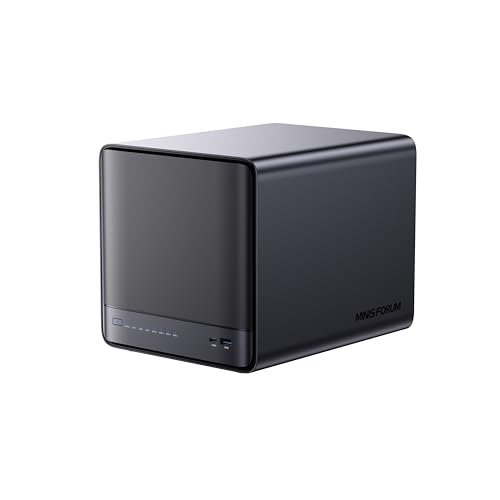
- Dual 10GbE networking for fast multi-user transfers
- Ryzen AI Max+ 395 with Radeon 8060S and NPU
- Five SATA bays plus five M.2 slots
Best For: Small teams wanting fast storage and local AI features
Business Storage Workhorse
Asustor Lockerstor 10 AS6510T Dual 10GbE
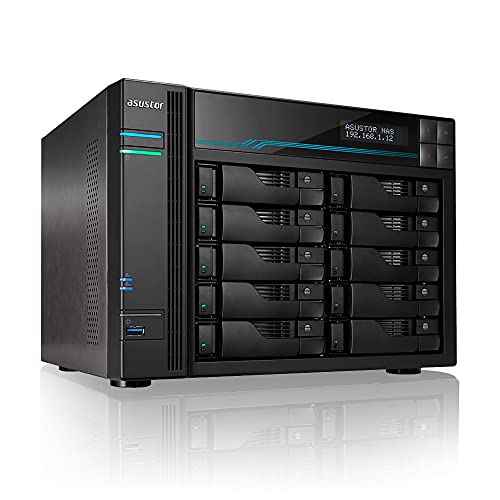
- Dual 10GbE plus dual 2.5GbE networking
- 10 bays with RAID support for scalable storage
- Dual M.2 NVMe slots for cache acceleration
Best For: SMBs needing reliable high-speed shared storage
Workstation-Class NAS – MINISFORUM N5 Air 5-Bay Desktop
If you want a NAS with 10GbE port that feels more like a compact workstation than a simple file box, the MINISFORUM N5 Air stands out. Its Ryzen 7 255, dual LAN setup, and support for heavy multitasking make it a strong fit for users who need storage, compute, and expansion in one chassis.
Best For: Creators, teams, and power users who want high-speed networking, virtualization headroom, and flexible expansion.
Pros:
- Ryzen 7 255 CPU with Radeon 780M graphics for demanding multitasking and transcoding
- 10GbE + 5GbE LAN with link aggregation up to 15Gbps
- Three M.2 NVMe slots, five SATA bays, and U.2 support for large-capacity builds
- OCuLink, USB4, and PCIe x16 slot add serious expansion options
Cons:
- Diskless configuration still requires you to supply drives
- Expansion-focused design may be more than casual home users need
- Best value depends on how much you plan to use the advanced ports and storage options
This is a flexible choice if you want a NAS that can grow into a more advanced storage and compute hub. The MinisCloud OS, ZFS snapshots, and Docker support add practical software features to the hardware muscle.
Creator-Focused 10GbE NAS – TERRAMASTER F6-425 Pro
The TERRAMASTER F6-425 Pro is a compelling NAS with 10GbE port support for creators who care about transfer speed and workflow tools. With dual 10GbE, USB4, and an AI-native operating system, it is built for fast file movement, editing, and day-to-day team storage.
Best For: Content creators, small teams, and business users who want fast networking and modern NAS software.
Pros:
- Dual 10GbE ports with SMB Multichannel performance up to 2090 MB/s
- Two USB4 host ports for direct PC-to-NAS transfer and high-speed editing workflows
- Three M.2 NVMe slots with Hyper Cache for performance tuning
- TOS 7 adds AI-native tools, Docker, VirtualBox, and backup features
Cons:
- Diskless unit means storage drives must be purchased separately
- 8GB RAM may feel modest for heavier virtualization or larger workloads
- Some advanced features may appeal more to workflow-focused users than basic home storage buyers
Overall, this model makes a strong case when fast networking and software convenience matter as much as raw bay count. It is especially attractive if you want a NAS that can support editing, backups, and mixed business tasks without feeling dated.
Expandable DIY NAS – MINISFORUM N5 Air AI NAS
If you are shopping for a NAS with 10GbE port capability and want room to build out storage, the MINISFORUM N5 Air AI NAS is aimed squarely at enthusiasts. It combines a Ryzen 7 255, DDR5 upgrade support, and a mix of HDD, M.2, and U.2 options for a highly configurable setup.
Best For: DIY builders and advanced users who want flexible storage, fast networking, and expansion headroom.
Pros:
- Dual 10GbE + 5GbE ports with link aggregation up to 15Gbps
- Five HDD bays plus three M.2 slots and U.2 support for large builds
- Two DDR5 SODIMM slots expandable up to 96GB
- MinisCloud OS includes ZFS snapshots, Docker apps, and remote access
Cons:
- At least one drive is required before you can create a storage pool
- Diskless, build-it-yourself style may be less convenient for beginners
- Advanced expansion options add complexity that casual users may not need
This version is best viewed as a flexible foundation rather than a simple plug-and-play box. For buyers who want to tune storage, memory, and networking around their own workflow, it offers a lot of room to scale.
Video Production NAS – Synology DS1525+
The Synology DS1525+ is a practical NAS with 10GbE port readiness for video teams that need reliable shared storage. Its focus on multi-user editing, large-scale expansion, and workflow-friendly media management makes it a strong fit for production environments.
Best For: Video editors, production teams, and businesses building a shared media workspace.
Pros:
- Supports 4K and 8K editing directly over the network at up to 1,181 MB/s
- 10GbE-ready for faster shared workflows
- Can scale from 100TB to 300TB with DX525 expansion units
- Includes AI tagging and project version control for media management
Cons:
- Diskless and requires separate drive purchase
- 10GbE is upgrade-ready rather than built in from the start
- Expansion system and business features may be more than casual users need
For teams centered on editing and asset sharing, this model emphasizes dependable workflow support over flashy extras. The combination of expansion potential, multi-user performance, and enterprise support makes it easy to recommend for production use.
AI-Ready DIY NAS – MINISFORUM N5 Pro Ryzen AI 9 HX Pro 370
If you want a NAS with 10GbE port and serious all-in-one flexibility, the MINISFORUM N5 Pro is built for high-performance home or small-office storage. It combines an AMD Ryzen AI 9 HX Pro 370, ECC-supported DDR5, five HDD bays, multiple M.2/U.2 options, and dual 10GbE+5GbE networking for fast file access and expansion-ready storage.
Best For: Users who want a powerful DIY NAS with AI acceleration, ECC memory support, and fast dual-network connectivity.
Pros:
- Dual 10GbE+5GbE ports support link aggregation for up to 15Gbps combined throughput.
- Five HDD slots plus multiple M.2 and U.2 options allow very large storage builds.
- ECC-supported DDR5 memory and RAID mode support help with reliability and data protection.
- Preloaded MinisCloud OS adds ZFS snapshots, Docker support, and remote access.
Cons:
- Requires at least one SSD or 3.5-inch HDD to create a storage pool.
- The hardware and expansion focus may be more than casual users need.
This is the strongest choice here if you want a feature-dense NAS platform rather than a basic storage box. It balances performance, capacity, and networking in a way that suits demanding storage and app workloads.
Expandable 8-Bay Storage – QNAP TS-855X-8G 8-Bay 10GbE NAS
The QNAP TS-855X-8G is a practical NAS with 10GbE port support for teams that need faster file transfers and flexible expansion. Its 8-bay design, Intel Atom 8-core processor, dual 2.5GbE ports, and dual M.2 NVMe slots make it a strong fit for shared storage, caching, and virtualization-focused setups.
Best For: Small teams and advanced home users who want a diskless 8-bay NAS with 10GbE and upgrade headroom.
Pros:
- Single 10Gbase-T port plus dual 2.5GbE ports improve network performance for shared workloads.
- Dual M.2 PCIe Gen 3 x4 NVMe slots can be used for cache acceleration or SSD storage pools.
- Dual PCIe Gen 3 x4 slots allow additional network, QM2, or Fibre Channel expansion cards.
- Supports backup for Google Workspace and Microsoft 365 through Boxafe.
Cons:
- Diskless configuration means drives must be purchased separately.
- 10GbE is limited to a single port rather than dual high-speed networking.
This model is a solid pick if you want QNAP’s expansion-friendly platform in an 8-bay chassis. It leans toward flexibility and business-style features instead of all-in-one simplicity.
AI Performance NAS – MINISFORUM N5 Pro 144TB Ryzen AI 10GbE
If you’re shopping for a NAS with 10GbE port support and want both performance and storage flexibility, the MINISFORUM N5 Pro is a standout. It pairs an AMD Ryzen AI 9 HX 370-class processor, ECC-supported DDR5, five HDD slots, multiple SSD/U.2 options, and dual 10GbE+5GbE networking in a preloaded MinisCloud OS package.
Best For: Users who want a high-end DIY NAS with AI-capable processing, large capacity potential, and fast networking.
Pros:
- Dual 10GbE+5GbE ports support link aggregation and up to 15Gbps combined speed.
- Up to 144TB storage capacity with five HDD bays and multiple M.2/U.2 options.
- ECC-supported DDR5 memory improves reliability for storage and multitasking.
- MinisCloud OS includes ZFS snapshots, Docker apps, and one-click remote access.
Cons:
- At least one SSD or 3.5-inch HDD is required to create a storage pool.
- The feature set is broad, so setup may be more involved than a basic NAS.
This is the most performance-oriented option in the group, especially if you value AI features and expansion flexibility. It makes the most sense for users who want a NAS that can grow with heavier storage and app demands.
Enterprise 8-Bay Powerhouse – UGREEN NAS DXP8800 Plus 8-Bay 2x10GbE
If you want a NAS with 10GbE port performance for heavy-duty team storage, the UGREEN NAS DXP8800 Plus is built for high-throughput business use. It combines an Intel Core i5 1235U, dual 10GbE ports, and support for large-capacity RAID setups, making it a strong fit for fast file transfer and centralized storage.
Best For: Businesses and advanced users who need high-speed, high-capacity local storage with dual 10GbE networking.
Pros:
- Dual 10GbE ports can be aggregated for up to 20G bandwidth.
- Intel 12th Gen Core i5 processor offers strong multitasking performance.
- Eight SATA bays plus two M.2 NVMe slots support up to 272TB capacity.
- Includes 8K HDMI and dual Thunderbolt 4 for flexible connectivity.
Cons:
- Drives are not included and must be purchased separately.
- Wired Ethernet only, with no Wi-Fi support.
- Maximum speed depends on the router, CPU, drives, and file size.
This is a strong pick if your priority is pushing large files quickly while keeping storage scalable and business-focused. The dual 10GbE setup and high-end processor make it especially appealing for demanding workflows.
AI-Ready Desktop NAS – MINISFORUM NAS N5 MAX 5 Bay Dual 10GbE
The MINISFORUM NAS N5 MAX stands out as a NAS with 10GbE port hardware for users who want storage plus local AI capability in one desktop system. Its dual 10GbE networking, Ryzen AI Max+ 395 processor, and multiple bays make it a compelling option for collaborative work, media storage, and privacy-sensitive AI tasks.
Best For: Small teams and creators who want fast networking, local AI features, and flexible high-capacity storage.
Pros:
- Dual 10GbE ports support fast transfers and multiple simultaneous users.
- Ryzen AI Max+ 395 with Radeon 8060S and XDNA2 NPU delivers strong compute.
- Five SATA bays plus five M.2 NVMe slots provide major storage expansion.
- Runs MinisCloud OS with AI photo tools and local model access.
Cons:
- RAM is non-expandable at 64GB LPDDR5x.
- Maximum storage depends on adding your own drives and SSDs.
- More specialized than a basic NAS for users who only need file backup.
If you want a NAS that does more than traditional storage, this model brings serious processing power into the mix. It is best suited to users who can take advantage of both the high-speed networking and the local AI-focused feature set.
Business Storage Workhorse – Asustor Lockerstor 10 AS6510T Dual 10GbE
The Asustor Lockerstor 10 AS6510T is a practical NAS with 10GbE port connectivity for small business and professional workloads. With dual 10GbE plus dual 2.5GbE ports, a 10-bay design, and NVMe cache support, it focuses on fast file sharing, backup, and steady 24/7 operation.
Best For: Small businesses and creative teams that want reliable high-speed networking and expandable storage.
Pros:
- Dual 10GbE and dual 2.5GbE ports provide flexible high-speed networking.
- 10-bay chassis supports large-scale RAID storage.
- Dual M.2 NVMe slots help improve responsiveness and cache performance.
- Built for continuous enterprise-style workloads and file collaboration.
Cons:
- Uses an Intel Atom C3538, which is more efficiency-focused than high-end.
- Comes with 8GB DDR4 memory, so it is not the most memory-rich option.
- Drives are not included.
This model is a strong choice when you want dependable networking and lots of room to grow without moving into a more compute-heavy NAS class. It is especially appealing for teams that need fast storage access, backups, and centralized file management.
How We Picked These NAS with 10GbE Port Models
We prioritized models that combine real-world speed benefits with sensible storage design. That means strong CPU and memory options, multiple drive bays or NVMe support, reliable networking, and features that fit both creative and business use cases. We also looked at expansion potential, because a NAS with 10GbE Port is most useful when it can keep pace as storage needs grow.
Quick Comparison
Use the lineup to match your workload: compact 5-bay systems are often best for small studios and advanced home users, while 8- and 10-bay models suit heavier storage demands and multi-user environments. Some units focus on easy file sharing and backup, while others add stronger processing for virtualization, AI-assisted tasks, or media workflows.
Key Buying Factors for a NAS with 10GbE Port
Drive Bays and Expansion
More bays usually mean better flexibility for RAID, capacity growth, and workload separation. If you expect your storage pool to expand, choose a chassis with enough room to avoid replacing the entire unit later.
CPU, RAM, and Caching
10GbE can move data quickly, but the processor and memory still matter. Heavier tasks like editing, multiple users, encryption, or virtualization benefit from faster CPUs and upgradeable RAM. NVMe slots can also help with cache or high-speed scratch storage.
Networking and Port Layout
Some NAS models include one 10GbE port, while others offer dual 10GbE for link aggregation or separate client and uplink traffic. Consider whether you need a direct-speed boost for one workstation or higher aggregate bandwidth for a team.
Software and Workflow Fit
The best choice depends on how you work. Creative professionals may value smooth file sharing and media support, while IT users may care more about virtualization, container tools, backup suites, and remote management. A NAS with 10GbE Port should match your software expectations as closely as your storage needs.
Who Should Buy Which NAS with 10GbE Port?
Choose a compact 5-bay model if you want fast shared storage for a small office, content studio, or advanced personal setup. Go with an 8- or 10-bay system if you need more capacity, more redundancy options, or better room for growth. If your workload includes editing, virtualization, or heavy multitasking, prioritize stronger CPUs, more RAM headroom, and dual 10GbE where available. For straightforward file serving and backup, a simpler, well-priced NAS with 10GbE Port may be the smartest value.