
Choosing a home server for Jellyfin is mostly about matching your media habits to the right mix of CPU, RAM, storage, and network speed.
Whether you want a simple two-bay NAS or a more powerful mini PC-style server, the best option should stream smoothly, handle transcoding reliably, and leave room to grow.
Best 10 Home Server for Jellyfin Picks for 2026
All-Round NAS Pick
UGREEN DXP2800 2-Bay NAS for Creators

- Intel N100 and 8GB DDR5
- 2.5GbE with 2x M.2 NVMe slots
- Up to 80TB capacity
Best For: Creators and home users who want an easy Jellyfin NAS
Mini PC NAS Hybrid
Beelink ME Pro Hybrid NAS Mini PC

- Intel N150 with 16GB LPDDR5
- 3 M.2 slots plus 2 HDD bays
- 5GbE and 2.5GbE dual LAN
Best For: Users who want a compact hybrid Jellyfin server
DIY Home Lab Choice
ZimaBlade 7700 x86 Self-Hosting Kit
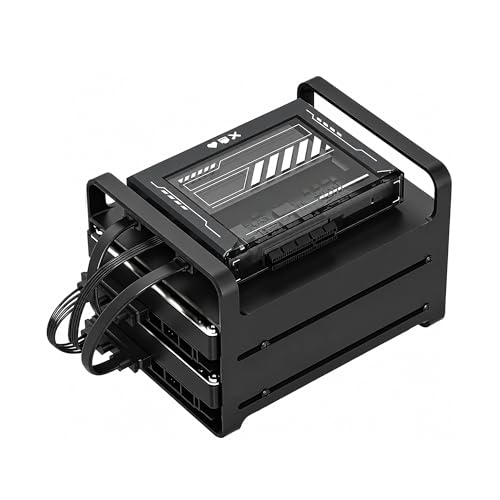
- Intel x86 quad-core platform
- 16GB RAM with CasaOS preinstalled
- Dual SATA kit for DIY NAS builds
Best For: Tinkerers building a flexible Jellyfin homelab
High-Performance NAS Build
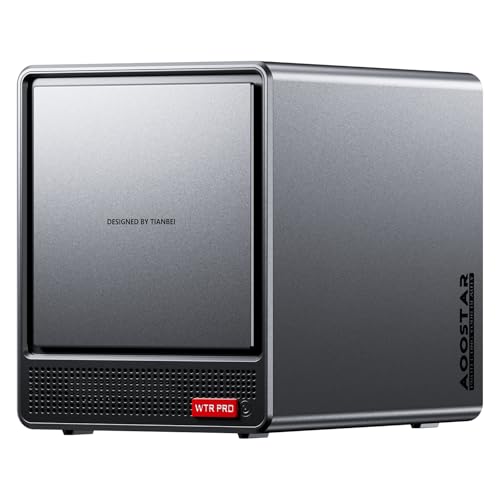
- AMD R7 5825U with 8C/16T
- 4+2 bays and up to 96TB support
- Dual 2.5GbE with RAID options
Best For: Advanced users building a powerful Jellyfin home lab
Synology Private Cloud Media Server

- Intel CPU with hardware transcoding
- Private-cloud media streaming for 4K movies and photos
- Automated backups with RAID and snapshot protection
Best For: A reliable NAS for Jellyfin, backups, and family media access
ZimaBoard Server-Class Homelab Board
ZimaBoard 2 832 x86 Home Server

- Intel N150 x86 board for 24/7 workloads
- Dual SATA, dual 2.5GbE, and PCIe expansion
- Preinstalled ZimaOS with Docker and media server support
Best For: DIY Jellyfin users who want an expandable homelab server
AOOSTAR Expandable NAS Mini PC
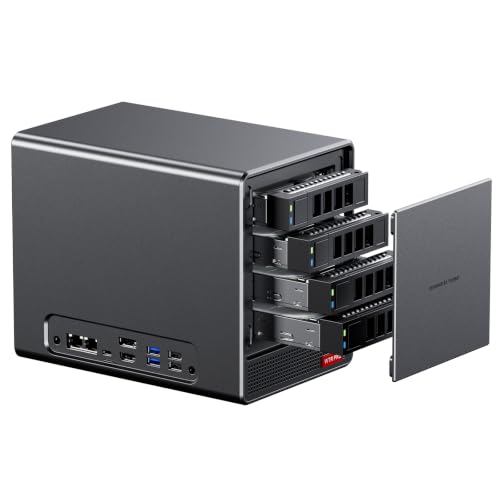
- Ryzen 7 5825U with 8 cores and 16 threads
- 4 SATA bays plus 2 M.2 NVMe slots
- Dual 2.5G LAN and 24-hour operation design
Best For: Users building a high-capacity, expandable Jellyfin NAS
Entry-Level Personal Cloud

- Quad-core 1.7GHz CPU for daily NAS tasks
- 2.5GbE networking for faster home transfers
- Tool-free install and private cloud features
Best For: Beginners needing simple storage and light Jellyfin use
High-Power Multi-Tasker

- Intel Pentium Gold 8505 and 8GB DDR5 for heavy multitasking
- 10GbE, 2.5GbE, and NVMe slots for high-speed setups
- Supports Docker and virtual machines
Best For: Power users building a fast, expandable home server
Quiet Media Hub

- Intel x86 quad-core CPU with 4GB RAM
- Hardware 4K H.265 decoding with Jellyfin support
- Quiet 19dB(A) operation and 2.5GbE networking
Best For: Home users who want quiet Jellyfin streaming and easy storage
All-Round NAS Pick – UGREEN DXP2800 2-Bay NAS for Creators
If you want a home server for Jellyfin that feels approachable but still has real NAS features, the UGREEN DXP2800 is a strong starting point. Its Intel N100 processor, 8GB of DDR5 RAM, 2.5GbE networking, and dual M.2 slots make it well suited for storing and serving a personal media library on a compact desktop system.
Best For: Content creators and home users who want a user-friendly Jellyfin server with room for local storage and media sharing.
Pros:
- Intel N100 quad-core CPU with 8GB DDR5 for everyday NAS and media server tasks
- 2.5GbE plus 2x M.2 NVMe slots for faster storage and network flexibility
- Supports up to 80TB, giving plenty of space for a growing video library
- Easy access from Windows, macOS, mobile devices, browsers, and smart TVs
Cons:
- Diskless, so you still need to buy and install drives
- Dual-bay layout is simpler than larger NAS systems for expansion
For a Jellyfin setup focused on ease of use, the DXP2800 combines capable hardware with a straightforward NAS experience. It looks especially practical if you want secure local storage, quick setup, and enough performance for a home media library without jumping into a more complex server build.
Mini PC NAS Hybrid – Beelink ME Pro Hybrid NAS Mini PC
The Beelink ME Pro is a good fit if your home server for Jellyfin needs to act like both a mini PC and a NAS. With an Intel N150 processor, 16GB of LPDDR5 RAM, a pre-installed 1TB SSD, three M.2 slots, and two HDD bays, it gives you a flexible platform for a centralized media library and other always-on server tasks.
Best For: Users who want a compact Jellyfin box with hybrid SSD and HDD storage, plus dual LAN for faster networking.
Pros:
- Hybrid storage design with 2 HDD bays and 3 M.2 SSD slots
- Intel N150 and 16GB LPDDR5 for efficient 24/7 multitasking
- 5GbE plus 2.5GbE dual LAN supports high-speed data transfer
- Whisper-quiet cooling and compact metal chassis for desktop use
Cons:
- Only 2 HDD bays, so bulk storage is still limited versus larger NAS units
- Accessories and power adapter are stored inside the HDD bays, which is easy to miss during setup
As a Jellyfin server, the ME Pro stands out for mixing local storage flexibility with small-form-factor convenience. It should appeal most to buyers who want a clean desktop footprint, dual-networking options, and enough room to build a capable private media library.
DIY Home Lab Choice – ZimaBlade 7700 x86 Self-Hosting Kit
If you want a more hands-on home server for Jellyfin, the ZimaBlade 7700 is built for DIY self-hosting rather than a locked-down appliance experience. Its Intel quad-core x86 platform, 16GB of RAM, dual SATA support, and preinstalled CasaOS make it a practical base for a media server, Docker apps, and a broader homelab.
Best For: Tinkerers who want a flexible x86 Jellyfin server with Docker, CasaOS, and room to experiment.
Pros:
- x86 Intel quad-core platform with broad OS and software compatibility
- 16GB RAM supports file sharing, backups, and multiple lightweight services
- Includes dual SATA, metal drive cage, power supply, and cables for a ready-to-build kit
- Supports 4K media streaming with Plex-style direct play use cases
Cons:
- Requires assembly, so it is less plug-and-play than a finished NAS
- Only two drive bays, which limits built-in storage expansion
For Jellyfin users who also want to run containers, home automation, or other services, the ZimaBlade 7700 is more about flexibility than simplicity. It is a compelling option if you value open-ended software support and a kit-based approach to building your server.
High-Performance NAS Build – AOOSTAR WTR PRO 5825U NAS
The AOOSTAR WTR PRO is aimed at buyers who want a more powerful home server for Jellyfin and other heavy multitasking jobs. Its AMD R7 5825U processor, 4+2 bay layout, dual 2.5GbE ports, and support for larger RAM and storage capacities make it a strong pick for a serious home lab or media server build.
Best For: Advanced users who want a powerful, customizable Jellyfin server with virtualization and RAID support.
Pros:
- AMD R7 5825U with 8 cores and 16 threads for demanding multitasking
- 4+2 bay design with up to 96TB storage support
- Dual 2.5GbE plus NVMe slots and RAID 0/1/5 support
- Metal chassis with rear fan for better cooling in 24/7 use
Cons:
- Ships without RAM, SSD, or OS, so it needs a fuller build-out
- More complex than simpler NAS options if you only want basic media streaming
As a Jellyfin server, the WTR PRO is best when you want headroom for storage, virtualization, and other services alongside media streaming. It is the most ambitious option here, especially if you are comfortable assembling and configuring your own home lab machine.
Synology Private Cloud Media Server – DS225+ 2-Bay Diskless NAS
If you want a home server for Jellyfin that feels polished and dependable, the Synology DS225+ is built around simple private-cloud media use. Its Intel CPU supports hardware transcoding, making it a strong fit for streaming your movie and photo library to different devices without monthly fees.
Best For: People who want a reliable, easy-to-manage NAS for Jellyfin, backups, and family media sharing.
Pros:
- Intel CPU with hardware transcoding for smoother media streaming
- Designed for a Netflix-style personal library with 4K movie, show, and photo access
- Automated backups to cloud services, external drives, and remote NAS devices
- Multi-layered data protection with RAID and snapshot technology
Cons:
- Diskless model, so storage drives must be purchased separately
- Only a 2-bay design, which limits expansion compared with larger NAS units
Overall, the DS225+ is the most straightforward choice here if your priority is a stable media server plus strong backup tools. It is less about DIY flexibility and more about dependable everyday use for a home Jellyfin setup.
ZimaBoard Server-Class Homelab Board – ZimaBoard 2 832 x86 Home Server
For a home server for Jellyfin with a more builder-friendly approach, the ZimaBoard 2 832 gives you x86 power in a compact, always-on platform. It includes dual 2.5GbE, dual SATA, and PCIe expansion, so you can start small and still have room to grow your media and homelab setup.
Best For: DIY users who want an expandable Jellyfin server platform with NAS, Docker, and homelab flexibility.
Pros:
- x86 Intel N150 platform designed for 24/7 home server workloads
- Dual SATA and dual 2.5GbE support for practical media and storage builds
- PCIe 3.0 x4 slot allows upgrades like 10GbE, NVMe adapters, GPUs, or AI accelerators
- ZimaOS comes preinstalled, with support for Docker, media servers, and other self-hosted services
Cons:
- More of a platform than a turnkey NAS, so setup takes more effort
- Included storage is limited to 32GB eMMC, so you will need external drives for media
The ZimaBoard 2 stands out if you want Jellyfin on a flexible home-server base instead of a fixed NAS appliance. It is especially appealing if you plan to add services over time or want hardware that can evolve with your homelab.
AOOSTAR Expandable NAS Mini PC – WTR PRO 4+2 Bay NAS Mini PC
If your home server for Jellyfin needs more storage flexibility, the AOOSTAR WTR PRO combines a Ryzen 7 5825U with a 4+2 bay layout. It is a barebone system, but the mix of SATA bays, M.2 slots, and dual 2.5G LAN makes it a strong option for a media-focused NAS build.
Best For: Buyers who want a high-expansion Jellyfin server with room for multiple drives and network upgrades.
Pros:
- Ryzen 7 5825U offers 8 cores and 16 threads for multitasking
- 4 SATA bays plus 2 M.2 NVMe slots support large storage expansion
- Dual 2.5G LAN and broad system support suit NAS and router use
- Low power range and active cooling are designed for 24-hour operation
Cons:
- Barebone version includes no RAM, SSD, HDD, or OS
- Requires more assembly and parts selection than an all-in-one NAS
The WTR PRO is a strong pick if storage capacity and expandability matter more than convenience. For a Jellyfin setup that may grow into a larger NAS or multi-role machine, it offers a very flexible foundation.
Entry-Level Personal Cloud – Asustor Drivestor 2 Gen 2
If you want a basic home server for Jellyfin and also need reliable everyday storage, the Asustor Drivestor 2 Gen 2 is a straightforward entry-level NAS. Its quad-core 1.7GHz Realtek CPU, 2.5GbE networking, and 1GB DDR4 memory are aimed at file sharing, backups, and personal cloud use rather than heavy multitasking.
Best For: Beginners who want a simple NAS for storage, backups, and light Jellyfin use.
Pros:
- Quad-core 1.7GHz CPU for stable daily NAS tasks
- 2.5GbE port for faster transfers than standard Gigabit NAS models
- Tool-free drive installation makes setup easy for first-time users
- Private cloud features support secure remote file access
Cons:
- 1GB RAM is limited for more demanding multitasking
- 2-bay design offers less expansion than larger NAS units
- Best suited to basic use rather than a high-load media server
Overall, this is a practical low-friction choice if your priority is dependable home storage with enough network speed for light media-server duties. It fits best when Jellyfin is only one part of a broader personal cloud and backup setup.
High-Power Multi-Tasker – UGREEN NAS DXP4800 Plus
For a more capable home server for Jellyfin, the UGREEN NAS DXP4800 Plus brings the kind of hardware that can handle heavier workloads. Its Intel Pentium Gold 8505 5-core CPU, 8GB DDR5 RAM, 128GB built-in SSD, and 10GbE plus 2.5GbE networking make it a strong pick for users who want storage, Docker, and virtual machine support in one box.
Best For: Power users who want a fast NAS for media, apps, and advanced home-server tasks.
Pros:
- Intel 5-core processor and 8GB DDR5 RAM for smooth multitasking
- 10GbE and 2.5GbE ports support very fast wired transfers
- Built-in 128GB SSD plus two M.2 NVMe slots add flexibility
- Docker and virtual machine support expand home server use cases
Cons:
- Hard drives are not included
- Wired Ethernet only, with no Wi-Fi support on this model
- More hardware than a casual user may need for simple media storage
This is the most feature-rich option here for people building a serious home server for Jellyfin and related services. If you want room to grow into containers, VMs, and faster networking, the DXP4800 Plus offers the strongest foundation.
Quiet Media Hub – TERRAMASTER F2-425
If your goal is a home server for Jellyfin that stays quiet and handles streaming well, the TERRAMASTER F2-425 is an appealing 2-bay option. It combines an Intel x86 quad-core CPU, 4GB RAM, and 2.5GbE networking with hardware-level 4K H.265 decoding and explicit support for Plex, Emby, and Jellyfin.
Best For: Home users who want a quiet NAS for media streaming and simple all-around storage.
Pros:
- Intel x86 quad-core CPU with 4GB RAM for 4K transcoding and multitasking
- Hardware-level 4K H.265 decoding and Jellyfin support for media playback
- 2.5GbE port helps speed up file transfers and multi-user access
- Very quiet operation at 19dB(A) suits bedrooms and shared spaces
Cons:
- 2-bay design limits total expansion compared with larger NAS systems
- Plastic enclosure is less premium than metal alternatives
- Designed for home use, so it is not the most scalable platform here
Among the three, this model is the most directly aligned with a Jellyfin-focused home server setup. The combination of quiet operation, 4K decoding, and app compatibility makes it especially practical for streaming-centric households.
How We Picked These Home Server for Jellyfin Options
For this roundup, we focused on devices that make sense for real-world Jellyfin use: hardware transcoding support, efficient x86 processors, enough memory for multitasking, and storage or expansion options that fit a growing media library. We also considered network speed, noise, and how easy each device is to set up for a home media server.
Quick Comparison: What Matters Most
In a Home Server for Jellyfin, the biggest performance differences usually come from the CPU and the storage layout. Lower-power Intel N-series systems are often excellent for direct play and light transcoding, while stronger Intel Pentium, Celeron-class, or AMD Ryzen systems are better if you expect multiple users, more background apps, or heavier 4K workloads. Two-bay NAS units are simpler and more compact, while 4-bay and hybrid mini NAS designs give you more room for RAID, cache, and future expansion.
Storage and Expansion
If your library is small, a 2-bay model may be enough. If you expect your collection to grow, look for extra bays, M.2 slots, or NVMe caching. Those features can improve responsiveness and make it easier to add capacity later without replacing the whole system.
Network and Transcoding
2.5GbE is a strong baseline for a media server at home, especially if you stream across multiple devices or move large video files often. If you plan to keep multiple 4K streams running, pay close attention to Intel iGPU support or other hardware acceleration options that Jellyfin can use for transcoding.
Key Buying Factors for a Home Server for Jellyfin
CPU: Choose a capable x86 chip with integrated graphics if you want reliable hardware transcoding. Intel-based systems are often the safest bet for Jellyfin compatibility.
RAM: 8GB is a practical starting point for a basic server, while 16GB gives you more breathing room for Docker, downloads, backups, and multiple services.
Drives: SSDs help with the operating system and app responsiveness, while HDDs are still the best value for large media libraries.
Ports: Dual 2.5GbE, NVMe slots, and SATA expansion can make a big difference if you want faster transfers or a more flexible setup.
Thermals and noise: A server that runs cool and quiet is easier to live with if it sits in an office, living room, or bedroom closet.
Who Should Buy Which Home Server for Jellyfin?
Beginner and light-streaming users: A compact 2-bay NAS or low-power mini server is usually enough if you mainly direct play and store a modest library.
Families and multi-device homes: Look for 2.5GbE, at least 8GB of RAM, and a CPU with solid hardware transcoding so several people can stream without stutter.
Power users and growing libraries: A 4-bay or hybrid NAS/mini PC setup is a better fit if you want more storage, more apps, and room for future expansion.
DIY enthusiasts: Barebone systems are ideal if you want to choose your own RAM, drives, and operating system for a more customizable Jellyfin build.
In short, the best Home Server for Jellyfin is the one that balances transcoding headroom, storage capacity, and noise level for how you actually watch media at home.