
If you want a barebone computer for Proxmox, the best choices are the ones that balance CPU performance, fast networking, and flexible storage expansion.
This roundup focuses on compact systems that can handle virtualization workloads, home-lab services, and light-to-moderate server duties without wasting space or power.
Best 10 Barebone Computer for Proxmox Picks for 2026
Network Appliance Barebone

- 4x 10G SFP+ plus 5x Intel 2.5GbE ports
- Atom C3758 8-core CPU with QAT support
- Fanless aluminum chassis for 24/7 use
Best For: Proxmox users building a silent router, firewall, or network appliance
Budget Flexible Barebone
Ryzen 5 3500U Mini PC for Proxmox
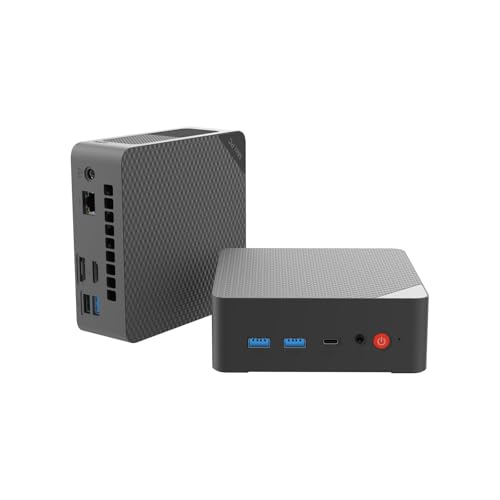
- Ryzen 5 3500U 4C/8T with Vega 8 graphics
- Dual DDR4 slots and dual SSD support
- Triple 4K display plus WiFi/Bluetooth
Best For: Budget-conscious users wanting a customizable Proxmox starter
Rackmount Proxmox Node

- 1U rackmount chassis for server racks
- 2x 10GbE plus 4x 2.5GbE networking
- DDR5 SO-DIMM and NVMe support
Best For: Rackmount Proxmox deployments that need compact networking hardware
AI-Ready Balanced Pick
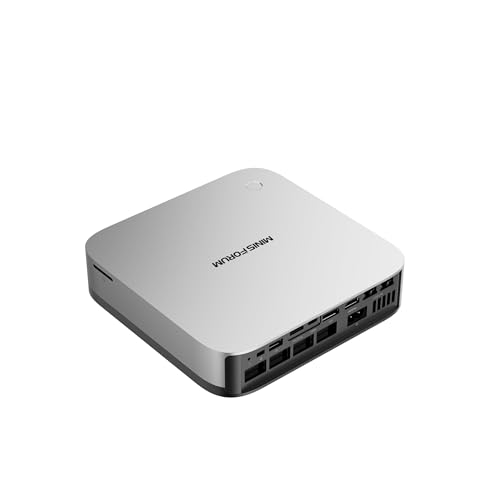
- Ryzen AI 9 HX 370 with 12 cores/24 threads
- Three PCIe 4.0 SSDs and up to 128GB DDR5
- Dual 2.5Gb LAN, WiFi 7, and OCuLink
Best For: buyers who want a modern Proxmox box with strong all-around expandability
Budget Barebone Pick
GMKtec G3 Pro Core i3 Barebone
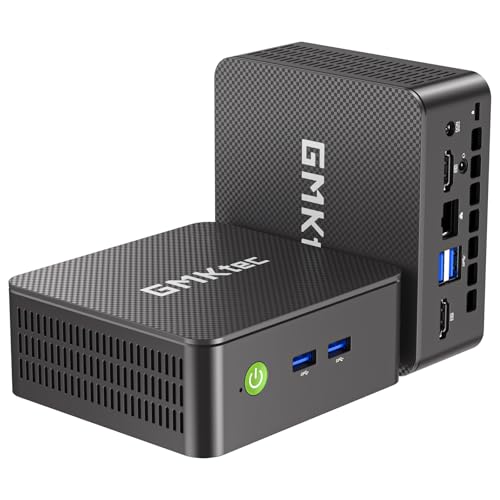
- Core i3-10110U for light virtualization tasks
- Two M.2 slots and barebone customization
- 2.5GbE plus WiFi 6 and Proxmox support
Best For: entry-level homelabs and light Proxmox setups on a budget
Balanced OCuLink Builder

- Ryzen 7 255 with Radeon 780M graphics
- OCuLink plus two USB4 ports
- Dual M.2 and dual SODIMM support
Best For: Flexible home lab builds that may grow into eGPU use
AI-Ready Compact Host

- Core Ultra 9 285H with 16 cores
- Dual M.2 PCIe 4.0 and dual SO-DIMM
- OCuLink, Wi-Fi 7, and 2.5GbE
Best For: Compact Proxmox hosts with modern I/O and external expansion
Ryzen 7 Barebone Workhorse – GMKtec K12 with Oculink and Quad Display
If you want a barebone computer for Proxmox with more modern expansion options, the GMKtec K12 is built around a Ryzen 7 H 255-class 8-core/16-thread platform and leaves you free to add your own RAM and storage. It stands out for dual 2.5GbE LAN, three M.2 2280 slots, USB4, and Oculink, making it a flexible base for virtualization, lab work, and multi-role use.
Best For: Home lab builders who want a fast, expandable barebone for Proxmox plus storage and network flexibility.
Pros:
- Ryzen 7 H 255-class 8C/16T processor with Radeon 780M graphics
- Three M.2 2280 PCIe 4.0 slots and dual-channel DDR5 support
- Dual 2.5GbE LAN plus Oculink and USB4 for expansion
- Quad-display support through HDMI 2.1, DP 1.4, USB4, and USB-C
Cons:
- Sold as barebones, so RAM, SSD, and OS must be added
- Gaming-focused features may be more than some Proxmox users need
The K12 is a strong pick if you want a compact Proxmox host that can also handle high-speed storage and networking upgrades later. Its mix of modern AMD compute, multiple M.2 slots, and dual LAN gives it a lot of room to grow.
Network Appliance Barebone – Qotom 10G SFP+ and 2.5G LAN
Qotom Barebone System Mini PC 4X 10G SFP+ 5X i226V B3 2.5G LAN Atom C3758 8 Core Processor 2.2 GHz
Check Price On AmazonThis barebone computer for Proxmox is best understood as a network-first platform rather than a general-purpose mini PC. The Qotom system pairs an Atom C3758 8-core processor with 4x 10G SFP+ ports and 5x Intel i226-V 2.5GbE ports, so it is aimed at routing, firewall, and virtualization workloads where connectivity matters most.
Best For: Proxmox users building a silent, always-on network appliance, firewall, or router node.
Pros:
- 4x 10G SFP+ and 5x Intel 2.5GbE LAN ports
- Intel Atom C3758 8-core CPU with QAT support
- Dual DDR4 SODIMM slots plus 2x M.2 NVMe and 2x 2.5-inch bays
- Fanless aluminum design for silent 24/7 operation
Cons:
- Atom-class CPU is better for networking than heavy general compute
- Designed more like an appliance than a flexible desktop mini PC
If your Proxmox box needs to sit at the center of a network stack, this Qotom configuration has the right port mix and a rugged passive design. It is less of an all-rounder, but it is very well suited to throughput-heavy duties.
Budget Flexible Barebone – Ryzen 5 3500U Mini PC for Proxmox
For buyers who want a practical barebone computer for Proxmox without stepping into premium territory, this Ryzen 5 3500U mini PC is a straightforward option. It comes without RAM, storage, or OS, but it does include dual RAM slots, dual SSD slots, and triple 4K display output, which makes it a useful compact base for light virtualization and general home-office tasks.
Best For: Budget-conscious users who want a customizable Proxmox starter with decent expansion.
Pros:
- Ryzen 5 3500U 4C/8T processor with Radeon Vega 8 graphics
- Dual DDR4 SO-DIMM slots and dual SSD slot support
- Triple 4K display output via USB-C, HDMI 2.0, and DP 1.4
- WiFi, Bluetooth, gigabit Ethernet, and VESA mount included
Cons:
- Older Ryzen mobile platform than newer high-end mini PCs
- Lower memory ceiling than more ambitious lab-focused systems
This model makes sense if you need a low-cost, configurable Proxmox machine and do not require a lot of CPU or I/O headroom. It is compact, practical, and easy to slot into a home office or small lab.
Rackmount Proxmox Node – Qotom 1U Atom X7425E Barebone
If you need a rack-ready barebone computer for Proxmox, the Qotom Q10924H6 is built for server cabinets and network closets rather than a desk. Its 1U chassis, DDR5 memory support, NVMe storage, and dual 10GbE plus four 2.5GbE ports make it a strong fit for dense infrastructure roles where space and connectivity are priorities.
Best For: Rackmount Proxmox deployments that need compact networking hardware and modern memory support.
Pros:
- 1U rackmount chassis designed for server racks and cabinets
- 2x 10GbE RJ45 and 4x Intel i226-V 2.5GbE ports
- DDR5 SO-DIMM support with M.2 NVMe SSD storage
- Compatible with Proxmox VE, Linux, OpenWrt, and Windows 10/11
Cons:
- 10G Marvell AQC113 ports require modern drivers
- Not compatible with pfSense, OPNsense, or FreeBSD per notes
This is a good fit when your Proxmox hardware must live in a rack and serve as a compact network node. Just be sure your software stack matches the driver and compatibility guidance before buying.
High-End Barebone Pick – MINISFORUM MS-01 i9 10G Workstation
If you want a barebone computer for Proxmox that can double as a serious lab host, the MINISFORUM MS-01 stands out for networking and expansion. Its Core i9-13900H, dual 10G SFP+ ports, dual 2.5G LAN, and three SSD slots make it especially appealing for homelabs, storage-heavy builds, and virtualization setups that need more than a basic mini PC.
Best For: Proxmox users who want high-speed networking, multiple SSD options, and workstation-level expandability.
Pros:
- Core i9-13900H offers strong 14-core/20-thread performance for demanding workloads.
- Dual 10G SFP+ plus dual 2.5G LAN gives unusually flexible networking for a mini workstation.
- Three SSD slots, RAID support, and U.2 compatibility help with storage-focused Proxmox builds.
- PCIe x16 slot adds room for a discrete GPU if your setup grows.
Cons:
- Barebone version means you still need to add RAM, SSDs, and an OS.
- Premium hardware likely makes it more than you need for a simple small lab.
- Active cooling and a workstation-class layout may be more complex than ultra-basic mini PCs.
This is a strong choice when Proxmox is only one part of a broader home server or workstation plan. The combination of fast wired networking and flexible storage makes it easy to scale into a powerful virtualized host.
AI-Ready Balanced Pick – MINISFORUM AI X1 Pro Barebone
The MINISFORUM AI X1 Pro is a compelling barebone computer for Proxmox if you want a newer platform with strong performance and flexible I/O. It pairs an AMD Ryzen AI 9 HX 370 with dual 2.5Gb LAN, WiFi 7, OCuLink, and three PCIe 4.0 SSD slots, making it a versatile option for virtualization, storage, and general homelab use.
Best For: Users who want a modern, feature-rich barebone for Proxmox with fast networking and expansion headroom.
Pros:
- Ryzen AI 9 HX 370 brings 12 cores, 24 threads, and up to 80 TOPS of AI-focused capability.
- Three PCIe 4.0 SSDs and support for up to 128GB DDR5 make it well suited to heavier VM workloads.
- Dual 2.5Gb LAN, WiFi 7, and OCuLink create plenty of connection and expansion options.
- Independent cooling for CPU and SSDs helps keep noise and thermals under control under load.
Cons:
- It is a barebone system, so RAM, storage, and OS are still your responsibility.
- Some AI-focused features like Copilot and Recall are less relevant if you only want a server.
- Built-in speakers and fingerprint features add convenience, but they are not essential for Proxmox.
For a Proxmox build, this model is attractive because it blends modern CPU performance with practical storage and networking. It is a good fit if you want a compact machine that can serve both as a lab node and a high-end everyday PC.
Budget Barebone Pick – GMKtec G3 Pro Core i3 Barebone
If your goal is a practical barebone computer for Proxmox without spending on high-end hardware, the GMKtec G3 Pro is the most budget-oriented option here. It uses a Core i3-10110U, includes 2.5GbE networking, and gives you two SSD slots, which is enough for a small lab, light server duties, or a compact virtualization starter system.
Best For: Entry-level Proxmox users who want an inexpensive, customizable mini PC for light virtualization.
Pros:
- Core i3-10110U offers solid single-core speed and Hyper-Threading for light multitasking.
- Two M.2 storage slots let you add your own RAM and storage configuration.
- 2.5GbE, WiFi 6, and Bluetooth 5.2 cover the essentials for a small server.
- Supports Linux, Proxmox, and server-friendly features like PXE Boot and Wake On LAN.
Cons:
- Older processor is far less capable than the other two options for heavy VM loads.
- Limited to a more basic office-class platform, so expansion is modest.
- No included RAM, SSD, or OS in the barebone package.
This is the sensible pick when you mainly need a low-cost Proxmox host for testing, learning, or light services. It gives you the networking and storage flexibility to start small without overcommitting to a more expensive machine.
Ultra-Frequency Proxmox Workhorse – MINISFORUM MS-02 Ultra
If you want a barebone computer for Proxmox with serious expansion room, the MINISFORUM MS-02 Ultra is built more like a compact workstation than a typical mini PC. Its Core Ultra 9 285HX, four DDR5 slots, and four SSD slots make it a strong fit for dense virtualized setups, especially when you need fast networking and plenty of storage flexibility.
Best For: Users building a high-core-count Proxmox host with heavy network and storage demands.
Pros:
- Intel Core Ultra 9 285HX with 24 cores for demanding multitasking and VM loads
- Two 25G SFP+ ports plus 10G and 2.5G RJ45 for high-speed networking
- Four DDR5 SO-DIMM slots and four M.2 SSD slots for extensive expansion
- HDMI plus three USB4-class video outputs for multi-monitor use
Cons:
- Barebone config means you still need to add memory and storage
- Some SSD slots and PCIe space are already occupied by the pre-installed 25GbE NIC and M.2 modules
- Advanced networking and workstation features may be more than a simple home lab needs
For Proxmox builders who care more about bandwidth, storage density, and expansion than small size alone, this model stands out. It is best treated as a premium virtualization box with workstation-grade connectivity and cooling rather than a basic budget mini PC.
Balanced OCuLink Builder – Reatan X7 AI
The Reatan X7 AI is a practical barebone computer for Proxmox if you want a compact system with modern networking, OCuLink, and room for dual drives. It is centered on the Ryzen 7 255 with Radeon 780M graphics, so it has enough onboard capability for general virtualization, light graphics work, and flexible desktop use.
Best For: Home lab users who want a balanced barebone with OCuLink and Wi-Fi 7.
Pros:
- Ryzen 7 255 with 8 cores and 16 threads for solid all-around performance
- Two M.2 slots and dual SODIMM support for straightforward barebone expansion
- OCuLink offers faster external GPU connectivity than Thunderbolt 4/USB4
- Wi-Fi 7, 2.5G LAN, and dual USB4 ports add strong connectivity options
Cons:
- Requires you to supply RAM, SSDs, and an operating system
- OCuLink uses one M.2 slot and does not support hot-swapping
- Storage ceiling is more modest than workstation-style alternatives
This is a good fit if you want a flexible Proxmox starting point without jumping to a bigger workstation class machine. Its mix of OCuLink, Wi-Fi 7, and dual-drive support makes it appealing for users who may later expand into eGPU or multi-purpose lab use.
AI-Ready Compact Host – MINISFORUM M1 Pro
The MINISFORUM M1 Pro is a strong barebone computer for Proxmox when you want a modern Intel platform with high memory bandwidth, dual SSD support, and external expansion potential. With the Core Ultra 9 285H, Wi-Fi 7, OCuLink, and quad-display output, it is positioned as a compact system that can handle virtualization while still serving as a versatile desktop or lab machine.
Best For: Users who want a compact Proxmox host with strong CPU performance and modern expansion.
Pros:
- Core Ultra 9 285H with 16 cores and 16 threads for demanding workloads
- Dual M.2 PCIe 4.0 slots and dual SO-DIMM memory support
- OCuLink plus two USB4 ports for fast peripheral and external GPU options
- 2.5GbE, Wi-Fi 7, and quad display outputs for flexible connectivity
Cons:
- Barebone configuration means no storage or OS is included
- Only two internal SSD slots, so storage density is lower than workstation-class models
- OCuLink requires one M.2 slot and is not hot-swappable
For Proxmox users who value a newer Intel platform and broad connectivity in a compact chassis, the M1 Pro is easy to recommend. It is not the most storage-dense option here, but it delivers a strong mix of speed, flexibility, and modern I/O.
How We Picked the Best Barebone Computer for Proxmox
For a Barebone Computer for Proxmox, raw CPU speed matters, but it is not the only priority. We looked for models with enough cores and threads for multiple VMs, strong I/O for storage and networking, and practical expandability so the system can grow with your lab. We also favored machines with better thermals, modern NIC options, and a form factor that fits rack, desktop, or compact server use.
Quick Comparison
The list breaks into a few clear categories: compact mini PCs for efficient virtualization, network-heavy barebones for routing and firewall roles, and workstation-class systems for users who want more PCIe, memory, and SSD headroom. If your setup is mostly VMs and containers, prioritize CPU efficiency and storage lanes. If you are building a Proxmox router, switch, or edge server, multi-port Ethernet becomes the deciding factor.
Key Buying Factors for a Barebone Computer for Proxmox
CPU and Core Count
Proxmox benefits from higher core counts, especially when you run several VMs or services at once. Look for modern Intel Core Ultra, Core H-series, or AMD Ryzen 7/AI-class chips if you plan to virtualize more than a few lightweight guests. For basic lab use, midrange chips can still be enough if your workloads are modest.
Memory Capacity and Upgrade Path
Memory is often the first bottleneck in virtualization. Choose a platform with at least 64GB support if possible, and prefer systems with two or more SO-DIMM slots. If you expect to run ZFS, multiple containers, or memory-hungry applications, prioritize higher maximum RAM over bundled specs.
Storage and Expansion
Multiple M.2 slots are a major advantage in a Barebone Computer for Proxmox. They let you separate the Proxmox boot drive from VM storage or cache drives. Additional PCIe lanes, Oculink, or 2.5/10GbE options are also valuable if you plan to use fast NAS storage or external expansion.
Networking
For home labs and firewall builds, dual NICs are the minimum sweet spot, while multi-port 2.5GbE or 10GbE systems are ideal for routing, isolation, and storage traffic. Check whether the ports are Intel-based when possible, since broad Linux compatibility can save setup time.
Who Should Buy Which Barebone Computer for Proxmox?
Choose a compact mini PC if you want an efficient Proxmox host for a few VMs, containers, or test labs. Pick a network-rich barebone if your goal is routing, firewall, or segmented lab networking. Go with a workstation-class option if you need the most room for RAM, NVMe drives, and heavier virtualization workloads. In short, the best choice depends less on size alone and more on how much isolation, storage, and throughput your Proxmox setup needs.