
If you want desktop-level flexibility in a tiny footprint, a mini PC with OCuLink port is one of the smartest upgrades you can buy. It gives you a fast lane to external GPU expansion without giving up the space-saving benefits of a compact system.
In this roundup, we focus on models that balance performance, connectivity, upgrade options, and value for gaming, creator work, and general productivity.
Best 10 Mini PC with OCuLink Port Picks for 2026
High-Expansion Gaming Pick
Ryzen 7 H 255 gaming mini PC with 780M

- Ryzen 7 H 255 with 8 cores / 16 threads
- Oculink plus USB4 for eGPU expansion
- 3x M.2 slots and dual 2.5GbE LAN
Best For: gamers and creators who want strong integrated graphics with expansion room
Ready-to-Use Pick
Ryzen 7 8845HS mini PC with OCuLink and 16GB RAM
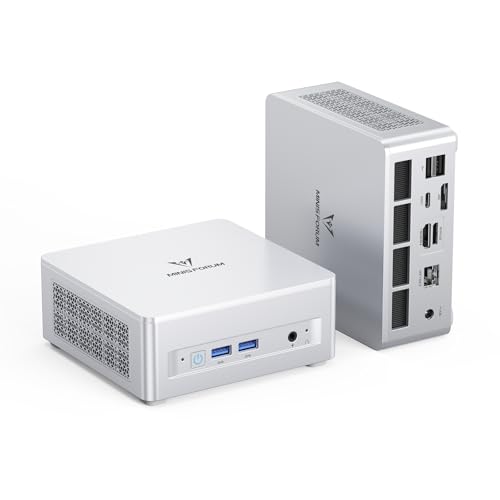
- Includes 16GB DDR5 and 512GB SSD
- OCuLink adapter included for eGPU use
- Triple-display support with HDMI 2.1, USB4, and DP 1.4
Best For: People who want a configured mini PC with upgrade headroom
Feature-Rich Value Pick
Ryzen 7 PRO mini PC with OCuLink and dual USB4

- OCuLink for external GPU support
- 32GB DDR5 RAM and 512GB SSD included
- Dual USB4 plus dual 2.5GbE LAN
Best For: Users who want strong included specs and broad connectivity
Ultra-Connected Barebone Pick
Reatan X7 AI Ryzen 7 255 Oculink Gaming Mini PC

- Ryzen 7 255 with Radeon 780M
- Wi-Fi 7, dual USB4, quad display
- Barebone build with OCuLink
Best For: Custom builders wanting a barebone mini PC with OCuLink and modern connectivity
Best Balanced Gaming Value
GMKtec Nucbox M7 Ultra Ryzen 7 PRO 6850U
- Ryzen 7 PRO 6850U with Radeon 680M
- OCuLink plus dual USB4 and HDMI 2.1
- 32GB DDR5 and 1TB SSD included
Best For: Buyers who want a ready-to-use OCuLink mini PC with strong all-around specs
High-Expansion Gaming Pick – Ryzen 7 H 255 gaming mini PC with 780M
If you want a mini pc with OCuLink port for gaming, multitasking, and flexible expansion, the GMKtec K12 is built around an AMD Ryzen 7 H 255 and Radeon 780M graphics. It adds USB4, HDMI 2.1, DP, quad-display support, and triple M.2 expansion, so it can fit both a compact desk setup and a more ambitious small-form-factor build.
Best For: gamers and creators who want strong integrated graphics plus high-speed OCuLink eGPU expansion.
Pros:
- Ryzen 7 H 255 with 8 cores and 16 threads for strong everyday and gaming performance
- Radeon 780M iGPU with support for up to 8K output and common hardware encode/decode formats
- Oculink port for lower-latency, higher-bandwidth eGPU setups
- 3x M.2 2280 expansion slots plus dual 2.5GbE networking
Cons:
- Storage maxes out only after you add drives yourself
- Designed as a compact performance box, so it relies on external expansion for true desktop-class graphics
Overall, the K12 stands out if you want a feature-rich mini PC that balances strong integrated graphics with serious expansion options. The OCuLink port and multiple display outputs make it especially practical for gaming-focused buyers who may upgrade to an eGPU later.
Balanced Work-and-Play Pick – Ryzen 5 PRO 6650H mini PC with dual LAN
The GMKtec M8 is a practical mini pc with OCuLink port for users who want a balanced mix of office speed, light gaming, and external GPU flexibility. Its Ryzen 5 PRO 6650H, Radeon 660M graphics, dual 2.5GbE LAN, and USB4 support make it a versatile compact desktop for workstations and home labs.
Best For: productivity users and light gamers who want eGPU support in a compact dual-LAN mini PC.
Pros:
- Ryzen 5 PRO 6650H with 6 cores and 12 threads for responsive multitasking
- OCuLink and USB4 provide direct external GPU and high-speed connectivity options
- Dual 2.5GbE LAN plus WiFi 6E for networking-heavy setups
- Triple-display support with HDMI, DisplayPort, and USB4/DP
Cons:
- Integrated Radeon 660M is aimed more at mainstream use than heavy gaming
- 16GB LPDDR5 is fixed memory, so upgrades are more limited than on socketed systems
For buyers who care more about stability, connectivity, and expansion than raw graphics power, the M8 is easy to recommend. It has the ports and BIOS options to work well as a compact desktop, small server, or eGPU-ready travel machine.
Barebones Builder Pick – Ryzen 7 8745HS barebones mini PC
If you are shopping for a mini pc with OCuLink port and want a barebones platform to build out yourself, the AOOSTAR GEM12 MAX is a strong option. It pairs the Ryzen 7 8745HS with Radeon 780M graphics, dual USB4, dual 2.5G LAN, and support for up to four displays, making it suited to a wide range of performance-focused setups.
Best For: builders who want a high-performance barebones mini PC with strong eGPU and display support.
Pros:
- Ryzen 7 8745HS offers 8 cores, 16 threads, and up to 5.1GHz boost
- OCuLink with stated 64Gbps bandwidth for external GPU setups
- Dual DDR5 and dual PCIe 4.0 M.2 expansion support
- Can support up to four displays with HDMI, DP, and USB4 connections
Cons:
- Ships with no RAM and no SSD, so you must supply your own parts
- Some BIOS power settings and setup details may require more tinkering than a ready-to-run system
The GEM12 MAX makes the most sense if you want to choose your own memory and storage and value maximum flexibility. Its OCuLink implementation, cooling system, and high-end Ryzen chip give it a strong foundation for demanding builds.
Storage-Rich Compact Pick – Ryzen 5 PRO 6650H mini PC with 1TB SSD
The GMKtec M8 with 1TB storage is a mini pc with OCuLink port aimed at buyers who want a ready-to-use compact desktop with room to grow. It combines the Ryzen 5 PRO 6650H, Radeon 660M graphics, dual 2.5GbE LAN, USB4, and triple-display support in a configuration that works well for office tasks, media, and casual gaming.
Best For: users who want a well-equipped, storage-heavy mini PC with eGPU-ready expansion.
Pros:
- 1TB NVMe SSD provides more out-of-box storage than smaller base models
- Oculink port and USB4 support external GPU and high-speed peripheral use
- Dual 2.5GbE LAN is useful for servers, link aggregation, and networking tasks
- Triple-display output via HDMI, DisplayPort, and USB4/DP
Cons:
- Radeon 660M is good for casual gaming and editing, but not a replacement for a discrete GPU
- Memory is fixed at 16GB LPDDR5, so it is less upgrade-friendly than some competing designs
This version of the M8 makes sense if you want a practical mini desktop with more included storage from day one. It keeps the same networking and OCuLink advantages as the smaller model, while giving you extra headroom for apps, games, and media files.
DIY Expansion Pick – Ryzen 7 H 255 barebone with OCuLink and 3 M.2 slots
If you want a mini pc with OCuLink port for an upgrade-friendly gaming or creator build, the GMKtec K12 is built around a Ryzen 7 H 255 and Radeon 780M graphics, but sold as a barebone unit. That makes it a strong pick if you already have RAM, SSDs, and an OS, or you want to customize the system from the start with dual-channel DDR5 and multiple M.2 slots.
Best For: DIY buyers who want a barebone mini PC with OCuLink, triple SSD expansion, and quad-display support.
Pros:
- OCuLink port supports external GPU setups with PCIe Gen4 x4 bandwidth.
- Three M.2 2280 PCIe 4.0 slots allow up to 24TB total storage.
- Quad-display output includes HDMI 2.1, DisplayPort 1.4, USB4, and USB-C.
- Dual 2.5GbE LAN plus Wi-Fi 6E/BT 5.2 for flexible networking.
Cons:
- Barebones only: no RAM, no SSD, and no OS included.
- Best value depends on already owning compatible parts for the build.
This is the most customizable option in the group, and its appeal is centered on expansion, not out-of-box convenience. If you want a mini PC with OCuLink port that can grow into a high-performance desktop replacement, the K12 is set up for that path.
Ready-to-Use Pick – Ryzen 7 8845HS mini PC with OCuLink and 16GB RAM
The MINISFORUM UM880 Plus is a practical mini pc with OCuLink port if you want strong everyday performance without building from scratch. It comes with Ryzen 7 8845HS, 16GB DDR5, and a 512GB PCIe 4.0 SSD already installed, while still leaving room for storage upgrades and an external GPU through its OCuLink interface.
Best For: Users who want a ready-to-use mini PC with OCuLink, strong iGPU performance, and easy expansion.
Pros:
- Ryzen 7 8845HS and Radeon 780M deliver strong general-purpose and gaming capability.
- OCuLink interface supports external discrete graphics, and an adapter is included.
- Preinstalled 16GB DDR5 and 512GB SSD make it usable right away.
- Triple display support via HDMI 2.1, USB4, and DisplayPort 1.4.
Cons:
- OCuLink is non-hot-swappable.
- Uses one M.2 slot for OCuLink, which affects storage expansion planning.
Compared with barebones models, the UM880 Plus is easier to recommend if you want less setup and more immediate usability. It balances speed, connectivity, and expandability well for a mini PC with OCuLink port.
Feature-Rich Value Pick – Ryzen 7 PRO mini PC with OCuLink and dual USB4
The GMKtec M7 Ultra is a compact mini pc with OCuLink port aimed at users who want solid performance, external GPU potential, and a roomy feature set. It pairs a Ryzen 7 PRO 6850U with Radeon 680M graphics, 32GB of DDR5 memory, and a 512GB PCIe SSD, so it is ready for multitasking and gaming-oriented use without requiring an immediate upgrade.
Best For: Buyers who want a well-equipped mini PC with OCuLink, dual USB4, and dual 2.5GbE networking.
Pros:
- OCuLink supports higher-bandwidth eGPU setups with lower lag.
- 32GB DDR5 and 512GB SSD are included out of the box.
- Dual USB4, HDMI 2.1, and Type-C display output support flexible multi-monitor use.
- Dual 2.5GbE LAN, Wi-Fi 6E, and Bluetooth 5.2 improve connectivity.
Cons:
- Ryzen 7 PRO 6850U is older than the newer 8845HS-class options.
- OCuLink and storage expansion are more appealing if you plan to use add-ons later.
This model stands out as a feature-rich, ready-to-run choice rather than a barebones project. If your priority is getting a mini PC with OCuLink port plus strong bundled specs, the M7 Ultra is an easy contender.
Ultra-Connected Barebone Pick – Reatan X7 AI Ryzen 7 255 Oculink Gaming Mini PC
If you want a mini pc with OCuLink port that also leans hard into display flexibility and high-speed networking, the Reatan X7 AI is a strong barebone option. It uses an AMD Ryzen 7 255 with Radeon 780M graphics, adds Wi-Fi 7, dual USB4 ports, and support for quad displays, making it a practical base for gaming, media, and multitasking once you add your own RAM, SSDs, and OS.
Best For: Buyers who want a barebone OCuLink mini PC with modern I/O, Wi-Fi 7, and dual USB4 for a custom build.
Pros:
- Ryzen 7 255 with Radeon 780M graphics for solid everyday performance.
- OCuLink plus two USB4 ports for fast external GPU and device connectivity.
- Quad-display support with DP 2.1, HDMI 2.1, and two USB4 outputs.
- Dual M.2 slots and dual SODIMM slots support a flexible barebone setup.
Cons:
- Ships barebone, so you must provide RAM, SSDs, and operating system.
- OCuLink uses one M.2 slot and does not support hot-swapping.
For shoppers building around their own components, this model stands out for its balance of connectivity, cooling modes, and premium networking. It is especially appealing if the priority is expansion headroom rather than an out-of-box ready desktop.
Best Balanced Gaming Value – GMKtec Nucbox M7 Ultra Ryzen 7 PRO 6850U
The GMKtec Nucbox M7 Ultra is a well-rounded mini pc with OCuLink port support if you want strong gaming-adjacent performance without jumping to a larger system. Its Ryzen 7 PRO 6850U, Radeon 680M graphics, dual USB4, and HDMI 2.1 make it versatile for mixed-use setups, while the included 32GB RAM and 1TB SSD give it a ready-to-go advantage.
Best For: Users who want an already-configured OCuLink mini PC for gaming, streaming, and multitasking.
Pros:
- Ryzen 7 PRO 6850U with Radeon 680M graphics for capable everyday and gaming use.
- OCuLink and dual USB4 expand external GPU and high-speed accessory options.
- 32GB DDR5 and 1TB SSD included, so it is usable right away.
- Dual 2.5G LAN and four-screen support add strong networking and productivity flexibility.
Cons:
- Wi-Fi is limited to Wi-Fi 6 rather than newer Wi-Fi 7.
- OCuLink is an add-on strength, but the unit still relies on integrated graphics out of the box.
Overall, this is a practical choice for buyers who want broad feature coverage with minimal setup. The combination of included memory, storage, and expansion-friendly ports makes it easier to recommend than a barebones model for many users.
Compact Everyday Performer – GMKtec Nucbox M8 Ryzen 5 PRO 6650H
The GMKtec Nucbox M8 is a smaller-value take on the mini pc with OCuLink port idea, aimed at users who want flexible expansion and dependable everyday performance. With a Ryzen 5 PRO 6650H, Radeon 660M graphics, dual 2.5GbE LAN, and triple-display support, it fits well as a compact desktop for work, media, and moderate gaming.
Best For: Buyers looking for an OCuLink mini PC focused on productivity, networking, and light-to-mid gaming.
Pros:
- Ryzen 5 PRO 6650H and Radeon 660M handle everyday and mid-range tasks well.
- OCuLink and USB4 provide flexible high-speed expansion options.
- Dual 2.5GbE LAN is useful for advanced networking or server-style use.
- Triple-display support helps build a productive workstation setup.
Cons:
- Includes 16GB LPDDR5, which is less than the 32GB option on some rivals.
- Not as powerful as higher-tier Ryzen 7 models for heavier gaming loads.
If you want OCuLink without paying for the highest-spec model, the M8 offers a balanced feature set. It is especially appealing for users who care more about connectivity, dual LAN, and compact versatility than raw graphics power.
How We Picked the Best Mini PC with OCuLink Port
We focused on systems that make practical sense for buyers who want an easy path to stronger graphics or better overall expansion. That means prioritizing a Mini PC with OCuLink Port, modern Ryzen processors, capable integrated graphics, and useful extras such as USB4, dual 2.5GbE networking, and multi-display support.
We also looked for models that are available in different configurations, including barebones options for builders and preconfigured systems for users who want a simpler setup.
Quick Comparison
The biggest differences among these mini PCs usually come down to CPU class, upgrade path, and how complete the package is out of the box. Ryzen 7 and Ryzen 7 PRO systems generally offer more headroom for heavier multitasking and gaming, while Ryzen 5 PRO models can deliver better value for everyday use. Barebones units are ideal if you already have RAM and storage, while bundled systems are more convenient for immediate use.
Key Buying Factors for a Mini PC with OCuLink Port
Performance Needs
Choose the CPU based on your workload. If you plan to pair the system with an external GPU, a strong processor still matters for gaming smoothness, creative apps, and background tasks. Look for newer 8-core Ryzen chips if you want more future-proofing.
Expansion and Connectivity
OCuLink is the main feature, but USB4 can add flexibility for docks and peripherals. Dual LAN is especially useful if you want a home lab, router, file server, or stable wired networking. Storage expansion also matters, particularly on barebone systems.
Integrated Graphics and Everyday Use
Even if you plan to add an external GPU later, Radeon 780M-class graphics and similar iGPUs are still valuable for light gaming, media playback, and backup operation when the discrete GPU is disconnected.
Barebone Vs Prebuilt
Barebone models suit enthusiasts who want control over RAM, SSDs, and sometimes operating system choice. Prebuilt versions are easier for most buyers because they reduce setup time and include everything needed to get started.
Who Should Buy Which Mini PC with OCuLink Port?
If you want the most straightforward path to an eGPU setup, pick a preconfigured Mini PC with OCuLink Port and enough RAM and SSD capacity for your daily workload. If you are building a compact workstation or experiment-friendly gaming rig, a barebone model can be the better deal.
For general productivity and light multitasking, a Ryzen 5 PRO or 6650H-based option is usually enough. For gaming, heavier multitasking, or a longer upgrade runway, step up to a Ryzen 7, Ryzen 7 PRO, or newer 8745HS-class system. The best choice is the one that matches your current needs while leaving room for expansion later.