
Wireless video receivers can simplify camera monitoring, live streaming, and studio routing by sending a clean feed without another long HDMI or SDI cable across the room.
This roundup compares 10 systems across resolution, latency, range, connectivity, and workflow flexibility so you can match the hardware to your home studio setup.
Best 10 Wireless Video Receivers for Home Studios Picks for 2026
Best Professional Streaming Pick

- Dual-band wireless transmission with under 0.06-second latency
- UVC output supports direct computer streaming
- One transmitter can reach up to four monitoring devices
Best For: Professional home-studio streaming and multi-device monitoring
Best Simple HDMI Extender
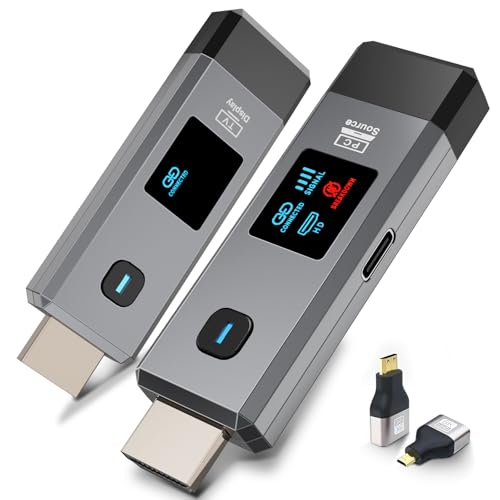
- Plug-and-play operation without Wi-Fi or an app
- 1080p/60Hz output with 4K decoding
- Up to 165 feet indoors and 328 feet outdoors
Best For: Basic display extension, presentations, and home theater use
Best Channel-Controlled System

- Twenty selectable channels with LCD interference information
- UVC output and HDMI loop-out support streaming and local monitoring
- Up to 1500 feet line of sight with 0.05-second latency
Best For: Small crews working in congested wireless environments
Best Portable Creator Setup

- 1080p/60Hz transmission with 50ms latency
- HDMI loop-out supports simultaneous local monitoring
- NP-F and USB-C power options plus mobile preview
Best For: Portable camera monitoring and home-studio video production
Flexible Dual-Source Pick
2-Transmitter Wireless HDMI Kit
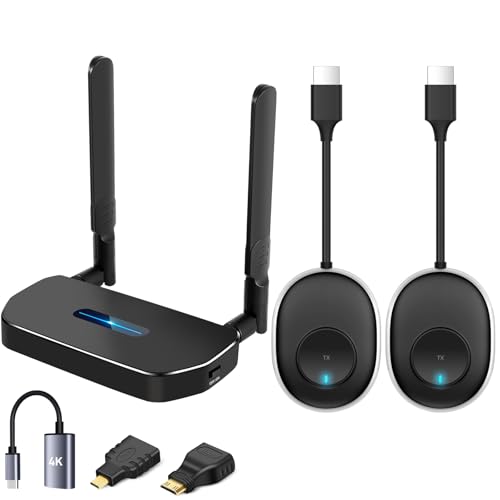
- Two transmitters with one receiver for source switching
- 1080p Full HD with 5.8GHz/2.4GHz dual-band support
- Pre-paired plug-and-play setup without Wi-Fi or apps
Best For: Home studios switching between two HDMI source devices
Professional Production Choice

- 4K HDMI plus HD/Full HD HDMI and SDI support
- 450-foot stated line-of-sight range with 66ms latency
- Monitoring for displays and up to four mobile app devices
Best For: Camera-based home studios and multi-monitor production workflows
Long-Range Low-Latency Pick

- Up to 400 feet/120 meters claimed transmission range
- 4K decoding with mirroring and extended-screen modes
- Plug-and-play operation without Wi-Fi, Bluetooth, or apps
Best For: Studios needing flexible long-distance HDMI placement
Long-Range Value Pick

- 1080p/60Hz transmission with 0.05-second stated latency
- HDMI loop out plus dual receiver outputs
- Flexible power and up to five receivers
Best For: Budget-conscious home studios using Full HD sources
On-Set Monitoring Pick
Wireless HDMI System with 7-Inch Monitor

- Built-in 7-inch receiver monitor
- 1080p/60Hz with less than 0.05-second stated latency
- One-to-five receiver support and flexible power
Best For: Creators needing integrated monitoring for shoots and live streams
Premium 4K Pick
Teradek Ace 750 Wireless HDMI System

- 4Kp30 10-bit HDR wireless video
- 6GHz transmission with auto channel selection
- 750-foot range and less than 0.01-second stated latency
Best For: Professional home studios requiring high-quality, low-delay monitoring
Best Professional Streaming Pick – Accsoon CineView HE
For home studios that need dependable wireless video receivers for home studios, the Accsoon CineView HE stands out with dual-band transmission, low latency, and a receiver with UVC output for direct computer streaming.
Best For: Creators who need long-range camera monitoring, multi-device viewing, or live streaming through OBS and similar platforms.
Pros:
- Dual-band 2.4GHz and 5GHz transmission helps improve stability and reduce interference.
- Supports up to 1200 feet of range with latency below 0.06 seconds under suitable conditions.
- Receiver UVC output enables computer streaming without a separate video capture device.
- One transmitter can send to up to four receivers or mobile devices, and the transmitter includes HDMI loop-out.
Cons:
- Battery and charging cables are not included.
- Its professional feature set may be more than a basic point-to-point setup requires.
The CineView HE is a strong fit when monitoring flexibility and streaming connectivity matter as much as wireless range. Its multiple power options and low power consumption also suit longer production sessions.
Best Simple HDMI Extender – Wireless HDMI 1080p Kit
This compact HDMI kit is a straightforward option for wireless video receivers for home studios, especially when you want to connect a camera, laptop, or set-top box to a display without Wi-Fi, apps, or Bluetooth.
Best For: Presentations, home theaters, classroom-style setups, gaming, and basic studio display extension.
Pros:
- Plug-and-play design does not require Wi-Fi, an app, or Bluetooth.
- Supports 1080p output at 60Hz and 4K decoding.
- Offers up to 165 feet indoors or 328 feet outdoors in open conditions.
- Compact design includes mini HDMI and micro HDMI adapters for broader device compatibility.
Cons:
- Walls and other obstacles can reduce transmission distance and speed.
- Both the transmitter and receiver need to be connected to power.
- The supplied notes do not identify a UVC output for direct computer streaming.
Choose this model when easy installation and general HDMI display sharing are more important than advanced production features. Its compact size makes it convenient for portable presentations and home entertainment setups.
Best Channel-Controlled System – Vrriis Wireless Video Kit
The Vrriis system gives home studios useful control over wireless video receivers for home studios, pairing low-latency 1080p transmission with manual channel selection and an included USB-C cable for UVC streaming.
Best For: Small production teams that need interference management, local monitoring, and direct streaming to software such as OBS.
Pros:
- Provides up to 1500 feet of line-of-sight range and 0.05-second latency in open, unobstructed conditions.
- Twenty adjustable channels and an LCD display help identify and manage interference.
- UVC output supports computer live streaming without an additional capture device.
- Transmitter HDMI loop-out allows a local monitor, while the system can support up to five receivers.
Cons:
- Walls, metal, brick, and glass can substantially reduce coverage.
- Transmission distance may decrease as more receivers are added.
- NP-F batteries are not included.
This is one of the more adaptable choices for busy wireless environments because channel selection is handled manually from the transmitter or receiver. It is particularly useful when a studio needs both streaming and on-site monitoring.
Best Portable Creator Setup – Lemorele R5000 Wireless HDMI
The Lemorele R5000 is a practical choice among wireless video receivers for home studios when you want 1080p monitoring, a transmitter loop-out, and flexible power for both indoor and mobile camera work.
Best For: Filmmakers, videographers, streamers, and home-studio users who need portable camera monitoring with app-based preview.
Pros:
- Transmits 1080p video at 60Hz with 50ms latency.
- Provides up to 656 feet of range in open, unobstructed spaces using 5GHz wireless transmission.
- HDMI loop-out lets users monitor locally while transmitting wirelessly.
- Supports NP-F batteries or USB-C power and offers TUTUPlay preview on iOS and Android devices.
Cons:
- NP-F batteries are not included.
- The package includes one transmitter and one receiver, despite support for up to four receivers.
- Phones can preview footage through TUTUPlay but cannot act as the signal source.
The R5000 balances portability and useful production features without requiring complicated network setup. It is a sensible middle ground for creators who want both a physical monitor connection and mobile preview.
Flexible Dual-Source Pick – 2-Transmitter Wireless HDMI Kit
For home studios that need to switch between two computers or other HDMI sources, this kit is a straightforward option among wireless video receivers for home studios. It includes two transmitters and one receiver, supports up to 1080p Full HD, and arrives pre-paired for plug-and-play use without Wi-Fi, Bluetooth, or an app.
Best For: Home studios, small offices, presentations, and setups that need two source devices feeding one display.
Pros:
- Includes two transmitters and one receiver for convenient source switching.
- Supports 1080p Full HD and 720p video.
- Uses 5.8GHz and 2.4GHz dual-band transmission with claimed ultra-low latency.
- Offers up to 164 feet in an open field, according to the supplied specifications.
Cons:
- The stated range can drop to 3–5 meters through rooms or cement walls.
- The supplied notes do not identify support for 4K output.
This is a practical choice when convenience and multiple HDMI sources matter more than professional production features. Its pre-paired design keeps installation simple, but wall construction and the 1080p ceiling should be considered before buying.
Professional Production Choice – Hollyland Mars 4K System
For camera-based workflows, the Hollyland Mars 4K is a more production-focused option among wireless video receivers for home studios. Its transmitter-receiver system supports 4K video over HDMI, HD and Full HD over HDMI or SDI, and monitoring through connected displays or mobile apps.
Best For: Home studios, camera operators, livestream productions, and creators who need HDMI/SDI connectivity and multi-device monitoring.
Pros:
- Supports HDMI video up to 3840×2160 at 24, 25, or 30 fps.
- Provides both HDMI and SDI input/output options, including select fractional SDI frame rates.
- Offers a stated 450-foot line-of-sight range and 66ms latency in interference-free laboratory conditions.
- Supports monitoring on up to four mobile apps and can drive multiple displays with additional equipment.
Cons:
- The advertised range is dependent on line-of-sight and laboratory conditions.
- QC/PD charging is not supported, according to the supplied details.
- Its professional interface and power options may be more than a basic home setup requires.
The Mars 4K stands out when your studio includes cameras, SDI gear, or multiple people monitoring a shoot. It is less focused on simple living-room casting, but its format support and monitoring options make it better suited to serious video workflows.
Long-Range Low-Latency Pick – 400-Foot Wireless HDMI System
This system targets creators who want long-distance HDMI distribution with a simple setup. As one of the wireless video receivers for home studios, it combines dual-band transmission, a stated 400-foot range, 4K decoding, and mirroring or extended-screen modes for monitors, projectors, and TVs.
Best For: Home studios, gaming and presentation setups, and rooms where the source and display need to be placed far apart.
Pros:
- Claims up to 400 feet or 120 meters of transmission range.
- Uses 5.8GHz and 2.4GHz bands with interference-management features.
- Supports 4K decoding and mirroring or extended-screen modes.
- Requires no Wi-Fi, Bluetooth, or app and is designed for quick plug-and-play setup.
Cons:
- The supplied notes specify 4K decoding rather than clearly stating 4K input or output support.
- Actual range may vary with walls, interference, and the surrounding environment.
- It uses HDMI connectivity rather than the HDMI/SDI combination offered by the Hollyland system.
This is a compelling fit for a studio where cable length and low setup effort are priorities. Verify how its 4K decoding fits your source and display chain, especially if native 4K transmission is essential.
Long-Range Value Pick – 1080p Wireless HDMI Extender
For shoppers comparing wireless video receivers for home studios, this Vrriis system offers a practical 1080p setup with long stated range, loop-out monitoring, and flexible power options. It is designed for cameras, laptops, set-top boxes, TVs, and projectors.
Best For: Home studios needing affordable Full HD transmission, local monitoring, and multi-screen output.
Pros:
- Supports up to 1080p at 60Hz with stated latency of 0.05 seconds.
- Includes transmitter HDMI loop out and dual HDMI outputs on the receiver.
- Supports NP-F batteries, USB-C power, adapters, and portable rechargeable power sources.
- Can connect one transmitter to up to five receivers, though range decreases as receivers are added.
Cons:
- The 1300-foot range is specified for open-field conditions; walls, metal, brick, and glass can reduce coverage.
- Batteries are not included.
- It is limited to Full HD rather than 4K.
This is a flexible choice when 1080p is sufficient and your studio benefits from loop-out monitoring or multiple displays. Plan placement carefully around walls and other obstructions.
On-Set Monitoring Pick – Wireless HDMI System with 7-Inch Monitor
This system stands out among wireless video receivers for home studios because the receiver includes a built-in 7-inch HD monitor. It can also feed an external display, making it useful for solo creators, small crews, and live production setups.
Best For: Studios and filming setups that need built-in monitoring, private viewing, and expandable multi-viewer output.
Pros:
- Built-in 7-inch screen provides monitoring without requiring a separate display.
- Receiver HDMI output can feed an external monitor, while the transmitter supports HDMI loop out.
- Supports 1080p at 60Hz, less than 0.05-second stated latency, and up to 1312 feet in line-of-sight conditions.
- One transmitter can broadcast to up to five receivers for collaborative monitoring.
Cons:
- An HDMI cable for connecting the receiver to an external monitor is not included.
- Smartphone and tablet compatibility requires a Type-C-to-HDMI cable.
- The system is Full HD rather than 4K.
The integrated screen makes this a convenient, self-contained monitoring solution. Its mounting options and NP-F, USB-C, and power-bank support also suit mobile studio or on-location workflows.
Premium 4K Pick – Teradek Ace 750 Wireless HDMI System
For demanding home studios, the Teradek Ace 750 provides a higher-end option for wireless video receivers for home studios, with 4Kp30 10-bit HDR support, 6GHz transmission, and less than 0.01 seconds of stated latency. It is intended for cameras and professional A/V workflows.
Best For: Professional studios and video workflows that prioritize 4K image quality, minimal delay, and reliable frequency management.
Pros:
- Supports 4Kp30 10-bit HDR over HDMI.
- Uses 6GHz transmission with 12 frequency options and automatic channel selection.
- Offers a stated 750-foot range and less than 0.01 seconds of latency.
- Arrives paired and includes camera-oriented mounting and power accessories.
Cons:
- The stated range is 750 feet, shorter than the longer-range Full HD systems listed here.
- A second AC adapter for studio or A/V setups is sold separately.
- Its professional feature set may be more than needed for basic 1080p monitoring.
The Ace 750 is the strongest fit when image fidelity and near-zero-delay monitoring matter more than maximum range or entry-level pricing. Its 6GHz controls and camera power options add flexibility for serious studio work.
How We Picked the Best Wireless Video Receivers for Home Studios
We focused on the specifications that matter most in real studio use: supported resolution and frame rates, HDMI or SDI compatibility, wireless band, claimed operating range, latency, receiver outputs, and setup flexibility. We also considered features such as UVC output for computer streaming, loop-through outputs, multi-receiver support, channel selection, and included monitoring hardware.
Range claims are measured under ideal conditions, so walls, neighboring Wi-Fi networks, Bluetooth devices, and crowded 2.4GHz or 5GHz channels can reduce performance. A strong pick should offer the right combination of reliability, workflow compatibility, and practical controls—not simply the longest advertised distance.
Quick Comparison
- Best for UVC streaming: Accsoon CineView HE and compatible UVC-equipped systems.
- Best for professional 4K workflows: Hollyland Mars 4K or Teradek Ace 750.
- Best for basic 1080p monitoring: Standard HDMI transmitter-and-receiver kits with low-latency output.
- Best for multi-display setups: Systems supporting multiple receivers, loop-out, or bundled monitors.
- Best for flexible camera switching: Kits with multiple transmitters, manual channel selection, or one-to-many transmission.
Key Buying Factors for Wireless Video Receivers for Home Studios
Resolution, Frame Rate, and Dynamic Range
Choose 1080p if you mainly stream, record tutorials, or monitor a single camera. Move to 4K when you need detailed preview images, 4K capture, or room to crop in post. Check the exact supported frame rates, since some systems support 4K only at 24 or 30 fps while offering 60 fps at 1080p. HDR and 10-bit support are useful only when both the camera and display chain support them.
Latency and Signal Stability
Low latency matters for presenter monitoring, focus pulling, and live production. Look for a clearly stated delay and consider whether the quoted figure applies to every supported mode. Dual-band operation, manual channel selection, and robust antennas can help in busy home environments, but line of sight still improves reliability.
Connections and Studio Workflow
Verify whether the units use HDMI, SDI, USB-C, or UVC output. UVC is especially useful for sending a camera feed directly to a computer without a separate capture device. HDMI loop-out helps feed a local monitor while transmitting wirelessly, while SDI is better suited to longer wired runs and professional cameras. Also check power requirements, mounting options, and whether cables are included.
Who Should Buy Which Wireless Video Receivers for Home Studios?
Streamers and educators should prioritize UVC output, dependable 1080p60 performance, and simple setup. Filmmakers and camera crews should favor 4K, SDI support, stronger interference management, and professional monitoring features. Home users connecting a camera to a television or projector may save money with a straightforward 1080p HDMI kit. Multi-camera studios should look for several transmitters, expandable receivers, channel controls, or included displays. Before buying, confirm connector types, operating bands, regional wireless restrictions, and the actual distance needed through your walls or studio layout.