
Managing several cameras is easier when you can send video to multiple displays without running long HDMI cables. The best wireless video receivers for multi-camera setups balance range, latency, image quality, receiver capacity, and dependable connections.
This roundup compares 10 HDMI wireless transmission systems with options for single-monitor links, multi-TV distribution, loop-through monitoring, and flexible receiver expansion.
Best 10 Wireless Video Receivers for Multi Camera Setups Picks for 2026
Best All-in-One Hub
7-Inch Multi-Receiver HDMI System

- Built-in 7-inch receiver monitor
- Supports up to five receivers
- 1080p60 with HDMI loop-out
Best For: Collaborative film sets and live productions
Best for Multi-Display Expansion

- Sends one source to two screens
- Pre-paired plug-and-play setup
- Expandable to up to six screens
Best For: Presentations and dual-display streaming
Best for Quiet Field Shooting
SYNCO XVision HD Wireless System

- Fanless 2W operation
- 40ms claimed latency and 984-foot range
- Supports up to nine monitor endpoints
Best For: Quiet, portable production monitoring
Best Adapter Bundle
Dual-Receiver Wireless HDMI Kit
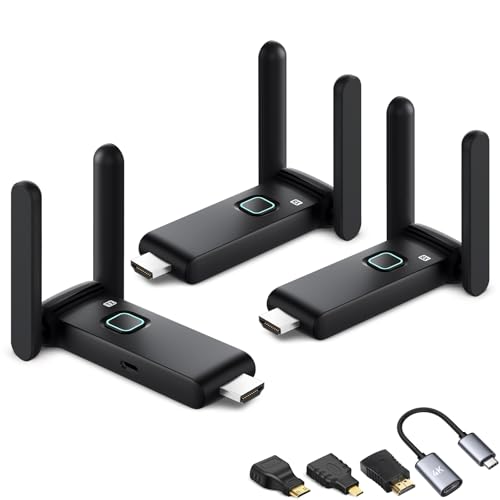
- Includes two receivers and multiple adapters
- Supports 1080p60 multi-screen output
- Works with HDMI, USB-C, and mini-HDMI sources
Best For: Mixed-device presentations and home theaters
Best Long-Range Pick
WELUSOPU 4K HDMI Kit with 2 Receivers
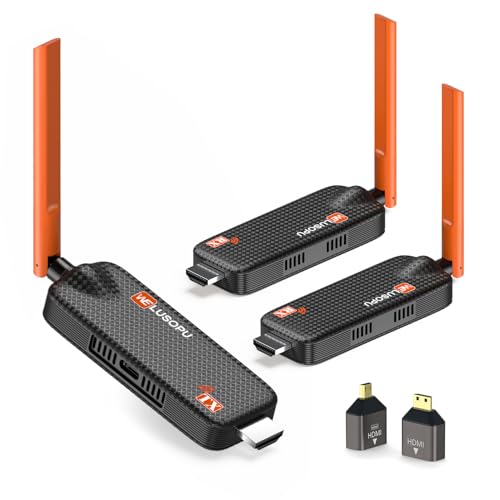
- One transmitter plus two receivers
- Up to 656 feet of stated range
- 4K input and 1080p/60Hz output
Best For: Large venues and long-distance multi-display installations
Best Compact Setup
YAOMAISI G9R Pro Multi-TV HDMI Extender

- Supports up to four receivers
- Pre-paired plug-and-play operation
- 1080p/60Hz video with 165-foot open-range claim
Best For: Portable events and moderate-distance multi-screen setups
Best Flexible Expansion
WELUSOPU 6-Receiver Wireless HDMI System

- Mirrors one source to up to six receivers
- Dual-band transmission with frequency hopping
- 4K input and 1080p/60Hz output
Best For: Expandable conference rooms, classrooms, and entertainment spaces
Best with Extra Features
Vrriis 1300FT Wireless HDMI Kit

- Advertised 1,300-foot open-field range
- 1080p/60Hz with claimed 0.05-second latency
- Loop-out, dual HDMI output, and IR support
Best For: Long-distance point-to-point monitoring
Multi-Screen Choice
4-Receiver 5G/2.4G HDMI System

- Includes four receivers and supports up to eight
- 165-foot stated range with dual-band transmission
- 4K decoding with 1080p output
Best For: Multi-display presentations and synchronized screens
Best Simple Pick
Wireless HDMI Kit with 2 Receivers

- Includes two receivers and expands to six
- 165-foot open-environment range is advertised
- Dual-band transmission and multiple HDMI adapters
Best For: Smaller multi-screen installations with expansion plans
Best All-in-One Hub – 7-Inch Multi-Receiver HDMI System
For crews comparing wireless video receivers for multi camera setups, this system stands out by combining a built-in 7-inch monitoring screen with support for up to five receivers. It transmits 1080p at 60Hz over distances up to 1,312 feet in line-of-sight conditions, with claimed latency below 0.05 seconds.
Best For: Film crews, studios, and live productions that need shared monitoring plus a private on-receiver display.
Pros:
- One transmitter can broadcast to up to five receivers.
- Built-in 7-inch screen, HDMI output, headphone jack, and brightness and volume controls.
- HDMI loop-out, IR remote control, and NP-F, power-bank, or USB-C power options.
- Supports 1080p at 60Hz with claimed ultra-low latency and 1,312-foot line-of-sight range.
Cons:
- External HDMI cable is not included.
- Smartphone and tablet use requires a Type-C-to-HDMI cable.
- Its larger built-in monitor may be more equipment than a simple point-to-point link requires.
This is the most complete option here for collaborative production work. The integrated monitor reduces the need for extra field screens, while multi-receiver support and loop-out make it flexible for camera teams and client viewing.
Best for Multi-Display Expansion – G9R Pro 1TX/2RX HDMI Kit
This G9R Pro kit is a practical choice among wireless video receivers for multi camera setups when the goal is to send one HDMI source to two displays. The pre-paired transmitter and two receivers support simultaneous 1080p at 60Hz transmission, with a stated 165-foot open-area range.
Best For: Presentations, church services, sports streaming, and other setups that need the same source on two screens.
Pros:
- Includes one transmitter and two receivers for two simultaneous displays.
- Pre-paired plug-and-play operation without apps, drivers, Wi-Fi, or Bluetooth.
- Dual-band 2.4GHz/5.8GHz operation and claimed 0.1-second latency.
- Additional receivers can expand the system to as many as six screens.
Cons:
- Open-area range is 165 feet; transmission through walls or ceilings is stated at about 50 feet.
- The transmitter requires an HDMI output source and cannot connect directly to a TV.
- The transmitter supports 1080p output only, despite receiver 4K decoding support.
Choose this model when straightforward two-screen distribution matters more than camera-specific features. Its expansion path is useful for growing display systems, but source compatibility and power requirements should be checked before installation.
Best for Quiet Field Shooting – SYNCO XVision HD Wireless System
The SYNCO XVision is a compact option for wireless video receivers for multi camera setups where quiet operation and portable power are priorities. It sends 1080p video at 60 frames per second, with claimed 40ms latency and transmission up to 984 feet, including through walls or crowded wireless environments.
Best For: Weddings, interviews, live music, drone work, and mobile crews that need quiet, low-power monitoring.
Pros:
- Fanless 2W design helps avoid cooling noise during recording.
- Claims 40ms latency and up to 300 meters of 1080p60 transmission.
- Receiver supports up to nine real-time monitoring endpoints.
- Lightweight 119g body, foldable antenna, NP-F battery support, and USB-C power input.
Cons:
- NP-F battery is not included.
- The additional endpoints are described as monitor-only.
- The supplied configuration includes one transmitter and one receiver.
This is the strongest fit for operators who value low noise, low power draw, and portability. Its team-monitoring capability can support larger productions, though expanding beyond the included receiver adds to the overall system needs.
Best Adapter Bundle – Dual-Receiver Wireless HDMI Kit
For buyers seeking wireless video receivers for multi camera setups with broad source compatibility, this kit includes one transmitter, two receivers, and several adapters. It supports simultaneous display on multiple screens, with 1080p at 60Hz, dual-band operation, and a stated 165-foot range in unobstructed conditions.
Best For: Classrooms, meetings, home theaters, and camera or laptop users who need adapters for HDMI, USB-C, and mini-HDMI devices.
Pros:
- Includes two receivers for simultaneous viewing on two displays.
- Supports up to four receivers, with additional mobile-device combinations described in the product notes.
- Includes three mini-HDMI adapters, USB-C-to-HDMI extension cables, and an HDMI extension interface.
- Plug-and-play design supports 1080p at 60Hz over 2.4GHz/5GHz bands.
Cons:
- Claimed 165-foot range applies to barrier-free conditions; through walls or floors it may drop to about 32 feet.
- Latency is listed at up to three seconds, which may not suit fast camera monitoring.
- Wireless congestion may require changing the channel through the setup page.
This bundle is appealing when connectivity flexibility is more important than the lowest possible latency. The included adapters simplify mixed-device installations, but production users should test delay and range in the actual venue.
Best Long-Range Pick – WELUSOPU 4K HDMI Kit with 2 Receivers
For demanding wireless video receivers for multi camera setups, this WELUSOPU kit stands out with one transmitter and two receivers, plus expansion support for as many as six to eight displays. It accepts 4K input, outputs 1080p at 60Hz, and is designed for long-distance synchronized viewing.
Best For: Large venues, security monitoring, churches, classrooms, and multi-room home theater systems that need extended range and synchronized screens.
Pros:
- Includes two receivers and supports expansion to multiple displays.
- Up to 656 feet of range in suitable conditions, with dual 5dBi antennas.
- Supports 4K input and 1080p at 60Hz output with stated 0.1-second latency.
- Plug-and-play operation requires no app, Bluetooth, or Wi-Fi password.
Cons:
- Displays receive 1080p output rather than 4K output.
- Mobile-device monitoring requires the Tutuplay app.
- The longer advertised range depends on the environment and signal conditions.
This is the strongest choice here when coverage distance and included receiver capacity matter most. Its cooling-focused design and broad HDMI compatibility also make it suitable for extended presentations, signage, and surveillance use.
Best Compact Setup – YAOMAISI G9R Pro Multi-TV HDMI Extender
If you want wireless video receivers for multi camera setups without a complicated installation, the YAOMAISI G9R Pro offers a compact, pre-paired approach. One transmitter can send 1080p video at 60Hz to as many as four receivers, making it practical for smaller multi-screen systems.
Best For: Portable presentations, classrooms, events, and home or office setups using multiple TVs, monitors, or projectors within moderate range.
Pros:
- Supports one transmitter to up to four receivers simultaneously.
- Pre-paired plug-and-play design needs no app, driver, Wi-Fi, or Bluetooth connection.
- Provides 1080p at 60Hz with stated 0.1-second latency.
- Compact units include unfoldable antennas for improved transmission.
Cons:
- Advertised open-area range is 165 feet, shorter than the longest-range option here.
- Stable operation requires an adequate 5V/1A power supply.
- The kit supports 1080p output rather than 4K output.
The G9R Pro is a sensible pick when ease of deployment and portability outweigh maximum range. Check power availability at every display, especially when using laptop or TV USB ports.
Best Flexible Expansion – WELUSOPU 6-Receiver Wireless HDMI System
For wireless video receivers for multi camera setups that may grow over time, this WELUSOPU system supports up to six receivers from one transmitter. Its dual-band transmission, 4K input support, and straightforward plug-and-play design fit conference rooms, classrooms, entertainment spaces, and other multi-display environments.
Best For: Users who need to mirror one HDMI source across several displays and want more expansion capacity than a basic two- or four-receiver kit.
Pros:
- Supports simultaneous mirroring to up to six receivers.
- Uses 2.4GHz and 5GHz bands with automatic frequency hopping.
- Accepts 4K input and delivers 1080p output at 60Hz.
- Works with cameras, laptops, projectors, TVs, monitors, and other HDMI devices.
Cons:
- Its stated 165-foot range is shorter than the longest-range kit.
- Smartphone and tablet viewing requires the companion app.
- Mobile devices can mirror content but do not provide reverse control.
This model offers a useful middle ground for buyers who prioritize receiver count and compatibility. It is especially attractive for installations that need several synchronized screens without adding HDMI cabling between rooms.
Best with Extra Features – Vrriis 1300FT Wireless HDMI Kit
For buyers comparing wireless video receivers for multi camera setups, the Vrriis kit stands out for its advertised long open-field range, Full HD output, and flexible monitoring options. It uses a point-to-point connection and supports 1080p at 60Hz with claimed 0.05-second latency, while the transmitter’s loop-out can feed a local display.
Best For: Long-distance point-to-point monitoring from a camera, laptop, or set-top box to one or more displays.
Pros:
- Advertised transmission range of up to 1,300 feet in an open field, with dual antennas and 2.4G/5G transmission.
- Supports 1080p at 60Hz and claims 0.05-second latency for real-time viewing.
- Transmitter loop-out, dual HDMI output on the receiver, IR support, and multiple power options add setup flexibility.
Cons:
- Walls, metal, brick, and glass can significantly reduce coverage or cause signal loss.
- The kit includes one transmitter and one receiver; adding receivers can reduce transmission distance.
- Batteries are not included.
This is the strongest choice here when range and local monitoring matter most, but its 1,300-foot figure is an open-field specification rather than a guarantee for obstructed venues.
Multi-Screen Choice – 4-Receiver 5G/2.4G HDMI System
This package is tailored to buyers seeking wireless video receivers for multi camera setups or other multi-display environments. One transmitter is supplied with four receivers, and the system is designed to support up to eight receivers, delivering synchronized video and audio to multiple screens without Wi-Fi, an app, or Bluetooth.
Best For: Conference rooms, classrooms, demonstrations, or venues needing several synchronized displays from one HDMI source.
Pros:
- Includes four receivers and supports wireless expansion to up to eight receivers.
- Uses 2.4G and 5G dual-band transmission with a stated range of up to 165 feet.
- Claims 4K decoding and 1080p output, with indicator lights for pairing, stability, and signal status.
- Includes mini HDMI and USB-C-to-HDMI accessories for broader device compatibility.
Cons:
- Output is specified as 1080p even though the system supports decoding up to 4K.
- Each transmitter and receiver requires a stable 5V/1A power supply.
- Signal range and stability can vary with the installation environment.
Its included receiver count makes it the most ready-to-deploy option for multi-screen layouts, especially when synchronized presentation content is more important than 4K output.
Best Simple Pick – Wireless HDMI Kit with 2 Receivers
For wireless video receivers for multi camera setups in smaller venues, this kit offers a practical starting point with one transmitter and two receivers. It supports expansion to as many as six receivers, uses 2.4GHz/5.8GHz transmission, and is designed for cameras, laptops, consoles, and other HDMI sources feeding multiple displays.
Best For: Home theaters, bars, classrooms, conference rooms, and similar installations that need two screens initially with room to expand.
Pros:
- Includes two receivers and supports expansion to up to six large screens or TVs.
- Dual-band transmission and dual antennas provide a stated open-environment range of up to 165 feet.
- Includes USB-C-to-HDMI, Micro HDMI, and Mini HDMI adapters for varied source devices.
- Supports the TuTuPlay app for using a phone or tablet as a second screen.
Cons:
- The stated range may fall to about 50 feet through walls.
- It cannot transmit from one TV to another.
- The current app version does not control the transmitter-connected laptop from a phone or iPad.
This is a balanced option for installations that need multiple displays without starting with a large receiver bundle. Its expansion path is useful, though walls and app limitations should be considered before purchase.
How We Picked the Best Wireless Video Receivers for Multi Camera Setups
We focused on systems that support practical multi-display workflows, including transmitter-and-receiver kits with two or more receivers, expandable receiver capacity, and loop-out connections. We also considered advertised transmission range, supported resolution, frequency bands, setup simplicity, latency claims, and compatibility with common HDMI sources such as cameras, switchers, laptops, and media players.
Because wireless performance depends on walls, interference, antenna placement, and the source device, stated range figures should be treated as best-case estimates rather than guaranteed indoor distances.
Quick Comparison
| Feature | Why It Matters |
|---|---|
| Receiver count | Determines how many displays or monitoring positions can receive the source simultaneously. |
| Transmission range | Shows the system’s intended coverage, though real-world obstacles can reduce it. |
| Resolution support | Confirm whether the kit supports your cameras and displays at 1080p or 4K. |
| Loop out | Lets you keep a local wired monitor while also transmitting wirelessly. |
| Frequency options | Dual-band operation may help reduce interference in busy wireless environments. |
Key Buying Factors for Wireless Video Receivers for Multi-Camera Setups
Receiver Capacity and Expansion
Count every screen you need to feed, then allow room for growth. A one-transmitter, two-receiver kit suits a basic camera-and-director-monitor arrangement, while systems supporting four, six, or more receivers are better for venues, classrooms, production areas, and multi-room viewing. Check whether extra receivers are included or sold separately.
Latency and Reliability
Low latency is especially important for live camera monitoring, event production, and directing. Look for clear delay specifications, but remember that wireless congestion and distance can affect responsiveness. Systems with stable signal handling and straightforward pairing are generally more useful than models that only advertise an extreme open-air range.
Resolution, Ports, and Compatibility
Verify the source and display requirements before buying. A 1080p system may be sufficient for monitoring and presentations, while 4K support is preferable when preserving detail matters. HDMI loop-out is valuable when the transmitter must feed a local display, recorder, or switcher at the same time.
Installation and Interference
Plug-and-play pairing can save setup time, but placement still matters. Keep transmitters and receivers away from dense obstructions, crowded wireless equipment, and enclosed metal spaces. Dual-band models can provide more flexibility, although they do not eliminate every interference issue.
Who Should Buy Which Wireless Video Receivers for Multi Camera Setups?
Choose a compact one-transmitter, one-receiver system for a single remote monitor or simple camera link. Pick a two-receiver kit for simultaneous viewing on two screens, such as a production monitor and a confidence display. For larger studios, classrooms, houses of worship, venues, or multi-room presentations, prioritize expandable systems supporting four, six, or more receivers. If you need a local wired display as well as wireless screens, select a model with HDMI loop-out. Finally, prioritize 4K support when your entire workflow—including cameras, cables, and displays—requires higher resolution; otherwise, a reliable 1080p system may offer the better value.