
Wireless video receivers can simplify displays where running HDMI cable is inconvenient, whether you are streaming from a laptop, extending a home theater, or sending one source to multiple screens.
This roundup compares 10 wireless video receivers under $500 by range, resolution support, receiver capacity, connection features, and setup practicality so you can choose a system that fits your space and workflow.
Best 10 Wireless Video Receivers Under 500 Picks for 2026
Best for Streaming Flexibility

- UVC output for OBS and other computer streaming platforms
- 20 adjustable channels with signal and interference display
- 1080p/60Hz, HDMI loop-out, and up to five receivers
Best For: Live streaming and long-range line-of-sight monitoring
Best for Multi-Screen Sharing
6-Display Wireless HDMI System
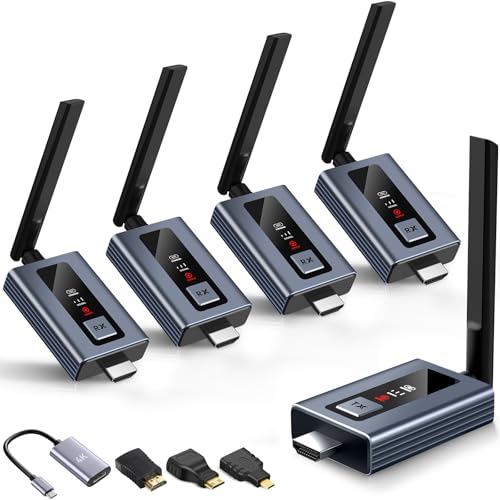
- Supports up to six simultaneous screens
- LED status display shows connection and signal information
- 1080p/60Hz output with 4K input support
Best For: Classrooms, conference rooms, venues, and home theaters
Best for Long-Range Presentations
328-Foot Wireless HDMI Adapter

- Plug-and-play pairing without apps, Wi-Fi, or Bluetooth
- 328-foot open-area range with dual-band transmission
- Mirror, extended, and selected-window privacy modes
Best For: Presentations, classrooms, meetings, and demonstrations
Best for Remote Source Control

- Up to 820 feet of open-area 1080p transmission
- IR support for controlling the source remotely
- HDMI loop-out and support for up to four receivers
Best For: Remote displays, conference rooms, churches, and home entertainment
Best 4K Flexibility
Long-Range Wireless HDMI System

- 4K input and output at 30Hz
- Up to 656-foot line-of-sight range
- Supports up to four receivers
Best For: 4K monitoring, presentations, and production setups
Best Long-Range 1080p Pick

- Up to approximately 1,312 feet of range
- 1080p at 60Hz with low latency
- Loop-out and IR remote support
Best For: Long-distance 1080p streaming and monitoring
Best Multi-Screen Setup
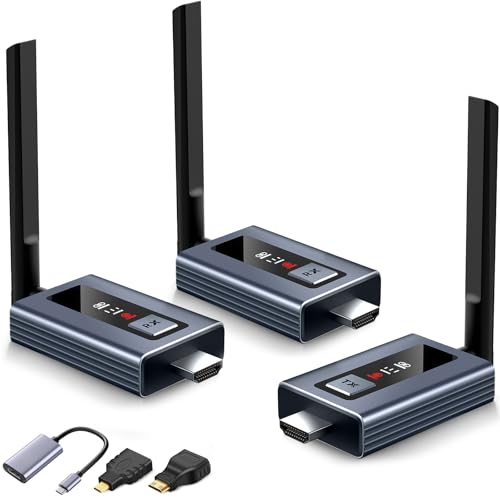
- Includes two receivers and supports up to six screens
- LED shows connection and signal status
- 165-foot range with 1080p output
Best For: Classrooms, venues, offices, and multi-display home theaters
Long-Range 4K Pick
BovBox WL097PRO Wireless HDMI Kit

- 4K at 30Hz and 1080p at 60Hz
- Stated range up to 820 feet
- Audio output and support for up to four receivers
Best For: Home theaters, presentations, and multi-display setups
Low-Latency 1080p Pick
Elalight Wireless HDMI Extender

- 1080p at 60Hz with 4K source compatibility
- Advertised 0.01-second latency
- Pre-paired design with Mini and Micro HDMI adapters
Best For: Full HD presentations, projectors, and travel
Versatile Office Pick
BRAIDOL R1 Wireless HDMI Adapter

- HDMI and VGA output options
- 4K decoding at 30Hz with 98-foot stated range
- Plug-and-play kit with included HDMI adapters
Best For: Offices, classrooms, projectors, and VGA-equipped displays
Best for Streaming Flexibility – 1500-Foot Wireless Video Kit
For shoppers comparing wireless video receivers under 500, this Vrriis kit stands out when long line-of-sight range and computer streaming matter. It supports 1080p at 60Hz, manual channel selection, HDMI loop-out, and UVC output for streaming through platforms such as OBS without a separate capture device.
Best For: Live streaming, camera monitoring, presentations, and setups that need flexible power options.
Pros:
- Rated for up to 1,500 feet in an open, unobstructed area with 0.05-second latency.
- UVC output supports computer-based streaming, while HDMI loop-out supports a local monitor.
- Offers 20 manually selectable channels and supports up to five receivers.
- Accepts NP-F batteries, USB-C power, or included adapters.
Cons:
- Walls, glass, metal, and brick can significantly reduce range.
- Batteries are not included.
- Transmission distance decreases as additional receivers are added.
This is a feature-rich choice for creators and event users who need direct streaming and channel-management options. Its strongest performance will come in clear line-of-sight installations.
Best for Multi-Screen Sharing – 6-Display Wireless HDMI System
This system is a practical pick among wireless video receivers under 500 for offices, classrooms, venues, and home theaters that need to share one source with several screens. Its LED display shows connection and signal information, and the plug-and-play design is intended to connect in about five seconds.
Best For: Multi-screen presentations, classrooms, conference rooms, restaurants, churches, and home entertainment.
Pros:
- Supports up to six displays when additional receivers are added.
- Provides 1080p at 60Hz output and supports 4K input decoding.
- Dual-band 2.4GHz/5GHz transmission reaches up to 165 feet in line of sight.
- Includes HDMI-to-USB-C, mini-HDMI, and micro-HDMI connection options.
Cons:
- Solid walls can reduce the stated transmission distance and speed.
- An antenna must be installed for the system to work properly.
- Adding receivers may require purchasing additional units.
The clear status display and multi-receiver capability make this a strong choice for organized group viewing. It is better suited to fixed, multi-screen sharing than to advanced production workflows.
Best for Long-Range Presentations – 328-Foot Wireless HDMI Adapter
Among wireless video receivers under 500, this adapter is aimed at users who want quick screen sharing without Wi-Fi, Bluetooth, or app installation. It supports 1080p at 60Hz, offers mirror and extended modes, and is rated for up to 328 feet in open areas.
Best For: Office presentations, classrooms, meetings, demonstrations, and home media setups.
Pros:
- Automatic pairing and plug-and-play operation require no apps or Wi-Fi connection.
- Dual-band transmission claims less than 0.01-second latency and supports 1080p/60Hz.
- Rated for up to 328 feet outdoors, with stated shorter ranges indoors and through walls.
- Supports mirror mode, extended mode, and selected-window privacy sharing.
Cons:
- The longest range depends on open-area conditions; walls reduce coverage.
- The supplied notes describe 4K decoding but specify 1080p output.
- Performance can vary in demanding environments and around signal interference.
This model is appealing for users prioritizing simple setup and presentation flexibility. Its mirror, extended, and privacy options add useful control for workplace sharing, while the receiver remains dependent on suitable line-of-sight conditions for maximum range.
Best for Remote Source Control – 820-Foot HDMI Extender
This Vrriis extender is worth considering when shopping for wireless video receivers under 500 and you need both long-distance HDMI transmission and remote source control. It delivers up to 1080p at 60Hz, includes HDMI loop-out, and supports IR commands from the receiver location.
Best For: Conference rooms, churches, home entertainment, digital signage, and installations using a remote HDMI source.
Pros:
- Rated for up to 820 feet in an unobstructed open field with 0.06-second latency.
- IR support lets users control the HDMI source from the secondary display location.
- Transmitter HDMI loop-out supports local monitoring.
- Can support one transmitter with up to four receivers.
Cons:
- Walls, brick, and glass can greatly reduce the range.
- Transmission distance decreases as more receivers are connected.
- It is limited to 1080p output rather than higher-resolution output.
This is a sensible choice for extending a cable or satellite box, laptop, camera, or similar HDMI source to a distant display. Its IR and loop-out features make it particularly useful where the source must remain in one location but still be monitored and controlled elsewhere.
Best 4K Flexibility – Long-Range Wireless HDMI System
For shoppers comparing wireless video receivers under 500, this system stands out for its 4K input and output support, plug-and-play setup, and multiple power options. It can also connect one transmitter to as many as four receivers, although the maximum range decreases as receivers are added.
Best For: 4K camera monitoring, presentations, live video work, and home entertainment setups needing flexible power.
Pros:
- Supports up to 4K at 30Hz with HDMI input, output, and loop-out capabilities.
- Offers up to 656 feet of transmission range in a clear line of sight with one receiver.
- Works with power banks, USB-C, or NP-F batteries, although batteries are not included.
- Supports one transmitter paired with up to four receivers.
Cons:
- Transmission distance drops substantially when additional receivers are connected.
- 4K support is limited to 30Hz.
- NP-F batteries must be purchased separately.
This is a versatile pick when resolution and deployment flexibility matter most. Its long line-of-sight range and 4K capability are useful for production and presentation work, while the multi-receiver option adds room for expansion.
Best Long-Range 1080p Pick – Wireless HDMI Extender
Among wireless video receivers under 500, this BovBox extender is aimed at buyers who prioritize long-distance 1080p transmission and straightforward operation. It arrives paired, supports dual-band wireless connectivity, and adds loop-out and IR control features for more convenient source-device management.
Best For: 1080p streaming, sports viewing, gaming, conference rooms, and installations requiring a local monitoring display.
Pros:
- Supports 1080p at 60Hz with stated latency of about 0.05 seconds.
- Provides up to approximately 1,312 feet of transmission range under suitable conditions.
- Includes transmitter loop-out for adding a local display.
- Supports IR remote control and up to five receivers from one transmitter.
Cons:
- Output resolution is limited to 1080p rather than 4K.
- Transmission distance shortens as more receivers are added.
- The supplied notes do not specify wall-penetration performance.
This model makes the most sense for users who want maximum stated range without moving to 4K. Its loop-out and IR features give it an advantage for presentations, monitoring, and entertainment setups where remote source control is useful.
Best Multi-Screen Setup – LED-Status Wireless HDMI Kit
For buyers comparing wireless video receivers under 500 for multi-display use, this kit combines two included receivers with an LED status screen and support for up to six screens. It accepts 4K input but outputs 1080p at 60Hz, making it a practical choice for classrooms, businesses, restaurants, and home theaters.
Best For: Multi-screen presentations, classrooms, restaurants, bars, conference rooms, and home theater installations.
Pros:
- Includes two receivers and can expand to as many as six connected screens.
- LED display shows connection, signal, output, and power status.
- Offers plug-and-play setup with an advertised five-second connection time.
- Supports up to 165 feet of line-of-sight transmission with less than 0.1-second latency.
Cons:
- True output resolution is 1080p at 60Hz, despite supporting 4K input.
- Range and performance can be affected by solid walls.
- Additional receivers are needed to reach the six-screen maximum.
This kit is especially compelling when visibility and expansion are more important than 4K output. The built-in status display can simplify troubleshooting, while the included adapters broaden compatibility with HDMI, USB-C, mini-HDMI, and micro-HDMI devices.
Long-Range 4K Pick – BovBox WL097PRO Wireless HDMI Kit
For shoppers comparing wireless video receivers under 500, the BovBox WL097PRO stands out for its 4K input support, long stated range, and flexible power options. It is designed for laptops, cameras, streaming devices, projectors, and other HDMI sources.
Best For: Home theater setups, presentations, and users who want 4K support with multi-receiver capability.
Pros:
- Supports 4K at 30Hz and 1080p at 60Hz.
- Claims up to 820 feet of wireless transmission range.
- Includes a 3.5mm audio interface and supports up to four receivers per transmitter.
- Can use USB-C, a power bank, or NP-F batteries for power; batteries are not included.
Cons:
- Adding receivers can shorten the wireless transmission distance.
- NP-F batteries must be purchased separately.
- The 4K mode is specified at 30Hz rather than 60Hz.
The BovBox is a feature-rich choice when range, audio flexibility, and multiple displays matter. Its 1080p mode may be the better fit when you prioritize stability and lower latency.
Low-Latency 1080p Pick – Elalight Wireless HDMI Extender
Among wireless video receivers under 500, the Elalight HZW-W3201 is a practical option for Full HD streaming where quick response and simple setup are priorities. It accepts 4K sources but outputs video at 1080p.
Best For: Presentations, movie playback, projectors, and travel-friendly HDMI connections.
Pros:
- Outputs 1080p at 60Hz and accepts 4K input sources.
- Advertises approximately 0.01 seconds of latency.
- Uses pre-paired dual-band 5GHz/2.4GHz wireless transmission.
- Includes Mini HDMI and Micro HDMI adapters plus a 24-month replacement warranty.
Cons:
- It does not provide 4K output; video output is limited to 1080p.
- Both units require a stable power supply of at least 5V/1A.
- The stated wireless range is 328 feet under the product’s specified conditions.
The Elalight makes the most sense for users who want Full HD rather than native 4K display output. Its pre-paired design, claimed low latency, and included adapters make it convenient for mobile presentations and projector use.
Versatile Office Pick – BRAIDOL R1 Wireless HDMI Adapter
For buyers seeking wireless video receivers under 500 for basic office, classroom, or home media use, the BRAIDOL R1 combines HDMI and VGA output with plug-and-play operation. It supports 4K decoding at 30Hz and uses dual-band wireless transmission.
Best For: Computers, projectors, conference displays, and older screens that require VGA connectivity.
Pros:
- Provides both HDMI and VGA output options, though they cannot be used simultaneously.
- Supports 4K 30Hz decoding and claims up to 98 feet of transmission distance.
- Designed for plug-and-play use without apps, drivers, or a Wi-Fi connection.
- Includes Mini HDMI and Micro HDMI adapters, an HDMI cable, two USB-C cables, and an 18-month warranty.
Cons:
- HDMI and VGA outputs cannot operate at the same time.
- The product is not intended for direct smartphone or tablet connections.
- The receiver requires a 5V/2A power adapter, while the transmitter may need USB-C power from a low-power computer.
The BRAIDOL R1 is a flexible choice for mixed equipment, especially when VGA compatibility is important. Its shorter stated range and 4K-at-30Hz limit make it better suited to rooms and workspaces than long-distance installations.
How We Picked the Best Wireless Video Receivers Under 500
We focused on the features that matter most when replacing or extending a wired HDMI connection: stated transmission range, supported output resolution, wireless-band flexibility, pairing simplicity, and useful extras such as loop-out, IR control, UVC output, LED status screens, and multi-receiver support.
Manufacturer range claims are measured in ideal conditions. Walls, interference, competing Wi-Fi networks, and the placement of the transmitter and receiver can reduce real-world performance. We therefore treat range as a comparison point rather than a guarantee.
Quick Comparison
- Best for multi-screen setups: Models supporting two or more receivers, with some advertising capacity for up to six.
- Best for longer distances: Systems claiming ranges from roughly 820 to 1,312 feet, although line-of-sight conditions are important.
- Best for modern sources: Products advertising 4K decoding, while many provide 1080p output.
- Best for production workflows: The UVC-equipped system, which may connect to compatible computers or live-streaming software.
- Best for source monitoring: A transmitter with HDMI loop-out lets you keep a local display connected.
Key Buying Factors for Wireless Video Receivers Under $500
Resolution and Compatibility
Check both input decoding and receiver output. “4K” may describe decoding while the actual display output remains 1080p. Confirm HDMI versions, supported refresh rates, HDCP requirements, and compatibility with your source and television or projector.
Range, Interference, and Frequency
Longer advertised range is useful in open spaces, but 2.4GHz and 5GHz performance varies with congestion and obstacles. For reliable results, keep antennas unobstructed and avoid placing units inside cabinets or directly beside routers and other wireless equipment.
Receiver Count and Expansion
If you need the same source on several screens, choose a kit designed for multiple receivers rather than assuming additional units can be added later. Verify whether receivers are included, optional, or limited by the manufacturer’s pairing system.
Installation and Control Features
Plug-and-play pairing, LED indicators, manual channel selection, IR remote support, and loop-out can make daily use easier. UVC output is especially relevant for computers, capture software, and live production, but confirm operating-system and application compatibility.
Who Should Buy Which Wireless Video Receivers Under 500?
Choose a multi-receiver kit for classrooms, offices, events, or homes that need one source displayed in multiple locations. Choose a long-range model for large open layouts, but plan for line-of-sight and test placement before permanent installation. Choose a 4K-decoding system when your source uses 4K and you want broader format compatibility, while remembering to verify its actual output resolution. Choose a loop-out model when local monitoring or a wired backup display matters. For streaming, conferencing, or camera workflows, prioritize UVC output and software compatibility over headline range alone.
Before buying, confirm the included power supplies, HDMI cables, receiver quantity, audio behavior, warranty, and return policy. Those details often determine whether a wireless link works smoothly in your specific room.