
Smart homes depend on stable coverage, low latency, and the ability to handle many connected devices at once. The wrong router can mean lagging cameras, offline plugs, and frustrating setup issues.
Our roundup of the best Wi-Fi router for smart home devices options in 2026 focuses on speed, range, mesh performance, and features that keep your home automation running smoothly.
Best 10 Wi-Fi Router for Smart Home Devices Picks for 2026
Mesh Starter with Built-In Smart Hub
Amazon eero 6 mesh wifi router

- Built-in Zigbee hub for Alexa devices
- Supports 75+ connected devices
- Covers up to 1,500 sq. ft.
Best For: smaller homes wanting smart home hub integration
Budget Wi-Fi 6 Hub for Smart Homes
TP-Link Archer AX10 WiFi 6 router

- Wi-Fi 6 with OFDMA and MU-MIMO
- Beamforming for stronger signal focus
- Works with Alexa and many devices
Best For: budget buyers who want efficient device handling
Whole-Home Mesh for Dense Device Networks

- Covers up to 2,200 sq. ft.
- Wi-Fi 6 mesh with OFDMA and MU-MIMO
- Alexa-compatible guest Wi-Fi control
Best For: larger homes needing expandable mesh coverage
Refurbished Premium Mesh with Smart Hub
Like-New eero Pro 6 mesh router
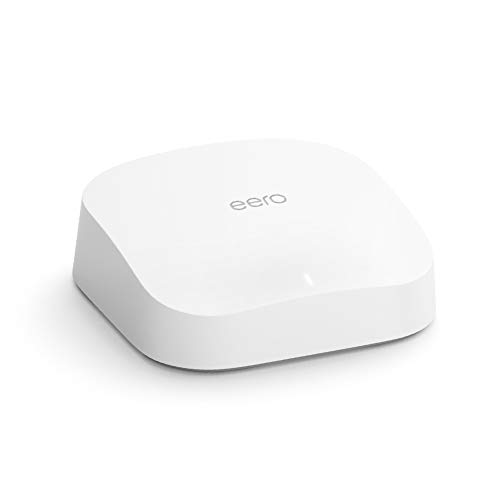
- Covers up to 2,000 sq. ft.
- Built-in Zigbee smart home hub
- Supports 75+ connected devices
Best For: buyers wanting premium eero features at refurbished value
Wi-Fi 7 speed pick
TP-Link BE6500 Dual-Band WiFi 7 Router

- Wi-Fi 7 with MLO and 4K-QAM
- Up to 90 devices, 2,400 sq. ft. coverage
- Dual 2.5 Gbps ports and USB 3.0
Best For: larger smart homes needing fast Wi-Fi and IoT security
Budget mesh hub pick
Amazon eero 6+ mesh wifi router

- Supports gigabit internet and 75+ devices
- Built-in smart home hub for Thread and Zigbee
- TrueMesh helps reduce drop-offs and dead spots
Best For: easy smart-home networking with built-in hub support
Tri-band coverage pick
TP-Link Deco XE75 AXE5400 Mesh System

- Wi-Fi 6E tri-band with 6 GHz band
- Up to 5,400 Mbps and 200 devices
- Covers up to 2,900 sq. ft. as a 1-pack
Best For: whole-home smart homes needing mesh-ready coverage
Whole-Home Mesh Choice

- Expandable mesh network with one Wi‑Fi name
- AC1300 dual-band speeds and MU-MIMO
- HomeCare security, parental controls, and QoS
Best For: Expandable whole-home coverage with easy app setup
Fast Wi‑Fi 6 Upgrade

- Wi‑Fi 6 AX1800 with OFDMA for more devices
- Beamforming and four antennas for coverage
- WPA3 security plus app and voice control
Best For: Busy smart homes needing stronger Wi‑Fi 6 capacity
Mesh Starter with Built-In Smart Hub – Amazon eero 6 mesh wifi router
If you want a Wi-Fi router for smart home devices that also simplifies whole-home coverage, the eero 6 is a practical place to start. It supports speeds up to 900 Mbps, covers up to 1,500 sq. ft., and uses Wi-Fi 6 to handle 75+ connected devices with fewer dead spots and drop-offs.
Best For: Homes that want a compact mesh router with a built-in Zigbee smart home hub for Alexa-connected devices.
Pros:
- Built-in Zigbee smart home hub connects compatible Alexa devices without separate hubs
- Wi-Fi 6 supports 75+ connected devices for busy smart homes
- Covers up to 1,500 sq. ft. and supports internet plans up to 900 Mbps
- App-guided setup and 7-day-a-week U.S. customer support
Cons:
- Single-pack coverage is best for smaller homes or as a base unit
- Not the highest-capacity option in the lineup for very large spaces
The eero 6 is a strong pick if you want an easy-to-manage router that blends smart home hub features with mesh networking. It is especially appealing when you want simple setup now and the option to expand later.
Budget Wi-Fi 6 Hub for Smart Homes – TP-Link Archer AX10 WiFi 6 router
The Archer AX10 is a solid Wi-Fi router for smart home devices if you want Wi-Fi 6 features without moving to a mesh system. It combines OFDMA, MU-MIMO, and beamforming to improve efficiency, reduce lag, and focus signal strength across a connected home.
Best For: Users who want an affordable Wi-Fi 6 router with strong device-handling features and Alexa compatibility.
Pros:
- Wi-Fi 6 with OFDMA and MU-MIMO helps serve multiple devices efficiently
- Beamforming improves signal focus for better coverage
- Dual-core 900MHz processor supports smooth streaming and video calls
- Works with Alexa and supports many previous Wi-Fi standards
Cons:
- Coverage is described as extensive, but no square-foot rating is provided
- It is a standard router, not a mesh kit
For smart homes that need a capable central router rather than a whole-home mesh setup, the Archer AX10 offers a balanced feature set. It is a sensible choice for handling mixed household traffic, including cameras, thermostats, and streaming devices.
Whole-Home Mesh for Dense Device Networks – TP-Link Deco X20 mesh system
If you need a Wi-Fi router for smart home devices across a larger home, the Deco X20 is built to reduce dead zones and handle more simultaneous connections. This Wi-Fi 6 mesh system covers up to 2,200 sq. ft., supports up to 1 Gbps internet plans, and uses OFDMA and MU-MIMO to improve device capacity.
Best For: Larger homes that want mesh coverage and easy control over lots of connected devices.
Pros:
- Wi-Fi 6 mesh design covers up to 2,200 sq. ft.
- OFDMA and MU-MIMO quadruple capacity for more simultaneous device use
- App setup is quick and includes remote management
- Compatible with Alexa for guest Wi-Fi voice control
Cons:
- Single-pack coverage may be limiting for very large or multi-story homes
- Only has 2 ports on the unit
The Deco X20 is a strong fit when the priority is broader coverage and steadier performance for a device-heavy household. It is especially useful if you want an expandable mesh platform that can grow with your home.
Refurbished Premium Mesh with Smart Hub – Like-New eero Pro 6 mesh router
Like-New Amazon eero Pro 6 tri-band mesh Wi-Fi 6 router with built-in Zigbee smart home hub
Check Price On AmazonThe eero Pro 6 is a Wi-Fi router for smart home devices if you want premium mesh performance and built-in hub functionality in a refurbished unit. It covers up to 2,000 sq. ft., supports wifi speeds up to a gigabit, and handles 75+ connected devices while keeping setup straightforward.
Best For: Buyers who want higher-end eero mesh performance and a Zigbee hub at a refurbished price point.
Pros:
- Premium Wi-Fi 6 performance with support for up to a gigabit
- Built-in Zigbee smart home hub works with Alexa-compatible devices
- Covers up to 2,000 sq. ft. and supports 75+ connected devices
- Like-new refurbished unit includes the same limited warranty as new
Cons:
- Refurbished product may arrive in generic Amazon-branded packaging
- Single unit may not be enough for very large homes
If you want eero’s mesh approach with more coverage than the base model, the Pro 6 is the most capable option here. Its combination of smart home hub support, easy setup, and refurbished value makes it appealing for connected homes.
Wi-Fi 7 speed pick – TP-Link BE6500 Dual-Band WiFi 7 Router
If you want a Wi-Fi router for smart home devices that can handle a busy house, the TP-Link BE400 is built for high device counts, fast wireless performance, and modern security features. Its dual-band Wi-Fi 7 design, multi-gig ports, and Private IoT support make it a strong fit for homes that mix smart cameras, TVs, phones, laptops, and streaming devices.
Best For: Larger smart homes that need fast Wi-Fi, multi-gig wiring, and solid IoT protection.
Pros:
- Wi-Fi 7 with MLO, Multi-RUs, and 4K-QAM for newer devices
- Up to 90 devices and coverage for up to 2,400 sq. ft.
- Dual 2.5 Gbps ports plus USB 3.0 for flexible wired connections
- HomeShield, Private IoT, and VPN support add security tools
Cons:
- Best benefits depend on having Wi-Fi 7-capable devices
- Coverage is strong, but not designed for very large homes on its own
This model stands out if you want a future-ready router that can support lots of connected gear without skimping on speed or security. For smart home users who also care about multi-gig internet and easier network management, it is one of the most capable single-router options here.
Budget mesh hub pick – Amazon eero 6+ mesh wifi router
The eero 6+ is a straightforward Wi-Fi router for smart home devices when you want simple setup and broad everyday reliability. It supports gigabit internet, handles 75+ devices, and includes a built-in smart home hub for compatible Thread and Zigbee devices, which can simplify a connected home without adding separate hubs.
Best For: Households that want an easy-to-manage router with built-in smart home hub support.
Pros:
- Supports internet plans up to a gigabit
- Connects 75+ devices for busy homes
- Built-in smart home hub for Thread and Zigbee devices with Alexa
- TrueMesh helps route traffic to reduce dead spots
Cons:
- Single-pack coverage is limited to up to 1,500 sq. ft.
- Advanced security and management features require a separate subscription
If you value convenience over advanced network tuning, this eero is easy to recommend. It is especially practical for smart homes that want app-based setup, automatic updates, and hub functionality in one compact router.
Tri-band coverage pick – TP-Link Deco XE75 AXE5400 Mesh System
The TP-Link Deco XE75 is a strong Wi-Fi router for smart home devices if you want mesh coverage, a cleaner 6 GHz band, and easy app-based control. It can work as a standalone router or as part of the Deco mesh system, and its tri-band design is aimed at homes that need stable connections for many devices.
Best For: Smart homes that need better whole-home coverage and low-interference Wi-Fi 6E performance.
Pros:
- Tri-band Wi-Fi 6E with a dedicated 6 GHz band
- Up to 5,400 Mbps and support for up to 200 devices
- Can cover up to 2,900 sq. ft. as a 1-pack system
- Easy setup with the Deco app plus HomeShield security features
Cons:
- Requires a modem for most internet service providers
- 6 GHz benefits depend on Wi-Fi 6E-compatible devices
This is a good fit when you want a router that can scale into mesh coverage later, while keeping the network organized and responsive. For smart homes with many connected devices, the extra band and mesh-friendly design are the main reasons to choose it.
Budget 2.4GHz Smart-Home Router – DBIT T1 Pro N300
If you want a Wi-Fi router for smart home devices without paying for extra speed you may not need, the DBIT T1 Pro focuses on steady 2.4GHz coverage and simple controls. It is built for everyday IoT use, security cameras, guest access, and basic streaming in homes that need practical network management.
Best For: Homes that need an affordable 2.4GHz router for smart devices, cameras, and easy access control.
Pros:
- 300Mbps 2.4GHz Wi-Fi is suited to HD streaming, browsing, and multiple smart home devices.
- WISP/repeater mode can extend coverage by rebroadcasting an existing network.
- Guest network, WLAN scheduling, and internet access control add useful home management tools.
- WPA2-PSK security, WPS, and a straightforward web UI make setup and use simple.
Cons:
- Single-band design does not support 5GHz or 4K-focused performance.
- LAN ports are limited to 10/100 Mbps.
- Requires a separate modem or ONT to get online.
Overall, this is a sensible pick if your priority is reliable connectivity for smart plugs, cameras, and other 2.4GHz devices rather than high-end throughput. Its strengths are coverage, basic security, and easy network control.
Whole-Home Mesh Choice – TP-Link Deco M5 1-Pack
The TP-Link Deco M5 is a Wi-Fi router for smart home devices when you want a cleaner whole-home setup instead of a traditional single-router dead-zone fix. Its mesh design, app-guided setup, and built-in HomeCare tools make it a practical option for households that want stable coverage and easier network control.
Best For: Homes that want expandable mesh coverage, app setup, and built-in security tools for connected devices.
Pros:
- Mesh system creates a unified network with a single Wi-Fi name and password.
- Dual-band AC1300 speeds support streaming, browsing, gaming, and multiple devices.
- HomeCare adds security features, parental controls, and QoS management.
- Guest WiFi and Alexa support add convenience for a connected home.
Cons:
- This is a 1-pack, so full mesh expansion requires adding more units later.
- Coverage is listed at up to 2,000 sq. ft. for this unit, which may not suit larger homes alone.
- A modem may still be required depending on your ISP setup.
For smart homes, the Deco M5 stands out because it combines simple setup with the kind of network consistency that connected devices appreciate. If you want a scalable system that can grow with your home, this is a strong starting point.
Fast Wi‑Fi 6 Upgrade – TP-Link Archer AX21
If your smart home has grown beyond basic connectivity, the TP-Link Archer AX21 is a Wi-Fi router for smart home devices that adds Wi‑Fi 6 capacity, stronger coverage tools, and broader compatibility. It is aimed at households that want better handling of many devices at once without moving to a more complex system.
Best For: Busy homes that need Wi‑Fi 6 performance for lots of connected devices and stable everyday use.
Pros:
- Wi‑Fi 6 with AX1800 speeds helps with smoother streaming, gaming, and downloads.
- OFDMA supports communication with more devices simultaneously.
- Beamforming, four high-gain antennas, and FEM chipset are designed for wider, more reliable coverage.
- WPA3 security, app control, and support for most major ISPs add practical value.
Cons:
- It is dual-band only and does not support the 6 GHz band.
- A separate modem is required for internet access.
- Best results depend on updated firmware and normal home conditions.
For a smart home that needs more headroom, the AX21 is the most capable all-around router here. It balances speed, security, and device capacity in a way that suits modern connected households well.
How We Picked the Best Wi-Fi Router for Smart Home Devices
We prioritized routers and mesh systems that can support multiple always-on devices, maintain strong signal through walls and floors, and deliver dependable performance for cameras, hubs, speakers, locks, and sensors. We also looked for easy setup, app-based controls, guest access, parental controls, and standards that help future-proof your network.
Quick Comparison
For smaller homes or lighter smart-home setups, a single-router option may be enough. For larger homes, multi-story layouts, or device-heavy households, a mesh system is usually the better fit because it spreads coverage more evenly and reduces dead zones. Wi-Fi 6 and newer models are the sweet spot for most buyers, while Wi-Fi 6E and Wi-Fi 7 add extra headroom for demanding networks and busy environments.
Key Buying Factors for Wi-Fi Router for Smart Home Devices
Device Capacity
Choose a router that can handle more devices than you currently own. Smart homes often grow quickly, and a model rated for 50 or more devices is a smarter long-term choice.
Coverage and Layout
Match the router type to your home size. Apartments and small homes can often use a single unit, while larger homes, basements, and tricky layouts benefit from mesh coverage.
Band and Standard Support
Wi-Fi 6 improves efficiency for many connected devices, and tri-band or Wi-Fi 6E options can help reduce congestion in busier homes. Wi-Fi 7 offers even more overhead, but it is best for buyers who want the newest platform or have high-speed internet service.
Smart Home Compatibility
Some routers include built-in smart home hubs or better support for IoT gear. If you use lots of cameras, assistants, or automation platforms, that can simplify setup and improve reliability.
Security and Controls
Look for guest networks, parental controls, automatic firmware updates, and basic security tools. These features help protect connected devices without adding complexity.
Who Should Buy Which Wi-Fi Router for Smart Home Devices?
If you want the simplest setup for a smaller home, a solid Wi-Fi 6 router is usually enough. If your home has dead zones or you want fewer dropouts across many devices, choose a mesh system. If you have a large device count, advanced networking needs, or faster internet service, step up to a tri-band, 6E, or Wi-Fi 7 model. For budget-conscious buyers with basic IoT needs, a simpler dual-band router can still do the job well.
In short, the best Wi-Fi Router for Smart Home Devices is the one that matches your coverage needs, device count, and internet speed without overcomplicating your setup.