
Choosing a video conferencing camera for large room setups is about more than resolution. You need wide coverage, reliable speaker tracking, strong audio pickup, and simple integration with your meeting platform.
In this roundup, we focused on systems that help teams look and sound better in bigger spaces, from huddle-to-boardroom layouts to rooms with multiple rows of participants.
Best 10 Video Conferencing Camera for Large Room Picks for 2026
All-in-One AI-Tracking Meeting Kit
TONGVEO 1080P PTZ + Speakerphone

- 1080p 60fps PTZ camera with AI auto-tracking
- 3x optical zoom and wide camera movement
- Speakerphone with 16.4 ft pickup and echo cancellation
Best For: Small-to-medium conference rooms needing an all-in-one video and audio setup
Portable USB Meeting Cam
NUROUM C10 Compact Speaker Cam

- 1080p camera with 4-mic array and speaker
- 90° wide-angle lens for small teams
- USB-C plug-and-play with no driver needed
Best For: Huddle rooms, focus rooms, and portable hybrid meetings
4K Gesture-Control PTZ Kit
TONGVEO 4K Auto-Tracking System

- 4K@30fps PTZ camera with 8.29MP sensor
- AI tracking plus gesture and remote control
- Speakerphone with 16.4 ft pickup range
Best For: Conference rooms that need 4K video and flexible control
360-Degree Collaboration Cam
j5create JVCU360 Meeting Webcam

- 360° video capture for full-room visibility
- 1080p with six display modes
- Built-in omnidirectional microphone
Best For: Team meetings and collaboration spaces that need everyone in view
Premium AI Conference Cam
AV Access 4K Conference Room Camera
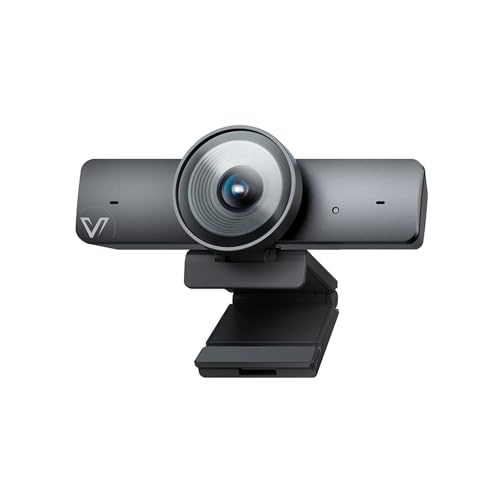
- 1/1.8" CMOS sensor with 4K/30fps video
- AI auto framing, presenter tracking, and gallery modes
- 120° FOV plus dual noise-canceling mics
Best For: Meeting rooms that need smart framing and clear 4K video
All-in-One Desktop System
Logitech BCC950 Conference Webcam

- 1080p HD webcam with Carl Zeiss lens
- Built-in full duplex speakerphone and noise-canceling mic
- Designed for 1-4 people in small rooms
Best For: Small meeting spaces needing an easy all-in-one setup
360-Degree Hybrid Room Cam

- 360° video and 360° audio for full-room coverage
- AI speaker tracking follows the active speaker
- 18-foot mic pickup suits larger meeting spaces
Best For: Hybrid rooms that need broad coverage and automatic speaker focus
Premium Room-Filling AV
Bose Professional VB-S for Offices, Classrooms, and Huddle Spaces

- 4K Ultra-HD camera with 5x digital zoom
- Four beamforming mics reduce unwanted noise
- Includes PTZ control, auto-framing, and remote
Best For: premium all-in-one conferencing in offices, classrooms, and shared rooms
AI Meeting Room Tracker
WYRESTORM FOCUS-210 for Small Conference Spaces

- 4K video with 120° wide-angle coverage
- AI auto framing and presenter tracking
- Dual noise-cancelling mics work up to 5m
Best For: small conference rooms that need smart framing and simple USB setup
360-Degree Collaboration Camera
TOUCAN SC360 for Mixed-Size Meeting Rooms

- 360° capture shows people anywhere in the room
- Four noise-reduction mics and built-in speaker
- Plug-and-play setup for common conferencing apps
Best For: group meetings that need full-room coverage and simple audio-video integration
All-in-One AI-Tracking Meeting Kit – TONGVEO 1080P PTZ + Speakerphone
If you need a video conferencing camera for large room meetings, this TONGVEO all-in-one kit is built to cover both video and audio in one setup. It combines a 1080p 60fps AI auto-tracking PTZ camera with a Bluetooth conference speakerphone, making it easier to handle in-room speaking and remote participation without piecing together separate gear.
Best For: Small-to-medium conference rooms that need a simple all-in-one camera and speakerphone solution.
Pros:
- AI auto-tracking PTZ camera with 3x optical zoom and 350° horizontal / 180° vertical movement
- 1080p output at 60fps over HDMI or USB 3.0 for flexible meeting setups
- Speakerphone supports up to 16.4 ft pickup and includes echo cancellation
- Plug-and-play USB 3.0, HDMI, Bluetooth, and wireless dongle options
Cons:
- Best suited to small-to-medium rooms rather than very large spaces
- The PTZ camera is wired, while only the speakerphone is wireless
- Large-room coverage may require thoughtful placement to get the best audio pickup
This kit is a practical choice if you want one package to cover camera movement, speaker tracking, and conference audio. It is especially appealing when ease of setup matters more than adding separate components.
Portable USB Meeting Cam – NUROUM C10 Compact Speaker Cam
The NUROUM C10 is a compact option if you want a video conferencing camera for large room use in a mobile, all-in-one form factor. It pairs a 1080p camera with a 4-mic array and built-in speaker, so it works well when you need a simple device for hybrid meetings, focus rooms, or quick setup on the go.
Best For: Huddle rooms, focus rooms, and portable meeting setups where compact size matters.
Pros:
- All-in-one design with camera, 4 MEMS microphones, and loudspeaker
- 90° wide-angle lens and 1080p video for small group coverage
- Full-duplex audio and AGC help keep conversations natural up to 10 ft
- USB-C plug-and-play design with no driver or power adapter required
Cons:
- 90° field of view is better for individuals and small teams than wide rooms
- Audio pickup is rated to 10 ft, so it may be limited in bigger spaces
- Not designed as a PTZ camera for active room-wide tracking
For buyers who value portability and simplicity, the C10 is easy to deploy and easy to carry between spaces. It is a strong fit when your room size is modest and you want reliable audio built into the camera.
4K Gesture-Control PTZ Kit – TONGVEO 4K Auto-Tracking System
If you’re shopping for a video conferencing camera for large room meetings, this TONGVEO 4K system offers the most room-ready feature set in the group. It combines a 4K auto-tracking PTZ camera with a separate speakerphone, plus gesture control, wide-angle coverage, and multiple mounting options for more polished meeting-room installations.
Best For: Conference rooms that need 4K video, tracking, and flexible control options.
Pros:
- 4K@30fps camera with 8.29MP sensor and 120° wide-angle field of view
- AI auto-tracking plus gesture, remote, and joystick-style control support
- Speakerphone includes dual microphones, noise reduction, and 16.4 ft pickup range
- USB 3.0 plug-and-play with Windows, Mac OS, and Chrome OS compatibility
Cons:
- The FAR/NEAR/MANUAL/AUTO focus buttons do not apply to this version
- 4K performance depends on both the equipment and software supporting 4K
- Setup is more involved than a simple webcam-style solution
This is a strong pick when you want pro-level room coverage and more ways to control the camera during meetings. The separate speakerphone and versatile mounting options make it better suited to a dedicated conference room than a casual desk setup.
360-Degree Collaboration Cam – j5create JVCU360 Meeting Webcam
The j5create JVCU360 takes a different approach to a video conferencing camera for large room collaboration by showing the whole meeting table instead of tracking one speaker. With 360° capture, six display modes, and a built-in omnidirectional microphone, it is geared toward group discussions where participants need to be seen clearly from multiple angles.
Best For: Team meetings, online classes, and collaboration spaces where full-room visibility matters.
Pros:
- 360° camera design captures participants around the room
- Six display modes add flexibility for different meeting layouts
- Built-in omnidirectional microphone supports conferencing audio
- USB-C plug-and-play setup works with major meeting platforms
Cons:
- Uses 1080p resolution, so it is not a 4K option
- Fixed-focus and digital zoom are more limited than a PTZ camera
- Best for participant visibility rather than active speaker tracking
This model is a good fit when everyone in the room needs to remain visible, especially for collaborative sessions. It is less about zooming in on a presenter and more about giving remote attendees a complete view of the group.
Premium AI Conference Cam – AV Access 4K Conference Room Camera
If you need a video conferencing camera for large room use that can keep pace with changing meeting layouts, this AV Access model is built around AI framing and tracking. The 1/1.8" CMOS sensor, 4K capture, and 120° wide-angle lens aim for a clearer, more flexible view, while the gallery mode and presenter tracking help remote participants follow who is speaking.
Best For: Medium-to-large meeting rooms that need automatic framing, presenter tracking, and strong image quality.
Pros:
- 1/1.8" CMOS sensor and 4K/30fps video for sharper, more detailed meetings
- AI auto framing, presenter tracking, and individuals gallery modes for dynamic rooms
- 120° field of view helps capture more people in frame
- Dual noise-canceling mics and USB plug-and-play setup for easy deployment
Cons:
- Digital zoom tops out at 5X, so it is less specialized for very long rooms
- Gesture control may require a firmware update on some units
- Built-in mic pickup is specified for up to 3 meters, so larger rooms may still need room audio support
Overall, this is a strong choice when you want an intelligent conference camera that can adapt to meetings with multiple participants and changing presenters without adding much setup complexity.
All-in-One Desktop System – Logitech BCC950 Conference Webcam
The Logitech BCC950 is a practical video conferencing camera for large room setups only when the meeting size is modest, since it is designed for 1-4 people and up to about 8 feet from the base. Its all-in-one webcam and speakerphone design simplifies small-team conferencing with 1080p HD video, a Carl Zeiss lens, and noise-canceling audio in one desktop unit.
Best For: Small rooms or desktop meeting spaces where simple plug-and-play video and audio matter most.
Pros:
- All-in-one webcam and full duplex speakerphone reduce the need for separate gear
- 1080p HD at 30 fps with a Carl Zeiss lens for business-grade video
- Noise-canceling mic and echo cancellation help conversations sound clearer
- Remote control and base controls make pan, tilt, zoom, mute, and call handling easy
Cons:
- Designed for 1-4 people, so it is not ideal for true large-room coverage
- Audio pickup is specified up to 8 feet from the base
- 1080p resolution is solid, but not as detailed as 4K options
For compact team meetings, this model remains a straightforward, dependable option, but buyers seeking broader room coverage should look at more room-focused cameras.
360-Degree Hybrid Room Cam – Owl Labs Meeting Owl 3
If you are shopping for a video conferencing camera for large room collaboration, the Meeting Owl 3 stands out with its 360° capture and speaker-tracking approach. It records in 1080p HD, picks up audio from up to 18 feet away, and automatically shifts focus to whoever is speaking, which helps remote attendees follow the room without a dedicated camera operator.
Best For: Hybrid meeting rooms that need wide room coverage, speaker tracking, and easy plug-and-play deployment.
Pros:
- 360° video and 360° audio create a full-room meeting view
- AI-driven speaker tracking automatically focuses on active speakers
- 18-foot mic pickup is well suited to larger shared spaces
- Expandable Owl ecosystem supports bigger room setups with add-ons
Cons:
- Video resolution is 1080p rather than 4K
- Best results in large spaces may require pairing with other Owl devices or accessories
- 360° design may be more than you need for smaller, simple meeting rooms
Overall, this is the most room-oriented option in the group, especially if you want the camera to handle participant visibility and speaker focus automatically in a collaborative hybrid space.
Premium Room-Filling AV – Bose Professional VB-S for Offices, Classrooms, and Huddle Spaces
If you need a video conferencing camera for large room setups that also handles sound well, the Bose Professional VB-S is built to cover both sides of the meeting. It combines a 4K Ultra-HD camera with 5x digital zoom, wide field of view, PTZ controls, and beamforming microphones, making it a strong all-in-one option for polished meetings in offices, classrooms, and shared spaces.
Best For: Teams that want a premium all-in-one conferencing bar with strong audio, 4K video, and simple mounting options.
Pros:
- 4K Ultra-HD camera with 5x digital zoom and wide field of view
- Digital PTZ plus two auto-framing modes and customizable presets
- Four beamforming microphones help focus on voices and reduce unwanted noise
- Includes simple tabletop or wall mounting options and an IR remote
Cons:
- Wall or display mounting may require additional accessories for some setups
- Uses a stationary form factor rather than a separate flexible camera system
- May be more than needed for smaller rooms or basic one-on-one calls
This is the most polished option in the group if you want a conference solution that balances video quality, microphone performance, and room-friendly design. It is especially appealing when you want less piecing together of separate camera and speaker hardware.
AI Meeting Room Tracker – WYRESTORM FOCUS-210 for Small Conference Spaces
The WYRESTORM FOCUS-210 is a practical video conferencing camera for large room alternatives that are better described as small conference rooms, boardrooms, or training spaces. Its 4K image, 120b0 wide angle, AI auto framing, and presenter tracking make it easier to keep groups visible without constant repositioning.
Best For: Small conference rooms that need AI framing, presenter tracking, and easy USB setup.
Pros:
- AI auto framing keeps all attendees in view during group meetings
- Presenter tracking follows the active speaker during presentations
- 120b0 wide angle helps cover the full meeting space
- Dual noise-cancelling microphones capture voices up to 5m
Cons:
- Product notes specify it is designed for small conference rooms
- USB webcam design may be less robust than larger integrated room systems
- Best fit depends on having a room size that matches the stated coverage focus
This model stands out when you want smart framing without a complicated install. It is a strong pick for meeting rooms that need clear 4K video, simple plug-and-play use, and enough width to keep everyone on screen.
360-Degree Collaboration Camera – TOUCAN SC360 for Mixed-Size Meeting Rooms
If you want a video conferencing camera for large room meetings that emphasizes full-room visibility, the TOUCAN SC360 is built around 360-degree capture. It offers 1080p HD video, four noise-reduction microphones, AI tracking, and a built-in speaker, so it can support more natural group discussions across a broader conference space.
Best For: Teams that want 360-degree room coverage, integrated audio, and easy plug-and-play operation.
Pros:
- 360b0 omni-directional shooting helps show people anywhere in the room
- Four noise-reduction microphones support clearer voice pickup
- Built-in speaker adds an all-in-one collaboration setup
- Plug-and-play design keeps setup simple across common conferencing platforms
Cons:
- Video resolution is 1080p HD rather than 4K
- Product materials focus on general room adaptability, not advanced PTZ controls
- May be more appealing for group collaboration than detail-heavy video needs
This is a solid choice when room coverage matters more than ultra-high resolution. The 360-degree approach, combined with integrated audio, makes it easy to keep meetings feeling natural in larger shared spaces.
How We Picked the Best Video Conferencing Camera for Large Room
We prioritized cameras designed for larger meeting spaces, with an emphasis on field of view, tracking behavior, microphone quality, and ease of setup. We also looked for models that support common platforms and offer flexible mounting or all-in-one convenience.
For a Video Conferencing Camera for Large Room use, the best options balance wide-angle coverage with the ability to keep speakers visible and voices intelligible without constant manual adjustment.
Quick Comparison
In general, all-in-one bar-style systems are the easiest choice for fast deployment, while PTZ and AI-tracking cameras are better when you need focused framing in larger or deeper rooms. 360-degree cameras can work well in collaborative spaces, but they are not always ideal for presentation-heavy meetings.
Key Buying Factors for a Video Conferencing Camera for Large Room
Coverage and Framing
Look for a wide field of view, strong auto-framing, or presenter tracking so people at the edges of the room stay included. In deeper rooms, optical zoom can be more useful than digital zoom alone.
Audio Pickup
Image quality matters, but audio is often what makes or breaks the experience. Built-in speakerphones, multi-mic arrays, and longer pickup ranges help remote attendees hear everyone clearly.
Tracking and Control
AI tracking, gesture control, and PTZ movement can reduce manual camera management. These features are especially helpful when meetings move between group discussion and single-speaker presentations.
Connectivity and Compatibility
USB is usually simplest for plug-and-play deployment, while HDMI and Bluetooth can add flexibility. Make sure the camera works smoothly with your preferred meeting apps and room computer setup.
Who Should Buy Which Video Conferencing Camera for Large Room?
If you want the simplest setup for a shared conference space, choose an all-in-one system with integrated audio and auto-framing. If your room is long or presentation-focused, a PTZ model with tracking and zoom is usually the smarter fit. If your team sits around a table and collaboration is the priority, a 360-degree camera can provide better group coverage.
For buyers comparing a Video Conferencing Camera for Large Room installations, the best pick is the one that matches your room size, seating layout, and how often you switch between group discussion and presenter-led meetings.