
Choosing the right video conferencing equipment with dual displays can make meetings feel smoother, more organized, and easier to follow. The best setups help presenters, remote teams, and in-room participants stay focused without constant screen juggling.
This roundup highlights 10 strong options for different room sizes, collaboration styles, and deployment needs, from simple BYOD systems to all-in-one meeting bars and room kits.
Best 10 Video Conferencing Equipment with Dual Displays Picks for 2026
Wireless Room Sharing
BenQ InstaShow VS25 Driver-Free Wireless Conferencing
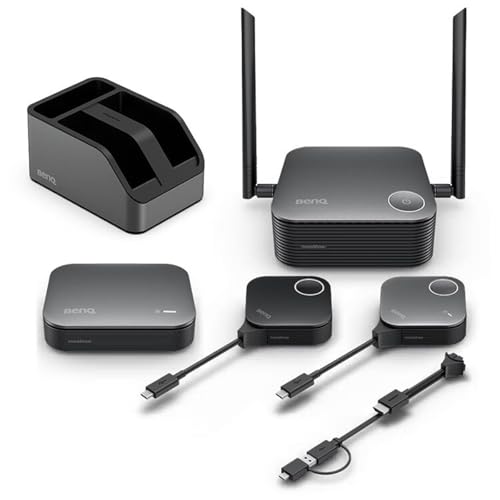
- No-driver wireless sharing from laptops and desktops
- Supports BYOM/BYOD across Windows, macOS, and Linux
- 4K/60Hz playback with touchback control support
Best For: Secure wireless presenting in shared meeting rooms
All-in-One Meeting Bar
Yealink MeetingBar A40 Dual-Camera Room Bar

- Built-in camera, speakers, and microphones
- Dual 48MP cameras with AI framing and tracking
- Plug-and-play setup for small to medium rooms
Best For: Teams needing a simple Teams or Zoom room system
Room Compute Hub
Lenovo ThinkSmart Core Gen 2 Dual-HDMI Compute Box

- 2 HDMI out ports for dual-display rooms
- Gigabit Ethernet and cable management included
- Compact TV-box design with VESA mounting
Best For: Dedicated compute for dual-display conference rooms
Camera + Audio Kit
v AV Access BizEye P30 4K AI Camera Kit

- 4K dual-lens AI camera with framing modes
- Bluetooth speakerphone with 360° mic pickup
- USB plug-and-play across major meeting platforms
Best For: Portable hybrid rooms needing camera and audio in one kit
Dual-Display BYOD Matrix Switcher
Boom ARC 4K BYOD Video Conferencing Switcher

- 4x2 matrix routing for mirror or independent dual displays.
- Shares USB peripherals across multiple hosts.
- Supports auto/manual switching plus RS232 and TCP/IP control.
Best For: Hybrid rooms needing dual-display BYOD switching and shared USB devices.
AI All-in-One Conference Camera

- 4K UHD camera with a wide-angle lens.
- AI object detection and auto framing.
- Automatic lens privacy cover and two-way audio.
Best For: Conference rooms that want AI video capture with built-in privacy.
Plug-and-Play Room System
Logitech GROUP Video Conferencing System

- USB plug-and-play setup for laptops and common UC apps.
- HD 1080p video with autofocus and digital pan/tilt/zoom.
- Four-mic speakerphone with noise cancellation for group calls.
Best For: Mid to large meeting rooms that want a simple conferencing system.
Premium Small-Room Video Bar
MeetingBar A25 with Triple 4K Cameras

- Triple 4K cameras with 151° field of view
- 8-mic array with 5-meter pickup range
- Teams Rooms, Zoom Rooms, and BYOD support
Best For: Small rooms needing wide coverage and integrated audio
Flexible Huddle-Room Choice
Logitech MeetUp 4K Conference Camera

- 4K sensor with 120° field of view
- Beamforming mics with optional expansion mic
- USB BYOD or room-solution deployment
Best For: Small rooms needing flexible mounting and easy setup
Touch-Control Room System
Yealink A10 All-in-One Meeting Bar

- 4K all-in-one bar with 8 MEMS microphones
- Includes CTP18 touch panel for control
- Auto framing, speaker tracking, and privacy shutter
Best For: Small rooms and home offices needing touch-controlled meetings
Wireless Room Sharing – BenQ InstaShow VS25 Driver-Free Wireless Conferencing
For video conferencing equipment with dual displays, the BenQ InstaShow VS25 is built around fast wireless sharing rather than a traditional camera-first setup. It supports BYOM and BYOD meetings, so you can plug in your own laptop and start presenting from Windows, macOS, or Linux without drivers, software, or network setup.
Best For: Teams that want secure, one-tap wireless presenting and conferencing across shared rooms.
Pros:
- One-tap wireless connectivity with no drivers or software required
- Works with Windows, macOS, and Linux for BYOM/BYOD use
- 4K/60Hz playback and screen mirroring for crisp visuals
- Touchback control from interactive displays up to 40 ft away
Cons:
- Focuses on wireless sharing and room collaboration rather than an integrated camera system
- Requires compatible displays and meeting-room hardware to complete the setup
The VS25 is a strong fit when your priority is quick, secure content sharing in conference rooms with dual-display workflows. Its CVSS 4.0-certified security and cloud management also make it practical for multi-room deployment.
All-in-One Meeting Bar – Yealink MeetingBar A40 Dual-Camera Room Bar
The Yealink MeetingBar A40 is a practical choice for video conferencing equipment with dual displays when you want an all-in-one room system with built-in camera, speakers, and microphones. It combines dual 48MP cameras, AI auto-framing, and speaker tracking with plug-and-play setup for small to medium conference rooms.
Best For: Small to medium rooms that need an integrated Teams or Zoom meeting bar with strong video and audio.
Pros:
- All-in-one design with camera, speakers, and microphones built in
- Dual 48MP camera system with AI auto-framing and speaker tracking
- 4K camera output for clearer meeting-room video
- Noise reduction and easy plug-and-play deployment
Cons:
- Best suited to structured meeting rooms rather than portable setups
- Requires room installation and compatible conference-room hardware
For teams standardizing on Microsoft Teams or Zoom, the A40 offers a clean room-bar approach with modern framing features and straightforward setup. It is designed to cover the basics well while reducing the number of separate devices you need to manage.
Room Compute Hub – Lenovo ThinkSmart Core Gen 2 Dual-HDMI Compute Box
The Lenovo ThinkSmart Core Gen 2 is a room-computing hub for video conferencing equipment with dual displays, thanks to its 1 HDMI in and 2 HDMI out ports. It is built for conference-room deployments that need organized cable management, Gigabit Ethernet, and a compact TV-box form factor.
Best For: Conference rooms that need a dedicated compute unit to drive dual-display video conferencing setups.
Pros:
- 2 HDMI out ports plus 1 HDMI in for dual-display room setups
- Gigabit Ethernet and RJ-45 network connectivity
- Includes cable management box and VESA mount bracket
- Designed as a dedicated video-conference compute box
Cons:
- Does not include an integrated camera or microphone system
- More of a room core than a complete out-of-the-box conferencing kit
This is the kind of system you choose when the room already has or will add separate peripherals. Its value is in making dual-display conference-room setups cleaner, more centralized, and easier to wire.
Camera + Audio Kit – v AV Access BizEye P30 4K AI Camera Kit
If you want video conferencing equipment with dual displays to also handle room audio and smart framing, the v AV Access BizEye P30 Kit is a flexible all-in-one option. It combines a 4K dual-lens AI camera with a Bluetooth speakerphone, making it useful for small to medium meeting rooms that need both video coverage and voice pickup.
Best For: Hybrid meeting rooms that need a portable camera-and-audio kit with AI framing and tracking.
Pros:
- 4K dual-lens camera with AI framing, presenter tracking, and gallery view
- Included Bluetooth speakerphone with 360° mic pickup and noise reduction
- USB plug-and-play setup with no drivers required
- Works with Zoom, Teams, Webex, Skype, Windows, macOS, Android, and iOS
Cons:
- Optimized for 4–8 participants rather than large rooms
- Portable design may not suit permanent room installations as well as fixed systems
The BizEye P30 Kit stands out when you need a compact bundle that covers video and audio without extra peripherals. Its tracking modes and flexible control options make it a solid fit for rooms that host a variety of meeting styles.
Dual-Display BYOD Matrix Switcher – Boom ARC 4K BYOD Video Conferencing Switcher
If you need video conferencing equipment with dual displays for a BYOD or hybrid room, the Boom ARC is built around flexible source routing. It can send inputs to either screen, mirror content to both displays, or run each display independently, while also sharing USB peripherals like a camera, speakerphone, or touchscreen across hosts.
Best For: Hybrid meeting rooms that need dual-host switching, flexible dual-display routing, and shared USB accessories.
Pros:
- 4×2 matrix routing supports dual-display setups with mirror or independent output modes.
- Dual-host switching makes it easier to move between laptops and in-room systems.
- USB peripheral sharing reduces re-plugging for cameras, speakerphones, and touchscreens.
- Auto and manual switching options add flexibility for different meeting workflows.
Cons:
- Best suited to installed meeting spaces rather than portable use.
- More feature-rich than a basic plug-and-play conferencing accessory.
- Requires some setup planning if you want to use control options like RS232 or TCP/IP.
This is a strong fit for teams that want a clean, centralized way to manage dual displays and multiple BYOD sources in one conferencing system. Its value is in flexibility and integration, not simplicity.
AI All-in-One Conference Camera – Yealink SmartVision 40
For teams comparing video conferencing equipment with dual displays, the Yealink SmartVision 40 is more about the meeting experience at the front of the room than the switching layer behind it. It brings 4K UHD capture, AI-powered object detection, auto framing, two-way audio communication, and an automatic lens privacy cover for a more polished conference setup.
Best For: Rooms that want an AI-enabled 4K conferencing camera with privacy cover and automatic framing.
Pros:
- 4K UHD capture with a wide-angle lens for clear meeting video.
- AI-powered object detection and auto framing help keep participants in view.
- Two-way audio communication supports conferencing in a single unit.
- Automatic lens privacy cover adds a practical privacy feature.
Cons:
- Does not provide dual-display switching or matrix routing.
- Wired USB-based design is less flexible than wireless options.
- Better suited as a conference camera component than a full room control solution.
This is a solid choice when the goal is smarter room video capture rather than display management. It pairs well with a larger conferencing setup, especially where AI framing and privacy matter.
Plug-and-Play Room System – Logitech GROUP Video Conferencing System
The Logitech GROUP is a straightforward choice if you want dependable video conferencing equipment with dual displays as part of a larger room setup, though its own focus is on easy USB-based conferencing. It offers HD 1080p video, a 90-degree field of view, and premium audio with four integrated omni-directional mics, making it a practical fit for medium to large meeting rooms.
Best For: Mid to large conference rooms that need an affordable, plug-and-play USB conferencing system.
Pros:
- Plug-and-play USB connection makes setup simple with a laptop.
- HD 1080p video with autofocus and digital pan/tilt/zoom.
- Four omni-directional microphones and noise cancellation improve group audio.
- Compatible with common UC and cloud meeting apps on Mac and PC.
Cons:
- It is not a dual-display switcher or matrix routing device.
- Video output is limited to the system’s conferencing workflow rather than advanced display management.
- Designed for room conferencing, but not for complex BYOD input handling.
This system is best when you want a proven, easy-to-use conferencing package for larger rooms. It keeps the setup simple while delivering the camera and audio performance expected in business meetings.
Premium Small-Room Video Bar – MeetingBar A25 with Triple 4K Cameras
For teams looking for video conferencing equipment with dual displays, the Yealink MeetingBar A25 is built to give small rooms a more complete, high-end meeting view. Its triple-camera system, 151° ultra-wide field of view, and 4K output help remote attendees see the room clearly, while the 8-microphone array and built-in speaker are designed to keep voices intelligible without extra hardware.
Best For: Small conference rooms that need wide room coverage, strong audio pickup, and native Teams or Zoom support.
Pros:
- Triple 4K camera system with 151° field of view for broad room coverage.
- 8x MEMS microphone array with 5-meter pickup range and noise reduction.
- Supports native Teams Rooms, Zoom Rooms, and BYOD mode.
- Includes CTP25 touch panel and simplified single-login deployment.
Cons:
- Designed for small rooms, so it may be more system than a basic huddle-space setup needs.
- Requires familiarity with room-based deployment rather than simple USB-only use.
The MeetingBar A25 stands out when you want an all-in-one room system with strong camera coverage and built-in audio instead of piecing together separate components. It is a practical fit for organizations standardizing on Teams or Zoom and wanting a clean deployment path.
Flexible Huddle-Room Choice – Logitech MeetUp 4K Conference Camera
If you need video conferencing equipment with dual displays in a small room or huddle space, the Logitech MeetUp is a straightforward all-in-one option. It combines a 4K sensor, 120° field of view, and beamforming microphones, and it can be expanded with optional accessories when you need more coverage or easier room deployment.
Best For: Small conference rooms and huddle rooms that need simple USB use, flexible mounting, and room-system compatibility.
Pros:
- Ultra HD 4K sensor with a 120° field of view for clear room capture.
- Beamforming mics pick up voices up to 4 m, with optional expansion mic support.
- Motorized pan/tilt can widen the view up to 170°.
- Works as a USB conference camera or as part of Teams Rooms, Zoom Rooms, or Google Meet deployments.
Cons:
- Expansion microphone is sold separately.
- Primary field of view is wide, but not as expansive as some triple-camera systems.
MeetUp is a practical pick when you want a reliable, well-known conference camera that can scale from simple plug-and-play use to a room solution. Its mounting options and remote management support make it especially useful for standardized meeting spaces.
Touch-Control Room System – Yealink A10 All-in-One Meeting Bar
For buyers comparing video conferencing equipment with dual displays, the Yealink A10 is a compact room system that keeps the essentials in one package. It combines a 4K camera, 8 MEMS microphones, speaker, Android OS, and wireless connectivity, while the included CTP18 touch panel gives you direct control for meetings in home offices and small rooms.
Best For: Small meeting rooms and home offices that want an integrated Teams or Zoom room experience with touch control.
Pros:
- All-in-one design with 4K camera, microphones, speaker, computing unit, Android OS, Wi-Fi, and Bluetooth.
- Includes CTP18 touch panel for easier meeting control.
- Auto framing and speaker tracking help keep participants centered.
- Electric privacy shutter adds a security-focused touch.
Cons:
- Designed for small rooms, so it may not suit larger spaces.
- Included display control is tied to the room-system approach rather than basic webcam use.
The A10 is appealing if you want an integrated meeting bar with guided control and certified platform support. It is especially practical for teams that value a tidy setup and want AI-assisted framing without adding separate peripherals.
How We Picked the Best Video Conferencing Equipment with Dual Displays
We focused on products that support practical dual-display workflows, strong video and audio performance, and simple setup. Priority went to systems that fit real meeting room use, including BYOD compatibility, room-scale microphones, camera framing features, and reliable connectivity options.
We also considered whether the hardware makes sense for small huddle spaces, medium conference rooms, or larger collaboration environments. The goal was to surface choices that balance image quality, ease of use, and deployment flexibility.
Quick Comparison
Some products are best for plug-and-play BYOD sharing, while others are built as all-in-one room systems with cameras, microphones, and control panels. Dual-display capable switchers and conferencing hubs are especially useful when you want one screen for people and another for content.
If your room already has displays and peripherals, a conferencing switcher or compute module may be the smarter buy. If you want a turnkey setup, an integrated bar or room kit will usually be easier to manage.
Key Buying Factors for Video Conferencing Equipment with Dual Displays
Display Workflow
Look for native support for dual outputs, clear content sharing behavior, and easy source switching. In dual-display rooms, the ideal setup shows participants on one screen and shared content on the other without extra steps.
Camera and Audio Coverage
Wide fields of view, multi-camera framing, speaker tracking, and multiple microphones matter more as rooms get larger. Good pickup and intelligent framing reduce distractions and make remote attendees feel included.
Connectivity and Compatibility
Check for HDMI, USB-C, wireless casting, and platform certifications for Teams or Zoom if your organization depends on them. For hybrid environments, BYOD support can simplify adoption and reduce IT overhead.
Room Size and Deployment Style
Small rooms often do best with compact all-in-one bars, while larger spaces may need separate compute hardware, external speakers, or matrix switchers. Match the system to your room layout instead of overbuying for specs alone.
Who Should Buy Which Video Conferencing Equipment with Dual Displays?
Choose a BYOD-oriented conferencing switcher if flexibility and device sharing are your top priorities. Pick an all-in-one meeting bar if you want a faster install and fewer components to manage.
Larger conference rooms usually benefit from systems with stronger microphones, broader camera coverage, and dual-display support built into the workflow. Teams that host frequent presentations should prioritize content sharing ease, while groups focused on hybrid collaboration should emphasize audio clarity and camera framing.
In short, the best Video Conferencing Equipment with Dual Displays is the one that fits your room, your platform, and how often people switch between presenting and discussing.