
Choosing a video conferencing system for boardroom use is about more than camera resolution. The right setup should deliver clear audio, wide room coverage, simple controls, and dependable compatibility with your meeting platform.
In this roundup, we focus on systems that suit real boardroom needs: larger spaces, multiple speakers, hybrid meetings, and setups that need to work smoothly day after day.
Best 10 Video Conferencing System for Boardroom Picks for 2026
Value Boardroom Kit
Logitech GROUP Video Conferencing System

- Plug-and-play USB connection for quick setup
- 1080p video with autofocus and Zeiss optics
- 4 mics, noise cancellation, and 20 ft audio range
Best For: Mid to large conference rooms needing an affordable, easy-to-use setup
Flexible Room Platform
Poly G7500 Video Conference Equipment

- Modular design works with cameras, mics, and controllers
- Compatible with nearly every video platform
- Poly Lens and REST APIs support remote management
Best For: Custom rooms that need a scalable, easily managed conferencing hub
Premium Panoramic Bar
Jabra PanaCast 50 Video Bar System

- 180° panoramic 4K view with three cameras
- AI framing features like Intelligent Zoom and Virtual Director
- Full-duplex audio with stereo speakers and touchscreen control
Best For: Large boardrooms needing premium panoramic coverage and modern meeting controls
Compact Meeting Cam
Logitech MeetUp Video Conferencing System

- 4K sensor with 120° field of view
- Beamforming mics and optional expansion mic support
- USB plug-and-play with multiple mounting options
Best For: Small boardrooms and huddle spaces that need quick BYOD-style setup
Best Zoom Rooms Option
Renewed Poly Studio X50 4K Video Bar

- Runs Zoom Rooms natively
- 4K camera with stereo speakers
- Dual monitor support
Best For: Boardrooms needing a simple native Zoom Rooms video bar
Best Wide-Angle Pick
TB5 4K Wide-Angle Conference Camera

- 120° wide-angle field of view
- AI face and speaker tracking
- Built-in 4-mic audio system
Best For: Small and medium boardrooms needing wide coverage and tracking
Reliable Classic Choice
Logitech CC3000e HD Video System
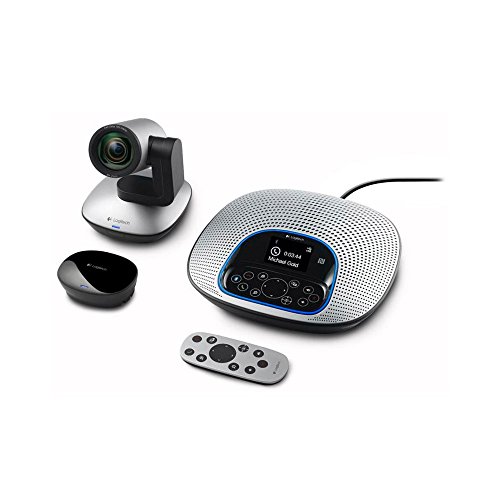
- 1080p HD video at 30 fps
- Remote pan/tilt/10x zoom
- Noise-cancelling speakerphone
Best For: Mid-size rooms that need a dependable all-in-one conferencing system
Premium All-in-One Room Kit

- Dual 48MP cameras with 4K video
- Built-in audio and mic array
- AI auto-framing and speaker tracking
Best For: Small to medium boardrooms needing an integrated Teams/Zoom system
Plug-and-Play Conference Bar

- USB setup with long 7m cable
- 4K video and 120° wide-angle view
- 8 mics with AI framing features
Best For: PC-based huddle rooms and smaller boardrooms
Compact Touch-Control Room System

- Includes CTP18 touch panel for control
- 4K camera with auto framing
- 8 MEMS mics and full-duplex audio
Best For: Small boardrooms needing touch-controlled Teams and Zoom meetings
Value Boardroom Kit – Logitech GROUP Video Conferencing System
If you need a video conferencing system for boardroom use without overcomplicating the setup, Logitech GROUP is built for straightforward plug-and-play meetings. It connects over USB to a laptop and works with the video app you already use, while the camera and speakerphone package is designed for mid to large conference rooms.
Best For: Large meeting spaces that need a simple, affordable USB-based conferencing setup.
Pros:
- All-in-one design makes deployment simple in meeting spaces.
- 1080p video with autofocus, pan/tilt/zoom, and Zeiss-certified optics.
- Four integrated microphones with a 20 ft audio range and noise cancellation.
- Compatible with Mac, PC, and major UC platforms like Skype for Business, WebEx, and Jabber.
Cons:
- Best suited to USB-connected BYOD style meetings rather than a fully integrated room system.
- Audio range is optimized for groups up to 14 people unless expansion mics are added.
For teams that want a proven, practical boardroom video setup, GROUP offers a strong balance of value and capability. It is especially appealing if you want professional video conferencing in a familiar laptop-driven workflow.
Flexible Room Platform – Poly G7500 Video Conference Equipment
The Poly G7500 is a strong choice if you want a video conferencing system for boardroom deployment that can be built around the room components you already prefer. Its modular design connects to cameras, microphones, controllers, and other third-party pieces, while also supporting remote management through Poly Lens.
Best For: Custom boardrooms that need a flexible, platform-friendly room hub.
Pros:
- Modular room solution connects with cameras, microphones, and third-party components.
- Works with nearly every video platform, according to the product notes.
- NoiseBlockAI and Acoustic Fence help reduce background noise and side conversations.
- REST APIs and Poly Lens support scalable setup and remote device management.
Cons:
- Does not include a built-in all-in-one camera bar or display-focused bundle in the supplied details.
- Best suited to teams comfortable assembling a room solution around a central hub.
If your boardroom needs flexibility more than an all-in-one package, the G7500 stands out as a room platform rather than a fixed kit. It is a good fit for organizations that want control over components, platform compatibility, and IT management.
Premium Panoramic Bar – Jabra PanaCast 50 Video Bar System
For a premium video conferencing system for boardroom environments, the Jabra PanaCast 50 is built to make in-room meetings feel more natural for remote participants. Its 180° panoramic view, AI-enabled framing features, and full-duplex audio are aimed at larger collaboration spaces that need both wide coverage and clear sound.
Best For: Boardrooms and larger meeting spaces that want a premium all-in-one video bar with broad room coverage.
Pros:
- Three 13MP cameras and real-time stitching deliver a 180° panoramic 4K view.
- Dynamic Composition, Intelligent Zoom, and Virtual Director help capture reactions and presenters.
- Full-duplex audio and four zero-vibration stereo speakers support natural conversation.
- Includes a PanaCast Control touchscreen for joining, sharing, and ending meetings.
Cons:
- Some mounting and platform options require separate purchases.
- Wireless content sharing through the control tablet is limited to Zoom.
The PanaCast 50 is the most feature-rich option in this group for teams prioritizing room coverage and polished meeting-room interaction. It is especially compelling when you want boardroom hardware that feels ready for modern hybrid collaboration.
Compact Meeting Cam – Logitech MeetUp Video Conferencing System
The Logitech MeetUp is a practical video conferencing system for boardroom setups when you want a compact, easy-to-mount camera with strong close- and mid-room coverage. It is designed for huddle and small rooms, but its 4K sensor, 120° field of view, and optional expansion mic make it versatile for smaller boardrooms and breakout spaces.
Best For: Small boardrooms and huddle rooms that need a simple USB conference camera.
Pros:
- Ultra HD 4K sensor with a wide 120° field of view.
- Beamforming mics capture voices up to 4 m away, with expansion mic support for more reach.
- Motorized pan/tilt can expand the view up to 170°.
- Plug-and-play USB connectivity works for BYOD meetings and common conferencing apps.
Cons:
- Designed primarily for small and huddle rooms rather than large boardrooms.
- Expansion microphone is sold separately.
MeetUp is best viewed as a compact boardroom-friendly option when room size is modest and easy deployment matters. It offers strong camera coverage and flexible mounting without pushing you into a full room system.
Best Zoom Rooms Option – Renewed Poly Studio X50 4K Video Bar
Poly Studio X50 All-in-one Video Bar 4k Conferencing System 2200-86270-001 (Renewed)
Check Price On AmazonIf you need a video conferencing system for boardroom use that keeps things simple, the Poly Studio X50 is built around an all-in-one design with 4K camera, microphone array, and stereo speakers. It runs the Zoom Rooms app natively, so it can fit neatly into a business meeting setup without requiring a PC.
Best For: Boardrooms and medium meeting rooms that want a native Zoom Rooms setup with integrated audio and video.
Pros:
- Runs Zoom Rooms natively with no PC required
- 4K camera, microphone array, and stereo speakers in one unit
- Dual monitor support for more flexible room layouts
- Designed for rooms of up to 10 participants
Cons:
- Renewed unit with a limited 90-day warranty
- Tabletop design may not suit every boardroom installation
The X50 is a practical choice if your priority is a clean, integrated collaboration setup rather than a pieced-together system. Its native Zoom support and room-filling audio make it especially appealing for teams that want a straightforward boardroom solution.
Best Wide-Angle Pick – TB5 4K Wide-Angle Conference Camera
The TB5 is a strong video conferencing system for boardroom environments when you want broad room coverage and clear in-room audio. It combines a 120° wide-angle lens, AI face and speaker tracking, auto framing, and a built-in audio system with 4 microphone arrays and stereo speakers.
Best For: Small to medium conference rooms that need wide coverage, tracking features, and broad platform compatibility.
Pros:
- 120° ultra-wide field of view helps cover the whole room
- AI face tracking, speaker tracking, and auto framing support meetings
- Built-in audio system includes 4 microphone arrays and stereo speakers
- USB-C/A plug-and-play compatibility with common platforms like Zoom and Teams
Cons:
- Designed primarily for small and medium rooms rather than larger boardrooms
- Expansion microphone is optional, not included
For teams that want a modern all-in-one conference camera with smart framing and easy setup, the TB5 offers a very practical package. Its wide-angle lens and flexible USB compatibility make it a good fit for mixed-device meeting environments.
Reliable Classic Choice – Logitech CC3000e HD Video System
If you’re comparing a video conferencing system for boardroom meetings and want a proven all-in-one option, the Logitech CC3000e focuses on straightforward HD video and speakerphone performance. It offers 1080p video, a 90-degree field of view, remote control pan/tilt/zoom, and plug-and-play USB connectivity for PC or Mac.
Best For: Mid-size meeting rooms that need a dependable HD video and speakerphone setup with broad UC compatibility.
Pros:
- 1080p HD video at 30 fps for clear conferencing
- 90-degree view plus remote pan, tilt, and 10x zoom
- Built-in noise-cancelling speakerphone with touch controls
- USB plug-and-play support plus Bluetooth and NFC pairing
Cons:
- Lower video resolution than newer 4K systems
- Best suited to mid-size rooms rather than very large boardrooms
The CC3000e is a sensible pick when you want familiar, business-grade conferencing hardware without extra complexity. Its mix of HD video, speakerphone functions, and wide application support keeps it relevant for everyday boardroom collaboration.
Premium All-in-One Room Kit – Yealink MeetingBar A40-031
If you want a video conferencing system for boardroom use that keeps setup simple while still delivering strong room coverage, the Yealink MeetingBar A40-031 is built for that job. It combines dual 48MP cameras, a 4K image, AI auto-framing, speaker tracking, and built-in audio in one Android 13-based unit, making it a practical fit for smaller boardrooms and medium conference spaces.
Best For: Small to medium boardrooms that need an all-in-one Teams and Zoom-ready room system.
Pros:
- All-in-one design includes camera, speakers, and microphones for a cleaner install.
- Dual 48MP cameras and 4K video help capture participants clearly.
- AI auto-framing and speaker tracking support more natural meetings.
- Plug-and-play setup can speed up deployment in conference rooms.
Cons:
- Designed for small to medium rooms rather than larger boardrooms.
- Requires room planning around its fixed-bracket form factor.
- Not water resistant, so it is intended for indoor meeting spaces only.
Overall, the A40-031 is a strong choice when you want a tidy, integrated boardroom solution with modern AI camera features and broad Microsoft Teams and Zoom compatibility.
Plug-and-Play Conference Bar – Yealink UVC34 4K System
The Yealink UVC34 is a straightforward video conferencing system for boardroom setups that need easy USB deployment instead of a more complex room install. With 4K optics, a 120° field of view, an 8-microphone array, and AI framing tools, it covers the core needs of small meeting spaces and huddle rooms while staying simple to connect to a PC.
Best For: PC-based huddle rooms and small boardrooms that need fast plug-and-play conferencing.
Pros:
- USB connectivity and a 7m cable make placement easier in conference rooms.
- 4K resolution with a 120° wide angle captures the whole table.
- 8-mic array supports far-field pickup up to 5 meters.
- AI auto framing, speaker tracking, and face enhancement improve call presentation.
Cons:
- Works with a Personal Computer, so it is not a standalone room system.
- Best suited to huddle rooms rather than larger boardrooms.
- Privacy shutter is useful, but the unit is still a camera-first solution.
If your priority is quick installation and reliable meeting-room basics, the UVC34 offers a balanced mix of video quality, audio pickup, and platform support.
Compact Touch-Control Room System – Yealink MeetingBar A10-020
The Yealink A10-020 is a compact video conferencing system for boardroom and small-room use when you want an integrated bar plus touch control. It bundles a 4K camera, 8 MEMS microphones, speaker, computing unit, and wireless options into a single device, and the included CTP18 panel gives teams an easy way to control Microsoft Teams and Zoom meetings.
Best For: Small boardrooms and meeting rooms that want an integrated bar with touch-panel control.
Pros:
- All-in-one bar includes camera, microphones, speaker, and computing unit.
- CTP18 touch panel adds simple in-room meeting control.
- 4K wide-angle camera with auto framing and speaker tracking.
- Noise cancellation and full-duplex audio support clearer conversations.
Cons:
- Compact design is aimed at small rooms rather than large boardrooms.
- Requires some setup around HDMI and Ethernet connections.
- Touch panel increases system footprint compared with a camera-only bar.
For teams that want an easy-to-manage room system with built-in control and strong audio-video basics, the A10-020 is a capable and polished option.
How We Picked the Best Video Conferencing System for Boardroom
We prioritized systems built for group meetings rather than personal desks. That means strong microphone pickup, wide-angle or dual-camera coverage, crisp video, and straightforward deployment. We also looked at platform certification, room-size fit, and whether the system offers an all-in-one design or a more modular approach.
Quick Comparison
For small to mid-size boardrooms, compact all-in-one bars are usually the easiest choice. Larger rooms benefit from wider field-of-view cameras, more robust audio arrays, or modular systems that can scale with external speakers and accessories. If your team uses Teams or Zoom heavily, certification and native controls can reduce setup friction.
Key Buying Factors for a Video Conferencing System for Boardroom
Room Size and Camera Coverage
Match the camera’s field of view to the room. A wider angle helps capture everyone at the table, while dual-camera systems or intelligent framing can improve visibility in longer boardrooms.
Audio Pickup and Speaker Quality
Boardroom calls fail when voices are hard to hear. Look for multiple microphones, beamforming, echo cancellation, and speakers that can fill the room without distortion.
Platform Compatibility
Make sure the system works cleanly with the platforms your organization uses most. Certified support for Teams, Zoom, or similar software can simplify scheduling, controls, and troubleshooting.
Deployment and Control
Consider whether your IT team wants a plug-and-play bar, a PC-based setup, or a touch-panel control system. Simpler installations are often better for standard meeting rooms, while larger organizations may prefer more configurable hardware.
Expandability and Future Needs
If the room may grow in size or usage, choose a system that can support add-ons, better mounting options, or more advanced room management features later.
Who Should Buy Which Video Conferencing System for Boardroom?
Small boardrooms and huddle spaces usually do best with compact all-in-one systems that reduce cable clutter and setup time. Mid-size conference rooms benefit from broader camera coverage and stronger built-in audio. Large executive boardrooms or multipurpose meeting spaces should favor systems with more advanced imaging, better microphone range, and flexible controls so every participant stays visible and audible.
If your priority is simplicity, pick an all-in-one system. If your priority is room coverage, audio quality, and scalability, choose a more advanced Video Conferencing System for Boardroom environments that is built to handle larger groups and longer tables.