
A USB hub with an SSD slot can expand your PC’s connectivity while adding fast, convenient external storage. The models in this roundup combine features such as NVMe or SATA support, 10Gbps data transfer, 4K HDMI output, card readers, and USB-C power delivery.
Use the comparison and buying advice below to match the hub’s drive compatibility, port selection, cooling, and power requirements to your setup.
Best 10 USB Hubs with SSD Slots for PC Picks for 2026
Best Balanced Hub

- M.2 NVMe/SATA enclosure for 2242/2260/2280 drives
- 4K 60Hz HDMI and Gigabit Ethernet
- 90W PD pass-through charging
Best For: Everyday USB-C storage, display, and network expansion
Best Travel Pick

- 2280 M-Key NVMe support up to 8TB
- 10Gbps USB, SD/TF, and Gigabit Ethernet
- Compact aluminum design with thermal system
Best For: Mobile photo, video, and backup workflows
Best High-Capacity Dock

- Supports M.2 plus 2.5/3.5-inch SSDs or HDDs
- Five 10Gbps USB ports and 4K 60Hz HDMI
- Heatsink, turbo fan, and independent power switch
Best For: Multi-drive backups and desktop-style expansion
Best Compact Value

- Supports M.2 NVMe and SATA drives
- Accepts 2230 through 2280 drive sizes
- Adds 10Gbps USB, HDMI, SD/TF, and 100W PD
Best For: Portable storage expansion and everyday laptop use
Best Flexible Storage Expansion

- M.2 NVMe and SATA support
- 4K HDMI and 10Gbps USB
- Up to 87W laptop charging
Best For: Users needing storage expansion plus everyday hub connectivity
Best Compact NVMe Dock

- PCIe NVMe support up to 4TB
- 4K@60Hz HDMI and 10Gbps USB
- Cooling kit included
Best For: NVMe-equipped laptops needing a compact docking station
Best Cooled High-Capacity Hub

- Supports M.2 drives up to 8TB
- Built-in fan and heatsink
- Gigabit Ethernet plus HDMI
Best For: High-capacity storage users needing cooling and wired networking
Best All-in-One Expansion
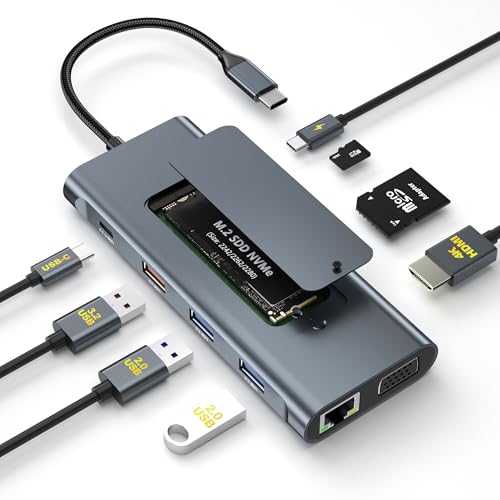
- Built-in M.2 NVMe slot with 10Gbps transfers
- Adds HDMI, VGA, Ethernet, card readers, and USB ports
- Includes SSD cooling accessories and installation tools
Best For: Power users needing NVMe storage and extensive desktop connectivity
Best 4K Display Support
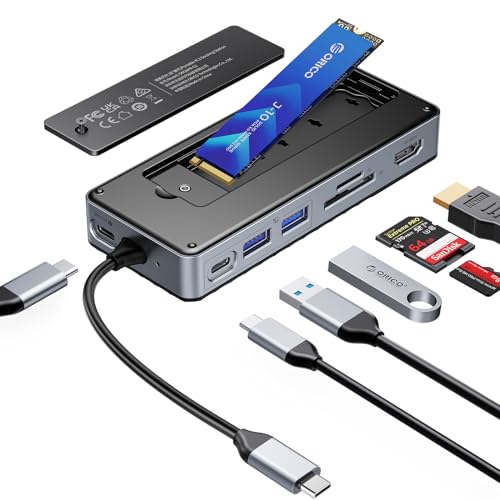
- Supports M.2 NVMe and SATA SSDs up to 8TB
- Delivers 4K@60Hz HDMI and 10Gbps USB connections
- Includes cooling accessories and a USB-C connection cable
Best For: Flexible SSD compatibility and smooth 4K external-display setups
Best Cooling Design
ORICO 10-in-1 Hub with M.2 Slot

- Built-in fan, aluminum slot, and copper heatpipes aid cooling
- Supports M.2 NVMe and SATA drives in multiple sizes
- Adds 4K@60Hz HDMI, Ethernet, card readers, and 100W PD
Best For: Sustained SSD use and users who want enhanced drive cooling
Best Balanced Hub – SABRENT 6-Port M.2 SSD Hub
For shoppers comparing usb hubs with ssd slots for pc, the SABRENT HB-6PNV combines an M.2 enclosure with everyday connectivity in a compact aluminum hub. It supports 2242, 2260, and 2280 M.2 NVMe or SATA drives, while also adding 4K HDMI, Gigabit Ethernet, and host charging.
Best For: Users who want one USB-C hub for an M.2 drive, an external display, wired networking, and basic peripherals.
Pros:
- Built-in M.2 enclosure supports NVMe and SATA drives in three common lengths.
- Provides 4K at 60Hz HDMI and Gigabit Ethernet.
- Supports up to 90W USB Power Delivery pass-through.
Cons:
- The internal drive interface is limited to up to 5Gbps.
- SSD, charger, and power adapter are not included.
- No SD or microSD card reader; HDMI requires DP Alt Mode.
This is a sensible all-purpose choice when you need storage expansion without giving up display or Ethernet connectivity. Its 5Gbps drive ceiling is worth keeping in mind if you expect maximum NVMe performance.
Best Travel Pick – ORICO 9-in-1 NVMe Hub
The ORICO DockPro D7 is a strong option among usb hubs with ssd slots for pc if you want fast NVMe storage plus card readers and networking in one portable unit. Its enclosure accepts a 2280 M-Key NVMe SSD and includes 10Gbps USB ports, Gigabit Ethernet, SD/TF readers, and USB-C charging pass-through.
Best For: Travelers, photographers, and remote workers who need NVMe storage, card transfers, and broad connectivity in a compact hub.
Pros:
- Supports 2280 M-Key NVMe SSDs up to 8TB.
- Includes 10Gbps USB-C and USB-A ports, SD/TF readers, and Gigabit Ethernet.
- Aluminum housing and a three-layer thermal design help manage drive heat.
- Tool-free drive replacement simplifies swaps and backups.
Cons:
- Supports NVMe drives only; SATA SSDs are not supported.
- 100W input provides a maximum 85W laptop output.
- Drive and charger are not included.
Choose this model when fast NVMe access and media-card support matter more than compatibility with SATA M.2 drives. Its compact design makes it especially convenient for mobile workflows.
Best High-Capacity Dock – ORICO 12-in-1 Dual-Drive Hub
For maximum storage flexibility, the ORICO D35M2 stands out among usb hubs with ssd slots for pc by combining an M.2 bay with an enclosure for a 2.5-inch or 3.5-inch SSD or HDD. It also supplies 10Gbps USB ports, 4K 60Hz HDMI, Gigabit Ethernet, SD/TF readers, and 100W PD pass-through.
Best For: Desktop-style setups and demanding backup tasks that require two drive formats and a large selection of ports.
Pros:
- Supports both M.2 storage and 2.5-inch/3.5-inch SSDs or HDDs.
- Offers two 10Gbps USB-C ports and three 10Gbps USB-A ports.
- Adds 4K at 60Hz HDMI, Gigabit Ethernet, and SD/TF 3.0 readers.
- Includes a power switch, M.2 heatsink, and temperature-activated turbo fan.
Cons:
- Drives are not included.
- 4K video requires a video-enabled USB-C host.
- The larger feature set may be more than needed for simple travel use.
This is the most expandable option in the group, particularly for users moving files between internal-style M.2 storage and larger SATA drives. Its cooling and independent drive control are useful during extended transfers.
Best Compact Value – 8-in-1 M.2 NVMe/SATA Hub
This 8-in-1 model is a practical entry among usb hubs with ssd slots for pc, pairing an M.2 NVMe/SATA enclosure with 10Gbps USB connectivity, HDMI, card readers, and 100W PD. It supports a broad range of M.2 sizes, including 2230, 2242, 2260, and 2280.
Best For: Laptop users who want portable storage expansion and common workstation ports without carrying a separate SSD enclosure.
Pros:
- Accepts both M.2 NVMe and SATA drives in four listed sizes.
- Includes 10Gbps USB-C and USB 3.1 connectivity.
- Adds 4K HDMI, SD/TF card reading, and 100W PD charging.
- Lightweight aluminum body is designed for passive heat dissipation.
Cons:
- HDMI output is limited to 4K at 30Hz.
- Only two USB ports are listed in the product details.
- Video output requires USB-C video support on the host.
This hub offers broad M.2 compatibility in a travel-friendly format, making it useful for backups, file recovery, and camera workflows. Consider it if 4K 30Hz is sufficient and you prefer SATA compatibility as well as NVMe support.
Best Flexible Storage Expansion – WAVLINK 8-in-1 SSD Hub
For shoppers comparing USB hubs with SSD slots for PC, the WAVLINK 8-in-1 combines portable storage expansion with everyday connectivity. Its enclosure supports M.2 NVMe and compatible SATA drives, while HDMI, fast USB ports, card readers, and laptop charging cover common desktop and laptop needs.
Best For: Users who want one hub for M.2 storage, display output, file transfers, and SD/TF cards.
Pros:
- Supports M.2 PCIe NVMe drives up to 10Gbps and M.2 SATA drives up to 6Gbps.
- Includes 4K HDMI output, 10Gbps USB-A and USB-C ports, and SD/TF card slots.
- Accepts up to 100W input and provides up to 87W laptop charging.
- Sliding enclosure design simplifies SSD installation.
Cons:
- Charger is not included.
- SSD compatibility excludes M.2 SATA B-Key, mSATA, and M.2 PCIe AHCI drives.
- Host USB-C port must support video output and charging for those functions.
This is a versatile choice when you need both storage and a broad selection of ports, but verify your SSD key type and host USB-C capabilities before buying.
Best Compact NVMe Dock – Buerlaseul 9-in-1 SSD Hub
This Buerlaseul model is a practical pick among USB hubs with SSD slots for PC when you use an M.2 NVMe drive exclusively. It pairs a 10Gbps enclosure with 4K HDMI, multiple USB ports, card readers, and 100W PD input in a compact docking-station design.
Best For: Laptop users with PCIe NVMe storage who want a compact hub for displays, peripherals, and quick file transfers.
Pros:
- Supports M-Key PCIe NVMe M.2 SSDs up to 4TB.
- Provides 4K@60Hz HDMI, USB 3.2 Gen 2 ports, and 100W PD input.
- Includes SD and TF card readers plus a dedicated USB-A 2.0 port for low-power accessories.
- Aluminum heatsink, silicone pad, screwdriver, and guide are included.
Cons:
- The SSD slot does not support SATA M.2 drives.
- Power adapter and charging cable are not included.
- SD and TF cards cannot be used simultaneously.
Its focused NVMe support and included cooling accessories make installation straightforward, provided your computer supports USB-C video, data, and Power Delivery functions.
Best Cooled High-Capacity Hub – ORICO 10-in-1 SSD Hub
The ORICO 10-in-1 stands out among USB hubs with SSD slots for PC by adding active cooling, wired networking, and broad storage compatibility. It supports NVMe/NGFF protocols, multiple M.2 sizes, dual card readers, HDMI, and a mix of 5Gbps and 10Gbps USB ports.
Best For: Content creators, desktop users, and travelers who need high-capacity M.2 expansion, Ethernet, and cooling.
Pros:
- Supports NVMe/NGFF M.2 drives in 2230, 2242, 2260, and 2280 sizes, with expansion up to 8TB.
- Built-in fan activates at 50°C and works with an M.2 heatsink.
- Includes Gigabit Ethernet, HDMI 4K@60Hz, 10Gbps USB-A/C, and dual SD/TF readers.
- Protective storage bag is included for travel.
Cons:
- External power is required for SSDs over 1TB for stable connection.
- Host USB-C must support video transmission for HDMI output.
- SSD operation can produce noticeable heat, and the product warns against direct contact during use.
This is the most feature-rich option here for sustained storage use and wired connectivity, especially if you value active cooling and support for larger M.2 capacities.
Best All-in-One Expansion – 11-in-1 NVMe SSD USB-C Dock
If you want USB hubs with SSD slots for PC use, this 11-in-1 USB-C dock combines an M.2 NVMe enclosure with display, networking, charging, and card-reader ports. Its SSD slot and USB 3.2 ports support up to 10Gbps, making it a practical choice for storage expansion and fast file transfers.
Best For: PC users, photographers, video editors, and power users who need NVMe storage plus broad peripheral connectivity.
Pros:
- Built-in M.2 NVMe slot supports drives up to 2TB without requiring a separate enclosure.
- Includes 4K HDMI, VGA, Gigabit Ethernet, SD/TF readers, USB ports, and 100W PD passthrough.
- Includes a heatsink, silicone cooling pad, screwdriver, and quick-start materials.
- Supports HDMI 4K@30Hz and VGA 1080p simultaneously for dual-display setups.
Cons:
- Supports M.2 NVMe SSDs only; M.2 SATA drives are not compatible.
- The SSD is not included and may require formatting before first use.
- Video output requires a compatible full-function USB-C or Thunderbolt 3 port.
This is the most feature-packed option in the group, especially for a desk setup that needs legacy VGA alongside modern connectivity. Choose it when NVMe compatibility and maximum port variety matter more than compact simplicity.
Best 4K Display Support – ORICO 8-in-1 NVMe/SATA Hub
For USB hubs with SSD slots for PC and laptop setups, the ORICO 8-in-1 combines an M.2 enclosure with a useful selection of everyday expansion ports. It supports both M.2 NVMe and SATA SSDs, while its HDMI output reaches 4K at 60Hz for smoother external-display use.
Best For: Users who want flexible M.2 drive compatibility, fast file transfers, and high-refresh 4K display output in a travel-friendly dock.
Pros:
- Supports M.2 NVMe and SATA SSDs up to 8TB, with the drive purchased separately.
- Provides 10Gbps USB-A and USB-C data ports for quick transfers and backups.
- Offers 4K@60Hz HDMI, 100W PD charging, and SD/TF card reading.
- Includes a heatsink, silicone cooling pad, screwdrivers, guide, and USB-C cable.
Cons:
- Power adapter and charging cable are not included.
- SD and TF cards cannot be used simultaneously.
- HDMI requires a host USB-C port that supports video transmission.
The standout advantage here is broad SSD compatibility paired with 4K@60Hz output. It is a strong fit for users who may reuse either NVMe or SATA M.2 drives, provided they already have suitable PD power equipment.
Best Cooling Design – ORICO 10-in-1 Hub with M.2 Slot
This ORICO model is a versatile choice among USB hubs with SSD slots for PC, Mac, and compatible USB-C devices. It accepts M.2 NVMe and SATA drives, adds an internal fan and heat-management hardware, and includes 10Gbps storage connectivity alongside HDMI, Ethernet, and card-reader ports.
Best For: Users who prioritize SSD cooling, tool-free installation, and a broad dock feature set for work, gaming, or travel.
Pros:
- Supports M.2 2230, 2242, 2260, and 2280 NVMe or SATA SSDs.
- Built-in fan, aluminum slot material, and copper heatpipes help manage SSD temperatures.
- Includes 4K@60Hz HDMI, Gigabit Ethernet, SD/TF readers, and 100W PD charging.
- Offers 10Gbps M.2, USB-C, and USB-A connections plus two additional 5Gbps USB-A ports.
Cons:
- Drives larger than 1TB require external power for stable operation.
- The SSD is not included.
- The listing provides no warranty description.
Its built-in fan and enhanced heat dissipation make this the most cooling-focused option here. It is especially appealing for sustained storage use, but buyers should plan for external power when installing an SSD above 1TB.
How We Picked the Best USB Hubs with SSD Slots for PC
We focused on hubs that combine practical PC expansion with an integrated M.2 or SSD enclosure. The selection represents compact hubs and more capable docking stations, including models with NVMe support, SATA compatibility, 10Gbps connectivity, HDMI output, card readers, Ethernet, and USB-C Power Delivery.
We also considered how clearly each design addresses heat management, drive installation, port variety, and desktop usability. Compatibility matters as much as the headline port count, so check the specifications for your computer, SSD format, and operating system before buying.
Quick Comparison
- Best for compact setups: Choose a smaller hub with an M.2 NVMe slot and essential USB ports.
- Best for creators: Prioritize 10Gbps transfer speeds, SD/TF readers, 4K output, and effective cooling.
- Best for mixed storage: Select a model that supports both M.2 NVMe and SATA drives.
- Best for desktop replacement: Look for Ethernet, multiple display or USB options, and at least 90W to 100W PD pass-through.
Key Buying Factors for USB Hubs with SSD Slots for PC
SSD Compatibility
Confirm whether the enclosure accepts M.2 NVMe drives, M.2 SATA drives, 2.5-inch SATA drives, or a combination. NVMe and SATA are not interchangeable, even when the drive has a similar physical size. Also check supported lengths, such as 2230, 2242, 2260, or 2280.
Real-World Speed
A 10Gbps USB connection is useful for large file transfers, backups, and editing workflows, but actual performance depends on the SSD, the host computer, the cable, and the hub controller. A drive installed in the hub may also share bandwidth with other active ports.
Cooling and Sustained Workloads
NVMe SSDs can become warm during long transfers. Aluminum housings, thermal pads, vents, and built-in fans may help maintain performance. Cooling is especially important if the hub will handle frequent backups, video files, or game libraries.
Ports, Displays, and Power
Count the ports you will use simultaneously rather than choosing by total port number. HDMI resolution and refresh rate depend on the host device and video protocol. Power Delivery pass-through charges the connected laptop but does not necessarily provide full power to every peripheral.
Who Should Buy Which USB Hubs with SSD Slots for PC?
Students and office users should choose a compact NVMe hub with HDMI, several USB ports, and card readers for a simple desk setup. Photographers and video creators will benefit from 10Gbps transfers, SD/TF readers, strong cooling, and a drive enclosure that matches their preferred SSD.
Desktop users and power users should consider a larger 9-in-1 or 10-in-1 design with Ethernet, multiple high-speed ports, 4K output, and reliable PD pass-through. Owners of mixed or older drives should select a model that explicitly supports both NVMe and SATA rather than assuming every M.2 slot accepts both standards.