
The best mechanical keyboard for productivity with quiet switches combines comfortable key feel, dependable connectivity, and low noise for focused work. This roundup covers compact, tenkeyless, full-size, and Mac-friendly options.
Use the buying guide below to compare switch types, layouts, wireless features, and workplace practicality before choosing the right board for your desk.
Best 10 Mechanical Keyboard for Productivity with Quiet Switches Picks for 2026
Best Wireless Pick
Logitech MX Mechanical Full-Size

- Quiet tactile switches with low-profile backlit keys
- Pairs with up to three devices
- USB-C rechargeable battery and multi-OS support
Best For: Wireless productivity across multiple devices
Best Wired Office Value

- Smooth, quiet MX2A Silent Red switches
- Sturdy aluminum plate and metal enclosure
- Full-size layout with rollover and office shortcuts
Best For: Quiet, dependable Windows office typing
Best Premium Multi-Device Pick

- Quiet tactile switches in a low-profile full-size design
- Controls up to three Bluetooth or Logi Bolt devices
- Smart illumination and long USB-C battery life
Best For: Multi-device office workflows
Best Budget Wired Option
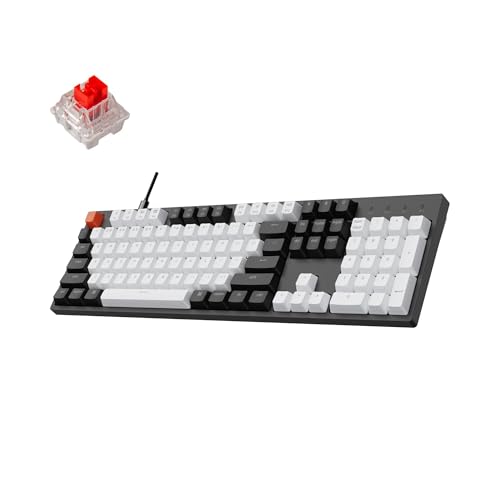
- 104-key layout with number pad and white backlight
- Linear Red switches rated for 50 million keystrokes
- USB-C wired Mac and Windows compatibility
Best For: Full-size wired productivity on a budget
Full-Size Office Workhorse
- Tactile Brown switches without a click
- Full-size wired layout with number pad
- Aluminum plate and durable keycaps
Best For: Windows office users wanting a robust full-size keyboard
Quiet Wireless Multitasker

- Smooth, quiet pre-lubed linear switches
- Compact 75% layout for Mac and Windows
- Bluetooth for three devices plus USB-C wired mode
Best For: Mixed-device users needing quiet, compact typing
Quiet TKL Multitasker

- Pre-lubed Silent K Pro Red switches
- Bluetooth for up to three devices
- TKL layout with white backlight
Best For: Quiet shared-office typing with a compact layout
Compact Number-Pad Pick

- 96% layout with 100 keys
- Bluetooth supports three devices
- Up to 240 hours with backlight off
Best For: Productivity and data entry in a compact number-pad layout
Full-Size Quiet Workhorse

- 104-key layout with number pad
- Pre-lubed Silent K Pro Red switches
- Bluetooth and USB-C wired modes
Best For: Quiet full-size office work and spreadsheet-heavy workflows
Best Wireless Pick – Logitech MX Mechanical Full-Size
For a mechanical keyboard for productivity with quiet switches, the Logitech MX Mechanical combines tactile feedback with a quieter typing experience, wireless convenience, and a full-size layout. Its low-profile, backlit keys and multi-device support make it well suited to busy Windows and multi-platform workstations.
Best For: Professionals who want quiet tactile typing, wireless flexibility, and a number pad.
Pros:
- Tactile quiet switches provide precise feedback with reduced noise.
- Connects to up to three devices through Bluetooth LE or the included Logi Bolt receiver.
- Smart backlighting adjusts to lighting conditions, while USB-C charging provides up to 15 days with backlight enabled.
- Supports Windows, macOS, ChromeOS, iPadOS, and more.
Cons:
- Full-size design takes up more desk space than compact keyboards.
- Backlight use reduces the maximum battery life compared with using it off.
The MX Mechanical is a strong all-around choice when quiet tactile switches, wireless device switching, and long-session productivity are priorities.
Best Wired Office Value – Cherry KC 200 MX
The Cherry KC 200 MX is a practical mechanical keyboard for productivity with quiet switches if you prefer a dependable wired connection. Its MX2A Silent Red switches offer smooth, linear, quiet keystrokes, while the metal plate, full-size layout, and dedicated control keys suit office work.
Best For: Windows users seeking a quiet, durable, full-size wired office keyboard.
Pros:
- MX2A Silent Red switches deliver smooth, quiet linear typing.
- Aluminum plate and metal enclosure provide a sturdy construction.
- Full N-key rollover and anti-ghosting help ensure accurate key registration.
- Includes volume and calculator shortcut keys plus white status LEDs.
Cons:
- USB-A wired connectivity offers no wireless flexibility.
- Supplied notes specify Windows 10 compatibility and PC use.
Choose the KC 200 MX when consistent wired performance and quiet linear switches matter more than wireless features or extensive lighting customization.
Best Premium Multi-Device Pick – Logitech MX Mechanical
The Logitech MX Mechanical is a mechanical keyboard for productivity with quiet switches designed for users who want tactile feedback without excessive noise. Its low-profile full-size layout, smart illumination, three-device pairing, and Logi Options+ customization support an efficient desk setup.
Best For: Multi-device users who want a polished full-size keyboard with quiet tactile typing.
Pros:
- Tactile Quiet switches provide a noticeable bump while limiting typing noise.
- Pairs with up to three devices through Bluetooth Low Energy or the included Logi Bolt receiver.
- Smart backlighting activates when hands approach and adapts to changing light.
- USB-C charging supports up to 15 days with backlighting or up to 10 months with it off.
Cons:
- Full-size dimensions and 2.6-pound weight may be less suitable for portable use.
- The listed layout is full-size, so it does not provide a compact footprint.
This MX Mechanical is especially compelling for professionals moving between computers or operating systems who value quiet tactile feedback and customizable workflow controls.
Best Budget Wired Option – Keychron C2 Full-Size
The Keychron C2 is a straightforward mechanical keyboard for productivity with quiet switches for shoppers who want a full-size wired board and backlighting. Its linear Keychron Red switches, Mac and Windows support, adjustable feet, and USB-C connection make it a flexible choice for home or office use.
Best For: Mac and Windows users who want an affordable full-size wired keyboard with linear switches.
Pros:
- Full-size 104-key layout includes a number pad and dedicated multimedia and function keys.
- Linear Red switches offer responsive typing and a rated 50-million-keystroke lifespan.
- USB-C wired connectivity supplies consistent power, with a white LED backlight.
- Includes Mac and Windows keycaps, adjustable feet, and hot-swappable functionality.
Cons:
- The Red switches are linear rather than specifically marketed as silent switches.
- It is wired and not water resistant.
- White backlighting offers single-color illumination rather than adjustable color support.
The C2 is a sensible productivity-focused option if you prioritize a familiar full-size layout, Mac/Windows compatibility, and reliable wired operation over wireless convenience.
Quiet Mac Productivity Pick – Logitech MX Mechanical Mini
For shoppers seeking a mechanical keyboard for productivity with quiet switches, the Logitech MX Mechanical Mini for Mac combines tactile feedback with a compact, low-profile design. Its Tactile Quiet switches are designed to provide a noticeable bump while keeping typing noise low, and the keyboard supports multi-device Mac and iPad workflows.
Best For: Mac users who want a compact wireless keyboard for focused, quieter office typing.
Pros:
- Tactile Quiet switches offer feedback with reduced noise.
- Compact 78-key layout and low-profile keys support a more minimalist workspace.
- Bluetooth connectivity supports switching among up to three Macs or iPads.
- Smart illumination adjusts to changing lighting conditions.
Cons:
- Its Mac-focused layout may be less suitable for primarily Windows-based setups.
- The compact design omits the dedicated number pad.
- It is not water resistant.
The MX Mechanical Mini is a strong productivity choice when quiet tactile typing, portability, and Apple-device integration matter more than a full-size layout.
Full-Size Office Workhorse – Cherry KC 200 MX
The Cherry KC 200 MX is a practical mechanical keyboard for productivity with quiet switches, using tactile CHERRY MX2A Brown switches without a click. Its wired full-size layout, aluminum plate, dedicated navigation area, and quick-access controls make it well suited to a conventional office desk.
Best For: Windows users who prefer a durable, full-size wired keyboard for office work.
Pros:
- MX2A Brown switches provide noticeable tactile feedback without a click.
- Full-size layout includes a number pad and quick-access calculator and volume keys.
- Aluminum plate, non-slip feet, and laser-etched keycaps support long-term durability.
- Full N-key rollover and anti-ghosting help prevent missed or incorrect inputs.
Cons:
- USB-A wired connectivity offers less flexibility than a wireless keyboard.
- The full-size footprint takes up more desk space.
- It is listed as compatible with Windows 10 and PC devices rather than a broad range of platforms.
Choose the KC 200 MX if you value a sturdy office keyboard, tactile non-click switches, and a complete layout over wireless convenience or compactness.
Quiet Wireless Multitasker – Keychron K2 Silent K Pro
The Keychron K2 is a mechanical keyboard for productivity with quiet switches, featuring pre-lubed Silent K Pro Red linear switches for a softer, quieter typing feel. Its 75% layout preserves common productivity keys while keeping the footprint compact, and Bluetooth 5.1 supports switching among up to three devices.
Best For: Users who need a quiet, compact keyboard that works across Mac and Windows devices.
Pros:
- Pre-lubed Silent K Pro Red switches are designed for smooth, quiet typing.
- 75% layout balances desk efficiency with access to essential keys.
- Bluetooth 5.1 connects up to three devices, with USB-C wired mode as an alternative.
- Mac support, Windows keycaps, white backlighting, and shine-through keycaps add versatility.
Cons:
- Linear switches provide less tactile feedback than Brown or tactile alternatives.
- The 84-key layout does not include a dedicated number pad.
- Its gaming-oriented features may be unnecessary for users seeking a basic office keyboard.
The K2 is a flexible pick for shared spaces and mixed-device workflows, especially if you prefer smooth linear switches and a compact layout over pronounced tactile feedback.
Quiet TKL Multitasker – Keychron K8 Silent Red
If you want a mechanical keyboard for productivity with quiet switches, the Keychron K8 pairs a space-saving tenkeyless layout with factory pre-lubed Silent K Pro Red linear switches. Bluetooth 5.1 supports up to three devices, while USB-C wired mode provides a 1000 Hz polling rate for work or gaming.
Best For: Shared offices, compact desks, and users switching between Mac, Windows, and multiple Bluetooth devices.
Pros:
- Quiet, smooth linear switches are suited to shared spaces and late-night use.
- Connects with up to three devices over Bluetooth 5.1.
- TKL design saves desk space while retaining dedicated navigation keys.
- White backlighting and shine-through keycaps improve visibility.
Cons:
- The tenkeyless layout omits a dedicated number pad.
- Plastic construction may feel less premium than metal-bodied alternatives.
The K8 is a practical productivity choice when quiet typing, wireless flexibility, and a compact full-function layout matter more than having a number pad.
Compact Number-Pad Pick – Keychron K4 Brown
The Keychron K4 is a useful mechanical keyboard for productivity with quiet switches when you need a number pad without a full-size footprint. Its tactile Apex Brown switches, 96% 100-key layout, Bluetooth 5.1 connectivity, and USB-C wired mode support office work, data entry, and light gaming.
Best For: Productivity users who need dedicated number-pad keys but want a more compact layout than a traditional full-size keyboard.
Pros:
- 96% layout includes a number pad in a compact design.
- Pairs with up to three devices through Bluetooth 5.1.
- Mac and Windows keycaps and functions support mixed-device setups.
- 4000 mAh battery can last up to 240 hours with backlighting disabled.
Cons:
- Apex Brown switches are tactile, not specifically marketed as silent switches.
- Wireless mode supports 6KRO, while NKRO is available in wired mode.
- It is not water resistant.
The K4 stands out for office workflows involving numbers and shortcuts, though buyers prioritizing the quietest possible typing should consider a keyboard with dedicated silent switches.
Full-Size Quiet Workhorse – Keychron K10 Silent Red
For users who prefer every key readily available, the Keychron K10 is a mechanical keyboard for productivity with quiet switches and a full-size 104-key layout. Its pre-lubed Silent K Pro Red switches, Bluetooth 5.1 support for up to three devices, and USB-C wired mode make it suitable for office work and multitasking.
Best For: Full-size desk setups, spreadsheet work, and users who regularly rely on a dedicated number pad.
Pros:
- Full-size 104-key layout includes a dedicated number pad.
- Silent K Pro Red switches provide a smooth, quiet typing feel.
- Bluetooth 5.1 connects with up to three devices.
- White backlighting and shine-through keycaps aid low-light visibility.
Cons:
- The full-size design uses more desk space than the K8 or K4.
- The supplied notes do not specify a battery-life figure.
- Plastic construction may not suit buyers seeking a heavier premium chassis.
The K10 is the straightforward choice for quiet productivity typing when a dedicated number pad is essential and desk space is plentiful.
How We Picked the Best Mechanical Keyboard for Productivity with Quiet Switches
We focused on keyboards that suit extended typing, office communication, and mixed-device workflows. The selection includes low-profile and traditional designs, wired and Bluetooth models, compact layouts, tenkeyless boards, and full-size keyboards with number pads. We also prioritized quiet switch options, useful backlighting, USB-C where available, and layouts that make common productivity tasks straightforward.
Switch naming is not perfectly consistent across brands, so the listed switch type should be treated as a guide rather than a guarantee of identical sound or feel. Your desk surface, keycap design, typing force, and technique also affect noise.
Quick Comparison
| Best For | Recommended Type | Why It Works |
|---|---|---|
| Quiet shared office | Silent linear switches | Less switch noise and a smoother, lighter keystroke |
| Balanced typing feel | Quiet tactile switches | Subtle feedback without the sharp sound of clicky switches |
| Heavy spreadsheet work | Full-size or 96% layout | Dedicated or near-dedicated number-pad access |
| Small desk | 75% or tenkeyless layout | Preserves navigation keys while saving desk space |
| Multi-device work | Bluetooth wireless model | Convenient switching between computers and tablets |
Key Buying Factors for a Mechanical Keyboard for Productivity with Quiet Switches
Switch Feel and Sound
Choose silent linear switches when minimizing noise is the priority. Quiet tactile switches are a better fit if you want a noticeable bump to confirm each keystroke. Avoid clicky switches for shared spaces, video calls, and late-night work.
Layout and Desk Space
Full-size models are easiest for frequent numeric entry. A 96% keyboard keeps most essential keys while reducing wasted gaps. Tenkeyless and 75% boards offer a strong balance for writing, coding, and general office work. Compact layouts save the most space but may require function-layer shortcuts.
Connection and Compatibility
Bluetooth is convenient for laptops and multiple devices, while a wired USB connection avoids battery management and pairing issues. Check Mac and Windows key legends, shortcut support, and whether the keyboard can switch between devices before buying.
Comfort and Practical Extras
Look for a comfortable height, adjustable feet, stable construction, legible backlighting, and a layout that matches your habits. Low-profile designs can feel more familiar to laptop users, while standard-height boards often provide greater customization.
Who Should Buy Which Mechanical Keyboard for Productivity with Quiet Switches?
- Choose a Logitech MX Mechanical model if you want a polished wireless office keyboard, laptop-style low-profile keys, or a Mac-focused compact option.
- Choose a Cherry KC 200 MX if you prefer a straightforward wired office keyboard and do not need wireless pairing.
- Choose a Keychron C2 or K10 if you want a traditional full-size layout for spreadsheets, accounting, or extensive numeric entry.
- Choose a Keychron K4 if you need number-pad access but want a more space-efficient 96% layout.
- Choose a Keychron K2 or K8 for a smaller desk, portable setup, or quiet wireless typing without giving up dedicated navigation keys.
Before ordering, verify the exact switch, layout, backlight, and operating-system version. Those details can vary by configuration and have the biggest effect on whether a keyboard fits your workflow.