
Portable SSD enclosures turn an internal M.2 drive into a fast, reusable external storage solution. They’re a smart way to build custom portable storage without paying for a full external SSD.
Below, we’ve narrowed the field to 10 strong picks based on speed, build quality, drive compatibility, and real-world convenience for everyday backup, creative work, and travel.
Best 10 Portable SSD Enclosures Picks for 2026
Tool-Free NVMe Pick
SABRENT USB-C NVMe Enclosure & Reader

- Flip-open, tool-free NVMe installation
- Aluminum build with thermal-pad cooling
- USB-C 10Gbps, no drivers or power
Best For: People who want easy, reliable portable NVMe storage
Smart Display Choice
MOVE SPEED AC10 Smart Touchscreen SSD Enclosure
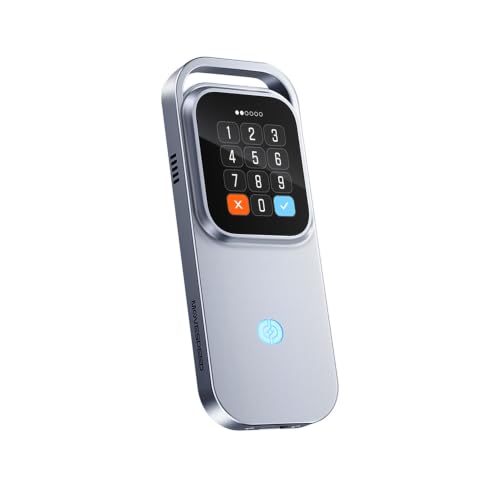
- Touchscreen shows speed, temperature, and charging
- Touch lock and 100W PD pass-through
- Supports NVMe up to 8TB at 10Gbps
Best For: People who want visible status and touch-based control
Compact Sandwich Option

- Tool-free sandwich design for quick installs
- USB 3.2 Gen 2 with UASP up to 10Gbps
- Pocket-size build with USB-C and USB-A support
Best For: Travelers who want a compact, easy-to-use NVMe case
Wire-Free 2230 Pick
JEYI 2230 NVMe USB-C Enclosure

- Fits only M.2 2230 NVMe SSDs.
- USB 3.2 Gen 2 / 10Gbps with UASP and TRIM.
- Pocket-sized aluminum build with bus power.
Best For: Users who need a very compact enclosure for a 2230 NVMe drive.
Smart Status Pick
DOCKCASE Explorer NVMe Enclosure

- HD display shows SSD health, life, and capacity.
- 10s power-loss protection helps prevent write data loss.
- Fits 2230 through 2280 NVMe drives.
Best For: Users who want a smart enclosure with drive-status readouts and data protection.
Tool-Free Value Pick
SABRENT Tool-Free NVMe & SATA Enclosure

- Works with both M.2 NVMe and M.2 SATA drives.
- Tool-free installs make drive swaps quick.
- Slim aluminum case is bus-powered and 10Gbps.
Best For: Users who want one enclosure for both NVMe and SATA M.2 drives.
RGB-Ready Premium Pick
ASUS ROG Strix Arion Aluminum Alloy M.2 NVMe SSD Enclosure

- 10Gbps USB 3.2 Gen 2 performance
- Aluminum alloy case with thermal pads
- Includes USB-C to C and USB-C to A cables
Best For: Users who want a durable, high-speed NVMe enclosure with a premium look
Best Heavy-Duty Pick
UGREEN Tool-Free 10Gbps M.2 NVMe Enclosure

- Tool-free installation with buckle design
- 10Gbps USB 3.2 Gen 2 support
- Includes protective silicon case and thermal pad
Best For: Anyone who wants a simple, travel-friendly NVMe enclosure
Flexible NVMe/SATA Choice
dockteck Tool-Free M.2 SSD Enclosure

- Supports both NVMe and SATA M.2 drives
- Up to 10Gbps over USB 3.2 Gen 2
- Tool-free design with included cables and thermal pad
Best For: Buyers who want one enclosure that can work with both NVMe and SATA drives
Tool-Free NVMe Pick – SABRENT USB-C NVMe Enclosure & Reader
If you want portable SSD enclosures that are simple to use and built for stable 10Gbps performance, this SABRENT model is a strong fit. Its flip-open, tool-free design makes SSD swaps fast, while the aluminum top and thermal pad are aimed at better heat transfer during long transfers and heavier workloads.
Best For: Users who want a fast, tool-free NVMe enclosure for everyday portable storage, cloning, and creator workflows.
Pros:
- Tool-free flip-open installation makes SSD changes quick and easy.
- Aluminum top with direct thermal-pad contact is designed to help with cooling.
- Supports NVMe drives in 2230, 2242, 2260, and 2280 sizes up to at least 8TB.
- USB-C plug-and-play setup needs no drivers or external power.
Cons:
- NVMe only; it is not compatible with M.2 SATA SSDs.
- 10Gbps is fast, but not as fast as USB4 options.
Overall, this is a practical pick if you want a dependable portable enclosure with easy installation and a cooling-focused build. It balances speed, simplicity, and portability well for general NVMe use.
Smart Display Choice – MOVE SPEED AC10 Smart Touchscreen SSD Enclosure
Among portable SSD enclosures, the MOVE SPEED AC10 stands out for its touchscreen status display and on-device controls. It shows transfer speed, connection status, temperature, and charging power, making it easier to monitor your drive while you work, travel, or share a setup.
Best For: Users who want a monitoring-focused NVMe enclosure with touchscreen controls for mobile work and shared spaces.
Pros:
- Touchscreen displays speed, connection status, temperature, and charging power.
- Touch lock adds convenient on-device privacy control.
- 10Gbps transfer support handles large files, backups, and media libraries.
- 100W PD pass-through charging helps keep a mobile setup tidy.
Cons:
- SSD is not included, so you must supply your own drive.
- M.2 SATA SSDs are not supported.
- 10Gbps performance may vary by SSD, device, cable, file type, and temperature.
If you like having more visibility and control from the enclosure itself, the AC10 offers a distinctive feature set. It is a smart choice for portable workflows where status monitoring and locking matter as much as speed.
Compact Sandwich Option – FIDECO M.2 NVMe SSD Enclosure
If you need portable SSD enclosures that are simple, compact, and broadly compatible, this FIDECO model is a sensible pick. Its sandwich-style, tool-free design is meant to make SSD installs easy while improving thermal pad contact for cooler operation during transfers.
Best For: Travelers and cross-platform users who want a pocket-sized NVMe enclosure with tool-free installation.
Pros:
- Supports M.2 NVMe SSDs in 2230, 2242, 2260, and 2280 sizes.
- USB 3.2 Gen 2 with UASP supports up to 10Gbps theory speed.
- Sandwich-style, tool-free installation is quick and simple.
- Includes a USB-C to USB-C cable with an attached USB-A adapter for travel.
Cons:
- Does not support any M.2 SATA SSDs.
- New SSDs may need initialization before they are recognized.
- It is limited to one supported drive at a time.
This enclosure is a good fit if you want straightforward NVMe storage in a small package without extra complexity. The included cable setup and broad OS compatibility make it easy to carry and use across different systems.
USB4 Speed Pick – SABRENT USB4 NVMe SSD Enclosure
For portable SSD enclosures aimed at maximum speed, this SABRENT USB4 model is the most performance-focused option here. It is built for NVMe drives only and can reach up to 3,900 MB/s over USB4, with broad compatibility across USB4, Thunderbolt 3/4, and backward-compatible USB-C ports.
Best For: Creators and mobile professionals who want the fastest NVMe enclosure in this group.
Pros:
- USB4 performance reaches up to 3,900 MB/s.
- Compatible with Thunderbolt 3/4, USB4, and USB-C hosts.
- Tool-free installation supports 2230, 2242, 2260, and 2280 NVMe SSDs.
- Integrated active cooling fan helps keep transfers stable.
Cons:
- Does not support SATA M.2 SSDs.
- Best speeds depend on a compatible high-performance SSD and host connection.
If speed is your top priority, this enclosure is the clear standout. The combination of USB4 throughput, active cooling, and tool-free setup makes it well suited to demanding portable storage jobs.
Wire-Free 2230 Pick – JEYI 2230 NVMe USB-C Enclosure
If you want portable SSD enclosures that feel closer to a thumb drive than a bulky case, this JEYI model is built around M.2 2230 NVMe drives and a USB-C 10Gbps connection. It is a simple bus-powered option for quick storage expansion, backups, cloning, and moving data between Windows, Mac, laptops, and USB-C or Thunderbolt devices.
Best For: Travelers and laptop users with a 2230 NVMe drive who want a compact, cable-free style enclosure.
Pros:
- Supports only M.2 2230 NVMe SSDs for a focused, compact fit.
- USB 3.2 Gen 2 / 10Gbps design with UASP and TRIM support.
- Bus-powered with no external adapter required.
- Durable aluminum body with ventilation features for heat dissipation.
Cons:
- 2230-only sizing limits compatibility with larger M.2 drives.
- Not a multi-drive solution; supports one SSD at a time.
Overall, this is a practical pick if your priority is a very small, portable NVMe enclosure for a 2230 drive. The no-cable, cover-style design is convenient, but the narrow compatibility means it is best for users who already know they need 2230 support.
Smart Status Pick – DOCKCASE Explorer NVMe Enclosure
Among portable SSD enclosures, this DOCKCASE model stands out because it adds live drive information to the usual USB 3.2 Gen 2 / 10Gbps NVMe case formula. It can show SSD health, life prediction, power-on count, and remaining capacity on its display, while also adding hot-swap support and power-loss protection for safer everyday use.
Best For: Users who want a smart NVMe enclosure with on-device status monitoring and extra data-protection features.
Pros:
- Built-in HD display shows SSD health and usage details at power-on.
- 10s power-loss protection helps reduce write-loss risk.
- Supports 2230/2242/2260/2280 M.2 NVMe drives.
- USB 3.2 Gen 2 Type-C with UASP and included USB-C cables.
Cons:
- More specialized than a basic enclosure if you only need simple storage.
- Health and power features add complexity compared with standard cases.
This is a strong choice if you value visibility into drive condition and want extra safeguards beyond transfer speed alone. The display and power-loss protection make it especially appealing for users who move important data frequently.
Tool-Free Value Pick – SABRENT Tool-Free NVMe & SATA Enclosure
If you need portable SSD enclosures that work with more than one drive type, this SABRENT case is designed for both M.2 NVMe and M.2 SATA drives. It uses a tool-free installation system, 10Gbps USB 3.2 Type-C connectivity, and a slim bus-powered build that is easy to keep in a laptop bag.
Best For: Anyone who wants a versatile enclosure for both NVMe and SATA M.2 drives without using tools.
Pros:
- Supports both M.2 NVMe and M.2 SATA SSDs.
- 100% tool-free design for fast drive swaps.
- USB 3.2 Type-C with up to 10Gbps and bus power.
- Slim aluminum shell with thermal pad for heat transfer.
Cons:
- Does not fit 2.5-inch SATA or mSATA drives.
- No room for SSDs with a pre-installed heatsink.
This is the most flexible option in the group if you switch between M.2 drive types or want a quick-swap enclosure. It keeps the feature set practical and travel-friendly, though heatsink-equipped drives are not supported.
RGB-Ready Premium Pick – ASUS ROG Strix Arion Aluminum Alloy M.2 NVMe SSD Enclosure
If you want a more premium take on portable ssd enclosures, the ASUS ROG Strix Arion pairs a 10Gbps USB 3.2 Gen 2 connection with a rugged aluminum alloy body. It supports M.2 PCIe NVMe drives in 2230, 2242, 2260, and 2280 sizes, and it includes both USB-C to USB-C and USB-C to USB-A cables for broader compatibility.
Best For: Users who want a durable, high-speed NVMe enclosure with a more polished design and RGB lighting.
Pros:
- USB 3.2 Gen 2 supports transfer speeds up to 10Gbps.
- Aluminum alloy body with thermal pads helps pull heat away from the drive.
- Includes both USB-C to C and USB-C to A cables.
- Supports M.2 NVMe sizes from 2230 through 2280.
Cons:
- M.2 NVMe SSD is not included.
- Only supports PCIe NVMe drives, not SATA SSDs.
- RGB lighting may not matter if you only want a basic enclosure.
This is a strong choice if you value build quality, cooling, and included accessories alongside the usual fast external storage performance. It fits well for users who want a portable enclosure that feels more premium than a plain adapter.
Best Heavy-Duty Pick – UGREEN Tool-Free 10Gbps M.2 NVMe Enclosure
Among portable ssd enclosures, this UGREEN model stands out for fast, tool-free setup and broad compatibility with M.2 NVMe drives. It supports 2230, 2242, 2260, and 2280 sizes up to 8TB, uses USB 3.2 Gen 2 for up to 10Gbps, and comes with both USB-C to C and USB-C to A cables plus a silicone case.
Best For: Anyone who wants a simple, travel-friendly NVMe enclosure that is quick to install and easy to carry.
Pros:
- Tool-free buckle design makes SSD installation quick and easy.
- USB 3.2 Gen 2 supports up to 10Gbps transfer speeds.
- Includes RTL9210 chip with short-circuit, over-current, and multi-protection.
- Comes with silicone case, thermal pad, and two cables.
Cons:
- Does not support SATA NGFF or mSATA SSDs.
- Needs a USB C 3.2 Gen 2 cable to reach full 10Gbps speeds.
- At 8TB max, it is not the highest-capacity option available.
This is a practical pick if you want a reliable everyday enclosure without extra setup hassle. Its mix of tool-free access, safety features, and portable design makes it especially convenient for travel and quick drive swaps.
Flexible NVMe/SATA Choice – dockteck Tool-Free M.2 SSD Enclosure
If you need one of the more versatile portable ssd enclosures, the dockteck enclosure is notable because it supports both NVMe and SATA M.2 drives. It uses a USB 3.2 Gen 2 Type-C interface for up to 10Gbps on NVMe and up to 6Gbps for SATA, and it fits 2230, 2242, 2260, and 2280 drives up to 4TB.
Best For: Buyers who want one enclosure that can work with both NVMe and SATA M.2 SSDs.
Pros:
- Supports both NVMe and SATA protocols.
- USB 3.2 Gen 2 Type-C interface delivers up to 10Gbps for NVMe.
- Tool-free sliding design makes opening and setup simple.
- Includes thermal pad, USB-C to C cable, and USB-A to C cable.
Cons:
- Max capacity is limited to 4TB.
- SATA speeds top out at 6Gbps, below NVMe performance.
- NVMe/SATA SSD is not included.
This enclosure makes sense if you need compatibility flexibility more than anything else. The combination of dual-protocol support, easy access, and included cables gives it a solid practical edge for mixed drive setups.
How We Picked These Portable SSD Enclosures
We focused on the factors that matter most in day-to-day use: interface speed, NVMe or SATA support, supported M.2 sizes, thermal design, tool-free installation, and portability. We also looked for clear compatibility with common laptops, desktops, tablets, and gaming systems.
Because Portable SSD Enclosures can vary widely in performance, we gave extra weight to models that balance heat management, stable transfers, and easy access when you need to swap drives quickly.
Quick Comparison
If you want the fastest options, look for USB4 or well-designed 10Gbps enclosures paired with a high-performance NVMe drive. If you need flexibility, choose a model that supports both NVMe and SATA. For compact travel builds, 2230-specific enclosures are worth considering. If your workflow involves frequent install-and-remove use, tool-free designs are the most convenient.
Key Buying Factors for Portable SSD Enclosures
Speed and Host Connection
The enclosure can only perform as fast as the connection allows. USB 3.2 Gen 2 tops out at 10Gbps in typical use, while USB4-class enclosures can unlock much higher potential with the right drive and compatible device. Match the enclosure to your computer’s ports before buying.
Drive Type and Size Support
Make sure the enclosure matches your SSD type. NVMe and SATA are not interchangeable, and M.2 length support matters too. Most users need 2280 support, but smaller 2230 drives are common in ultra-compact builds and handheld gaming devices.
Thermals and Long Transfers
Heat can reduce sustained performance, especially during large file transfers or video editing. Aluminum housings, thermal pads, and ventilation-focused designs help maintain steadier speeds.
Ease of Use
Tool-free installation is ideal if you plan to rotate drives often. Some Portable SSD Enclosures add lock mechanisms, status displays, or smart features, which can be useful if you want more feedback during use.
Durability and Portability
For travel, choose a compact enclosure with a sturdy shell and a secure cable connection. If the enclosure will stay on a desk, you may prefer a larger body with better cooling and broader compatibility.
Who Should Buy Which Portable SSD Enclosures?
If you want the simplest option for everyday storage expansion, a standard 10Gbps NVMe enclosure is usually the best value. If you need maximum performance for creative work or large backups, step up to USB4. If you reuse older drives or want the broadest compatibility, a dual NVMe-and-SATA model is the most versatile choice.
Frequent travelers and handheld gaming users should prioritize compact 2230 support, while power users who swap drives regularly should focus on tool-free builds and stronger thermal designs. The best Portable SSD Enclosures are the ones that match your drive, your port type, and how you actually plan to use them.