
Choosing the right enclosure can make a big difference in speed, reliability, and ease of use on a Mac. The best options balance the right interface, solid thermal design, and broad SSD compatibility.
Below, we focus on ssd enclosures for mac that suit everything from modern USB4 setups to older Apple SSD replacement needs.
Best 10 SSD Enclosures for Mac Picks for 2026
Tool-Free Portable Speed

- Tool-free flip-open installation
- Aluminum body with thermal pad for cooling
- USB-C 10Gbps, NVMe only
Best For: Mac users who want a fast, easy NVMe enclosure for portable storage
USB4 Premium Compact

- Up to 40Gbps USB4 performance
- Cooling vents plus thermal pad
- Slim Mac-friendly design with hidden cable storage
Best For: Mac users who want premium speed and a polished desktop enclosure
Legacy Mac Adapter Case
Chenyang 2012 Mac SSD Enclosure

- Made for 2012 Mac Air and Mac Pro SSDs
- USB-C 5Gbps connection
- Requires a 7+17 pin connector
Best For: Owners of compatible 2012 Mac SSDs who need USB-C access to old drives
High-Speed Portable NVMe

- Up to 3836MB/s real-world performance
- Patented heat-dissipating rugged design
- USB4, Thunderbolt, and USB-C compatible
Best For: Power users needing a fast, rugged Mac-friendly NVMe enclosure
Retro Mac SSD Adapter
2012 Mac Air/Pro 7+17 Pin SSD Case
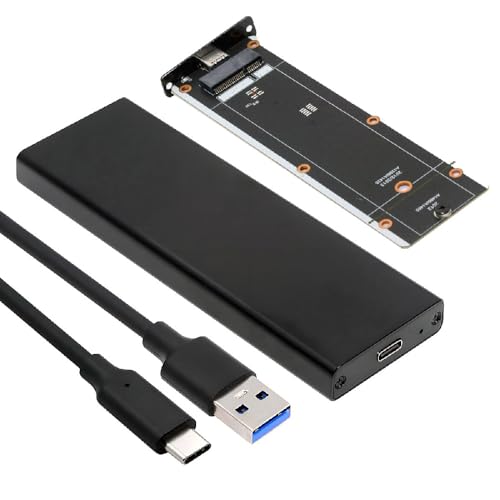
- Made for specific 2012 Mac Air and Mac Pro SSDs
- USB 3.0 Type-C with JMS580 bridge
- Requires a compatible 7+17 pin Apple SSD
Best For: Reusing a compatible older Apple blade SSD externally
Tool-Free NVMe Pick
10Gbps UGREEN M.2 USB-C Enclosure

- 10Gbps USB 3.2 Gen2 NVMe enclosure
- Tool-free design with included cables
- Supports 2230 through 2280 NVMe drives
Best For: Portable Mac-friendly NVMe storage with easy installation
Thunderbolt Speed Pick

- 40Gbps enclosure with USB4 and Thunderbolt 3/4 support
- Up to 3600MB/s with the right cable and device
- Double-sided fin cooling design
Best For: High-speed Mac workflows and Thunderbolt-based file transfers
Most Flexible Choice
dockteck tool-free M.2 NVMe/SATA enclosure

- Fits NVMe and SATA M.2 drives
- Tool-free design for fast installation
- USB 3.2 Gen 2 with thermal pad included
Best For: Users who want one enclosure for Mac and other platforms
Compact Mac SSD Case
Jorkar USB-C enclosure for 12+16 pin Mac SSDs

- Built for select 2013-2017 Apple SSDs
- CNC aluminum design with heat pad
- Up to 20Gbps with supported hardware
Best For: Owners of compatible 12+16 pin MacBook SSDs
Tool-Free Portable Speed – Sabrent USB-C NVMe Enclosure
If you want ssd enclosures for mac that are simple to use and quick for everyday transfers, this Sabrent NVMe enclosure is built around ease and consistent 10Gbps performance. Its flip-open, tool-free design makes SSD swaps fast, while the aluminum top and thermal pad help keep temperatures under control during longer copy jobs.
Best For: Mac users who want a fast, no-tools NVMe enclosure for portable work and easy SSD upgrades.
Pros:
- Tool-free flip-open design makes installation quick and convenient.
- Aluminum top presses the thermal pad directly against the SSD for better heat transfer.
- Supports M.2 NVMe drives in 2230, 2242, 2260, and 2280 sizes up to at least 8TB.
- USB-C plug-and-play with no drivers or external power needed.
Cons:
- NVMe only, so it is not compatible with M.2 SATA SSDs.
- 10Gbps speed is solid, but not as fast as USB4 or Thunderbolt options.
This is a practical pick if you want a straightforward enclosure that balances portability, cooling, and ease of setup. It is especially appealing for creators, gamers, and general Mac users who value simple external storage without extra hassle.
USB4 Premium Compact – Satechi Slim NVMe Enclosure
For buyers comparing ssd enclosures for mac, this Satechi USB4 model stands out when speed and a clean desk setup matter most. It supports up to 40Gbps host connections, includes cooling vents and a thermal pad, and is designed to work with Mac Mini M4, MacBooks, iPads, PCs, and other USB4 or Thunderbolt systems.
Best For: Mac users who want a premium USB4 enclosure for high-speed editing, backups, and a tidy desktop setup.
Pros:
- Up to 40Gbps transfer speeds with quoted read up to 3840MB/s and write up to 3200MB/s.
- Supports M.2 sizes 2230, 2242, 2260, and 2280 up to 8TB.
- Cooling vents and a thermal pad help reduce thermal throttling.
- Compact design includes a hidden cable compartment and a slim profile that matches Mac mini styling.
Cons:
- Premium feature set likely makes it a higher-cost choice than basic 10Gbps enclosures.
- The included USB4 host cable may be too short for some setups.
This is the strongest choice here if your priority is top-tier performance and a polished Mac-friendly design. It fits best into workflows where fast transfers, quiet cooling, and a neat desktop footprint matter.
Legacy Mac Adapter Case – Chenyang 2012 Mac SSD Enclosure
If you need an ssd enclosure for mac specifically for older Apple hardware, this chenyang adapter is aimed at 2012 MacBook Air and MacBook Pro SSDs with the correct 7+17 pin connector. It is a niche 5Gbps USB-C enclosure, so the main value is compatibility with those legacy Mac SSDs rather than modern NVMe speed.
Best For: Owners of compatible 2012 MacBook Air or MacBook Pro SSDs who need a simple way to access old drives over USB-C.
Pros:
- Built for specific 2012 MacBook Air and MacBook Pro SSD form factors.
- USB 3.0 Type-C connection with 5Gbps transfer support.
- Works with Mac-formatted SSDs on macOS for reading data.
Cons:
- Only works with SSDs that use the 7+17 pin connector.
- Not suitable for many newer SSDs or drives with different connector requirements.
- USB 5Gbps performance is far slower than modern NVMe enclosure options.
This is a very specific solution, but that makes it useful if you are trying to recover or reuse a compatible older Mac SSD. If your drive does not match the listed connector and size requirements, this is not the right enclosure.
High-Speed Portable NVMe – OWC Express 1M2
Among ssd enclosures for mac, the OWC Express 1M2 is the performance-focused option for users who want near top-end portable NVMe speeds. It supports USB4, Thunderbolt, and USB-C computers, includes a patented heat-dissipating design, and is built for bus-powered portability with a choice of compatible M.2 NVMe drives.
Best For: Power users who want a fast, rugged NVMe enclosure for demanding Mac workflows.
Pros:
- Real-world performance is listed at up to 3836MB/s.
- Patented heat-dissipating design helps keep the SSD cool and stable.
- Compatible with USB4, Thunderbolt, and USB-C devices.
- Supports NVMe M.2 2280, 2242, and 2230 SSDs.
Cons:
- Performance and features may be more than casual users need.
- Included screwdriver means setup is still a small DIY install, not tool-free.
This enclosure makes sense if your Mac workflow depends on speed, reliability, and portability. It is a strong all-around premium choice when you want a bus-powered drive that can handle heavy multimedia, gaming, or business use.
Retro Mac SSD Adapter – 2012 Mac Air/Pro 7+17 Pin SSD Case
If you need ssd enclosures for mac that specifically support older Apple blade drives, this Cablecc adapter is built around 2012 Mac Air and Mac Pro SSD form factors. It uses a JMS580 USB 3.0 bridge and connects over USB 3.0 Type-C at 5Gbps, but only works with the right 7+17 pin SSD type, so compatibility matters more than raw speed here.
Best For: Owners of 2012 MacBook Air or Mac Pro systems who want to reuse a compatible Apple SSD externally.
Pros:
- Designed for 2012 Mac Air A1465/A1466 and Mac Pro A1398/A1425 SSDs
- USB 3.0 Type-C connection with JMS580 bridge controller
- Works with specific 7+17 pin Apple SSDs listed in the notes
- Supports Mac-formatted SSDs on macOS
Cons:
- SSD is not included
- Only works with 7+17 pin connector drives
- Not suitable for SSDs that are 3.1A or higher, per the notes
This is a niche enclosure, but that makes it useful if your goal is to repurpose an older Mac SSD rather than buy a general-purpose NVMe case. If your drive matches the listed connector and model family, it is a practical way to bring that storage back into service.
Tool-Free NVMe Pick – 10Gbps UGREEN M.2 USB-C Enclosure
For buyers comparing ssd enclosures for mac, this UGREEN model is a straightforward NVMe option with a 10Gbps USB 3.2 Gen2 interface and broad OS support. It is built for M.2 NVMe drives only, supports common 2230 to 2280 sizes up to 8TB, and uses a tool-free design that makes swapping drives quick on the go.
Best For: Mac users who want a simple, portable NVMe enclosure for everyday external storage or backup use.
Pros:
- 10Gbps USB 3.2 Gen2 support for fast NVMe transfers
- Tool-free installation for easy drive swaps
- Supports 2230/2242/2260/2280 M.2 NVMe drives up to 8TB
- Compatible with Mac OS, Windows, Linux, Android, and iOS
Cons:
- Does not support SATA NGFF SSDs or mSATA SSDs
- 10Gbps performance requires a matching USB-C 3.2 Gen2 cable
- Only supports NVMe protocol drives, not SATA-based M.2 models
This enclosure lands in the sweet spot for most Mac users who want a dependable NVMe case without extra complexity. Its tool-free build and included accessories make it a convenient choice if you plan to move drives between devices often.
Thunderbolt Speed Pick – 40Gbps UGREEN NVMe Enclosure
If you want ssd enclosures for mac with more headroom, this UGREEN 40Gbps NVMe enclosure is aimed at users who need very fast transfers and Thunderbolt compatibility. It supports USB4, USB 3.x, and Thunderbolt 3/4, and the enclosure is rated up to 3600MB/s when paired with Thunderbolt 4 cables and devices.
Best For: Mac users who need a high-speed NVMe enclosure for large file transfers and Thunderbolt setups.
Pros:
- Up to 40Gbps bandwidth with compatible USB4/Thunderbolt connections
- Rated for up to 3600MB/s with Thunderbolt 4 cables and devices
- Supports 2230/2242/2260/2280 NVMe drives up to 8TB
- Includes a double-sided fin cooling design for quieter operation
Cons:
- Does not support SATA NGFF or mSATA SSDs
- To reach top speed, Thunderbolt 4 cables and devices are required
- SSD is not included
This is the most performance-focused option in the group, especially if your Mac workflow involves big media files or frequent large transfers. The cooling design and Thunderbolt-ready spec make it a strong pick when speed matters more than budget.
Apple SSD Recovery Pick – ACASIS USB-C 3.2 enclosure for 2013-2017 Macs
If you need SSD enclosures for mac specifically for an older Apple machine, this ACASIS model is aimed at original 12+16 pin Apple SSDs from 2013-2017 MacBook Air, MacBook Pro/Retina, iMac, and Mac Pro. It also includes an M.2 NVMe adapter, which adds flexibility if you want to reuse a standard 2280 NVMe drive instead of the original Apple module.
Best For: Users recovering or repurposing compatible 2013-2017 Apple SSDs, especially when they want a Mac-focused enclosure with an NVMe adapter included.
Pros:
- Supports original Apple 12+16 pin SSDs from multiple 2013-2017 Macs.
- Includes an M.2 NVMe adapter for 2280 NVMe drives.
- USB 3.2 Gen 2 interface offers up to 10Gbps, with up to 20Gbps on supported hosts.
- Aluminum alloy casing helps with heat dissipation.
Cons:
- Does not support Toshiba 12+16 pin SSDs.
- Not compatible with SATA SSDs or third-party Apple-replacement SSDs.
- Requires careful insertion and tightening to avoid disconnections.
This is a strong pick if your priority is compatibility with original Apple SSD hardware rather than broad M.2 support. The included adapter is a useful bonus, but the compatibility limits are strict, so it is best chosen only when your drive type matches the listing exactly.
Most Flexible Choice – dockteck tool-free M.2 NVMe/SATA enclosure
For shoppers comparing SSD enclosures for mac that also work across other devices, this dockteck enclosure is built around broad M.2 compatibility and simple setup. It supports both NVMe and SATA M.2 drives, so it is a practical choice if you want one enclosure that can move between a Mac, Windows machine, and other USB-C devices.
Best For: Anyone who wants a tool-free enclosure for M.2 NVMe or SATA drives with wide cross-platform use, including Mac.
Pros:
- Supports NVMe and SATA M.2 drives in 2230/2242/2260/2280 sizes.
- Tool-free, slide-open design makes installation quick.
- USB 3.2 Gen 2 interface supports up to 10Gbps for fast transfers.
- Includes thermal pad and aluminum alloy housing for heat control.
Cons:
- SSD is not included.
- Automatic sleep after 15 minutes may interrupt some workflows.
- Best fit is M-key and B&M-key SSDs, so compatibility still depends on your drive type.
Overall, this is the most flexible option in the group for mixed-use storage duties. If you want a compact enclosure that is easy to assemble and can serve multiple systems, it is a very practical buy.
Compact Mac SSD Case – Jorkar USB-C enclosure for 12+16 pin Mac SSDs
If you are shopping for SSD enclosures for mac and need a small case specifically for Apple 12+16 pin drives, this Jorkar model is purpose-built for that job. It targets MacBook Air A1465/A1466 and MacBook Pro A1398/A1502 from 2013-2017, with CNC aluminum construction and a compact footprint for portable use.
Best For: Users with compatible 12+16 pin MacBook SSDs who want a smaller, sturdier enclosure for recovery or reuse.
Pros:
- Designed for 12+16 pin Apple SSDs from specific 2013-2017 Mac models.
- CNC aluminum alloy case helps with heat dissipation.
- Supports up to 20Gbps when both SSD and host support it.
- Includes cable, screwdriver, silicone heat pad, adapter, and manual.
Cons:
- Not compatible with 1TB wide SSDs.
- Does not support SATA SSDs or third-party SSDs.
- Some Apple desktops and notebooks may need a hub or docking station for power stability.
This enclosure is a good match if you know your drive is one of the compatible Apple modules and you want a more compact, portable reader box. The speed potential is strong, but the narrow compatibility means it is best for exact Mac SSD matches rather than general use.
How We Picked These SSD Enclosures for Mac
We prioritized compatibility with Mac hardware and common upgrade paths, then looked at real-world transfer speed, enclosure build quality, cooling, and ease of installation. For SSD Enclosures for Mac, the most important factors are not just peak bandwidth, but whether the enclosure matches your Mac’s ports and the SSD type you already own.
Quick Comparison
Use USB 3.2 Gen 2 10Gbps enclosures for a practical balance of speed and value, USB4 or 40Gbps models for the fastest external SSD performance, and Apple-specific 12+16 pin or 7+17 pin adapters only when you are reusing an original MacBook SSD. Tool-free designs are best if you plan to swap drives often.
Key Buying Factors for SSD Enclosures for Mac
1. Interface Speed
Match the enclosure to your Mac’s fastest supported connection. A 40Gbps USB4 enclosure can outperform 10Gbps models, but only if your Mac supports USB4 or Thunderbolt speeds. Otherwise, a 10Gbps enclosure may be the smarter buy.
2. SSD Type and Size
Check whether the enclosure supports NVMe only, SATA only, or both. Also confirm the drive form factor, such as M.2 2230, 2242, 2260, or 2280. Apple SSD replacement enclosures are different from standard M.2 enclosures, so don’t assume they are interchangeable.
3. Heat Management
Fast SSDs can throttle if they run hot. Aluminum shells, thermal pads, and vented designs help maintain consistent performance during large file transfers, video editing, or backup jobs.
4. Mac Compatibility
Look for clear support for macOS, USB-C, and any special Apple SSD pin layouts if you are upgrading an older MacBook. Some models are designed for modern external storage use, while others are specifically made for internal Apple SSDs removed from older systems.
Who Should Buy Which SSD Enclosures for Mac?
If you want the best everyday value, choose a 10Gbps USB-C NVMe enclosure. If you edit large media files or want top-tier external SSD performance, a USB4 or 40Gbps model is the better fit. If you are repurposing an older Apple SSD from a MacBook Air or Pro, pick a purpose-built 7+17 pin or 12+16 pin enclosure instead of a standard M.2 case. For users who swap drives frequently, a tool-free enclosure saves time and reduces hassle.
In short, the best SSD Enclosures for Mac are the ones that match your drive, your Mac’s connection speed, and your real-world workflow.