
Old slides and negatives can hold decades of memories, but film is vulnerable to dust, fading, scratches, and storage damage. The right scanner makes it easier to preserve those images as shareable digital files.
This roundup compares 10 options across convenience, resolution, format support, connectivity, and image quality so you can choose a film digitizer that matches your archive and workflow.
Best 10 Slide Scanners for Digitizing Film Picks for 2026
Fast All-in-One Pick
Magnasonic FS71 24MP Film Scanner

- 24MP JPEG scans from several film and slide formats
- 5-inch display, HDMI viewing, and onboard adjustments
- Scans in under five seconds and saves to SD card
Best For: Computer-free family archiving of mixed film collections
Best Large-Screen Option

- 7-inch tilting LCD for previewing and sharing scans
- Quick-feeding tray helps maintain scanning momentum
- Supports 135mm, 110mm, and 126mm film
Best For: Simple home scanning with a large, easy-to-view display
Best Camera-Scanning System

- Stable carrier helps maintain precise 35mm positioning
- Includes masks for standard, panoramic, and half-frame film
- Dedicated light source provides even illumination
Best For: Camera-based 35mm scanning workflows
Best Renewed Value
KODAK SCANZA Film & Slide Scanner

- Handles 35mm, 126, 110, Super 8, and 8mm formats
- Includes multiple adapters and one-touch scanning controls
- Tilting 3.5-inch display supports image viewing and adjustments
Best For: Mixed-format collections on a renewed-product budget
Best High-Resolution Choice

- 7200 dpi resolution for 35mm film
- Infrared dust and scratch removal
- SilverFast SE Plus 9 included
Best For: High-detail 35mm film scanning
Best Standalone Workflow
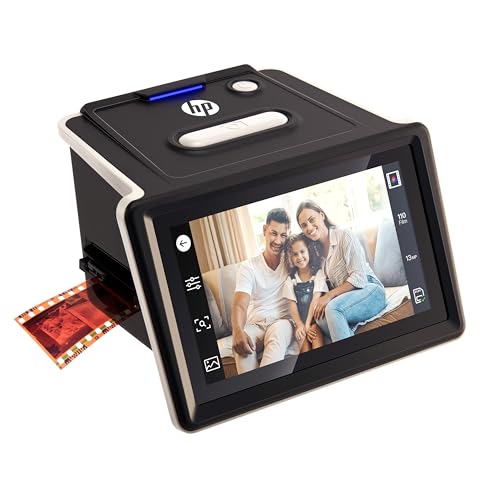
- Scans without a computer
- Supports 135, 126, and 110 formats
- 5-inch touchscreen with quick-load tray
Best For: Convenient mixed-format home archives
Best Format Flexibility
KODAK SCANZA Film & Slide Scanner
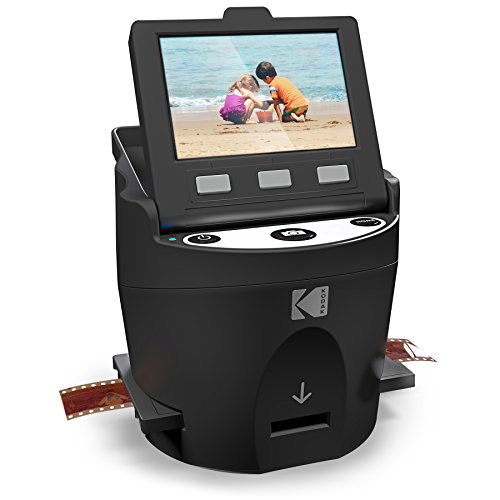
- Handles five listed film formats
- 14/22MP JPEG conversion
- LCD preview and included adapters
Best For: Multi-format family film collections
Best Camera-Based Pick
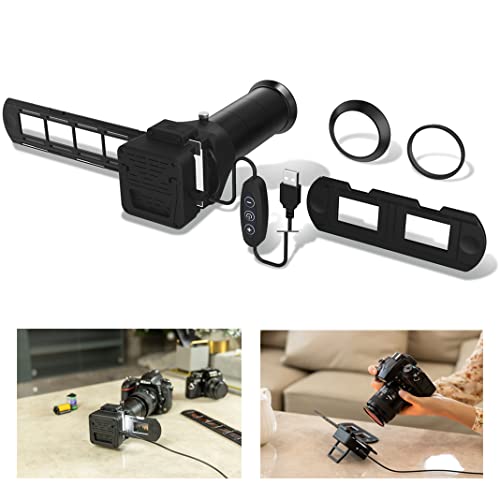
- Re-photographs 35mm negatives and slides
- Includes seven lens adapters
- Dimmable 6500K LED backlight
Best For: Photographers with compatible macro lenses
Best Standalone Feeder
DigitPro 35mm Film & Slide Scanner

- Scans without a computer
- Includes a quick-loading slide feeder
- Stores JPEGs on an SD card
Best For: Beginners archiving 35mm collections
Best High-Resolution Compact Pick

- Captures up to 16MP
- Supports 126 and 135 film
- Includes basic in-device editing
Best For: Portable film digitizing and casual sharing
Fast All-in-One Pick – Magnasonic FS71 24MP Film Scanner
For shoppers comparing slide scanners for digitizing film, the Magnasonic FS71 is a convenient standalone option. It handles 35mm, 110, 126, Super 8 film, and several slide formats, saves JPEG files to an SD card, and scans images in less than five seconds each.
Best For: Families digitizing mixed film and slide collections without relying on a computer.
Pros:
- Supports 24MP output and several film and slide formats.
- Large 5-inch display supports direct viewing and HDMI output.
- Built-in brightness, RGB correction, flip, and mirror controls.
- SD card storage supports up to 128GB.
Cons:
- SD card and HDMI cable are not included.
- Its listed minimum system requirement is Windows 7, which may matter for computer-based use.
The FS71 is a practical choice when speed, format flexibility, and computer-free operation matter more than a specialized camera-scanning workflow.
Best Large-Screen Option – KODAK Slide N Scan Max
The KODAK Slide N Scan Max is one of the more approachable slide scanners for digitizing film, with a 7-inch tilting LCD and a quick-feeding tray. It supports 135mm, 110mm, and 126mm film and can save scans directly to SD or SDHC cards.
Best For: Users who want a large preview screen and a simple workflow for family slides and negatives.
Pros:
- 7-inch tiltable LCD also works as a digital picture frame.
- Quick-feeding tray supports a smoother scanning workflow.
- Handles 135mm, 110mm, and 126mm film.
- One-touch editing simplifies resizing and image adjustments.
Cons:
- SD/SDHC storage is limited to cards up to 32GB.
- The supplied connection detail lists USB rather than HDMI output.
Choose this model if easy viewing and straightforward controls are priorities, especially when scanning a sizable household archive.
Best Camera-Scanning System – Negative Supply Simple 35
The Negative Supply Simple 35 takes a different approach from self-contained slide scanners for digitizing film: it is a film carrier and light-source system designed for a separate camera-based scanning setup. Its masks support standard, panoramic, and half-frame 35mm formats, with additional cassette options available for other film types.
Best For: Photographers who already use a compatible camera workflow and want stable, evenly lit 35mm film positioning.
Pros:
- Basic Film Carrier 35 MK2 is designed to minimize film movement.
- Included masks accommodate standard, panoramic, and half-frame formats.
- Light Source 35 provides consistent illumination for color and detail capture.
- Lightweight carrier supports portable setup and breakdown.
Cons:
- It is a scanning system rather than a complete standalone scanner.
- The supplied details focus on 35mm; 110, 126, and APS require additional cassette options.
- A separate camera-based workflow is needed.
This system is best suited to users seeking precise film handling and flexible 35mm framing, rather than shoppers looking for a one-box scanner with a built-in display.
Best Renewed Value – KODAK SCANZA Film & Slide Scanner
The renewed KODAK SCANZA is a flexible option among slide scanners for digitizing film, supporting 35mm, 126, 110, Super 8, and 8mm negatives and slides. Its multiple adapters, one-touch controls, and built-in display are aimed at quick JPEG conversion with minimal setup.
Best For: Buyers seeking a renewed, format-flexible scanner with simple controls and built-in image viewing.
Pros:
- Supports a broad range of negative and slide formats.
- Includes multiple film inserts and adapters.
- 3.5-inch tilting LCD offers adjustable brightness for viewing.
- One-touch scanning and onboard RGB and resolution editing simplify operation.
Cons:
- It is a renewed product with a listed 90-day limited warranty.
- SD card is not included, though capacity up to 128GB is supported.
- The supplied details list USB and HDMI connections but do not include a computer-free workflow description.
SCANZA makes sense for mixed-format archives when adapter variety and uncomplicated controls are more important than buying a new unit with a longer warranty.
Best High-Resolution Choice – Plustek OpticFilm 8200i SE
For photographers prioritizing image detail, the Plustek OpticFilm 8200i SE is a specialized option among slide scanners for digitizing film. Its 7200 dpi resolution, 48-bit color support, and infrared dust-and-scratch detection are designed for 35mm negatives and mounted slides.
Best For: 35mm film users who want high-resolution scans and built-in defect removal.
Pros:
- 7200 dpi scanning for 35mm negatives and mounted slides.
- Infrared channel helps detect and remove dust and scratches.
- Includes SilverFast SE Plus 9 and Plustek QuickScan software.
- Supports Windows 7 through 11 and Mac OS 10.7 through 14.x.
Cons:
- Designed for 35mm film rather than multiple film formats.
- Requires a computer and USB connection for operation.
This is the most detail-focused pick in the group, particularly for carefully scanning a 35mm archive. Its specialized format support and computer-based workflow make it less convenient for casual, standalone scanning.
Best Standalone Workflow – HP FilmScan HPFS500
The HP FilmScan HPFS500 offers a straightforward approach to slide scanners for digitizing film, with no computer required during scanning. Its 5-inch touchscreen, SD card storage workflow, and support for 135, 126, and 110 film formats suit mixed collections.
Best For: Users who want standalone scanning with touchscreen controls and broad format support.
Pros:
- Standalone operation makes it possible to digitize without a computer.
- Supports 135, 126, and 110 negatives and positive slides.
- 5-inch all-angle touchscreen allows image preview and editing.
- Quick-load tray helps speed up batch scanning.
Cons:
- Its 24-bit color depth is lower than the Plustek’s 48-bit specification.
- Requires Windows 10 or later or macOS 10.15 or later for computer compatibility.
The HPFS500 is a practical choice for convenience and varied film formats. Its touchscreen and standalone design simplify the process, while the 13MP sensor with 22MP interpolation targets easy archival digitization rather than specialized high-end scanning.
Best Format Flexibility – KODAK SCANZA Film & Slide Scanner
The KODAK SCANZA is a flexible option among slide scanners for digitizing film, supporting 35mm, 126, 110, Super 8, and 8mm negatives and slides. Its built-in LCD, one-touch controls, and included adapters make it approachable for home users.
Best For: Families and hobbyists digitizing several supported film formats with simple controls.
Pros:
- Supports 35mm, 126, 110, Super 8, and 8mm film.
- 14/22MP scanning converts negatives and slides to JPEG files.
- 3.5-inch adjustable LCD supports previewing and image viewing.
- Includes multiple inserts, adapters, cables, and a film-cleaning brush.
Cons:
- SD card is not included.
- Does not convert film formats outside those specifically supported.
- Its 24 bpp color depth is below the Plustek’s 48-bit specification.
The SCANZA stands out for format coverage and included accessories, making it useful for varied family archives. It is less suited to collections requiring unsupported formats or the highest color-depth specification.
Best Camera-Based Pick – JJC Film Digitizer Scanner
For photographers seeking slide scanners for digitizing film, the JJC Film Digitizer Scanner is a camera-based option for re-photographing 35mm negatives and mounted slides. It includes multiple lens adapters, a dimmable 6500K LED backlight, and adjustment controls for positioning the film and fine-tuning the view.
Best For: Camera owners with compatible macro lenses who want a flexible setup for 35mm film digitization.
Pros:
- Works with select Canon, Nikon, Sony, and Olympus macro-lens setups through included adapters.
- Handles both 35mm film strips and mounted slides.
- Includes a 10-level, 6500K LED backlight with a stated CRI of 95+.
- View-angle and tilt adjustments help with positioning during manual-focus captures.
Cons:
- Requires a compatible camera and macro lens rather than operating as a standalone scanner.
- Manual focusing and camera-based capture may involve more setup than a dedicated desktop scanner.
- The supplied guidance recommends caution with incandescent light sources to avoid film or holder damage.
This kit is a strong fit for photographers who already own the required macro equipment. Its broad adapter selection and adjustable LED illumination add flexibility, while the camera-based workflow may be less convenient for beginners without compatible gear.
Best Standalone Feeder – DigitPro 35mm Film & Slide Scanner
The DigitPro 35mm Film & Slide Scanner is a practical choice among slide scanners for digitizing film when you want a computer-free workflow. Its 2.4-inch LCD, quick-loading holder, SD-card storage, and USB transfer support make it suited to straightforward home archiving.
Best For: Beginners and hobbyists digitizing larger collections of 35mm negatives and mounted slides.
Pros:
- Standalone operation lets you scan, preview, and edit without a computer.
- Supports positive, negative, and black-and-white modes.
- Quick-loading feeder accepts framed slides up to 2mm thick.
- Saves JPEG files to an SD card and supports USB card-reader transfer.
Cons:
- Supports 35mm/135 media rather than a wider range of film formats.
- Its stated resolution is 1800 dpi with a 5/10MP sensor, which may be less suited to demanding professional workflows.
- An SD card is needed for direct storage and is not specified as included.
With simple controls, a built-in display, and a continuous-loading design, this scanner emphasizes convenience over advanced camera-based control. It is a sensible option for home users who want to process 35mm film without installing scanning software.
Best High-Resolution Compact Pick – BEONEGLOBAL ClearScan MINI
The BEONEGLOBAL ClearScan MINI combines a compact design with a stated 16MP resolution, making it a noteworthy option among slide scanners for digitizing film. It supports 126 and 135 film, saves to an SD card, and includes basic in-device adjustments for brightness, color, rotation, and flipping.
Best For: Users who want a portable scanner with broad film-format support and simple on-device editing.
Pros:
- Digitizes 35mm/135 and 126 film and slides.
- Uses a 16MP CMOS sensor with 24-bit color depth.
- Built-in controls allow brightness and color adjustments before saving.
- Compact, lightweight body weighs 10.08 ounces and includes a 2.31-inch LCD.
Cons:
- SD card storage supports cards up to 32GB, but the card is not included.
- The compact 2.31-inch screen may be limiting for detailed image review.
- Its feature set is focused on convenient digitizing rather than advanced computer-based editing.
The ClearScan MINI offers a useful balance of portability, resolution, and format compatibility. Its direct SD-card workflow and built-in edits are convenient for casual preservation and sharing, while users seeking extensive post-processing may prefer a more specialized system.
How We Picked the Best Slide Scanners for Digitizing Film
We evaluated these scanners by looking at the features that matter most when converting physical film: supported formats, effective resolution, color depth, dust and scratch handling, preview quality, file transfer, and ease of use. We also considered whether each model is better suited to casual family archives, frequent batch scanning, or photographers who want more control over image quality.
Some products are standalone converters with built-in screens and simple JPEG output. Others use a computer-based workflow or camera-style setup that can produce more detailed results with the right software and technique. Because those approaches serve different buyers, the “best” choice depends on your priorities rather than one specification alone.
Quick Comparison
Standalone scanners with LCD screens are generally the fastest option for scanning mixed collections of 35mm, 110, 126, Super 8, and 8mm film. They typically let you preview and save images without a computer, making them convenient for family photos and occasional use. Computer-connected models tend to offer better control over color, resolution, and correction, but they require more setup.
Camera-based systems can be efficient for large 35mm collections when paired with a suitable camera, lens, light source, and software. They are less self-contained, yet they may provide a practical upgrade path for photographers who already own compatible equipment.
Key Buying Factors for Slide Scanners for Digitizing Film
Film and Slide Compatibility
Check the exact formats in your collection before buying. Many models handle 35mm film and slides, while some also support 110, 126, Super 8, or 8mm. Adapters and holders can affect how quickly you move through a batch.
Resolution and Image Quality
Advertised dpi figures do not always represent real-world detail. Look for consistent reviews, a quality film holder, accurate focus, and good color reproduction. Higher-end scanners are more useful when you plan to crop, print, or restore images.
Dust, Scratches, and Color Correction
Infrared dust and scratch removal can save substantial editing time, but it is not available on every scanner or supported for every film type. Clean film and holders still matter, especially for negatives with visible dust.
Workflow and File Transfer
A built-in display and memory-card or USB saving can make standalone scanning very simple. If you prefer editing immediately, confirm the scanner’s computer compatibility, included software, connection type, and maximum file format.
Who Should Buy Which Slide Scanners for Digitizing Film?
Choose a standalone LCD scanner if you want the simplest way to digitize family slides and negatives without learning specialized software. These are convenient for mixed formats and occasional projects.
Choose a higher-resolution computer-connected scanner if image quality, enlargement, and editing flexibility matter more than speed. This is the better route for photographers, collectors, and anyone preserving valuable originals.
Choose a camera-based digitizing system if you already own suitable camera equipment and expect to scan many 35mm frames. It can be efficient, but plan for extra setup and post-processing.