
Old negatives and slides can deteriorate, but the right scanner makes it easier to preserve them as shareable digital files. Today’s models range from simple 35mm viewers to versatile scanners that handle multiple film formats and work with a PC or memory card.
We’ve gathered 10 strong options for different digitizing needs, including large-screen designs, high-resolution sensors, and models that can scan without a computer. Use the guide below to narrow the list by compatibility, image quality, workflow, and convenience.
Best 10 Negative Scanners for PC Picks for 2026
Best All-Around Pick

- Supports 135, 110, and 126 film formats
- 5-inch LCD for previewing and editing
- Direct SD-card saving without a computer
Best For: Mixed-format home film collections
Best Touchscreen Workflow
- Standalone operation without a computer
- 5-inch all-angle LCD touchscreen
- Supports 135, 126, and 110 formats
Best For: Hands-on scanning and mixed archives
Best for Large Digital Files
Magnasonic FS71 24MP Film Scanner

- Creates 24MP digital JPEG files
- Supports Super 8, 35mm, 110, and 126 formats
- Scans in less than five seconds per image
Best For: Fast, high-resolution home archiving
Best Large-Screen Option

- 7-inch tiltable LCD for easy viewing
- Quick-feeding tray for continuous scanning
- Supports 135, 110, and 126 film
Best For: Large-screen previewing and simple archiving
Best for Easy Setup

- Up to 24MP scanning with a CMOS sensor
- 7-inch LCD for comfortable previews
- Includes SD card and supports multiple film formats
Best For: Large-screen, standalone film scanning
Best Cordless Option
- Rechargeable battery enables cord-free scanning
- Handles common negatives, slides, and photos up to 4x6
- No computer or drivers required
Best For: Portable, quick scans of mixed photo media
Best Format-Flexible Value
KODAK SCANZA Film & Slide Scanner
- Supports five common film and slide formats
- Includes multiple inserts and adapters
- Offers 14MP/22MP JPEG scanning with USB and HDMI
Best For: Digitizing mixed-format film collections
Best Stand-Alone Value

- Scans 35mm negatives and slides to JPEG
- Saves to SD card or connects by USB
- Includes rapid feeder and 2.4-inch LCD
Best For: Simple 35mm film archiving with or without a computer
Best All-in-One Format Support

- Scans 135 and 110 film, photos, and cards
- Includes 5-inch LCD and 8GB SD card
- Saves 22MP JPEG files to memory or computer
Best For: Mixed home collections and family photo archiving
Best High-Resolution Choice

- Scans at up to 24MP with a CMOS sensor
- Supports 135, 126, 110, and Super8 film
- Includes 5-inch LCD and USB transfer
Best For: Detailed scans across multiple film formats
Best All-Around Pick – KODAK Slide N Scan
For shoppers comparing negative scanners for PC use, the KODAK Slide N Scan offers a flexible way to digitize 135, 110, and 126 negatives plus slides. Its 5-inch LCD, direct SD-card saving, and USB connectivity make it practical for previewing and transferring scans.
Best For: Families digitizing mixed-format negatives and slides with convenient on-device controls.
Pros:
- Supports 135, 110, and 126 negatives and slides.
- Includes a 5-inch LCD with gallery mode for previewing and editing.
- Saves directly to SD or SDHC cards up to 32GB.
- Includes quick-loading trays, film adapters, cables, and a cleaning brush.
Cons:
- SD card is not included.
- Computer connectivity requires a Type-C USB-enabled computer.
With broad format support and simple one-touch adjustments, this is a well-rounded choice for home archiving, especially when you want to review images without relying entirely on a PC.
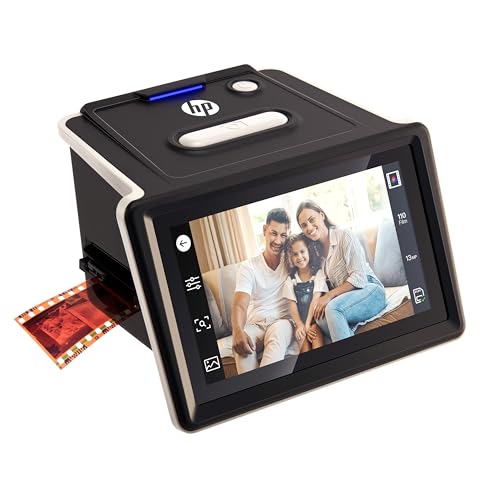
Best Touchscreen Workflow – HP FilmScan HPFS500
Among negative scanners for PC shoppers, the HP FilmScan HPFS500 stands out for its standalone operation and touchscreen controls. It supports several common film formats and lets you preview and edit scans on its 5-inch LCD before preserving them digitally.
Best For: Users who want a hands-on touchscreen workflow for organizing mixed slide and negative collections.
Pros:
- Works as a standalone digitization device without a computer.
- Supports 135, 126, and 110 negatives and positive slides.
- Features a 5-inch all-angle LCD touchscreen.
- Quick-load tray helps streamline scanning sessions.
Cons:
- Its 13MP sensor uses 22MP interpolation rather than a native 22MP sensor.
- Requires Windows 10 or later or macOS 10.15 or later for computer use.
The HPFS500 is a practical choice when ease of operation matters most. Its touchscreen and standalone design reduce setup steps, while USB connectivity supports computer-based workflows when needed.
Best for Large Digital Files – Magnasonic FS71 24MP Film Scanner
If you are comparing negative scanners for PC and want high-resolution JPEG output, the Magnasonic FS71 offers 24MP scanning for several film and slide formats. It also provides direct SD-card storage, HDMI viewing, and image adjustments without requiring computer software.
Best For: Users seeking fast, computer-free scanning with flexible viewing and storage options.
Pros:
- Converts 35mm, 110, 126, and Super 8 negatives plus compatible slides.
- Produces 24MP digital JPEG files.
- Scans images in less than five seconds each according to the supplied notes.
- Supports SD cards up to 128GB and offers HDMI display output.
Cons:
- SD card and HDMI cable are not included.
- Its broader Super 8 support may be unnecessary for users with only standard 35mm film.
The FS71 combines fast operation with useful standalone editing controls. Its 24MP output and large-capacity SD support make it appealing for users building a sizable digital archive.
Best Large-Screen Option – KODAK Slide N Scan Max
For shoppers looking at negative scanners for PC with a larger preview display, the KODAK Slide N Scan Max features a tiltable 7-inch LCD. It handles 135, 110, and 126 film, saves directly to SD or SDHC cards, and includes one-touch editing for a straightforward digitization process.
Best For: Users who value a large viewing screen and simple controls when scanning family film collections.
Pros:
- Large 7-inch tiltable LCD doubles as a digital picture frame.
- Supports 135, 110, and 126 film formats.
- Quick-feeding tray supports continuous scanning.
- Saves scans directly to SD or SDHC cards up to 32GB.
Cons:
- SD card is not included.
- Its listed resolution is 3200 dpi, so specifications differ from the megapixel ratings of the other models here.
The Slide N Scan Max is particularly convenient for previewing and sharing images on its spacious screen. Choose it when display size and a simple, computer-independent workflow are higher priorities than compactness.
Best for Easy Setup – BEONEGLOBAL ClearScan P7
If you want negative scanners for PC that can also work without a computer, the BEONEGLOBAL ClearScan P7 offers a straightforward standalone workflow. Its 7-inch LCD, included SD card, and support for several film formats make it practical for scanning and reviewing images immediately.
Best For: Users who want a large preview screen, broad film-format support, and simple one-touch scanning.
Pros:
- Scans film and slides at up to 24MP using a 1/2.3-inch CMOS sensor.
- Large 7-inch LCD makes previews and image adjustments easier to view.
- Supports 35mm/135, 126, 110, Super 8, and 8mm film and includes an SD card.
- Works without a computer and offers a one-touch scanning workflow.
Cons:
- It saves images to an SD card, so computer-based workflows may require transferring files afterward.
- The listed supported formats do not include every possible film type.
The ClearScan P7 stands out for convenience and visibility rather than a computer-dependent setup. Choose it if a large screen, included storage, and flexible format support matter most.
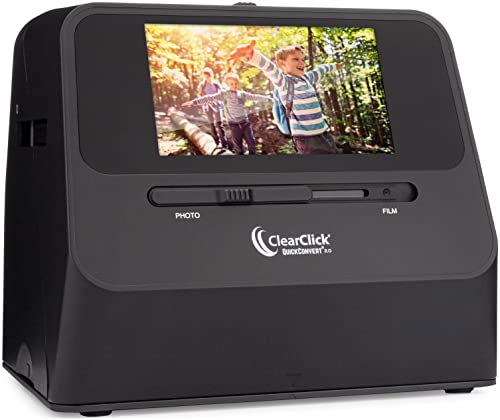
Best Cordless Option – ClearClick QuickConvert 2.0
For shoppers comparing negative scanners for PC, the ClearClick QuickConvert 2.0 is a flexible photo-and-film converter that does not require a computer or drivers. Its rechargeable battery and 5-inch preview screen are useful for scanning away from a desk.
Best For: Users who want cordless scanning for 4×6 photos, slides, and several common negative formats.
Pros:
- Scans 35mm, 110, and 126 negatives, plus slides and photos up to 4×6.
- Built-in rechargeable battery supports cord-free scanning.
- Converts images to JPEG files on an SD memory card without requiring a computer or drivers.
- Scans in about 2–3 seconds and includes a 5-inch instant-preview LCD.
Cons:
- There is no autofeeder; items must be scanned one at a time.
- It does not support 5×7 photos.
- The listed 22MP figure is interpolated; native scanning is listed at 14MP.
The QuickConvert 2.0 is a practical choice for convenience and portability. Its limits are worth noting if you need larger photo sizes, automated feeding, or the highest native resolution.
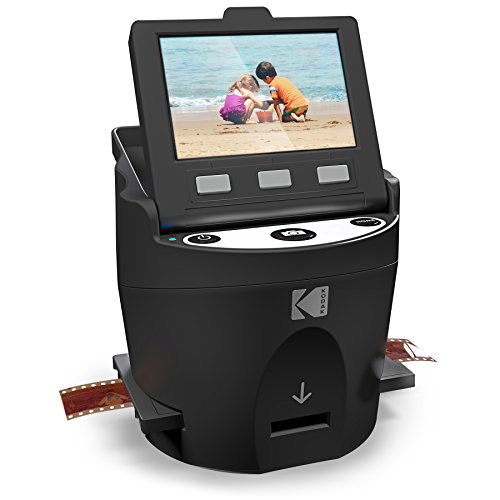
Best Format-Flexible Value – KODAK SCANZA Film & Slide Scanner
The KODAK SCANZA is one of the more versatile negative scanners for PC if your collection includes multiple older film formats. It converts supported negatives and slides to JPEG, includes several adapters, and offers both USB and HDMI connectivity for flexible setup and viewing.
Best For: Film owners with 35mm, 126, 110, Super 8, or 8mm negatives and slides who want included adapters.
Pros:
- Supports 35mm, 126, 110, Super 8, and 8mm negatives and slides.
- Offers 14MP and 22MP scanning options and saves files as JPEGs.
- Includes multiple film inserts and adapters for different formats.
- Has a tilt-adjustable 3.5-inch LCD plus USB and HDMI connections.
Cons:
- SD card is not included.
- It only supports the listed film formats and will not convert other types.
- The LCD is smaller than the displays on some newer standalone scanners.
SCANZA makes sense for mixed-format collections because the adapters are included and the controls are designed for one-step scanning. Budget separately for an SD card when planning your setup.
Best Stand-Alone Value – DIGITNOW! 35mm Film Scanner
For shoppers comparing negative scanners for pc use, the DIGITNOW! offers flexible digitizing with or without a computer. It converts 35mm negatives and slides to JPEG files at up to 1800 dpi, saving them directly to an SD card or transferring them through USB.
Best For: Users who want a compact, straightforward 35mm film and slide scanner with stand-alone SD-card storage.
Pros:
- Works with 35mm negatives and slides and supports Windows XP through Windows 10 plus Mac OS.
- Can save scans to an SDHC card up to 32GB or connect to a computer by USB 2.0.
- Includes an adjustable rapid slide feeder and a built-in 2.4-inch LCD screen.
Cons:
- Its supported film format is limited to 35mm negatives and slides.
- The listed resolution is up to 1800 dpi, lower than the higher-resolution options in this roundup.
The DIGITNOW! is a practical choice for basic home archiving, especially if you value computer-free operation and a small footprint over broader media support or maximum resolution.
Best All-in-One Format Support – KEDOK 4-in-1 Negative Scanner
If you need negative scanners for pc workflows but also want broader media coverage, the KEDOK handles 135 and 110 film, slides, photos, and business cards. It can save 22MP JPEG files to its included 8GB SD card, internal memory, or a computer through USB.
Best For: Families and home archivists digitizing mixed collections of negatives, slides, printed photos, and name cards.
Pros:
- Supports 135 and 110 negatives, 135 slides, several photo sizes, and business cards.
- Includes a large 5-inch LCD for previewing images before saving.
- Comes with an 8GB SD card, multiple holders, cleaning accessories, and a three-year warranty.
- Offers one-touch adjustments for film type, color, brightness, resolution, and date/time.
Cons:
- Its 2.2 kg listed weight makes it less portable than the smallest scanners here.
- The minimum listed system requirement is Windows 7 for computer use.
The KEDOK stands out for versatility and included accessories. Choose it when your archive includes more than standard 35mm film and you want a large screen and generous package support.
Best High-Resolution Choice – BEONEGLOBAL ClearScan S5
For buyers seeking negative scanners for pc transfer with detailed output, the BEONEGLOBAL ClearScan S5 scans at up to 24MP using an advanced CMOS sensor. It supports 135, 126, 110, and Super8 negatives and slides, with USB transfer plus built-in memory or optional SD-card storage.
Best For: Users who prioritize high-resolution JPEG scans, broad film-format compatibility, and quick previewing on a large screen.
Pros:
- Produces scans up to 24MP with a 1/2.3-inch CMOS sensor and 24-bit color depth.
- Supports 135, 126, 110, and Super8 negatives and slides.
- Includes a bright 5-inch LCD, front-panel controls, and one-touch scanning and editing.
- Offers built-in 128MB memory, USB transfer, and SD-card support up to 32GB.
Cons:
- The SD card is not included.
- Its listed warranty is one year, shorter than the KEDOK’s three-year warranty.
The ClearScan S5 is the strongest fit when resolution and format range matter most. Its direct-storage options also make it convenient for scanning without keeping a computer connected.
How We Picked These Negative Scanners for PC
We focused on scanners that can digitize common film and slide formats while offering a practical way to view, save, and transfer images. The selection includes dedicated 35mm units, multi-format scanners for 110, 126, Super 8, and 8mm film, and models with larger displays for easier framing.
We also considered resolution claims, included holders, file-storage options, display size, connectivity, and whether a computer is required. A higher advertised megapixel count can help produce larger files, but it does not guarantee better results if the optics, film condition, or holder alignment are poor.
Quick Comparison
| Best For | What to Look For |
|---|---|
| Large film collections | Fast loading, broad format support, and SD-card storage |
| 35mm negatives and slides | A well-designed holder, clear preview, and straightforward controls |
| Mixed vintage formats | Support for 110, 126, Super 8, or 8mm film as needed |
| Computer-free scanning | Internal storage or SD-card saving and a built-in display |
| Frequent editing on a PC | USB connectivity, transferable JPEG files, and dependable software support |
Key Buying Factors for Negative Scanners for PC
Film-Format Compatibility
Check the exact formats in your collection before buying. Many scanners handle 35mm film, but fewer support 110, 126, Super 8, or 8mm. Confirm that the required trays or adapters are included rather than assuming every listed format uses the same holder.
Resolution and Image Quality
Resolution affects how much detail a scanner can capture, especially when cropping or making larger prints. Look beyond the headline number and consider dust on the film, scratches, exposure, color correction, and whether the scanner offers adjustable brightness or color controls.
PC Connection and File Handling
Some models connect directly by USB, while others save scans to an SD card and may also function without a computer. If you plan to scan hundreds of frames, choose a workflow that makes file transfer, naming, backup, and repeat scanning simple.
Screen, Speed, and Ease of Use
A 5- or 7-inch screen can make framing easier, particularly for users who do not want to rely on a computer preview. Look for quick-loading holders, clear menus, and a stable scanning process. Batch-friendly handling matters more than a slightly higher resolution for large archives.
Who Should Buy Which Negative Scanners for PC?
Choose a dedicated 35mm scanner if most of your collection uses standard negatives and slides and you want a compact, uncomplicated setup. A multi-format model is the better choice for family archives containing several generations of film sizes. Large-screen scanners suit users who value comfortable previews, while computer-free models are convenient for occasional scanning away from a desk.
Before purchasing, inventory your film, decide whether you need PC editing or standalone operation, and estimate how many frames you will scan. For a large project, prioritize speed, reliable holders, and easy file storage; for a smaller collection, a simple scanner with the correct adapters may offer the best value.