
Choosing the right processor for a NAS build has a bigger impact than many buyers expect. It affects file transfer speed, media streaming, virtual machine support, Docker performance, and how efficiently the system runs day to day.
In this roundup, we focus on NAS platforms and processor-backed systems that balance low power use, reliable multitasking, and upgrade-friendly features for home labs, creators, and small offices.
Best 10 Processor for NAS Build Picks for 2026
Creator-Friendly Compact NAS
UGREEN NAS DXP2800 2-Bay, Intel N100

- Intel N100 quad-core CPU with 8GB DDR5 RAM
- 2.5GbE, dual M.2 NVMe, and 4K HDMI
- Supports up to 80TB with easy cross-device apps
Best For: Content creators and enthusiasts needing a simple, modern 2-bay NAS
DIY Network-Attached Board
N100 Industrial Motherboard NAS
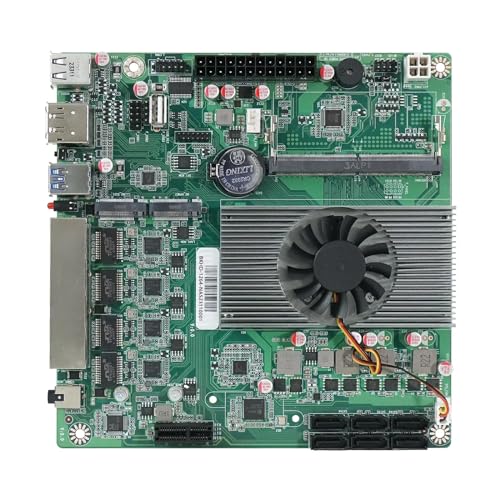
- Intel N100 with 4 cores, 4 threads, low power
- 4x 2.5GbE, 6 SATA, and M.2 storage support
- Dual 4K display output at 60Hz
Best For: DIY builders wanting a low-power NAS board with lots of ports
Quiet Media NAS Pick

- Intel x86 quad-core CPU for 4K transcoding
- 2.5GbE, 4GB RAM, and quiet 19dB(A) operation
- Tool-free trays and mobile app setup
Best For: Home users focused on media streaming and quiet operation
Beginner Private Storage NAS

- Entry-level 2-bay NAS with 4GB RAM
- AI photo tagging and automatic backups
- Up to 64TB capacity with 1GbE networking
Best For: Beginners who want private storage and simple backup features
DIY x86 Starter NAS
ZimaBlade 7700 x86 Home Server & 2-Bay NAS Kit
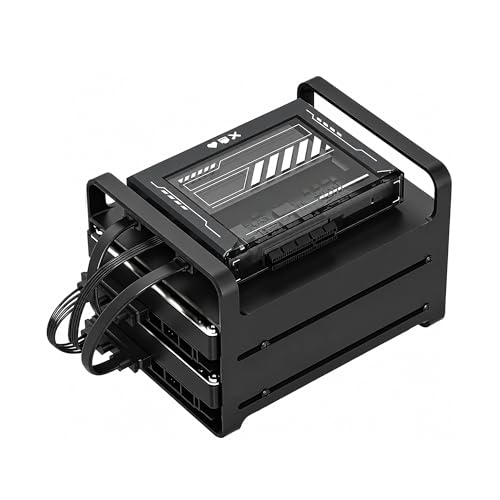
- Intel quad-core x86 platform for broad software support
- 16GB RAM and dual SATA for DIY NAS and homelab use
- Includes 2-bay kit hardware plus PCIe expansion
Best For: DIY builders who want an x86 NAS platform for self-hosting and experimentation
Beginner-Friendly 4-Bay NAS
UGREEN NAS DH4300 Plus 4-Bay Diskless

- Entry-level 4-bay NAS with 8GB RAM and 2.5GbE
- Beginner-friendly setup with app guidance and NFC
- Supports Docker, 4K HDMI, and AI photo features
Best For: Beginners who want simple private storage and remote access
Balanced Performance NAS
Yxk Zero1 Pro 4-Bay Desktop NAS

- Intel N100 quad-core CPU with 8GB DDR4 RAM
- Dual 2.5GbE, 4K HDMI, and link aggregation support
- Docker-ready with TrueNAS, Unraid, and OMV support
Best For: Enthusiasts who want a quiet, flexible NAS for media and Docker
Enterprise 8-Bay Performance
UGREEN NAS DXP8800 Plus 8-Bay, Intel i5 1235u 10-Core CPU

- 12th Gen Intel Core i5 1235U, 10 cores/12 threads
- Dual 10GbE with up to 20G aggregated bandwidth
- 8 bays + 2 M.2 NVMe slots for major expansion
Best For: Business users and advanced home labs needing maximum storage and fast networking
Fast Small-Office NAS
UGREEN NAS DXP4800 Plus 4-Bay NAS, Intel Pentium Gold 8505 5-Core CPU

- Intel Pentium Gold 8505 with 8GB DDR5 RAM
- 1x 10GbE + 1x 2.5GbE for flexible networking
- Two M.2 NVMe slots and up to 144TB capacity
Best For: Small offices and home users who want fast networking in a compact 4-bay NAS
Balanced Pro 6-Bay
UGREEN NAS DXP6800 Pro 6-Bay, Intel i5 1235u 10-Core CPU

- 12th Gen Intel Core i5 1235U, 10 cores/12 threads
- Dual 10GbE with up to 20G aggregated bandwidth
- 6 bays + 2 M.2 NVMe slots for flexible expansion
Best For: Buyers who want strong performance and a more manageable 6-bay NAS
Creator-Friendly Compact NAS – UGREEN NAS DXP2800 2-Bay, Intel N100
If you want a processor for NAS build that keeps things simple but still leaves room for more serious home storage, the UGREEN NAS DXP2800 is a practical starting point. Its Intel N100 quad-core CPU, 8GB of DDR5 RAM, 2.5GbE networking, dual M.2 NVMe slots, and 4K HDMI output make it a well-rounded diskless NAS for creators and enthusiasts who want centralized storage without cloud subscriptions.
Best For: Content creators, enthusiasts, and small teams looking for an easy-to-use 2-bay NAS with modern baseline hardware.
Pros:
- Intel N100 quad-core CPU with 8GB DDR5 RAM for everyday NAS tasks.
- 2.5GbE plus dual M.2 NVMe slots add speed and flexibility.
- Supports up to 80TB for large photo, video, and backup libraries.
- User-friendly apps work across Windows, macOS, Android, iOS, browsers, and smart TVs.
Cons:
- Diskless system, so drives must be purchased separately.
- 2-bay design limits expansion compared with larger chassis.
Overall, the DXP2800 fits buyers who want a capable processor for NAS build without jumping into a complicated DIY platform. It balances accessible setup, modern connectivity, and strong media-friendly features in a compact desktop format.
DIY Network-Attached Board – N100 Industrial Motherboard NAS
For a processor for NAS build based on a DIY motherboard, this N100 industrial board is built around low power, lots of storage connectivity, and flexible networking. The Intel Celeron N100 delivers 4 cores and 4 threads, while the board adds four 2.5GbE i226 ports, six SATA ports, DDR5 support, and NVMe storage options for a compact home server or NAS appliance.
Best For: Builders who want to assemble a low-power NAS with multiple network ports and broad storage support.
Pros:
- Intel Celeron N100 offers 4 cores, 4 threads, and low power operation.
- Four 2.5GbE i226 ports are useful for fast networking setups.
- Six SATA ports plus M.2 NVMe and M.2 SSD slots support flexible storage layouts.
- HDMI 2.0 and DP 1.4 support dual 4K output at 60Hz.
Cons:
- Requires both 24-pin and 4-pin power connections.
- First boot may take time for memory self-test and setup.
- Max RAM is limited to 16GB.
This board makes sense if you want to build around a modest processor for NAS build and prioritize networking plus storage ports over plug-and-play simplicity. It is best suited to users comfortable with assembly, BIOS access, and system tuning.
Quiet Media NAS Pick – TERRAMASTER F2-425 2-Bay NAS
If your processor for NAS build needs lean toward media streaming and simple home sharing, the TERRAMASTER F2-425 is a compelling turnkey option. Its Intel x86 quad-core CPU, 4GB RAM, and 2.5GbE port are aimed at smooth multitasking, 4K transcoding, and faster file transfers, while the diskless 2-bay design keeps the system compact.
Best For: Home users who want a quiet NAS for media streaming, backups, and easy day-to-day access.
Pros:
- Intel x86 quad-core processor handles 4K transcoding and multitasking.
- 2.5GbE networking supports faster transfers and multi-user access.
- Quiet 19dB(A) operation suits bedrooms and other quiet spaces.
- Tool-free Push-Lock trays simplify drive installation.
Cons:
- Diskless model requires separate hard drives.
- 2-bay layout limits total drive count.
- 4GB RAM may be modest for heavier workloads.
For buyers who want a straightforward NAS with a capable processor for NAS build use cases like Plex, Emby, and Jellyfin, the F2-425 keeps the focus on practical home media features. It combines quiet operation, app-based setup, and strong backup options without pushing into complex territory.
Beginner Private Storage NAS – UGREEN NAS DH2300 2-Bay
For shoppers who want a processor for NAS build without the complexity of a DIY server, the UGREEN NAS DH2300 is an entry-level 2-bay option built for personal storage and backups. It includes 4GB of RAM, a 1GbE port, 4K HDMI, and a high-performance processor, but it is clearly aimed at beginners who want simple, private file storage rather than advanced server features.
Best For: Beginners looking for a private, easy-to-use NAS for photos, videos, and personal backups.
Pros:
- Beginner-friendly design with simple setup for personal storage.
- 4GB RAM and a high-performance processor handle everyday tasks.
- AI photo tools can tag faces, locations, texts, and objects.
- Supports up to 64TB and automatic backups across devices.
Cons:
- Only 1GbE networking, so transfers are not as fast as 2.5GbE models.
- Does not support Docker or virtual machines.
- Wi-Fi is not built in and requires an external USB adapter.
The DH2300 is best for users who value convenience, privacy, and simple media backup over advanced expansion. If your processor for NAS build priorities are easy access and low-friction storage management, this is a sensible entry point.
DIY x86 Starter NAS – ZimaBlade 7700 x86 Home Server & 2-Bay NAS Kit
If you want a processor for NAS build projects that leaves room to experiment, the ZimaBlade 7700 is built around an Intel quad-core x86 platform with 16GB RAM and dual SATA support. It is more of a flexible home server than a fixed appliance, so it suits DIY NAS setups, homelabs, Docker apps, and lightweight always-on services.
Best For: DIY builders who want an x86 NAS platform for self-hosting, media, and homelab experimentation.
Pros:
- Intel quad-core x86 processor with broad Linux and Docker compatibility
- 16GB RAM helps with file sharing, backups, Plex, and multiple lightweight services
- Includes 2-bay hardware, power supply, metal drive cage, and dual SATA cables
- PCIe expansion adds upgrade flexibility for custom builds
Cons:
- Assembly is required, so it is not a plug-and-play NAS
- Better suited to DIY and learning than to a locked-down appliance experience
- Plex support is positioned around direct play rather than heavy transcoding
Overall, this is a strong pick if your priority is choosing a processor for NAS build flexibility instead of buying a fully managed storage box. It gives you the core hardware, expansion headroom, and x86 software support to shape the system around your own workflow.
Beginner-Friendly 4-Bay NAS – UGREEN NAS DH4300 Plus 4-Bay Diskless
For shoppers comparing a processor for NAS build options, the UGREEN NAS DH4300 Plus aims more at easy setup than tinkering. It pairs an entry-level 4-bay design with 8GB LPDDR4X RAM, 2.5GbE networking, Docker support, and a high-performance processor for home storage, remote access, and private cloud use.
Best For: Beginners who want simple private storage, remote access, and photo management without building from scratch.
Pros:
- Beginner-friendly setup with NFC, app guidance, and broad device support
- 8GB RAM, 2.5GbE, and a high-performance processor for everyday multitasking
- Supports Docker and 4K HDMI output for flexible home use
- AI photo album tools can recognize people, objects, pets, and similar photos
Cons:
- Does not support virtual machines
- Diskless enclosure means storage drives must be purchased separately
- Best fit is straightforward storage, not advanced homelab workloads
This is a practical choice if you want a simple NAS experience with modern networking and easy app support. It is less about custom processor selection and more about getting a capable, user-friendly storage system running quickly.
Balanced Performance NAS – Yxk Zero1 Pro 4-Bay Desktop NAS
The Yxk Zero1 Pro is a solid middle-ground option if you are evaluating a processor for NAS build performance without going all-in on a custom DIY platform. Its Intel N100 quad-core CPU, 8GB DDR4 RAM, dual 2.5GbE ports, and 4K HDMI output make it well suited to home storage, media streaming, and Docker-based apps.
Best For: Enthusiasts who want a quiet, flexible NAS for media, Docker, and third-party OS support.
Pros:
- Intel N100 quad-core processor with 8GB DDR4 RAM
- Dual 2.5GbE and link aggregation support for smoother multi-user access
- Supports Docker plus third-party operating systems like TrueNAS, Unraid, and OMV
- Aluminum alloy chassis and dual-fan cooling help keep temperatures under control
Cons:
- Diskless model, so drives are not included
- Third-party OS installation requires manual setup
- RAID 0 capacity claims are dependent on configuration and may not reflect usable storage
For buyers who want a capable NAS processor and broad OS flexibility, this model hits a useful balance between simplicity and customization. It is especially attractive if you want media streaming, Docker support, and quiet operation in one desktop unit.
Enterprise 8-Bay Performance – UGREEN NAS DXP8800 Plus 8-Bay, Intel i5 1235u 10-Core CPU
If you’re shopping for a processor for NAS build that can handle heavier workloads, the UGREEN NAS DXP8800 Plus is built around a 12th Gen Intel Core i5 1235U, dual 10GbE, and an 8-bay layout with two M.2 NVMe slots. That combination makes it a strong fit for users who want fast transfers, broad RAID support, and room to scale storage without giving up compute headroom.
Best For: Business users and advanced home labs that need high capacity, dual 10GbE networking, and strong all-around NAS performance.
Pros:
- 12th Gen Intel Core i5 1235U with 10 cores and 12 threads for demanding NAS tasks
- Dual 10GbE ports can be aggregated for up to 20G bandwidth
- Eight SATA bays plus two M.2 NVMe slots for large storage expansion
- Supports Docker and virtual machines, plus 8K HDMI and Thunderbolt 4
Cons:
- Drives are not included
- Wired Ethernet only; no Wi-Fi support
- Top-end capacity and features may be more than casual users need
Overall, this is the most capable option in the group for buyers prioritizing a stronger processor for NAS build plans, especially where networking speed and expansion matter as much as raw bay count.
Fast Small-Office NAS – UGREEN NAS DXP4800 Plus 4-Bay NAS, Intel Pentium Gold 8505 5-Core CPU
For a processor for NAS build focused on everyday speed rather than maximum scale, the UGREEN NAS DXP4800 Plus pairs an Intel Pentium Gold 8505 with 8GB DDR5 RAM, a 10GbE port, and two M.2 NVMe slots. It is positioned as a high-performance NAS for small offices and shared family storage, with enough hardware to support Docker, virtual machines, and fast local transfers.
Best For: Small offices and home users who want a compact NAS with fast networking and straightforward backup features.
Pros:
- Intel Pentium Gold 8505 processor with 8GB DDR5 RAM
- 1x 10GbE plus 1x 2.5GbE for flexible network setup
- Two M.2 NVMe slots and up to 144TB capacity
- Supports Docker, virtual machines, and AI-powered photo organization
Cons:
- Four-bay design has less expansion than the larger models
- Drives are not included
- Wired Ethernet only; no Wi-Fi support
This is a practical pick if you want a balanced NAS with a capable processor and fast connectivity, but do not need the larger bay count or heavier enterprise-oriented footprint.
Balanced Pro 6-Bay – UGREEN NAS DXP6800 Pro 6-Bay, Intel i5 1235u 10-Core CPU
If you’re comparing a processor for NAS build options and want a middle ground between storage growth and performance, the UGREEN NAS DXP6800 Pro stands out with a 12th Gen Intel Core i5 1235U, dual 10GbE, and six SATA bays plus two M.2 NVMe slots. It is designed for demanding business use, with RAID support, Docker, virtual machine support, and enough bandwidth to move large files quickly.
Best For: Buyers who want strong processing power, dual 10GbE networking, and a more manageable 6-bay chassis.
Pros:
- 12th Gen Intel Core i5 1235U with 10 cores and 12 threads
- Dual 10GbE ports support up to 20G aggregated bandwidth
- Six SATA bays plus two M.2 NVMe slots for flexible expansion
- Supports Docker, virtual machines, and multiple RAID levels
Cons:
- Drives are not included
- Wired Ethernet only; no Wi-Fi support
- Less total bay capacity than the 8-bay model
For many buyers, this is the most practical high-performance balance in the lineup: it keeps the stronger CPU and dual 10GbE while trimming the size and storage ceiling to something easier to plan around.
How We Picked the Best Processor for NAS Build
We focused on systems that make sense for a Processor for NAS Build: efficient CPUs, practical memory support, modern networking, and storage expansion options. We also weighed chassis size, bay count, and whether the platform is better suited to light file serving, media use, or heavier workloads like Docker and transcode support.
Quick Comparison
Entry-level Intel N100-based models are the most power-efficient and are usually best for basic file storage, backups, and simple media serving. Midrange options with Pentium Gold or Core i5-class chips add more headroom for multiple users, larger media libraries, and light virtualization. Higher-bay systems typically offer better long-term expansion and are the better fit if you expect storage needs to grow.
Key Buying Factors for a Processor for NAS Build
Performance and Efficiency
For most NAS use cases, the sweet spot is a CPU that is efficient at idle but still strong enough for encryption, indexing, and background services. Low-power chips are ideal if the NAS will run 24/7 and mostly handle file storage, while stronger processors help with richer app ecosystems.
Networking and Storage I/O
Look for 2.5GbE at minimum if you want faster-than-gigabit transfers. For more serious workloads, 10GbE and multiple M.2 NVMe slots can improve caching, scratch storage, and overall responsiveness. These features matter as much as raw CPU speed in a NAS environment.
Memory and Expandability
RAM capacity influences how well the system handles multiple services at once. If you plan to use containers, photos, backups, or media apps together, choose more memory headroom. Also consider whether the platform supports easy upgrades, because that can extend useful life substantially.
Bay Count and Future Growth
Two-bay systems suit compact backups and starter media libraries. Four-bay models offer a strong balance of cost, flexibility, and RAID options. Six- and eight-bay units are better if you want room to grow or need more tolerant storage layouts.
Who Should Buy Which Processor for NAS Build?
Choose an Intel N100-based NAS if you want the lowest power draw and a simple setup for backups, home files, and light streaming. Pick a Pentium Gold or Core i5-based system if you want faster multitasking, better app performance, or more demanding media tasks. If you are building for a home lab, content workflow, or a small office with growth in mind, prioritize 10GbE, NVMe slots, and a larger bay count over buying the cheapest CPU available.
In short, the best Processor for NAS Build is the one that matches your workload today while leaving enough headroom for tomorrow’s storage and service needs.