
Moving camcorder footage to a PC is easier when you choose a capture card that matches the camera’s output. HDMI models suit modern camcorders and live streaming, while composite, S-Video, and USB converters are better for older tape-based formats.
We’ve selected 10 options covering 4K HDMI capture, Full HD recording, RCA and S-Video conversion, and VHS, Video8, Hi8, and MiniDV transfers. Use the guide below to narrow the choices by connection type, resolution, software compatibility, and intended workflow.
Best 10 Capture Cards for Camcorder to PC Picks for 2026
Premium HDMI Pick

- 1080p60 and 4K capture support
- Ultra-low-latency HDMI-to-USB 3.0
- Works with PC, Mac, iPad, and streaming apps
Best For: Modern HDMI camcorders and creator streaming setups
Most Versatile Inputs
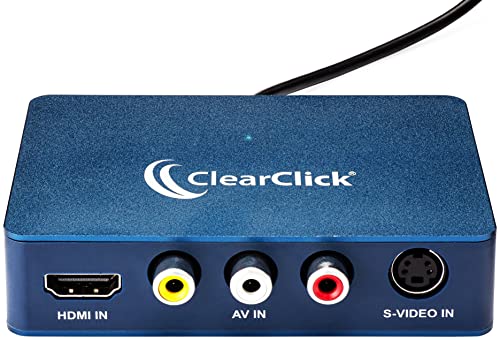
- HDMI, RCA, AV, and S-Video inputs
- USB-C with included USB-A adapter
- Works with PC, Mac, and Linux
Best For: Digitizing mixed camcorder and legacy video sources
High-Frame-Rate Alternative
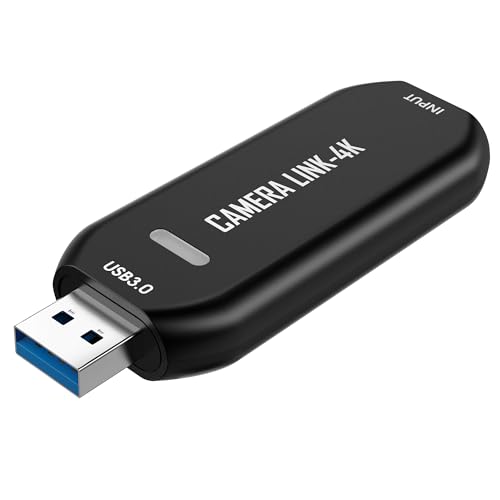
- Up to 1080p120 or 4K60 capture
- Ultra-low-latency HDMI connection
- Plug-and-play on Windows and macOS
Best For: Smooth HDMI streaming, recording, and real-time monitoring
Best for Analog Archives
Oassuose VHS to Digital Converter
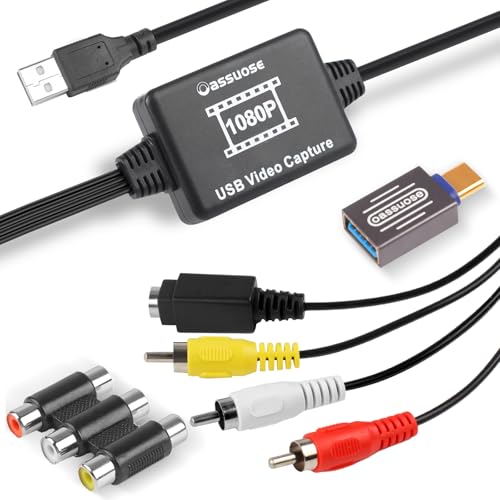
- RCA and S-Video to USB capture
- Up to 1080p/30fps output
- USB-A and USB-C compatibility
Best For: Digitizing analog camcorder, VHS, Hi8, and DVD footage
Compact HDMI Cam Link
Plug-and-Play Camcorder Capture

- 4K input with 1080p/30Hz output
- No driver or external power required
- Supports OBS, VLC, and Amcap
Best For: Camcorder recording, streaming, teaching, and conferences
Analog Video Digitizer

- Converts VHS, Hi8, Mini DV, and analog video
- Supports NTSC, PAL, and PAL/60
- Includes RCA cable, CDs, and manual
Best For: Digitizing legacy camcorder tapes and home videos
Universal HDMI Capture
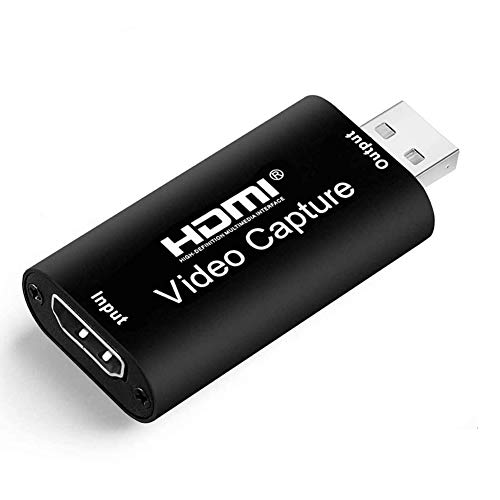
- 4K input and 1080p/30fps output
- Compatible with Windows, Mac, and Linux
- No driver or external power needed
Best For: HDMI camcorder streaming, recording, and gaming capture
Best Analog-to-USB Pick
RCA and S-Video Camcorder Capture Card

- Converts RCA or S-Video video and audio to USB
- Supports Windows and Mac with no external power
- Captures up to 720p for VHS and camcorder transfers
Best For: Digitizing footage from older analog camcorders and tape players
Best Plug-and-Play HDMI Option

- Captures HDMI sources at up to 1080p
- Uses driver-free USB 3.0 plug-and-play setup
- Provides HDMI loop-out and microphone input
Best For: HDMI camcorders used for recording or live streaming
Best Feature-Rich HDMI Pick
4K Loop-Out Camcorder Capture Card

- Accepts 4K60 input and captures up to 1080p60
- Offers HDMI loop-out for low-latency monitoring
- Includes USB-A, USB-C adapter, and microphone input
Best For: Advanced HDMI camcorder capture and streaming setups
Premium HDMI Pick – Elgato Cam Link 4K
If you need capture cards for camcorder to pc setups and want a polished streaming workflow, the Elgato Cam Link 4K is a strong HDMI option. It connects compatible camcorders, cameras, action cams, and other HDMI sources to a PC or Mac through USB 3.0, with support for 1080p60 and 4K capture.
Best For: Creators who want low-latency HDMI capture for livestreaming, video calls, recording, or iPad monitoring.
Pros:
- Supports 1080p60 and 4K60 capture with compatible equipment.
- Ultra-low latency helps keep video and audio in sync.
- Works with camcorders, action cameras, iPhone, PC, Mac, and iPad.
- Compact USB 3.0 design works with OBS, Zoom, and Discord.
Cons:
- Requires an HDMI-output device and compatible computer setup.
- 4K capabilities depend on the specific Cam Link model and source camera.
The Cam Link 4K is the most streamlined choice here for modern HDMI camcorders and high-quality live production. Its compact design and broad software compatibility make it practical when ease of use matters.
Most Versatile Inputs – ClearClick Video2USB
For shoppers comparing capture cards for camcorder to pc use across both newer and older equipment, the ClearClick Video2USB stands out for input flexibility. It accepts HDMI, AV, RCA, and S-Video sources, making it suitable for camcorders as well as VCRs, VHS tapes, Video8, Hi8, DVDs, and gaming systems.
Best For: Users digitizing mixed analog and HDMI sources on Windows, Mac, or Linux computers.
Pros:
- Captures HDMI video up to 1080p and supports HDMI sources up to 4K 30 FPS.
- Accepts AV, RCA, and S-Video inputs for legacy camcorders and media.
- USB-C plug-and-play connection includes a full-size USB-A adapter.
- Software, instructions, one-year warranty, and technical support are included.
Cons:
- Does not support copyrighted or content-protected HDMI sources.
- Analog sources are automatically upscaled rather than captured as native high definition.
This is the most adaptable option in the group if your camcorder collection spans different eras and connectors. Its included software and multi-platform support also reduce setup friction for basic recording and streaming.
High-Frame-Rate Alternative – VIXLW Cam Link 4K
The VIXLW Cam Link 4K is a compact HDMI capture option for capture cards for camcorder to pc workflows, especially when smooth motion is important. It connects a camcorder or other HDMI device to Windows or macOS over USB and is designed for plug-and-play streaming, recording, calls, and observation work.
Best For: Streamers, educators, gamers, and technical users who want high-frame-rate HDMI capture without external power.
Pros:
- Supports up to 1080p120 or 4K60, depending on the capture format.
- Ultra-low latency is suited to livestreams, video calls, and real-time viewing.
- Works with camcorders, cameras, consoles, microscopes, and other HDMI devices.
- Plug-and-play operation requires no drivers or external power.
Cons:
- It requires an HDMI-output source and a computer with a USB port.
- Supported resolution and frame rate vary by format, including MJPEG, NV12, YUY2, and XRGB.
Choose this model when frame rate and broad HDMI compatibility are higher priorities than analog-input support. It offers a flexible, no-driver setup for users who want to move quickly from camcorder to computer.
Best for Analog Archives – Oassuose VHS to Digital Converter
If your camcorder uses RCA or S-Video rather than HDMI, this Oassuose converter is a practical choice among capture cards for camcorder to pc setups. It transfers video and audio from camcorders, Hi8, Mini DV players, VCRs, DVDs, and similar analog sources to a Windows or Mac computer through USB-A or USB-C.
Best For: Digitizing analog camcorder footage, VHS recordings, and other family video archives.
Pros:
- Converts RCA or S-Video inputs to up to 1080p/30fps USB output.
- Supports USB-A and USB-C computer connections.
- Works with Windows and Mac and supports NTSC and PAL formats.
- Compatible with free capture software such as OBS Studio, PotPlayer, and QuickTime Player.
Cons:
- Requires separate capture software to record or save footage.
- Uses RCA or S-Video input rather than HDMI.
- The listed warranty is one year.
This converter makes the most sense for preserving older recordings instead of capturing modern HDMI video. Its dual USB connector support is useful when moving footage between computers with different port types.
Compact HDMI Cam Link – Plug-and-Play Camcorder Capture
If you need capture cards for camcorder to pc use, this compact HDMI-to-USB 2.0 model is a practical option for recording or previewing footage. It accepts up to 4K at 30Hz and outputs up to 1080p at 30Hz, with support for OBS, VLC, and Amcap on compatible Windows, MacOS, and Android setups.
Best For: Camcorder, DSLR, and action-camera recording, teaching, conferences, gaming, and live streaming.
Pros:
- Supports 4K input and Full HD 1080p output at 30fps.
- Plug-and-play design requires no driver or external power supply.
- Works with common software including OBS, VLC, and Amcap.
- Compact housing and real-time preview support convenient setup.
Cons:
- Uses USB 2.0, with output limited to 1080p at 30Hz.
- Requires a camera or other source with an HDMI output.
This is a straightforward choice when you want a small, driver-free capture device for HDMI camcorder footage and basic streaming or recording rather than higher-resolution output.
Analog Video Digitizer – VHS and Camcorder Transfer
For capture cards for camcorder to pc projects involving older media, this USB video capture device converts analog footage from camcorders, VCRs, VHS, Hi8, and Mini DV sources. It supports Windows, Mac OS, and Android, and can work with software such as OBS, PotPlayer, and QuickTime Player.
Best For: Digitizing home videos and transferring analog camcorder or tape recordings to a computer.
Pros:
- Supports VHS, VCR, Hi8, Mini DV, and other analog video sources.
- Automatically detects NTSC, PAL, and PAL/60 formats.
- Includes an RCA cable, two blank CDs, and a user manual.
- Captures up to 1920×1080 MJPEG, depending on the source.
Cons:
- Designed for analog connections rather than HDMI camera output.
- Actual capture resolution depends on the original video source.
- Software is not included as a dedicated application; compatible software is recommended.
This model makes the most sense for preservation work, especially if your camcorder or tape player uses RCA or another analog connection instead of HDMI.
Universal HDMI Capture – Full HD Camcorder Recording
This HDMI-to-USB 2.0 device is a flexible option among capture cards for camcorder to pc setups, supporting DSLR, camcorder, action-camera, and gaming-console HDMI sources. It accepts up to 4K at 30Hz and records or streams at up to 1080p at 30fps through compatible software such as OBS, PotPlayer, and VLC.
Best For: Full HD camcorder streaming, recording, gaming capture, and video conferencing across Windows, Mac, and Linux.
Pros:
- Supports 4K HDMI input with 1080p/30fps output.
- Compatible with Windows, Mac, and Linux systems.
- Plug-and-play operation needs no external driver or power supply.
- Works with cameras, consoles, OBS, PotPlayer, and VLC.
Cons:
- USB 2.0 output is limited to Full HD at 30fps.
- Supports one HDMI video signal channel.
- Requires a compatible HDMI-output device and a computer meeting the listed requirements.
Choose this capture card if broad computer compatibility and simple HDMI connectivity matter most. Its 1080p output is well suited to everyday streaming and recording, while 4K input provides source flexibility.
Best Analog-to-USB Pick – RCA and S-Video Camcorder Capture Card
For older camcorders and tape players with RCA or S-Video outputs, this analog-to-USB converter is a practical choice among capture cards for camcorder to PC transfers. It converts composite video and audio to a USB output for recording on Windows or Mac, with no external power required.
Best For: Digitizing footage from VHS, Hi8, Mini DV, VCR, DVD, and compatible camcorders with RCA or S-Video connections.
Pros:
- Supports RCA and S-Video sources, including camcorders, VCRs, and Hi8 devices.
- Captures up to 720p and includes audio capture without a separate sound card.
- Plug-and-play setup with Windows and Mac compatibility; no external power needed.
- Works with free software such as OBS Studio, PotPlayer, or QuickTime Player.
Cons:
- Designed for analog inputs rather than HDMI-equipped camcorders.
- Requires separate acquisition software to record or save video.
- Maximum stated USB output is 720p.
This is the most purpose-built option here for preserving footage from legacy camcorders and tape formats. Choose it when your source device uses RCA or S-Video instead of HDMI.
Best Plug-and-Play HDMI Option – 1080p USB 3.0 Capture Card
This HDMI model is a straightforward choice among capture cards for camcorder to PC use when the camcorder provides HDMI output. It connects over USB 3.0, appears as a webcam without a driver, and supports live capture through common software on Windows and Mac.
Best For: HDMI camcorders, cameras, and other HDMI sources used for 1080p recording, streaming, or preview.
Pros:
- Supports up to 1080p capture and USB 3.0 connectivity.
- Plug-and-play operation requires no driver or external power supply.
- HDMI loop-out enables low-delay monitoring while capturing.
- Includes microphone input for external commentary with a compatible 3.5mm TRS headset.
Cons:
- Requires an HDMI-output camcorder or source; it does not replace an RCA converter.
- Computer must have a USB 3.0 port for the stated requirements.
- Microphone input accepts only a 3.5mm TRS standard microphone headset.
For an HDMI camcorder, this offers a simple setup and useful pass-through monitoring. It is a better fit for live capture and streaming than for converting older analog tapes.
Best Feature-Rich HDMI Pick – 4K Loop-Out Camcorder Capture Card
If you want more flexibility from capture cards for camcorder to PC workflows, this HDMI device adds 4K60 input and loop-out while capturing up to 1080p at 60fps over USB 3.0. It is suited to HDMI camcorders, cameras, and streaming setups that need pass-through monitoring.
Best For: HDMI camcorders and cameras used for low-latency capture, live streaming, interviews, or real-time recording.
Pros:
- Accepts 4K60 HDMI input and loop-out while capturing up to 1080p60.
- Supports up to 2K30 output via USB 3.0 with YUY2.
- Plug-and-play design requires no driver or external power supply.
- Includes HDMI loop-out, optional audio capture, and a 3.5mm microphone input.
Cons:
- Does not support 4K120 or 4K144 input.
- Requires a USB 3.0 port and a computer capable of processing 1080p video.
- The microphone input does not record party chats and accepts only a 3.5mm microphone headset.
This is the strongest choice for users who value higher-resolution HDMI pass-through and multiple connection options. Its capture output remains below the maximum 4K input capability, so verify your recording needs before buying.
How We Picked the Best Capture Cards for Camcorder to PC
We focused on the connection between the camcorder and computer first, since compatibility matters more than headline resolution. The selection includes HDMI-to-USB devices for newer cameras, plus analog capture hardware for RCA, composite, S-Video, VHS, Video8, Hi8, and MiniDV sources.
We also considered recording resolution, frame-rate support, audio handling, USB connectivity, plug-and-play compatibility, and whether a device is better suited to one-time archiving or frequent streaming. Capture cards can advertise 4K input while outputting only 1080p, so those specifications should be read separately.
Quick Comparison
| Camcorder output | Best capture-card type | Typical use |
|---|---|---|
| HDMI | HDMI-to-USB capture card | Streaming, webcam use, and digital recording |
| RCA or composite | Analog USB video grabber | VHS, Video8, and older camcorder transfers |
| S-Video | Analog capture device with S-Video input | Higher-quality legacy video capture |
| USB-C computer | USB-C-compatible capture card or adapter | Modern laptops and tablets |
Key Buying Factors for Capture Cards for Camcorder to PC
Check the Camcorder Output
Confirm whether the camera provides HDMI, composite video, S-Video, FireWire, or another connection. An HDMI capture card cannot accept RCA cables without a separate converter, and an analog grabber will not replace an HDMI interface.
Match Resolution and Frame Rate
For ordinary camcorder transfers, 1080p capture is usually sufficient. Choose a 4K-capable model only when the source, computer, and software can use that extra resolution. For smooth live video, check the supported frame rate as well as the maximum input resolution.
Verify USB and Software Compatibility
USB 3.0 is preferable for higher-bandwidth HDMI capture, while many basic analog devices work over USB 2.0. Look for UVC support and compatibility with the operating system and applications you plan to use, such as OBS, Zoom, or video-editing software.
Consider Audio and Copy Protection
Some capture cards carry audio through HDMI; analog models usually require left-and-right RCA audio connections. Consumer camcorder footage is generally straightforward, but protected commercial VHS content may not capture correctly because of copy-protection signals.
Who Should Buy Which Capture Cards for Camcorder to PC?
Choose an HDMI capture card if you have a modern camcorder and want to stream, record directly to a computer, or use the camera as a webcam. Prioritize USB 3.0 and the desired 1080p or 4K capability.
Choose an RCA or S-Video converter if you are digitizing tapes from an older camcorder, VCR, or DVD player. Input options and stable audio synchronization matter more than 4K branding.
Choose a USB-C-ready model if your laptop lacks USB-A ports. Otherwise, a USB-A device may work well with a reliable adapter. For occasional family-archive projects, a simple plug-and-play grabber is often the most practical choice; frequent creators should spend more on dependable HDMI capture and broader software support.