
Running three 4K displays is a demanding setup, so the right GPU matters more than almost any other component. You need enough display outputs, modern bandwidth, and enough horsepower to keep desktop work, creative apps, or games running smoothly.
This guide focuses on the best graphics cards for triple 4K monitors in 2026, from budget multi-display options to newer PCIe 5.0 cards built for sharper visuals and faster performance.
Best 10 Graphics Card for Triple 4K Monitors Picks for 2026
Top Pick for Modern Triple-Monitor Gaming

- 3x DisplayPort 2.1b + HDMI 2.1b
- DLSS 4, Ray Tracing, and Reflex support
- Up to 7680 x 4320 display maximum
Best For: Gamers and creators wanting a modern triple-monitor GPU
Budget Legacy Multi-Display Choice
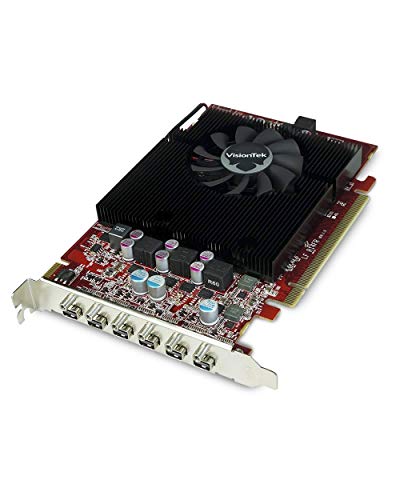
- Supports up to six displays
- 4K UHD support up to 4096 x 2160 @ 60Hz
- Includes Mini DisplayPort adapters
Best For: Office setups needing lots of displays on a budget
Best Non-Gaming Productivity Card
WAVLINK 4-Monitor DisplayLink Card

- 2 DisplayPort + 2 HDMI outputs
- Supports extend and mirror modes
- Windows 11/10 and Ubuntu compatible
Best For: Productivity users needing up to four displays
Quad-Display Budget Pick

- Up to 4x 4K displays at 60Hz
- Bus-powered with no extra connectors
- Single-slot, full-height design
Best For: Office and trading setups needing simple multi-monitor output
Best Performance Upgrade
GIGABYTE RTX 5060 WINDFORCE OC 8G

- Blackwell-based RTX 5060 with DLSS 4
- 8GB GDDR7 and PCIe 5.0
- DisplayPort plus HDMI outputs
Best For: High-resolution desktop users wanting newer GPU performance
Low-Power Multi-Display Value

- Four HDMI ports for multi-monitor use
- Slot-powered, no external connector
- 3840x2160 at 60Hz support
Best For: Budget office and trading setups with simple HDMI displays
Triple-Display RTX Upgrade

- 3x DisplayPort 2.1b + HDMI 2.1b
- 16GB GDDR7 with RTX 50 Series performance
- Up to 7680 x 4320 maximum resolution
Best For: Modern triple-4K monitor setups with gaming headroom
Budget Quad-Display Option

- 4x HDMI 2.0 ports for multiple screens
- Low 38W power draw for 24/7 use
- Compact, quiet single-fan design
Best For: Low-cost monitoring and signage setups
Balanced Triple-Display RTX
PNY RTX 5060 Epic-X Triple Fan

- DisplayPort and HDMI outputs
- Up to 7680 x 4320 maximum resolution
- Triple-fan cooling with DLSS 4
Best For: Balanced gaming and productivity across multiple monitors
Top Pick for Modern Triple-Monitor Gaming – RTX 5070 Epic-X ARGB OC
If you want a graphics card for triple 4K monitors that still leaves room for modern gaming and creative work, the PNY GeForce RTX 5070 is the strongest all-around option here. It includes three DisplayPort 2.1b outputs plus HDMI 2.1b, supports up to 8K display maximum resolution, and brings DLSS 4, Ray Tracing, and Reflex technologies to help balance image quality and responsiveness.
Best For: Gamers and creators who need a capable triple-monitor card with modern NVIDIA features and a 250W power profile.
Pros:
- Three DisplayPort 2.1b ports plus HDMI 2.1b for flexible multi-display hookups
- Blackwell architecture with DLSS 4, Tensor Cores, and Ray Tracing Cores
- Up to 7680 x 4320 maximum display support
- Studio drivers and AI-assisted workflow support for creative apps
Cons:
- 12GB VRAM may be limiting for heavier pro workloads
- 250W TDP means you need adequate power and cooling
- 2.4-slot triple-fan design may not suit very small cases
This is the best fit if you want one card that can handle a triple-screen setup without giving up current-generation gaming features. It is more versatile than a pure display adapter, but the power draw and size should be checked before buying.
Budget Legacy Multi-Display Choice – Radeon HD 7750 Eyefinity 6
If your priority is running a graphics card for triple 4K monitors on a budget or in a legacy workstation, the VisionTek Radeon HD 7750 is built around multi-display output. It supports up to six displays through Mini DisplayPort outputs and advertises 4K UHD support at up to 4096 x 2160 at 60Hz, making it useful for expansive desktop setups rather than modern gaming performance.
Best For: Office or professional users who need many displays from a low-end, older GPU platform.
Pros:
- Supports up to six displays with AMD Eyefinity 2.0
- 4K UHD support up to 4096 x 2160 at 60Hz
- Wide operating system compatibility including Windows 7 through Windows 10
- Includes Mini DisplayPort adapters for easier display connections
Cons:
- Only 2GB of GDDR5 memory
- Not designed for modern gaming or demanding graphics workloads
- Older platform with much lower performance than newer cards
This card makes sense when display count matters more than raw graphics power. For triple 4K monitors, it is better viewed as a basic multi-monitor solution than a high-performance GPU.
Midrange Gaming Option for Triple Displays – RTX 5060 Ti Epic-X OC
The PNY GeForce RTX 5060 Ti is a practical graphics card for triple 4K monitors if you want modern NVIDIA features in a smaller, lower-power package. It offers DisplayPort and HDMI output, supports up to 7680 x 4320 maximum resolution, and includes DLSS 4, Tensor Cores, Ray Tracing Cores, and Reflex technologies for responsive gaming and productivity use.
Best For: Users who want a modern triple-display card with current NVIDIA features and a compact 2-slot design.
Pros:
- DisplayPort and HDMI output support for multi-monitor setups
- DLSS 4, Tensor Cores, Ray Tracing Cores, and Reflex technologies
- Up to 7680 x 4320 maximum display resolution
- 2-slot, SFF-ready design for tighter builds
Cons:
- 8GB VRAM is modest for heavier creative workloads
- PCIe x8 interface is less than a full x16 card
- Not as strong as higher-tier GPUs for demanding triple-4K gaming
This is a sensible step-down choice if you need triple-monitor capability without jumping to a larger or pricier GPU. It fits smaller systems well, but the 8GB memory limit is worth keeping in mind.
Best Non-Gaming Productivity Card – WAVLINK 4-Monitor DisplayLink Card
If your main goal is a graphics card for triple 4K monitors in an office or productivity setup, this WAVLINK DisplayLink card is purpose-built for that job. It provides 2 DisplayPort and 2 HDMI outputs, supports extend and mirror modes, and is rated for up to 8K or 4K output depending on the port, making it a focused multi-monitor adapter rather than a gaming GPU.
Best For: Windows or Ubuntu users who need a reliable four-display productivity setup.
Pros:
- 2 DisplayPort and 2 HDMI outputs for up to four monitors
- Supports extend and mirror modes
- Up to 8K@60Hz or 4K@144Hz on DisplayPort, 4K@60Hz on HDMI
- Compatible with Windows 11/10 and Ubuntu
Cons:
- Explicitly not a gaming GPU
- Does not support HDCP content such as Netflix
- Requires driver installation from DisplayLink
This is the right choice when productivity matters more than 3D performance. It is a practical way to drive multiple high-resolution screens, but it is not a substitute for a gaming graphics card.
Quad-Display Budget Pick – VisionTek RX 550 4GB 4x HDMI
If you need a graphics card for triple 4K monitors and want a simple, low-power setup, the VisionTek Radeon RX 550 is built around multi-display productivity. It supports up to four 4K displays at 60Hz, making it a practical choice for office work, financial trading, and digital signage where reliability matters more than raw gaming power.
Best For: Compact multi-monitor workstations that need four 4K outputs without external power
Pros:
- Supports up to 4x 4K displays simultaneously at 60Hz
- Bus-powered design with no extra power connectors required
- Single-slot, full-height form factor for easier compatibility
- Includes 4GB GDDR5 memory and FreeSync 2 support
Cons:
- RX 550 is positioned as a productivity card, not a high-end gaming GPU
- Uses HDMI output only, which may limit connection flexibility
- Recommended 350W or greater system power supply still applies
Overall, this is the most straightforward option here if your priority is driving multiple 4K screens with minimal setup complexity. It makes sense for office and trading rigs that value stability and simple installation.
Best Performance Upgrade – GIGABYTE RTX 5060 WINDFORCE OC 8G
For a graphics card for triple 4K monitors with more headroom, the GIGABYTE GeForce RTX 5060 WINDFORCE OC 8G brings a modern NVIDIA Blackwell-based build, DisplayPort and HDMI support, and a rated maximum resolution of 7680 x 4320. It is a stronger fit when you want a dedicated card that can handle high-resolution multitasking with newer architecture and cooling.
Best For: Users who want a newer dedicated GPU for high-resolution multi-monitor work
Pros:
- NVIDIA GeForce RTX 5060 with Blackwell architecture and DLSS 4
- 8GB GDDR7 memory and PCIe 5.0 interface
- DisplayPort and HDMI outputs for flexible monitor hookups
- WINDFORCE cooling system with dual fans
Cons:
- More GPU than many basic productivity builds may need
- Only 8GB of VRAM, which may be limiting for heavier creative workloads
- Requires a desktop system and dedicated PCIe x16 slot
This is the most future-facing option in the group if you want a modern card for a triple-4K or broader high-resolution monitor setup. It balances display support, newer memory, and cooling in a way that suits premium desktops.
Low-Power Multi-Display Value – Radeon RX560 4G 4 HDMI
The Radeon RX560 4G is a budget-friendly graphics card for triple 4K monitors if your goal is stable everyday output rather than heavy gaming. With four HDMI ports, no external power connector, and support for 3840×2160 at 60Hz, it is aimed at office, stock-monitoring, and basic multi-screen setups.
Best For: Low-cost office rigs and trading setups that need four HDMI-connected displays
Pros:
- Four HDMI ports for a straightforward four-monitor setup
- No external power connector required; slot-powered up to 60W
- Supports 3840×2160 at 60Hz
- Includes a cooling fan and solid-state components for stability
Cons:
- Entry-level RX 560 class is not intended for demanding gaming
- Maximum resolution listed is 3840×2160 at 60Hz, not a higher-tier spec
- Compatibility is tied to specific Windows versions in the supplied notes
As a value pick, this card is best when you want multiple 4K-capable outputs without adding power complexity. It is a practical, low-wattage choice for productivity-focused systems.
Triple-Display RTX Upgrade – ASUS Dual RTX 5060 Ti 16GB OC
If you want a graphics card for triple 4K monitors and also need modern gaming features, this ASUS Dual RTX 5060 Ti is the most capable option in this group. It offers three DisplayPort 2.1b outputs plus HDMI 2.1b, 16GB of GDDR7 memory, and support for up to 7680 x 4320 resolution, making it a strong fit for multi-monitor desktop use.
Best For: Users who want a newer RTX card with three-monitor 4K-capable outputs and extra VRAM for gaming or productivity.
Pros:
- Three DisplayPort 2.1b ports plus HDMI 2.1b for flexible multi-display hookups
- 16GB GDDR7 memory and RTX 50 Series Blackwell architecture
- Supports up to 7680 x 4320 maximum resolution
- Dual-fan design with 0dB technology and a 3-year warranty
Cons:
- Only two fans, so it is not the most aggressive cooling design in this roundup
- May be more card than you need if your setup is only basic office multitasking
- Not positioned as a dedicated multi-display business card like the GT 730
This is the best-rounded choice here if you need a modern GPU that can handle triple 4K monitor connectivity while still being useful for gaming and AI-accelerated workloads.
Budget Quad-Display Option – SOYO GT 730 4GB Quad HDMI
If your priority is a graphics card for triple 4K monitors on a tight budget, this SOYO GT 730 is built more for display count than raw performance. Its four HDMI 2.0 ports make it easy to connect multiple screens at once, and the card is aimed at video walls, stock trading, CCTV monitoring, and other 24/7 desktop display tasks.
Best For: Basic multi-monitor office, monitoring, and signage setups where low power draw matters more than speed.
Pros:
- Four HDMI 2.0 outputs for multi-display setups
- Very low 38W power draw for efficient always-on use
- Compact single-fan design fits small desktops easily
- Supports up to 3840 x 2160 maximum resolution
Cons:
- 4GB DDR3 and a 64-bit bus are modest for demanding workloads
- Maximum resolution is 3840 x 2160, so it is not a true high-end 4K solution
- Best suited to display output and monitoring, not heavy gaming
This is the practical pick when you need lots of HDMI ports and reliable low-power operation, but it is not the card to choose for performance-focused triple 4K use.
Balanced Triple-Display RTX – PNY RTX 5060 Epic-X Triple Fan
This PNY RTX 5060 is a solid graphics card for triple 4K monitors if you want a newer GPU with modern display support but do not need the extra VRAM of the 16GB model. It includes HDMI and DisplayPort outputs, supports up to 7680 x 4320 resolution, and uses NVIDIA Blackwell architecture with DLSS 4 for a more current feature set.
Best For: Users who want a triple-monitor-capable RTX 5060 with triple-fan cooling and a balanced feature set.
Pros:
- DisplayPort and HDMI outputs for multi-monitor connections
- Supports up to 7680 x 4320 maximum resolution
- Triple-fan cooler for stronger thermal headroom
- RTX 50 Series Blackwell architecture with DLSS 4 support
Cons:
- 8GB GDDR7 is less generous than the 16GB ASUS model
- PCIe x8 interface may be less appealing if you want a full x16 card
- Not as display-port-dense as a card with three native DisplayPort outputs listed
For buyers who want a newer RTX card with triple-fan cooling and triple-4K-capable output support, this PNY model sits between the higher-memory ASUS card and the budget SOYO option.
How We Picked the Best Graphics Card for Triple 4K Monitors
We focused on cards that can realistically support three 4K screens, either through native DisplayPort/HDMI outputs or through multi-display adapters built for workstation-style use. We also looked at GPU generation, output standards, cooling design, power requirements, and whether the card is better suited for gaming, office productivity, or content creation.
Quick Comparison
For the strongest all-around performance, newer GeForce RTX 50-series options stand out. For a lower-cost office or monitoring setup, older Radeon and entry-level GeForce cards with multiple HDMI or mini DisplayPort outputs can still handle triple-screen 4K use when the workload is light. Adapter-based cards may be useful for expanding outputs, but they are not ideal for demanding gaming or graphics work.
Key Buying Factors for a Graphics Card for Triple 4K Monitors
Video Outputs and Bandwidth
Triple 4K depends on having enough physical ports and the right version support. Look for DisplayPort 1.4 or newer, HDMI 2.1, or a combination that can deliver 4K at your target refresh rate. If you want three 4K displays at 60Hz or beyond, output bandwidth matters as much as raw GPU power.
GPU Power Vs. Display-Only Use
A Graphics Card for Triple 4K Monitors does not always need flagship gaming performance. If you mainly need productivity, trading, dashboards, or surveillance, a modest GPU with the right outputs may be enough. For gaming across three 4K panels or heavy creative work, step up to a stronger RTX or Radeon model with more memory and better cooling.
VRAM and Thermal Headroom
More VRAM helps when driving high-resolution textures, multitasking across multiple apps, or using GPU-accelerated creative software. Thermal design also matters because triple-monitor setups can keep the card active for long periods. A dual-fan or triple-fan cooler is usually better for sustained workloads than a compact single-slot option.
Who Should Buy What
Choose a high-end RTX 5060 Ti or RTX 5070-class card if you want the best balance of modern ports, smooth multi-display performance, and gaming headroom. Pick a midrange card like an RTX 5060 if you want strong everyday performance with triple 4K support. Choose older Radeon or GT 730-style cards only if your priority is basic multi-monitor output, not demanding visuals. Adapter-focused cards make sense for specialized workstation setups, but they are the least flexible choice for most buyers.
In short, the best Graphics Card for Triple 4K Monitors is the one that matches your refresh-rate target, workload, and port layout—not just the highest spec sheet.