
Shopping for game controllers under 200 can get confusing fast, especially when you’re balancing comfort, compatibility, and input quality. The good news: today’s midrange controllers often deliver premium features without the premium price.
Below, we focus on controllers that make sense for real-world gaming across Xbox, Switch, PC, and mobile—prioritizing reliable controls, low-drift sticks, and the best value for different play styles.
Best 10 Game Controllers Under 200 Picks for 2026
Everyday Cross-Platform Pick
Xbox Wireless Controller (Carbon Black)
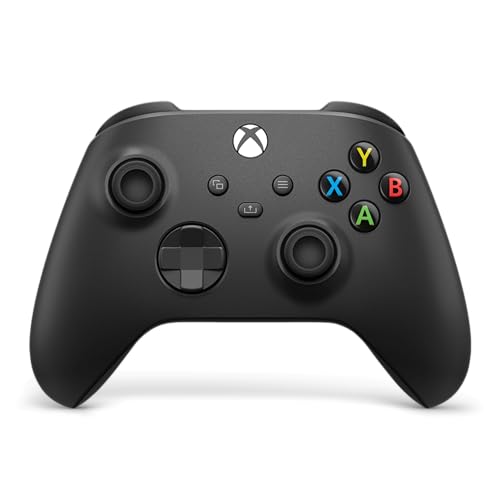
- Textured grips and sculpted surfaces improve comfort
- Works with Xbox, PC, mobile, and supported TVs
- USB-C, Bluetooth, wireless, and headset jack support
Best For: Players who want a reliable all-round controller for Xbox and PC
Feature-Packed Switch Alternative
VOYEE Wireless Switch Pro Controller

- Supports Switch, Lite, OLED, PC, Android, and iOS
- Adds gyro, turbo, programmable buttons, and rumble
- Includes RGB lighting with multiple modes
Best For: Switch players who want extra features and customization
Premium Competitive Pick
Xbox Elite Series 2 Controller

- Adjustable-tension thumbsticks and trigger locks
- Includes paddles, D-pad, thumbsticks, case, and dock
- Built for profiles, remapping, and pro-level tuning
Best For: Competitive players who want maximum control and customization
Budget Switch Light-Up Option

- Wireless Switch controller with RGB lightning design
- Offers gyro, turbo, vibration, and programmable buttons
- PC support is wired only
Best For: Budget Switch players who want extra features and RGB style
Wired Precision Pick

- Hall effect joysticks and triggers
- Plug-and-play wired USB setup
- Two custom back buttons and headset jack
Best For: Xbox and Windows players who want accurate wired control
Multi-Platform Wireless Pick

- TMR anti-drift joysticks and mechanical buttons
- Wireless, wired, and 2.4G with 1000Hz polling
- Charging dock, RGB lighting, and back buttons
Best For: Multi-platform gamers who want a feature-rich wireless controller
Official Xbox Value Pick

- Officially licensed for Xbox and Windows
- Dual rumble motors and impulse triggers
- 10 ft USB-C cable with headset jack
Best For: Xbox and Windows players wanting a simple wired official controller
Budget Drift-Free Multi-Platform Pick
Diswoe Wireless Pro Controller for Switch

- Hall Effect joysticks help reduce drift.
- Works with Switch, Switch 2, Lite, OLED, and PC.
- Includes turbo, vibration levels, and screenshot support.
Best For: Buyers wanting one versatile controller for Nintendo systems and PC
Best Overall Switch-and-PC Pro Pad
AceGamer Wireless Pro Controller

- Hall Effect sticks and instant wake-up support.
- Adds turbo, macros, gyro, and screenshot controls.
- Works with Switch 2, Switch, PC, Steam Deck, and mobile.
Best For: Gamers wanting the fullest feature set for Switch and PC
Everyday Cross-Platform Pick – Xbox Wireless Controller (Carbon Black)
If you want one of the most versatile game controllers under 200, the standard Xbox Wireless Controller is an easy fit. It offers a comfortable modernized design, textured grips for better handling, and broad compatibility across Xbox consoles, PC, mobile, and supported TVs.
Best For: Players who want a familiar, reliable controller for Xbox and PC gaming with simple wireless and USB-C connectivity.
Pros:
- Modernized sculpted design with textured grips for comfort and control
- Wireless, Bluetooth, and USB-C support for flexible device use
- Share button and 3.5mm headset jack add everyday convenience
- Remappable controls through the Xbox Accessories app
Cons:
- Battery powered, so it is not a built-in rechargeable model
- Best suited to Xbox-style layouts rather than advanced pro customization
This is the practical pick if you value simplicity, cross-device support, and a proven feel over extra competitive features. For many buyers shopping game controllers under 200, it covers the basics very well.
Feature-Packed Switch Alternative – VOYEE Wireless Switch Pro Controller
This VOYEE model stands out among game controllers under 200 if you want a Switch-style pad with extra features. It supports Switch, Lite, OLED, PC, Android, and iOS, while adding RGB lighting, motion controls, turbo, and programmable buttons for more flexible play.
Best For: Switch players who want motion control, turbo, and customizable buttons without paying for a premium first-party pad.
Pros:
- Compatible with Switch, Switch Lite, OLED, PC, Android, and iOS
- 6-axis gyro, programmable M1/M2 buttons, and turbo modes
- 4 levels of vibration feedback plus wake-up support
- RGB lighting with multiple display modes
Cons:
- PC use requires a cable
- Battery life is listed at about 10-15 hours, which is solid but not exceptional
If you want a budget-friendly controller with plenty of gaming extras, this one is easy to recommend. It is especially appealing for players who like added controls and visual flair.
Premium Competitive Pick – Xbox Elite Series 2 Controller
For buyers comparing game controllers under 200, the Xbox Elite Series 2 is the premium option here. It focuses on performance and customization with adjustable-tension thumbsticks, shorter hair trigger locks, interchangeable parts, and support across Xbox, PC, and cloud play.
Best For: Competitive players who want deep customization, fast trigger response, and a pro-style feel.
Pros:
- Adjustable-tension thumbsticks help fine-tune aim and control
- Hair trigger locks reduce pull distance for faster input
- Includes swappable thumbstick toppers, D-pad, paddles, case, and charging dock
- Supports up to 3 profiles and detailed settings in the Xbox Accessories app
Cons:
- Pricier than standard controllers in this roundup
- Designed for users who will actually use the advanced customization features
This is the strongest choice if your priority is precision and configuration rather than simplicity. It brings a true pro-controller feature set to players who want more control over every input.
Budget Switch Light-Up Option – VOYEE RGB Switch Controller
If you want one of the more affordable game controllers under 200 for Nintendo Switch-style play, this VOYEE controller focuses on the essentials plus a few extras. It offers wireless play, motion control, vibration, turbo support, and a bright RGB lightning-bolt design that makes it stand out.
Best For: Budget-minded Switch players who want motion sensing, turbo, and a colorful controller.
Pros:
- Compatible with Switch, Switch Lite, OLED, and wired PC use
- Includes 6-axis gyro, programmable buttons, and turbo modes
- Dual vibration motors with four feedback levels
- RGB lighting with multiple display modes and wake-up support
Cons:
- PC support is wired only
- Battery runtime is listed at 10-15 hours, so it is not the longest-lasting option
This is a solid value choice if you want a colorful controller with the core features most players use. It is less about high-end refinement and more about packing in useful extras at a practical price.
Wired Precision Pick – GameSir G7 SE for Xbox & PC
If you want game controllers under 200 that focus on precise control and simple setup, the GameSir G7 SE is a strong wired option for Xbox and PC players. Its Hall effect joysticks and Hall triggers are built for long service life, while the plug-and-play USB connection keeps setup quick.
Best For: Xbox and Windows players who want a wired controller with Hall effect sticks, Hall triggers, and extra back buttons.
Pros:
- Hall joysticks and Hall triggers help improve control accuracy and durability.
- Wired USB connection is plug-and-play with no extra drivers needed.
- Two custom back buttons can help reduce false triggers during play.
- Includes a 3.5 mm audio jack plus textured ergonomic grips.
Cons:
- Wired design limits movement compared with wireless controllers.
- Only compatible with Xbox consoles and Windows 10/11 PC.
Overall, this is a practical pick for players who value reliable wired performance and modern stick technology over wireless freedom.
Multi-Platform Wireless Pick – EasySMX D10 with Dock
Among game controllers under 200, the EasySMX D10 stands out if you want a feature-heavy wireless pad for PC and several mobile and console platforms. It combines TMR anti-drift joysticks, dual-mode triggers, mechanical buttons, and a charging dock for a more premium-feeling setup.
Best For: Multi-platform players who want a wireless controller with anti-drift sticks, fast inputs, and a charging dock.
Pros:
- Compatible with Windows PC, Android, Switch, Switch 2, and iOS.
- TMR joysticks are designed for anti-drift precision and long life.
- Dual-mode triggers and full mechanical buttons support different game genres.
- Includes a magnetic charging dock, 1000Hz polling, RGB lighting, and remappable back buttons.
Cons:
- Not compatible with Xbox, PlayStation, Amazon Luna, or GeForce Now.
- Some advanced features are platform-specific, such as the gyroscope on Switch only.
In short, this is a good fit if you want a versatile wireless controller with a lot of competitive-focused features and don’t need Xbox or PlayStation support.
Official Xbox Value Pick – PowerA Wired Black Controller
If you’re shopping for game controllers under 200 and want an officially licensed wired Xbox pad, the PowerA Black controller is a straightforward choice. It focuses on comfort, long cable reach, and familiar features like rumble, impulse triggers, and headset support.
Best For: Xbox Series X|S, Xbox One, and Windows players who want an affordable wired controller with official licensing.
Pros:
- Officially licensed for Xbox Series X|S and compatible with Xbox One and Windows 10/11.
- Dual rumble motors and impulse triggers add tactile feedback.
- 10 ft USB-C cable gives you more room than shorter wired controllers.
- Includes a 3.5 mm headset jack and ergonomic lightweight design.
Cons:
- Wired-only design may not suit players who want wireless freedom.
- Does not include the advanced stick or trigger tech found on some newer controllers.
For buyers who want a dependable official Xbox-compatible controller without extra setup, this model covers the basics well and keeps the price-focused approach simple.
Budget Drift-Free Multi-Platform Pick – Diswoe Wireless Pro Controller for Switch
If you want game controllers under 200 that work across Switch, Switch Lite, OLED, Switch 2, and PC, this Diswoe model is built for broad use. It focuses on the features many buyers care about most: Hall Effect sticks for drift resistance, low-latency wireless performance, long battery life, and extra controls like turbo, vibration adjustment, and screenshot capture.
Best For: Players who want one affordable controller for Switch family systems and PC gaming.
Pros:
- Hall Effect joysticks are designed for drift-free, precise control.
- Supports Switch, Switch Lite, OLED, Switch 2, and wired PC play.
- 8-12 hour battery life with a 2-3 hour recharge.
- Includes turbo, adjustable vibration, wake-up, and screenshot functions.
Cons:
- Battery life is solid, but not the longest in this group.
- The feature list is broad, so some buyers may prefer a simpler pad.
This is a practical value option if your priority is versatility rather than premium extras. For game controllers under 200, it stands out by packing a lot of useful play features into a single all-purpose pad.
Feature-Packed Wireless PC Pick – AceGamer Aurora II Controller
For shoppers comparing game controllers under 200, the AceGamer Aurora II is a strong all-rounder with a focus on customization and stable connectivity. It supports PC, Android, Switch, iOS, Switch 2, and Steam Deck, and adds Hall Effect sticks, programmable back buttons, RGB lighting, and both 2.4G and Bluetooth connection options.
Best For: Players who want extra customization and multi-platform support in a wireless controller.
Pros:
- Supports 2.4G wireless and Bluetooth connections.
- Hall Effect joysticks are designed for more precise control and less drift.
- Two programmable back buttons add convenience and customization.
- 1000mAh battery offers long play sessions between charges.
Cons:
- Setup differs between 2.4G and Bluetooth modes, so pairing takes a little attention.
- Not compatible with Xbox systems.
If you want a controller that leans into features, this one covers a lot of bases without leaving the budget category. Its mix of stable wireless, back-button mapping, and wide platform support makes it especially appealing for mixed-device gamers.
Best Overall Switch-and-PC Pro Pad – AceGamer Wireless Pro Controller
This AceGamer Wireless Pro Controller is a strong pick if you’re shopping for game controllers under 200 and want a feature set that covers a lot of ground. It supports Switch 2, Switch, PC, Steam Deck, iOS, and Android, and combines Hall Effect joysticks, wake-up support, turbo, macros, dual vibration, 6-axis gyro, and screenshot capture.
Best For: Players who want a feature-rich wireless controller for Switch and PC gaming.
Pros:
- Hall Effect joysticks are designed to resist drift and wear.
- Supports instant wake-up for Switch 2 and Switch.
- Macros, turbo, 6-axis gyro, and screenshot functions add flexibility.
- 800mAh battery delivers up to 12 hours of use.
Cons:
- Its many features may be more than casual players need.
- Battery life is good, but shorter than the 1000mAh rival in this roundup.
Overall, this is the most balanced option if you want a controller that feels fully loaded without stepping outside the budget tier. It combines broad compatibility with the kinds of extras that matter for action, racing, and motion-based games.
How We Picked the Best Game Controllers Under 200
We focused on controllers that offer strong value, broad platform support, and practical features players actually notice: stick technology, wireless reliability, button layout, battery life, and build quality. For Game Controllers Under 200, the best choices are usually the ones that reduce frustration over time, not just the ones with the most extras.
We also considered whether each controller is a better fit for competitive play, casual gaming, couch co-op, or travel. That means some picks emphasize performance and latency, while others prioritize compatibility and convenience.
Quick Comparison
In general, wired Xbox-style controllers are the simplest choice for zero-battery hassle and consistent input. Wireless models are better if you want freedom of movement or multi-device use. Hall-effect and similar anti-drift stick technologies are especially appealing if you want a controller that may hold up better over long-term use. If you play on Switch, PC, or mobile, cross-platform support can matter more than extra features you may never use.
Key Buying Factors for Game Controllers Under 200
Platform Compatibility
Make sure the controller works with your main system before anything else. Some are best for Xbox and Windows, while others are designed for Switch, Switch 2, PC, Android, or iOS.
Connection Type
Wired controllers can offer plug-and-play reliability and no charging concerns. Wireless controllers add convenience, but you should check whether they use Bluetooth, 2.4G, or a proprietary connection, since that affects latency and device support.
Stick Technology
Hall-effect, TMR, and similar anti-drift designs are worth a close look if you want better long-term consistency. They’re especially useful for frequent players who have dealt with worn analog sticks before.
Ergonomics and Controls
Grip texture, button feel, trigger response, and thumbstick layout all affect comfort during longer sessions. If you play action games or shooters, trigger locks, adjustable sticks, and tactile buttons may matter more than flashy lighting.
Who Should Buy Which Game Controllers Under 200?
If you want the most familiar all-around option, look for a mainstream controller with wide compatibility and solid ergonomics. If you mainly game on Xbox or PC, a wired performance controller can be a smart value pick. If you play on Switch or a mix of devices, a wireless multi-platform controller is often the most flexible choice. And if stick drift is your biggest concern, prioritize models with Hall-effect or similar anti-drift technology.
For most buyers shopping Game Controllers Under 200, the best choice is the one that matches your platform first, then your preferred connection type, and finally the features you’ll actually use every day.