
The best condenser microphones can make vocals, podcasts, streams, instruments, and video calls sound clearer and more detailed. The right choice depends on your recording setup, connection type, room, and budget.
We compare 10 popular USB and XLR models, from beginner-friendly desktop microphones to studio-focused options, so you can choose a mic that fits the way you create.
Best 10 Condenser Microphones Picks for 2026
Best Value Studio Pick
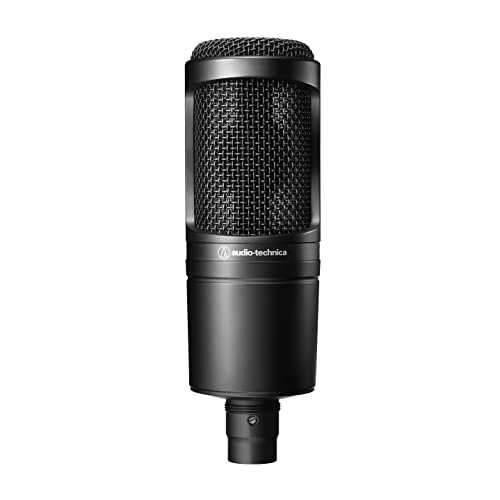
- Cardioid XLR condenser for home studios
- Handles high SPLs with a wide dynamic range
- Includes mount, adapter, and protective pouch
Best For: Project and home-studio recording
Best for Streamers

- USB-C condenser with plug-and-play setup
- Clipguard 2.0 and Auto Gain simplify levels
- Built-in DSP effects and headphone monitoring
Best For: Streaming and computer-based voice recording
Best Complete XLR Bundle
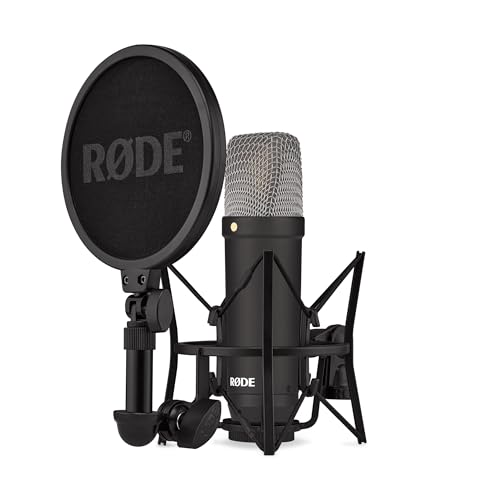
- Large-diaphragm XLR condenser for vocals
- Very low 4.5 dBA self-noise
- Includes shock mount, pop filter, and cable
Best For: Vocal recording with an audio interface
Studio Detail Pick

- Hand-tuned K67-style capsule
- High-pass filter and -10 dB pad
- Includes springless shockmount and flight case
Best For: Home studios and voice-over recording
Plug-and-Play Streaming Pick

- USB setup for PC and Mac
- Four selectable pickup patterns
- Onboard controls and Blue VO!CE software
Best For: Streaming, podcasting, and computer recording
Budget Studio Workhorse

- Large-diaphragm condenser capsule
- Cardioid pattern reduces ambience
- Includes shockmount and XLR cable
Best For: Affordable home-studio vocals and instruments
Best Hybrid Setup
MAONO A04 Gen2 XLR/USB Condenser Microphone

- USB and XLR connectivity
- 192kHz/24-bit USB recording
- Complete arm-stand accessory kit
Best For: Creators planning to use USB now and XLR later
Best for Gaming Style
TONOR TC310+ RGB USB Microphone

- RGB lighting with brightness control
- Tap-to-mute and gain adjustment
- Complete boom-arm kit included
Best For: Gamers and streamers who want visual effects and quick controls
Best Simple Desktop Pick
FIFINE K669B USB Condenser Microphone

- Plug-and-play USB setup
- Metal body with tripod stand
- Built-in volume control
Best For: Everyday PC recording, meetings, gaming, and streaming
Best Value Studio Pick – Audio-Technica AT2020
The Audio-Technica AT2020 is a practical entry point for condenser microphones in project and home studios. Its cardioid pattern helps isolate the sound source, while high SPL handling and a wide dynamic range make it suitable for varied recording tasks.
Best For: Home-studio recording with an audio interface and XLR setup.
Pros:
- Cardioid pickup helps reduce sound from the sides and rear.
- High SPL handling and wide dynamic range support versatile recording.
- Includes a stand mount, threaded adapter, and protective pouch.
Cons:
- Requires an XLR cable, audio interface, and phantom power.
- Does not offer USB connectivity or onboard controls.
The AT2020 is a straightforward choice when you want capable studio sound without moving beyond a traditional XLR workflow. It is especially sensible for a first project-studio microphone.
Best for Streamers – Elgato Wave:3 MK.2
The Elgato Wave:3 MK.2 is a USB condenser microphone built for convenient computer-based recording and streaming. USB-C connectivity, Auto Gain, Clipguard 2.0, onboard effects, and direct headphone monitoring make setup and level management simple.
Best For: Streaming, gaming, podcasting, and voice recording on a PC or Mac.
Pros:
- USB-C connection enables a quick plug-and-play setup.
- Clipguard 2.0 and Auto Gain help control clipping and levels.
- Offers onboard voice enhancement, compressor, EQ, and headphone monitoring.
- Wave Link provides routing, effects, and monitoring control.
Cons:
- Designed for USB use rather than a traditional XLR interface.
- Its software and DSP features may be more than basic recording requires.
Choose the Wave:3 MK.2 if you value fast setup and hands-on control during live sessions. Its built-in processing and monitoring are particularly useful for creators who do not want a separate mixer or signal chain.
Best Complete XLR Bundle – RØDE NT1 Signature
The RØDE NT1 Signature is a large-diaphragm XLR condenser microphone aimed at vocals and studio recording. Its tight cardioid pattern focuses on the performer, and the included shock mount, pop filter, and cable provide a useful starting setup.
Best For: Vocalists, streamers, and home-studio users who already have an audio interface.
Pros:
- Legendary NT1 voicing is designed for vocal recording.
- Very low 4.5 dBA self-noise supports quiet takes.
- Includes the SM6 shock mount, pop filter, six-meter XLR cable, and dust cover.
- Tight cardioid pickup helps reject room sound.
Cons:
- Requires an audio interface and XLR-based setup.
- Not a direct USB microphone for mobile or computer plug-and-play use.
The NT1 Signature stands out when you want a more complete XLR vocal package rather than only the microphone. Its unusually low self-noise and included accessories make it a strong fit for a focused home recording space.
Best All-in-One USB Setup – RØDE NT-USB+
The RØDE NT-USB+ brings studio-style condenser microphone features directly to computers, tablets, and smartphones. It combines USB-C connectivity with zero-latency headphone monitoring, onboard controls, APHEX processing through RØDE Central, and a desktop stand with detachable pop filter.
Best For: Podcasting, music recording, streaming, calls, and mobile-friendly desktop setups.
Pros:
- USB-C connection works with computers and mobile devices.
- Zero-latency headphone output supports real-time monitoring.
- RØDE Central provides APHEX processing, including Aural Exciter and Big Bottom.
- Includes a desktop stand, ring mount, pop filter, and USB-C cable.
Cons:
- USB-only connectivity may not suit users building an XLR studio chain.
- Software processing requires using RØDE Central for access to the APHEX effects.
The NT-USB+ is a convenient choice for creators who want a complete desktop recording solution with minimal extra equipment. Its included accessories and direct monitoring make it ready for podcasts and voice work out of the box.
Studio Detail Pick – Stellar X3
The Stellar X3 is a versatile choice among condenser microphones for vocal recording, voice-over work, and other studio sources. Its hand-tuned K67-style capsule, high-pass filter, and -10 dB pad give you useful control over tone, proximity effect, background rumble, and loud signals.
Best For: Home studios, voice-over recording, and users who want added recording controls with an XLR setup.
Pros:
- Hand-tuned K67-style capsule is designed for smoother midrange response and improved off-axis coloration.
- High-pass filter helps reduce proximity effect and low-frequency rumble.
- -10 dB pad adds headroom for louder sources.
- Includes a springless shockmount, aluminum flight case, wind cover, and adapters.
Cons:
- Requires a 48V audio interface or other compatible phantom-power setup.
- XLR connectivity is less direct than a USB microphone for computer recording.
With a 20 Hz–20 kHz frequency range, 87 dB signal-to-noise ratio, and practical included accessories, the Stellar X3 is a well-equipped option for buyers building an XLR-based recording chain.
Plug-and-Play Streaming Pick – Blue Yeti USB
The Blue Yeti is one of the most straightforward condenser microphones for PC and Mac recording, streaming, podcasting, and online meetings. Its USB connection, desktop stand, onboard controls, and four pickup patterns make it flexible without requiring a separate audio interface.
Best For: Streamers, podcasters, gamers, and computer users who want simple setup and flexible pickup options.
Pros:
- USB plug-and-play connection works with PC and Mac.
- Four pickup patterns—cardioid, omni, bidirectional, and stereo—support different recording arrangements.
- Onboard gain, headphone volume, pattern selection, and mute controls simplify operation.
- Blue VO!CE software provides vocal effects, modulation, and HD audio samples.
Cons:
- USB connectivity is less suitable for users specifically building an XLR studio system.
- The included desktop design weighs 3.5 pounds and may take more desk space than a compact microphone.
With a custom three-capsule array, no-latency monitoring, and an adjustable stand, the Blue Yeti is a convenient all-in-one choice for computer-based audio production.
Budget Studio Workhorse – Mackie EM-91C
The Mackie EM-91C is a practical entry point among condenser microphones for studio vocals and instruments. Its large-diaphragm capsule, cardioid pattern, rugged construction, shockmount, and included XLR cable provide a straightforward setup for home or larger studios.
Best For: Budget-conscious home-studio users recording vocals and instruments through an audio mixer or interface.
Pros:
- Affordable professional-quality condenser microphone for studio use.
- Cardioid pattern helps reduce ambient sound around the microphone.
- Rugged, reliable construction suits regular studio use.
- Includes a shockmount and XLR cable.
Cons:
- Its single cardioid pattern offers less placement flexibility than a multipattern microphone.
- Requires an audio mixer or compatible XLR recording setup.
The EM-91C keeps the feature set focused, making it a sensible option when you want a large-diaphragm XLR microphone and essential accessories without adding unnecessary complexity.
Best Hybrid Setup – MAONO A04 Gen2 XLR/USB Condenser Microphone
The MAONO A04 Gen2 is one of the most flexible condenser microphones here, with both USB and XLR connectivity. Its 192kHz/24-bit USB recording, cardioid pickup, and included accessories make it suitable for home podcasting, voiceover, streaming, and other content-creation tasks.
Best For: Creators who want plug-and-play USB recording now with the option to move to an XLR interface or mixer later.
Pros:
- Supports both USB and XLR connections.
- Offers up to 192kHz/24-bit sampling in USB mode.
- Includes a shock mount, pop filter, windscreen, and adjustable arm stand.
- MAONO Link provides gain, noise-reduction, EQ, compressor, and limiter controls in USB mode.
Cons:
- XLR cable is not included.
- Software controls are available only in USB mode.
- XLR use with phones, iOS devices, or tablets requires phantom power.
Choose this model if connection flexibility and a complete desktop setup matter more than having the simplest possible microphone. The included accessories also reduce the need for immediate add-on purchases.
Best for Gaming Style – TONOR TC310+ RGB USB Microphone
The TONOR TC310+ is a gaming-focused USB condenser microphone with built-in RGB lighting, one-tap mute, and a physical gain control. It arrives as a complete boom-arm kit, making it a practical choice for streaming, online chat, and gaming setups.
Best For: PC and console gamers or streamers who want convenient controls, RGB effects, and a boom-arm mounting setup.
Pros:
- One-tap top mute and rotating gain control simplify live use.
- Offers four RGB modes with adjustable brightness.
- Includes a metal boom arm, clamp, pop filter, shock mount, and USB cable.
- Compatible with desktop computers, laptops, macOS, PS4, and PS5.
Cons:
- Uses USB connectivity rather than offering XLR output.
- The desk clamp is intended for surfaces no thicker than 2.36 inches.
- Requires a properly connected USB Type-C plug and a USB 2.0 or 3.0 port.
This is a strong fit for users who value fast controls and visual customization during streams. Its included arm and gaming-oriented features make it less dependent on separate mounting accessories.
Best Simple Desktop Pick – FIFINE K669B USB Condenser Microphone
The FIFINE K669B is a straightforward USB condenser microphone for computer recording, meetings, gaming, and streaming. Its metal body, cardioid pickup pattern, built-in volume knob, and included tripod keep the setup simple for everyday desktop use.
Best For: Users who need an affordable-style plug-and-play microphone for a PC, laptop, PS4, or PS5 without an external phantom-power setup.
Pros:
- Plug-and-play USB connection with an included 5.9-foot cable.
- Cardioid design focuses on the main voice source and reduces background sound.
- Durable metal construction and a stable tripod stand.
- On-microphone volume control can also be set to zero for privacy.
Cons:
- Not compatible with Xbox or phones.
- USB-only, with no XLR connection for an audio interface.
- Some applications may need automatic volume adjustment disabled to prevent level changes.
The K669B is a sensible choice when ease of setup and basic voice clarity are the priorities. It lacks advanced software and XLR expansion, but its desktop controls and included stand cover common recording and communication needs.
How We Picked These Condenser Microphones
We focused on microphones suited to common recording and communication needs, including home studios, podcasting, streaming, gaming, voiceovers, vocals, and online meetings. The selection includes both USB models for plug-and-play convenience and XLR microphones for users who want more control through an audio interface or mixer.
We also considered pickup pattern, included controls, monitoring features, accessories, recording flexibility, brand reputation, and value. Because microphone performance depends heavily on the room and source, no single model is ideal for every buyer.
Quick Comparison
| Best For | Connection | What to Look For |
|---|---|---|
| Home studio recording | XLR | Detailed sound and an audio interface |
| Streaming and gaming | USB | Simple controls, headphone monitoring, and mute access |
| Podcasting and voiceovers | USB or XLR | Clear speech reproduction and low handling noise |
| Budget recording | USB or XLR | Useful accessories and easy setup |
Key Buying Factors for Condenser Microphones
USB Versus XLR
USB microphones connect directly to a computer and typically include a built-in converter, making them convenient for beginners, streamers, and podcasters. XLR microphones require an audio interface or mixer, but they offer a more expandable setup and can integrate with studio hardware.
Pickup Pattern and Room Noise
Most models in this roundup use a cardioid pattern, which prioritizes sound from the front and reduces some noise from behind. However, Condenser Microphones are sensitive, so fans, keyboards, untreated walls, and traffic can still be noticeable. A quiet room and proper mic placement often matter as much as the microphone itself.
Controls and Monitoring
Built-in gain controls, tap-to-mute functions, headphone outputs, and direct monitoring can make USB models easier to use during live sessions. For studio recording, prioritize consistent sound, a suitable frequency response, and compatibility with your interface.
Accessories and Positioning
Check whether the microphone includes a stand, boom arm, shock mount, pop filter, or windscreen. Position the mic close enough for a strong signal but far enough to reduce plosives and excessive bass buildup. A stable stand and pop filter can noticeably improve results.
Who Should Buy Which Condenser Microphones?
Choose a USB microphone if you want the fastest setup for streaming, meetings, gaming, or podcasting. Look for onboard controls and headphone monitoring if you record live. Choose an XLR model if you already own an interface or plan to build a more advanced studio system.
First-time buyers should prioritize ease of use and included accessories, while vocalists and musicians may benefit from a more studio-oriented large-diaphragm model. If your room is noisy or untreated, invest in placement, acoustic improvements, and gain control before spending substantially more on a microphone.