
Choosing the right controller can make gaming feel instantly easier, especially if you are new to consoles or PC play. The best options for beginners balance comfort, simple setup, and dependable controls.
In this roundup, we focused on beginner-friendly picks that work across popular platforms and avoid unnecessary complications, so you can start playing with confidence.
Best 10 Game Controllers for Beginners Picks for 2026
RGB Budget Pick

- 9-color RGB lighting with 4 modes
- One-key pairing and wake-up support
- Programmable buttons, turbo, and motion control
Best For: New Switch players who want an easy-to-use wireless controller with extra features
Precision PC Choice
8Bitdo Ultimate 2C Wireless Controller

- Hall effect sticks and triggers
- 1000Hz polling on wired/2.4G
- Remappable L4/R4 bumpers without software
Best For: Beginners who want a responsive controller for Windows or Android
Wired Starter Classic

- Xbox-style layout with easy familiarity
- Plug-and-play USB connection
- 10 programmable buttons and 8-way D-pad
Best For: Beginners who want a simple wired PC controller
Feature-Rich Switch Pick
MYSTILUCK Wireless Pro Controller
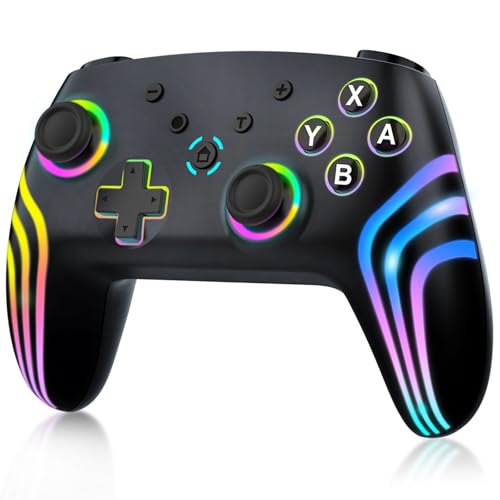
- Works with Switch, Switch 2, and PC
- Hall effect joystick tech for accuracy
- RGB lighting, vibration, gyro, and turbo
Best For: Beginners who want a versatile wireless controller for multiple systems
Budget-Friendly Wired Pick
PowerA Wired Xbox Series X|S Controller

- Plug-and-play wired USB-C setup
- Dual rumble motors and impulse triggers
- 10 ft cable with ergonomic comfort
Best For: Beginners who want a simple wired controller for Xbox or Windows PC
Flexible Multi-Device Choice
GameSir Nova Lite Wireless Controller

- Bluetooth, 2.4G, and USB-C connectivity
- Hall effect sticks help reduce drift
- Works with PC, Switch, mobile, and Steam Deck
Best For: Beginners who want one wireless controller for multiple devices
Classic Plug-and-Play Option

- Plug-and-play wired setup for PC and Xbox 360
- Rumble feedback and responsive controls
- Comfortable grip with 7.2 ft cord
Best For: Beginners who want a basic wired controller for PC or Xbox 360
Wireless all-rounder
EasySMX X15 Wireless PC & Steam Gaming Controller

- Hall Effect sticks and triggers for drift resistance
- 2.4G, Bluetooth, and wired USB-C connections
- Works with PC, Steam, Switch, Android, and iOS
Best For: Beginners who want one flexible controller for multiple devices
Easiest setup
GameSir G7 SE Wired Controller

- Plug-and-play wired USB setup
- Hall joysticks and Hall triggers
- Includes 2 custom back buttons and 3.5mm audio
Best For: Beginners on Xbox or PC who want simple wired play
Fast wired multi-platform
GameSir Tegenaria Lite Wired Game Controller

- 1000Hz wired connection for low latency
- Hall Effect sticks for drift-free control
- Works with Switch, Android, iOS, PC, Steam, and PS3
Best For: Beginners who want a responsive wired controller across several platforms
RGB Budget Pick – VOYEE Switch Pro Controller
If you want game controllers for beginners that feel familiar but still add extra features, this VOYEE Switch controller is an easy place to start. It supports Switch, Switch Lite, Switch OLED, and wired PC play, and the one-key pairing plus wake-up function helps keep setup simple.
Best For: New Switch players who want a feature-packed wireless controller with easy pairing and adjustable extras.
Pros:
- 9-color RGB lighting with four light modes for a fun look
- One-key pairing and one-key wake-up support for Switch consoles
- Programmable M1/M2 buttons plus three turbo speeds
- 6-axis motion control and four vibration levels add helpful game feedback
Cons:
- PC use is limited to wired connection
- Charging time is 3-4 hours
- Lighting and extra functions may be more than some beginners need
This is a practical starter controller if you want straightforward wireless play with room to grow into turbo, motion, and remapping features. It stands out most for Switch users who like a colorful design without giving up core control features.
Precision PC Choice – 8Bitdo Ultimate 2C Wireless Controller
For game controllers for beginners on PC or Android, the 8Bitdo Ultimate 2C keeps things simple while still offering better control than many basic pads. It works with Windows and Android, supports 2.4G and wired play at 1000Hz polling, and includes Hall effect joysticks and triggers for smoother, wear-resistant use.
Best For: Beginners who want a responsive, durable controller for Windows or Android gaming.
Pros:
- Hall effect joysticks and triggers for durability and reduced wear
- 1000Hz polling rate on 2.4G and wired connections
- Extra remappable L4/R4 bumpers without software
- Turbo function and refined D-pad/bumpers for better control
Cons:
- Designed for Windows and Android, not consoles
- Best polling performance is limited to 2.4G and wired use
- Lightweight feel may not suit everyone
This controller is a strong pick if you want a beginner-friendly layout with room for more advanced performance. Its Hall effect hardware and simple remapping make it especially appealing for players who want accuracy without a steep learning curve.
Wired Starter Classic – Logitech G F310 Gamepad
Logitech G F310 Wired Gamepad Controller Console - Blue/Black | Console-like layout, 4-switch D-pad
Check Price On AmazonIf you are comparing game controllers for beginners on PC, the Logitech G F310 is one of the easiest wired options to understand. Its console-like layout keeps the controls familiar, and the simple plug-and-play USB connection makes setup straightforward for supported Windows systems.
Best For: Beginners who want a familiar, low-fuss wired controller for PC gaming.
Pros:
- Familiar Xbox-style button layout with little learning curve
- Simple plug-and-play USB connection
- Broad game support for new titles and older favorites
- 10 programmable buttons and an 8-way programmable D-pad
Cons:
- Wired only, so there is no wireless play
- Profiler software is required for some customization
- Official support listed for older Windows versions
This is a sensible entry-level PC controller if you want the most familiar layout possible. It focuses on ease of use and broad compatibility rather than flashy extras, which is often exactly what beginners need.
Feature-Rich Switch Pick – MYSTILUCK Wireless Pro Controller
Among game controllers for beginners, this MYSTILUCK wireless controller offers a lot of useful features without changing the basic Switch-style layout. It works with Switch, Switch Lite, Switch OLED, Switch 2, and PC, and includes Hall effect buttons, dual vibration, 6-axis gyroscope support, and turbo.
Best For: Beginners who want a versatile wireless controller with modern features and wide console support.
Pros:
- Supports Switch, Switch 2, Switch Lite, OLED, Pro, and PC
- Hall effect joystick technology for zero drift and accuracy
- RGB lighting with 7 colors and 4 lighting modes
- Dual motors, turbo, and 6-axis gyroscope for added gameplay feedback
Cons:
- HOME button cannot wake up Switch 2
- No C button for voice chat functions
- Extra lighting and features may be more than basic players need
This controller is a good fit if you want a beginner-friendly wireless pad that still feels packed with useful upgrades. Its wide compatibility and Hall effect sticks make it especially appealing for players who expect to keep using the same controller across multiple systems.
Budget-Friendly Wired Pick – PowerA Wired Xbox Series X|S Controller
If you’re looking at game controllers for beginners, this wired PowerA option is an easy place to start. It keeps the setup simple with plug-and-play USB-C connection, offers familiar Xbox-style controls, and adds comfort-focused features like an ergonomic shape and a long 10 ft cable for relaxed play.
Best For: New players who want a straightforward wired controller for Xbox or Windows PC use.
Pros:
- Wired USB-C connection keeps setup simple
- Dual rumble motors and impulse triggers add tactile feedback
- Lightweight ergonomic design suits longer sessions
- 10 ft cable gives you extra reach and flexibility
Cons:
- Wired-only design may limit movement
- No mention of wireless play
- Uses a standard black finish only
This is a practical beginner-friendly controller if you want a reliable, easy-to-understand layout without extra setup complexity. The extra cable length and headset jack make it especially convenient for casual console or PC gaming.
Flexible Multi-Device Choice – GameSir Nova Lite Wireless Controller
For gamers comparing game controllers for beginners, the GameSir Nova Lite stands out because it works across several devices and gives you multiple ways to connect. The hall effect joysticks are a useful plus for smoother stick performance, and the Bluetooth, 2.4G dongle, and USB-C options make it easier to match the controller to your setup.
Best For: Beginners who want one wireless controller that can move between PC, Switch, mobile, and Steam Deck.
Pros:
- Three connection modes: Bluetooth, 2.4G dongle, and USB-C
- Hall effect joysticks are designed for no dead zone and no drifting
- Compatible with Windows 10/11, Switch, Android, iOS, and Steam Deck
- Built-in battery offers up to 10 hours of playtime
Cons:
- Battery life is limited compared with some longer-lasting wireless controllers
- Features like Turbo and button customization may be more than some beginners need
- Sold in a pink finish in the provided listing details
This is a good starter wireless controller if flexibility matters more than a single-platform focus. It adds helpful features without requiring a complicated setup, making it easy to use across different devices.
Classic Plug-and-Play Option – VOYEE Wired PC 360 Controller
Among game controllers for beginners, this VOYEE wired pad is the most familiar, no-frills choice. It supports plug-and-play use on Windows PCs and Xbox 360 systems, includes responsive joysticks and vibration feedback, and uses a comfortable grip shape for longer sessions.
Best For: Beginners who want a straightforward wired controller for Windows PC or Xbox 360-compatible play.
Pros:
- Simple plug-and-play setup on supported systems
- Rumble feedback adds basic immersion
- Comfort-focused grip contours help during longer play
- 7.2 ft cord provides decent reach
Cons:
- Not listed as compatible with newer Xbox consoles
- Notes say it is not for FPS games
- Wired-only design may feel limiting for some users
If you want a basic controller that behaves like a classic gamepad, this is a practical entry-level pick. Its simple compatibility and comfortable shape make it easy to recommend for casual PC gaming.
Wireless all-rounder – EasySMX X15 Wireless PC & Steam Gaming Controller
If you want game controllers for beginners that can handle multiple devices without much setup fuss, the EasySMX X15 is a practical pick. It supports Windows PC, Steam, Switch, Android, and iOS, and gives you 2.4G wireless, Bluetooth, and wired USB-C options so you can start simple and expand later.
Best For: New players who want one controller for PC, Switch, and mobile gaming with Hall Effect precision.
Pros:
- Hall Effect joysticks and triggers help prevent stick drift.
- Three connection modes: 2.4G wireless, Bluetooth, and wired USB-C.
- Works across Windows PC, Steam, Switch, Android, and iOS.
- Two programmable back buttons and 20-hour battery life add flexibility.
Cons:
- No mic jack.
- No gyro sensor.
- ABXY layout switch may take a quick setup step when changing between PC and Switch modes.
Overall, this is a well-rounded starter controller if you value compatibility and low-drift sticks more than extra console-specific features. The wireless options and long battery life make it easy to use as your main everyday gamepad.
Easiest setup – GameSir G7 SE Wired Controller
For game controllers for beginners, the GameSir G7 SE keeps setup straightforward: plug in the removable USB cable and play on Xbox Series X/S, Xbox One, or Windows 10/11. Its Hall joysticks and Hall triggers are built for precise control, while the wired connection avoids battery worries and connection pairing.
Best For: First-time buyers who want a wired Xbox and PC controller with easy setup and reliable control.
Pros:
- Plug-and-play wired USB connection with no additional drivers needed.
- Hall joysticks and Hall triggers for improved accuracy and long service life.
- Includes 2 custom back buttons for extra control options.
- 3.5mm audio jack supports headset connection.
Cons:
- Wired only, so there is no wireless mode.
- Designed for Xbox and Windows, not broader multi-platform use.
- Requires a USB connection every time you play.
This is a good beginner option if you want a dependable controller that feels familiar and is easy to get working right away. The simple wired setup and Hall sensor controls make it a strong pick for newcomers on Xbox or PC.
Fast wired multi-platform – GameSir Tegenaria Lite Wired Game Controller
If you’re comparing game controllers for beginners and want something responsive without a complicated feature set, the GameSir Tegenaria Lite is built around wired simplicity. It supports Switch, Android, iOS, PC, Steam, and PS3, and its 1000Hz polling rate plus Hall Effect sticks focus on fast, accurate input.
Best For: New players who want a wired multi-platform controller with drift-resistant sticks and low latency.
Pros:
- 1000Hz wired connection for ultra-low latency.
- Hall Effect sticks help eliminate stick drift.
- Two mappable back buttons and turbo support add control options.
- Ergonomic grip and cushioned buttons are made for longer sessions.
Cons:
- Wired only, so it is not ideal if you want wireless freedom.
- No batteries or signal drops, but you must stay tethered to the cable.
- Retro-style design may not suit every setup.
This controller makes sense for beginners who want quick responsiveness and broad platform support in a straightforward wired package. The Hall sticks and mappable buttons give you room to grow without making the controller feel overwhelming.
How We Picked the Best Game Controllers for Beginners
We prioritized controllers that are easy to learn, comfortable to hold, and broadly compatible with the systems beginners are most likely to use. We also favored models with straightforward wired or wireless pairing, responsive buttons, and reliable build quality that supports casual and regular play.
Quick Comparison: What Matters Most
For Game Controllers for Beginners, the biggest differences usually come down to platform compatibility, connection type, and feel in the hand. Wired models are often the simplest choice for plug-and-play use, while wireless controllers offer more freedom once setup is complete. Hall effect sticks and triggers can be a helpful bonus because they are designed for smoother movement and improved durability.
Key Buying Factors for Game Controllers for Beginners
Compatibility
Start by matching the controller to your main device. Some models are best for Switch, others for Xbox or PC, and a few work across multiple platforms. If you plan to play on more than one system, multi-platform support can save money and reduce confusion.
Connection Type
Wired controllers are usually the easiest for beginners because they do not require charging or pairing steps. Wireless options are more convenient for couch gaming, but they may take a little more setup and battery management.
Comfort and Layout
Look for a shape that fits your hands well and a button layout that feels intuitive. A comfortable grip matters more than flashy features if you are still learning control schemes, camera movement, and timing.
Extra Features
Hall effect sticks, adjustable trigger behavior, and programmable buttons can improve performance, but they are not essential for every first-time buyer. For many players, simplicity is still the better choice.
Who Should Buy Which Game Controllers for Beginners?
If you want the simplest path, choose a wired controller with native support for your platform. If you play mostly on PC, a multi-platform wireless model may offer the best mix of convenience and flexibility. Switch players should look for reliable wireless comfort, while Xbox users may prefer a controller that is officially compatible and easy to connect. For shoppers comparing Game Controllers for Beginners, the right pick is usually the one that matches your system first and adds advanced features second.