
Choosing a first PC case can feel harder than it should. Compatibility, airflow, cable space, front-panel ports, and included fans all affect how easy your build will be to assemble and use.
We selected 10 computer cases for beginners across budget, mid-range, and feature-focused options, including compact designs, spacious ATX towers, mesh-front models, and tempered-glass cases with preinstalled fans.
Best 10 Computer Cases for Beginners Picks for 2026
Feature-Rich Cooling Pick

- Seven PWM ARGB fans included
- 400 mm GPU clearance
- Panoramic tempered-glass design
Best For: Beginners wanting abundant cooling and RGB lighting
Simple Budget Build

- Supports three motherboard sizes
- 120 mm rear fan included
- Includes 5.25-inch drive bay
Best For: Basic home, office, or gaming desktops
Practical Airflow Choice

- Perforated front and top panels
- Supports standard ATX motherboards
- Includes cable-management support
Best For: Straightforward first gaming or general-purpose builds
Showcase Upgrade Pick

- Three reverse ARGB fans included
- Supports up to ten 120 mm fans
- Removable wraparound glass panels
Best For: Showcase builds with expansion and modern cooling options
Best Budget ATX Starter
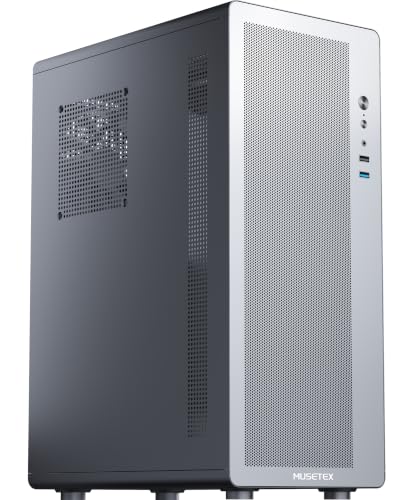
- Compact, lightweight ATX-compatible design
- Mesh airflow with magnetic dust filter
- Supports air coolers up to 160mm
Best For: First-time builders seeking a practical air-cooled case
Best Expandable Mid-Tower

- Mesh front panel for airflow
- Supports up to eight 120mm fans
- Fits GPUs up to 340mm and a 360mm radiator
Best For: Beginners planning future cooling or component upgrades
Best Ready-to-Cool Showcase

- Four non-LED fans included
- 270-degree tempered-glass viewing area
- Supports 410mm GPUs and 360mm radiators
Best For: Beginners building a spacious, highly visible gaming PC
Best Value Airflow Pick
MOROVOL 621 RGB Mid-Tower Case

- Four pre-installed 120mm RGB fans
- Supports ATX, Micro-ATX, and Mini-ITX
- Removable tempered-glass side panel
Best For: First-time builders seeking an affordable, airflow-focused case
Best Modern Connectivity

- Four pre-installed ARGB PWM fans
- Supports GPUs up to 420mm
- Includes USB 3.0 and Type-C ports
Best For: ATX beginners planning a spacious, upgrade-friendly build
Best Showcase Design
MUSETEX Y6 ARGB Mid-Tower Case

- Seven pre-installed Infinity Mirror ARGB fans
- 270-degree tempered-glass viewing area
- Supports GPUs up to 410mm and 360mm radiators
Best For: Beginners building a highly visible, customizable gaming PC
Feature-Rich Cooling Pick – MUSETEX K2 ATX ARGB Case
For beginners shopping for computer cases for beginners, the MUSETEX K2 offers a visually impressive starting point with seven pre-installed PWM ARGB fans, a spacious ATX layout, and straightforward front-panel connectivity. Its dual tempered-glass design is especially appealing if you want to showcase your components.
Best For: First-time builders who want strong out-of-the-box airflow, RGB lighting, and room for large components.
Pros:
- Includes seven adjustable-speed PWM ARGB fans.
- Supports graphics cards up to 400 mm and CPU coolers up to 165 mm.
- Features a Type-C port, two USB 3.0 ports, and panoramic dual tempered glass.
Cons:
- The power-supply length limit varies depending on whether the hard-drive cage is installed.
- Power supply, motherboard, graphics card, and radiator are not included.
The K2 is a strong all-in-one option for beginners who want cooling and lighting already handled. Just check your power-supply dimensions and component clearances before purchasing.
Simple Budget Build – Zalman T6 ATX Mid-Tower Case
Among computer cases for beginners, the Zalman T6 keeps the setup practical with a conventional mid-tower layout, broad motherboard support, and a pre-installed 120 mm rear fan. Its mesh design makes it a sensible choice for a basic home, office, or gaming build.
Best For: Beginners building an uncomplicated ATX, micro-ATX, or Mini-ITX desktop with traditional drive support.
Pros:
- Supports ATX, micro-ATX, and Mini-ITX motherboards.
- Includes a 120 mm rear fan and mesh panels for airflow.
- Provides a 5.25-inch external drive bay plus multiple 2.5-inch and 3.5-inch drive positions.
Cons:
- Only one fan is pre-installed.
- It does not fit ATX motherboards with side-facing SATA ports.
- Front I/O lacks a USB Type-C port.
The T6 is easy to understand and versatile for everyday builds, but beginners should verify motherboard SATA-port orientation and plan for additional fans if they need more airflow.
Practical Airflow Choice – Thermaltake Versa H21 Case
Thermaltake Versa H21 SPCC ATX Mid Tower Computer Chassis CA-1B2-00M1NN-00,Black
Check Price On AmazonThe Thermaltake Versa H21 is a straightforward option for computer cases for beginners, combining a familiar ATX mid-tower format with perforated front and top panels. Its accessible layout and cable-management support can help make a first build more manageable.
Best For: New builders who want a conventional ATX case for a gaming or general-purpose desktop.
Pros:
- Perforated front and top panels promote airflow.
- Supports standard ATX motherboards and long graphics cards.
- Offers tool-free installation features, cable-management support, and liquid-cooling support.
Cons:
- Only one fan is listed as included.
- Front I/O has one USB 3.0 and one USB 2.0 port, but no Type-C port.
- The supplied notes do not specify exact graphics-card or radiator clearances.
The Versa H21 favors practical ventilation and familiar components over premium styling. It is a reasonable starter chassis, provided you confirm the dimensions of your selected cooler and graphics card.
Showcase Upgrade Pick – CORSAIR 3500X RS ARGB
For beginners considering computer cases for beginners with a premium showcase style, the CORSAIR 3500X RS ARGB combines wraparound tempered glass with three pre-installed reverse ARGB fans. Removable panels and support for Mini-ITX through EATX motherboards make access and future upgrades more convenient.
Best For: New builders who prioritize a clean panoramic display, modern expandability, and strong fan-installation flexibility.
Pros:
- Includes three RS120-R ARGB reverse fans.
- Supports up to ten 120 mm fans and radiators up to 360 mm.
- Removable glass panels simplify building and maintenance.
- Supports Mini-ITX through EATX and selected reverse-connection motherboards.
Cons:
- Only three fans are included; other components are sold separately.
- The glass-focused design may require careful cable routing to preserve the view.
The 3500X is a flexible, visually polished case for beginners who want room to grow. Its broad compatibility is useful, but budget separately for any additional fans or cooling hardware you need.
Best Budget ATX Starter – MUSETEX M2 Slim PC Case
For shoppers comparing computer cases for beginners, the MUSETEX M2 keeps the build straightforward and affordable. Its slim ATX-compatible layout, mesh ventilation, magnetic dust filter, and included rear fan cover the basics for an air-cooled system.
Best For: First-time builders who want a compact, practical case for an ATX, Micro-ATX, or Mini-ITX motherboard.
Pros:
- Supports ATX, Micro-ATX, and Mini-ITX motherboards.
- Mesh ventilation and a removable magnetic dust filter support easy maintenance.
- Supports CPU coolers up to 160mm and graphics cards up to 265mm.
- Includes one rear 120mm fan and supports up to three fans total.
Cons:
- Designed for air cooling; liquid coolers are not supported.
- Additional fans must be installed separately.
- Its slim design limits graphics card length to 265mm.
The M2 is a sensible entry-level choice when price, compact dimensions, and simple air cooling matter more than extensive expansion or liquid-cooling support. Check component measurements before buying, especially for the graphics card and power supply.
Best Expandable Mid-Tower – DARKROCK EC2 ATX Gaming Case
The DARKROCK EC2 is a flexible option for beginners choosing computer cases for beginners who may upgrade later. It combines a mesh front, tempered-glass side panels, Type-C readiness, and room for multiple fans or a large front radiator.
Best For: New builders who want a roomy ATX mid-tower with upgrade-friendly cooling and component clearance.
Pros:
- Supports ATX, Micro-ATX, and Mini-ITX motherboards.
- Mesh front panel helps promote airflow.
- Supports up to eight 120mm fans and a 360mm front radiator.
- Accommodates graphics cards up to 340mm and power supplies up to 200mm.
Cons:
- Only one fan is pre-installed.
- Tempered-glass panels require extra care during installation.
- Its larger mid-tower footprint may not suit compact desks.
Choose the EC2 if you want more expansion room than a basic starter chassis provides. It is especially useful for builds that may gain additional fans, a longer graphics card, or front-mounted liquid cooling later.
Best Ready-to-Cool Showcase – MUSETEX Y6 ATX Case
For beginners who want a polished display build, the MUSETEX Y6 offers a generous ATX layout and four pre-installed fans. Its 270-degree tempered-glass view, Type-C connectivity, dust filters, and dual-chamber design make it an appealing step up from basic computer cases for beginners.
Best For: First-time builders who want strong component visibility, included airflow hardware, and room for larger parts.
Pros:
- Includes four 120mm non-LED fans.
- Supports ATX, Micro-ATX, and Mini-ITX motherboards.
- Fits graphics cards up to 410mm and liquid coolers up to 360mm.
- Includes Type-C, magnetic dust filters, and 270-degree tempered-glass panels.
Cons:
- The case is larger and heavier than a compact starter chassis.
- Liquid cooler, motherboard, graphics card, and power supply are not included.
- CPU cooler clearance is limited to 160mm.
The Y6 is a strong choice when presentation and included cooling matter as much as beginner-friendly compatibility. Its generous GPU and radiator clearance also leave more room for a performance-oriented build, provided the larger case fits your workspace.
Best Value Airflow Pick – MOROVOL 621 RGB Mid-Tower Case
For beginners comparing computer cases for beginners, the MOROVOL 621 is a practical mid-tower option with four pre-installed RGB fans and a mesh front panel. Its support for ATX, Micro-ATX, and Mini-ITX motherboards also gives first-time builders flexibility when choosing components.
Best For: First-time builders who want an affordable, ready-to-cool case with straightforward component support.
Pros:
- Includes four pre-installed 120mm RGB fans for airflow and lighting.
- Supports ATX, Micro-ATX, and Mini-ITX motherboards.
- Removable tempered-glass side panel makes component installation easier.
- Offers one USB 3.0 port, two USB 2.0 ports, and audio connections.
Cons:
- RGB lighting is fixed rather than addressable.
- GPU clearance is limited to 300mm, so component measurements matter.
- CPU cooler height is limited to 155mm.
The MOROVOL 621 keeps the feature list beginner-friendly while covering common motherboard sizes and basic storage needs. Check your graphics card, CPU cooler, and power supply dimensions before buying.
Best Modern Connectivity – RUIX OV303 ATX Mid-Tower Case
The RUIX OV303 is a spacious choice for beginners shopping for computer cases for beginners, especially if you want modern front-panel connectivity and room for larger graphics cards. It arrives with four pre-installed ARGB PWM fans and includes dust filters for easier maintenance.
Best For: New builders planning a full-size ATX system with a long graphics card and USB Type-C accessories.
Pros:
- Includes four pre-installed 120mm ARGB PWM fans.
- Supports graphics cards up to 420mm long.
- Provides USB 3.0 and USB Type-C ports on the exterior.
- Supports up to 10 fans or seven fans with a 360mm AIO cooler.
Cons:
- Only ATX motherboard support is specified.
- The tempered-glass front and side panels may require more care during installation.
- Its larger feature set can be more than a basic beginner build needs.
With generous graphics-card clearance, expansion room, a built-in GPU support bracket, and dust filters, the OV303 is designed for upgrades as well as an initial build. Confirm your planned cooling configuration and storage requirements first.
Best Showcase Design – MUSETEX Y6 ARGB Mid-Tower Case
The MUSETEX Y6 stands out for beginners who want computer cases for beginners with dramatic lighting and a clear view of their components. It includes seven pre-installed Infinity Mirror ARGB fans, 270-degree tempered-glass viewing, and broad compatibility with common motherboard and cooling formats.
Best For: First-time builders who prioritize a showcase appearance, configurable lighting, and strong component clearance.
Pros:
- Includes seven pre-installed 120mm Infinity Mirror ARGB fans.
- Supports ATX, Micro-ATX, and Mini-ITX motherboards.
- Provides up to 410mm of graphics-card clearance and supports 360mm radiators.
- Includes USB Type-C, USB 3.0, and USB 2.0 front-panel ports.
Cons:
- Its extensive lighting and glass design may not suit understated builds.
- The case is relatively large and weighs 14.6 pounds.
- ARGB customization depends on compatible motherboard software.
The Y6 gives a beginner plenty of visual impact and room for future component choices, while its fan speed and lighting controls add flexibility. Plan cable routing carefully around the large glass panels and verify motherboard software compatibility.
How We Picked These Computer Cases for Beginners
We focused on features that matter most during a first build: support for common ATX components, straightforward layouts, useful front-panel connectivity, cooling potential, and reasonable room for cable management. Preinstalled fans were also considered because they can reduce extra purchases and simplify setup. Since needs vary, the list includes both practical airflow-first cases and display-oriented models with tempered-glass panels and RGB lighting.
Product specifications can vary by revision, so confirm motherboard, graphics-card, radiator, power-supply, and storage clearances before ordering.
Quick Comparison
| What to Compare | Best For | What to Check |
|---|---|---|
| Mesh front panel | Cooling-focused builds | Dust-filter access and included fans |
| Tempered glass | Showing components and lighting | Panel clearance and careful installation |
| Preinstalled fans | Lower setup cost | Fan size, connectors, and speed control |
| ATX mid-tower layout | Most mainstream gaming PCs | GPU, cooler, radiator, and PSU clearance |
| USB-C front I/O | Modern peripherals | Whether your motherboard supports the internal header |
Key Buying Factors for Computer Cases for Beginners
Compatibility Comes First
Check that the case supports your motherboard size, usually ATX, microATX, or Mini-ITX. Then compare the maximum graphics-card length, CPU-cooler height, power-supply length, and radiator support against your planned components. A case can look spacious while still limiting a large cooler or graphics card.
Prioritize Airflow and Simplicity
A ventilated front panel generally provides better cooling than a solid front, especially with a gaming CPU or GPU. Look for removable dust filters, accessible fan mounts, and a layout that keeps intake and exhaust paths clear. Preinstalled fans are convenient, but verify their orientation, connectors, and whether a controller or motherboard header is required.
Consider Building Comfort
Beginners benefit from generous cable-routing space, a removable or accessible side panel, tool-friendly drive mounts, and enough room behind the motherboard tray. Front USB-C is useful, but it is only fully functional when your motherboard includes the matching internal connector.
Who Should Buy Which Computer Cases for Beginners?
Choose a mesh-front case if cooling, quiet operation, and easy maintenance matter more than showcasing lighting. These are strong choices for performance-focused first builds.
Choose a tempered-glass RGB case if appearance is a major priority and you are comfortable handling glass panels carefully. Models with several included fans can simplify a visually polished build, but check lighting-control compatibility.
Choose a basic budget case if you need a dependable enclosure for an office, school, or modest gaming PC. Spend the savings on a better power supply, SSD, or CPU cooler rather than decorative extras.
Choose a larger ATX mid-tower if you want easier installation, multiple storage options, or future upgrades. For a first PC, a little extra internal space is often worth more than the smallest possible footprint.