
Two Ethernet ports can turn a compact PC into a flexible router, firewall, network appliance, or small lab server. But port speed alone doesn’t tell you whether a machine fits the job.
These 10 picks span faster Ryzen desktops, lower-power systems, and fanless industrial designs. Use the buying guide below to narrow them down by workload, connectivity, and upgrade needs.
Best 10 Mini PC with Dual Ethernet Picks for 2026
Best for eGPU Expansion

- Dual 2.5GbE Ethernet ports
- OCuLink and 40Gbps USB4
- Dual M.2 slots and three-display support
Best For: Wired networking with future eGPU expansion
Best for Multiscreen Work

- Eight-core Ryzen 7 6800H
- Dual LAN; port speeds unstated
- Supports three 4K displays
Best For: Three-monitor productivity with dual wired connections
Best for Upgradable RAM

- Two 2.5GbE RJ45 ports
- DDR4 RAM expandable to 64GB
- Three 4K 60Hz display outputs
Best For: Everyday computing with room to add RAM
Best for Remote Management

- Dual 2.5GbE Ethernet ports
- Wake-on-LAN and Auto Power On
- OCuLink, USB4, and dual M.2 slots
Best For: Compact networking setups needing remote-start controls
Best for Home Labs
GMKtec G11 Ryzen Embedded Mini PC

- Dual 2.5GbE ports
- 16GB dual-channel RAM
- Three 4K@60Hz displays
Best For: Home labs and network appliances
Best for Fast Wired Networking

- 10GbE plus 2.5GbE LAN
- Two Thunderbolt 4 ports
- Dual M.2 expansion slots
Best For: Fast wired workstations and small servers
Best Fanless Industrial Pick
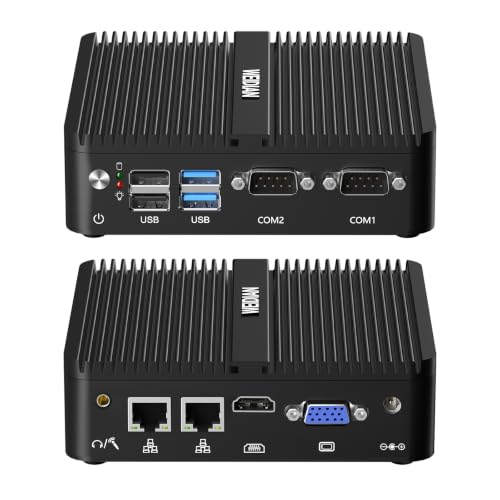
- Fanless aluminum chassis
- Dual Gigabit LAN and RS232
- VESA mount included
Best For: Quiet kiosks and industrial installations
Best for Multi-Monitor Offices

- Dual 2.5GbE ports
- Three 4K@60Hz display outputs
- Extra M.2 NVMe slot
Best For: Home offices with multiple monitors and wired NAS access
Best for Business Deployment

- Dual Gigabit Ethernet
- Windows 11 Pro and Intel vPro
- Modular Compute Element
Best For: Business kiosks, signage, and dual-display installations
Best for Legacy Industrial Ports

- Dual Gigabit LAN
- Two switchable RS232/RS485 ports
- No OS preinstalled
Best For: Light-duty industrial setups needing serial ports and dual LAN
Best for eGPU Expansion – GMKtec NucBox M8
If you want a mini pc with dual ethernet that can also grow into a graphics-focused workstation, the GMKtec NucBox M8 pairs two 2.5GbE ports with OCuLink and USB4. Its Ryzen 5 PRO 6650H, 16GB LPDDR5 memory, and 512GB SSD cover everyday multitasking without requiring an external GPU.
Best For: Buyers who need two fast wired connections and a dedicated path for an external GPU.
Pros:
- Two 2.5GbE ports suit separate wired networks or supported link-aggregation setups.
- OCuLink and 40Gbps USB4 offer flexible expansion options.
- Dual M.2 slots support additional storage; HDMI, DisplayPort, and USB4 support three displays.
Cons:
- The 16GB LPDDR5 memory is not described as upgradable.
- An external GPU is needed to take advantage of OCuLink graphics expansion.
Choose this M8 when networking and expansion matter as much as processor performance. Its selectable power modes and Wake-on-LAN setting also make it worth considering for a compact, remotely managed desk setup.
Best for Multiscreen Work – Glorlin GT103 Ryzen 7
The Glorlin GT103 is a mini pc with dual ethernet aimed at buyers who also need strong everyday multitasking. Its eight-core Ryzen 7 6800H, Radeon 680M graphics, and HDMI, DisplayPort, and Type-C outputs make it a practical fit for a three-monitor desk.
Best For: Office users and home multitaskers who want two wired LAN ports and up to three 4K displays.
Pros:
- Ryzen 7 6800H has eight cores and 16 threads for demanding multitasking.
- Supports up to three 4K displays through HDMI, DisplayPort, and Type-C.
- Includes 16GB LPDDR5 memory, a 512GB NVMe SSD, Wi-Fi 6, and Bluetooth 5.3.
Cons:
- The supplied specifications do not state the Ethernet ports’ speeds.
- Listed maximum memory is 16GB, leaving no stated RAM upgrade path.
This is the stronger fit here for buyers prioritizing an eight-core processor and integrated graphics over specialized expansion. Check the LAN speed before buying if 2.5GbE is essential to your setup.
Best for Upgradable RAM – Getorli Ryzen 5 7430U
The Getorli Ryzen 5 7430U is a mini pc with dual ethernet for daily office and home use, with two specified 2.5GbE ports and room to increase its installed 16GB of DDR4 memory. It also supports three 4K 60Hz displays through HDMI, DisplayPort, and Type-C.
Best For: Buyers who want dual 2.5GbE networking and a stated RAM upgrade path for a compact everyday PC.
Pros:
- Two 2.5GbE RJ45 ports provide separate wired connections.
- 16GB DDR4 memory is listed as expandable to 64GB; SSD storage is listed as expandable to 4TB.
- Ryzen 5 7430U offers six cores and 12 threads, with triple-display support.
Cons:
- Its DDR4-3200 memory is slower on paper than the LPDDR5-6400 listed for the other models.
- The supplied notes position its integrated graphics for light gaming rather than demanding games.
Pick this model if memory expandability is more useful to you than faster soldered memory. The combination of two 2.5GbE ports and three video outputs also gives a small office setup plenty of connection options.
Best for Remote Management – GMKtec M8 Ryzen PRO
This GMKtec M8 is a mini pc with dual ethernet for a compact workstation or home server setup. Its two 2.5GbE ports sit alongside a Ryzen 5 PRO 6650H, 16GB LPDDR5 memory, and BIOS options including Wake-on-LAN and Auto Power On.
Best For: Buyers who want dual 2.5GbE networking, remote-start options, and external-GPU connectivity.
Pros:
- Dual 2.5GbE ports are suited to separate networks, virtualization, or supported link aggregation.
- Wake-on-LAN, Auto Power On, and three selectable power modes offer useful setup controls.
- OCuLink, 40Gbps USB4, and dual M.2 slots provide expansion options.
Cons:
- The supplied notes do not describe the 16GB LPDDR5 memory as upgradable.
- Video-port versions differ between the supplied bullets and details, so verify the exact display specification if it matters.
Its hardware overlaps substantially with the other listed M8, so compare the two listings’ prices and exact port specifications rather than assuming a performance difference. This one stands out in the supplied details for its explicit BIOS and remote-start features.
Best for Home Labs – GMKtec G11 Ryzen Embedded Mini PC
If you want a mini pc with dual ethernet for a home lab, the GMKtec G11 pairs two 2.5GbE ports with a Ryzen Embedded R2514 processor and 16GB of dual-channel RAM. It is a practical choice for separating network traffic while running everyday desktop or server workloads.
Best For: Home labs, network appliances, and users who also need a three-display desktop.
Pros:
- Two 2.5GbE ports suit separate network connections.
- 16GB dual-channel RAM supports multitasking.
- Two HDMI outputs and USB-C DisplayPort Alt Mode support three 4K@60Hz displays.
Cons:
- Neither Ethernet port is rated for 10GbE.
- Storage capacity is not specified in the supplied notes.
The dual 2.5GbE setup is the main draw for router, VPN, or lab projects; the display outputs make it more versatile than a dedicated network box. Check the storage configuration before ordering.
Best for Fast Wired Networking – Beelink EQI Mini PC
The Beelink EQI is a mini pc with dual ethernet for buyers who need more than two standard Gigabit ports: it combines 10GbE and 2.5GbE LAN. Its Intel Processor 304, 16GB LPDDR5 memory, and 512GB UFS 3.1 storage also make it a compact workstation option.
Best For: Workstations or small servers that can use a 10GbE connection alongside a separate 2.5GbE link.
Pros:
- 10GbE and 2.5GbE ports offer flexible wired connectivity.
- Two Thunderbolt 4 ports and HDMI support three 4K displays.
- Dual M.2 PCIe 4.0 slots provide room for storage expansion.
Cons:
- Installed 16GB LPDDR5 memory is listed as the maximum capacity.
- The two LAN ports have different speed ratings, which may not suit setups requiring matching links.
Choose this model when the 10GbE port will be useful for a fast network connection. Its display and storage options add workstation flexibility, but confirm that the fixed memory capacity fits your plans.
Best Fanless Industrial Pick – WEIDIAN N100 Mini PC
For a silent mini pc with dual ethernet, this WEIDIAN model combines two Gigabit RJ45 ports with a fanless aluminum chassis. Its Intel N100 processor, dual RS232 ports, and included VESA mount make it particularly relevant to kiosks and industrial setups.
Best For: Quiet, unattended installations that need dual LAN and serial-device connectivity.
Pros:
- Fanless chassis runs without fan noise.
- Dual Gigabit Ethernet and two RS232 ports support connected equipment.
- Includes a VESA mount and supports auto power-on, RTC wake, and PXE boot.
Cons:
- Both Ethernet ports are Gigabit rather than 2.5GbE or 10GbE.
- This configuration starts with 8GB RAM and 256GB storage.
This is the most purpose-built option here for quiet equipment control or signage. If faster wired transfers or more memory are priorities, compare its Gigabit ports and installed 8GB against your workload.
Best for Multi-Monitor Offices – N5 Ryzen 3 Mini PC
If you need a mini pc with dual ethernet for everyday office work, the N5 pairs two 2.5GbE ports with a Ryzen 3 5400U, 8GB of RAM, and a 256GB NVMe SSD. Its HDMI, DisplayPort, and USB-C outputs support up to three 4K@60Hz displays.
Best For: Home-office users who want faster wired networking and a three-monitor workspace.
Pros:
- Two 2.5GbE ports offer flexible connections for a NAS or local network.
- Supports three 4K@60Hz displays through separate outputs.
- Includes an additional M.2 2280 PCIe 3.0 x4 slot for compatible NVMe storage.
- Wake-on-LAN, RTC Wake, and Auto Power-On support unattended setups.
Cons:
- 8GB of installed RAM and 256GB of storage may be modest for larger workloads.
- Wi-Fi is limited to Wi-Fi 5.
Choose this one when display flexibility and 2.5GbE matter more than generous out-of-box memory and storage.
Best for Business Deployment – Intel NUC Pro Chassis Element
For buyers comparing a mini pc with dual ethernet for a business or kiosk, this NUC Pro Chassis Element comes with a Core i5-8365U Compute Element, 8GB of RAM, a 256GB SSD, and Windows 11 Pro. Its two Gigabit Ethernet ports provide separate wired connections, while dual HDMI outputs accommodate two displays.
Best For: Business, signage, or kiosk installations that need Windows 11 Pro and two wired ports.
Pros:
- Preinstalled Windows 11 Pro and an Intel vPro platform suit managed business setups.
- Two Gigabit Ethernet ports and two HDMI outputs provide practical deployment flexibility.
- Modular Compute Element design and an extra M.2 Key M slot offer upgrade options.
- Chassis is described as certified for 24/7 operation.
Cons:
- Gigabit ports are slower than the N5’s 2.5GbE ports.
- Installed 8GB RAM and 256GB SSD leave limited capacity out of the box.
This is the more deployment-oriented choice if modularity and Windows 11 Pro outweigh the need for faster-than-Gigabit networking.
Best for Legacy Industrial Ports – UDPTCP N2840 Mini PC
This mini pc with dual ethernet targets specialized installations rather than demanding desktop work. It combines two Gigabit LAN ports with HDMI, VGA, and two RS232 serial ports that can be switched to RS485, making it worth considering when older equipment dictates the connections.
Best For: Light-duty industrial or network-appliance projects requiring dual LAN and serial connectivity.
Pros:
- Two Gigabit Ethernet ports support separate wired network connections.
- Two switchable RS232/RS485 ports accommodate serial-connected devices.
- Includes 8GB RAM, a 128GB SSD, HDMI, VGA, and six USB ports.
- Listed compatibility includes Linux, OPNsense, OpenWrt, and Windows.
Cons:
- The dual-core Celeron N2840 is a poor fit for heavier multitasking.
- Product details state that no operating system is preinstalled.
- The notes conflict on whether the cooling is fanless, so confirm that requirement before buying.
Prioritize this model for its legacy I/O and dual LAN, but verify its cooling configuration and plan to install an operating system.
How We Picked the Best Mini PC with Dual Ethernet
We looked for systems advertised with two Ethernet ports, then compared their listed processors, memory, storage, display connections, and intended use. The selection includes performance-oriented Ryzen models, compact everyday PCs, and fanless industrial options. Product listings do not establish real-world throughput, noise, power draw, or operating-system compatibility, so verify those details before buying.
Quick Comparison: Match the Hardware to the Job
For a home lab that also runs desktop apps, the Ryzen 7 6800H and Ryzen PRO 6650H models offer the strongest listed processors in this group. The Ryzen 5 7430U and Ryzen 3 5400U systems are alternatives when you want dual 2.5GbE without choosing a higher-performance H-series chip. For an always-on appliance, the N100 fanless WEIDIAN is worth considering if its listed Gigabit ports meet your speed needs. Older industrial and NUC-based options make more sense when their specific ports, chassis, or management features matter more than newer hardware.
Key Buying Factors for a Mini PC with Dual Ethernet
Port Speed and Network Role
Check each port separately: some listings specify dual 2.5GbE, while industrial models here advertise two Gigabit connections. A router or firewall can use one port for WAN and one for LAN, but that does not guarantee a particular internet speed. CPU capacity, software configuration, and features such as VPN encryption also affect performance. Confirm the Ethernet controller models if your preferred firewall or hypervisor has strict driver requirements.
Memory, Storage, and Expandability
For a dedicated router, modest RAM and storage may suffice; virtual machines and multiple services benefit from more. Do not assume memory is replaceable: listings in this group include both LPDDR5 and upgradable DDR4 configurations. Check available M.2 slots, supported drive types, and whether an included drive occupies an expansion slot.
Cooling, Ports, and Software
Fanless systems avoid fan noise and suit some dusty or industrial spaces, but they still need ventilation and may be less suitable for sustained heavy work. HDMI, DisplayPort, USB-C video, VGA, and RS232 serve different setups; buy for the connections you will actually use. Confirm the installed operating system, BIOS options, warranty, and support for your intended network software rather than relying on the listing title.
Who Should Buy Which Mini PC with Dual Ethernet?
Choose a Ryzen 7 6800H or Ryzen PRO 6650H configuration for a mixed-use desktop and lab. Consider a Ryzen 5 7430U or Ryzen 3 5400U model if dual 2.5GbE is the priority and the listed specifications otherwise fit your workload. Pick a fanless industrial PC when quiet operation or serial ports are essential, accepting its stated network speeds and older or lower-power processor. If remote management is your deciding factor, investigate the NUC option’s listed vPro platform and confirm the exact feature set before purchase.